
类与对象
函数题
一、定义Person类
请定义Person类,包含两个属性,根据主方法中的调用形式,定义构造方法,输出方法。
类的定义:
class Person{}
裁判测试程序样例:
import java.util.Scanner;
public class Main {

    public static void main(String[] args) {
        Scanner sc = new Scanner(System.in);
        Person p1;
          String name = sc.next();
          int age = sc.nextInt();
          p1= new Person(name,age);
          p1.show();
          sc.close();
    }

}

/* 请在这里填写答案 */
输入样例:
例如:
zhang
18
输出样例:
例如:
name:zhang
age:18
 1 class Person{
 2     private int age;
 3     private String name;
 4
 5     public String getName()
 6     {return name;
 7
 8     }
 9     public int getAge()
10     {
11         return age;
12
13     }
14     public Person (String name,int age)
15
16     {
17         this.name=name;
18             if(age>=0&&age<=150)
19         this.age=age;
20         else
21             this.age=0;
22
23
24
25     }
26     public void show()
27     {
28         System.out.println("name:"+name);
29         System.out.println("age:"+age);
30     }
31
32
33 }
二、矩形
设计一个表示矩形的类Rectangle,这个类用一个表示坐标点的类Point的对象来表达它的左上角坐标,用一个表示尺寸的类Dimension的对象来表示它的大小。 你的程序要严格按照所给的类和函数的声明来实现。
函数接口定义:
/**
 * Represents a point in 2D, with x and y, like (x,y).
 */
class Point {
    private int x;
    private int y;

    /**
     * Creates a point with coordinate at (x,y)
     * @param x the x coordinate
     * @param y the y coordinate
     */
    public Point(int x, int y) {

    }

    /* (non-Javadoc)
     * @see java.lang.Object#toString()
     * The generated string as: "(x,y)
     */
    @Override
    public String toString() {

    }

    /**
     * Moves the point with dx and dy.
     * @param dx the distance to be moved at x-axis
     * @param dy the distance to be moved at y-axis
     */
    public void move(int dx, int dy) {

    }

    /**
     * Calculate the distance between this and p.
     * @param p the other point.
     * @return the distance between this and p.
     */
    public double distance(Point p) {

    }
}

/**
 * A dimension in 2D, with width and height.
 */
class Dimension {
    private int width;
    private int height;

    /**
     * Creates a dimension with specified width and height.
     * @param width the width of the dimension
     * @param height the height of the dimension
     */
    public Dimension(int width, int height) {

    }

    /* (non-Javadoc)
     * @see java.lang.Object#toString()
     * The generated string as: "width by height"
     */
    @Override
    public String toString() {

    }

    /**
     * Resizes the dimension with scales at width and height.
     * Although the scales are in double, the result should be integers as well.
     * @param widthScale the scale at width
     * @param heightScale the scale at height
     */
    public void resize(double widthScale, double heightScale) {

    }

    /**
     * Calculate the area of this dimension.
     * @return the area of this dimension.
     */
    public int area() {

    }
}

/**
 * Represents a rectangle, with a point at its top-left and a dimension.
 *
 */
class Rectangle {
    private Point topleft;
    private Dimension size;

    /**
     * Creates a rectangle.
     * @param topleft the coordinate of its top-left
     * @param size the dimension of its size
     */
    public Rectangle(Point topleft, Dimension size) {

    }

    /* (non-Javadoc)
     * @see java.lang.Object#toString()
     * The generated string as: "Rectangle at (x,y):width by height"
     */
    public String toString() {

    }

    /**
     * Moves the rectangle some distance.
     * @param dx the distance to be moved at x-axis
     * @param dy the distance to be moved at y-axis
     */
    public void move(int dx, int dy) {

    }

    /**
     * Resizes the rectangle at both width and height
     * @param widthScale the scale at width
     * @param heightScale the scale at height
     */
    public void resize(double widthScale, double heightScale) {

    }

    /**
     * Calculates the area of this rectangle.
     * @return the area of this rectangle.
     */
    public double area() {

    }

    /**
     * Calculates the distance between this rectangle and r.
     * @param r the other rectangle
     * @return the distance between this rectangle and r.
     */
    public double distance(Rectangle r) {

    }
}
裁判测试程序样例:
public class Main {
    public static void main(String[] args) {
        Scanner in = new Scanner(System.in);
        int x = in.nextInt();
        int y = in.nextInt();
        int width = in.nextInt();
        int height = in.nextInt();
        Rectangle r = new Rectangle(
            new Point(x,y), new Dimension(width, height));
        Rectangle r2 = new Rectangle(
            new Point(x,y), new Dimension(width, height));
        int dx = in.nextInt();
        int dy = in.nextInt();
        r.move(dx, dy);
        double widthScale = in.nextDouble();
        double heightScale = in.nextDouble();
        r.resize(widthScale, heightScale);
        System.out.println(r);
        System.out.printf("%.2f\n", r.area());
        System.out.printf("%.2f\n", r.distance(r2));
        in.close();
    }
}

/* 请在这里填写答案 */
输入样例:
0 0 100 100 20 20 2 2
输出样例:
Rectangle at (20,20):200 by 200
40000.00
28.28
  1 class Point {
  2     private int x;
  3     private int y;
  4
  5     /**
  6      * Creates a point with coordinate at (x,y)
  7      * @param x the x coordinate
  8      * @param y the y coordinate
  9      */
 10     public Point(int x, int y) {
 11     this.x=x;
 12     this.y=y;
 13
 14     }
 15
 16     /* (non-Javadoc)
 17      * @see java.lang.Object#toString()
 18      * The generated string as: "(x,y)
 19      */
 20     @Override
 21     public String toString() {
 22 return "("+x+","+y+")";
 23     }
 24
 25     /**
 26      * Moves the point with dx and dy.
 27      * @param dx the distance to be moved at x-axis
 28      * @param dy the distance to be moved at y-axis
 29      */
 30     public void move(int dx, int dy) {
 31           this.x=this.x+dx;
 32           this.y=this.y+dy;
 33     }
 34
 35     /**
 36      * Calculate the distance between this and p.
 37      * @param p the other point.
 38      * @return the distance between this and p.
 39      */
 40     public double distance(Point p) {
 41 return Math.sqrt(Math.pow((p.x-this.x),2)+Math.pow((p.y-this.y),2));
 42     }
 43 }
 44
 45 /**
 46  * A dimension in 2D, with width and height.
 47  */
 48 class Dimension {
 49     private double  width;
 50     private double height;
 51
 52     /**
 53      * Creates a dimension with specified width and height.
 54      * @param width the width of the dimension
 55      * @param height the height of the dimension
 56      */
 57     public Dimension(int width, int height) {
 58 this.width=width;
 59 this.height=height;
 60     }
 61
 62     /* (non-Javadoc)
 63      * @see java.lang.Object#toString()
 64      * The generated string as: "width by height"
 65      */
 66     @Override
 67     public String toString() {
 68 return (int)this.width+" by "+(int)this.height;
 69     }
 70
 71     /**
 72      * Resizes the dimension with scales at width and height.
 73      * Although the scales are in double, the result should be integers as well.
 74      * @param widthScale the scale at width
 75      * @param heightScale the scale at height
 76      */
 77     public void resize(double  widthScale, double heightScale) {
 78         this.width=this.width*widthScale;
 79          this.height=this.height*heightScale;
 80     }
 81
 82     /**
 83      * Calculate the area of this dimension.
 84      * @return the area of this dimension.
 85      */
 86     public double  area() {
 87 return this.width*this.height;
 88     }
 89 }
 90
 91 /**
 92  * Represents a rectangle, with a point at its top-left and a dimension.
 93  *
 94  */
 95 class Rectangle {
 96      private Point topleft;
 97      private Dimension size;
 98     /**
 99      * Creates a rectangle.
100      * @param topleft the coordinate of its top-left
101      * @param size the dimension of its size
102      */
103     public Rectangle(Point topleft, Dimension size) {
104 this.topleft=topleft;
105 this.size=size;
106     }
107
108     /* (non-Javadoc)
109      * @see java.lang.Object#toString()
110      * The generated string as: "Rectangle at (x,y):width by height"
111      */
112     public String toString() {
113 return "Rectangle at "+topleft+":"+size;
114     }
115     /**
116      * Moves the rectangle some distance.
117      * @param dx the distance to be moved at x-axis
118      * @param dy the distance to be moved at y-axis
119      */
120     public void move(int dx, int dy) {
121     this.topleft.move(dx,dy);
122     }
123
124     /**
125      * Resizes the rectangle at both width and height
126      * @param widthScale the scale at width
127      * @param heightScale the scale at height
128      */
129     public void resize(double widthScale,double heightScale) {
130 this.size.resize(widthScale, heightScale);
131     }
132
133     /**
134      * Calculates the area of this rectangle.
135      * @return the area of this rectangle.
136      */
137     public double area() {
138 return this.size.area();
139     }
140
141     /**
142      * Calculates the distance between this rectangle and r.
143      * @param r the other rectangle
144      * @return the distance between this rectangle and r.
145      */
146     public double distance(Rectangle r) {
147         return this.topleft.distance(r.topleft);
148
149     }
150 }
三、设计一个矩形类Rectangle
设计一个名为Rectangle的类表示矩形。这个类包括: 两个名为width和height的double型数据域,它们分别表示矩形的宽和高。width和height的默认值都为1. 一个无参构造方法。 一个为width和height指定值的矩形构造方法。 一个名为getArea()的方法返回这个矩形的面积。 一个名为getPerimeter()的方法返回这个矩形的周长。
类名为:
Rectangle
裁判测试程序样例:
import java.util.Scanner;
/* 你的代码将被嵌入到这里 */

public class Main {
  public static void main(String[] args) {
    Scanner input = new Scanner(System.in);

    double w = input.nextDouble();
    double h = input.nextDouble();
    Rectangle myRectangle = new Rectangle(w, h);
    System.out.println(myRectangle.getArea());
    System.out.println(myRectangle.getPerimeter());

    input.close();
  }
}
输入样例:
3.14 2.78
输出样例:
8.7292
11.84
 1 class Rectangle{
 2     private double width;
 3     private double height;
 4     public  Rectangle(double width,double height)
 5     {
 6         this.width=width;
 7         this.height=height;
 8     }
 9     public double getArea(){
10         return width*height;
11
12     }
13     public double getPerimeter() {
14         return width*2+height*2;
15     }
16
17
18 }
四、Book类的设计
阅读测试程序,设计一个Book类。
函数接口定义:
class Book{}
该类有 四个私有属性 分别是 书籍名称、 价格、 作者、 出版年份,以及相应的set 与get方法;该类有一个含有四个参数的构造方法,这四个参数依次是书籍名称、 价格、 作者、 出版年份 。
裁判测试程序样例:
import java.util.*;
public class Main {
    public static void main(String[] args) {
        List <Book>books=new ArrayList<Book>();
        Scanner in=new Scanner(System.in);
        for(int i=0;i<5;i++)
        {    String str=in.nextLine();
            String []data=str.split(",");
            Book book=new Book(data[0],Integer.parseInt(data[1]),data[2],Integer.parseInt(data[3]));
            books.add(book);
        }

        System.out.println(totalprice(books));
    }

    /*计算所有book的总价*/
    public static int totalprice(List <Book>books)
    {  int result=0;
        for(int i=0;i<books.size();i++){result+=books.get(i).getPrice();}
        return result;
    }
}

/* 请在这里填写答案 */
输入样例:
三体,100,无名氏,1998
上下五千年,50,编辑部,2015
海底世界,50,无名氏2,2000
三体1,100,无名氏3,2017
三体3,100,无名氏4,1998
输出样例:
400
 1 class Book{
 2 String name;
 3 int Price;
 4 String writer;
 5 int year;
 6
 7     public Book(String name,int Price,String writer,int year)
 8     {
 9         this.name=name;
10         this.Price=Price;
11         this.writer=writer;
12         this.year=year;
13     }
14     public int getPrice(){
15         return  this.Price;
16
17
18     }
19
20
21
22 }
五、数组工具类的设计
本题要求设计一个名为MyArrays的类,根据调用的方式实现相应的方法。
函数接口定义:
请同学根据该类的调用方式和结果,自行设计MyArrays类中的方法,满足应用的需要。
裁判测试程序样例:
import java.util.Scanner;

public class Main {

    public static void main(String[] args) {

        Scanner sc=new Scanner(System.in);
        int n=sc.nextInt();

        int array[]= new int[n];

        for(int i=0;i<n;i++)
        {
            array[i]=sc.nextInt();
        }

        MyArrays.printArray(array);//显示数组的内容
        MyArrays.sortArray(array);    //对数组元素排序
        MyArrays.printArray(array);//显示排序后的结果
        int sum=MyArrays.sumOfArray(array);//数组元素求和
        System.out.println(sum);//显示数组元素的和

    }

}

/* 请在这里填写MyArrays类的有关代码 */
输入样例:
5
5 4 6 8 3
输出样例:
5,4,6,8,3
3,4,5,6,8
26
 1 class MyArrays{
 2
 3     static public void  printArray(int  s[]) {
 4         for(int i=0;i<s.length;i++)
 5                 {
 6                 if(i==s.length-1)
 7                     System.out.print(s[i]);
 8                     else
 9                     System.out.print(s[i]+",");
10                  }
11         System.out.println();
12     }
13     static public  void sortArray(int  s[]) {
14         Arrays.sort(s);
15     }
16     static public int sumOfArray(int s[]) {
17         int d=0;
18         for(int i=0;i<s.length;i++)
19         {
20             d+=s[i];
21         }
22         return d;
23     }
24
25 }
六、TDVector
There is a class TDVector that is incompleted. Please complete the class according to the test code in Main.
函数接口定义:
class TDVector {
    private double x;
    private double y;
    public String toString() {
        return "("+this.x+","+this.y+")";
    }
}
裁判测试程序样例:
import java.util.Scanner;
class TDVector {
    private double x;
    private double y;
    public String toString() {
        return "("+this.x+","+this.y+")";
    }

    /** 你所提交的代码将被嵌在这里(替换此行) **/

}

public class Main {
    public static void main(String[] args) {
        TDVector a = new TDVector();  //    default ctor, x and y are zeros
        Scanner sc = new Scanner(System.in);
        double x,y,z;
        x = sc.nextDouble();
        y = sc.nextDouble();
        z = sc.nextDouble();
        TDVector b = new TDVector(x, y);    //  ctor by x and y
        TDVector c = new TDVector(b);       //  ctor by another TDVector
        a.setY(z);
        System.out.println(a);
        System.out.println(b);
        System.out.println(c);
        c.setX(z);
        a = b.add(c);
        System.out.println(a);
        System.out.println("b.x="+b.getX()+" b.y="+b.getY());
        sc.close();
    }
}
输入样例:
3.14 1.9 2.72
输出样例:
(0.0,2.72)
(3.14,1.9)
(3.14,1.9)
(5.86,3.8)
b.x=3.14 b.y=1.9
 1     public   TDVector(double x,double y) {
 2         this.x=x;
 3         this.y=y;
 4     }
 5     public TDVector() {
 6     }
 7     public  TDVector(TDVector c) {
 8                this.x=c.x;
 9                this.y=c.y;
10     }
11     public void setX(double x) {
12         this.x=x;
13
14     }
15     public void setY(double y) {
16         this.y=y;
17
18     }
19     public TDVector add(TDVector c) {
20         TDVector cd=new TDVector();
21     cd.x=this.x+c.x;
22     cd.y=this.y+c.y;
23     return cd;
24     }
25     public double getX() {
26         return this.x;
27
28     }
29 public double getY() {
30     return this.y;
31 }
七、Point
There is a class Point that is incompleted. Please complete the class according to the test code in Main.
函数接口定义:
class Point {
    private double x;
    private double y;
    public String toString() {
        return "("+this.x+","+this.y+")";
    }
}
裁判测试程序样例:
import java.util.Scanner;
class Point {
    private double x;
    private double y;
    public String toString() {
        return "("+this.x+","+this.y+")";
    }

    /** 你所提交的代码将被嵌在这里(替换此行) **/

}

public class Main {
    public static void main(String[] args) {
        Point a = new Point();  //    default ctor, x and y are zeros
        Scanner sc = new Scanner(System.in);
        double x,y,z;
        x = sc.nextDouble();
        y = sc.nextDouble();
        z = sc.nextDouble();
        Point b = new Point(x, y);    //  ctor by x and y
        Point c = new Point(b);       //  ctor by another Point
        a.setY(z);
        System.out.println(a);
        System.out.println(b);
        System.out.println(c);
        c.setX(z);
        a = b.add(c);
        System.out.println(a);
        System.out.println("b.x="+b.getX()+" b.y="+b.getY());
        sc.close();
    }
}
输入样例:
3.14 1.9 2.72
输出样例:
(0.0,2.72)
(3.14,1.9)
(3.14,1.9)
(5.86,3.8)
b.x=3.14 b.y=1.9
 1  public   Point (double x,double y) {
 2         this.x=x;
 3         this.y=y;
 4     }
 5     public Point() {
 6     }
 7     public  Point(Point c) {
 8                this.x=c.x;
 9                this.y=c.y;
10     }
11     public void setX(double x) {
12         this.x=x;
13
14     }
15     public void setY(double y) {
16         this.y=y;
17
18     }
19     public Point add(Point c) {
20         Point cd=new Point();
21     cd.x=this.x+c.x;
22     cd.y=this.y+c.y;
23     return cd;
24     }
25     public double getX() {
26         return this.x;
27
28     }
29 public double getY() {
30     return this.y;
31 }
编程题
一、构造函数与toString
定义一个有关人的Person类,内含属性:String name、int age、boolean gender、int id,所有的变量必须为私有(private)。 注意:属性顺序请严格按照上述顺序依次出现。
###1.编写无参构造函数:
- 打印"This is constructor"。
- 将name,age,gender,id按照
name,age,gender,id格式输出
###2.编写有参构造函数 依次对name,age,gender赋值。
###3.覆盖toString函数: 按照格式:类名 [name=, age=, gender=, id=]输出。建议使用Eclipse自动生成.
###4.对每个属性生成setter/getter方法
###5.main方法中
- 首先从屏幕读取n,代表要创建的对象个数。
- 然后输入n行name age gender , 调用上面2编写的有参构造函数新建对象。
- 然后将刚才创建的所有对象
逆序输出。 - 接下来使用无参构造函数新建一个Person对象,并直接打印该对象。
输入样例:
3
a 11 false
b 12 true
c 10 false
输出样例:
Person [name=c, age=10, gender=false, id=0]
Person [name=b, age=12, gender=true, id=0]
Person [name=a, age=11, gender=false, id=0]
This is constructor
null,0,false,0
Person [name=null, age=0, gender=false, id=0]
 1 import java.util.Scanner;
 2 class Person {
 3     private String name;
 4     private int age;
 5     private boolean gender;
 6     private int id;
 7     public Person () {
 8
 9     }
10      public Person(String name,int age,boolean gender) {
11          this.name=name;
12          this.age=age;
13          this.gender=gender;
14      }
15      public void show() {
16          System.out.println("This is constructor");
17              System.out.println(this.name+","+this.age+","+this.gender+","+this.id);
18             System.out.println("Person [name="+this.name+", age="+this.age+", gender="+this.gender+", id="+this.id+"]");
19         }
20
21     public String toString() {
22         return "Person [name="+this.name+", age="+this.age+", gender="+this.gender+", id="+this.id+"]";
23     }
24      public void settername(String name) {
25          this.name=name;
26
27      }
28
29      public void setterage(int age) {
30          this.age=age;
31
32      }
33
34      public void settergender(boolean gender) {
35          this.gender=gender;
36
37 }
38
39      public void setterid(int id) {
40          this.id=id;
41
42 }
43     public String gettername() {
44         return this.name;
45     }
46     public int getterage() {
47         return this.age;
48     }
49     public boolean gettergender() {
50         return this.gender;
51     }
52     public int getterid() {
53         return this.id;
54     }
55 }
56
57 public class Main {
58
59        public static void main (String args[]) {
60            Scanner sc=new Scanner(System.in);
61            int n=sc.nextInt();
62            Person person[]=new Person[n];
63            for(int i=0;i<n;i++)
64            {
65                person[i]=new Person(sc.next(),sc.nextInt(),sc.nextBoolean());
66
67
68            }
69            for(int i=n-1;i>=0;i--)
70            {
71 System.out.println(person[i]);
72
73            }
74 Person s=new Person();
75 s.show();
76     sc.close();
77 }
78 }
二、构造函数与初始化块
##1.定义一个Person类 属性:name(String)、gender(boolean)、age(int)、id(int) ,所有的变量必须为私有(private)。
无参构造函数:Person(), 功能:打印This is constructor 。
有参构造函数:Person(name, gender, age) ,功能:给属性赋值。
建议:使用Eclipse自动生成toString方法
##2.定义类的初始化块 为Person类加入初始化块,在初始化块中对id属性赋值,并且要保证每次的值比上次创建的对象的值+1。然后在下一行打印This is initialization block, id is ... 其中...是id的值。
提示:可为Person类定义一个static属性来记录所创建的对象个数。
##3.编写静态初始化块 打印This is static initialization block
##4.编写main方法
- 首先输入n,代表要创建的对象数量。
- 然后从控制台分别读取n行的
name, gender, age, 并调用有参构造函数Person(name, age, gender)新建对象 。 - 将创建好的n个对象逆序输出(即输出
toString()方法)。 - 使用无参构造函数新建一个Person对象,然后直接打印该对象。
##思考 初始化类与对象有几种方法,构造函数、初始化块、静态初始化块。这三种方法执行的先后顺序是什么?各执行几次。
输入样例:
3
a 11 false
b 12 true
c 10 false
输出样例:
This is static initialization block
This is initialization block, id is 0
This is initialization block, id is 1
This is initialization block, id is 2
Person [name=c, age=10, gender=false, id=2]
Person [name=b, age=12, gender=true, id=1]
Person [name=a, age=11, gender=false, id=0]
This is initialization block, id is 3
This is constructor
null,0,false,3
Person [name=null, age=0, gender=false, id=3]
 1 import java.util.Scanner;
 2 class Person {
 3     private String name;
 4     private int age;
 5     private boolean gender;
 6
 7     static int a=-1;
 8     private int id=Person.a+1;
 9
10     public Person () {
11
12     }
13      public Person(String name,int age,boolean gender) {
14          this.name=name;
15          this.age=age;
16          this.gender=gender;
17          this.id=Person.a+1;
18          Person.a+=1;
19
20      }
21      public void show() {
22          System.out.println("This is constructor");
23             System.out.println(this.name+","+this.age+","+this.gender+","+this.id);
24         }
25
26     public String toString() {
27         return "Person [name="+this.name+", age="+this.age+", gender="+this.gender+", id="+this.id+"]";
28     }
29      public void settername(String name) {
30          this.name=name;
31
32      }
33
34      public void setterage(int age) {
35          this.age=age;
36
37      }
38
39      public void settergender(boolean gender) {
40          this.gender=gender;
41
42 }
43
44      public void setterid(int id) {
45          this.id=id;
46
47 }
48     public String gettername() {
49         return this.name;
50     }
51     public int getterage() {
52         return this.age;
53     }
54     public boolean gettergender() {
55         return this.gender;
56     }
57     public int getterid() {
58         return this.id;
59     }
60
61 }
62
63 public class Main{
64
65        public static void main (String args[]) {
66
67            Scanner sc=new Scanner(System.in);
68
69            int n=sc.nextInt();
70
71            Person person[]=new Person[n];
72
73            for(int i=0;i<n;i++)
74            {
75                person[i]=new Person(sc.next(),sc.nextInt(),sc.nextBoolean());
76            }
77              {
78                    System.out.println("This is static initialization block");
79                }
80              for(int i=0;i<n;i++)
81              {
82                  System.out.println("This is initialization block, id is "+person[i].getterid());
83              }
84            for(int i=n-1;i>=0;i--)
85            {
86 System.out.println(person[i]);
87
88            }
89
90 Person s=new Person();
91 System.out.println("This is initialization block, id is "+s.getterid());
92 s.show();
93 System.out.println(s);
94     sc.close();
95
96
97 }
98 }
三、形状
##1. 定义长方形类与圆形类Circle 长方形类-类名:Rectangle,private属性:int width,length
圆形类-类名:Circle,private属性:int radius
编写构造函数:
带参构造函数:Rectangle(width, length),Circle(radius)
编写方法:public int getPerimeter(),求周长。public int getArea(),求面积。toString方法,使用Eclipse自动生成。
注意:
- 计算圆形的面积与周长,使用
Math.PI。 - 求周长和面积时,应先计算出其值(带小数位),然后强制转换为
int再返回。
##2. main方法
- 输入2行长与宽,创建两个Rectangle对象放入相应的数组。
- 输入2行半径,创建两个Circle对象放入相应的数组。
- 输出1:上面2个数组中的所有对象的周长加总。
- 输出2:上面2个数组中的所有对象的面积加总。
- 最后需使用
Arrays.deepToString分别输出上面建立的Rectangle数组与Circle数组
思考:如果初次做该题会发现代码冗余严重。使用继承、多态思想可以大幅简化上述代码。
输入样例:
1 2
3 4
7
1
输出样例:
69
170
[Rectangle [width=1, length=2], Rectangle [width=3, length=4]]
[Circle [radius=7], Circle [radius=1]]
 1 import java.util.Scanner;
 2 class Rectangle{
 3     private int width;
 4     private int length;
 5     public Rectangle(int width,int length)
 6     {
 7         this.width=width;
 8         this.length=length;
 9     }
10     public int getPerimeter() {
11         return (width+length)*2;
12     }
13     public String toString() {
14         return "Rectangle [width="+this.width+", length="+this.length+"]";
15     }
16     public int  getArea() {
17         return this.width*this.length;
18     }
19
20
21 }
22 class Cricle{
23     private int radius;
24     public  Cricle(int radius) {
25         this.radius=radius;
26     }public int  getPerimeter() {
27      double s=Math.PI*2*radius;
28            return (int )s;
29     }
30     public int  getArea() {
31         double s= Math.PI*radius*radius;
32         int i=(int)s;
33         return i;
34     }
35 public String toString () {
36     return "Circle [radius="+this.radius+"]";
37 }
38
39 }
40
41
42 public class Main {
43     public static void  main(String args[]) {
44         Scanner sc=new Scanner(System.in);
45         Rectangle s[]=new Rectangle[2];
46         Cricle r[]=new Cricle[2];
47         for(int i=0;i<2;i++)
48         {
49              s[i]=new Rectangle(sc.nextInt(),sc.nextInt());
50
51         }
52         for(int i=0;i<2;i++)
53         {
54             r[i]=new Cricle(sc.nextInt());
55         }
56         System.out.println( s[0].getPerimeter()+s[1]. getPerimeter()+r[0].getPerimeter()+r[1].getPerimeter());
57
58         System.out.println(r[0].getArea()+r[1].getArea()+s[0].getArea()+s[1].getArea());
59         System.out.println("["+s[0]+", "+s[1]+"]");
60         System.out.println("["+r[0]+", "+r[1]+"]");
61         sc.close();
62     }
63
64
65
66
67 }
四、构造方法
请补充以下代码,完成输出要求。
public class Main {
    public Main(){
        System.out.println("构造方法一被调用了");
    }
    public Main(int x){
        this();
        System.out.println("构造方法二被调用了");
    }
    public Main(boolean b){
        this(1);
        System.out.println("构造方法三被调用了");
    }
    public static void main(String[] args) {

    }
}
输入格式:
无
输出格式:
输出以下三行: 构造方法一被调用了 构造方法二被调用了 构造方法三被调用了
输入样例:
无
输出样例:
构造方法一被调用了
构造方法二被调用了
构造方法三被调用了
 1 public class Main {
 2     public Main(){
 3         System.out.println("构造方法一被调用了");
 4     }
 5     public Main(int x){
 6         this();
 7         System.out.println("构造方法二被调用了");
 8     }
 9     public Main(boolean b){
10         this(1);
11         System.out.println("构造方法三被调用了");
12     }
13     public static void main(String[] args) {
14         Main s=new Main(true);
15
16
17     }
18 }
五、构造方法
请补充以下代码,完成输出要求。(注意:需要提交完整代码)
public class Main {
    public static void main(String[] args) {

    }
}
class RR{
    public RR(){
       System.out.print("8");
    }
    public RR(int x){
       this();
       System.out.print(".");
    }
    public RR(boolean b){
       this(1);
       System.out.print("00");
    }
}
输入格式:
无
输出格式:
输出以下字符串:8.00
输入样例:
无
输出样例:
8.00
 1 public class Main {
 2     public static void main(String[] args) {
 3         RR s=new RR(true);
 4     }
 5 }
 6 class RR{
 7     public RR(){
 8        System.out.print("8");
 9     }
10     public RR(int x){
11        this();
12        System.out.print(".");
13     }
14     public RR(boolean b){
15        this(1);
16        System.out.print("00");
17     }
18 }
六、定义类
请补充以下代码,完成输出要求。(注意:需要提交完整代码)
import java.util.Scanner;
public class Main {
    public static void main(String[] args) {
                Scanner in = new Scanner(System.in);
                int a,b,c,d,e;
                a = in.nextInt();
                b = in.nextInt();
                c = in.nextInt();
                d = in.nextInt();
                e = in.nextInt();
                RR rr = new RR();
                double dd = rr.fun(a,b,c,d,e);
                System.out.printf("%.2f",dd);
    }
}
class RR{


}
输入格式:
在一行中给出5个不超过1000的正整数。
输出格式:
输出5个整数的平均值,保留小数点后两位。
输入样例:
1 2 3 4 5
输出样例:
3.00
 1 import java.util.Scanner;
 2 public class Main {
 3     public static void main(String[] args) {
 4                 Scanner in = new Scanner(System.in);
 5                 int a,b,c,d,e;
 6                 a = in.nextInt();
 7                 b = in.nextInt();
 8                 c = in.nextInt();
 9                 d = in.nextInt();
10                 e = in.nextInt();
11                 RR rr = new RR();
12                 double dd = rr.fun(a,b,c,d,e);
13                 System.out.printf("%.2f",dd);
14     }
15 }
16 class RR{
17
18     public double fun(int a,int b,int c,int d,int e){
19        return (a+b+c+d+e)*1.0/5;
20
21     }
22
23
24 }
七、定义类2
请补充以下代码,完成输出要求。(注意:需要提交完整代码)
import java.util.Scanner;
public class Main {
    public static void main(String[] args) {
                double dd = RR.fun();
                System.out.printf("%.2f",dd);
    }
}
class RR{


}
输入格式:
在一行中给出5个不超过1000的实数。
输出格式:
输出排在中间的那个数,保留小数点后两位。
输入样例:
1 2 5 4 3
输出样例:
5.00
 1 import java.util.Scanner;
 2 public class Main {
 3     public static void main(String[] args) {
 4         Scanner sc=new Scanner(System.in);
 5
 6
 7     int s[]=new int[5];
 8         for(int i=0;i<5;i++)
 9         {
10             s[i]=sc.nextInt();
11         }
12
13         int na=s[2];
14                 double dd = RR.fun(na);
15                 System.out.printf("%.2f",dd);
16     }
17 }
18 class RR{
19
20     static double fun(int a){
21     return  a;
22 }
23
24
25 }
八、计算年龄
定义一个Birthday类,其成员变量有3个整形变量(出生的年月日):year,month,day;提供构造方法对这3个成员变量进行初始化;提供成员变量的get、set方法;成员函数有getAge(),功能是实现计算到2017年12月25日时该Birthday对象的年龄。编写程序测试这个类。
输入格式:
输入出生的年、月、日(注:输入的年月日以换行隔开)
输出格式:
计算得到年龄
输入样例:
在这里给出一组输入。例如:
1995
12
23
输出样例:
在这里给出相应的输出。例如:
age=22
 1 import java.util.*;
 2 public class Main {
 3     public static void main(String[] args) {
 4         Scanner sc=new Scanner(System.in);
 5         Birthday birth=new Birthday();
 6        birth.setyear(sc.nextInt());
 7        sc.nextLine();
 8         birth.setmonth(sc.nextInt());
 9         sc.nextLine();
10         birth.setday(sc.nextInt());
11        System.out.print("age="+birth.getAge());
12     }
13 }
14 class Birthday{
15      private int year=0;
16     private int month=0;
17     private int day=0;
18
19  public int getyear(){
20     return this.year;
21     }
22  public int getmonth(){
23         return this.month;
24     }
25  public int getday(){
26         return this.day;
27     }
28  public void setyear(int year) {
29         this.year=year;
30     }
31  public void setmonth(int month) {
32         this.month=month;
33     }
34  public void setday(int day) {
35     this.day=day;
36      }
37     public int getAge() {
38         int years=2017-this.year;
39         int months=12-this.month;
40         int days=25-this.day;
41         if(months<=0&&days<=0)
42             return years+1;
43         else
44             return years;
45
46     }
47
48 }
九、程序改错题
程序改错题。下述代码有错,请参照程序的输出修改程序。
 public class Main {
    public static void main(String[] args) {
        Person[] p = new Person[3];
        p[0].name = "zhangsan";
        p[0].age = 18;
        p[1].name = "lisi";
        p[1].age = 20;
        p[2].name = "wangwu";
        p[2].age = 22;
        for (int i = 0; i < p.length; i++) {
            System.out.println(p[i]);
        }
    }
}

class Person {
    private String name;
    private int age;

    public Person(String name, int age) {
        super();
        this.name = name;
        this.age = age;
    }

    public String getName() {
        return name;
    }

    public void setName(String name) {
        this.name = name;
    }

    public int getAge() {
        return age;
    }

    public void setAge(int age) {
        this.age = age;
    }
}
输入格式:
无
输出格式:
无
输入样例:
输出样例:
zhangsan 18
lisi 20
wangwu 22
 1 public class Main {
 2     public static void main(String[] args) {
 3         Person[] p = new Person[3];
 4         p[0]=new Person("zhangsan",18);
 5         p[1]=new Person("lisi",20);
 6         p[2]=new Person("wangwu",22);
 7         for (int i = 0; i < p.length; i++) {
 8             System.out.println(p[i]);
 9         }
10     }
11 }
12
13 class Person {
14     private String name;
15     private int age;
16
17     public Person(String name, int age) {
18         super();
19         this.name = name;
20         this.age = age;
21     }
22
23     public String getName() {
24         return name;
25     }
26
27     public void setName(String name) {
28         this.name = name;
29     }
30
31     public int getAge() {
32         return age;
33     }
34
35     public void setAge(int age) {
36         this.age = age;
37     }
38     public String toString() {
39         return this.name+" "+this.age;
40     }
41 }
十、程序填空题
补全以下程序,使得程序输出结果与下述结果一致。
public class Main {
    public static void main(String[] args) {
        Test test = new Test(true);
    }
}

class Test {
    public Test(){
        System.out.println("Constructor one invoked!");
    }
    public Test(int x){
        //此处添加代码
        System.out.println("Constructor two invoked!");
    }
    public Test(boolean b){
        //此处添加代码
        System.out.println("Constructor three invoked!");
    }

}
### 输入格式:

无

### 输出格式:

无

### 输入样例:


```in

```

### 输出样例:

```out
Constructor one invoked!
Constructor two invoked!
Constructor three invoked!
```
 1 public class Main {
 2     public static void main(String[] args) {
 3         Test test = new Test(true);
 4     }
 5 }
 6
 7 class Test {
 8     public Test(){
 9         System.out.println("Constructor one invoked!");
10     }
11     public Test(int x){
12         //此处添加代码
13         this();
14         System.out.println("Constructor two invoked!");
15     }
16     public Test(boolean b){
17         //此处添加代码
18         this(1);
19         System.out.println("Constructor three invoked!");
20     }
21
22 }
十一、定义商品类,封装成员变量,输出对象
定义一个商品类。创建对象并按指定格式输出它。 商品类要求:
(1)成员变量:商品编号(String) 、商品名称(String)、商品单价(double)
(2)成员变量封装,定义为私有属性,并为每个成员变量定义getXXXX,setXXXX方法
(3)定义构造方法,要求带三个参数,参数值用于给成员变量赋值。
(4)重写toString()方法,将对象转换为字符串,格式:商品编号,商品名称,商品单价
测试类要求:
按指定的格式 输入商品信息,调用构造方法生成对象,并输出它。
例:输入:WJ002 记事本 5.5
输出:WJ002,记事本,5.5
输入商品的信息,每个属性值之间用1个空格分隔。 输出 格式,商品的每个属性值之间用逗号分隔。
输入样例:
WJ002 记事本 5.5
输出样例:
WJ002,记事本,5.5
 1 import java.util.*;
 2 class Goods {
 3     private String  name;
 4     private String  score;
 5     private double  Price;
 6     public  Goods(String score,String name,double Price) {
 7     this.name=name;
 8     this.score=score;
 9     this.Price=Price;
10     }
11     public double getPrice() {
12     return this.Price;
13     }
14         public String toString() {
15             return this.score+","+this.name+","+this.Price;
16         }
17     }
18
19
20
21
22 public class Main{
23
24     public static void main(String args[]){
25         Scanner sc = new Scanner(System.in);
26         Goods ga =new Goods(sc.next(),sc.next(),sc.nextDouble());
27             System.out.println(ga);
28     }
29 }
十二、统计商品总价
消费者购买超市5件商品,输入商品名和价格,输出购买的商品信息,并输出应付的总价。
要求:定义Goods类及其成员变量和方法。
(1)定义Goods类:成员变量有 name,  price
(2)定义Goods类的带两个参数的构造方法。
(3)定义Goods类的toString()方法,getPrice()方法。
输入格式:
输入5行数据,每行一个商品信息,包括商品名和价格,以一个空格分隔。
输出格式:
输出商品信息,格式:商品名,价格
最后输出总价,格式:should pay:总价
裁判程序如下:
class Main{
    public static void main(String args[]){
        Goods ga[] =new Goods[5];
        Scanner sc = new Scanner(System.in);

        for(int i =0;i<5;i++){
            ga[i]= new Goods(sc.next(),sc.nextDouble());
        }

        double  shouldPay = 0;
        for(Goods g:ga){
            shouldPay += g.getPrice();
            System.out.println(g.toString());
        }

        System.out.println("should pay:"+shouldPay);
    }
}
输入样例:
book 5.5
pencil 1.2
pen 8.0
ruler 2.5
eraser 1.0
输出样例:
book,5.5
pencil,1.2
pen,8.0
ruler,2.5
eraser,1.0
should pay:18.2
 1 import java.util.*;
 2 class Goods {
 3     private String  name;
 4     private double  Price;
 5     public  Goods(String name,double Price) {
 6     this.name=name;
 7     this.Price=Price;
 8     }
 9     public double getPrice() {
10     return this.Price;
11     }
12         public String toString() {
13             return this.name+","+this.Price;
14         }
15     }
16
17
18
19
20 public class Main{
21
22     public static void main(String args[]){
23         Goods ga[] =new Goods[5];
24         Scanner sc = new Scanner(System.in);
25
26         for(int i =0;i<5;i++){
27             ga[i]= new Goods(sc.next(),sc.nextDouble());
28         }
29
30         double  shouldPay = 0;
31         for(Goods g:ga){
32             shouldPay += g.getPrice();
33             System.out.println(g.toString());
34         }
35
36         System.out.println("should pay:"+shouldPay);
37     }
38 }
十三、程序改错1:对象与数组
修改如下程序的语法错误和逻辑错误,使程序运行结果如下:
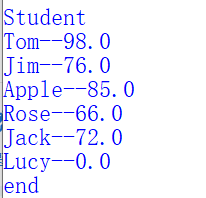
//--------------------Main.java
 public class Student {
    private String name;
    private double score;

    public  String getName(){
        return name;
    }

    public void setName(String name){
        this.name = name;
    }

    public double getScore(){
        return score;
    }

    public void setScore(double score){
        this.score =score;
    }

    public void  toString( ){
        return  this.name + "--" +this.score ;
    }

}

public class Main {
    public static void main(String args[])    {
        String []name = {"Tom","Jim","Apple","Rose","Jack"    ,"Lucy"};
        double [] score = {98,76,85,66,72};

        Student [] sGroup = new Student[ name.length ];

        for( int i = 0 ; i < sGroup.length ; i++)
            sGroup[i] = new Student (name[i], score[i]);

        System.out.println("Student");
        for( int i = 0 ; i < sGroup.length ; i++)
            System.out.println(sGroup[i]);

        System.out.println("end");
    }
}
输入格式:
无
输出格式:
Student
Tom--98.0
Jim--76.0
Apple--85.0
Rose--66.0
Jack--72.0
Lucy--0.0
end
 1 import java.util.Scanner;
 2  class Student {
 3     private String name;
 4     private double score;
 5
 6     public  String getName(){
 7         return name;
 8     }
 9
10     public void setName(String name){
11         this.name = name;
12     }
13
14     public double getScore(){
15         return score;
16     }
17
18     public void setScore(double score){
19         this.score =score;
20     }
21
22     public String  toString( ){
23         return  this.name + "--" +this.score ;
24     }
25     public Student(String name,double score) {
26         this.name=name;
27         this.score=score;
28
29     }
30
31 }
32
33 public class Main {
34     public static void main(String args[])    {
35         String []name = new String []{"Tom","Jim","Apple","Rose","Jack","Lucy"};
36         double [] score = new double []{98,76,85,66,72,0};
37
38         Student [] sGroup = new Student[ name.length ];
39
40         for( int i = 0 ; i < sGroup.length ; i++)
41             sGroup[i] = new Student (name[i], score[i]);
42
43         System.out.println("Student");
44         for( int i = 0 ; i < sGroup.length ; i++)
45             System.out.println(sGroup[i]);
46
47         System.out.println("end");
48     }
49 }
十四、统计学生年龄异常的人数
定义Student类
(1)成员变量有:姓名,年龄。
(2)对成员变量进行封装。
(3)定义getXXXX,setXXXX方法,其中对年龄的限定条件是:年龄大于0。
定义主类,包含主方法
实现输入5个学生,输出年龄不符合要求 的学生人数和姓名。
如果年龄全部正确,输出“right”,如果全部错误,输出"all wrong"。
输入格式:
5行,每行1个学生信息,包括姓名和年龄
输出格式:
多行,第1行是不符合要求的人数 其余各行是不符合要求的学生的姓名 如果年龄全部正确,输出“right”,如果全部错误,输出"all wrong"。
输入样例:
zhang 18
Li -15
wang 0
zhao 20
wu -20
输出样例:
3
Li
wang
wu
 1 import java.util.Scanner;
 2  class Student {
 3      String name;
 4     int age;
 5
 6     public  String getName(){
 7         return name;
 8     }
 9
10     public void setName(String name){
11         this.name = name;
12     }
13
14     public void setAge(int age){
15         this.age=age;
16     }
17     public int  getAge(){
18         return this.age;
19     }
20     public Student(String name,int age) {
21         this.name =name;
22         this.age=age;
23     }
24
25     public String toString(){
26        return this.name;
27     }
28
29 }
30
31 public class Main {
32     public static void main(String args[])    {
33         Scanner sc=new Scanner (System.in);
34         Student [] sGroup = new Student[5];
35 int s=0;
36         for( int i = 0 ; i < 5 ; i++)
37            {
38             sGroup[i]=new Student(sc.next(),sc.nextInt());
39
40            }
41         for( int i = 0 ; i < 5 ; i++)
42         {
43             if(sGroup[i].age<=0)
44             {
45                 s+=1;
46             }
47         }
48 if(s==0)
49 {
50     System.out.println("right");
51 }
52 else if(s==5)
53 {
54     System.out.println("all wrong");}
55     else {System.out.println(s);
56         for( int i = 0 ; i < sGroup.length ; i++)
57             if(sGroup[i].age<=0)
58             System.out.println(sGroup[i]);
59     }
60
61
62     }
63 }

 浙公网安备 33010602011771号