1、基础知识
1.1、需求
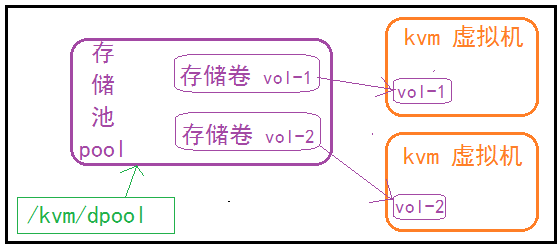
有了存储池,代表我们有存储数据的基本前提了,但是还不能正常使用,需要借助于存储卷才可以。
1.2、流程图
1.3、什么是存储卷
存储卷是一种可以分配给虚拟机使用的存储设备。在虚拟机中与一个挂载点对应,而物理上可以是一个虚拟机磁盘文件或一个真实的磁盘分区。
它一般存放在一个专用的存储池中来使用。
1.4、存储卷命令介绍
1.4.1、存储卷帮助参数查询
root@localhost:~#  virsh --help | grep vol
 Storage Volume (help keyword 'volume')
    vol-clone                      clone a volume.
    vol-create-as                  create a volume from a set of args
    vol-create                     create a vol from an XML file
    vol-create-from                create a vol, using another volume as input
    vol-delete                     delete a vol
    vol-download                   download volume contents to a file
    vol-dumpxml                    vol information in XML
    vol-info                       storage vol information
    vol-key                        returns the volume key for a given volume name or path
    vol-list                       list vols
    vol-name                       returns the volume name for a given volume key or path
    vol-path                       returns the volume path for a given volume name or key
    vol-pool                       returns the storage pool for a given volume key or path
    vol-resize                     resize a vol
    vol-upload                     upload file contents to a volume
    vol-wipe                       wipe a vol
1.4.2、创建存储卷
1.4.3、查看存储卷信息
查看列表:virsh vol-list 存储池名称
查看属性:virsh vol-info <存储卷> <存储池>
查看配置:virsh vol-dumpxml <存储卷> <存储池>
2、实战【创建存储卷】
2.1、创建存储池
mkdir /kvm/images
virsh pool-define-as keep_dpool --type dir --target /kvm/images
virsh pool-start keep_dpool
virsh pool-autostart keep_dpool
2.2、创建存储卷
2.2.1、创建命令
virsh vol-create-as --pool keep_dpool --name cnblog.img --capacity 2G --allocation 1G --format raw
2.2.2、命令参数解析
命令格式:
virsh vol-create-as --pool keep_dpool --name cnblog.img --capacity 2G --allocation 1G --format raw

注释:
virsh vol-create-as 命令
--pool magedu_pool 指定存储池
--name cnblog.img 支持创建的磁盘卷
--capacity 2G 存储卷的容量
--allocation 1G 存储卷的初始分配大小
--format qcow2 存储卷的格式,默认格式是raw
2.3、查询创建效果
root@localhost:~# ll /kvm/images/
-rw------- 1 root root 2147483648 May 21 17:42 cnblog.img
2.4、存储池信息查看
2.4.1、查看存储池的存储卷列表
root@localhost:~# virsh vol-list keep_dpool
 Name         Path
--------------------------------------
 cnblog.img   /kvm/images/cnblog.img
2.4.2、查看存储卷信息
# virsh vol-info cnblog.img keep_dpool
Name:           cnblog.img
Type:           file
Capacity:       2.00 GiB
Allocation:     1.00 GiB
2.4.3、查看存储卷配置信息
# virsh vol-info cnblog.img keep_dpool
Name:           cnblog.img
Type:           file
Capacity:       2.00 GiB
Allocation:     1.00 GiB

root@localhost:~#
root@localhost:~#
root@localhost:~#
root@localhost:~# virsh vol-dumpxml cnblog.img keep_dpool
<volume type='file'>
  <name>cnblog.img</name>
  <key>/kvm/images/cnblog.img</key>
  <capacity unit='bytes'>2147483648</capacity>
  <allocation unit='bytes'>1073745920</allocation>
  <physical unit='bytes'>2147483648</physical>
  <target>
    <path>/kvm/images/cnblog.img</path>
    <format type='raw'/>
    <permissions>
      <mode>0600</mode>
      <owner>0</owner>
      <group>0</group>
    </permissions>
    <timestamps>
      <atime>1684663043.066524451</atime>
      <mtime>1684662173.798137060</mtime>
      <ctime>1684662173.802137340</ctime>
      <btime>0</btime>
    </timestamps>
  </target>
</volume>


 浙公网安备 33010602011771号