
SSM整合具体步骤实现(自己回顾复习)
SSM整合开发步骤
数据库:

项目结构:
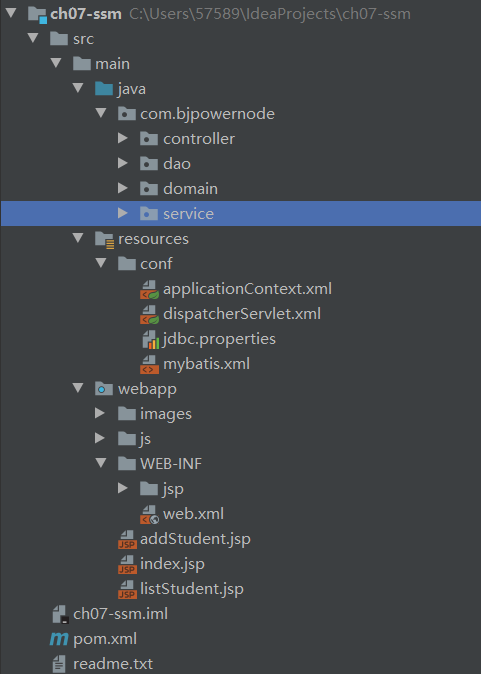
pom文件:
<?xml version="1.0" encoding="UTF-8"?>

<project xmlns="http://maven.apache.org/POM/4.0.0" xmlns:xsi="http://www.w3.org/2001/XMLSchema-instance"
  xsi:schemaLocation="http://maven.apache.org/POM/4.0.0 http://maven.apache.org/xsd/maven-4.0.0.xsd">
  <modelVersion>4.0.0</modelVersion>

  <groupId>com.bjpowernode</groupId>
  <artifactId>ch07-ssm</artifactId>
  <version>1.0-SNAPSHOT</version>
  <packaging>war</packaging>


  <properties>
    <project.build.sourceEncoding>UTF-8</project.build.sourceEncoding>
    <maven.compiler.source>1.8</maven.compiler.source>
    <maven.compiler.target>1.8</maven.compiler.target>
  </properties>

  <dependencies>
    <dependency>
      <groupId>junit</groupId>
      <artifactId>junit</artifactId>
      <version>4.11</version>
      <scope>test</scope>
    </dependency>
    <!--servlet依赖-->
    <dependency>
      <groupId>javax.servlet</groupId>
      <artifactId>javax.servlet-api</artifactId>
      <version>3.1.0</version>
      <scope>provided</scope>
    </dependency>
    <!-- jsp依赖 -->
    <dependency>
      <groupId>javax.servlet.jsp</groupId>
      <artifactId>jsp-api</artifactId>
      <version>2.2.1-b03</version>
      <scope>provided</scope>
    </dependency>
    <dependency>
      <groupId>org.springframework</groupId>
      <artifactId>spring-webmvc</artifactId>
      <version>5.2.5.RELEASE</version>
    </dependency>
    <dependency>
      <groupId>org.springframework</groupId>
      <artifactId>spring-tx</artifactId>
      <version>5.2.5.RELEASE</version>
    </dependency>
    <dependency>
      <groupId>org.springframework</groupId>
      <artifactId>spring-jdbc</artifactId>
      <version>5.2.5.RELEASE</version>
    </dependency>
    <!--json依赖-->
    <dependency>
      <groupId>com.fasterxml.jackson.core</groupId>
      <artifactId>jackson-core</artifactId>
      <version>2.9.0</version>
    </dependency>
    <dependency>
      <groupId>com.fasterxml.jackson.core</groupId>
      <artifactId>jackson-databind</artifactId>
      <version>2.9.0</version>
    </dependency>
    <!--mybatis依赖-->
    <dependency>
      <groupId>org.mybatis</groupId>
      <artifactId>mybatis-spring</artifactId>
      <version>1.3.1</version>
    </dependency>
    <dependency>
      <groupId>org.mybatis</groupId>
      <artifactId>mybatis</artifactId>
      <version>3.5.1</version>
    </dependency>
    <!--msyql驱动-->
    <dependency>
      <groupId>mysql</groupId>
      <artifactId>mysql-connector-java</artifactId>
      <version>5.1.9</version>
    </dependency>
    <!--数据源包-->
    <dependency>
      <groupId>com.alibaba</groupId>
      <artifactId>druid</artifactId>
      <version>1.1.12</version>
    </dependency>
  </dependencies>

  <build>
    <resources>
      <resource>
        <directory>src/main/java</directory><!--所在的目录-->
        <includes><!--包括目录下的.properties,.xml 文件都会扫描到-->
          <include>**/*.properties</include>
          <include>**/*.xml</include>
        </includes>
        <filtering>false</filtering>
      </resource>
    </resources>
    <plugins>
      <plugin>
        <artifactId>maven-compiler-plugin</artifactId>
        <version>3.1</version>
        <configuration>
          <source>1.8</source>
          <target>1.8</target>
        </configuration>
      </plugin>
    </plugins>
  </build>
</project>
web.xml:
<?xml version="1.0" encoding="UTF-8"?>
<web-app xmlns="http://xmlns.jcp.org/xml/ns/javaee"
         xmlns:xsi="http://www.w3.org/2001/XMLSchema-instance"
         xsi:schemaLocation="http://xmlns.jcp.org/xml/ns/javaee http://xmlns.jcp.org/xml/ns/javaee/web-app_4_0.xsd"
         version="4.0">


  <!--注册中央调度器-->
  <servlet>
    <servlet-name>myweb</servlet-name>
    <servlet-class>org.springframework.web.servlet.DispatcherServlet</servlet-class>
    <init-param>
      <param-name>contextConfigLocation</param-name>
      <param-value>classpath:conf/dispatcherServlet.xml</param-value>
    </init-param>
    <load-on-startup>1</load-on-startup>
  </servlet>
  <servlet-mapping>
    <servlet-name>myweb</servlet-name>
    <url-pattern>*.do</url-pattern>
  </servlet-mapping>

  <!--注册spring的监听器-->
  <context-param>
    <param-name>contextConfigLocation</param-name>
    <param-value>classpath:conf/applicationContext.xml</param-value>
  </context-param>
  <listener>
    <listener-class>org.springframework.web.context.ContextLoaderListener</listener-class>
  </listener>


  <!--注册字符集过滤器-->
  <filter>
    <filter-name>characterEncodingFilter</filter-name>
    <filter-class>org.springframework.web.filter.CharacterEncodingFilter</filter-class>
    <init-param>
      <param-name>encoding</param-name>
      <param-value>utf-8</param-value>
    </init-param>
    <init-param>
      <param-name>forceRequestEncoding</param-name>
      <param-value>true</param-value>
    </init-param>
    <init-param>
      <param-name>forceResponseEncoding</param-name>
      <param-value>true</param-value>
    </init-param>
  </filter>
  <filter-mapping>
    <filter-name>characterEncodingFilter</filter-name>
    <url-pattern>/*</url-pattern>
  </filter-mapping>


</web-app>
mybatis.xml
<?xml version="1.0" encoding="UTF-8" ?>
<!DOCTYPE configuration
        PUBLIC "-//mybatis.org//DTD Config 3.0//EN"
        "http://mybatis.org/dtd/mybatis-3-config.dtd">
<configuration>

    <!--settings:控制mybatis全局行为-->
   <settings>
        <setting name="logImpl" value="STDOUT_LOGGING"/>
    </settings>

    <!--设置别名-->
    <typeAliases>
        <!--name:实体类所在的包名(不是实体类的包名也可以)-->
        <package name="com.bjpowernode.domain"/>
    </typeAliases>


    <!-- sql mapper(sql映射文件)的位置-->
    <mappers>
        <!--
          name:是包名, 这个包中的所有mapper.xml一次都能加载
          使用package的要求:
           1. mapper文件名称和dao接口名必须完全一样,包括大小写
           2. mapper文件和dao接口必须在同一目录
        -->
        <package name="com.bjpowernode.dao"/>
    </mappers>
</configuration>
springmvc.xml(dispatcherServlet.xml)
<?xml version="1.0" encoding="UTF-8"?>
<beans xmlns="http://www.springframework.org/schema/beans"
       xmlns:xsi="http://www.w3.org/2001/XMLSchema-instance"
       xmlns:context="http://www.springframework.org/schema/context"
       xmlns:mvc="http://www.springframework.org/schema/mvc"
       xsi:schemaLocation="http://www.springframework.org/schema/beans http://www.springframework.org/schema/beans/spring-beans.xsd http://www.springframework.org/schema/context https://www.springframework.org/schema/context/spring-context.xsd http://www.springframework.org/schema/mvc https://www.springframework.org/schema/mvc/spring-mvc.xsd">

    <!--springmvc配置文件, 声明controller和其它web相关的对象-->
    <context:component-scan base-package="com.bjpowernode.controller" />

    <bean class="org.springframework.web.servlet.view.InternalResourceViewResolver">
        <property name="prefix" value="/WEB-INF/jsp/" />
        <property name="suffix" value=".jsp" />
    </bean>

    <mvc:annotation-driven />
    <!--
      1. 响应ajax请求,返回json
      2. 解决静态资源访问问题。
    -->
</beans>
连接数据库的基本信息(jdbc.propercies):
jdbc.url=jdbc:mysql://localhost:3306/springdb?useUnicode=true&characterEncoding=utf8
jdbc.username=root
jdbc.password=root
spring的配置文件(applicationContext.xml)
<?xml version="1.0" encoding="UTF-8"?>
<beans xmlns="http://www.springframework.org/schema/beans"
       xmlns:xsi="http://www.w3.org/2001/XMLSchema-instance"
       xmlns:context="http://www.springframework.org/schema/context"
       xsi:schemaLocation="http://www.springframework.org/schema/beans http://www.springframework.org/schema/beans/spring-beans.xsd http://www.springframework.org/schema/context https://www.springframework.org/schema/context/spring-context.xsd">

    <!--spring配置文件: 声明service,dao,工具类等对象-->

    <context:property-placeholder location="classpath:conf/jdbc.properties" />

    <!--声明数据源,连接数据库-->
    <bean id="dataSource" class="com.alibaba.druid.pool.DruidDataSource"
          init-method="init" destroy-method="close">
        <property name="url" value="${jdbc.url}" />
        <property name="username" value="${jdbc.username}" />
        <property name="password" value="${jdbc.password}" />
    </bean>

    <!--SqlSessionFactoryBean创建SqlSessionFactory-->
    <bean id="sqlSessionFactory" class="org.mybatis.spring.SqlSessionFactoryBean">
        <property name="dataSource" ref="dataSource" />
        <property name="configLocation"  value="classpath:conf/mybatis.xml" />
    </bean>

    <!--声明mybatis的扫描器,创建dao对象-->
    <bean class="org.mybatis.spring.mapper.MapperScannerConfigurer">
        <property name="sqlSessionFactoryBeanName" value="sqlSessionFactory" />
        <property name="basePackage" value="com.bjpowernode.dao" />
    </bean>

    <!--声明service的注解@Service所在的包名位置-->
    <context:component-scan base-package="com.bjpowernode.service" />

    <!--事务配置:注解的配置, aspectj的配置-->
</beans>
实体类:
public class Student {

    private Integer id;
    private String name;
    private Integer age;

    public Integer getId() {
        return id;
    }

    public void setId(Integer id) {
        this.id = id;
    }

    public String getName() {
        return name;
    }

    public void setName(String name) {
        this.name = name;
    }

    public Integer getAge() {
        return age;
    }

    public void setAge(Integer age) {
        this.age = age;
    }
}
dao中的接口及对应的xml文件:
public interface StudentDao {

    int insertStudent(Student student);
    List<Student> selectStudents();
}

<!-- StudentDao.xml -->
<mapper namespace="com.bjpowernode.dao.StudentDao">
    <select id="selectStudents" resultType="Student">
        select id,name,age from student order by id desc
    </select>

    <insert id="insertStudent">
        insert into student(name,age) values(#{name},#{age})
    </insert>
</mapper>
sevice包中接口及对应的实现类:
//接口
public interface StudentService {

    int addStudent(Student student);
    List<Student> findStudents();
}

//实现类
@Service
public class StudentServiceImpl implements StudentService {
    //引用类型自动注入@Autowired, @Resource
    @Resource
    private StudentDao studentDao;

    @Override
    public int addStudent(Student student) {
        int nums = studentDao.insertStudent(student);
        return nums;
    }

    @Override
    public List<Student> findStudents() {
        return studentDao.selectStudents();
    }
}
controller包下的类
@Controller
@RequestMapping("/student")
public class StudentController {

    @Resource
    private StudentService service;

    //注册学生
    @RequestMapping("/addStudent.do")
    public ModelAndView addStudent(Student student){
        ModelAndView mv = new ModelAndView();
        String tips = "注册失败";
        //调用service处理student
        int nums = service.addStudent(student);
        if( nums > 0 ){
            //注册成功
            tips = "学生【" + student.getName() + "】注册成功";
        }
        //添加数据
        mv.addObject("tips",tips);
        //指定结果页面
        mv.setViewName("result");
        return mv;

    }

    //处理查询,响应ajax
    @RequestMapping("/queryStudent.do")
    @ResponseBody
    public List<Student> queryStudent(){
        //参数检查, 简单的数据处理
        List<Student> students = service.findStudents();
        return students;
    }
}
查询学生界面的脚本代码:
<head>
    <title>查询学生ajax</title>
    <base href="<%=basePath%>" />
    <script type="text/javascript" src="js/jquery-3.4.1.js"></script>
    <script type="text/javascript">
        $(function(){
            //在当前页面dom对象加载后,执行loadStudentData()
            loadStudentData();

            $("#btnLoader").click(function(){
                //loadStudentData();
                alert($("#country > option:selected").val());

                alert($("#country > option:selected").text());
            })
        })

        function loadStudentData(){
            $.ajax({
                url:"student/queryStudent.do",
                type:"get",
                dataType:"json",
                success:function(data){
                    //清除旧的数据
                    $("#info").html("");
                    //增加新的数据
                    $.each(data,function(i,n){
                        $("#info").append("<tr>")
                            .append("<td>"+n.id+"</td>")
                            .append("<td>"+n.name+"</td>")
                            .append("<td>"+n.age+"</td>")
                            .append("</tr>")

                    })
                }
            })
        }
    </script>
</head>

 浙公网安备 33010602011771号