


深入解析:el-table合并单元格
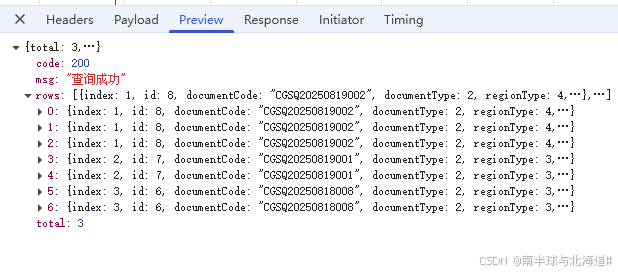
这个是后端返回的数据结构,按id字段,把相同内容的单元格的进行合并
data() {
return {
//需要合并的字段
mergeFields: [
"index",
"documentCode",
"documentType",
"documentDate",
"status",
"applicant",
"deptName",
"purchasePerson",
"tool"
],
// 合并规则
mergeRules: {},
}
},
methods: {
/**
* 计算合并规则
* @param {String} groupKey 分组依据字段(这里用id)
*/
calcMergeRules(groupKey) {
const rules = {};
// 初始化需要合并的字段规则
this.mergeFields.forEach((field) => (rules[field] = []));
let sameCount = 1; // 相同id的连续行数
this.tableData.forEach((row, index) => {
if (index === 0) {
// 第一行默认占1行
this.mergeFields.forEach((field) => rules[field].push(1));
} else {
// 判断与上一行是否同组
const isSameGroup = row[groupKey] === this.tableData[index - 1][groupKey];
if (isSameGroup) {
sameCount++;
// 当前行设为0(不显示),上一行累加
this.mergeFields.forEach((field) => {
rules[field].push(0);
rules[field][index - sameCount + 1] = sameCount;
});
} else {
// 不同组则重置计数
sameCount = 1;
this.mergeFields.forEach((field) => rules[field].push(1));
}
}
});
return rules;
},
/**
* 合并单元格方法
*/
mergeRows({ column, rowIndex }) {
// 找到当前列对应的字段
const field = column.property;
// 如果是需要合并的字段,则应用规则
if (this.mergeFields.includes(field)) {
const rowspan = this.mergeRules[field][rowIndex];
return { rowspan, colspan: rowspan > 0 ? 1 : 0 };
}
// 不需要合并的列返回默认值
return { rowspan: 1, colspan: 1 };
},
// 调接口获取数据
getList() {
this.tableLoading = true;
queryPurchaseReqList(this.queryParams)
.then((res) => {
if (res.code === 200) {
this.tableData = res.rows || [];
this.total = res.total;
this.tableLoading = false;
// 初始化合并规则(按id分组)
this.mergeRules = this.calcMergeRules("id");
}
})
.catch((err) => null);
},
}
效果

通过以上方法就能实现合并了,主要用到了el-table的 span-method

这世界很喧嚣,做你自己就好

 浙公网安备 33010602011771号