


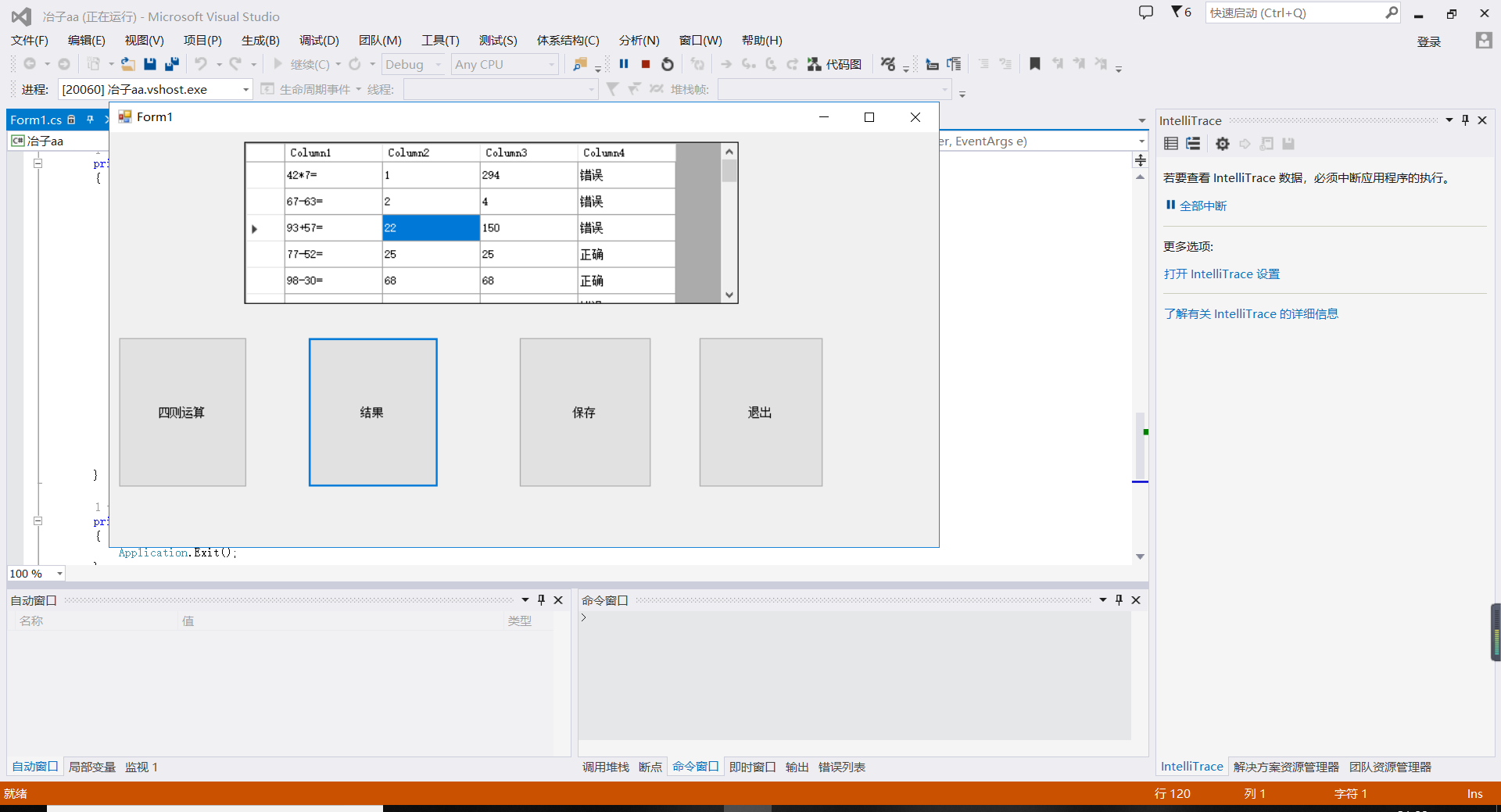
题目:做一个100以内的四则运算,随机生成30道题目
要求:实现在线答题
答题结束后可以判断正误
并将错题的结果保存起来
using System;
using System.Collections.Generic;
using System.ComponentModel;
using System.Data;
using System.Drawing;
using System.Linq;
using System.Text;
using System.Threading.Tasks;
using System.Windows.Forms;
using System.IO;

namespace 冶子aa
{
    public partial class Form1 : Form
    {
        public Form1()
        {
            InitializeComponent();
        }

        private void dataGridView1_CellContentClick(object sender, DataGridViewCellEventArgs e)
        {

        }

        private void button1_Click(object sender, EventArgs e)
        {

            dataGridView1.RowCount = 30;      //定义表格的行数
            Random r = new Random();              //取随机数的函数
            for (int i = 0; i < 30; i++)
            {
                double num1 = r.Next(0,99);    //取随机数
                double num2 = r.Next(0,99);
                int a = r.Next(0, 3);
                double c = 1;
                char signal = '+';
                if (a % 3 == 0)             //随机取四则运算的符号
                {
                    signal = '+';
                    c = num1 + num2;
                }
                else if (a % 3 == 1)
                {
                    signal = '-';
                    if (num1 < num2)
                    {
                        double temp;
                        temp = num1;
                        num1 = num2;
                        num2 = temp;
                    }
                    c = num1 - num2;
                }
                else if (a % 3 == 2)
                {
                    signal = '*';
                    c = num1 * num2;
                }
                else if (num1 / num2 == 0 && num1 != 0 && num2 != 0)
                {
                    signal = '/';
                    c = num1 / num2;
                }
                dataGridView1.Rows[i].Cells[2].Value = c;   //四则运算的正确结果
                string s = Convert.ToString(num1) + signal + Convert.ToString(num2) + '=';
                dataGridView1.Rows[i].Cells[0].Value = s;   //显示四则运算
            }
        }

        private void button2_Click(object sender, EventArgs e)
        {
            double q = 30;
            dataGridView1.RowCount = (int)q;
            dataGridView1.Columns[2].Visible = true;     //将列“正确结果”和“结果正确性”变为可见
            dataGridView1.Columns[3].Visible = true;
            int a = 0;
            for (int i = 0; i < q; i++)     //判断结果正确性
            {
                if (Convert.ToDouble(dataGridView1.Rows[i].Cells[1].Value) == Convert.ToDouble(dataGridView1.Rows[i].Cells[2].Value))
                {
                    dataGridView1.Rows[i].Cells[3].Value = "正确";
                    a += 1;
                }
                else
                {
                    dataGridView1.Rows[i].Cells[3].Value = "错误";
                }
            }
        }

        private void button3_Click(object sender, EventArgs e)
        {
            string path = @"D:\QQPCmgr\Desktop\错题本.txt";
            if (File.Exists(path))
            {
                File.Delete(path);
            }
            string wrrong = "";
            double q = 30;
            dataGridView1.RowCount = 30;
            for (int i = 0; i < 30; i++)
            {
                if (Convert.ToDouble(dataGridView1.Rows[i].Cells[1].Value) != Convert.ToDouble(dataGridView1.Rows[i].Cells[2].Value))
                {
                    wrrong += Convert.ToString(dataGridView1.Rows[i].Cells[0].Value + "\r\n");
                }
            }
            StreamWriter sw = new StreamWriter(path);
            sw.WriteLine(wrrong);
            sw.Close();
        }

        private void button4_Click(object sender, EventArgs e)
        {
            Application.Exit();
        }
    }
}
思路:一个datagridview控件用来存放题目和判断正误,使用4个BUTTON控件来选择生成题目,判断正误,保存错题,退出。

 浙公网安备 33010602011771号