
关于position的操作
1.position:relative
相较于正常位置的定位
<!DOCTYPE html>
<html lang="en">
<head>
    <meta charset="UTF-8">
    <meta name="viewport" content="width=device-width, initial-scale=1.0">
    <meta http-equiv="X-UA-Compatible" content="ie=edge">
    <title>Document</title>
    <style>
    #div1{
        width: 150px;
        height: 150px;
        background-color: red;
    }
    #div2{
        width: 150px;
        height: 150px;
        background-color: yellow;
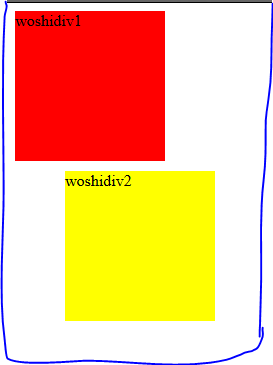
        position: relative;
        left: 50px;//第二个div块离左边窗口50px
        top: 10px;//div2块相对于上面的div1块有
10px
    }
    </style>
</head>
<body>
    <div id="div1">woshidiv1</div>
    <div id="div2">woshidiv2</div>
</body>
</html>
下图为代码结果:

<!DOCTYPE html>
<html lang="en">
<head>
    <meta charset="UTF-8">
    <meta name="viewport" content="width=device-width, initial-scale=1.0">
    <meta http-equiv="X-UA-Compatible" content="ie=edge">
    <title>Document</title>
    <style>
    #div1{
        width: 150px;
        height: 150px;
        background-color: red;
    }
    #div2{
        width: 150px;
        height: 150px;
        background-color: yellow;
        position: relative;
        left: 150px;
        top: -150px;
    }
    </style>
</head>
<body>
    <div id="div1">woshidiv1</div>
    <div id="div2">woshidiv2</div>
</body>
</html>
<!DOCTYPE html>
<html lang="en">
<head>
    <meta charset="UTF-8">
    <meta name="viewport" content="width=device-width, initial-scale=1.0">
    <meta http-equiv="X-UA-Compatible" content="ie=edge">
    <title>Document</title>
    <style>
    #div1{
        width: 150px;
        height: 150px;
        background-color: red;
    }
    #div2{
        width: 150px;
        height: 150px;
        background-color: yellow;
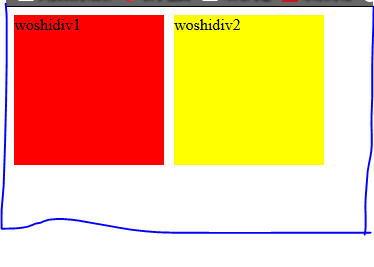
        position: relative;
        left: 150px;//div2相对于div1距离左边有150px
        top: -150px;//div2相对于div1距离上边有150px
    }
    </style>
</head>
<body>
    <div id="div1">woshidiv1</div>
    <div id="div2">woshidiv2</div>
</body>
</html>
下图为代码结果:
2.position:absolute若滚动浏览器,则区块随之滚动
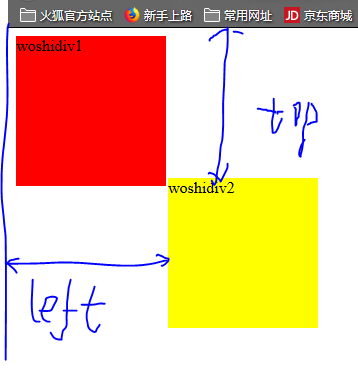
相对于浏览器窗口的左上角
<!DOCTYPE html>
<html lang="en">
<head>
    <meta charset="UTF-8">
    <meta name="viewport" content="width=device-width, initial-scale=1.0">
    <meta http-equiv="X-UA-Compatible" content="ie=edge">
    <title>Document</title>
    <style>
    #div1{
        width: 150px;
        height: 150px;
        background-color: red;
    }
    #div2{
        width: 150px;
        height: 150px;
        background-color: yellow;
        position: absolute;
        left: 160px;//距离窗口左边160px
        top: 150px;//距离窗口上边150px
    }
    </style>
</head>
<body>
    <div id="div1">woshidiv1</div>
    <div id="div2">woshidiv2</div>
</body>
</html>
下图为代码结果:
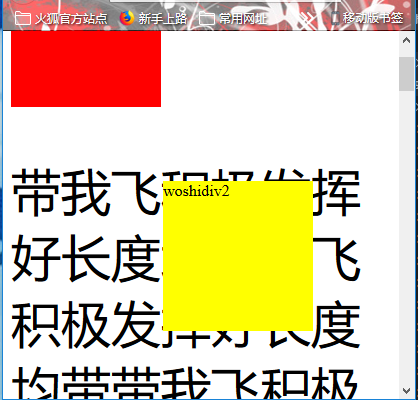
3.position:fixed位移基于浏览器左上角,以这种方式定位,若滚动窗口这个区块不随之滚动
<!DOCTYPE html>
<html lang="en">
<head>
    <meta charset="UTF-8">
    <meta name="viewport" content="width=device-width, initial-scale=1.0">
    <meta http-equiv="X-UA-Compatible" content="ie=edge">
    <title>Document</title>
    <style>
    #div1{
        width: 150px;
        height: 150px;
        background-color: red;
    }
    #div2{
        width: 150px;
        height: 150px;
        background-color: yellow;
        position: fixed;
        left: 160px;
        top: 150px;
    }
    p{
        font-size: 50px;
    }
    </style>
</head>
<body>
    <div id="div1">woshidiv1</div>
    <div id="div2">woshidiv2</div>
    <p>带我飞积极发挥好长度均带我飞积极发挥好长度均带
            带我飞积极发挥好长度均带我飞积极发挥
            带我飞积极发挥好长度均带我飞积极发挥好长度均
            带我飞积极发挥好长度均带我飞积极发挥好长度均
            带我飞积极发挥好长度均带我飞积极发挥好长度均带我飞积极发挥好长度均带我飞积极发
挥好长度均带带我飞积极发挥好长度均我飞积极发挥好长度均带我飞积极发挥好带我飞积极发挥好长度均长度均带我飞
积极发挥好长度均带我飞积极发带我飞积极发挥好长度均挥好长度均带我飞积极发挥好长度均带我飞带我飞积极发挥好长
度均积极发挥好长度均带我飞积极发挥好长度均带我飞积极发挥好长度均带我飞积极发挥好长度均
            带我飞积极发挥好长度均好长度均我飞积极发挥好长度均</p>
</body>
</html>
下图为代码结果:
4.position:static表示默认值
<!DOCTYPE html>
<html lang="en">
<head>
    <meta charset="UTF-8">
    <meta name="viewport" content="width=device-width, initial-scale=1.0">
    <meta http-equiv="X-UA-Compatible" content="ie=edge">
    <title>Document</title>
    <style>
    #div1{
        width: 150px;
        height: 150px;
        background-color: red;
    }
    #div2{
        width: 150px;
        height: 150px;
        background-color: yellow;
        position: static;
    }
    </style>
</head>
<body>
    <div id="div1">woshidiv1</div>
    <div id="div2">woshidiv2</div>

</body>
</html>
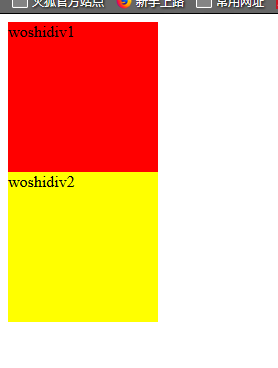
下图为代码结果:
5.position:auto由浏览器自己计算

 浙公网安备 33010602011771号