


Python测试Kafka连通性、生产和消费(使用SCRAM-SHA-256认证)
1、准备工作
使用python连接Kafka,需要安装依赖kafka-python。
pip install kafka-python
2、测试Kafka连通性、生产和消费数据
通过Python测试Kafka连通性、生产和消费数据,代码如下:
from kafka import KafkaAdminClient, KafkaProducer, KafkaConsumer
from kafka.admin import NewTopic
from kafka.errors import TopicAlreadyExistsError
import time


class KafkaConnectionTester:
    def __init__(self, bootstrap_servers, topic_name, sasl_config):
        self.bootstrap_servers = bootstrap_servers
        self.test_topic = topic_name
        self.sasl_config = sasl_config

    def test_admin_connection(self):
        """测试管理客户端连接"""
        try:
            admin_client = KafkaAdminClient(
                bootstrap_servers=self.bootstrap_servers,
                request_timeout_ms=5000,
                **self.sasl_config
            )
            topics = admin_client.list_topics()
            print(f"✅ Admin连接成功! 现有主题: {len(topics)} 个", topics)
            admin_client.close()
            return True
        except Exception as e:
            print(f"❌ Admin连接失败: {e}")
            return False

    def test_producer_connection(self):
        """测试生产者连接"""
        try:
            producer = KafkaProducer(
                bootstrap_servers=self.bootstrap_servers,
                request_timeout_ms=5000,
                **self.sasl_config
            )

            # 发送测试消息
            future = producer.send(self.test_topic, b'test_message')
            future.get(timeout=100)
            print("✅ 生产者连接成功!")
            producer.close()
            return True
        except Exception as e:
            print(f"❌ 生产者连接失败: {e}")
            return False

    def test_consumer_connection(self):
        """测试消费者连接"""
        try:
            consumer = KafkaConsumer(
                self.test_topic,
                bootstrap_servers=self.bootstrap_servers,
                auto_offset_reset='earliest',
                enable_auto_commit=False,
                group_id='test_connection_group',
                request_timeout_ms=50000,
                value_deserializer=lambda x: x.decode('utf-8'),  # 消息反序列化
                **self.sasl_config
            )

            # 尝试获取消息
            # consumer.poll(timeout_ms=5000)
            message_count = 0
            print("开始消费消息....")
            for message in consumer:
                print(f"  键: {message.key}", f"值: {message.value}", f"时间戳: {message.timestamp}")
                message_count += 1
                if message_count >= 2:
                    break
            print("✅ 消费者连接成功!")
            return True
        except Exception as e:
            print(f"❌ 消费者连接失败: {e}")
            return False
        finally:
            consumer.close()
            print(f"✅ 成功消费 {message_count} 条消息")

    def create_test_topic(self):
        """创建测试主题"""
        try:
            admin_client = KafkaAdminClient(
                bootstrap_servers=self.bootstrap_servers,
                request_timeout_ms=5000,
                **self.sasl_config
            )

            topic_list = [NewTopic(
                name=self.test_topic,
                num_partitions=1,
                replication_factor=1
            )]

            admin_client.create_topics(new_topics=topic_list, validate_only=False)
            print(f"✅ 测试主题 '{self.test_topic}' 创建成功")
            admin_client.close()
            return True
        except TopicAlreadyExistsError:
            print(f"📝 测试主题 '{self.test_topic}' 已存在")
            return True
        except Exception as e:
            print(f"❌ 创建测试主题失败: {e}")
            return False

    def run_all_tests(self):
        """运行所有连接测试"""
        print(f"🔍 开始测试Kafka连接: {self.bootstrap_servers}")
        print("-" * 50)

        tests = [
            ("Admin连接", self.test_admin_connection),
            ("创建测试主题", self.create_test_topic),
            ("生产者连接", self.test_producer_connection),
            ("消费者连接", self.test_consumer_connection)
        ]

        results = []
        for test_name, test_func in tests:
            print(f"正在测试: {test_name}...")
            result = test_func()
            results.append((test_name, result))
            time.sleep(1)  # 短暂延迟

        print("-" * 50)
        print("📊 测试结果汇总:")
        for test_name, result in results:
            status = "✅ 通过" if result else "❌ 失败"
            print(f"  {test_name}: {status}")

        all_passed = all(result for _, result in results)
        return all_passed


# 使用示例
if __name__ == "__main__":
    # 配置Kafka服务器地址
    kafka_servers = [
        '192.168.80.131:9092',
        '192.168.80.132:9092',
        '192.168.80.133:9092'
    ]

    topic_name = 'test_topic'

    # SCRAM-SHA-256认证配置
    sasl_config = {
        'sasl_mechanism': 'SCRAM-SHA-256',  # SASL机制,使用SCRAM-SHA-256认证
        'security_protocol': 'SASL_PLAINTEXT',  # 安全协议,使用SASL_PLAINTEXT
        'sasl_plain_username': 'admin',  # 认证用户名
        'sasl_plain_password': 'admin'  # 认证密码
    }

    tester = KafkaConnectionTester(kafka_servers, topic_name, sasl_config)
    success = tester.run_all_tests()

    if success:
        print("\n🎉 所有连接测试通过!")
    else:
        print("\n💥 部分连接测试失败,请检查Kafka配置!")
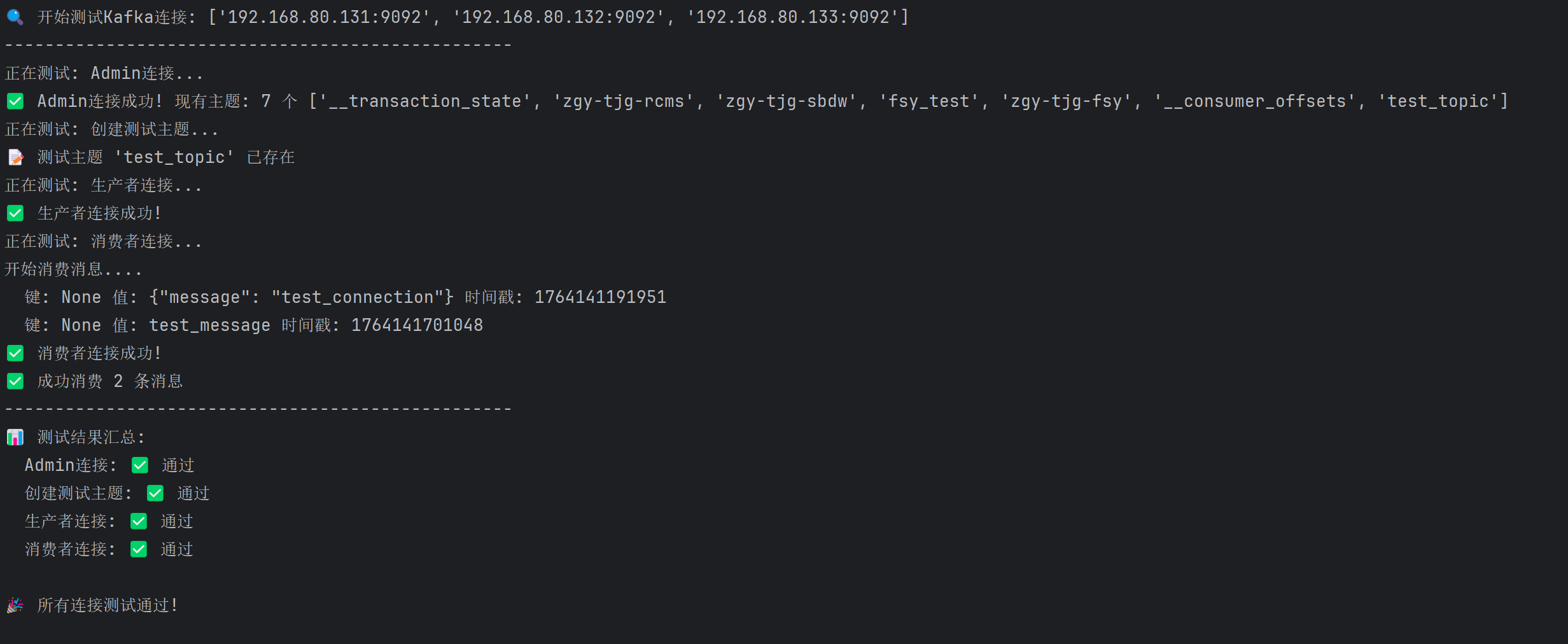
3、测试运行结果
本文来自博客园,作者:业余砖家,转载请注明原文链接:https://www.cnblogs.com/yeyuzhuanjia/p/19275691

 浙公网安备 33010602011771号