

第18周作业
1、请列出 nginx 常用模块的各个优缺点以及区别
nginx 有多种模块
-
核心模块:是 Nginx 服务器正常运行必不可少的模块,提供错误日志记录 、配置文件解析 、事件 驱动机制 、进程管理等核心功能
-
标准HTTP模块:提供 HTTP 协议解析相关的功能,比如: 端口配置 、 网页编码设置 、 HTTP响 应头设置 等等
-
可选HTTP模块
-
邮件服务模块:主要用于支持 Nginx 的 邮件服务 ,包括对 POP3 协议、 IMAP 协议和 SMTP协议 的支持
-
Stream服务模块: 实现反向代理功能,包括TCP协议代理
-
第三方模块:是为了扩展 Nginx 服务器应用,完成开发者自定义功能,比如: Json 支持、 Lua 支 持等
2、请写出用户通过 nginx 访问的工作过程
1)在浏览器输入网址通过DNS服务器将域名解析成IP地址;
2)通过ip地址,中间经过路由转换找到网站服务器,发送http请求;
3)因为http工作在第七层应用层,tcp工作在第四层传输层,所以在发送http请求之前,会先进行tcp三次握手,确保数据传输的稳定性;
4)三次握手完成后,开始向服务器发送http请求报文,服务器收到请求报文后,会给出响应报文。如果是静态页面,服务器会直接将资源响应给客;端;如果是动态页面,Nginx会将请求转给后端程序,后端程序会去查询数据库,根据数据库返回的内容,发送给客户端
5)客户端浏览器收到响应报文后,渲染html文档,最终得到我们看到的网页页面
3、请写出实现 nginx-https 访问得步骤过程
1)Nginx在编译安装的时候需开启ssl模块,使用--with-http_ssl_module

2)使用openssl生成证书文件

3)在Nginx配置文件中配置https信息

4)检查Nginx语法,重新加载服务


#具体实现如下:
[root@centos8 ~]#cd /usr/local/src/
[root@centos8 src]#ls
echo-nginx-module  nginx-1.18.0  nginx-1.18.0.tar.gz
[root@centos8 src]#cd nginx-1.18.0/
--prefix=/apps/nginx \
--user=nginx --group=nginx \
--with-http_ssl_module \
--with-http_v2_module
--with-http_realip_module \
--with-http_stub_status_module \
--with-http_gzip_static_module \
--with-pcre --with-stream \
--with-stream_ssl_module \
--with-stream_realip_module \
--add-module=/usr/local/src/echo-nginx-module

#自签名CA证书
[root@centos8 ~]#cd /apps/nginx/
[root@centos8 nginx]#mkdir -pv certs
[root@centos8 certs]#cd certs
[root@centos8 certs]#openssl req -newkey rsa:4096 -nodes -sha256 -keyout ca.key -x509 -days 3650 -out ca.crt
Generating a RSA private key
................................................................................++++
...............................................................++++
writing new private key to 'ca.key'
-----
You are about to be asked to enter information that will be incorporated
into your certificate request.
What you are about to enter is what is called a Distinguished Name or a DN.
There are quite a few fields but you can leave some blank
For some fields there will be a default value,
If you enter '.', the field will be left blank.
-----
Country Name (2 letter code) [XX]:CN
State or Province Name (full name) []:YN
Locality Name (eg, city) [Default City]:Kunming
Organization Name (eg, company) [Default Company Ltd]:keyun
Organizational Unit Name (eg, section) []:cloud
Common Name (eg, your name or your server's hostname) []:ca.magedu.org
Email Address []:

[root@centos8 certs]#openssl req -newkey rsa:4096 -nodes -sha256 -keyout www.magedu.org.key -out  www.magedu.org.csr


Generating a RSA private key
.....................................................................................................................................................................................................................................................++++
.........................................................................................................................................++++
writing new private key to 'www.magedu.org.key'
-----
You are about to be asked to enter information that will be incorporated
into your certificate request.
What you are about to enter is what is called a Distinguished Name or a DN.
There are quite a few fields but you can leave some blank
For some fields there will be a default value,
If you enter '.', the field will be left blank.
-----
Country Name (2 letter code) [XX]:CN
State or Province Name (full name) []:YN
Locality Name (eg, city) [Default City]:Kunming
Organization Name (eg, company) [Default Company Ltd]:keyun
Organizational Unit Name (eg, section) []:cloud
Common Name (eg, your name or your server's hostname) []:www.magedu.org
Email Address []:yds941268778@qq.com

Please enter the following 'extra' attributes
to be sent with your certificate request
A challenge password []:magedu
An optional company name []:keyun

[root@centos8 certs]#ll
total 16
-rw-r--r-- 1 root root 2025 Oct 12 16:42 ca.crt
-rw------- 1 root root 3272 Oct 12 16:40 ca.key
-rw-r--r-- 1 root root 1805 Oct 12 16:45 www.magedu.org.csr
-rw------- 1 root root 3272 Oct 12 16:43 www.magedu.org.key

#签发证书
[root@centos8 certs]#openssl x509 -req -days 3650 -in www.magedu.org.csr -CA ca.crt -CAkey ca.key -CAcreateserial -out www.magedu.org.crt
Signature ok
subject=C = CN, ST = YN, L = Kunming, O = keyun, OU = cloud, CN = www.magedu.org, emailAddress = yds941268778@qq.com
Getting CA Private Key

#验证证书内容
[root@centos8 certs]#openssl x509 -in www.magedu.org.crt -noout -text
Certificate:
    Data:
        Version: 1 (0x0)
        Serial Number:
            2f:f3:d2:5b:23:22:db:18:52:51:73:2a:53:04:bc:b3:fa:f8:6c:1d
        Signature Algorithm: sha256WithRSAEncryption
        Issuer: C = CN, ST = YN, L = Kunming, O = keyun, OU = cloud, CN = ca.magedu.org
        Validity
            Not Before: Oct 12 08:51:47 2020 GMT
            Not After : Oct 10 08:51:47 2030 GMT
        Subject: C = CN, ST = YN, L = Kunming, O = keyun, OU = cloud, CN = www.magedu.org, emailAddress = yds941268778@qq.com
        Subject Public Key Info:
            Public Key Algorithm: rsaEncryption
                RSA Public-Key: (4096 bit)
https配置
[root@centos8 certs]#vi /apps/nginx/conf/conf.d/pc.conf
server {
  listen 80;
  listen 443 ssl;
  ssl_certificate  /apps/nginx/certs/www.magedu.org.crt;
  ssl_certificate_key  /apps/nginx/certs/www.magedu.org.key;
  ssl_session_cache shared:sslcache:20m;
  ssl_session_timeout 10m;
}
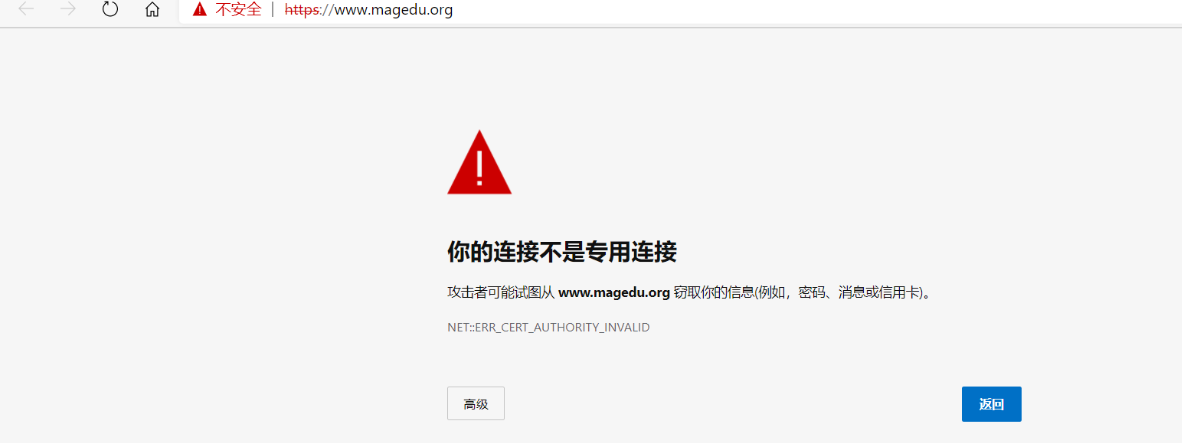
重启Nginx并访问验证:
4、请写出隐藏 Nginx 版本号得过程
修改Nginx的主配置文件nginx.conf,在http上下文中添加指令server_tokens,并将值设为off,然后重新加载Nginx服务生效。
5、请写出 nginx 各种优化参数。以及每个参数得作用是什么
1)worker_processes number | auto;
worker进程的数量,通常应该为当前主机的cpu物理核心数,用来处理用户的请求
2)worker_cpu_affinity auto [cpumask];
将worker进程绑定在固定cpu上提高缓存命中率
3)worker_priority number;
指定worker进程的nice值,设定worker进程优先级:[-20 , 19]
4)worker_rlimit_nofile number;
worker进程能够打开的文件数量上限,默认较小,生产中需调大如65535

 浙公网安备 33010602011771号