sonarqube添加一条自定义规则,扫描文件中出现的username和password,方法二,使用implements Sensor
特别指出:

所以,sonarqube默认过滤掉了resources下的文件;
以下代码可以扫出yml / xml /properties 等文件中的敏感字符,当然是放在src/main下的,不是resources;
下载源码与使用详情参考:
假设你已经有了sonarqube-java源码,并且已经把sonarqube部署到电脑上;因为我的代码是基于SonarSource / sonar-java源码中示例项目docs/java-custom-rules-example
就进行如下步骤:
1、创建CustomNameCheck
package org.sonar.samples.java.custom;

import org.sonar.api.batch.fs.FileSystem;
import org.sonar.api.batch.fs.InputFile;
import org.sonar.api.batch.fs.TextRange;
import org.sonar.api.batch.sensor.Sensor;
import org.sonar.api.batch.sensor.SensorContext;
import org.sonar.api.batch.sensor.SensorDescriptor;
import org.sonar.api.batch.sensor.issue.NewIssue;
import org.sonar.api.batch.sensor.issue.NewIssueLocation;
import org.sonar.api.rule.RuleKey;
import org.sonar.check.Rule;
import org.sonar.plugins.java.api.JavaCheck;
import java.io.BufferedReader;
import java.io.FileReader;
import java.io.IOException;
import java.util.regex.Pattern;


@Rule(key = "CustomName")
//@Rule(key = "CustomName",name = "Custom Sensitive Information Rule  txt txt",description = "ddddddddddddddddddddddddddd",tags = { "bugs", "gandalf", "magic"},priority = Priority.CRITICAL)
public class CustomNameCheck implements Sensor ,JavaCheck{

  private static final Pattern SENSITIVE_PATTERN = Pattern.compile(".*(username|password).*", Pattern.CASE_INSENSITIVE);
//  private final FileSystem fs;

  @Override
  public void describe(SensorDescriptor descriptor) {
//    System.out.println("------------------------------describe--");
    descriptor.name("Hardcoding is not allowed, username or password")
      .onlyOnLanguage("java");
  }

  @Override
  public void execute(SensorContext context) {
//    System.out.println("------------------------------execute--");
    FileSystem fileSystem = context.fileSystem();
    Iterable<InputFile> inputFiles = fileSystem.inputFiles(fileSystem.predicates().all());
    String absolutePath;
    for(InputFile input:inputFiles ){
       absolutePath = input.absolutePath();
      try {
        scanFile(input,context,absolutePath);
      } catch (IOException e) {
        throw new RuntimeException(e);
      }
    }
  }

  private void scanFile(InputFile inputFile, SensorContext context,String absolutePath) throws IOException {
//    System.out.println("---------------------scanFile----" + absolutePath);
    try(BufferedReader reader = new BufferedReader(new FileReader(absolutePath))) {
      String line;
      int lineNumber = 0;
      while ((line = reader.readLine()) != null) {
        lineNumber++;
        if (SENSITIVE_PATTERN.matcher(line.toLowerCase()).matches()) {
          NewIssue newIssue = context.newIssue().forRule(RuleKey.of("mycompany-java", "CustomName"));
          TextRange range = inputFile.newRange(lineNumber, 0, lineNumber, line.length());
          NewIssueLocation newIssueLocation = newIssue.newLocation()
            .on(inputFile)
            .message("Hardcoding is not allowed, username or password").at(range);
          newIssue.at(newIssueLocation).save();
        }
      }
    }
  }
}
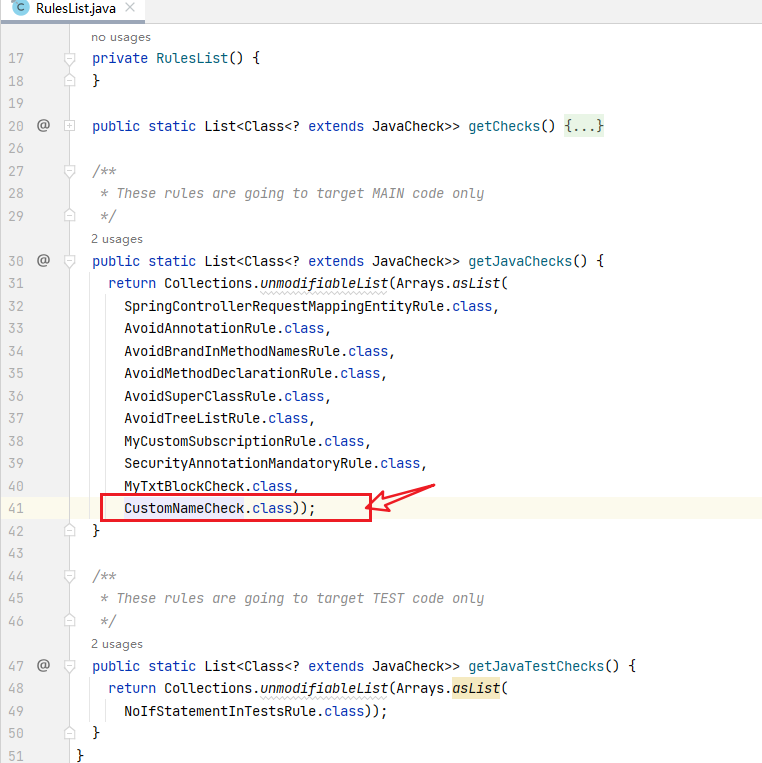
2、将CustomNameCheck 加入到RulesList
3、编写.html .json文件
CustomName.html如下
<!DOCTYPE html>
<html>
<head>
  <title>Custom Sensitive Information Rule - implements Sensor</title>
</head>
<body>
<h1>Sensitive Information Rule TXT TXT</h1>
<p>This rule detects hardcoded sensitive information such as 'username' or 'password' in the code.</p>

<h2>Rule Description</h2>
<p>Hardcoding sensitive information can lead to security vulnerabilities and is considered a bad practice. This rule helps identify such cases in your codebase.</p>

<h2>Examples</h2>
<h3>Non-compliant Code</h3>
<pre>
    private static final String username = "myUsername";
    private static final String password = "myPassword";
    </pre>

<h3>Compliant Code</h3>
<pre>
    private static final String someValue = "value"; // Use configuration files or environment variables
    </pre>

<h2>Best Practices</h2>
<ul>
  <li>Do not hardcode sensitive information in your codebase.</li>
  <li>Use configuration files or environment variables to manage sensitive data securely.</li>
</ul>
</body>
</html>
CustomName.json如下
{
  "title": "Custom Sensitive Information Rule - implements Sensor",
  "type": "Bug",
  "status": "ready",
  "tags": [
    "bugs",
    "gandalf",
    "magic"
  ],
  "defaultSeverity": "Critical"
}
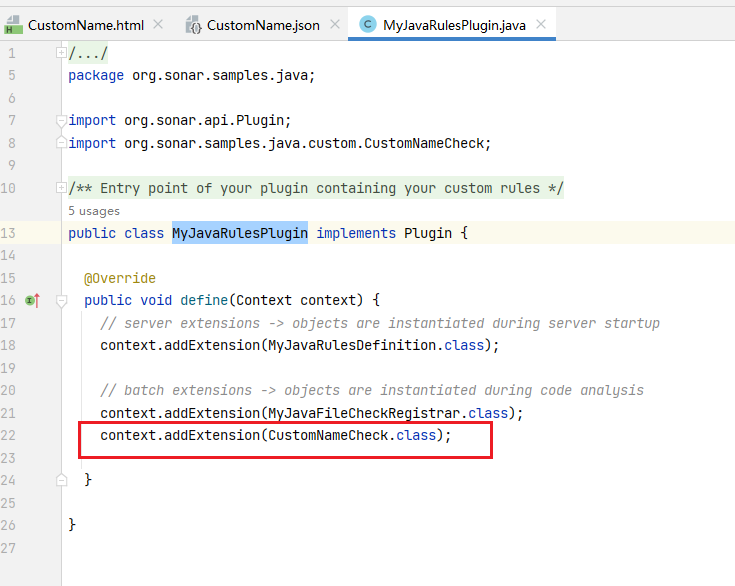
4、将CustomNameCheck 加入到MyJavaRulesPlugin
(为什么要把CustomNameCheck 加入到MyJavaRulesPlugin? 我也不知道,只是如果不加入,扫描时无法使用这条规则)
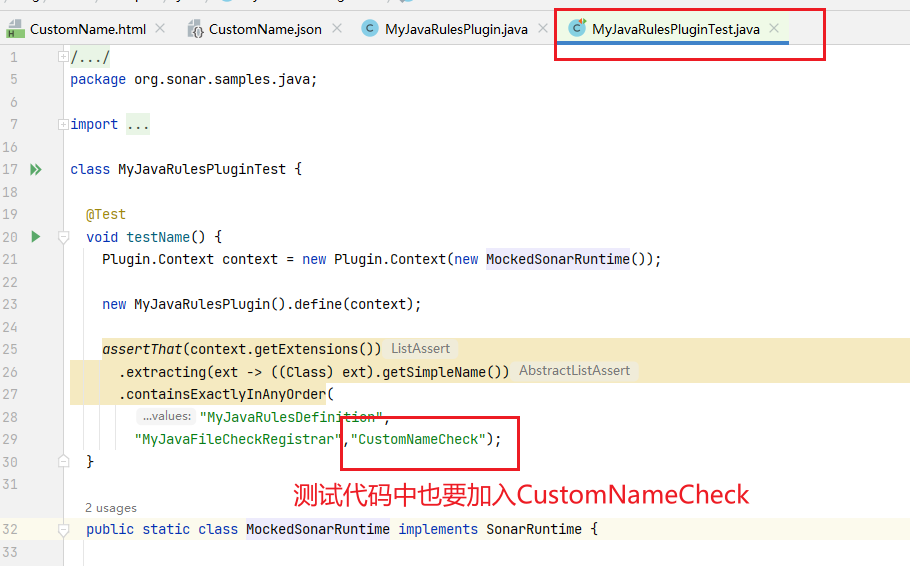
5、测试代码也要加入,不然打包会报错;
5、打包
mvn clean install -f .\pom_SQ_9_9_LTS.xml
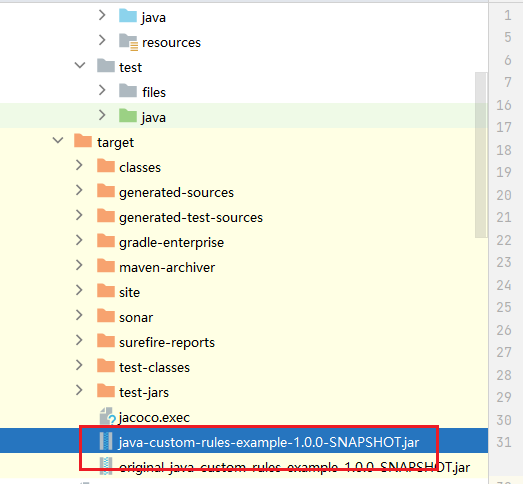
6、将新生成的jar放到sonarqube\安装目录\extensions\plugins,然后重启项目
接下来如何在sonarqube使用这些规则?请参考:
SonarQube使用新增的自定义规则,进行maven项目扫描 - yxchun - 博客园 (cnblogs.com)

 浙公网安备 33010602011771号