jmeter 调用 python代码
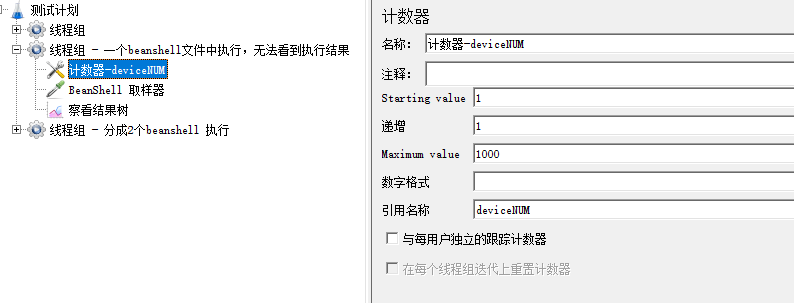
1、添加计数器
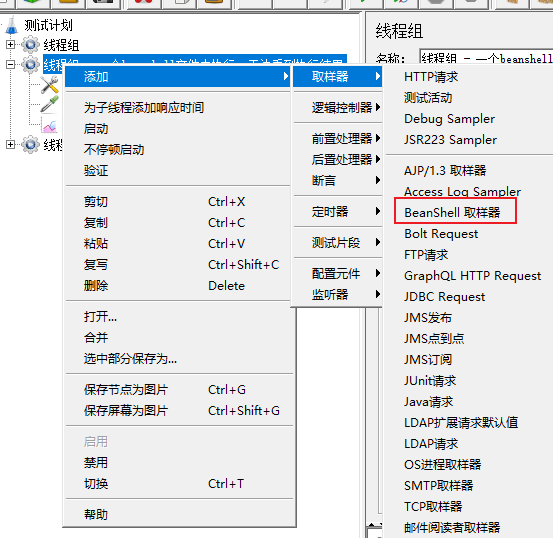
2、创建BeanShell 取样器
3、BeanShell 取样器内容如下
import java.io.BufferedReader;
import java.io.InputStreamReader;
//python 路径 C://Users//chun//Desktop//FAPlus//auto//ymxia1test//test04.py
// 传递参数:-t ${deviceNUM}
String command = "cmd /c python C://Users//chun//Desktop//FAPlus//auto//ymxia1test//test04.py -t ${deviceNUM}";
Runtime rt = Runtime.getRuntime();
Process pr = rt.exec(command);
//等待执行
pr.waitFor();
//读取python打印到控制台的内容
BufferedReader b = new BufferedReader(new InputStreamReader(pr.getInputStream()));
String line = "";
StringBuilder response = new StringBuilder();
//一行行读取
while ((line = b.readLine()) != null) {
response.append(line);
}
String response_data = response.toString();
//将数据打印到控制台
System.out.println("response_data="+response_data);
b.close();

 浙公网安备 33010602011771号