python+appium基本操作,进行wechat登录、注册
1、滑屏
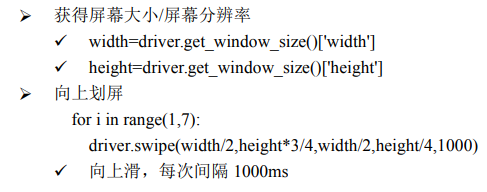
     width=driver.get_window_size()['width']
        height=driver.get_window_size()['height']
        for i in range(1,6):
            driver.swipe(width/2,height*3/4,width/2,height/4,1000)
2、判断是否出现指定窗口
方法一
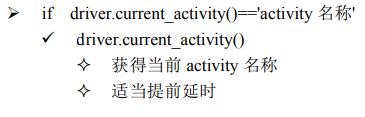
方法二
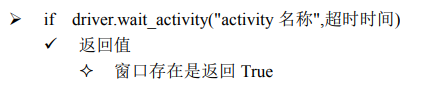
 win=driver.wait_activity(".permission.ui.GrantPermissionsActivity",5)
        if win:
                print("窗口出现")
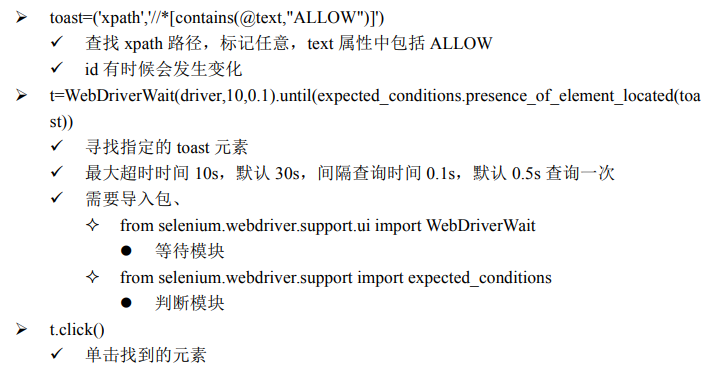
3、操作弹窗
        win=driver.wait_activity(".permission.ui.GrantPermissionsActivity",5)
        if win:
            #输出当前窗口名称
           # print(driver.current_activity)
            #点击允许01
            #driver.find_element_by_id("com.android.packageinstaller:id/permission_allow_button").click()
            toast=('xpath','//*[contains(@text,"ALLOW")]')
            t=WebDriverWait(driver,10,0.1).until(expected_conditions.presence_of_element_located(toast))
            t.click()
4、其他
device['autoLaunch'] = False
不想让 appium 每次都启动 app,而是想自己打开 activity 或者在原来 activity 基础上继续操作,可以使用此项;但device['appPackage']='com.tencent.mm'和device['appActivity']='com. tencent.mm.ui. LauncherUI'仍然不能省略。
driver.launch_app()
启动App
driver.close_app()
关闭App
driver.reset()
重置 App ; 清除设置以后启动或重启 App
driver.start_activity('com.tencent.mm','com.tencent.mm.ui.LauncherUI')
自己启动 activity
driver.contexts
查看所有的 App 类型/上下文
driver.context
driver.current_context
查看当前的 App 类型/上下文
driver.switch_to.context("WEBVIEW_com…")
切换 App 类型/上下文
driver.wait_activity("activity 名称",超时时间)
切换 Activity
微信允许请求、登录、注册


import unittest
from time import sleep
from appium import webdriver
from selenium.webdriver.support.ui import WebDriverWait
from selenium.webdriver.support import expected_conditions

driver=None;
class Test_weChat(unittest.TestCase):

    @classmethod
    def setUpClass(cls) :
        device={}
        device['deviceName']='192.168.231.101:5555'
        #设备平台
        device['platformName']='Android'
        #移动设备操作系统版本
        device['platformVersion']='9'
        #不重新启动APP
        #device['autoLaunch'] = False
        #运行程序包名
        device['appPackage']='com.tencent.mm'
        #程序启动页名称
        device['appActivity']='com.tencent.mm.ui.LauncherUI'
        #设置不重新安装APP
        device['noReset']=True
        device['unicodeKeyboard']= True
        device['resetKeyboard']=True
        global driver
        driver=webdriver.Remote("http://127.0.0.1:4723/wd/hub",device)


    def test_01_reset(self):
        print("重置微信")
        #重置app
        driver.reset()
        win=driver.wait_activity(".permission.ui.GrantPermissionsActivity",5)
        if win:
            #输出当前窗口名称
           # print(driver.current_activity)
            #点击允许01
            #driver.find_element_by_id("com.android.packageinstaller:id/permission_allow_button").click()
            toast=('xpath','//*[contains(@text,"ALLOW")]')
            t=WebDriverWait(driver,10,0.1).until(expected_conditions.presence_of_element_located(toast))
            t.click()
            sleep(6)
        win=driver.wait_activity(".permission.ui.GrantPermissionsActivity",5)
        if win:
            #输出当前窗口名称
            #print(driver.current_activity)
            #点击允许02
            toast=('xpath','//*[contains(@text,"ALLOW")]')
            t=WebDriverWait(driver,10,0.1).until(expected_conditions.presence_of_element_located(toast))
            t.click()
            sleep(5)

    def test_02login(self):
        print("去登录")
        #点击登录
        driver.find_element_by_xpath('//*[contains(@text,"Log In")]').click()
        sleep(3)
        #点击电话号码
        driver.find_element_by_xpath('//*[contains(@text,"United States(+1)")]').click()
        sleep(5)
        #进行滑屏
        width=driver.get_window_size()['width']
        height=driver.get_window_size()['height']
        for i in range(1,6):
            driver.swipe(width/2,height*3/4,width/2,height/4,1000)
        #调换框架  com.tencent.mm/com.tencent.mm.ui.tools.CountryCodeUI
        sleep(3)
        print(driver.current_activity)
        #点击china
        driver.find_element_by_xpath('//*[contains(@text,"China")]').click()
        sleep(3)
        #输入电话号码
        driver.find_element_by_xpath('//*[contains(@text,"Enter mobile number")]').send_keys("14674468093")
        sleep(6)
        #点击左上角 x
        driver.find_element_by_id("com.tencent.mm:id/jc").click()
        sleep(3)

    def test_03Register(self):
        print("去注册")
        driver.find_element_by_xpath('//*[contains(@text,"Sign Up")]').click()
        sleep(5)
        #
        driver.find_element_by_xpath('//*[contains(@text,"John Appleseed")]').send_keys("app123456")
        #点击电话号码
        driver.find_element_by_xpath('//*[contains(@text,"United States(+1)")]').click()
        sleep(5)
        #进行滑屏
        width=driver.get_window_size()['width']
        height=driver.get_window_size()['height']
        for i in range(1,6):
            driver.swipe(width/2,height*3/4,width/2,height/4,1000)
        #调换框架  com.tencent.mm/com.tencent.mm.ui.tools.CountryCodeUI
        sleep(3)
        print(driver.current_activity)
        #点击china
        driver.find_element_by_xpath('//*[contains(@text,"China")]').click()
        sleep(3)
        driver.find_element_by_xpath('//*[contains(@text,"Enter mobile number")]').send_keys("17722356709")
        driver.find_element_by_xpath('//*[contains(@text,"Enter Password")]').send_keys("password356709")
        print("over")
    @classmethod
    def tearDownClass(cls) :
        driver.quit()

if __name__=="__main__" :
    unittest.main(verbosity=2)

 浙公网安备 33010602011771号