完整教程:Spring轻量级文件预览的组件
File View 文件预览
一个轻量级文件预览的starter组件,支持多种文档和媒体格式的在线预览,采用模块化架构,易于扩展和定制。
支持的文件类型
- office文件(docx,xlsx,xls,pptx)
- 业务流程管理文件(bpmn,dmn,cmmn)
- 图片文件
- 视频文件
- 音频文件
- 文档文件(pdf,ofd,epub)
- 文本文件/代码文件(sh,c,cpp,cs,css,diff,go,graphql,ini,java,js,json,kt,less,lua,mk,m,pl,php,phtml,txt,py,pyrepl,r,rb,rs,scss,sh,sql,swift,ts,vb,wasm,xml,yaml,yml)
- Markdown文档文件
- 3D模型文件(3dm,3ds,3mf,amf,bim,brep,dae,fbx,fcstd,gltf,ifc,iges,step,stl,obj,off,ply,wrl)
- 思维导图文件(xmind)
- 压缩文件(zip)
引入
增加 JitPack 仓库
<repositories>
  <repository>
  <id>jitpack.io</id>
  <url>https://jitpack.io</url>
  </repository>
</repositories>
Maven依赖
<dependency>
<groupId>com.gitee.wb04307201.file-view</groupId>
<artifactId>file-view-spring-boot-starter</artifactId>
<version>1.3.0</version>
</dependency>
配置文件
file:
view:
## 以下为默认的处理器,默认无需配置
bpmn:
enable: true
dmn:
enable: true
cmmn:
enable: true
code:
enable: true
epub:
enable: true
image:
enable: true
markdown:
enable: true
pdf:
enable: true
xmind:
enable: true
ofd:
enable: true
docx:
enable: true
excel:
enable: true
pptx:
enable: true
o3d:
enable: true
zip:
enable: true
## 以下为默认的文件名和处理器匹配规则,默认无需配置
strategies:
- syntaxAndPattern: glob:*.bpmn
serviceName: bpmn
- syntaxAndPattern: glob:*.dmn
serviceName: dmn
- syntaxAndPattern: glob:*.cmmn
serviceName: cmmn
- syntaxAndPattern: glob:*.{sh,c,cpp,cs,css,diff,go,graphql,ini,java,js,json,kt,less,lua,mk,m,pl,php,phtml,html,txt,py,pyrepl,r,rb,rs,scss,sh,sql,swift,ts,vb,wasm,xml,yaml,yml}
serviceName: code
- syntaxAndPattern: glob:*.epub
serviceName: epub
- syntaxAndPattern: glob:*.{jpg,png,bmp,gif,tiff,webp,svg,raw,heic,cr2,nef,orf,sr2}
serviceName: image
- syntaxAndPattern: glob:*.md
serviceName: markdown
- syntaxAndPattern: glob:*.pdf
serviceName: pdf
- syntaxAndPattern: glob:*.xmind
serviceName: xmind
- syntaxAndPattern: glob:*.ofd
serviceName: ofd
- syntaxAndPattern: glob:*.docx
serviceName: docx
- syntaxAndPattern: glob:*.{xlsx,xls}
serviceName: excel
- syntaxAndPattern: glob:*.pptx
serviceName: pptx
- syntaxAndPattern: glob:*.{3dm,3ds,3mf,amf,bim,brep,dae,fbx,fcstd,gltf,ifc,iges,step,stl,obj,off,ply,wrl}
serviceName: o3d
- syntaxAndPattern: glob:*.zip
serviceName: zip
syntaxAndPattern通过指定语法(如 glob 或 regex)对文件名进行匹配
- glob:*.txt
- regex:(.*).txt
使用
静态资源库
部分文件类型使用内置渲染器,如:pdf、epub、xmind、zip、image、code、markdown、cmmn、dmn、bpmn等
使用的js库资源从jsDelivr加载,如无法从jsDelivr获取资源,可以添加file-view-static将js库本地化
<dependency>
<groupId>com.gitee.wb04307201.file-view</groupId>
<artifactId>file-view-static</artifactId>
<version>1.3.0</version>
</dependency>
访问内置界面进行文件上传和预览
访问 http://localhost:8080/file/view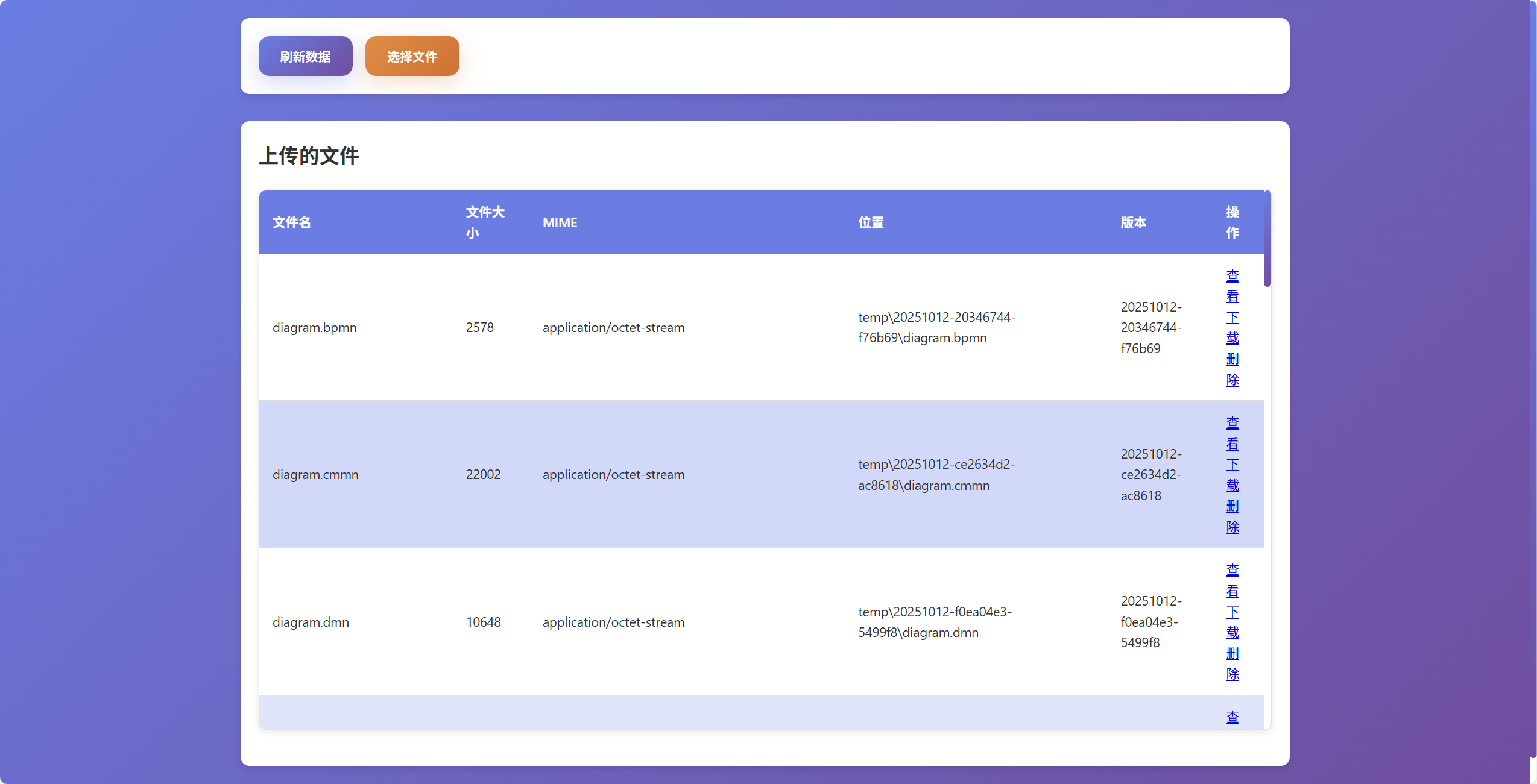
预览扩展
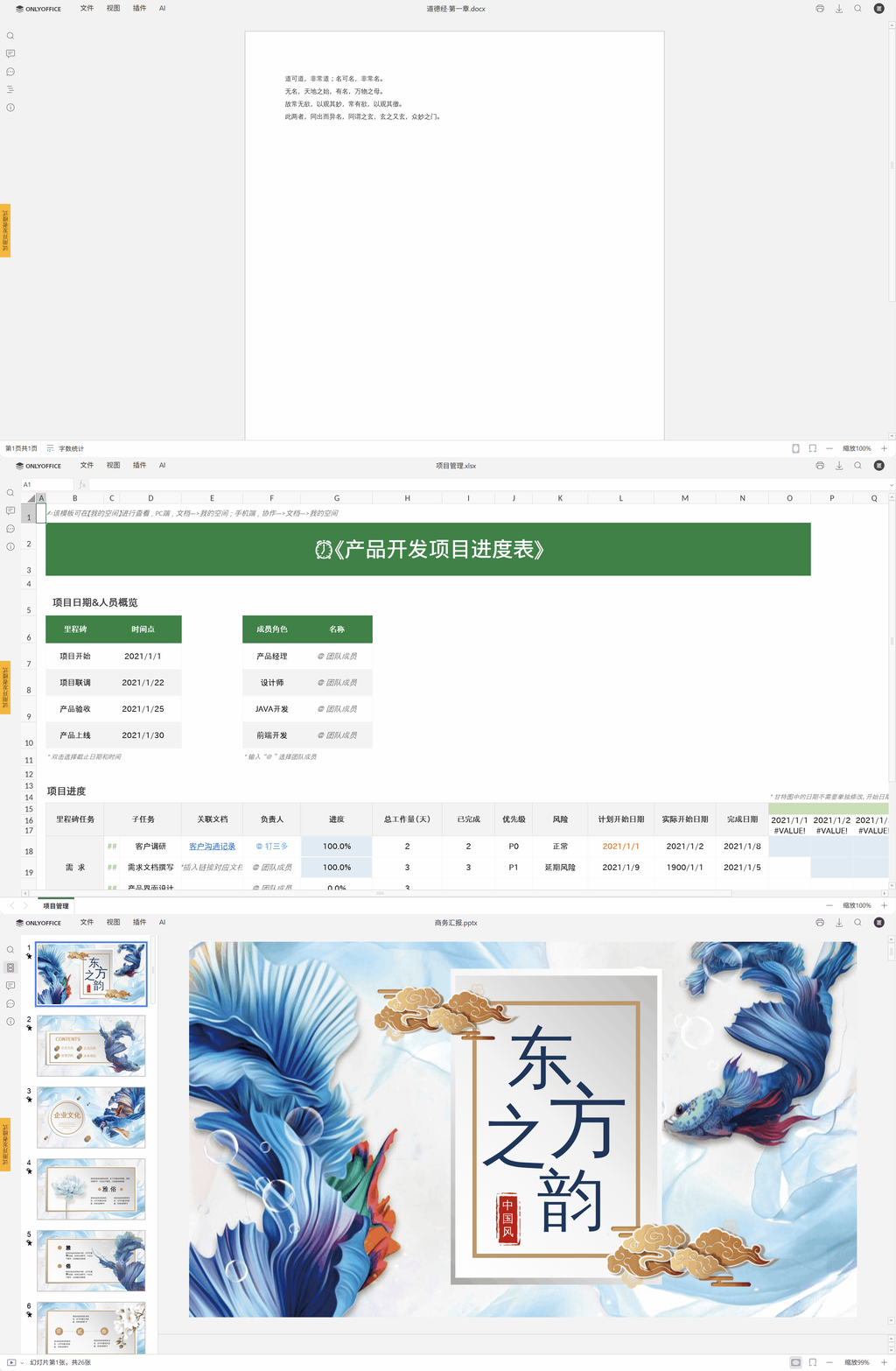
下面以OnlyOffice为例说明如何扩展预览
- 使用docker安装OnlyOffice文档开发者版,更详细内容请查看
docker run --name onlyoffice -i -t -d -p 80:80 -e JWT_ENABLED=false -e ALLOW_PRIVATE_IP_ADDRESS=true onlyoffice/documentserver-de- 文件预览渲染器扩展
编写IView.java接口的实现OnlyOfficeView.java
package cn.wubo.file.view.test;
import cn.wubo.file.view.preview.IView;
import org.springframework.stereotype.Service;
import org.springframework.web.servlet.function.ServerRequest;
import org.springframework.web.servlet.function.ServerResponse;
import java.net.URI;
@Service
public class OnlyOfficeView implements IView {
@Override
public String getServiceName() {
return "onlyoffice";
}
@Override
public ServerResponse handle(ServerRequest request) {
String id = request.pathVariable("id");
return ServerResponse.temporaryRedirect(URI.create(String.format("/onlyoffice.html?id=%s",id))).build();
}
}编写页面onlyoffice.html
<!DOCTYPE html>
    <html lang="zh-cmn-Hans">
    <head>
        <meta charset="UTF-8">
          <meta name="viewport" content="width=device-width, initial-scale=1.0">
        <script src="/static/common.js"></script>
        <script type="text/javascript" src="http://localhost/web-apps/apps/api/documents/api.js"></script>
        <title>onlyoffice</title>
          <style>
            html, body {
            height: 100%;
            padding: 0;
            margin: 0;
            }
          </style>
        </head>
        <body>
        <div id="placeholder"></div>
          <script>
            document.addEventListener('DOMContentLoaded', function () {
            const id = getUrlParam('id');
            fetch(`/wopi/files/${id}`)
            .then(response => response.json())
            .then(data => {
            const fileName = data.BaseFileName;
            const fileType = data.BaseFileName.substring(data.BaseFileName.lastIndexOf('.') + 1);
            let documentType;
            if (fileType === 'docx' || fileType === 'doc') documentType = 'word';
            if (fileType === 'xlsx' || fileType === 'xls') documentType = 'cell';
            if (fileType === 'pptx' || fileType === 'ppt') documentType = 'slide';
            const config = {
            "type": "desktop",
            "width": "100%",
            "height": "100%",
            "documentType": `${documentType}`,
            "document": {
            "fileType": `${fileType}`,
            "key": `${data.id}`,
            "title": `${fileName}`,
            "url": `http://192.168.31.197:8080/wopi/files/${data.id}/contents`,
            },
            "editorConfig": {
            "mode": "view",
            "lang": "zh"
            },
            };
            console.log('config',config)
            const docEditor = new DocsAPI.DocEditor("placeholder", config);
            });
            });
          </script>
        </body>
</html>- 修改配置,关闭重复的渲染器,重定义文件匹配规则application.yml
file:
view:
docx:
enable: false
excel:
enable: false
pptx:
enable: false
strategies:
- syntaxAndPattern: glob:*.bpmn
serviceName: bpmn
- syntaxAndPattern: glob:*.dmn
serviceName: dmn
- syntaxAndPattern: glob:*.cmmn
serviceName: cmmn
- syntaxAndPattern: glob:*.{sh,c,cpp,cs,css,diff,go,graphql,ini,java,js,json,kt,less,lua,mk,m,pl,php,phtml,html,txt,py,pyrepl,r,rb,rs,scss,sh,sql,swift,ts,vb,wasm,xml,yaml,yml}
serviceName: code
- syntaxAndPattern: glob:*.epub
serviceName: epub
- syntaxAndPattern: glob:*.{jpg,png,bmp,gif,tiff,webp,svg,raw,heic,cr2,nef,orf,sr2}
serviceName: image
- syntaxAndPattern: glob:*.md
serviceName: markdown
- syntaxAndPattern: glob:*.pdf
serviceName: pdf
- syntaxAndPattern: glob:*.xmind
serviceName: xmind
- syntaxAndPattern: glob:*.ofd
serviceName: ofd
#      - syntaxAndPattern: glob:*.docx
#        serviceName: docx
#      - syntaxAndPattern: glob:*.{xlsx,xls}
#        serviceName: excel
#      - syntaxAndPattern: glob:*.pptx
#        serviceName: pptx
- syntaxAndPattern: glob:*.{3dm,3ds,3mf,amf,bim,brep,dae,fbx,fcstd,gltf,ifc,iges,step,stl,obj,off,ply,wrl}
serviceName: o3d
- syntaxAndPattern: glob:*.zip
serviceName: zip
- syntaxAndPattern: glob:*.{docx,doc,xlsx,xls,pptx,ppt}
serviceName: onlyoffice- 预览效果如下
文件存储扩展
下面以MinIO为例说明如何扩展文件存储
- 使用docker安装MinIO
docker run -p 9000:9000 -p 9001:9001 --name minio -e "MINIO_ROOT_USER=ROOTUSER" -e "MINIO_ROOT_PASSWORD=CHANGEME123" quay.io/minio/minio server /data --console-address ":9001"- 添加MinIO依赖
<dependency>
<groupId>io.minio</groupId>
<artifactId>minio</artifactId>
<version>8.6.0</version>
</dependency>- 实现自定义存储
- 编写接口IFileStorage.java的实现MinioFileStorageImpl.java
package cn.wubo.file.view.test;
import cn.wubo.file.view.exception.LocalFileStorageException;
import cn.wubo.file.view.storage.IFileStorage;
import cn.wubo.file.view.storage.dto.FileStorageInfo;
import cn.wubo.file.view.utils.VersionUtls;
import io.minio.GetObjectArgs;
import io.minio.MinioClient;
import io.minio.PutObjectArgs;
import io.minio.RemoveObjectArgs;
import io.minio.errors.*;
import org.springframework.stereotype.Service;
import java.io.ByteArrayInputStream;
import java.io.IOException;
import java.io.InputStream;
import java.nio.file.Path;
import java.nio.file.Paths;
import java.security.InvalidKeyException;
import java.security.NoSuchAlgorithmException;
import java.util.ArrayList;
import java.util.List;
import java.util.UUID;
@Service
public class MinioFileStorageImpl implements IFileStorage {
private final MinioClient minioClient;
private static final String BUCKET_NAME = "temp";
private static List<FileStorageInfo> fileStorageInfos = new ArrayList<>();
  public MinioFileStorageImpl() {
  this.minioClient = new MinioClient.Builder()
  .endpoint("http://127.0.0.1:9000")
  .credentials("ROOTUSER", "12345678")
  .build();
  }
  @Override
  public FileStorageInfo upload(String fileName, byte[] content, String mimeType) {
  try {
  String id = UUID.randomUUID().toString();
  String version = VersionUtls.generateContentVersion(content, id);
  Path filePath = Paths.get(version, fileName);
  minioClient.putObject(
  PutObjectArgs.builder()
  .bucket(BUCKET_NAME)
  .object(filePath.toString())
  .stream(new ByteArrayInputStream(content), content.length, -1)
  .contentType(mimeType)
  .build()
  );
  FileStorageInfo fpi = new FileStorageInfo(id, fileName, content.length, mimeType, filePath.toString(), version);
  fileStorageInfos.add(fpi);
  return fpi;
  } catch (NoSuchAlgorithmException | IOException | ServerException | InsufficientDataException |
  InvalidKeyException | ErrorResponseException | InvalidResponseException | XmlParserException |
  InternalException e) {
  throw new LocalFileStorageException(e.getMessage(), e);
  }
  }
  @Override
  public FileStorageInfo findById(String id) {
  return fileStorageInfos.stream()
  .filter(fpi -> fpi.getId().equals(id))
  .findAny()
  .orElseThrow(() -> new LocalFileStorageException("File info not found for id: " + id)
  );
  }
  @Override
  public List<FileStorageInfo> list() {
    return fileStorageInfos;
    }
    @Override
    public byte[] getContentByLocation(String location) {
    try {
    InputStream is = minioClient.getObject(
    GetObjectArgs.builder()
    .bucket(BUCKET_NAME)
    .object(location)
    .build()
    );
    return is.readAllBytes();
    } catch (IOException | ErrorResponseException | InsufficientDataException | InternalException |
    InvalidKeyException | InvalidResponseException | NoSuchAlgorithmException | ServerException |
    XmlParserException e) {
    throw new LocalFileStorageException(e.getMessage(), e);
    }
    }
    @Override
    public Boolean deleteById(String id) {
    FileStorageInfo fsi = findById(id);
    if (fsi != null) {
    try {
    minioClient.removeObject(
    RemoveObjectArgs.builder()
    .bucket(BUCKET_NAME)
    .object(fsi.getLocation())
    .build()
    );
    fileStorageInfos.remove(fsi);
    } catch (IOException | ErrorResponseException | InsufficientDataException | InternalException |
    InvalidKeyException | InvalidResponseException | NoSuchAlgorithmException | ServerException |
    XmlParserException e) {
    throw new LocalFileStorageException(e.getMessage(), e);
    }
    }
    return true;
    }
    }
使用的第三方库
| 文件类型 | 第三方库 |
|---|---|
| office文件 | vue-office |
| 业务流程管理文件 | bpmn-io |
| 图片文件 | viewerjs |
| 文档文件(pdf) | pdfobject |
| 文档文件(ofd) | ofd.js |
| 文档文件(epub) | epub.js |
| 文本文件/代码文件 | highlight.js |
| Markdown文档文件 | vditor |
| 3D模型文件 | Online3DViewer |
| 思维导图文件 | xmind-embed-viewer |
| 压缩文件 | jszip |

 浙公网安备 33010602011771号