Spring 3
自动装配说明
-
自动装配是使用spring满足bean依赖的一种方法
-
spring会在应用上下文中为某个bean寻找其依赖的bean。
Spring中bean有三种装配机制,分别是:
-
在xml中显式配置;
-
在java中显式配置;
-
隐式的bean发现机制和自动装配。
这里我们主要讲第三种:自动化的装配bean。
Spring的自动装配需要从两个角度来实现,或者说是两个操作:
-
组件扫描(component scanning):spring会自动发现应用上下文中所创建的bean;
-
自动装配(autowiring):spring自动满足bean之间的依赖,也就是我们说的IoC/DI;
组件扫描和自动装配组合发挥巨大威力,使得显示的配置降低到最少。
推荐不使用自动装配xml配置 , 而使用注解 .
测试环境搭建
1、新建一个项目
2、新建两个实体类,Cat Dog 都有一个叫的方法
public class Cat {
    public void shout() {
        System.out.println("miao~");
    }
}

public class Dog {
    public void shout() {
        System.out.println("wang~");
    }
}
3、新建一个用户类 User
public class User {
    private Cat cat;
    private Dog dog;
    private String str;
}
4、编写Spring配置文件
<?xml version="1.0" encoding="UTF-8"?>
<beans xmlns="http://www.springframework.org/schema/beans"
       xmlns:xsi="http://www.w3.org/2001/XMLSchema-instance"
       xsi:schemaLocation="http://www.springframework.org/schema/beans
        http://www.springframework.org/schema/beans/spring-beans.xsd">

    <bean id="dog" class="com.kuang.pojo.Dog"/>
    <bean id="cat" class="com.kuang.pojo.Cat"/>

    <bean id="user" class="com.kuang.pojo.User">
        <property name="cat" ref="cat"/>
        <property name="dog" ref="dog"/>
        <property name="str" value="qinjiang"/>
    </bean>
</beans>
5、测试
public class MyTest {
    @Test
    public void testMethodAutowire() {
        ApplicationContext context = new ClassPathXmlApplicationContext("beans.xml");
        User user = (User) context.getBean("user");
        user.getCat().shout();
        user.getDog().shout();
    }
}
结果正常输出,环境OK
autowire byName (按名称自动装配)
由于在手动配置xml过程中,常常发生字母缺漏和大小写等错误,而无法对其进行检查,使得开发效率降低。
采用自动装配将避免这些错误,并且使配置简单化。
测试:
1、修改bean配置,增加一个属性 autowire="byName"
<bean id="user" class="com.kuang.pojo.User" autowire="byName">
    <property name="str" value="qinjiang"/>
</bean>
2、再次测试,结果依旧成功输出!
3、我们将 cat 的bean id修改为 catXXX
4、再次测试, 执行时报空指针java.lang.NullPointerException。因为按byName规则找不对应set方法,真正的setCat就没执行,对象就没有初始化,所以调用时就会报空指针错误。
小结:
当一个bean节点带有 autowire byName的属性时。
-
将查找其类中所有的set方法名,例如setCat,获得将set去掉并且首字母小写的字符串,即cat。
-
去spring容器中寻找是否有此字符串名称id的对象。
-
如果有,就取出注入;如果没有,就报空指针异常。
byType
autowire byType (按类型自动装配)
使用autowire byType首先需要保证:同一类型的对象,在spring容器中唯一。如果不唯一,会报不唯一的异常。
NoUniqueBeanDefinitionException
测试:
1、将user的bean配置修改一下 : autowire="byType"
2、测试,正常输出
3、在注册一个cat 的bean对象!
<bean id="dog" class="com.kuang.pojo.Dog"/>
<bean id="cat" class="com.kuang.pojo.Cat"/>
<bean id="cat2" class="com.kuang.pojo.Cat"/>

<bean id="user" class="com.kuang.pojo.User" autowire="byType">
    <property name="str" value="qinjiang"/>
</bean>
4、测试,报错:NoUniqueBeanDefinitionException
5、删掉cat2,将cat的bean名称改掉!测试!因为是按类型装配,所以并不会报异常,也不影响最后的结果。甚至将id属性去掉,也不影响结果。
这就是按照类型自动装配!
使用注解
jdk1.5开始支持注解,spring2.5开始全面支持注解。
准备工作:利用注解的方式注入属性。
1、在spring配置文件中引入context文件头
xmlns:context="http://www.springframework.org/schema/context"

http://www.springframework.org/schema/context
http://www.springframework.org/schema/context/spring-context.xsd
2、开启属性注解支持!
<context:annotation-config/>
@Autowired
-
@Autowired是按类型自动转配的,不支持id匹配。
-
需要导入 spring-aop的包!
测试:
1、将User类中的set方法去掉,使用@Autowired注解
public class User {
    @Autowired
    private Cat cat;
    @Autowired
    private Dog dog;
    private String str;

    public Cat getCat() {
        return cat;
    }
    public Dog getDog() {
        return dog;
    }
    public String getStr() {
        return str;
    }
}
2、此时配置文件内容
<context:annotation-config/>

<bean id="dog" class="com.kuang.pojo.Dog"/>
<bean id="cat" class="com.kuang.pojo.Cat"/>
<bean id="user" class="com.kuang.pojo.User"/>
3、测试,成功输出结果!
【小狂神科普时间】
@Autowired(required=false) 说明:false,对象可以为null;true,对象必须存对象,不能为null。
//如果允许对象为null,设置required = false,默认为true
@Autowired(required = false)
private Cat cat;
@Qualifier
-
@Autowired是根据类型自动装配的,加上@Qualifier则可以根据byName的方式自动装配
-
@Qualifier不能单独使用。
测试实验步骤:
1、配置文件修改内容,保证类型存在对象。且名字不为类的默认名字!
<bean id="dog1" class="com.kuang.pojo.Dog"/>
<bean id="dog2" class="com.kuang.pojo.Dog"/>
<bean id="cat1" class="com.kuang.pojo.Cat"/>
<bean id="cat2" class="com.kuang.pojo.Cat"/>
2、没有加Qualifier测试,直接报错
3、在属性上添加Qualifier注解
@Autowired
@Qualifier(value = "cat2")
private Cat cat;
@Autowired
@Qualifier(value = "dog2")
private Dog dog;
测试,成功输出!
@Resource
-
@Resource如有指定的name属性,先按该属性进行byName方式查找装配;
-
其次再进行默认的byName方式进行装配;
-
如果以上都不成功,则按byType的方式自动装配。
-
都不成功,则报异常。
实体类:
public class User {
    //如果允许对象为null,设置required = false,默认为true
    @Resource(name = "cat2")
    private Cat cat;
    @Resource
    private Dog dog;
    private String str;
}
beans.xml
<bean id="dog" class="com.kuang.pojo.Dog"/>
<bean id="cat1" class="com.kuang.pojo.Cat"/>
<bean id="cat2" class="com.kuang.pojo.Cat"/>

<bean id="user" class="com.kuang.pojo.User"/>
测试:结果OK
配置文件2:beans.xml , 删掉cat2
<bean id="dog" class="com.kuang.pojo.Dog"/>
<bean id="cat1" class="com.kuang.pojo.Cat"/>
实体类上只保留注解
@Resource
private Cat cat;
@Resource
private Dog dog;
结果:OK
结论:先进行byName查找,失败;再进行byType查找,成功。
小结
@Autowired与@Resource异同:
1、@Autowired与@Resource都可以用来装配bean。都可以写在字段上,或写在setter方法上。
2、@Autowired默认按类型装配(属于spring规范),默认情况下必须要求依赖对象必须存在,如果要允许null 值,可以设置它的required属性为false,如:@Autowired(required=false) ,如果我们想使用名称装配可以结合@Qualifier注解进行使用
3、@Resource(属于J2EE复返),默认按照名称进行装配,名称可以通过name属性进行指定。如果没有指定name属性,当注解写在字段上时,默认取字段名进行按照名称查找,如果注解写在setter方法上默认取属性名进行装配。当找不到与名称匹配的bean时才按照类型进行装配。但是需要注意的是,如果name属性一旦指定,就只会按照名称进行装配。
它们的作用相同都是用注解方式注入对象,但执行顺序不同。@Autowired先byType,@Resource先byName。
使用注解开发
说明
在spring4之后,想要使用注解形式,必须得要引入aop的包
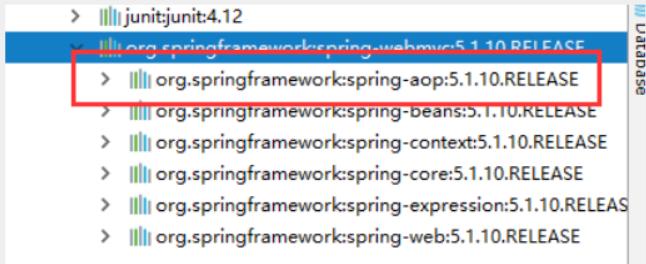
在配置文件当中,还得要引入一个context约束
<?xml version="1.0" encoding="UTF-8"?>
<beans xmlns="http://www.springframework.org/schema/beans"
       xmlns:xsi="http://www.w3.org/2001/XMLSchema-instance"
       xmlns:context="http://www.springframework.org/schema/context"
       xsi:schemaLocation="http://www.springframework.org/schema/beans
        http://www.springframework.org/schema/beans/spring-beans.xsd
        http://www.springframework.org/schema/context
        http://www.springframework.org/schema/context/spring-context.xsd">

</beans>
Bean的实现
我们之前都是使用 bean 的标签进行bean注入,但是实际开发中,我们一般都会使用注解!
1、配置扫描哪些包下的注解
<!--指定注解扫描包-->
<context:component-scan base-package="com.kuang.pojo"/>
2、在指定包下编写类,增加注解
@Component("user")
// 相当于配置文件中 <bean id="user" class="当前注解的类"/>
public class User {
    public String name = "秦疆";
}
3、测试
@Test
public void test(){
    ApplicationContext applicationContext =
        new ClassPathXmlApplicationContext("beans.xml");
    User user = (User) applicationContext.getBean("user");
    System.out.println(user.name);
}
属性注入
使用注解注入属性
1、可以不用提供set方法,直接在直接名上添加@value("值")
@Component("user")
// 相当于配置文件中 <bean id="user" class="当前注解的类"/>
public class User {
    @Value("秦疆")
    // 相当于配置文件中 <property name="name" value="秦疆"/>
    public String name;
}
2、如果提供了set方法,在set方法上添加@value("值");
@Component("user")
public class User {

    public String name;

    @Value("秦疆")
    public void setName(String name) {
        this.name = name;
    }
}
衍生注解
我们这些注解,就是替代了在配置文件当中配置步骤而已!更加的方便快捷!
@Component三个衍生注解
为了更好的进行分层,Spring可以使用其它三个注解,功能一样,目前使用哪一个功能都一样。
-
@Controller:web层
-
@Service:service层
-
@Repository:dao层
写上这些注解,就相当于将这个类交给Spring管理装配了!
自动装配注解
在Bean的自动装配已经讲过了,可以回顾!
作用域
@scope
-
singleton:默认的,Spring会采用单例模式创建这个对象。关闭工厂 ,所有的对象都会销毁。
-
prototype:多例模式。关闭工厂 ,所有的对象不会销毁。内部的垃圾回收机制会回收
@Controller("user")
@Scope("prototype")
public class User {
    @Value("秦疆")
    public String name;
}
小结
XML与注解比较
-
XML可以适用任何场景 ,结构清晰,维护方便
-
注解不是自己提供的类使用不了,开发简单方便
xml与注解整合开发 :推荐最佳实践
-
xml管理Bean
-
注解完成属性注入
-
使用过程中, 可以不用扫描,扫描是为了类上的注解
<context:annotation-config/>
作用:
-
进行注解驱动注册,从而使注解生效
-
用于激活那些已经在spring容器里注册过的bean上面的注解,也就是显示的向Spring注册
-
如果不扫描包,就需要手动配置bean
-
如果不加注解驱动,则注入的值为null!
基于Java类进行配置
JavaConfig 原来是 Spring 的一个子项目,它通过 Java 类的方式提供 Bean 的定义信息,在 Spring4 的版本, JavaConfig 已正式成为 Spring4 的核心功能 。
测试:
1、编写一个实体类,Dog
@Component  //将这个类标注为Spring的一个组件,放到容器中!
public class Dog {
    public String name = "dog";
}
2、新建一个config配置包,编写一个MyConfig配置类
@Configuration  //代表这是一个配置类
public class MyConfig {

    @Bean //通过方法注册一个bean,这里的返回值就Bean的类型,方法名就是bean的id!
    public Dog dog(){
        return new Dog();
    }

}
3、测试
@Test
public void test2(){
    ApplicationContext applicationContext =
            new AnnotationConfigApplicationContext(MyConfig.class);
    Dog dog = (Dog) applicationContext.getBean("dog");
    System.out.println(dog.name);
}
4、成功输出结果!
导入其他配置如何做呢?
1、我们再编写一个配置类!
@Configuration  //代表这是一个配置类
public class MyConfig2 {
}
2、在之前的配置类中我们来选择导入这个配置类
@Configuration
@Import(MyConfig2.class)  //导入合并其他配置类,类似于配置文件中的 inculde 标签
public class MyConfig {

    @Bean
    public Dog dog(){
        return new Dog();
    }

}
关于这种Java类的配置方式,我们在之后的SpringBoot 和 SpringCloud中还会大量看到,我们需要知道这些注解的作用即可!

 浙公网安备 33010602011771号