
Vite+Vue3+Ts+Pinia搭建项目
1、创建项目
# 使用 pnpm 调用 Vite 的脚手架工具,在当前目录下创建一个名为 ly-demo03-complete-template 的新项目,该项目基于 Vue 3 + TypeScript
pnpm create vite ly-demo03-complete-template --template vue-ts

cd ly-demo03-complete-template # 进入项目中
pnpm install      # 安装依赖
pnpm run dev      # 启动开发服务器
2、配置src路径别名为@
修改vite.config.ts文件
// ...省略其他代码
import path from 'path'


const pathSrc = path.resolve(__dirname, 'src')

// https://vite.dev/config/
export default defineConfig({
    plugins: [
        vue(),
    ],
    // 路径别名
    resolve: {
        alias: {
            '@': pathSrc,
        },
    },
})
修改tsconfig.json文件
{
    // ...省略其他代码
    "compilerOptions": {
        // 解析非相对模块的基地址,默认是当前目录
        "baseUrl": "./",
        "paths": {
            // 路径映射,相对于baseUrl
            "@/*": [
                "src/*"
            ]
        }
    }
}
修改tsconfig.app.json文件
{
    // ...省略其他代码
    "compilerOptions": {
        // ...省略其他代码
        "baseUrl": ".",
        "paths": {
            "@/*": [
                "src/*"
            ]
        },
        // ...省略其他代码
    },
    // ...省略其他代码
}
新建一个.editorconfig配置文件
# http://editorconfig.org

root = true

[*] # 表示所有文件适用
charset = utf-8 # 设置文件字符集为 utf-8
indent_style = space # 缩进风格(tab | space)
indent_size = 2 # 缩进大小
end_of_line = lf # 控制换行类型(lf | cr | crlf)
trim_trailing_whitespace = true # 去除行尾的任意空白字符
insert_final_newline = true # 始终在文件末尾插入一个新行

[*.md] # 表示仅 md 文件适用以下规则
max_line_length = off
trim_trailing_whitespace = false
3、集成ESLint检验代码工具
安装依赖
# @typescript-eslint/eslint-plugin 8.53.0
# @typescript-eslint/parser 8.53.0
# eslint 9.39.2
# eslint-plugin-vue 10.7.0
# globals 17.0.0
# vue-eslint-parser 10.2.0

pnpm add -D pnpm list eslint @typescript-eslint/eslint-plugin @typescript-eslint/parser eslint-plugin-vue vue-eslint-parser globals
依赖的解释说明
| 包名 | 作用 | 你的项目是否需要? | 建议 |
|---|---|---|---|
eslint-plugin-vue |
✅ 必须 提供 Vue 3 的语法检查(如 <template>、组件规则) |
✅ 需要 | 保留 |
eslint-plugin-prettier |
让 ESLint 调用 Prettier,并把格式问题当作 ESLint 错误 | ✅ 如果你用 Prettier 集成到 ESLint | 保留(你已用) |
eslint-config-prettier |
关键! 关闭所有与 Prettier 冲突的 ESLint 规则 | ✅ 必须(避免冲突) | 保留 |
在项目根目录下(与src同一级)创建eslint.config.js文件,文件配置内容如下
// eslint.config.js
import tsPlugin from '@typescript-eslint/eslint-plugin'
import tsParser from '@typescript-eslint/parser'
import vue from 'eslint-plugin-vue'
import globals from 'globals'
import vueParser from 'vue-eslint-parser'

export default [
    {
        ignores: [
            'node_modules/',
            'dist/',
            'coverage/',
            '.vite/',
            '.vscode/',
            '.idea/',
            '*.log',
            '.env*',
            'public/',
            'build/',
            'out/',
        ],
    },

    // JavaScript 基础规则
    {
        files: ['**/*.js', '**/*.ts', '**/*.vue'],
        languageOptions: {
            ecmaVersion: 'latest',
            sourceType: 'module',
            globals: {
                ...globals.browser,
                ...globals.node,
                ...globals.es2021,
            },
        },
        rules: {
            'no-var': 'error',
            'no-multiple-empty-lines': ['warn', { max: 1 }],
            'no-console': process.env.NODE_ENV === 'production' ? 'error' : 'off',
            'no-debugger': process.env.NODE_ENV === 'production' ? 'error' : 'off',
        },
    },

    // TypeScript
    {
        files: ['**/*.ts', '**/*.tsx', '**/*.vue'],
        languageOptions: {
            parser: tsParser,
            parserOptions: {
                ecmaVersion: 'latest',
                sourceType: 'module',
            },
        },
        plugins: {
            '@typescript-eslint': tsPlugin,
        },
        rules: {
            // ✅ 必须带完整前缀!
            '@typescript-eslint/no-explicit-any': 'warn',
            '@typescript-eslint/no-non-null-assertion': 'off',
            '@typescript-eslint/no-namespace': 'off',
            '@typescript-eslint/no-unused-vars': 'error',
        },
    },

    // Vue
    {
        files: ['**/*.vue'],
        languageOptions: {
            parser: vueParser,
            parserOptions: {
                parser: tsParser,
                sourceType: 'module',
                ecmaVersion: 'latest',
            },
        },
        plugins: {
            vue: vue,
        },
        rules: {
            // ✅ Vue 规则也必须带前缀
            'vue/multi-word-component-names': 'off',
            'vue/no-mutating-props': 'error',
            'vue/attribute-hyphenation': 'warn',
            'vue/require-explicit-emits': 'warn',
        },
    },
]
4、集成ESLint检验代码工具
安装依赖
pnpm add -D prettier eslint-config-prettier
在项目根目录下(与src同一级)创建.prettierrc文件,文件配置内容如下
注意:复制的时候把下面的相关注释去掉
去掉注释的版本:
{
    "printWidth": 100,
    "overrides": [
        {
            "files": ".prettierrc",
            "options": {
                "parser": "json"
            }
        }
    ],
    "tabWidth": 4,
    "useTabs": false,
    "semi": true,
    "singleQuote": true,
    "proseWrap": "preserve",
    "arrowParens": "avoid",
    "bracketSpacing": true,
    "disableLanguages": [
        "vue"
    ],
    "endOfLine": "auto",
    "eslintIntegration": false,
    "htmlWhitespaceSensitivity": "ignore",
    "ignorePath": ".prettierignore",
    "jsxBracketSameLine": false,
    "jsxSingleQuote": false,
    "requireConfig": false,
    "stylelintIntegration": false,
    "trailingComma": "es5",
    "prettier.tslintIntegration": false
}
未去注释的版本:
{
  "printWidth": 100, // 超过最大值换行
    "overrides": [
        {
            "files": ".prettierrc",
            "options": { "parser": "json" }
        }
    ],
  "tabWidth": 4, // 缩进字节数
  "useTabs": false, // 缩进不使用tab,使用空格
  "semi": true, // 句尾添加分号
  "singleQuote": true, // 使用单引号代替双引号
  "proseWrap": "preserve", // 默认值。因为使用了一些折行敏感型的渲染器(如GitHub comment)而按照markdown文本样式进行折行
  "arrowParens": "avoid", // (x) => {} 箭头函数参数只有一个时是否要有小括号。avoid:省略括号
  "bracketSpacing": true, // 在对象,数组括号与文字之间加空格 "{ foo: bar }"
  "disableLanguages": ["vue"], // 不格式化vue文件,vue文件的格式化单独设置
  "endOfLine": "auto", // 结尾是 \n \r \n\r auto
  "eslintIntegration": false, //不让prettier使用eslint的代码格式进行校验
  "htmlWhitespaceSensitivity": "ignore",
  "ignorePath": ".prettierignore", // 不使用prettier格式化的文件填写在项目的.prettierignore文件中
  "jsxBracketSameLine": false, // 在jsx中把'>' 是否单独放一行
  "jsxSingleQuote": false, // 在jsx中使用单引号代替双引号  "prettier.parser": "babylon", // 格式化的解析器,默认是babylon
  "requireConfig": false, // Require a 'prettierconfig' to format prettier
  "stylelintIntegration": false, //不让prettier使用stylelint的代码格式进行校验
  "trailingComma": "es5", // 在对象或数组最后一个元素后面是否加逗号(在ES5中加尾逗号)
  "prettier.tslintIntegration": false // 不让prettier使用tslint的代码格式进行校验
}
在项目根目录下(与src同一级)创建.prettierignore文件,文件配置内容如下
# .prettierignore
node_modules/
dist/
coverage/
public/
*.min.js
*.log
.env*
5、集成 unplugin-auto-import 和 unplugin-vue-components(这两个插件常用于自动导入 Vue Composition API、组件等,避免手动 import)
安装依赖
pnpm add -D unplugin-auto-import unplugin-vue-components
修改vite.config.ts文件
import vue from '@vitejs/plugin-vue'
import path from 'path'
import AutoImport from 'unplugin-auto-import/vite'
import Components from 'unplugin-vue-components/vite'
import { defineConfig } from 'vite'

const pathSrc = path.resolve(__dirname, 'src')

// https://vite.dev/config/
export default defineConfig({
    plugins: [
        // ...其他代码
        AutoImport({
            // 自动导入 Vue 相关函数,如:ref, reactive, toRef 等
            imports: [
                'vue',
                // 'vue-router',
                // 'pinia', // 如果你用 Pinia
                // 'vue-i18n', // 如果你用 i18n
            ],
            eslintrc: {
                enabled: true, // 👈 启用
                filepath: './.eslintrc-auto-import.json', // 默认路径
                globalsPropValue: true, // 全局变量值设为 true
            },
            dts: path.resolve(pathSrc, 'types', 'auto-imports.d.ts'), // 指定自动导入函数TS类型声明文件路径
        }),
        Components({
            dirs: ['src/components'], // 自动扫描的组件目录
            extensions: ['vue'],
            deep: true,
            dts: path.resolve(pathSrc, 'types', 'components.d.ts'), // 指定自动导入组件TS类型声明文件路径
        }),
    ],
    // ...其他代码
})
启动项目,会生成一个 .eslintrc-auto-import.json文件,修改 eslint.config.js,合并这个配置
// eslint.config.js
import autoImportEslint from './.eslintrc-auto-import.json' assert { type: 'json' }

export default [
  // ... 其他配置

  {
    files: ['**/*.js', '**/*.ts', '**/*.vue'],
    languageOptions: {
      globals: {
        ...globals.browser,
        ...globals.node,
        ...autoImportEslint.globals, // 合并自动导入的全局变量
      },
    },
    // ...
  },
]
测试
// 我们可以将App.vue文件中的 HelloWorld 组件去掉发现页面也还是正常的
import HelloWorld from '@/components/HelloWorld.vue';
6、集成stylelint校验css
安装依赖
pnpm add -D stylelint stylelint-config-standard-scss postcss-html
依赖说明
| 包 | 作用 |
|---|---|
stylelint |
核心校验工具 |
stylelint-config-standard-scss |
SCSS 扩展规则(如果你用 SCSS) |
postcss-html |
支持在 .vue 文件中解析 <style> |
在项目根目录下(与src同一级)创建.stylelintrc.cjs文件,文件配置内容如下
// .stylelintrc.cjs
module.exports = {
  // 启用对 Vue/HTML 中 <style> 的支持
  overrides: [
    {
      files: ['**/*.{vue,html}'],
      customSyntax: 'postcss-html',
    },
  ],

  // 继承标准 SCSS 规则集
  extends: ['stylelint-config-standard-scss'],

  // 👇 关键:关闭所有格式/风格类规则(交给 Prettier)
  rules: {
    // --- 关闭颜色格式规则 ---
    'color-function-notation': null, // 允许 rgba()
    'color-function-alias-notation': null, // 允许 rgb() / rgba()
    'color-hex-length': null, // 允许 #fff 或 #ffffff
    'alpha-value-notation': null, // 允许 0.5 或 50%

    // --- 关闭空行/缩进等格式规则 ---
    'rule-empty-line-before': null,
    'declaration-empty-line-before': null,
    'at-rule-empty-line-before': null,

    // --- 关闭大小写规则 ---
    'value-keyword-case': null, // 允许 optimizeLegibility

    // --- 其他可选关闭 ---
    'comment-empty-line-before': null,
    // 'no-missing-end-of-source-newline': null,

    // --- 保留的逻辑类规则(推荐开启)---
    'property-no-unknown': true, // 禁止未知 CSS 属性
    'selector-type-no-unknown': true, // 禁止未知选择器
    'no-duplicate-selectors': true, // 禁止重复选择器
    'font-family-no-missing-generic-family-keyword': true,
  },

  ignoreFiles: ['**/*.js', '**/*.ts', '**/*.jsx', '**/*.tsx'],
}
修改.prettierrc文件
{
    "printWidth": 100,
    "tabWidth": 4,
    "useTabs": false,
    "semi": true,
    "singleQuote": true,
    "trailingComma": "es5",
    "bracketSpacing": true,
    "arrowParens": "avoid",
    "proseWrap": "preserve",
    "endOfLine": "auto",
    "htmlWhitespaceSensitivity": "ignore",
    "overrides": [
        {
            "files": ".prettierrc",
            "options": {
                "parser": "json"
            }
        },
        {
            "files": [
                "*.vue"
            ],
            "options": {
                "parser": "vue"
            }
        },
        {
            "files": [
                "*.css",
                "*.scss"
            ],
            "options": {
                "parser": "css"
            }
        }
    ]
}
修改.prettierignore文件
# Dependencies
node_modules/

# Build outputs
dist/
.vite/
.cache/

# Logs
npm-debug.log*
yarn-debug.log*
yarn-error.log*

# Editor
.vscode/
7、集成env多环境
在项目根目录下(与src同一级)创建env文件夹,根据需要配置以下文件
1. .env —— 公共默认值
# 应用名称
VITE_APP_NAME=Ly_Vue3_TS_Template

# API 基础路径(默认)
VITE_API_BASE_URL=/api
2. .env.dev —— 开发环境
NODE_ENV=dev
VITE_API_BASE_URL=http://localhost:8080/api
3. .env.test —— 测试环境
NODE_ENV=test
VITE_API_BASE_URL=https://test-api.ly.com
4. .env.uat —— 预发环境
NODE_ENV=uat
VITE_API_BASE_URL=https://uat-api.ly.com
5. .env.prod —— 生产环境
NODE_ENV=prod
VITE_API_BASE_URL=https://api.ly.com
在项目根目录下(与src同一级)创建env.d.ts文件,文件配置内容如下
/// <reference types="vite/client" />
interface ImportMetaEnv {
  readonly VITE_BASE_API: string
  readonly VITE_APP_NAME: string
}

// eslint-disable-next-line no-unused-vars
interface ImportMeta {
  readonly env: ImportMetaEnv
}
修改vite.config.ts文件
import vue from '@vitejs/plugin-vue'
import path from 'path'
import AutoImport from 'unplugin-auto-import/vite'
import Components from 'unplugin-vue-components/vite'
import { defineConfig } from 'vite'

const pathSrc = path.resolve(__dirname, 'src')

// https://vite.dev/config/
export default defineConfig({
  // ...其他代码

  // 路径别名
  resolve: {
    alias: {
      '@': pathSrc,
    },
  },
  // 指定环境文件目录
  envDir: path.resolve(__dirname, '.env'),
})
修改package.json文件
"scripts": {
        "dev": "vite",
    	-------环境配置---------
        "dev:test": "vite --mode test",
        "dev:uat": "vite --mode uat",
        "dev:pre": "vite --mode pre",
        "build": "vue-tsc && vite build",
        "build:test": "vue-tsc && vite build --mode test",
        "build:uat": "vue-tsc && vite build --mode uat",
        "build:pre": "vue-tsc && vite build --mode pre",
        -------环境配置---------
        "preview": "vite preview",
        "lint": "eslint .",
        "lint:fix": "eslint . --fix",
        "lint:style": "stylelint \"**/*.{vue,css,scss}\" --cache --quiet",
        "lint:style:fix": "stylelint \"**/*.{vue,css,scss}\" --fix"
    },
8、集成ElementPlus
安装依赖
pnpm add element-plus
# 按需导入依赖前面以及装过了
# pnpm add -D unplugin-vue-components unplugin-auto-import
安装自动导入 Icon 依赖
pnpm add -D unplugin-icons
修改vite.config.ts增加自动导入图标配置
import vue from '@vitejs/plugin-vue'
import path from 'path'
import AutoImport from 'unplugin-auto-import/vite'
import IconsResolver from 'unplugin-icons/resolver' // 👈 新增:图标解析器
import Icons from 'unplugin-icons/vite'
import { ElementPlusResolver } from 'unplugin-vue-components/resolvers'
import Components from 'unplugin-vue-components/vite'
import { defineConfig } from 'vite'

const pathSrc = path.resolve(__dirname, 'src')

// https://vite.dev/config/
export default defineConfig({
  plugins: [
    vue(),

    // 自动导入 Vue API + 图标组件(可选)
    AutoImport({
      imports: [
        'vue',
        // 'vue-router',
        // 'pinia', // 如果你用 Pinia
        // 'vue-i18n', // 如果你用 i18n
      ],
      eslintrc: {
        enabled: true,
        filepath: './.eslintrc-auto-import.json',
        globalsPropValue: true,
      },
      dts: path.resolve(pathSrc, 'types', 'auto-imports.d.ts'),

      // 👇 新增:让 auto-import 也能识别图标组件(如 IconMdiHome)
      resolvers: [
        IconsResolver({
          prefix: 'Icon', // 使用时为 IconMdiHome
          extension: 'vue',
        }),
        // ElementPlus按需导入
        ElementPlusResolver(),
      ],
    }),

    // 自动注册普通组件 + 图标组件
    Components({
      dirs: ['src/components'],
      extensions: ['vue'],
      deep: true,
      dts: path.resolve(pathSrc, 'types', 'components.d.ts'),

      // 👇 新增:支持图标组件自动注册(如 <i-mdi-home />)
      resolvers: [
        IconsResolver({
          prefix: 'i', // 组件名前缀:`i-mdi-home`
          extension: 'vue',
        }),
        // ElementPlus按需导入
        ElementPlusResolver(),
      ],
    }),

    // 👇 核心:unplugin-icons 插件(必须放在最后)
    Icons({
      compiler: 'vue3', // 你使用的是 Vue 3
      autoInstall: true, // 自动从 CDN 安装缺失的图标集(无需 @iconify/json)
    }),
  ],

  resolve: {
    alias: {
      '@': pathSrc,
    },
  },

  envDir: path.resolve(__dirname, '.env'),
})
安装并全局注册ICON
pnpm add @element-plus/icons-vue
修改main.ts配置文件,加入以下配置
import * as ElementPlusIconsVue from '@element-plus/icons-vue'

const app = createApp(App)
for (const [key, component] of Object.entries(ElementPlusIconsVue)) {
  app.component(key, component)
}
测试:在App.vue页面加入如下代码
<div>
    <el-button type="success"><i-ep-SuccessFilled />Success</el-button>
    <el-button type="info"><i-ep-InfoFilled />Info</el-button>
    <el-button type="warning"><i-ep-WarningFilled />Warning</el-button>
    <el-button type="danger"><i-ep-WarnTriangleFilled />Danger</el-button>
  </div>
9、集成SCSS
安装依赖
pnpm add -D sass
在src目录下创建styles目录,在styles目录下创建index.scss、reset.scss、variables.scss文件,文件内容如下
index.scss
/* src/styles/index.scss */

// 1. 先重置浏览器默认样式
@use 'reset';

// 2. 再定义全局变量(虽然 variables 会被 additionalData 注入,但这里统一管理)
@use 'variables' as *;

// 3. 可选:全局通用样式
body {
  font-family: -apple-system, BlinkMacSystemFont, 'Segoe UI', Roboto, sans-serif;
}

// 4. 可选:全局组件样式(避免在组件内写全局样式)
.el-button {
  border-radius: var(--radius-md);
}
reset.scss
/**
 * Modern CSS Reset Tweaks
 * ==================================================
 * A collection of modern CSS reset and normalization styles
 * to ensure consistent behavior across browsers, OS and devices.
 */

/* Ensure consistent font resizing on mobile devices */
html {
  -webkit-text-size-adjust: 100%;

  &:focus-within {
    scroll-behavior: smooth;
  }
}

/* Basic body setup for layout and text rendering optimization */
body {
  text-size-adjust: 100%;
  position: relative;

  width: 100%;
  min-height: 100vh;

  -moz-osx-font-smoothing: grayscale;
  -webkit-font-smoothing: antialiased;
  text-rendering: optimizeSpeed;
}

/* Apply box-sizing globally for consistent element sizing */
*,
::after,
::before {
  box-sizing: border-box;
}

/* Style unclassed links for better accessibility */
a:not([class]) {
  text-decoration-skip-ink: auto;
}

/**
 * CSS Reset Tweaks
 * Based on Eric Meyer's CSS Reset v2.0-modified (public domain)
 * URL: http://meyerweb.com/eric/tools/css/reset/
 */

a,
abbr,
acronym,
address,
applet,
article,
aside,
audio,
b,
big,
blockquote,
body,
br,
button,
canvas,
caption,
center,
cite,
code,
col,
colgroup,
data,
datalist,
dd,
del,
details,
dfn,
div,
dl,
dt,
em,
embed,
fieldset,
figcaption,
figure,
footer,
form,
h1,
h2,
h3,
h4,
h5,
h6,
head,
header,
hgroup,
hr,
html,
i,
iframe,
img,
input,
ins,
kbd,
label,
legend,
li,
link,
main,
map,
mark,
menu,
meta,
meter,
nav,
noscript,
object,
ol,
optgroup,
option,
output,
p,
param,
picture,
pre,
progress,
q,
rb,
rp,
rt,
rtc,
ruby,
s,
samp,
script,
section,
select,
small,
source,
span,
strong,
style,
svg,
sub,
summary,
sup,
table,
tbody,
td,
template,
textarea,
tfoot,
th,
thead,
time,
title,
tr,
track,
tt,
u,
ul,
var,
video,
wbr {
  font-size: 100%;
  font: inherit;
  margin: 0;
  padding: 0;
  border: 0;
  vertical-align: baseline;
}

/* Add focus styles to improve accessibility */
:focus {
  outline: 0;
}

/* Normalize HTML5 elements for older browsers */
article,
aside,
details,
embed,
figcaption,
figure,
footer,
header,
hgroup,
main,
menu,
nav,
object,
section {
  display: block;
}

canvas,
iframe {
  max-width: 100%;
  height: auto;
  display: block;
}

/* Remove default list styling */
ol,
ul {
  list-style: none;
}

/* Normalize quote styling */
blockquote,
q {
  quotes: none;

  &:before,
  &:after {
    content: '';
    content: none;
  }
}

/* Reset and normalize form inputs */
input:required,
input {
  box-shadow: none;
}

/* Autofill styling for better compatibility */
input:-webkit-autofill,
input:-webkit-autofill:hover,
input:-webkit-autofill:focus,
input:-webkit-autofill:active {
  -webkit-box-shadow: 0 0 0 30px white inset;
}

/* Improve appearance of search inputs */
input[type='search']::-webkit-search-cancel-button,
input[type='search']::-webkit-search-decoration,
input[type='search']::-webkit-search-results-button,
input[type='search']::-webkit-search-results-decoration {
  -webkit-appearance: none;
  -moz-appearance: none;
}

input[type='search'] {
  -webkit-appearance: none;
  -moz-appearance: none;
  -webkit-box-sizing: content-box;
  -moz-box-sizing: content-box;
  box-sizing: content-box;
}

textarea {
  overflow: auto;
  vertical-align: top;
  resize: vertical;
}

input {
  &:focus {
    outline: none;
  }
}

video {
  background: #000;
}

/**
 * Prevent modern browsers from displaying `audio` without controls.
 * Remove excess height in iOS 5 devices.
 */
audio:not([controls]) {
  display: none;
  height: 0;
}

/**
 * Address styling not present in IE 7/8/9, Firefox 3, and Safari 4.
 */
[hidden] {
  display: none;
}

/**
 * Improve readability when focused and also mouse hovered in all browsers.
 */
a:active,
a:hover {
  outline: none;
}

/**
 * Make media easier to work with
 */
audio,
img,
picture,
svg,
video {
  max-width: 100%;
  display: inline-block;
  vertical-align: middle;
  height: auto;
}

/**
 * Address Firefox 3+ setting `line-height` on `input` using `!important` in
 * the UA stylesheet.
 */
button,
input {
  line-height: normal;
}

/**
 * Address inconsistent `text-transform` inheritance for `button` and `select`.
 * All other form control elements do not inherit `text-transform` values.
 * Correct `button` style inheritance in Chrome, Safari 5+, and IE 6+.
 * Correct `select` style inheritance in Firefox 4+ and Opera.
 */

button,
select {
  text-transform: none;
}

button,
html input[type='button'],
input[type='reset'],
input[type='submit'] {
  -webkit-appearance: button;
  cursor: pointer;
  border: 0;
  background: transparent;
}

/**
 * Re-set default cursor for disabled elements.
 */
button[disabled],
html input[disabled] {
  cursor: default;
}

/* Additional attribute handling for accessibility */
[disabled],
[disabled='true'],
[aria-disabled='true'] {
  pointer-events: none;
}

/**
 * Address box sizing set to content-box in IE 8/9.
 */
input[type='checkbox'],
input[type='radio'] {
  padding: 0;
}

/**
 * 1. Address `appearance` set to `searchfield` in Safari 5 and Chrome.
 * 2. Address `box-sizing` set to `border-box` in Safari 5 and Chrome
 *    (include `-moz` to future-proof).
 */
input[type='search'] {
  -webkit-appearance: textfield;
  -moz-box-sizing: content-box;
  -webkit-box-sizing: content-box;
  box-sizing: content-box;
}

/**
 * Remove inner padding and search cancel button in Safari 5 and Chrome
 * on OS X.
 */
input[type='search']::-webkit-search-cancel-button,
input[type='search']::-webkit-search-decoration {
  -webkit-appearance: none;
}

/**
 * Remove inner padding and border in Firefox 3+.
 */
button::-moz-focus-inner,
input::-moz-focus-inner {
  border: 0;
  padding: 0;
}

button {
  border: 0;
  background: transparent;
}

textarea {
  overflow: auto;
  vertical-align: top;
  resize: vertical;
}

/**
 * Remove most spacing between table cells.
 */
table {
  border-collapse: collapse;
  border-spacing: 0;
  text-indent: 0;
}

/**
 * Based on normalize.css v8.0.1
 * github.com/necolas/normalize.css
 */
hr {
  box-sizing: content-box;
  overflow: visible;
  background: #000;
  border: 0;
  height: 1px;
  line-height: 0;
  margin: 0;
  padding: 0;
  page-break-after: always;
  width: 100%;
}

/**
 * Correct the inheritance and scaling of font size in all browsers.
 */
pre {
  font-family: monospace, monospace;
  font-size: 100%;
}

/**
 * Remove the gray background on active links in IE 10.
 */
a {
  background-color: transparent;
}

/**
 * 1. Remove the bottom border in Chrome 57-
 * 2. Add the correct text decoration in Chrome, Edge, IE, Opera, and Safari.
 */
abbr[title] {
  border-bottom: none;
  text-decoration: none;
}

code,
kbd,
pre,
samp {
  font-family: monospace, monospace;
}

/**
 * Add the correct font size in all browsers.
 */
small {
  font-size: 75%;
}

/**
 * Prevent `sub` and `sup` elements from affecting the line height in
 * all browsers.
 */
sub,
sup {
  font-size: 75%;
  line-height: 0;
  position: relative;
  vertical-align: baseline;
}

sub {
  bottom: -5px;
}

sup {
  top: -5px;
}

/**
 * 1. Change the font styles in all browsers.
 * 2. Remove the margin in Firefox and Safari.
 */
button,
input,
optgroup,
select,
textarea {
  font-family: inherit;
  font-size: 100%;
  line-height: 1;
  margin: 0;
  padding: 0;
}

/**
 * Show the overflow in IE and Edge.
 */
button,
input {
  /* 1 */
  overflow: visible;
}

/**
 * Remove the inheritance of text transform in Edge, Firefox, and IE.
 */
button,
select {
  /* 1 */
  text-transform: none;
}

/**
 * Correct the inability to style clickable types in iOS and Safari.
 */
button,
[type='button'],
[type='reset'],
[type='submit'] {
  -webkit-appearance: button;
}

/**
 * Remove the inner border and padding in Firefox.
 */
button::-moz-focus-inner,
[type='button']::-moz-focus-inner,
[type='reset']::-moz-focus-inner,
[type='submit']::-moz-focus-inner {
  border-style: none;
  padding: 0;
  outline: 0;
}

legend {
  color: inherit;
  white-space: normal;

  display: block;
  border: 0;
  max-width: 100%;
  width: 100%;
}

fieldset {
  min-width: 0;
}

body:not(:-moz-handler-blocked) fieldset {
  display: block;
}

/**
 * Add the correct vertical alignment in Chrome, Firefox, and Opera.
 */
progress {
  vertical-align: baseline;
}

/**
 * Correct the cursor style of increment and decrement buttons in Chrome.
 */
[type='number']::-webkit-inner-spin-button,
[type='number']::-webkit-outer-spin-button {
  height: auto;
}

/**
 * 1. Correct the odd appearance in Chrome and Safari.
 * 2. Correct the outline style in Safari.
 */
[type='search'] {
  -webkit-appearance: textfield;
  /* 1 */
  outline-offset: -2px;
  /* 2 */
}

/**
 * Remove the inner padding in Chrome and Safari on macOS.
 */
[type='search']::-webkit-search-decoration {
  -webkit-appearance: none;
}

/**
 * 1. Correct the inability to style clickable types in iOS and Safari.
 * 2. Change font properties to `inherit` in Safari.
 */
::-webkit-file-upload-button {
  -webkit-appearance: button;
  /* 1 */
  font: inherit;
  /* 2 */
}

/* Interactive
   ========================================================================== */

/*
 * Add the correct display in all browsers.
 */
summary {
  display: list-item;
}

/* Misc
   ========================================================================== */

template {
  display: none;
}
variables.scss
/* src/styles/variables.scss */

// ===== 颜色系统 =====
$color-primary: #3b82f6;
$color-success: #10b981;
$color-warning: #f59e0b;
$color-danger: #ef4444;
$color-info: #3b82f6;

$color-text: #333;
$color-text-secondary: #666;
$color-border: #e5e7eb;
$color-bg: #ffffff;
$color-bg-light: #f9fafb;

// ===== 间距系统 (基于 8px 基准) =====
$spacing-1: 4px;
$spacing-2: 8px;
$spacing-3: 12px;
$spacing-4: 16px;
$spacing-5: 20px;
$spacing-6: 24px;
$spacing-8: 32px;
$spacing-10: 40px;
$spacing-12: 48px;

// ===== 字体大小 =====
$font-size-xs: 12px;
$font-size-sm: 14px;
$font-size-base: 16px;
$font-size-lg: 18px;
$font-size-xl: 20px;
$font-size-2xl: 24px;

// ===== 圆角 =====
$radius-xs: 2px;
$radius-sm: 4px;
$radius-md: 6px;
$radius-lg: 8px;
$radius-full: 9999px;

// ===== 边框 =====
$border-width: 1px;
$border-style: solid;

// ===== 断点(响应式)=====
$breakpoint-sm: 640px;
$breakpoint-md: 768px;
$breakpoint-lg: 1024px;
$breakpoint-xl: 1280px;
$breakpoint-2xl: 1536px;

// ===== 混合宏(Mixin)=====
@mixin flex-center {
  display: flex;
  justify-content: center;
  align-items: center;
}

@mixin ellipsis {
  overflow: hidden;
  text-overflow: ellipsis;
  white-space: nowrap;
}

@mixin responsive($breakpoint) {
  @if $breakpoint == sm {
    @media (min-width: #{$breakpoint-sm}) {
      @content;
    }
  } @else if $breakpoint == md {
    @media (min-width: #{$breakpoint-md}) {
      @content;
    }
  } @else if $breakpoint == lg {
    @media (min-width: #{$breakpoint-lg}) {
      @content;
    }
  }
}
在main.ts中引入
import './styles/index.scss' // 引入整个样式体系
// ... 其他代码
修改vite.config.ts文件,加入如下配置
// 👇 新增:SCSS 全局变量注入
css: {
    preprocessorOptions: {
        scss: {
            additionalData: `@use "@/styles/variables.scss" as *;`,
        },
    },
},
10、集成SVG图标
安装依赖
pnpm add -D vite-plugin-svg-icons
修改vite.config.ts文件,加入如下配置
// vite.config.ts
import vue from '@vitejs/plugin-vue'
import path from 'path'

// 自动导入 API(如 ref, reactive, defineComponent 等)
import AutoImport from 'unplugin-auto-import/vite'

// unplugin-icons 相关
import IconsResolver from 'unplugin-icons/resolver' // 图标组件解析器
import Icons from 'unplugin-icons/vite' // 核心图标插件(支持 Iconify)

// 组件自动注册(包括 Element Plus 和图标组件)
import { ElementPlusResolver } from 'unplugin-vue-components/resolvers'
import Components from 'unplugin-vue-components/vite'

// 本地 SVG 图标管理(用于业务专属图标)
import { createSvgIconsPlugin } from 'vite-plugin-svg-icons'

import { defineConfig } from 'vite'

// 定义 src 目录的绝对路径,用于 alias 和路径引用
const pathSrc = path.resolve(__dirname, 'src')

// https://vite.dev/config/
export default defineConfig({
  plugins: [
    // 1. Vue 插件(必须)
    vue(),

    // 2. Iconify 图标系统(在线图标库,如 mdi, ph, carbon 等)
    //    - 支持 <i-mdi-home /> 这样的组件写法
    //    - autoInstall: true 表示自动从 CDN 下载图标集,无需安装 @iconify/json
    Icons({
      compiler: 'vue3', // 指定为 Vue 3 项目
      autoInstall: true, // 自动安装缺失的图标集(开发时联网一次即可)
    }),

    // 3. 自动导入常用 API 和图标组件
    //    - 自动导入 Vue API(ref, computed 等)
    //    - 自动导入 Iconify 图标组件(如 IconMdiHome)
    //    - 自动生成类型声明(auto-imports.d.ts)
    AutoImport({
      imports: ['vue'], // 可扩展:'vue-router', 'pinia', 'vue-i18n' 等
      eslintrc: {
        enabled: true, // 生成 ESLint 全局变量规则
        filepath: './.eslintrc-auto-import.json',
        globalsPropValue: true,
      },
      dts: path.resolve(pathSrc, 'types', 'auto-imports.d.ts'), // 类型声明文件路径
      resolvers: [
        // 支持通过 IconMdiHome 形式直接使用图标(无需 import)
        IconsResolver({
          prefix: 'Icon', // 组件名前缀:IconMdiHome
          extension: 'vue', // 使用 Vue 组件形式
        }),
        // Element Plus 按需自动导入(如 ElButton, ElMessage 等)
        ElementPlusResolver(),
      ],
    }),

    // 4. 自动注册全局组件
    //    - 扫描 src/components 下的所有 .vue 文件并自动注册
    //    - 同时支持 Iconify 图标组件(<i-mdi-home />)和 Element Plus 组件
    Components({
      dirs: ['src/components'], // 组件扫描目录
      extensions: ['vue'], // 支持的文件扩展名
      deep: true, // 是否深度扫描子目录
      dts: path.resolve(pathSrc, 'types', 'components.d.ts'), // 自动生成类型声明
      resolvers: [
        // 支持 <i-mdi-home /> 这样的图标组件写法
        IconsResolver({
          prefix: 'i', // 组件名前缀:i-mdi-home
          extension: 'vue',
        }),
        // Element Plus 组件按需自动注册(如 <el-button>)
        ElementPlusResolver(),
      ],
    }),

    // 5. 本地 SVG 图标系统(用于业务专属图标,完全离线)
    //    - 将 src/assets/icons/ 下的 .svg 文件打包成雪碧图
    //    - 通过 <SvgIcon icon-class="xxx" /> 使用
    createSvgIconsPlugin({
      // 指定要缓存的 SVG 图标目录(必须存在)
      iconDirs: [path.resolve(pathSrc, 'assets/icons')],
      // 定义 symbolId 生成规则:
      //   - [dir] → 目录名(如 icons)
      //   - [name] → 文件名(如 home)
      //   最终生成:#icon-icons-home
      symbolId: 'icon-[dir]-[name]',
    }),
  ],

  // 路径别名配置(@ -> src)
  resolve: {
    alias: {
      '@': pathSrc,
    },
  },

  // CSS 预处理器配置
  css: {
    preprocessorOptions: {
      scss: {
        // 在每个 SCSS 文件顶部自动注入全局变量
        // 使得所有 .vue 文件中的 <style lang="scss"> 都能直接使用 $primary-color 等变量
        additionalData: `@use "@/styles/variables.scss" as *;`,
      },
    },
  },

  // 环境变量目录(.env, .env.development 等)
  envDir: path.resolve(__dirname, '.env'),
})
修改main.ts文件,加入如下配置
// svg插件
import 'virtual:svg-icons-register'
如果报错了,则在src/types/下,加一个svg-icons.d.ts文件,文件内容如下
// 声明 virtual 模块
declare module 'virtual:svg-icons-register'
在 scr/components/下定义一个SvgIcon.vue的组件,组件内容如下
<template>
  <div id="container"></div>
  <!-- svg图标外层容器 -->
  <svg :style="{ width, height }">
    <use :xlink:href="prefix + name" :fill="color"></use>
  </svg>
</template>

<script setup lang="ts">
defineProps({
  // 属性前缀
  prefix: {
    type: String,
    default: '#icon-',
  },
  // 图标名称
  name: String,
  // 接收父组件传递颜色
  color: {
    type: String,
    default: '',
  },
  // 接收父组件传递过来的图标宽度
  width: {
    type: String,
    default: '16px',
  },
  // 接收父组件传递过来的图标高度
  height: {
    type: String,
    default: '16px',
  },
})
</script>
<style scoped></style>
测试
<!-- 基础 -->
<SvgIcon name="home" width="32px" height="32px" />

<!-- 自定义大小 -->
<SvgIcon name="user" size="32px" />

<span style="color: green">
    <SvgIcon name="tag" />
</span>

<!-- 控制颜色 -->
<SvgIcon name="copy" color="red" />

<SvgIcon name="search" class="text-gray-500 text-xl" />
11、集成UnoCss
安装依赖
pnpm add -D unocss
修改vite.config.ts文件,加入以下配置
// UnoCSS
import UnoCSS from 'unocss/vite'

// UnoCSS
UnoCSS(),
修改main.ts文件,加入以下配置
// UnoCSS 样式入口
import 'uno.css'
在VSCode中安装UnoCSS插件,如果安装后还没有只能提示,则在项目根目录下(与src同一级)创建uno.config.ts文件,文件配置内容如下
// uno.config.ts
import {
    defineConfig,
    presetAttributify,
    presetIcons,
    presetTypography,
    presetUno,
    presetWebFonts,
    transformerDirectives,
    transformerVariantGroup,
} from 'unocss';

export default defineConfig({
    shortcuts: [],
    theme: {
        colors: {},
    },
    presets: [
        presetUno(),
        presetAttributify(),
        presetIcons(),
        presetTypography(),
        presetWebFonts({
            fonts: {
                // ...
            },
        }),
    ],
    transformers: [transformerDirectives(), transformerVariantGroup()],
});
12、跨域处理
跨域原理
- 浏览器同源策略: 协议、域名和端口都相同是同源,浏览器会限制非同源请求读取响应结果。
- 本地开发环境通过 Vite 配置反向代理解决浏览器跨域问题,生产环境则是通过 nginx 配置反向代理 。
vite.config.ts 配置代理
import { defineConfig, loadEnv, type ConfigEnv, type UserConfig } from 'vite';

export default defineConfig(({ mode }: ConfigEnv): UserConfig => {
    // 获取环境配置信息
    const env = loadEnv(mode, process.cwd());
    return {
        // 服务跨域配置
        server: {
            host: '127.0.0.1',
            port: 5666,
            open: true, // 运行时是否打开浏览器
            // 反向代理配置
            proxy: {
                [env.VITE_APP_PORT]: {
                    target: 'http://localhost:9999',
                    changeOrigin: true,
                    rewrite: url => url.replace(new RegExp('^' + env.VITE_APP_BASE_API), ''),
                },
            },
        },
        // ... 其他代码
    };
});
13、集成Pinia
安装依赖
pnpm add pinia
在src/下,创建一个名为store的文件夹,在store中创建一个index.ts的文件,文件配置内容如下
import { createPinia } from 'pinia';

const pinia = createPinia();

export default pinia;
修改main.ts,文件配置内容如下
// ... 其他代码
// pinia
import pinia from './store';

const app = createApp(App);

app.use(pinia);
测试使用pinia,在store文件夹下创建一个modules的目录,以后所有的pinia相关组件都定义在modules下
import { defineStore } from 'pinia';

const useCounterStore = defineStore('counter', () => {
    const count = ref(0);

    const incr = () => {
        count.value++;
    };

    const decr = () => {
        count.value--;
    };

    return {
        count,
        incr,
        decr,
    };
});

export default useCounterStore;
在页面使用
<script setup lang="ts">
import { storeToRefs } from 'pinia';
import useCounterStore from './store/modules/counter';

const counterStore = useCounterStore();

// storeToRefs 防止丢失响应式
const { count } = storeToRefs(counterStore);
const { incr, decr } = counterStore;
</script>

<template>
    <div class="font-700 text-blue">{{ count }}</div>
    <el-button @click="incr">count 加 1</el-button>
    <el-button @click="decr">count 减 1</el-button>
</template>
14、集成axios
安装依赖
pnpm add axios
在src/utils下,创建一个名为request.ts的文件,文件内容如下
// request.ts
import type { ApiResponse } from '@/types/common'; // 如果你有统一响应结构
import axios, {
    type AxiosInstance,
    type AxiosRequestConfig,
    type AxiosResponse,
    type CreateAxiosDefaults,
} from 'axios';

class Request {
    private axiosInstance: AxiosInstance;

    constructor(defaultConfig: CreateAxiosDefaults) {
        this.axiosInstance = axios.create(defaultConfig);
        this.setupInterceptors();
    }

    private setupInterceptors() {
        // 请求拦截器(可添加 token 等)
        this.axiosInstance.interceptors.request.use(
            config => config,
            error => Promise.reject(error)
        );

        this.axiosInstance.interceptors.response.use(
            (response: AxiosResponse<ApiResponse>) => {
                const { code, msg } = response.data;
                if (code !== '00000') {
                    return Promise.reject(new Error(msg || '请求失败'));
                }
                return response;
            },
            (error: any) => {
                // 1. 服务器返回了响应(状态码非 2xx,如 400、401、500 等)
                if (error.response) {
                    const { status, data, headers } = error.response;
                    console.error('[HTTP Response Error]');
                    console.error('  Status:', status);
                    console.error('  URL:', error.config?.url);
                    console.error('  Response Data:', data);
                    console.error('  Headers:', headers);

                    // 可选:根据状态码做统一提示(如 401 跳登录)
                    if (status === 401) {
                        // 例如:清除 token 并跳转登录页
                        // localStorage.removeItem('token');
                        // window.location.href = '/login';
                    }
                }
                // 2. 请求已发出,但没有收到响应(网络中断、超时、DNS 失败等)
                else if (error.request) {
                    console.error('[Network Error] Request sent but no response received');
                    console.error('  Request Object:', error.request);
                    console.error('  URL:', error.config?.url);

                    // 可提示用户“网络连接异常,请检查网络”
                }
                // 3. 其他错误(如 Axios 配置错误、URL 无效、取消请求等)
                else {
                    console.error('[Axios Config or Other Error]');
                    console.error('  Message:', error.message);
                    console.error('  Config:', error.config);
                }

                // 统一 reject,让调用方处理
                return Promise.reject(error);
            }
        );
    }

    /**
     * 通用请求方法
     * @param method - HTTP 方法
     * @param url - 请求地址
     * @param data - 请求体数据(POST/PUT/PATCH)
     * @param params - 查询参数(GET/DELETE 或其他方法的 query)
     * @param config - 其他 Axios 配置
     * @returns Promise<R> - 响应数据类型(通常是 ApiResponse 中的 data 部分)
     */
    private request<R = any, D = any>(
        method: string,
        url: string,
        data?: D, // D = Data (请求体)
        params?: any, // params 通常结构简单,也可泛型化
        config: AxiosRequestConfig<D> = {}
    ): Promise<R> {
        const finalConfig: AxiosRequestConfig<D> = {
            method,
            url,
            ...config,
        };

        if (data !== undefined && finalConfig.data === undefined) {
            finalConfig.data = data;
        }

        if (params || config.params) {
            finalConfig.params = {
                ...(config.params || {}),
                ...(params || {}),
            };
        }

        return this.axiosInstance
            .request<ApiResponse<R>, AxiosResponse<ApiResponse<R>>, D>(finalConfig)
            .then(res => res.data.data) // 提取 data 字段
            .catch(error => {
                throw error;
            });
    }

    // 公共方法:支持双泛型 <响应数据类型, 请求体类型>
    public get<R = any>(url: string, params?: any, config?: AxiosRequestConfig): Promise<R> {
        return this.request<R>('get', url, undefined, params, config);
    }

    public post<R = any, D = any>(
        url: string,
        data?: D,
        params?: any,
        config?: AxiosRequestConfig<D>
    ): Promise<R> {
        return this.request<R, D>('post', url, data, params, config);
    }

    public put<R = any, D = any>(
        url: string,
        data?: D,
        params?: any,
        config?: AxiosRequestConfig<D>
    ): Promise<R> {
        return this.request<R, D>('put', url, data, params, config);
    }

    public patch<R = any, D = any>(
        url: string,
        data?: D,
        params?: any,
        config?: AxiosRequestConfig<D>
    ): Promise<R> {
        return this.request<R, D>('patch', url, data, params, config);
    }

    public delete<R = any>(url: string, params?: any, config?: AxiosRequestConfig): Promise<R> {
        return this.request<R>('delete', url, undefined, params, config);
    }
}

// 默认配置
const defaultConfig: CreateAxiosDefaults = {
    timeout: 5000,
    baseURL: import.meta.env.VITE_APP_BASE_API,
    headers: { 'Content-Type': 'application/json;charset=utf-8' },
};

export const request = new Request(defaultConfig);
export default request;
修改vite.config.ts文件,完整内容如下
// vite.config.ts
import vue from '@vitejs/plugin-vue';
import path from 'path';

// 自动导入 API(如 ref, reactive, defineComponent 等)
import AutoImport from 'unplugin-auto-import/vite';

// unplugin-icons 相关
import IconsResolver from 'unplugin-icons/resolver'; // 图标组件解析器
import Icons from 'unplugin-icons/vite'; // 核心图标插件(支持 Iconify)

// 组件自动注册(包括 Element Plus 和图标组件)
import { ElementPlusResolver } from 'unplugin-vue-components/resolvers';
import Components from 'unplugin-vue-components/vite';

// 本地 SVG 图标管理(用于业务专属图标)
import { createSvgIconsPlugin } from 'vite-plugin-svg-icons';

// UnoCSS
import UnoCSS from 'unocss/vite';

import { defineConfig, loadEnv, type ConfigEnv, type UserConfig } from 'vite';

// 定义 src 目录的绝对路径,用于 alias 和路径引用
const pathSrc = path.resolve(__dirname, 'src');

// https://vite.dev/config/
export default defineConfig(({ mode }: ConfigEnv): UserConfig => {
    // 获取环境配置信息
    const env = loadEnv(mode, path.resolve(__dirname, 'env'));
    console.log(env.VITE_APP_BASE_API);

    return {
        // 服务跨域配置
        server: {
            host: '127.0.0.1',
            port: 5666,
            open: false, // 运行时是否打开浏览器
            // 反向代理配置
            proxy: {
                [env.VITE_APP_BASE_API]: {
                    target: 'http://localhost:8000',
                    changeOrigin: true,
                    rewrite: url => url.replace(new RegExp('^' + env.VITE_APP_BASE_API), ''),
                },
            },
        },

        plugins: [
            // Vue 插件
            vue(),

            // UnoCSS
            UnoCSS(),

            // Iconify 图标系统(在线图标库,如 mdi, ph, carbon 等)
            //    - 支持 <i-mdi-home /> 这样的组件写法
            //    - autoInstall: true 表示自动从 CDN 下载图标集,无需安装 @iconify/json
            Icons({
                compiler: 'vue3', // 指定为 Vue 3 项目
                autoInstall: true, // 自动安装缺失的图标集(开发时联网一次即可)
            }),

            // 自动导入常用 API 和图标组件
            //    - 自动导入 Vue API(ref, computed 等)
            //    - 自动导入 Iconify 图标组件(如 IconMdiHome)
            //    - 自动生成类型声明(auto-imports.d.ts)
            AutoImport({
                imports: ['vue'], // 可扩展:'vue-router', 'pinia', 'vue-i18n' 等
                eslintrc: {
                    enabled: true, // 生成 ESLint 全局变量规则
                    filepath: './.eslintrc-auto-import.json',
                    globalsPropValue: true,
                },
                dts: path.resolve(pathSrc, 'types', 'auto-imports.d.ts'), // 类型声明文件路径
                resolvers: [
                    // 支持通过 IconMdiHome 形式直接使用图标(无需 import)
                    IconsResolver({
                        prefix: 'Icon', // 组件名前缀:IconMdiHome
                        extension: 'vue', // 使用 Vue 组件形式
                    }),
                    // Element Plus 按需自动导入(如 ElButton, ElMessage 等)
                    ElementPlusResolver(),
                ],
            }),

            // 自动注册全局组件
            //    - 扫描 src/components 下的所有 .vue 文件并自动注册
            //    - 同时支持 Iconify 图标组件(<i-mdi-home />)和 Element Plus 组件
            Components({
                dirs: ['src/components'], // 组件扫描目录
                extensions: ['vue'], // 支持的文件扩展名
                deep: true, // 是否深度扫描子目录
                dts: path.resolve(pathSrc, 'types', 'components.d.ts'), // 自动生成类型声明
                resolvers: [
                    // 支持 <i-mdi-home /> 这样的图标组件写法
                    IconsResolver({
                        prefix: 'i', // 组件名前缀:i-mdi-home
                        extension: 'vue',
                    }),
                    // Element Plus 组件按需自动注册(如 <el-button>)
                    ElementPlusResolver(),
                ],
            }),

            // 本地 SVG 图标系统(用于业务专属图标,完全离线)
            //    - 将 src/assets/icons/ 下的 .svg 文件打包成雪碧图
            //    - 通过 <SvgIcon icon-class="xxx" /> 使用
            createSvgIconsPlugin({
                // 指定要缓存的 SVG 图标目录(必须存在)
                iconDirs: [path.resolve(pathSrc, 'assets/icons')],
                // 定义 symbolId 生成规则:
                //   - [dir] → 目录名(如 icons)
                //   - [name] → 文件名(如 home)
                //   最终生成:#icon-icons-home
                symbolId: 'icon-[dir]-[name]',
            }),
        ],

        // 路径别名配置(@ -> src)
        resolve: {
            alias: {
                '@': pathSrc,
            },
        },

        // CSS 预处理器配置
        css: {
            preprocessorOptions: {
                scss: {
                    // 在每个 SCSS 文件顶部自动注入全局变量
                    // 使得所有 .vue 文件中的 <style lang="scss"> 都能直接使用 $primary-color 等变量
                    additionalData: `@use "@/styles/variables.scss" as *;`,
                },
            },
        },
    };
});
15、集成VueRouter
安装依赖
pnpm add vue-router
创建路由
import { createRouter, createWebHashHistory, type RouteRecordRaw } from 'vue-router';

// 定义路由
const routes: Array<RouteRecordRaw> = [
    {
        path: '/',
        redirect: { name: 'Home' },
    },
    {
        path: '/home',
        component: () => import('@/views/home/index.vue'),
        name: 'Home',
    },
    {
        path: '/about',
        component: () => import('@/views/about/index.vue'),
        name: 'About',
    },
    // 👇 404 路由:必须放在最后!
    {
        path: '/:pathMatch(.*)*',
        name: 'NotFound',
        component: () => import('@/views/404/index.vue'),
    },
];

// 创建路由
const router = createRouter({
    history: createWebHashHistory(),
    routes,
});

export default router;
16、集成nprogress进度条
安装依赖
pnpm add nprogress
在路由router中加入下面的配置(当然你也可以抽取到单独的index.ts配置中)
import NProgress from 'nprogress';
import 'nprogress/nprogress.css';
import { createRouter, createWebHashHistory, type RouteRecordRaw } from 'vue-router';

// 👇 可选:自定义样式(去掉 spinner,调整颜色/高度)
NProgress.configure({
    showSpinner: false, // 隐藏右上角旋转图标
    easing: 'ease', // 动画缓动效果
    speed: 500, // 动画速度(毫秒)
    trickleSpeed: 200, // 自动递增间隔
    minimum: 0.3, // 最小百分比
});

// 定义路由
const routes: Array<RouteRecordRaw> = [
    {
        path: '/',
        redirect: { name: 'Home' },
    },
    {
        path: '/home',
        component: () => import('@/views/home/index.vue'),
        name: 'Home',
    },
    {
        path: '/about',
        component: () => import('@/views/about/index.vue'),
        name: 'About',
    },
    // 👇 404 路由:必须放在最后!
    {
        path: '/:pathMatch(.*)*',
        name: 'NotFound',
        component: () => import('@/views/404/index.vue'),
    },
];

// 创建路由
const router = createRouter({
    history: createWebHashHistory(),
    routes,
});

// 👇 路由导航守卫
router.beforeEach((_to, _from, next) => {
    NProgress.start(); // 开始进度条
    try {
        // 例如:检查登录
        // if (to.meta.requiresAuth && !isLogin) return next('/login')
        next();
    } catch (error) {
        NProgress.done();
        console.error('Navigation guard error:', error);
        next(false); // 取消导航
    }
});

router.afterEach(() => {
    NProgress.done(); // 完成进度条
});

export default router;
问题与解决方案
1、找不到模块“unplugin-auto-import/vite”或其相应的类型声明
解决办法:修改tsconfig.app.json文件
{
    ...其他代码
    "include": [
        ...其他代码
        "vite.config.ts" // 关键配置
    ]
}
2、vite.config.ts下面这段代码报错
// 5. 本地 SVG 图标系统(用于业务专属图标,完全离线)
        //    - 将 src/assets/icons/ 下的 .svg 文件打包成雪碧图
        //    - 通过 <SvgIcon icon-class="xxx" /> 使用
        createSvgIconsPlugin({
            // 指定要缓存的 SVG 图标目录(必须存在)
            iconDirs: [path.resolve(pathSrc, 'assets/icons')],
            // 定义 symbolId 生成规则:
            //   - [dir] → 目录名(如 icons)
            //   - [name] → 文件名(如 home)
            //   最终生成:#icon-icons-home
            symbolId: 'icon-[dir]-[name]',
        }),
没有与此调用匹配的重载。
  最后一个重载给出了以下错误。
    不能将类型“Plugin<any>”分配给类型“PluginOption”。
      不能将类型“import("D:/Codes/Front/ly-admin/node_modules/.pnpm/vite@7.3.1_@types+node@24.10.9_sass@1.97.3/node_modules/vite/dist/node/index").Plugin<any>”分配给类型“import("D:/Codes/Front/ly-admin/node_modules/.pnpm/vite@7.3.1_@types+node@24.10.9/node_modules/vite/dist/node/index").Plugin<any>”。
        属性“hotUpdate”的类型不兼容。
          类型“import("D:/Codes/Front/ly-admin/node_modules/.pnpm/rollup@4.57.0/node_modules/rollup/dist/rollup").ObjectHook<(this: import("D:/Codes/Front/ly-admin/node_modules/.pnpm/rollup@4.57.0/node_modules/rollup/dist/rollup").MinimalPluginContext & { ...; }, options: import("D:/Codes/Front/ly-admin/node_modules/.pnpm/vite@7.3...”无法分配给类型“import("D:/Codes/Front/ly-admin/node_modules/.pnpm/rollup@4.57.0/node_modules/rollup/dist/rollup").ObjectHook<(this: import("D:/Codes/Front/ly-admin/node_modules/.pnpm/rollup@4.57.0/node_modules/rollup/dist/rollup").MinimalPluginContext & { ...; }, options: import("D:/Codes/Front/ly-admin/node_modules/.pnpm/vite@7.3...”。存在具有此名称的两种不同类型,但它们是不相关的。
            不能将类型“(this: MinimalPluginContext & { environment: DevEnvironment; }, options: HotUpdateOptions) => void | EnvironmentModuleNode[] | Promise<...>”分配给类型“ObjectHook<(this: MinimalPluginContext & { environment: DevEnvironment; }, options: HotUpdateOptions) => void | EnvironmentModuleNode[] | Promise<...>> | undefined”。
              不能将类型“(this: import("D:/Codes/Front/ly-admin/node_modules/.pnpm/rollup@4.57.0/node_modules/rollup/dist/rollup").MinimalPluginContext & { ...; }, options: import("D:/Codes/Front/ly-admin/node_modules/.pnpm/vite@7.3.1_@types+node@24.10.9_sass@1.97.3/node_modules/vite/dist/node/index").HotUpdateOptions) => void | ... 1 more ...”分配给类型“(this: import("D:/Codes/Front/ly-admin/node_modules/.pnpm/rollup@4.57.0/node_modules/rollup/dist/rollup").MinimalPluginContext & { ...; }, options: import("D:/Codes/Front/ly-admin/node_modules/.pnpm/vite@7.3.1_@types+node@24.10.9/node_modules/vite/dist/node/index").HotUpdateOptions) => void | ... 1 more ... | Promis...”。
                每个签名的 "this" 类型不兼容。
                  不能将类型“import("D:/Codes/Front/ly-admin/node_modules/.pnpm/rollup@4.57.0/node_modules/rollup/dist/rollup").MinimalPluginContext & { environment: import("D:/Codes/Front/ly-admin/node_modules/.pnpm/vite@7.3.1_@types+node@24.10.9/node_modules/vite/dist/node/index").DevEnvironment; }”分配给类型“import("D:/Codes/Front/ly-admin/node_modules/.pnpm/rollup@4.57.0/node_modules/rollup/dist/rollup").MinimalPluginContext & { environment: import("D:/Codes/Front/ly-admin/node_modules/.pnpm/vite@7.3.1_@types+node@24.10.9_sass@1.97.3/node_modules/vite/dist/node/index").DevEnvironment; }”。
                    不能将类型“MinimalPluginContext & { environment: DevEnvironment; }”分配给类型“{ environment: DevEnvironment; }”。
                      在这些类型中,"environment.pluginContainer" 的类型不兼容。
                        不能将类型“EnvironmentPluginContainer<import("D:/Codes/Front/ly-admin/node_modules/.pnpm/vite@7.3.1_@types+node@24.10.9/node_modules/vite/dist/node/index").DevEnvironment>”分配给类型“EnvironmentPluginContainer<import("D:/Codes/Front/ly-admin/node_modules/.pnpm/vite@7.3.1_@types+node@24.10.9_sass@1.97.3/node_modules/vite/dist/node/index").DevEnvironment>”。
                          类型具有私有属性“_pluginContextMap”的单独声明。ts(2769)
index.d.ts(3102, 18): 在此处声明最后一个重载。
解决办法:修改package.json文件
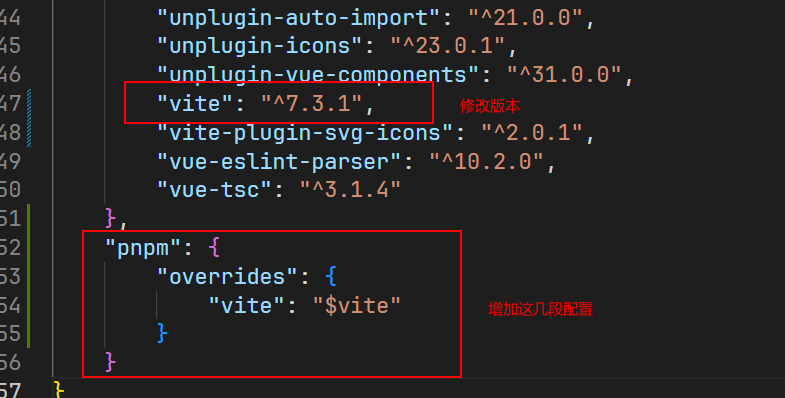
打开终端执行下面命令,然后重启VScode
rd /s /q node_modules
del /f /q pnpm-lock.yaml
rd /s /q :删除目录及子目录(/q = 安静模式,不确认)
del /f /q :强制删除文件

 浙公网安备 33010602011771号