


SpringBoot集成ElasticSearch8.x 基本应用 CRUD操作 环境安装
SpringBoot集成ElasticSearch8.x 基本应用 CRUD操作 环境安装
前言
最近在研究es的时候发现官方已经在7.15.0放弃对旧版本中的Java REST Client (High Level Rest Client (HLRC))的支持,从而替换为推荐使用的Java API Client 8.x
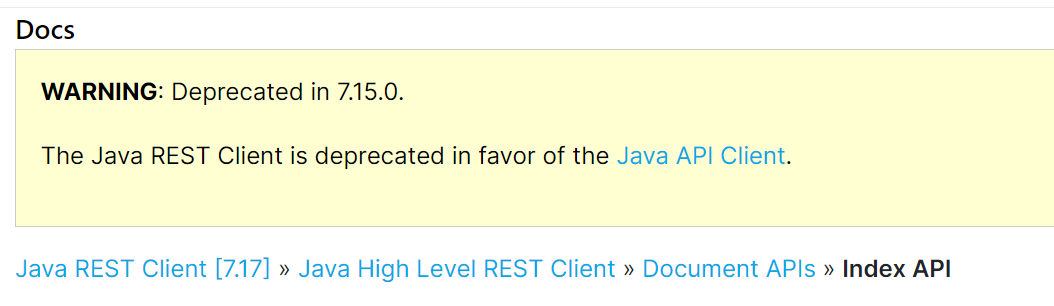
查看SpringBoot2.6.4的依赖,其中es的版本仅为7.15.2
安装
首先去官网下载最新的安装包Download Elasticsearch | Elastic
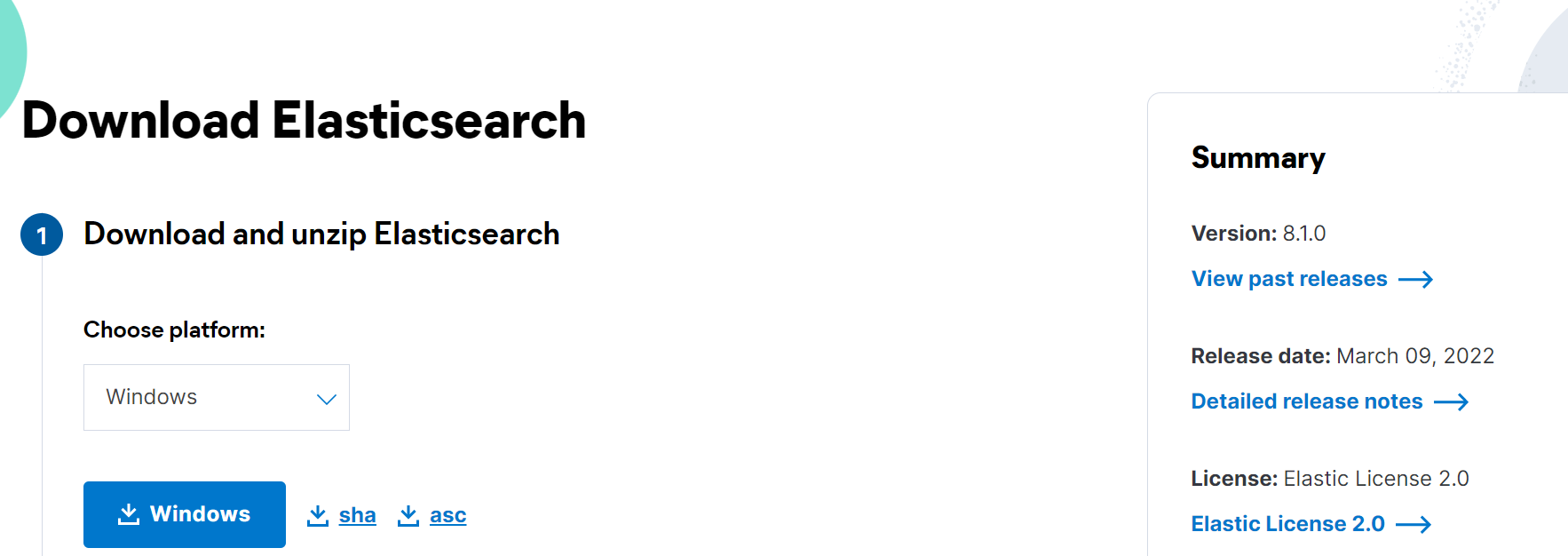
解压即可,进入/bin,启动elasticsearch.bat
访问 127.0.0.1:9200,出现es的集群信息即安装成功
有内置的jdk,所以不需要我们的电脑先安装jdk环境了
打开配置文件
elasticsearch-8.5.3-windows-x86_64\elasticsearch-8.5.3\config\elasticsearch.yml
把network.host改成局域网的IP(cmd用 ipconfig查询),别用默认的localhost,不然可能启动不成功
增加这个配置
不然可能启动爆下面的错误,它启动时会去更新地图的一些数据库,这里直接禁掉即可,用到时再说
 exception during geoip databases updateorg.elasticsearch.ElasticsearchException: not all primary shards of [.geoip_databases] index are active
        at org.elasticsearch.ingest.geoip@8.5.3/org.elasticsearch.ingest.geoip.GeoIpDownloader.updateDatabases(GeoIpDownloader.java:134)
双击启动 elasticsearch.bat,
第一次启动会输出账号信息和令牌,记得保存
如果忘记保存,在es的bin目录,执行cmd然后执行:elasticsearch-reset-password -u elastic
就会输出如下账号密码,然后重启下elasticsearch.bat就好
Password for the [elastic] user successfully reset.
New value: 2QUn9Lx8=KyCuF9CT*=w
kibana部署
官方参考:
https://www.elastic.co/guide/en/elasticsearch/reference/current/configuring-stack-security.html
1下载解压
https://artifacts.elastic.co/downloads/kibana/kibana-8.5.3-windows-x86_64.zip
2修改配置
kibana的config文件夹中的kibana.yml
server.port: 5601
server.host: "192.168.1.106"
i18n.locale: "zh-CN"
3生成秘钥
如果之前安装es保存了密钥就不用再生产了,不然就在es的bin目录下执行
elasticsearch-create-enrollment-token -s kibana
>elasticsearch-create-enrollment-token -s kibana
warning: ignoring JAVA_HOME=D:\mySoftwareWork\java\jdk1.8.0_91; using bundled JDK
eyJ2ZXIiOiI4LjUuMyIsImFkciI6WyIxOTIuMTY4LjEuMTA2OjkyMDAiXSwiZmdyIjoiZTJhMWY3ZGZjMzM5NjVmNDA4N2QxY2UzZTM1ZDY5ZmRhMWVhZDljN2RhMDIwNGY5MWU1MTIyYTc3ZDljOTQ4NCIsImtleSI6Ii12dHlHNFVCSXdOSklKVG5MSXV5OmI4ZnJXc3pLUTQtZWZsUDgyaGhsRHcifQ==
4启动bin\kibana.bat
输入密钥,然后输入es账号登录到控制台页面
logstach部署
下载解压
https://artifacts.elastic.co/downloads/logstash/logstash-8.5.3-windows-x86_64.zip
官方配置参考:
https://www.elastic.co/guide/en/logstash/current/configuration.html
添加配置文件
logstash-simple.conf内容如下,表示从标准输入,filebeat输入,两个过滤器,然后从标准出书和es输出
input { stdin {} beats { port => 5044 } } filter { grok { match => { "message" => "%{COMBINEDAPACHELOG}" } } date { match => [ "timestamp" , "dd/MMM/yyyy:HH:mm:ss Z" ] } } output { stdout {} elasticsearch { hosts => ["https://192.168.1.106:9200"] index => "my-es-index" user => "elastic" password => "2QUn9Lx8=KyCuF9CT*=w" cacert => "C:\Users\10995\Desktop\elk\elasticsearch-8.5.3-windows-x86_64\elasticsearch-8.5.3\config\certs\http_ca.crt" } }
启动
启动 bin/logstash -f logstash-simple.conf 检查配置文件是否有问题 bin/logstash -f logstash-simple.conf --config.test_and_exit 重载配置文件 bin/logstash -f logstash-simple.conf --config.reload.automatic
filebeat
官方文档
https://www.elastic.co/guide/en/beats/filebeat/current/filebeat-installation-configuration.html
配置参考
https://www.elastic.co/guide/en/beats/filebeat/current/configuring-howto-filebeat.html
安装方式有两种,可以选择安装为window服务,或者不按照直接解压,使用命令启动,这里选择第二种(https://blog.csdn.net/zhousenshan/article/details/81053976)
下载解压
https://artifacts.elastic.co/downloads/beats/filebeat/filebeat-8.5.3-windows-x86_64.zip
新建配置文件 filebeat-config.yml,内容如下,表示抓取logs目录下所有文件内容传到logstash,当然也可以加*.log来过滤文件等
filebeat.inputs:
- type: filestream
  paths:
    - C:\Users\10995\Desktop\elk\logs\*
output.logstash:
  hosts: ["localhost:5044"]
cmd启动
filebeat.exe -e -c filebeat-config.yml
测试
可视化界面elasticsearch-head安装
在github上搜索elasticsearch-head,下载他的源码
进入源码目录执行(需安装Node.js)
npm install
npm run start

Running "connect:server" (connect) task
Waiting forever...
Started connect web server on http://localhost:9100
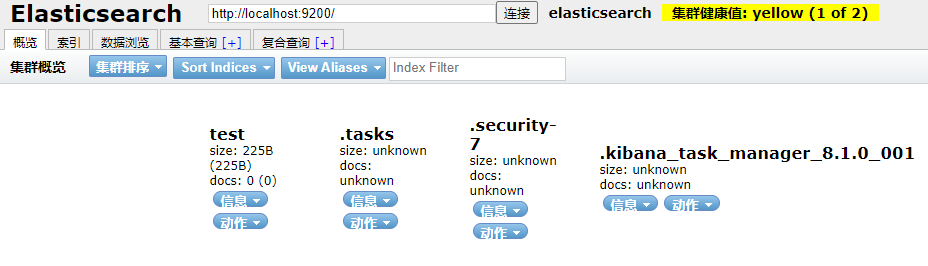
即可访问9100端口访问
依赖导入
        <dependency>
            <groupId>co.elastic.clients</groupId>
            <artifactId>elasticsearch-java</artifactId>
            <version>8.6.2</version>
        </dependency>
        <dependency>
            <groupId>com.fasterxml.jackson.core</groupId>
            <artifactId>jackson-databind</artifactId>
            <version>2.14.2</version>
        </dependency>
        <dependency>
            <groupId>jakarta.json</groupId>
            <artifactId>jakarta.json-api</artifactId>
            <version>2.1.1</version>
        </dependency>
配置类:官方文档
package com.tongda.config;

@Configuration
@ConfigurationProperties(prefix = "elasticsearch")
public class ElasticSearchConfig {

    @Bean
    public ElasticsearchClient elasticsearchClient(){
        // 创建低级客户端
        RestClient restClient = RestClient.builder(
                new HttpHost("localhost", 9200)).build();

        // 使用Jackson映射器创建传输层
        ElasticsearchTransport transport = new RestClientTransport(
                restClient, new JacksonJsonpMapper());

        // 创建API客户端
        ElasticsearchClient client = new ElasticsearchClient(transport);
        return client;
    }
}
Document CRUD
这里准备了一个简单的实体类User用于测试
package com.tongda.domain;

@Data
@AllArgsConstructor
@NoArgsConstructor
public class User {
    private String name;
    private Integer age;

}
索引CRUD
增加index
package com.tongda;

import co.elastic.clients.elasticsearch.ElasticsearchClient;
import co.elastic.clients.elasticsearch.indices.CreateIndexResponse;
import org.junit.jupiter.api.Test;
import org.springframework.beans.factory.annotation.Autowired;
import org.springframework.beans.factory.annotation.Qualifier;
import org.springframework.boot.test.context.SpringBootTest;

import java.io.IOException;

@SpringBootTest
class Springboot18Se8ApplicationTests {

    @Test
    void contextLoads() {
    }

    @Autowired
    @Qualifier("elasticsearchClient")
    private ElasticsearchClient Client;

    // 增加index索引
    @Test
    public void createTest() throws IOException {
        // 写法比RestHighLevelClient更加简洁
        CreateIndexResponse indexResponse = Client.indices().create(c -> c.index("user"));
    }
}
查询Index
// 查询Index
    @Test
    public void queryTest() throws IOException {
        GetIndexResponse getIndexResponse = Client.indices().get(i -> i.index("user"));
        System.out.println(getIndexResponse);
    }
判断index是否存在
    @Test
    public void existsTest() throws IOException {
        BooleanResponse booleanResponse = client.indices().exists(e -> e.index("user"));
        System.out.println(booleanResponse.value());
    }
删除index
@Test
    public void deleteTest() throws IOException {
        DeleteIndexResponse deleteIndexResponse = client.indices().delete(d -> d.index("user"));
        System.out.println(deleteIndexResponse.acknowledged());
    }
插入document
    @Test
    public void addDocumentTest() throws IOException {

        User user = new User("user1", 10);
        IndexResponse indexResponse = client.index(i -> i
                .index("user")
                //设置id
                .id("1")
                //传入user对象
                .document(user));
    }
进入可视化插件,可以看到数据已经成功插入

更新Document
// 插入document
    @Test
    public void  addDocumentTest() throws IOException {
        User user = new User("juelan", 10);
        IndexResponse indexResponse = Client.index(i -> i.index("user")
                // 设置id
                .id("1")
                // 传入user对象
                .document(user));
    }
判断Document是否存在
    @Test
    public void existDocumentTest() throws IOException {
        BooleanResponse indexResponse = client.exists(e -> e.index("user").id("1"));
        System.out.println(indexResponse.value());
    }
查询Document
    @Test
    public void getDocumentTest() throws IOException {
        GetResponse<User> getResponse = client.get(g -> g
                        .index("user")
                        .id("1")
                , User.class
        );
        System.out.println(getResponse.source());
    }
返回
User(name=user2, age=13)
删除Document
    @Test
    public void deleteDocumentTest() throws IOException {
        DeleteResponse deleteResponse = client.delete(d -> d
                .index("user")
                .id("1")
        );
        System.out.println(deleteResponse.id());
    }
批量删除文档
// 批量删除
    @Test
    public void deleteBulkTest() throws IOException {
        // 创建ES客户端部分
        RestClient restClient = RestClient.builder(
                new HttpHost("localhost", 9200)).build();
        ElasticsearchTransport transport = new RestClientTransport(
                restClient, new JacksonJsonpMapper());
        ElasticsearchClient client = new ElasticsearchClient(transport);

        // 构建批量操作对象BulkOperation的集合
        List<BulkOperation> bulkOperations = new ArrayList<>();

        // 向集合中添加需要删除的文档id信息
        bulkOperations.add(new BulkOperation.Builder().delete(d-> d.index("newapi").id("3001")).build());
        bulkOperations.add(new BulkOperation.Builder().delete(d-> d.index("newapi").id("3002")).build());
        bulkOperations.add(new BulkOperation.Builder().delete(d-> d.index("newapi").id("3003")).build());

        // 调用客户端的bulk方法,并获取批量操作响应结果
        BulkResponse response = client.bulk(e->e.index("newapi").operations(bulkOperations));
        System.out.println(response.took());
        System.out.println(response.items());

        // 关闭ES客户端部分
        transport.close();
        restClient.close();
    }
批量插入Document
批量添加的核心是需要构建一个泛型为BulkOperation的ArrayList集合,实质上是将多个请求包装到一个集合中,进行统一请求,进行构建请求时调用bulk方法,实现批量添加效果。
    @Test
    public void bulkTest() throws IOException {
        List<User> userList = new ArrayList<>();
        userList.add(new User("user1", 11));
        userList.add(new User("user2", 12));
        userList.add(new User("user3", 13));
        userList.add(new User("user4", 14));
        userList.add(new User("user5", 15));
        List<BulkOperation> bulkOperationArrayList = new ArrayList<>();
        //遍历添加到bulk中
        for(User user : userList){
            bulkOperationArrayList.add(BulkOperation.of(o->o.index(i->i.document(user))));
        }

        BulkResponse bulkResponse = client.bulk(b -> b.index("user")
                .operations(bulkOperationArrayList));

    }
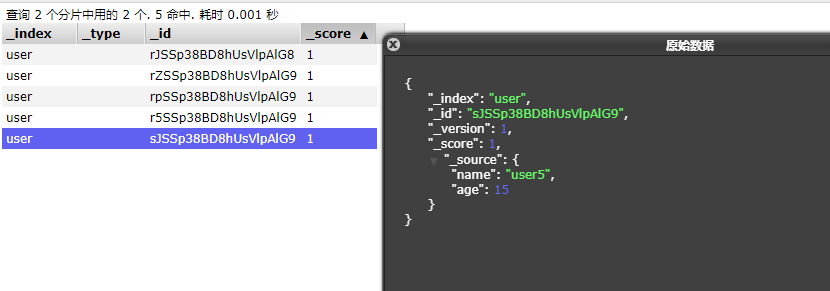
查询
    @Test
    public void searchTest() throws IOException {
        SearchResponse<User> search = client.search(s -> s
                .index("user")
                //查询name字段包含hello的document(不使用分词器精确查找)
                .query(q -> q
                        .term(t -> t
                                .field("name")
                                .value(v -> v.stringValue("hello"))
                        ))
                //分页查询,从第0页开始查询3个document
                .from(0)
                .size(3)
                //按age降序排序
                .sort(f->f.field(o->o.field("age").order(SortOrder.Desc))),User.class
        );
        for (Hit<User> hit : search.hits().hits()) {
            System.out.println(hit.source());
        }
    }
为了测试,我们先添加以下数据
        List<User> userList = new ArrayList<>();
        userList.add(new User("hello world", 11));
        userList.add(new User("hello java", 12));
        userList.add(new User("hello es", 13));
        userList.add(new User("hello spring", 14));
        userList.add(new User("user", 15));
查询结果:
User(name=hello spring, age=14)
User(name=hello es, age=13)
User(name=hello java, age=12)
完整代码
package com.tongda;

import co.elastic.clients.elasticsearch.ElasticsearchClient;
import co.elastic.clients.elasticsearch._types.SortOrder;
import co.elastic.clients.elasticsearch._types.aggregations.Aggregate;
import co.elastic.clients.elasticsearch._types.aggregations.Buckets;
import co.elastic.clients.elasticsearch._types.aggregations.LongTermsAggregate;
import co.elastic.clients.elasticsearch._types.aggregations.LongTermsBucket;
import co.elastic.clients.elasticsearch.core.*;
import co.elastic.clients.elasticsearch.core.bulk.BulkOperation;
import co.elastic.clients.elasticsearch.core.search.Hit;
import co.elastic.clients.elasticsearch.indices.CreateIndexResponse;
import co.elastic.clients.elasticsearch.indices.DeleteIndexResponse;
import co.elastic.clients.elasticsearch.indices.GetIndexResponse;
import co.elastic.clients.json.JsonData;
import co.elastic.clients.json.jackson.JacksonJsonpMapper;
import co.elastic.clients.transport.ElasticsearchTransport;
import co.elastic.clients.transport.Transport;
import co.elastic.clients.transport.endpoints.BooleanResponse;
import co.elastic.clients.transport.rest_client.RestClientTransport;
import com.tongda.domain.User;
import com.tongda.utils.ESconst;
import org.apache.http.HttpHost;
import org.elasticsearch.client.RequestOptions;
import org.elasticsearch.client.RestClient;
import org.junit.jupiter.api.Test;
import org.springframework.beans.factory.annotation.Autowired;
import org.springframework.beans.factory.annotation.Qualifier;
import org.springframework.boot.test.context.SpringBootTest;

import java.io.IOException;
import java.util.ArrayList;
import java.util.List;
import java.util.Map;

@SpringBootTest
class Springboot18Se8ApplicationTests {

    @Test
    void contextLoads() {
    }

    // @Qualifier("XXX") 中的 XX是 Bean 的名称,所以 @Autowired 和 @Qualifier 结合使用时,自动注入的策略就从 byType 转变成 byName 了。
    @Autowired
    @Qualifier("elasticsearchClient")
    private ElasticsearchClient client; // 调用配置类,client缩写必须

    // 增加index索引
    @Test
    public void createTest() throws IOException {
        // 写法比RestHighLevelClient更加简洁
        // lambda表达式,变量和临时代码块的分隔符,即:(变量)->{代码块}
        CreateIndexResponse indexResponse = client.indices().create(c -> c.index("user"));
        System.out.println(indexResponse);
    }

    // 查询Index
    @Test
    public void queryTest() throws IOException {
        GetIndexResponse getIndexResponse = client.indices().get(i -> i.index("user"));
        System.out.println(getIndexResponse);
    }

    // 判断index是否存在
    @Test
    public void existsTest() throws IOException {
        // BooleanResponse request = client.indices().exists(request, RequestOptions.DEFAULT); // ES7.6.1
        BooleanResponse booleanResponse = client.indices().exists(e -> e.index("user"));
        System.out.println(booleanResponse.value());
    }

    // 删除index
    @Test
    public void deleteTest() throws IOException {
        DeleteIndexResponse deleteIndexResponse = client.indices().delete(d -> d.index("user"));
        System.out.println(deleteIndexResponse.acknowledged());
    }

    // 插入document
    @Test
    public void  addDocumentTest() throws IOException {
        // 创建对象
        User user = new User("juelan", 10);
        // 创建请求
        IndexResponse indexResponse = client.index(i -> i.index("user")
                // 规则PUT: /user/_doc/1
                // 设置id
                .id("1")
                // 传入user对象
                .document(user));
    }

    // 判断Document是否存在
    @Test
    public void existDocumentTest() throws IOException {
        BooleanResponse indexResponse = client.exists(e -> e.index("user").id("1"));
        System.out.println(indexResponse.value());
    }

    // 查询Document
    @Test
    public void getDocumentTest() throws IOException {
        GetResponse<User> getResponse = client.get(g -> g
                        .index("user")
                        .id("1")
                , User.class);
        System.out.println(getResponse.source()); // 返回 User(name=juelan2,age=13)
    }

    // 更新Document
    @Test
    public void updateDocumentTest() throws IOException {
        UpdateResponse<User> updateResponse = client.update(u -> u
                        .index("user")
                        .id("1")
                        .doc(new User("juelan2", 13))
                , User.class);
        System.out.println(updateResponse.result());
    }

    // 删除Document
    @Test
    public void deleteDocumentTest() throws IOException {
        DeleteResponse deleteResponse = client.delete(d -> d
                .index("user")
                .id("1"));
        System.out.println(deleteResponse.id());
    }

    // 批量插入Document
    @Test
    public void bulkTest() throws IOException {
        ArrayList<User> userList = new ArrayList<>();
        userList.add(new User("juelan1",11));
        userList.add(new User("juelan2",12));
        userList.add(new User("juelan3",13));
        userList.add(new User("juelan4",14));
        userList.add(new User("juelan5",15));
        ArrayList<BulkOperation> bulkOperationArrayList = new ArrayList<>();
        // 遍历添加到bulk中
        for (User user : userList) {
            bulkOperationArrayList.add(BulkOperation.of(o->o
                    .index(i->i
                            .document(user))));
        }
        BulkResponse bulkResponse = client.bulk(b -> b.index("user")
                .operations(bulkOperationArrayList));
    }

    // 查询 (重点)
    @Test
    public void searchTest() throws IOException {
        SearchResponse<User> search = client.search(s->s
                .index("user")
                // 构建搜索条件
                // 查询name字段包含hello的document(不使用分词器精确查找)
                .query(q->q
                        .term(t->t
                                .field("name")
                                .value(v->v
                                        .stringValue("hello"))
                        ))
                // 分页查询,从第0页开始查询3个document
                .from(0)
                .size(3)
                .sort(f->f.field(o->o.field("age").order(SortOrder.Desc)))
                , User.class);
        for (Hit<User> hit : search.hits().hits()) {
            System.out.println(hit.score());
        }
    }

    // 批量删除
    @Test
    public void deleteBulkTest() throws IOException {
        // 创建ES客户端部分
        RestClient restClient = RestClient.builder(
                new HttpHost("localhost", 9200)).build();
        ElasticsearchTransport transport = new RestClientTransport(
                restClient, new JacksonJsonpMapper());
        ElasticsearchClient client = new ElasticsearchClient(transport);

        // 构建批量操作对象BulkOperation的集合
        List<BulkOperation> bulkOperations = new ArrayList<>();

        // 向集合中添加需要删除的文档id信息
        bulkOperations.add(new BulkOperation.Builder().delete(d-> d.index("newapi").id("3001")).build());
        bulkOperations.add(new BulkOperation.Builder().delete(d-> d.index("newapi").id("3002")).build());
        bulkOperations.add(new BulkOperation.Builder().delete(d-> d.index("newapi").id("3003")).build());

        // 调用客户端的bulk方法,并获取批量操作响应结果
        BulkResponse response = client.bulk(e->e.index("user").operations(bulkOperations));
        System.out.println(response.took());
        System.out.println(response.items());

        // 关闭ES客户端部分
        transport.close();
        restClient.close();
    }

    // 分页查询
    @Test
    public void searchTest02() throws IOException {
        SearchResponse<User> searchResponse = client.search(s -> s
                .index("user")
                .query(q->q
                        .matchAll(m->m))
                .from(4)
                .size(2)
            , User.class);
        System.out.println(searchResponse.took());
        System.out.println(searchResponse.hits().total().value());
        searchResponse.hits().hits().forEach(e-> System.out.println(e.source().toString()));
    }

    // 查询排序:matchAll查询所有,按年龄降序排序
    @Test
    public void searchSortTest() throws IOException {
        SearchResponse<User> searchResponse = client.search(s -> s
                .index("user")
                .query(q->q
                        .matchAll(m->m)
                )
                .sort(sort->sort
                        .field(f->f
                                .field("age")
                                .order(SortOrder.Desc)))
            , User.class);
        System.out.println(searchResponse.took());
        System.out.println(searchResponse.hits().total().value());
    }

    // 过滤字段:source中includes白名单和excludes黑名单
    @Test
    public void sourceIncludeTest() throws IOException {
        SearchResponse<User> searchResponse = client.search(s -> s
                .index("user")
                .query(q->q
                        .matchAll(m->m)
                )
                .sort(sort->sort
                        .field(f->f
                                .field("sge")
                                .order(SortOrder.Desc)
                        )
                )
                .source(source->source.filter(f->f
                        .includes("name")
                        .excludes("")
                    )
                )

            , User.class);
        System.out.println(searchResponse.took());
        System.out.println(searchResponse.hits().total().value());
        searchResponse.hits().hits().forEach(e-> System.out.println(e.source().toString()));

    }

    // 组合查询:must\should
    @Test
    public void mustAndShouldTest() throws IOException {
        SearchResponse<User> searchResponse = client.search(s -> s
                .index("user")
                .query(q->q
                        .bool(b->b
                                .must(must->must
                                        .match(m->m
                                                .field("age")
                                                .query(30)
                                        )
                                )
                                .must(must->must
                                        .match(m->m
                                                .field("sex")
                                                .query("男")
                                        )
                                )
                                .should(should->should
                                        .match(m->m
                                                .field("age")
                                                .query(30)
                                        )
                                )
                                .should(should->should
                                        .match(m->m
                                                .field("age")
                                                .query(40)
                                        )
                                )
                        )
                )
            , User.class);
        System.out.println(searchResponse.took());
        System.out.println(searchResponse.hits().total().value());
        searchResponse.hits().hits().forEach(e-> System.out.println(e.source().toString()));
    }

    // 范围查询: range中条件age年龄.gte大于等于30.lt小于40
    @Test
    public void rangeTest() throws IOException {
        SearchResponse<User> searchResponse = client.search(s -> s
                .index("user")
                .query(q->q
                        .range(r->r
                                .field("age")
                                .gte(JsonData.of(30))
                                .lt(JsonData.of(40))
                        ))
            , User.class);
        System.out.println(searchResponse.took());
        System.out.println(searchResponse.hits().total().value());
        searchResponse.hits().hits().forEach(e-> System.out.println(e.source().toString()));
    }

    // 模糊查询
    // field代表需要判断的字段名称,
    // value代表需要模糊查询的关键词,
    // fuzziness代表可以与关键词有误差的字数,可选值为0、1、2这三项
    @Test
    public void fuzzyTest() throws IOException {
        SearchResponse<User> searchResponse = client.search(s -> s
                .index("user")
                .query(q->q.fuzzy(f->f
                        .field("name")
                        .value("juelan")
                        .fuzziness("1")))
            , User.class);
    }

    // 高亮查询: 给查询出的关键词添加一个标识符
    // 使用highlight字段,其中fields的key代表需要标记的字段名称,
    // preTags代表需要添加标记的前缀,
    // postTags代表需要添加标记的后缀。
    // 同时响应的获取方式也有所改变
    @Test
    public void highlightTest() throws IOException {
        SearchResponse<User> searchResponse = client.search(s -> s
                .index("user")
                .query(q->q
                        .term(t->t
                                .field("name")
                                .value("juelan")
                        )
                )
                .highlight(h->h
                        .fields("name",f->f
                                .preTags("<font color='red'>")
                                .postTags("</font>")
                        ))
                , User.class);
        System.out.println(searchResponse.took());
        System.out.println(searchResponse.hits().total().value());
        searchResponse.hits().hits().forEach(e-> {
            System.out.println(e.source().toString());
            for (Map.Entry<String, List<String>> entry : e.highlight().entrySet()) {
                System.out.println("key = " + entry.getKey());
                entry.getValue().forEach(System.out::println);
            }
        });
    }

    // 聚合查询: aggregations
    @Test
    public void aggregationsTest() throws IOException {
        SearchResponse<User> searchResponse = client.search(s -> s
                .index("user")
                .aggregations("maxAge", a -> a
                        .max(m -> m.field("age"))), User.class);
        System.out.println(searchResponse.took());
        System.out.println(searchResponse.hits().total().value());
        searchResponse.hits().hits().forEach(e->{
            System.out.println(e.source().toString());
            for (Map.Entry<String, Aggregate> entry : searchResponse.aggregations().entrySet()) {
                System.out.println("key = " + entry.getKey() + ",Value = " + entry.getValue().max().value());
            }
        });
    }

    // 分组查询: 属于聚合查询的一部分,所以同样使用aggregations方法
    // 并使用terms方法来代表分组查询,
    // field传入需要分组的字段,最后通过响应中的aggregations参数来获取,这里需要根据数据的类型来获取最后的分组结果,
    // 因为统计的是数字类型,所以使用LongTermsAggregate来获取结果,最后打印出docCount属性即可。
    @Test
    public void aggregationsSizeTest() throws IOException {
        SearchResponse<User> searchResponse = client.search(s -> s
                .index("user")
                .size(100)
                .aggregations("ageGroup",a->a
                        .terms(t->t
                                .field("age")))
            , User.class);
        System.out.println(searchResponse.took());
        System.out.println(searchResponse.hits().total().value());
        searchResponse.hits().hits().forEach(e->{
            System.out.println(e.source().toString());
        });
        Aggregate aggregate = searchResponse.aggregations().get("ageGroup");
        LongTermsAggregate lterms = aggregate.lterms();
        Buckets<LongTermsBucket> buckets = lterms.buckets();
        for (LongTermsBucket bucket : buckets.array()) {
            System.out.println(bucket.key() + " : " + bucket.docCount());
        }
    }
}

 浙公网安备 33010602011771号