
巅峰丶歌谣-手动封装一个日历组件2
首先搭建一个npm的环境
npm init -y
安装所需的依赖
yarn add vite sass -D
error解决 vite@3.0.3: The engine “node” is incompatible with this module. Expected version “^14.18.0 || >=16.0.0”. Got “14.16.0”
yarn config set ignore-engines true
error解决 Cannot use import statement outside a module的解决方法
<script type="module" src="./src/app.js"></script>
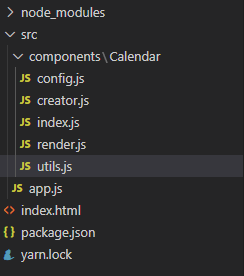
 ## 目录结构
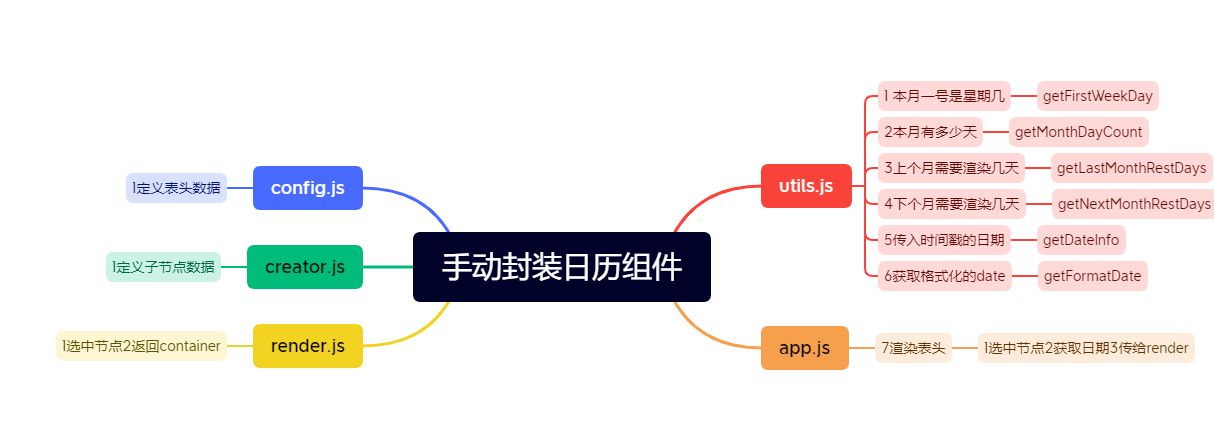
 ## utils.js
//拿到当月是周几
export function getFirstWeekDay(year,month){
    const date=new Date(year,month-1 ,1);
    return date.getDay()
}
//拿到当月的最后一个日期
export function getMonthDayCount(year,month){
    const date=new Date(year,month,0);
    return date.getDate()
}

//上月的日期形成数组
export function getLastMonthRestDays(year,month){
    const days=getFirstWeekDay(year,month)
    let lastDate=getMonthDayCount(year,month-1)
    const restDays=[]

    while(restDays.length<days){
        restDays.push(lastDate--)
    }
    return restDays.reverse()
}

//本月的日期形成数组
export function getNextMonthRestDays(year,month){
    const LastMonthRestDayCount=getFirstWeekDay(year,month)
    let currentMothDayCount=getMonthDayCount(year,month-1)
    const nextMonthRestDayCount=42-(LastMonthRestDayCount+currentMothDayCount)
    let restDays=[]

    for(let i=1;i<=nextMonthRestDayCount;i++){
        restDays.push(i)
    }
    return restDays
}

//
export function getDateInfo(timeStamp){
    var date=timeStamp?new Date(timeStamp):new Date();
    return [date.getFullYear(),date.getMonth()+1,date.getDate()]
}

export function getFormatDate(year,month,date){
    const dateArr=[year,month,date]
    for(let i=1;i<dateArr.length;i++){
        dateArr[i]<10&&(dataArr[i]='0'+dateArr[i])
    }
    return dataArr.join("-")
}
app.js
import MyCalendar from './components/Calendar';


;(()=>{

    const myCalendar = MyCalendar()
    console.log(myCalendar,"myCalendar")
    const oApp=document.querySelector("#app")
    //返回值
    const dataInfo=myCalendar.getDateInfo();
    const init=()=>{
        render(...dataInfo)
    }

    function render(...args){
        oApp.appendChild(myCalendar.render(...args))
    }
    init()
})();
index.scss
.my-calendar{
    width: 324px;
    border:1px solid #add;
    font-size:12px;
    color: #666;
    border-collapse:collapse;
    tHead{
        border-bottom: 1px soild #ddd;
    }
    tr{
        height: 38px;
    }
    td{
        text-align: center;
    }
    .day{
        &.rest-day{
            color: #ccc;
        }
        &.current-day{
            cursor: pointer;
        }
        &.current{
            color: orange;
            font-size: bold;
        }
        &.selected{
            background-color: orange;
            color: #fff;
        }
    }
}
render.js
import { createWeekDaysNode,createDateNode} from "./creator"


export function render(container){
    const oThead = document.createElement("thead")
    const oTBody = document.createElement("tbody")
    const weekDaysNode=createWeekDaysNode()
    oTBody.className="my-calendar-body"
    return function(year,month){
        const dateTrs=createDateNode(year,month)
        oThead.appendChild(weekDaysNode)
        const obj=createDateNode(year,month)
        console.log(obj,"obj")
       dateTrs.forEach(tr=>{
        oTBody.appendChild(tr)
       })
       container.appendChild(oThead)
       container.appendChild(oTBody)
        return container
    }
}

export function update(year,month){
    oTBody=document.querySelector(".my-calendar-body")
    const dateTrs=createDateNode(year,month);
    oTBody.innerHTML="";
    dateTrs.forEach(tr=>{
        oTBody.appendChild(tr)
    })
}
index.js
import {getDateInfo} from "./utils"
import {
    render,
    update
} from "./render"
import "./index.scss"
import event from "./event"
export default ()=>{
    const oContainer = document.createElement("table")
    oContainer.className="my-calendar"
    oContainer.border="1"

    event(oContainer)
    return {
        render:render(oContainer),
        update,
        getDateInfo
    }
}
event.js
let target=null;

export default (container)=>{
    container.addEventListener("click",function(e){


        const tar=e.target
        const className=tar.className;
        if(className.includes("current-day")){
            if(target){
                target.className=target.className.replace(' selected','')
            }
            target=tar
           tar.className+=" selected"
        }
    },false)
}
## creator.js
import { WEEK_DAYS } from "./config"
import { getLastMonthRestDays,getMonthDayCount,getNextMonthRestDays,getDateInfo} from "./utils"
export function createWeekDaysNode(){
const oTr=document.createElement("tr")
oTr.className="week-day"
oTr.innerHTML=WEEK_DAYS.map(item=>(
`<th>${item}</th>`
)).join('')
return oTr
}
export function createDateNode(year,month){
const LastMonthRestDays=getLastMonthRestDays(year,month)
const currentMothDayCount=getMonthDayCount(year,month)
const nextMonthRestDays=getNextMonthRestDays(year,month)
const LastMonthRestDaysTD=createRestDaysTD(LastMonthRestDays)
const currentMothDaysTD=createCurrentDaysTd(currentMothDayCount,year,month)
const nextMonthRestDaysTD=createRestDaysTD(nextMonthRestDays)
const dateTrArr=createDateTrs(6)
const tdArr=[
...LastMonthRestDaysTD,
...currentMothDaysTD,
...nextMonthRestDaysTD
]
let index=0;
dateTrArr.forEach(tr=>{
for(var i=0;i<7;i++){
tr.appendChild(tdArr[index])
index++
}
})
return dateTrArr
}
export function createDateTrs(count){
const trArr=[];
for(var i=0;i<count;i++){
const oTr=document.createElement("tr")
trArr.push(oTr)
}
return trArr
}
function createRestDaysTD(restDays){
return restDays.map(item=>{
const oTd=document.createElement('td')
oTd.className='day rest-day'
oTd.innerHTML=item
return oTd
})
}
function createCurrentDaysTd(currentDayCount,year,month){
let tdArr=[]
const [currentYear,currentMonth,currentDate]=getDateInfo()
for(let i=1;i<=currentDayCount;i++){
const oTd=document.createElement("td")
if(currentYear===year&¤tMonth===month&¤tDate===i){
oTd.className="day current-day current"
}else{
oTd.className="day current-day"
}
oTd.innerHTML=i;
tdArr.push(oTd)
}
return tdArr
}
config.js
export const WEEK_DAYS=[
    "日",
    "一",
    "二",
    "三",
    "四",
    "五",
    "六",
]
app.js
import MyCalendar from './components/Calendar';
(()=>{
    const myCalendar = MyCalendar()
    console.log(myCalendar,"myCalendar")
    const oApp=document.querySelector("#app")
    //返回值
    const dataInfo=myCalendar.getDateInfo();
    const init=()=>{
        render(...dataInfo)
    }
    function render(...args){
        oApp.appendChild(myCalendar.render(...args))
    }
    init()
})();
运行结果
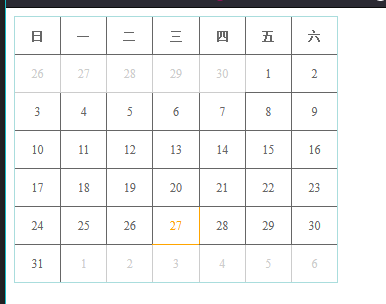
备注
启动项目 npm run dev

 浙公网安备 33010602011771号