


Spring Boot----PageHelper
如何进行分页
不使用PageHelper
需要进行两次查询,一次查询总数,用来计算前端分页的页码数量,一次查询数据;
public PageResult query(IplogQueryObject qo) {
		int totalCount = this.iplogMapper.queryForCount(qo);
		if (totalCount > 0) {
			List<Iplog> list = this.iplogMapper.query(qo);
			PageResult pageResult = new PageResult(list, totalCount, qo.getCurrentPage(),
					qo.getPageSize());
			return pageResult;
		}
		return PageResult.empty(qo.getPageSize());
	}
在dao需要写limit
<select id="query" resultMap="BaseResultMap">
    SELECT <include refid="base_column" />
    FROM iplog
    <include refid="base_where" />
    ORDER BY loginTime DESC
    LIMIT #{start},#{pageSize}
  </select>
使用PageHelper
配置
springBoot的依赖
注意:spring如果依赖普通的pageHelper(不是springboot-pagehelper),就需要进行配置pageHeper,不然pageHelper不生效
<dependency>
    <groupId>com.github.pagehelper</groupId>
    <artifactId>pagehelper‐spring‐boot‐starter</artifactId>
    <version>1.2.4</version>
</dependency>
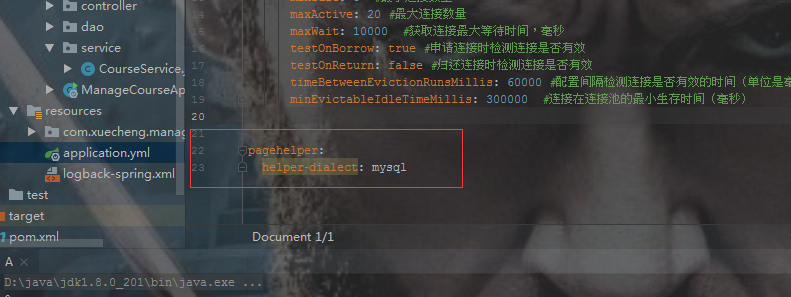
在application.yml中配置pageHelper操作的数据库类型(其实springboot-pageHelper不需要配置)
PageHelper测试
注意:PageHelper只对第一个查询有效
定义接口
@Mapper
public interface CourseMapper {
    Page<CourseInfo> findCourseListPage(CourseListRequest courseListRequest)
};
定义mapper.xml映射文件(不需要加limit)
<select id="findCourseListPage" resultType="com.xuecheng.framework.domain.course.ext.CourseInfo" parameterType="com.xuecheng.framework.domain.course.request.CourseListRequest">
  SELECT * FROM course_base
</select>
测试
    //测试分页
    @Test
    public void testPageHelper() {
        PageHelper.startPage(1, 10);//查询第一页,每页显示10条记录
        CourseListRequest courseListRequest = new CourseListRequest();
        Page<CourseInfo> courseListPage = courseMapper.findCourseListPage(courseListRequest);
        List<CourseInfo> result = courseListPage.getResult();
      Long l = courseListPage.getTotal();
        System.out.println(courseListPage);
    }
使用二
        PageHelper.startPage(pageNumber, pageSize);
        classCountStatistics = schoolClassMapper.getMajorCountStatistics(startYear, schoolTerm, classYear, null, schoolId, 0, id);
        PageInfo<ClassStuSelectionCountInfoVo> classStuSelectionCountInfoVoPageInfo = new PageInfo<>(classCountStatistics);

 浙公网安备 33010602011771号