
Nginx下部署Laravel项目
Nginx下部署Laravel项目
标签(空格分隔): php
Nginx配置文件
listen 80 default_server;
#listen [::]:80 default_server ipv6only=on;
server_name _;
index index.html index.htm index.php;
#root /home/wwwroot/default;
root /home/wwwroot/web.laravel.cn/public;
location /nginx_status
{
stub_status on;
access_log off;
}
location / {
try_files $uri $uri/ /index.php?$query_string;
}
location ~ .*.(gif|jpg|jpeg|png|bmp|swf)$
{
log_not_found off;
access_log off;
expires 30d;
}
location ~ .*.(js|css)?$
{
expires 12h;
}
location ~ /.well-known {
allow all;
}
location ~ /.
{
deny all;
}
access_log /home/wwwlogs/access.log;
注意点
1 根目录要写对 /home/wwwroot/web.laravel.cn/public 要指向你的项目入口文件

2 如果出现 除/根目录外 其他路由都不能访问
2.1 首先在配置文件添加
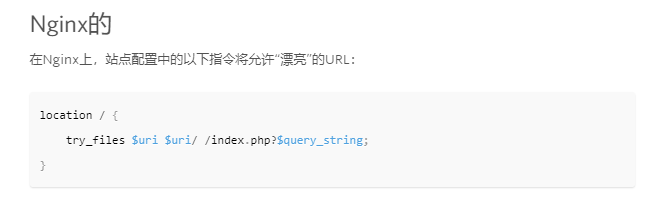
laravel => https://laravel.com/docs/5.0/installation#pretty-urls
2.2 修改fastcgi.conf
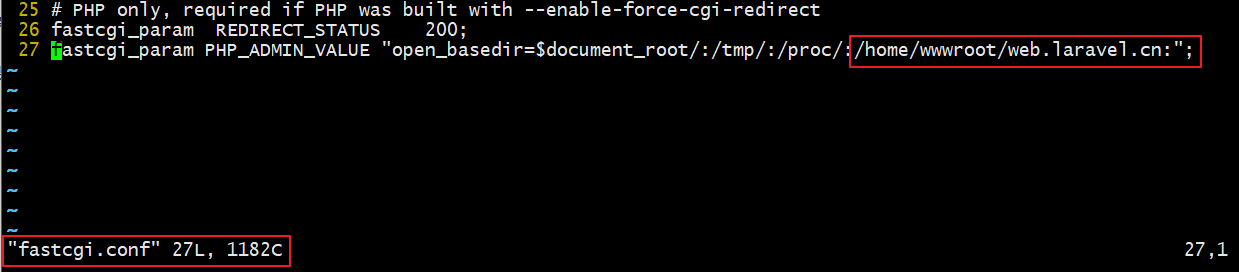
2.3 修改项目根目录下的.user.ini
修改如果无法写 请修改权限
chattr -i /home/wwwroot/web.laravel/public/.user.ini

vim 打开


 浙公网安备 33010602011771号