
数据大屏屏幕自适应
因为数据大屏一般在大的屏幕端进行展示。
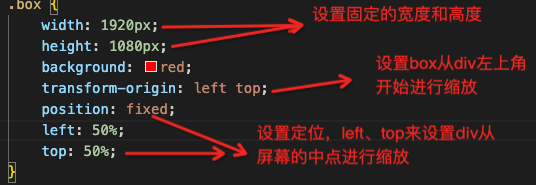
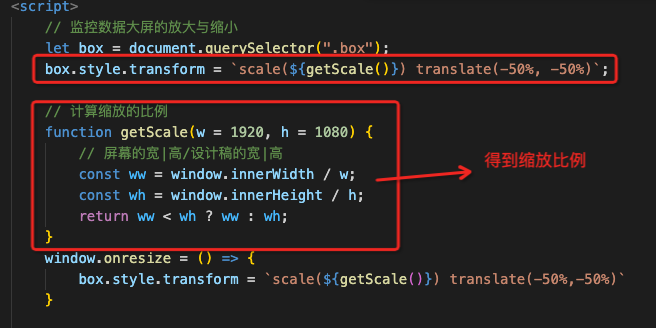
实现缩放的逻辑:给div设置固定的高度和宽度。通过innerWidth来获取当前屏幕的宽度和高度,得到缩放比例。通过scale来缩放当前div、
具体的实现代码如下:
<!DOCTYPE html>
<html>

<head>
    <meta charset="utf-8">
    <meta name="viewport" content="width=device-width, initial-scale=1">
    <title>数据大屏scale</title>
</head>
<style type="text/css">
    /* 去除默认样式 */
    * {
        margin: 0;
        padding: 0;
    }

    .container {
        width: 100wh;
        height: 100vh;
        background: orange;
        background: url(/Users/hoge/Desktop/code/vueStudy/硅谷甄选/admin_template/project/src/views/screen/images/bg.png) no-repeat;
        background-size: cover;
    }

    .box {
        width: 1920px;
        height: 1080px;
        background: red;
        transform-origin: left top;
        position: fixed;
        left: 50%;
        top: 50%;
    }

    .top {
        width: 100px;
        height: 100px;
        background: hotpink;
        margin-left: 50px;
    }

    .bottom {
        width: 100px;
        height: 100px;
        background: skyblue;
        margin-left: 50px;
        margin-top: 100px;
    }

    /* 放大缩小的倍数从设备的中心点开始进行放大 */

</style>

<body>
    <!-- div box 为整个数据大屏的根节点,100vh 100wh的高度 -->
    <div class="container">
        <!-- 数据展示的区域 -->
        <div class="box">
            <div class="top">我是祖国的</div>
            <div class="bottom">老花骨朵</div>
        </div>
    </div>
</body>

</html>
<script>
    // 监控数据大屏的放大与缩小
    let box = document.querySelector(".box");
    box.style.transform = `scale(${getScale()}) translate(-50%)`;

    // 计算缩放的比例
    function getScale(w = 1920, h = 1080) {
        // 屏幕的宽|高/设计稿的宽|高
        const ww = window.innerWidth / w;
        const wh = window.innerHeight / h;
        return ww < wh ? ww : wh;
    }
    window.onresize = () => {
        box.style.transform = `scale(${getScale()}) translate(-50%)`
    }

</script>

 浙公网安备 33010602011771号