
cesium 点击弹窗鼠标移动跟随,不用infobox
cesium原有infobox 不好调位置,样式不好调,自己写一个灵活

1、map.vue中 html:
<template>
  <div ref="mapContainer" id="mapContainer" style="width: 100%; height: 100%;">
    <div style="position: absolute;z-index: 2;
    visibility: hidden;background-color: #ffffff;
    max-height: 300px;
    overflow-y: auto;
    box-shadow: rgba(106, 146, 228, 0.2) 0rem 0.285714rem 2.14286rem 0rem, rgb(255, 255, 255) 0.142857rem 0.142857rem 0.0714286rem 0rem inset;"
         ref="infoBox" id="infobox">
    </div>
  </div>
</template>
2、代码
<script lang="ts" setup>
import { onMounted, ref, defineProps, watch, toRefs } from 'vue';

let viewer: Viewer | null = null;
let cartesian;

onMounted(() => {

  Cesium.Credential.CREDENTIAL = new Cesium.Credential(
      "超图iserver地图token",
      "token");
  viewer = new Cesium.Viewer('mapContainer',{infoBox: false });

  //鼠标单击左键 点击白模 事件
  viewer.screenSpaceEventHandler.setInputAction(async function onMouseClick(click) {
    const ray = viewer.camera.getPickRay(click.position);
    cartesian = viewer.scene.globe.pick(ray, viewer.scene);
    //获取到了白模实体
    var pickedFeature = viewer.scene.pick(click.position);
    if (Cesium.defined(pickedFeature)) {
      //根据白模上的id 值请求接口数据
      let params = {
        "datasetNames": ["fclt:xx_bm"],
        "getFeatureMode": "ID",
        "ids": [pickedFeature.id],
        "hasGeometry": true
      }
      const res = await featureResults(params, '超图iserver地图token')

      let item = createObjByFeature(res.data.features[0].fieldNames,res.data.features[0].fieldValues);
      let desp = createDescriptionHtml(item);
      //添加事件,左键点击到实体了就添加
      viewer.scene.postRender.addEventListener(updatePosition);
      Popupposition(click.position,pickedFeature.id,desp)
    }else{
      //未点击到实体,隐藏 + 移除事件
      document.getElementById('infobox').style.display = "none";
      viewer.scene.postRender.removeEventListener(updatePosition);
    }

  },Cesium.ScreenSpaceEventType.LEFT_CLICK);
});

const updatePosition=()=> {
  // 将WGS84坐标中的位置转换为窗口坐标
  let windowPosition = Cesium.SceneTransforms.wgs84ToWindowCoordinates(viewer.scene, cartesian);
  // 数值是样式中定义的宽高
  if (windowPosition == undefined) return
  document.getElementById('infobox').style.left = (windowPosition.x - (220 / 2)) + 'px'
  document.getElementById('infobox').style.top = (windowPosition.y +20) + 'px'
}

const createDescriptionHtml = (item)=>{
  let contentHtml = '<table class="cesium-infoBox-defaultTable"><tbody>';
  for (let pro in item) {
    if (pro == "positions") continue;
    contentHtml += '<tr><th>' + `${pro}` + '</th>' + '<td>' + `${item[pro]}` + '</td>' + '</tr>'
  }
  contentHtml += '</tbody></table>'
  return contentHtml
}

const createObjByFeature=(fieldNames,fieldValues)=>{
  let obj = {};
  for(let i = 0; i < fieldNames.length; i++){
    // 构造对象
    obj[fieldNames[i]] = fieldValues[i];
  }
  return obj;
}

const Popupposition=(pos,id,desp)=>{
  document.getElementById('infobox').innerHTML = desp
  document.getElementById('infobox').style.display = 'block' //弹出信息框
  document.getElementById('infobox').style.visibility = 'visible'
  document.getElementById('infobox').style.left = (pos.x) + 'px'
  document.getElementById('infobox').style.top = (pos.y) + 'px'
}
超图接口返回:
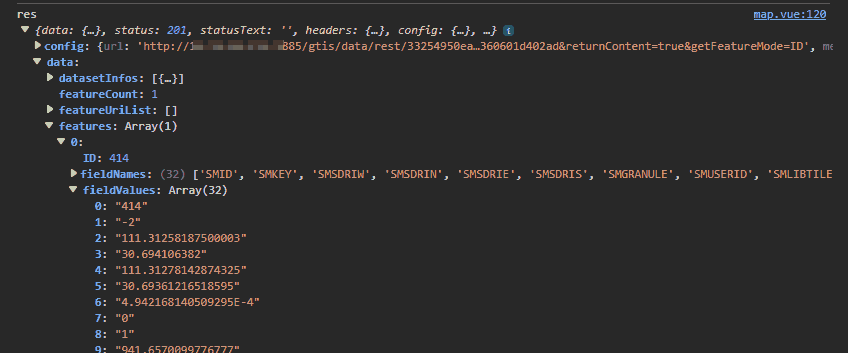
位置跟随也可以参考这里

 浙公网安备 33010602011771号