CentOS 7.2配置Apache服务httpd(上)
http://www.jb51.net/article/97434.htm
二、安装Apache httpd
安装httpd以配置Web服务器, HTTP使用80 / TCP
|
1
2
3
4
5
6
7
8
9
10
11
12
13
14
15
16
17
18
19
20
21
22
23
24
25
26
27
28
29
30
31
32
33
34
35
|
[1] 安装 httpd.[root@linuxprobe ~]# yum -y install httpd# 删除默认欢迎页面[root@linuxprobe ~]# rm -f /etc/httpd/conf.d/welcome.conf[2] 配置httpd,将服务器名称替换为您自己的环境[root@linuxprobe ~]# vi /etc/httpd/conf/httpd.conf# line 86: 改变管理员的邮箱地址ServerAdmin root@linuxprobe.org# line 95: 改变域名信息ServerName www.linuxprobe.org:80# line 151: none变成AllAllowOverride All# line 164: 添加只能使用目录名称访问的文件名DirectoryIndex index.html index.cgi index.php# add follows to the end# server's response header(安全性)ServerTokens Prod# keepalive is ONKeepAlive On[root@linuxprobe ~]# systemctl start httpd[root@linuxprobe ~]# systemctl enable httpd[3] 如果Firewalld正在运行,请允许HTTP服务。,HTTP使用80 / TCP[root@linuxprobe ~]# firewall-cmd --add-service=http --permanentsuccess[root@linuxprobe ~]# firewall-cmd --reloadsuccess[4] 创建一个HTML测试页,并使用Web浏览器从客户端PC访问它。如果显示以下页面,是正确的[root@linuxprobe ~]# vi /var/www/html/index.html<html><body><div style="width: 100%; font-size: 40px; font-weight: bold; text-align: center;">Welcome access LinuxProbe.org,This is Test Page!</div></body></html> |
三、支持Perl
启用CGI执行并使用Perl脚本
|
1
2
3
4
5
6
7
8
9
10
11
12
13
14
15
16
17
18
19
20
21
22
23
24
25
26
27
28
29
30
|
[1] 安装Perl.[root@linuxprobe ~]# yum -y install perl perl-CGI[2] 默认情况下,在“/var/www/cgi-bin”目录下允许CGI。 可以使用Perl Scripts放在目录下。然而,它下面的所有文件都被处理为CGI。# 下面的设置是CGI的设置[root@linuxprobe ~]# grep -n "^ *ScriptAlias" /etc/httpd/conf/httpd.conf247: ScriptAlias /cgi-bin/ "/var/www/cgi-bin/"[3] 如果你想允许在其他目录中的CGI,配置如下。 例如,在“/var/www/html/cgi-enabled”中允许。[root@linuxprobe ~]# vi /etc/httpd/conf.d/cgi-enabled.conf# create new# processes .cgi and .pl as CGI scripts<Directory "/var/www/html/cgi-enabled"> Options +ExecCGI AddHandler cgi-script .cgi .pl</Directory>[root@linuxprobe ~]# systemctl restart httpd[4] 如果SELinux被启用,并且允许CGI在不是像上面[3]的默认目录下,更改规则如下。[root@linuxprobe ~]# chcon -R -t httpd_sys_script_exec_t /var/linuxprobe/html/cgi-enabled[root@linuxprobe ~]# semanage fcontext -a -t httpd_sys_script_exec_t /var/www/html/cgi-enabled[5] 创建一个CGI测试页面,并使用Web浏览器从客户端PC访问它。如果显示以下页面,说明配置正确。[root@linuxprobe ~]# vi /var/www/html/cgi-enabled/index.cgi#!/usr/bin/perlprint "Content-type: text/html\n\n";print "<html>\n<body>\n";print "<div style=\"width: 100%; font-size: 40px; font-weight: bold; text-align: center;\">\n";print "CGI Test Page";print "\n</div>\n";print "</body>\n</html>\n";[root@linuxprobe ~]# chmod 705 /var/www/html/cgi-enabled/index.cgi |
配置httpd以使用PHP脚本
[1] 安装PHP.
|
1
2
3
4
5
|
[root@linuxprobe ~]# yum -y install php php-mbstring php-pear[root@linuxprobe ~]# vi /etc/php.ini# line 878: 取消注释,设置时区date.timezone = "Asia/Shanghai"[root@linuxprobe ~]# systemctl restart httpd |
[2] 创建一个PHP测试页面,并使用Web浏览器从客户端PC访问它。如果显示以下页面,它是确定。
|
1
2
3
4
5
6
7
8
9
10
|
[root@linuxprobe ~]# vi /var/www/html/index.php<html><body><div style="width: 100%; font-size: 40px; font-weight: bold; text-align: center;"><?php print Date("Y/m/d");?></div></body></html> |
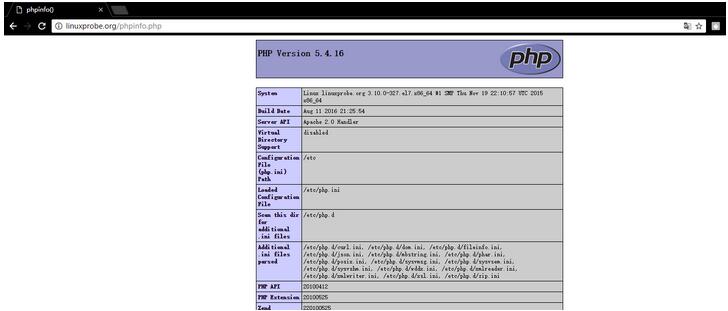
[3] 创建phpinfo测试页,确认是都开启php支持
[root@linuxprobe ~]# echo "<?php phpinfo(); ?>" > /var/www/html/phpinfo.php
九、创建SSL证书
创建自己的SSL证书。但是,如果您使用您的服务器作为业务,最好购买和使用来自Verisigh的正式证书等。
|
1
2
3
4
5
6
7
8
9
10
11
12
13
14
15
16
17
18
19
20
21
22
23
24
25
26
27
28
29
30
31
32
33
34
35
36
37
38
39
40
41
42
|
[root@linuxprobe ~]# cd /etc/pki/tls/certcert.pem certs/ [root@linuxprobe ~]# cd /etc/pki/tls/certs/[root@linuxprobe certs]# make server.keyumask 77 ; \/usr/bin/openssl genrsa -aes128 2048 > server.keyGenerating RSA private key, 2048 bit long modulus...............................................................+++....................................................................................................+++e is 65537 (0x10001)Enter pass phrase:Verifying - Enter pass phrase:[root@linuxprobe certs]# openssl rsa -in server.key -out server.keyEnter pass phrase for server.key:writing RSA key[root@linuxprobe certs]# make server.csrumask 77 ; \/usr/bin/openssl req -utf8 -new -key server.key -out server.csrYou are about to be asked to enter information that will be incorporatedinto your certificate request.What you are about to enter is what is called a Distinguished Name or a DN.There are quite a few fields but you can leave some blankFor some fields there will be a default value,If you enter '.', the field will be left blank.-----Country Name (2 letter code) [XX]:CN #国家后缀State or Province Name (full name) []:Shanghai #省Locality Name (eg, city) [Default City]:Shanghai #市Organization Name (eg, company) [Default Company Ltd]:LinuxProbe #公司Organizational Unit Name (eg, section) []:DevOps #部门Common Name (eg, your name or your server's hostname) []:linuxprobe.org #主机名Email Address []:root@linuxprobe.org #邮箱Please enter the following 'extra' attributesto be sent with your certificate requestA challenge password []: #默认An optional company name []: #默认#[root@linuxprobe certs]# openssl x509 -in server.csr -out server.crt -req -signkey server.key -days 3650Signature oksubject=/C=CN/ST=Shanghai/L=Shanghai/O=LinuxProbe/OU=DevOps/CN=linuxprobe.org/emailAddress=root@linuxprobe.orgGetting Private key |
十、配置SSL
[1] 配置SSL.
|
1
2
3
4
5
6
7
8
9
10
11
12
13
14
|
[root@linuxprobe ~]# yum -y install mod_ssl[root@linuxprobe ~]# vi /etc/httpd/conf.d/ssl.conf# line 59: 取消注释DocumentRoot "/var/www/html"# line 60: 取消注释,定义域名ServerName linuxprobe.org:443# line 75: 改变SSLProtocolSSLProtocol -All +TLSv1 +TLSv1.1 +TLSv1.2# line 100: 改成刚刚创建的server.crtSSLCertificateFile /etc/pki/tls/certs/server.crt# line 107: 改成刚刚创建的server.keySSLCertificateKeyFile /etc/pki/tls/certs/server.key[root@www ~]# systemctl restart httpd |
[2] 如果Firewalld正在运行,请允许HTTPS服务。 HTTPS使用443 / TCP
|
1
2
3
4
|
[root@www ~]# firewall-cmd --add-service=https --permanentsuccess[root@www ~]# firewall-cmd --reloadsuccess |
十一、启用基本身份验证
启用基本身份验证以限制特定网页的访问
[1]例如,在目录[/var/www/html/auth-basic]下设置基本身份验证设置。
|
1
2
3
4
5
6
7
8
9
10
11
12
13
14
15
16
17
18
19
20
21
22
23
24
25
26
27
28
29
|
[root@linuxprobe ~]# vi /etc/httpd/conf.d/auth_basic.conf# 创建新配置文件<Directory /var/www/html/auth-basic> AuthType Basic AuthName "Basic Authentication" AuthUserFile /etc/httpd/conf/.htpasswd require valid-user</Directory># 添加用户:使用“-c”创建新文件(仅为初始注册添加“-c”选项)[root@linuxprobe ~]# htpasswd -c /etc/httpd/conf/.htpasswd wangNew password: # set passwordRe-type new password: # confirmAdding password for user wang[root@linuxprobe ~]# systemctl restart httpd[root@linuxprobe ~]# mkdir /var/www/html/auth-basic[root@linuxprobe ~]# vi /var/www/html/auth-basic/index.html# create a test page<html><body><div style="width: 100%; font-size: 40px; font-weight: bold; text-align: wanger;">Test Page for Basic Auth</div></body></html> |

 浙公网安备 33010602011771号