
完整教程:给 MHTML 添加滚动条.mhtml
问题1
把网页保存为单个mhtml ,在浏览器打开后,没有滚动条,如何给全文内容添加滚动条
DeepSeek 回答
可以在 HTML 文件中添加 CSS 样式来为整个页面添加滚动条。以下是修改方案:
解决方案:
在 <head> 标签内添加以下 CSS 样式:
<style>
  /* 为根元素添加滚动条 */
  #root {
  overflow-y: auto !important;
  height: 100vh !important;
  }
  /* 或者为 body 添加滚动条 */
  body {
  overflow-y: auto !important;
  height: 100vh !important;
  }
  /* 确保整个页面有滚动条 */
  html, body {
  height: 100%;
  overflow: auto;
  }
</style>
具体添加位置:
在已有的 <head> 标签内,找到最后一个 </head> 标签之前,插入上述 CSS 代码。例如:
<head>
  <!-- 原有的 meta、link 等标签 -->
      <meta name="viewport" content="initial-scale=1.0,maximum-scale=1,minimum-scale=1.0,user-scalable=no,width=device-width,viewport-fit=cover">
        <meta name="commit-id" content="d0e8a4f9">
        <!-- 在这里添加滚动条样式 -->
          <style>
            #root {
            overflow-y: auto !important;
            height: 100vh !important;
            }
            body {
            overflow-y: auto !important;
            height: 100vh !important;
            }
            html, body {
            height: 100%;
            overflow: auto;
            }
          </style>
          <!-- 原有的其他内容 -->
              <link rel="stylesheet" type="text/css" href="cid:css-203e2445-bdb4-4c25-b828-22fceafe3d9c@mhtml.blink">
            <title>Python字典参数传递与修改影响 - DeepSeek</title>
            </head>
备选方案(如果上述无效):
如果上面的方法不生效,可以尝试更强制的方法:
<style>
  /* 强制为所有内容容器添加滚动条 */
  * {
  overflow: auto !important;
  }
  /* 确保页面结构有高度 */
  html, body, #root {
  height: 100% !important;
  min-height: 100vh !important;
  }
  /* 如果页面使用 flex 布局 */
  .ds-theme, .cb86951c, .c3ecdb44 {
  height: 100% !important;
  overflow: auto !important;
  }
</style>
调试建议:
- 检查元素:在浏览器中按 F12 打开开发者工具,检查哪个元素导致无法滚动
- 临时测试:在浏览器控制台输入以下代码测试:
document.body.style.overflow = 'auto' document.getElementById('root').style.overflow = 'auto' - 查看布局:检查是否有元素的
position: fixed或overflow: hidden属性阻止了滚动
添加这些样式后,重新打开 MHTML 文件,应该会出现垂直滚动条,允许查看全部内容。
-------------------------------------------------------------------------------------
问题2
打开 mhtml 后,水平宽度不太够,我想扩充全体的水平宽度,并且添加垂直滚动条
DeepSeek 回答
为了同时解决水平宽度不足和添加垂直滚动条的问题,你可以在 MHTML 文件中添加以下 CSS 样式:
完整解决方案:
在 <head> 标签内添加以下 CSS 代码:
<style>
  /* 重置整体布局 */
  html, body {
  width: 100% !important;
  max-width: 100% !important;
  min-width: 100% !important;
  overflow-x: auto !important;
  overflow-y: auto !important;
  height: 100vh !important;
  }
  /* 根元素容器 */
  #root {
  width: auto !important;
  min-width: 100% !important;
  overflow-x: auto !important;
  overflow-y: auto !important;
  }
  /* 主内容区域 */
  .ds-theme, .cb86951c, .c3ecdb44 {
  width: auto !important;
  min-width: 100% !important;
  max-width: none !important;
  }
  /* 消息区域 */
  .message-area, .chat-container, .conversation-container {
  width: auto !important;
  min-width: 100% !important;
  }
  /* 移除可能的固定宽度限制 */
  *[style*="width:"], *[style*="max-width:"], *[style*="min-width:"] {
  max-width: none !important;
  }
  /* 确保文本内容可以换行,防止水平溢出 */
  pre, code {
  white-space: pre-wrap !important;
  word-wrap: break-word !important;
  }
</style>
具体添加位置:
在你的 MHTML 文件中,找到 <head> 标签,在已有的 CSS 链接之后添加上述代码。例如:
<head>
  <!-- 已有的 CSS 链接 -->
      <link rel="stylesheet" type="text/css" href="cid:css-203e2445-bdb4-4c25-b828-22fceafe3d9c@mhtml.blink">
      <!-- 添加滚动条和宽度修复样式 -->
        <style>
          html, body {
          width: 100% !important;
          max-width: 100% !important;
          min-width: 100% !important;
          overflow-x: auto !important;
          overflow-y: auto !important;
          height: 100vh !important;
          }
          #root {
          width: auto !important;
          min-width: 100% !important;
          overflow-x: auto !important;
          overflow-y: auto !important;
          }
          .ds-theme, .cb86951c, .c3ecdb44 {
          width: auto !important;
          min-width: 100% !important;
          max-width: none !important;
          }
          *[style*="width:"], *[style*="max-width:"], *[style*="min-width:"] {
          max-width: none !important;
          }
          pre, code {
          white-space: pre-wrap !important;
          word-wrap: break-word !important;
          }
        </style>
        <!-- 其他标签继续 -->
        <title>Python字典参数传递与修改影响 - DeepSeek</title>
        </head>
备选方案(强制扩展):
如果上面的方法效果不佳,可以尝试这个更强制性的版本:
<style>
  /* 强制重置所有元素的宽度和滚动行为 */
  * {
  box-sizing: border-box !important;
  min-width: 0 !important;
  }
  html, body {
  width: 100% !important;
  min-width: 100% !important;
  overflow-x: scroll !important;
  overflow-y: auto !important;
  height: 100vh !important;
  margin: 0 !important;
  padding: 0 !important;
  }
  #root, .ds-theme, [class*="container"], [class*="content"] {
  width: fit-content !important;
  min-width: 100% !important;
  overflow: visible !important;
  }
  /* 防止内容被截断 */
  div, section, main, article {
  overflow: visible !important;
  max-width: none !important;
  }
  /* 保持代码块的显示 */
  pre {
  max-width: 100% !important;
  overflow-x: auto !important;
  }
</style>
额外建议:
如果添加了 CSS 后效果仍不理想,你还可以在浏览器中临时调整:
使用浏览器开发者工具:
- 按 F12 打开开发者工具
- 在控制台执行以下代码:
document.body.style.overflowX = 'auto';
document.body.style.overflowY = 'auto';
document.body.style.width = '100%';
document.querySelector('#root').style.width = 'auto';
使用浏览器缩放:
- 按 Ctrl+鼠标滚轮缩小页面(或 Ctrl± 缩小)
- 这样可以让更多内容显示在可见区域内
如果代码块太长:
- 对于过长的代码行,使用以下 CSS 确保它们会换行:
pre, code {
white-space: pre-wrap !important;
word-break: break-all !important;
}
- 对于过长的代码行,使用以下 CSS 确保它们会换行:
添加这些样式后,重新打开 MHTML 文件,应该会有水平滚动条来查看超出宽度的内容,同时保持垂直滚动条用于上下滚动。
总结
水平扩展宽度的实验结果不成功,现只取垂直滚动条。
添加代码
<style>
  /* 强制为所有内容容器添加滚动条 */
  * {
  overflow: auto !important;
  }
  /* 确保页面结构有高度 */
  html, body, #root {
  height: 100% !important;
  min-height: 100vh !important;
  }
  /* 如果页面使用 flex 布局 */
  #root, .ds-theme, [class*="content"] {
  height: 100% !important;
  overflow: auto !important;
  }
</style>
添加示图
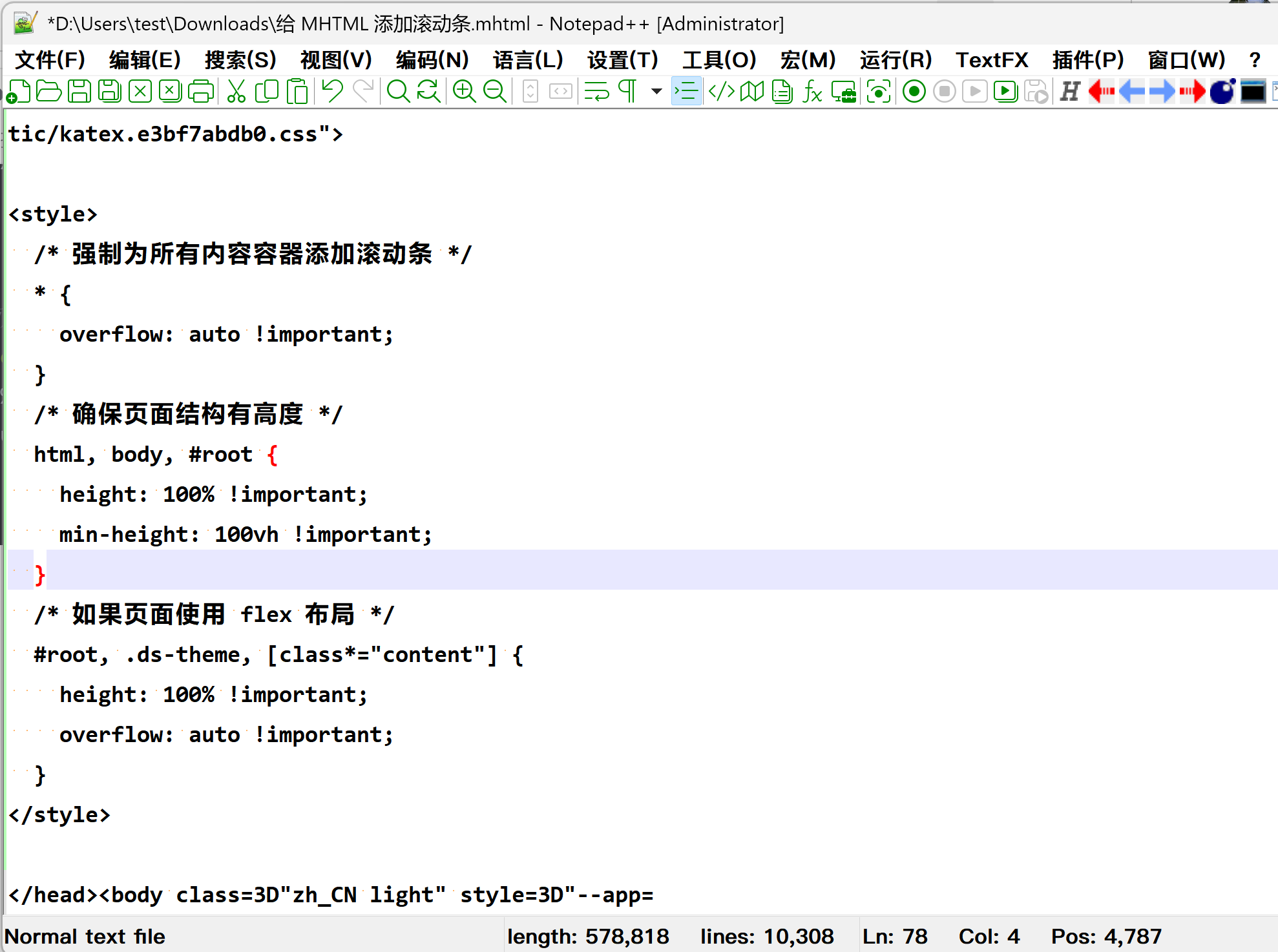
结果示图


 浙公网安备 33010602011771号