

8.基础IO(三) - 实践
一.上集回顾
建议先学上篇博客,再向下学习,上篇博客的链接如下:
二.myshell增加重定向功能
1.回顾
上篇博客,我们完成了关于重定向内容的定义和指令的分析

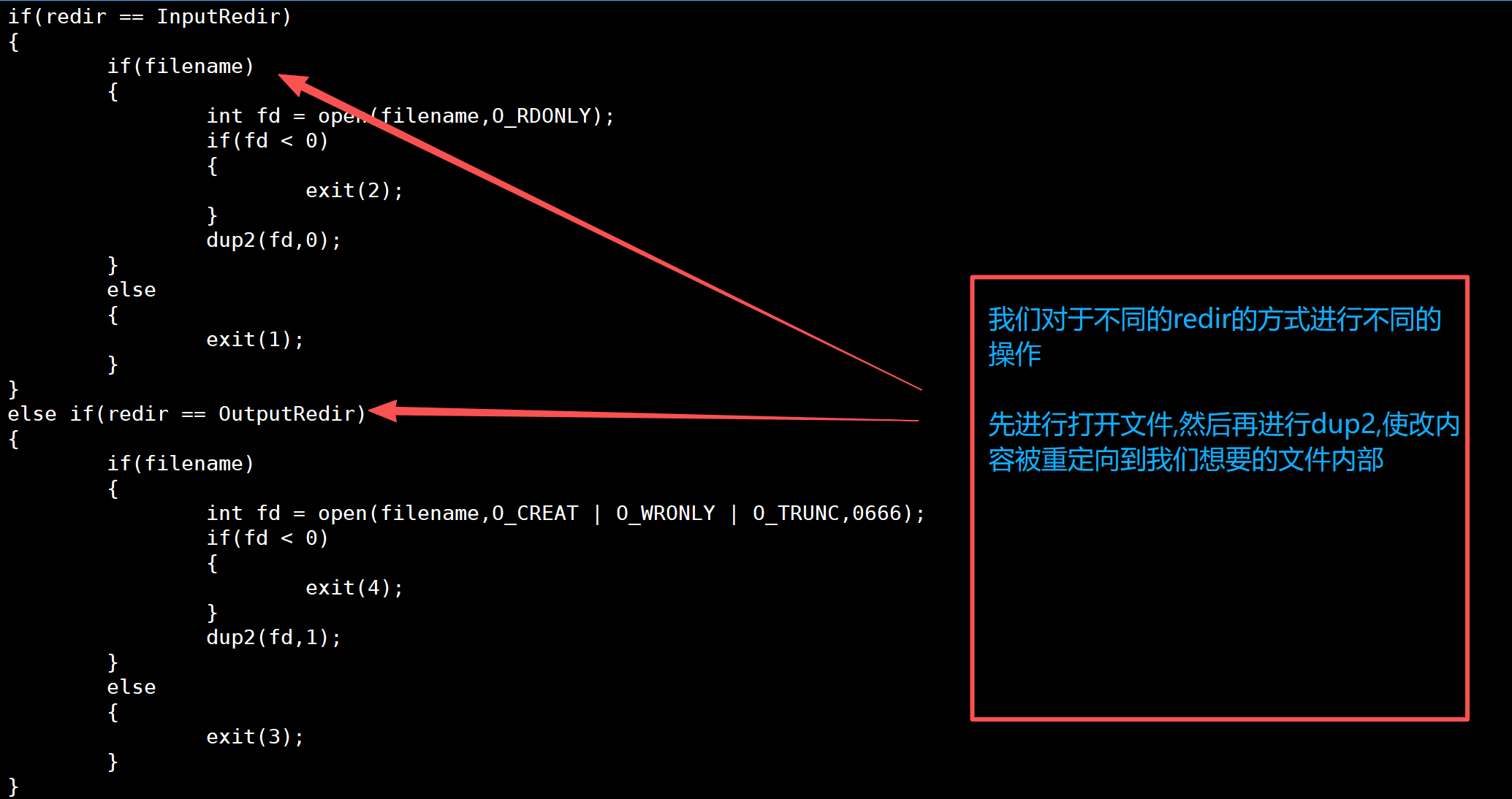
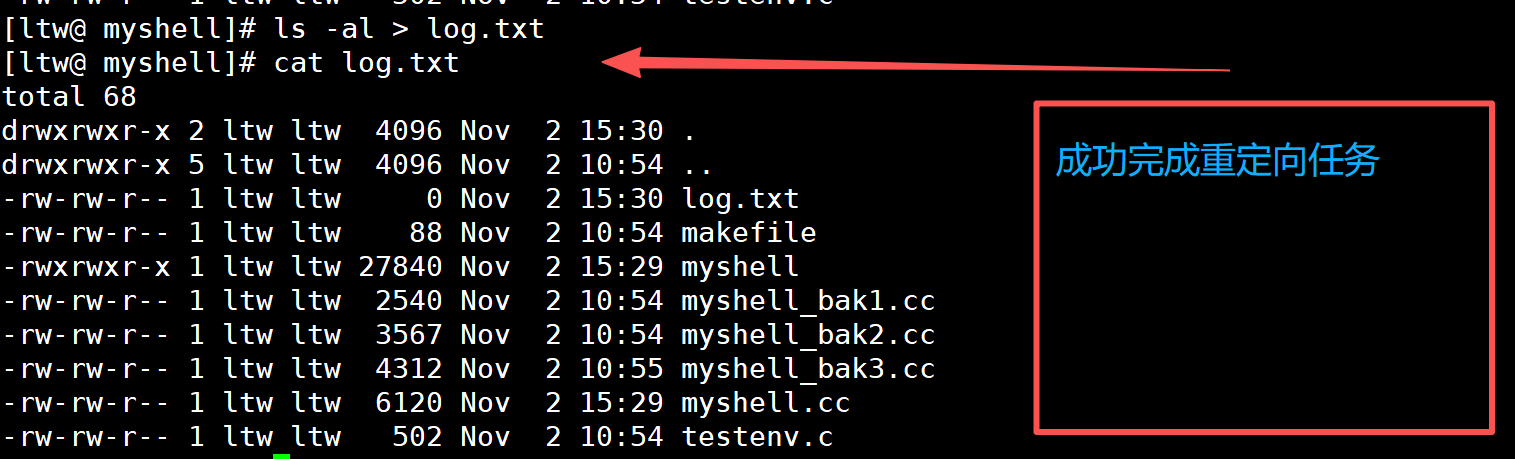
2.执行重定向指令
a.重定向应该交给子进程进行操作
b.程序替换会不会影响我们的重定向?
答案是 不会影响
因为程序替换只会对我们的代码和数据进行操作,不会影响我们的文件描述符表
bool ExecuteCommand()   //4.执行命令
{
	//子进程执行命令
	pid_t id = fork();
	if(id < 0)
	{
		return false;
	}
	else if(id == 0)
	{
		//子进程
		if(redir == InputRedir)
		{
			if(filename)
			{
				int fd = open(filename,O_RDONLY);
				if(fd < 0)
				{
					exit(2);
				}
				dup2(fd,0);
			}
			else
			{
				exit(1);
			}
		}
		else if(redir == OutputRedir)
		{
			if(filename)
			{
				int fd = open(filename,O_CREAT | O_WRONLY | O_TRUNC,0666);
				if(fd < 0)
				{
					exit(4);
				}
				dup2(fd,1);
			}
			else
			{
				exit(3);
			}
		}
		else if(redir == AppRedir)
		{
			if(filename)
			{
				int fd = open(filename,O_CREAT | O_WRONLY | O_APPEND,0666);
				if(fd < 0)
				{
					exit(6);
				}
				dup2(fd,1);
			}
			else
			{
				exit(5);
			}
		}
		else
		{
			//没有重定向,Do Nothing!
		}
		//1.执行命令
		execvpe(gargv[0],gargv,genv);
		//2.退出
		exit(1);
	}
	int status = 0;
	pid_t rid = waitpid(id,&status,0);
	if(rid > 0)
	{
		if(WIFEXITED(status))
		{
			lastcode = WEXITSTATUS(status);
		}
		else
		{
			lastcode = 100;
		}
		return true;
	}
	return false;
}
3.修改代码
#include
#include
#include
#include
#include
#include
#include
#include
#include
#include
#include
using namespace std;
const int basesize = 1024;
const int argvnum = 64;
const int envnum = 64;
// 全局的命令行参数表
char *gargv[argvnum];
int gargc = 0;
// 全局的变量
int lastcode = 0;
// 我的系统的环境变量
char *genv[envnum];
// 全局的当前shell工作路径
char pwd[basesize];
char pwdenv[basesize];
// 全局变量与重定向有关
#define NoneRedir   0
#define InputRedir  1
#define OutputRedir 2
#define AppRedir    3
int redir = NoneRedir;
char *filename = nullptr;
// "    "file.txt
#define TrimSpace(pos) do{\
    while(isspace(*pos)){\
        pos++;\
    }\
}while(0)
string GetUserName()
{
    string name = getenv("USER");
    return name.empty() ? "None" : name;
}
string GetHostName()
{
    string hostname = getenv("HOSTNAME");
    return hostname.empty() ? "None" : hostname;
}
string GetPwd()
{
    if(nullptr == getcwd(pwd, sizeof(pwd))) return "None";
    snprintf(pwdenv, sizeof(pwdenv),"PWD=%s", pwd);
    putenv(pwdenv);
    return pwd;
}
string LastDir()
{
    string curr = GetPwd();
    if(curr == "/" || curr == "None") return curr;
    size_t pos = curr.rfind("/");
    if(pos == std::string::npos) return curr;
    return curr.substr(pos+1);
}
string MakeCommandLine()
{
    char command_line[basesize];
    snprintf(command_line, basesize, "[%s@%s %s]# ",\
            GetUserName().c_str(), GetHostName().c_str(), LastDir().c_str());
    return command_line;
}
void PrintCommandLine() // 1. 命令行提示符
{
    printf("%s", MakeCommandLine().c_str());
    fflush(stdout);
}
bool GetCommandLine(char command_buffer[], int size)   // 2. 获取用户命令
{
    char *result = fgets(command_buffer, size, stdin);
    if(!result)
    {
        return false;
    }
    command_buffer[strlen(command_buffer)-1] = 0;
    if(strlen(command_buffer) == 0) return false;
    return true;
}
void ResetCommandline()
{
    memset(gargv, 0, sizeof(gargv));
    gargc = 0;
    // 重定向
    redir = NoneRedir;
    filename = nullptr;
}
void ParseRedir(char command_buffer[], int len)
{
    int end = len - 1;
    while(end >= 0)
    {
        if(command_buffer[end] == '<')
        {
            redir = InputRedir;
            command_buffer[end] = 0;
            filename = &command_buffer[end] + 1;
            TrimSpace(filename);
            break;
        }
        else if(command_buffer[end] == '>')
        {
            if(command_buffer[end-1] == '>')
            {
                redir = AppRedir;
                command_buffer[end] = 0;
                command_buffer[end-1] = 0;
                filename = &command_buffer[end]+1;
                TrimSpace(filename);
                break;
            }
            else
            {
                redir = OutputRedir;
                command_buffer[end] = 0;
                filename = &command_buffer[end]+1;
                TrimSpace(filename);
                break;
            }
        }
        else
        {
            end--;
        }
    }
}
void ParseCommand(char command_buffer[])
{
    // "ls -a -l -n"
    const char *sep = " ";
    gargv[gargc++] = strtok(command_buffer, sep);
    // =是刻意写的
    while((bool)(gargv[gargc++] = strtok(nullptr, sep)));
    gargc--;
}
void ParseCommandLine(char command_buffer[], int len) // 3. 分析命令
{
    ResetCommandline();
    ParseRedir(command_buffer, len);
    ParseCommand(command_buffer);
}
void debug()
{
    printf("argc: %d\n", gargc);
    for(int i = 0; gargv[i]; i++)
    {
        printf("argv[%d]: %s\n", i, gargv[i]);
    }
}
void DoRedir()
{
    if(redir == InputRedir)
    {
        if(filename)
        {
            int fd = open(filename, O_RDONLY);
            if(fd < 0)
            {
                exit(2);
            }
            dup2(fd, 0);
        }
        else
        {
            exit(1);
        }
    }
    else if(redir == OutputRedir)
    {
        if(filename)
        {
            int fd = open(filename, O_CREAT | O_WRONLY | O_TRUNC, 0666);
            if(fd < 0)
            {
                exit(4);
            }
            dup2(fd, 1);
        }
        else
        {
            exit(3);
        }
    }
    else if(redir == AppRedir)
    {
        if(filename)
        {
            int fd = open(filename, O_CREAT | O_WRONLY | O_APPEND, 0666);
            if(fd < 0)
            {
                exit(6);
            }
            dup2(fd, 1);
        }
        else
        {
            exit(5);
        }
    }
    else
    {
        // 没有重定向,Do Nothong!
    }
}
bool ExecuteCommand()   // 4. 执行命令
{
    // 让子进程进行执行
    pid_t id = fork();
    if(id < 0) return false;
    if(id == 0)
    {
        //子进程
        DoRedir();
        // 1. 执行命令
        execvpe(gargv[0], gargv, genv);
        // 2. 退出
        exit(7);
    }
    int status = 0;
    pid_t rid = waitpid(id, &status, 0);
    if(rid > 0)
    {
        if(WIFEXITED(status))
        {
            lastcode = WEXITSTATUS(status);
        }
        else
        {
            lastcode = 100;
        }
        return true;
    }
    return false;
}
void AddEnv(const char *item)
{
    int index = 0;
    while(genv[index])
    {
        index++;
    }
    genv[index] = (char*)malloc(strlen(item)+1);
    strncpy(genv[index], item, strlen(item)+1);
    genv[++index] = nullptr;
}
// shell自己执行命令,本质是shell调用自己的函数
bool CheckAndExecBuiltCommand()
{
    if(strcmp(gargv[0], "cd") == 0)
    {
        // 内建命令
        if(gargc == 2)
        {
            chdir(gargv[1]);
            lastcode = 0;
        }
        else
        {
            lastcode = 1;
        }
        return true;
    }
    else if(strcmp(gargv[0], "export") == 0)
    {
        // export也是内建命令
        if(gargc == 2)
        {
            AddEnv(gargv[1]);
            lastcode = 0;
        }
        else
        {
            lastcode = 2;
        }
        return true;
    }
    else if(strcmp(gargv[0], "env") == 0)
    {
        for(int i = 0; genv[i]; i++)
        {
            printf("%s\n", genv[i]);
        }
        lastcode = 0;
        return true;
    }
    else if(strcmp(gargv[0], "echo") == 0)
    {
        if(gargc == 2)
        {
            // echo $?
            // echo $PATH
            // echo hello
            if(gargv[1][0] == '$')
            {
                if(gargv[1][1] == '?')
                {
                    printf("%d\n", lastcode);
                    lastcode = 0;
                }
            }
            else
            {
                printf("%s\n", gargv[1]);
                lastcode = 0;
            }
        }
        else
        {
            lastcode = 3;
        }
        return true;
    }
    return false;
}
void InitEnv()
{
    extern char **environ;
    int index = 0;
    while(environ[index])
    {
        genv[index] = (char*)malloc(strlen(environ[index])+1);
        strncpy(genv[index], environ[index], strlen(environ[index])+1);
        index++;
    }
    genv[index] = nullptr;
}
int main()
{
    InitEnv();
    char command_buffer[basesize];
    while(true)
    {
        PrintCommandLine(); // 1. 命令行提示符
        // command_buffer -> output
        if( !GetCommandLine(command_buffer, basesize) )   // 2. 获取用户命令
        {
            continue;
        }
        ParseCommandLine(command_buffer, strlen(command_buffer)); // 3. 分析命令
        if ( CheckAndExecBuiltCommand() )
        {
            continue;
        }
        ExecuteCommand();   // 4. 执行命令
    }
    return 0;
}
fd是不需要进行关闭的(close(fd)) --> (子进程创建的)
文件描述符的生命周期随进程(进程退出,fd直接被回收了)
三.系统调用和封装调用


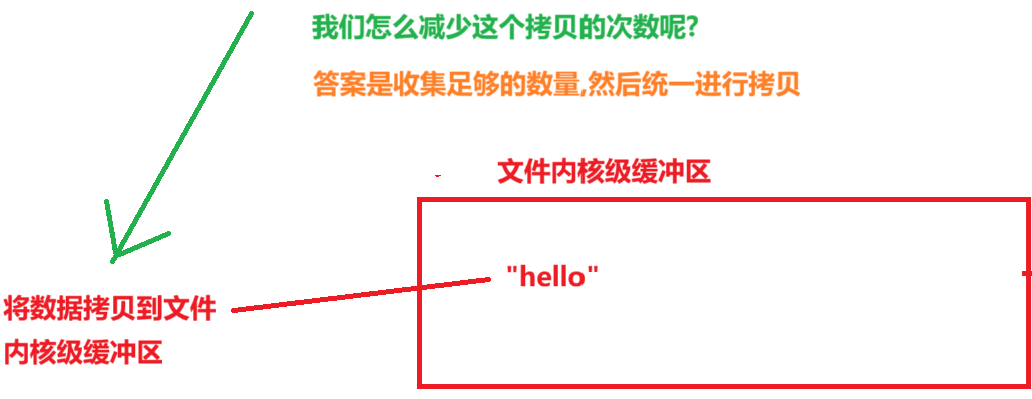
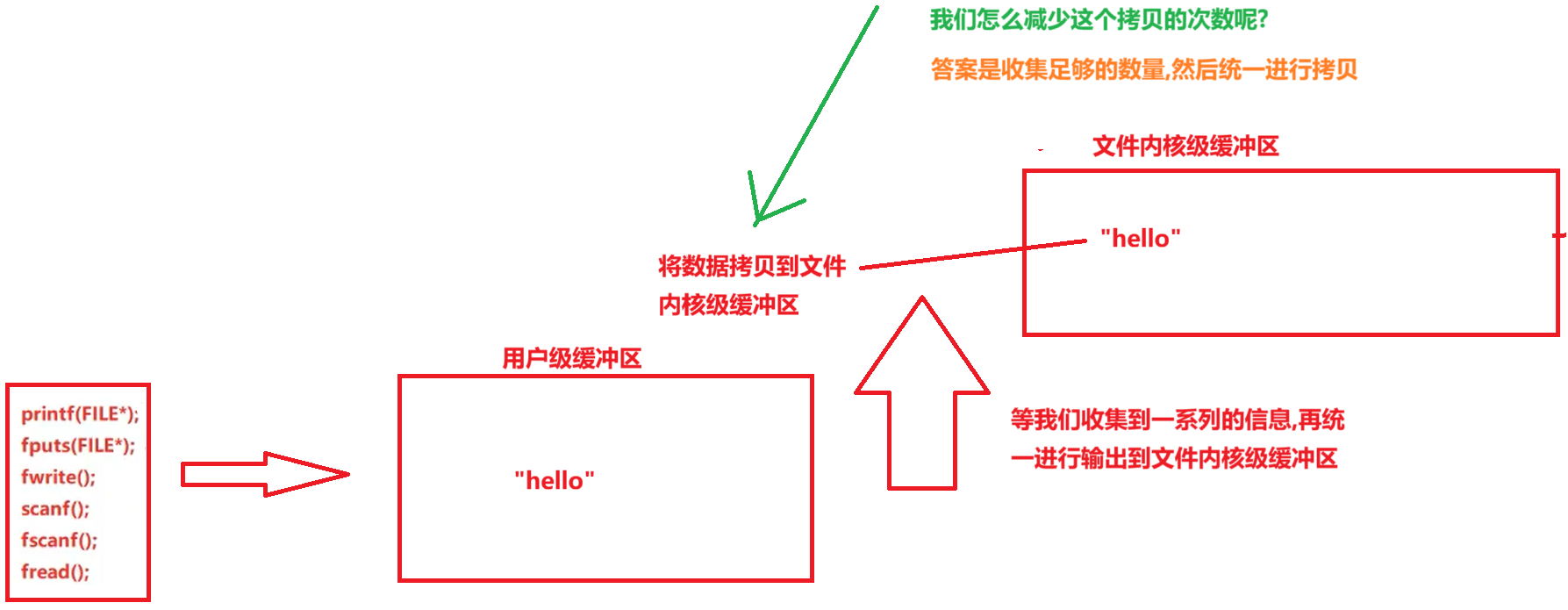
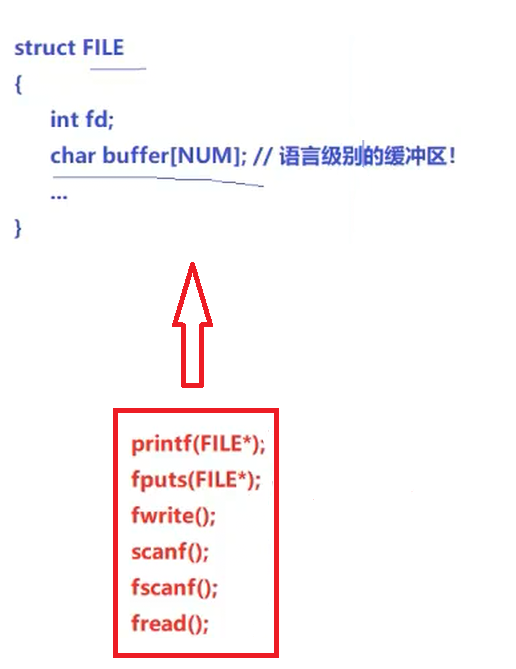
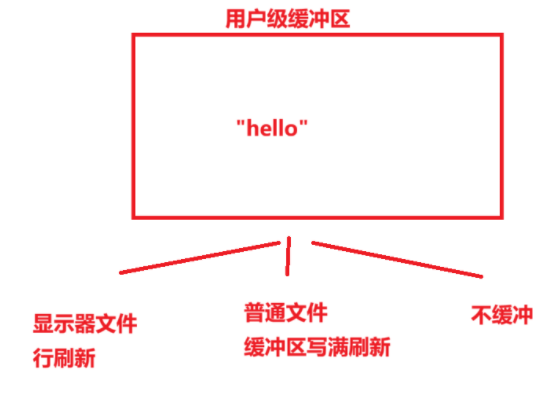
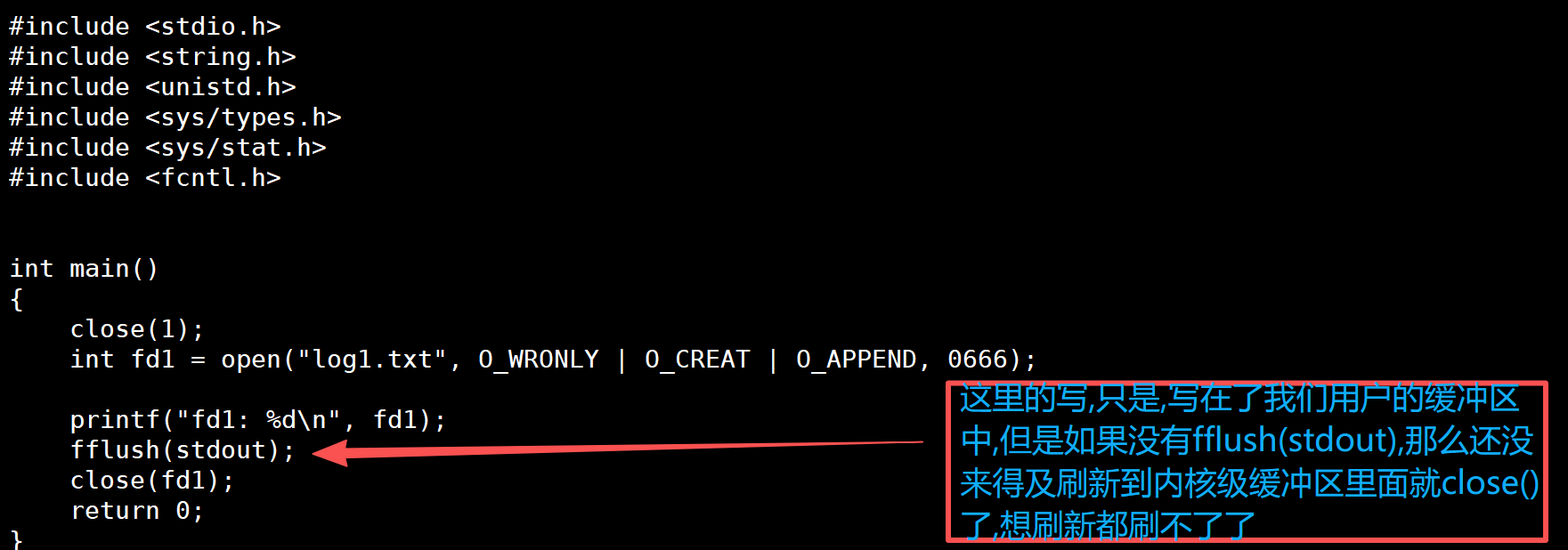
我们要尽量少的使用系统调用(时间耗费多),这也是为什么我们的vector,map等有内存池或者扩容一次(1.5倍 -> 2倍)的原因,这样就能减少系统调用的次数(让程序更高效)
#include
#include
#include
#include
#include
#include
int main()
{
	close(1);
	int fd1 = open("log1.txt", O_WRONLY | O_CREAT | O_APPEND, 0666);
    printf("fd1: %d\n", fd1);
	fflush(stdout);
    close(fd1);
	return 0;
}
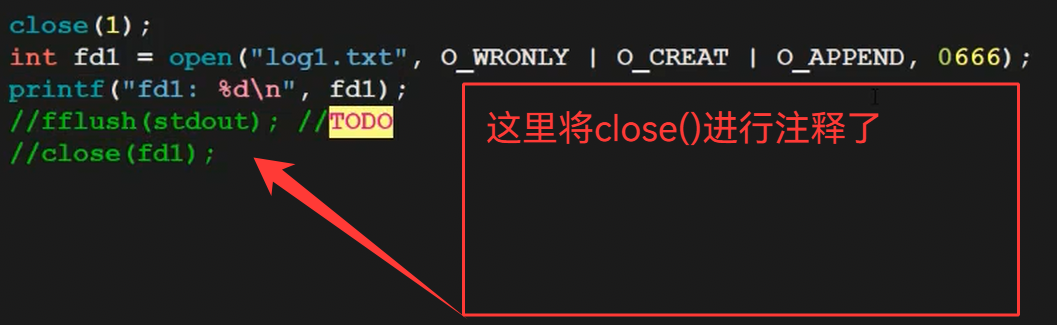
但是,如果我们不写close()呢?
#include
#include
#include
#include
#include
#include
int main()
{
	close(1);
	int fd1 = open("log1.txt", O_WRONLY | O_CREAT | O_APPEND, 0666);
    printf("fd1: %d\n", fd1);
	//fflush(stdout);
    //close(fd1);
	return 0;
} 
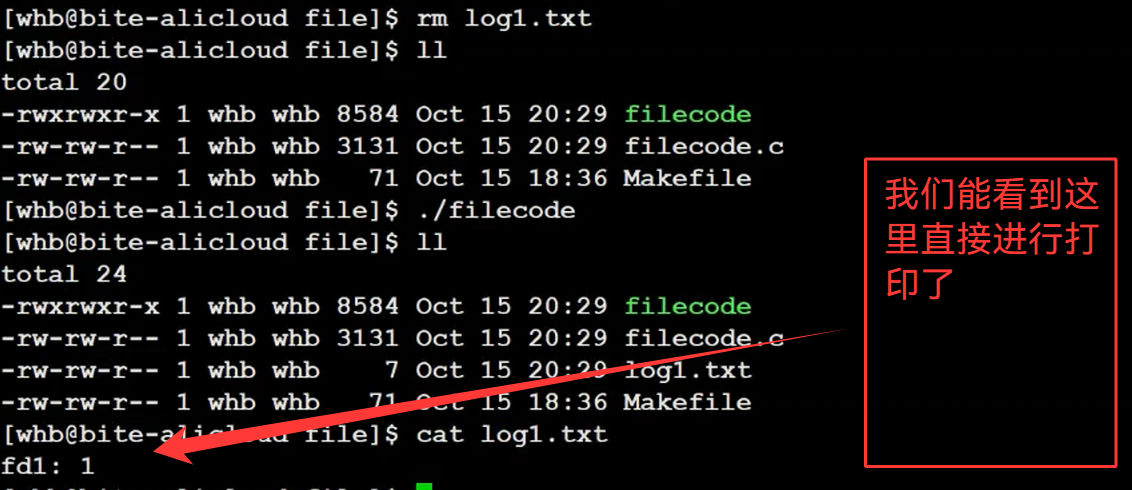
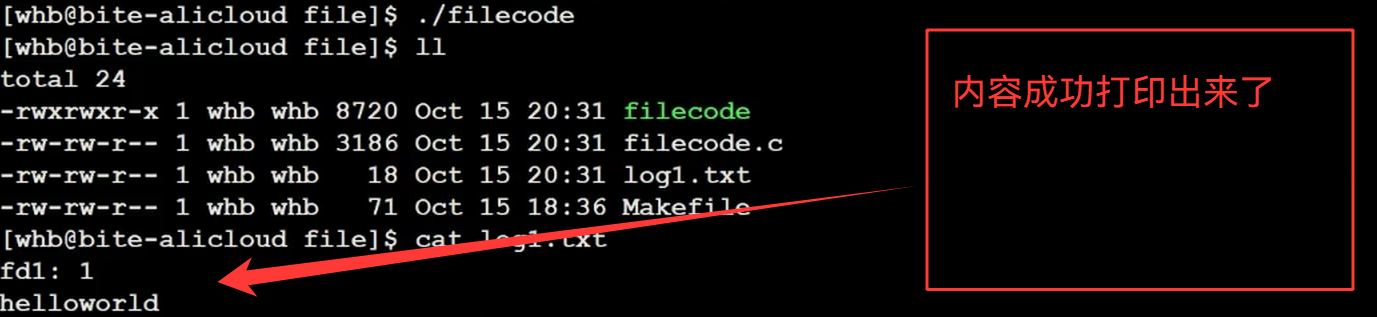
#include
#include
#include
#include
#include
#include
int main()
{
	close(1);
	int fd1 = open("log1.txt", O_WRONLY | O_CREAT | O_APPEND, 0666);
    printf("fd1: %d\n", fd1);
	fprintf(stdout,"helloworld\n");
	//fflush(stdout);
    //close(fd1);
	fclose(stdout);
	return 0;
} 


还有一点
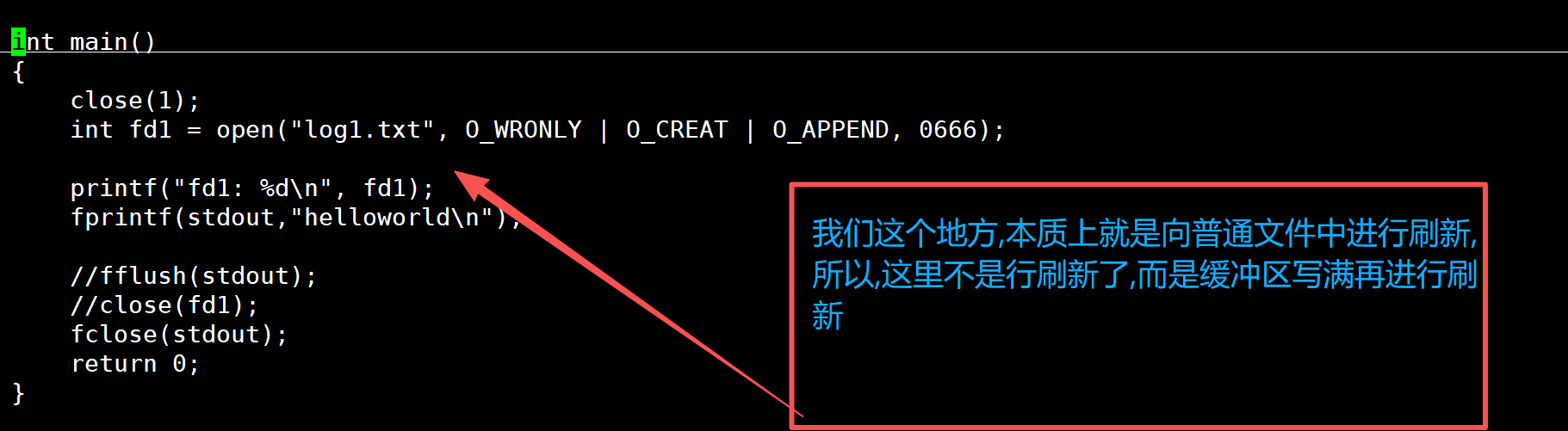
由内核缓冲区刷新到外设,是由操作系统决定的(还有强制刷新的系统调用)

四.缓冲区的理解
#include
#include
#include
int main()
{
    // C库函数
    printf("hello printf\n");
    fprintf(stdout, "hello fprintf\n");
    const char *message = "hello fwrite\n";
    fwrite(message, 1, strlen(message), stdout);
    // 系统调用
    const char *w = "hello write\n";
    write(1, w, strlen(w));
    return 0;
} 

#include
#include
#include
int main()
{
    // C库函数
    printf("hello printf\n");
    fprintf(stdout, "hello fprintf\n");
    const char *message = "hello fwrite\n";
    fwrite(message, 1, strlen(message), stdout);
    // 系统调用
    const char *w = "hello write\n";
    write(1, w, strlen(w));
	//创建子进程
	fork();
    return 0;
}
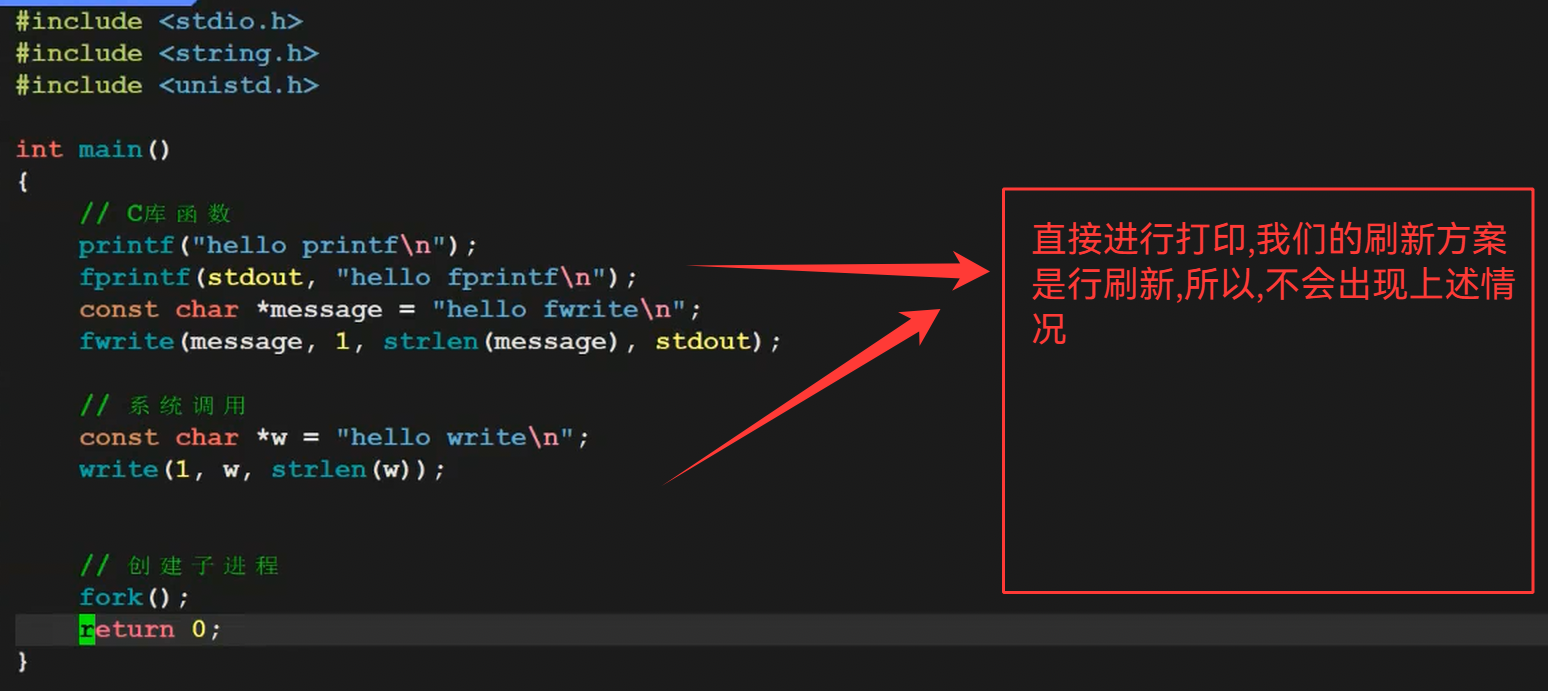
我们在最后加上一个fork()函数,会出现什么情况呢?
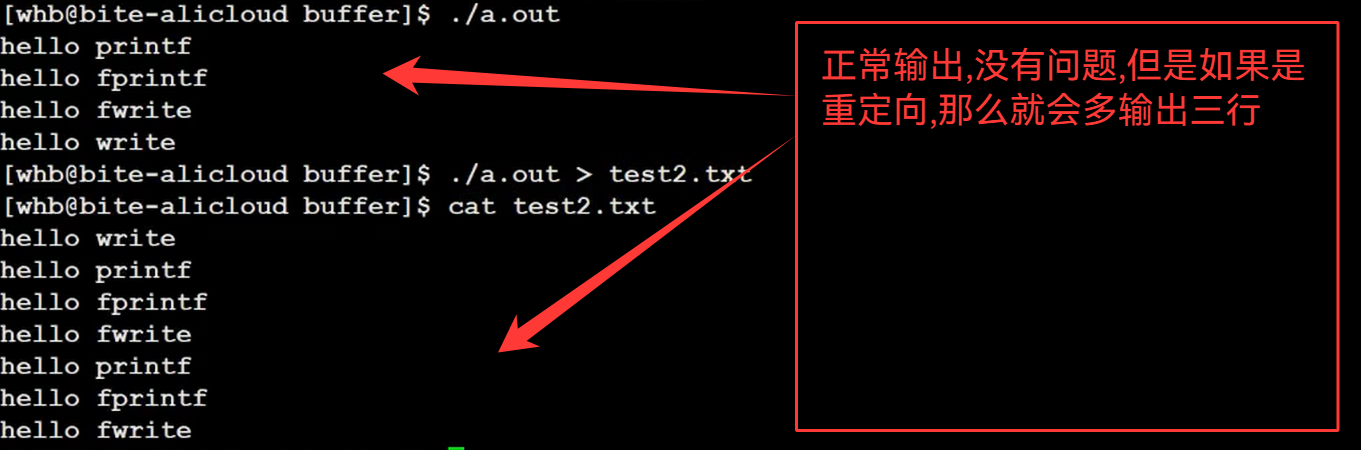
重复打印的,都是C库函数的内容,和系统调用没有关系
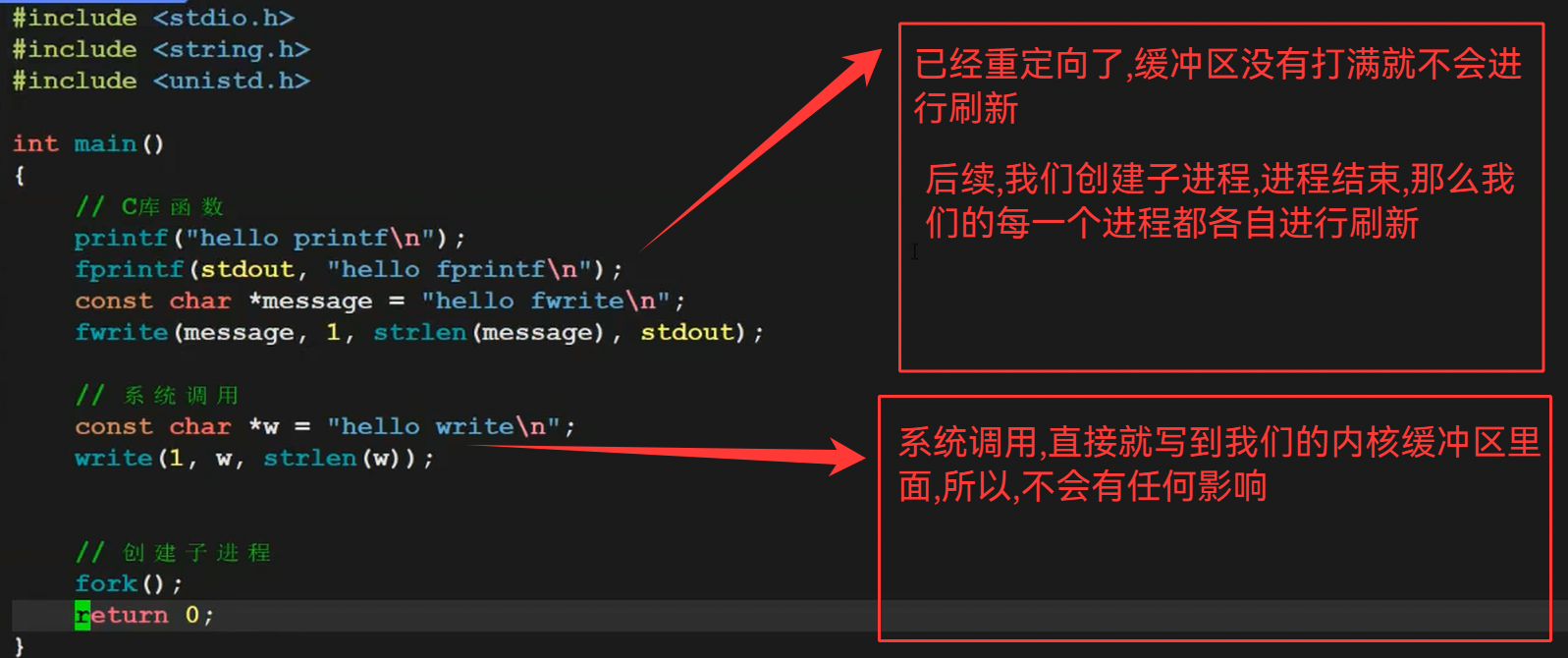
父子进程在刷新的时候,发生了写时拷贝
五.模拟实现stdio.h的fopen,fwrite等函数
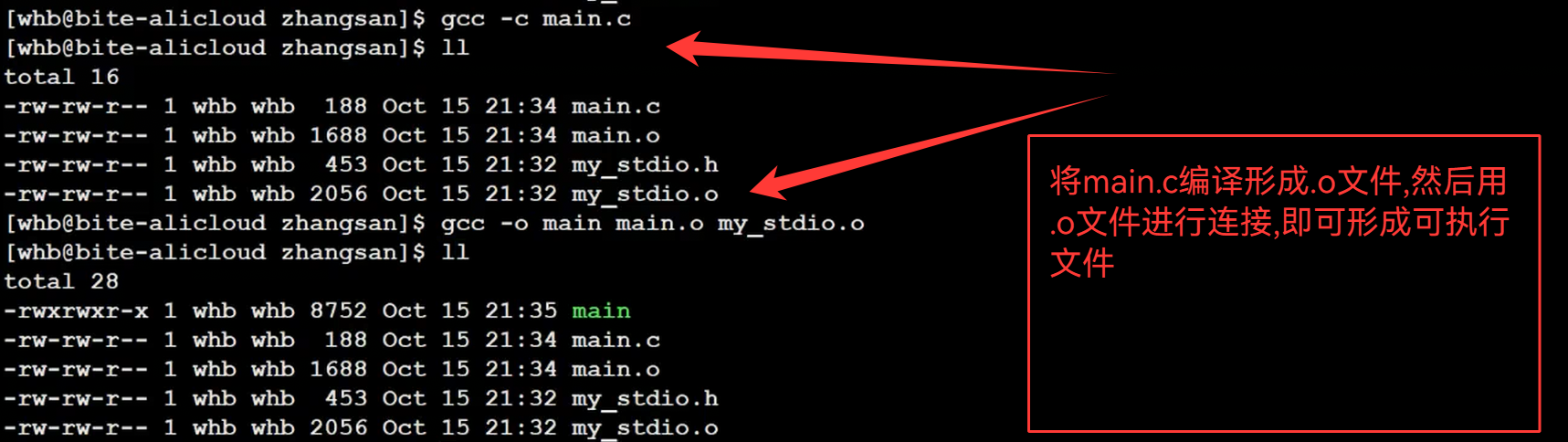
"my_stdio.h"
#pragma once
#define SIZE 1024
#define FLUSH_NONE 0
#define FLUSH_LINE 1
#define FLUSH_FULL 2
struct IO_FILE
{
	int flag;   //刷新方式
	int fileno; //文件描述符
	char outbuffer[SIZE];
    int cap;
    int size;
	// ....
};
typedef struct IO_FILE mFILE;
mFILE *mfopen(const char* filename,const char* mode);
int mfwrite(const void* ptr,int num,mFILE* stream);
void mfflush(mFILE* stream);
void mfclose(mFILE* stream);
1.mfopen()的实现
mFILE *mfopen(const char *filename, const char *mode)
{
	int fd = -1;
	if(strcmp(mode,"r") == 0)
	{
		fd = open(filename,O_RDONLY);
	}
	else if(strcmp(mode,"w") == 0)
	{
		fd = open(filename,O_CREAT|O_ERONLY|O_TRUNC,0666);
	}
	else if(strcmp(mode,"a") == 0)
	{
		fd = open(filename,O_CREAT|O_ERONLY|O_APPEND,0666);
	}
	if(fd < 0)
	{
		return NULL;
	}
	mFILE* mf = (mFILE*)malloc(sizeof(mFILE));
	if(!mf)
	{
		close(fd);
		return NULL;
	}
	mf->fileno = fd;
	mf->flag = FLUSH_LINE;
	mf->size = 0;
	mf->cap = SIZE;
	return mf;
}
2.mfflush()的实现
void mfflush(mFILE *stream)
{
	if(stream->size > 0)
	{
		write(stream->fileno,stream->outbuffer,stream->size);
		stream->size = 0;
	}
}
3.mfwrite()的实现
int mfwrite(const void *ptr, int num, mFILE *stream)
{
	//1.拷贝
	memcpy(stream->outbuffer+stream->size,ptr,num);
	stream->size += num;
	//2.检测是否要刷新
	if(stream->flag == FLUSH_LINE && stream->size > 0 && stream->outbuffer[stream->size-1] == '\n')
	{
		mfflush(stream);
	}
	return num;
}
这里我们只进行对行刷新进行操作,后续可以自己进行补充
4.mclose()的实现
void mfclose(mFILE *stream)
{
	if(stream->size > 0)
	{
		mfflush(stream);
	}
	close(stream->fileno);
}
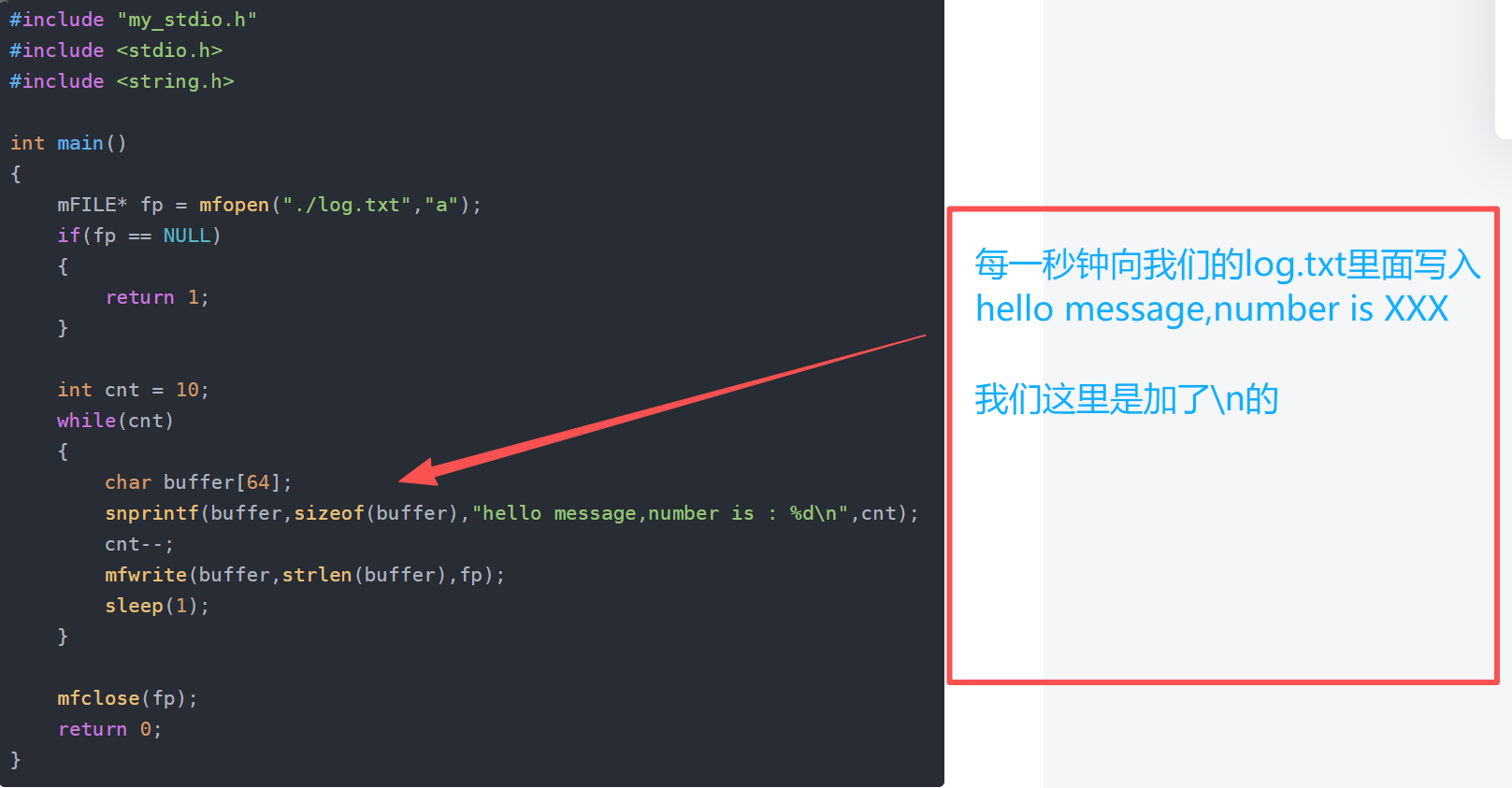
5.main.c的实现
#include "my_stdio.h"
#include
#include
int main()
{
	mFILE* fp = mfopen("./log.txt","a");
	if(fp == NULL)
	{
		return 1;
	}
	int cnt = 10;
	while(cnt)
	{
		char buffer[64];
		snprintf(buffer,sizeof(buffer),"hello message,number is : %d\n",cnt);
		cnt--;
		mfwrite(buffer,strlen(buffer),fp);
		sleep(1);
	}
	mfclose(fp);
	return 0;
} 
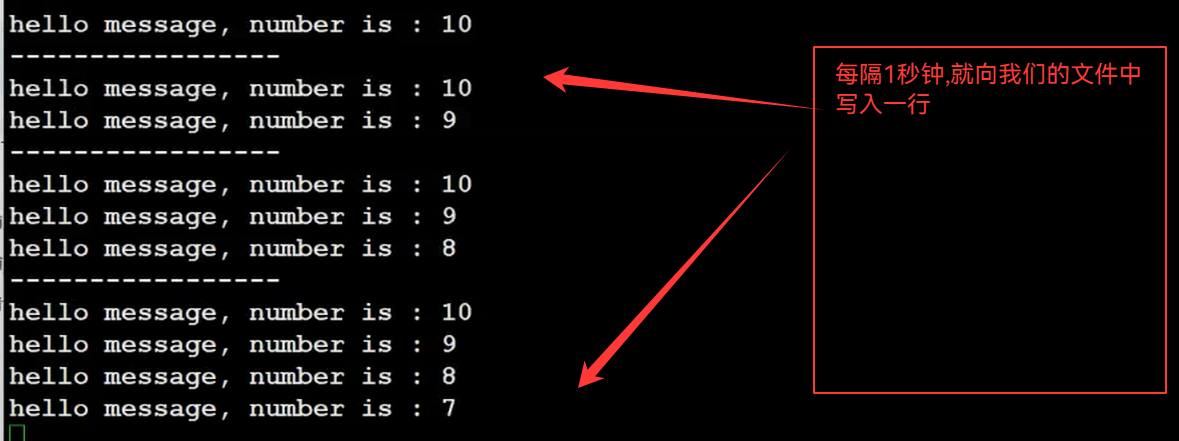
#include "my_stdio.h"
#include
#include
int main()
{
	mFILE* fp = mfopen("./log.txt","a");
	if(fp == NULL)
	{
		return 1;
	}
	int cnt = 10;
	while(cnt)
	{
		char buffer[64];
		snprintf(buffer,sizeof(buffer),"hello message,number is : %d",cnt);
		cnt--;
		mfwrite(buffer,strlen(buffer),fp);
		sleep(1);
	}
	mfclose(fp);
	return 0;
} 
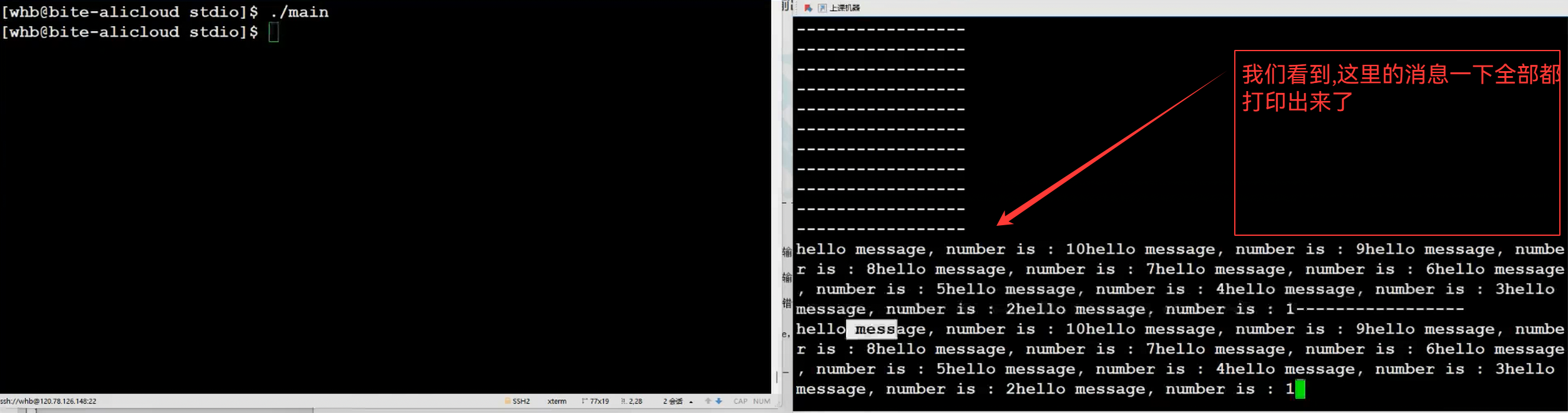
我们写入的就是在文件缓冲区内部
#include "my_stdio.h"
#include
#include
int main()
{
	mFILE* fp = mfopen("./log.txt","a");
	if(fp == NULL)
	{
		return 1;
	}
	int cnt = 10;
	while(cnt)
	{
		char buffer[64];
		snprintf(buffer,sizeof(buffer),"hello message,number is : %d\n",cnt);
		mfflush(fp);
		cnt--;
		mfwrite(buffer,strlen(buffer),fp);
		sleep(1);
	}
	mfclose(fp);
	return 0;
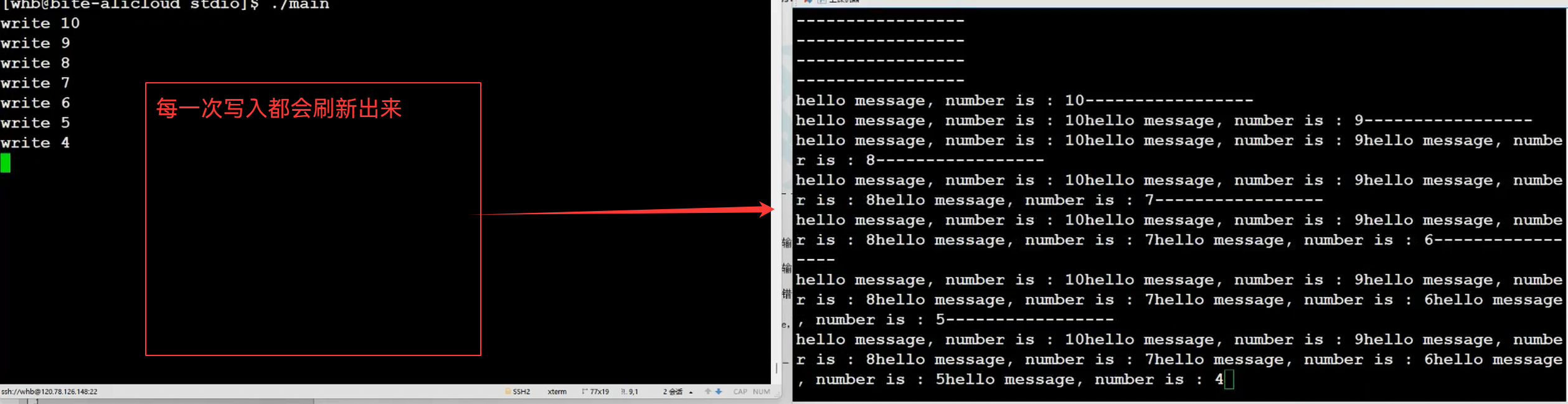
}
我们在这里让其强制进行刷新
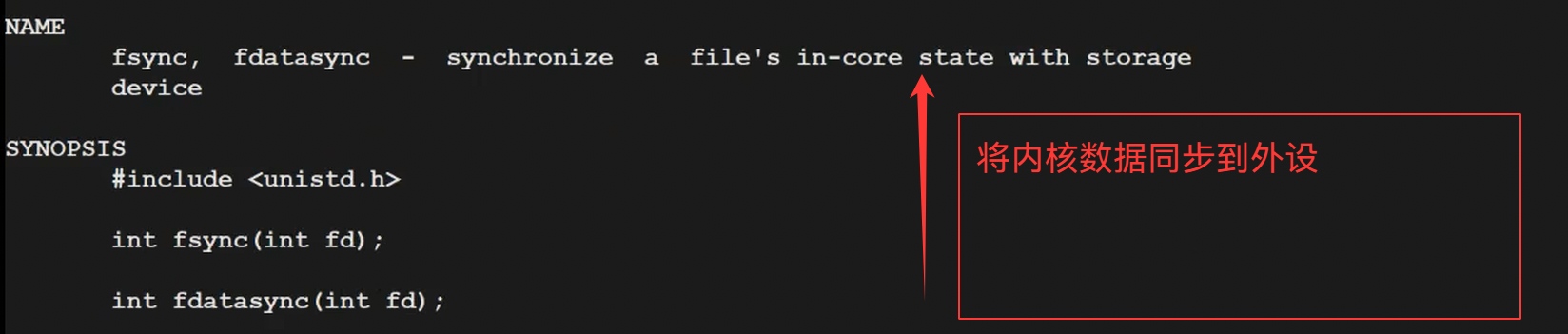
6.内核数据和磁盘的同步
void mfflush(mFILE *stream)
{
	if(stream->size > 0)
	{
		//写到内核文件的文件缓冲区中!
		write(stream->fileno,stream->outbuffer,stream->size);
		//刷新到外设
		fsync(stream->fileno);
		stream->size = 0;
	}
}
这就叫做数据的持久化操作

 浙公网安备 33010602011771号