


vue个人信息卡 - 详解
vue的个人信息卡制作
里面主要使用了porps emits 以及 provide ,inject 算是对我上一篇博客简单的应用,感兴趣的可以尝试一下
father.vue
<template>
    <div class="app">
  <h2>个人信息卡片</h2>
    <input v-model="name" placeholder="请输入你的名字"/>
    <input v-model ="age" placeholder="请输入你的年龄"/>
    <input v-model="job" placeholder="你的工作"/>
  <button @click="change()">提交修改</button>
    <input type="color" v-model="color"/>
  <button @click="changeColor()">改变颜色</button>
    <BasicInfo
      :name="name1"
      :age="age1"
      :job="job1"
    />
    <Hobby :hobbies="hobbyList" @match="match" @back="deletes"/>
  </div>
</template>
  <script setup>
  import BasicInfo from './son.vue'
  import Hobby from './hooby.vue'
  import { ref,provide } from 'vue'
  const hobbyList = ref(['Vue开发', '篮球', '阅读', '旅行'])
  const name =ref('')
  const age=ref()
  const job = ref('')
  const name1  = ref('张三')
  const age1 = ref(20)
  const job1 = ref('软件工程师')
  const color = ref('')
  const color1 = ref('')
  const change=()=>{//这个是我的修改个人信息卡的事件
  name1.value=name.value
  age1.value=age.value
  job1.value=job.value
  }
  const changeColor=()=>{
  color1.value=color.value
  }
  // 定义provide
  provide("changecolor",color1)
  //定义子组件中的deletes要删除的index
  function deletes(value){
  hobbyList.value.splice(value,1)
  }
  // 定义子组件中的match要添加的爱好
  function match(value){
  hobbyList.value.push(value)
  }
</script>
  <style scoped>
  .app {
  padding: 20px;
  }
  .app h2 {
  color: #2c3e50;
  }
</style>
son.vue
<!-- eslint-disable vue/multi-word-component-names -->
  <template>
      <div class="basic-info">
    <h3>基本信息</h3>
      <ul>
      <li v-bind:style="{color:textcolor}">姓名:{{ name }}</li>
      <li v-bind:style="{color:textcolor}">年龄:{{ age }}</li>
      <li v-bind:style="{color:textcolor}">职业:{{ job }}</li>
      </ul>
    </div>
  </template>
  <script>
    export default {
    props: {
    name: String,
    age:{
    type:Number,
    validator(value){
    if (typeof value !== 'number') {
    console.log("内容不符合规范,要的是数字类型数据")
    return false
    }
    return true
    }
    },
    job: String,
    },
    inject:['changecolor'],
    computed:{
    textcolor(){
    return this.changecolor
    }
    }
    }
  </script>
    <style scoped>
    .basic-info {
    border: 2px solid #42b983;
    border-radius: 8px;
    padding: 15px;
    margin-bottom: 20px;
    width: 300px;
    }
    .basic-info h3 {
    color: #42b983;
    margin-top: 0;
    }
    .basic-info ul {
    list-style: none;
    padding-left: 0;
    }
    .basic-info li {
    margin: 8px 0;
    }
  </style>
hooby.vue
<!-- eslint-disable vue/multi-word-component-names -->
  <template>
      <div class="hobby">
      <input placeholder="添加爱好" v-model="aihao" @keyup.enter.exact="multplay()"/>
    <button @click="multplay()" >确认添加</button>
    <h3>兴趣爱好</h3>
        <div class="hobby-list">
      <span v-for="(item, index) in hobbies" :key="index" @click="deletes(index)">{{ item }}</span>
      </div>
    </div>
  </template>
    <script setup>
    import {ref} from 'vue'
    defineProps({
    hobbies: Array
    })
    const emit = defineEmits(['match','back'])
    // 删除爱好function
    function deletes(index){
    emit('back',index)
    }
    // 增加 爱好function
    const aihao = ref('')
    // 有点卡顿这里我使用异步方法看看
    async function multplay(){
    emit('match',aihao.value)
    aihao.value=''
    }
  </script>
    <style scoped>
    .hobby {
    border: 2px solid #3498db;
    border-radius: 8px;
    padding: 15px;
    width: 300px;
    }
    .hobby h3 {
    color: #3498db;
    margin-top: 0;
    }
    .hobby-list {
    display: flex;
    flex-wrap: wrap;
    gap: 10px;
    }
    .hobby-list span {
    background-color: #e3f2fd;
    padding: 5px 10px;
    border-radius: 20px;
    }
  </style>
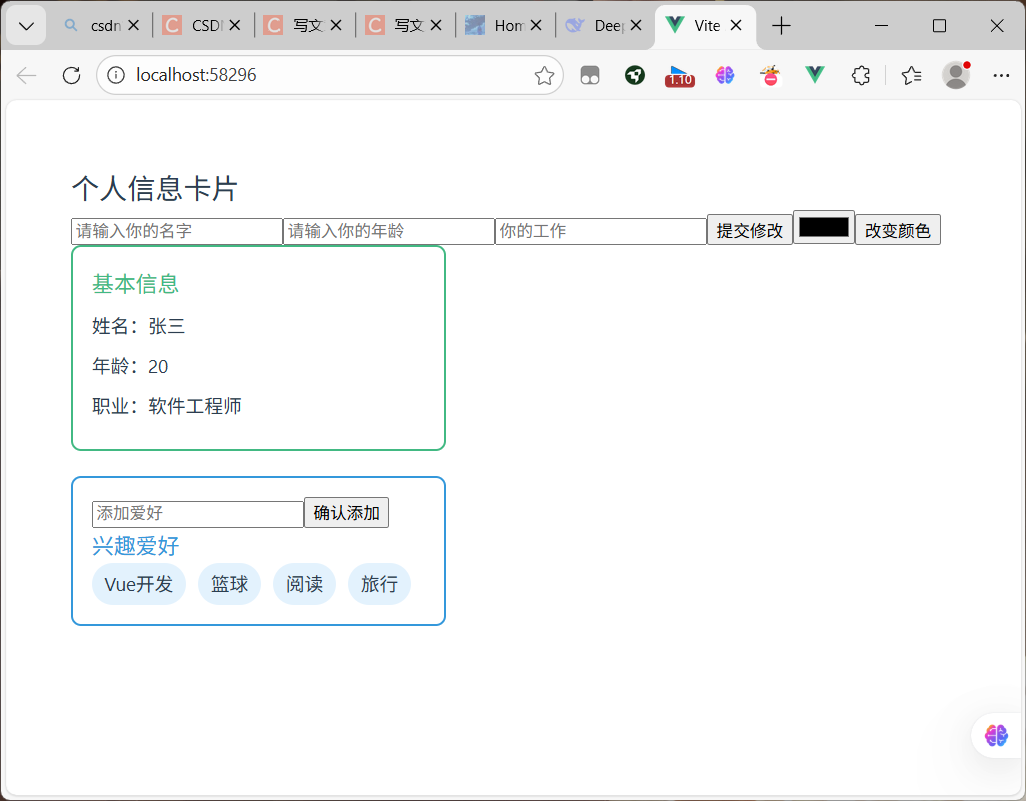
运行结果
可以改变基本信息的颜色,以及添加删除兴趣爱好

 浙公网安备 33010602011771号