


跨设备状态同步实战:基于 HarmonyOS 分布式数据管理(DDM)构建多端协同应用 - 详解
- 个人首页: VON
- 鸿蒙系列专栏: 鸿蒙开发小型案例总结
- 综合案例 :鸿蒙综合案例开发
- 鸿蒙6.0:从0开始的开源鸿蒙6.0.0
- 鸿蒙5.0:鸿蒙5.0零基础入门到项目实战
- Electron适配开源鸿蒙专栏:Electron for OpenHarmony
- Flutter 适配开源鸿蒙专栏:Flutter for OpenHarmony
跨设备状态同步实战
基于 HarmonyOS 分布式数据管理(DDM)构建多端协同应用
——涵盖数据模型设计、KV 存储操作、监听机制与典型场景落地
作者:VON
技术栈:Vue 3 + TypeScript + Vite + DevUI
参考文档
- MateChat:https://gitcode.com/DevCloudFE/MateChat
- MateChat官网:https://matechat.gitcode.com
- DevUI官网:https://devui.design/home
在万物互联时代,用户不再只使用单一设备。他们可能在手机上开始一项任务,在平板上继续编辑,最后在车机上完成确认。如何让数据在这些设备间无缝流动? 这正是 HarmonyOS 分布式数据管理(Distributed Data Management, DDM) 的核心使命。
本文将带你从零实现一个 “跨设备待办事项(To-Do List)” 应用,深入掌握 DDM 的关键能力:数据建模、跨设备写入、实时监听、冲突处理,助你构建真正“一次开发,多端协同”的鸿蒙原生体验。
一、为什么选择 DDM?
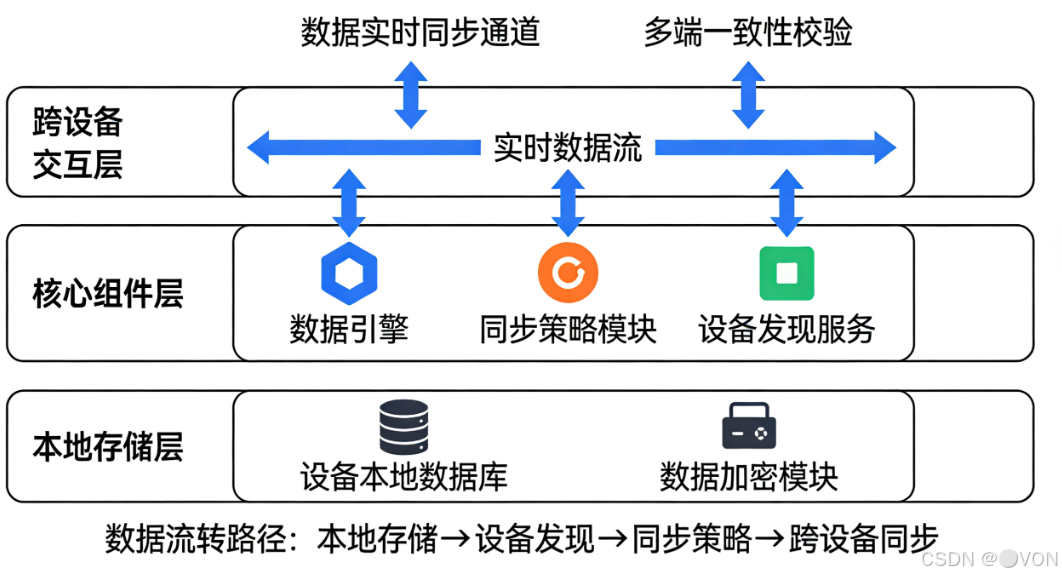
DDM 是 HarmonyOS 提供的原生分布式数据同步能力,具备以下优势:
- ✅ 自动组网同步:设备加入同一账号后,数据自动加密同步
- ✅ 本地优先读写:即使离线也可操作,网络恢复后自动合并
- ✅ 事件驱动更新:通过监听器实时响应数据变更
- ✅ 类型安全支持:配合 ArkTS 实现强类型数据管理
- ✅ 低功耗优化:基于软总线,通信效率高、能耗低
适用场景:笔记同步、购物清单、健康管理、协同办公等需跨设备状态一致的应用。
二、第一步:创建分布式 KV Store
DDM 的核心是 分布式键值存储(Distributed KV Store)。我们先初始化它:
// store/DistributedTodoStore.ets
import distributedData from '@ohos.data.distributedData';
class DistributedTodoStore {
private kvManager: distributedData.KVManager | null = null;
async init() {
const config: distributedData.KVManagerConfig = {
bundleName: 'com.example.todoapp',
storeName: 'todo_items' // 同一 storeName 的设备会自动同步
};
this.kvManager = await distributedData.createKVManager(config);
console.log('分布式存储初始化成功');
}
// 写入待办事项
async putTodo(id: string, todo: TodoItem): Promise<void> {
  if (!this.kvManager) throw new Error('Store not initialized');
  await this.kvManager.put(id, JSON.stringify(todo));
  }
  // 读取单条
  async getTodo(id: string): Promise<TodoItem | null> {
    if (!this.kvManager) return null;
    const val = await this.kvManager.get(id);
    return val ? JSON.parse(val) : null;
    }
    // 获取所有(需遍历)
    async getAllTodos(): Promise<TodoItem[]> {
      if (!this.kvManager) return [];
      const result: TodoItem[] = [];
      await this.kvManager.on('dataChange', (device, key) => {
      // 注意:getAll 需结合快照或本地缓存,此处简化
      });
      // 实际建议:维护本地列表 + 监听增量更新
      return result;
      }
}注意:
storeName必须全局唯一且一致,否则设备间无法识别为同一数据集。
三、核心功能实现:跨设备增删改查
1. 添加待办事项(任一设备均可发起)
// pages/Index.ets
@Entry
@Component
struct TodoListPage {
@State todos: TodoItem[] = [];
private store = new DistributedTodoStore();
aboutToAppear() {
this.store.init();
this.loadTodos();
this.setupListener();
}
build() {
Column() {
Button('添加测试任务')
.onClick(async () => {
const newTodo: TodoItem = {
id: Date.now().toString(),
title: '来自手机的新任务',
completed: false,
createdAt: Date.now()
};
await this.store.putTodo(newTodo.id, newTodo);
// 无需手动刷新 UI,监听器会触发更新
})
// 渲染列表...
}
}
}
2. 实时监听数据变更(关键!)
// 在 aboutToAppear 中注册监听
private setupListener() {
if (!this.store.kvManager) return;
this.store.kvManager.on('dataChange', (device, key) => {
// device: 变更来源设备 networkId
// key: 变更的键(如 "1712345678901")
// 重新加载全部数据(简化版)
this.loadTodos();
// 更优做法:仅更新变更项
// this.updateSingleTodo(key);
});
}
⚠️ 避坑:
dataChange事件在所有设备上都会触发(包括写入设备自身),避免重复操作。
3. 标记完成 / 删除(自动同步)
private async toggleComplete(id: string) {
const todo = await this.store.getTodo(id);
if (todo) {
todo.completed = !todo.completed;
await this.store.putTodo(id, todo); // 写入即同步
}
}
private async deleteTodo(id: string) {
if (this.store.kvManager) {
await this.store.kvManager.delete(id); // 删除也同步
}
}四、高级技巧:冲突处理与性能优化
1. 写冲突怎么办?
DDM 默认采用 “最后写入胜出(LWW)” 策略。若需自定义逻辑,可在写入前读取最新值:
async safeUpdate(id: string, updater: (old: TodoItem) => TodoItem) {
const current = await this.store.getTodo(id);
const updated = updater(current || createDefault());
await this.store.putTodo(id, updated);
}
2. 避免频繁全量刷新
不要每次 dataChange 都调用 getAllTodos()。建议:
- 本地维护
@State todos: TodoItem[] - 仅根据
key更新对应项 - 使用
id作为唯一标识进行 diff
五、典型场景扩展
| 场景 | 实现要点 |
|---|---|
| 多用户隔离 | 在 storeName 中加入用户 ID,如 todo_items_user123 |
| 敏感数据加密 | 写入前用 @ohos.security.cryptoFramework 加密 |
| 大对象存储 | DDM 适合小数据(<1MB),大文件建议用 分布式文件服务(DFS) |
| 离线优先体验 | 所有操作先写本地,DDM 自动后台同步 |
六、总结:DDM 如何重塑应用架构?
通过本次实战,我们看到 DDM 不仅是一个“同步工具”,更是一种新的应用设计范式:
| 传统模式 | DDM 模式 |
|---|---|
| 数据绑定单一设备 | 数据属于“用户”,设备只是入口 |
| 需手动实现同步逻辑 | 系统自动处理组网、加密、合并 |
| 离线 = 功能受限 | 离线仍可完整操作,体验无感 |
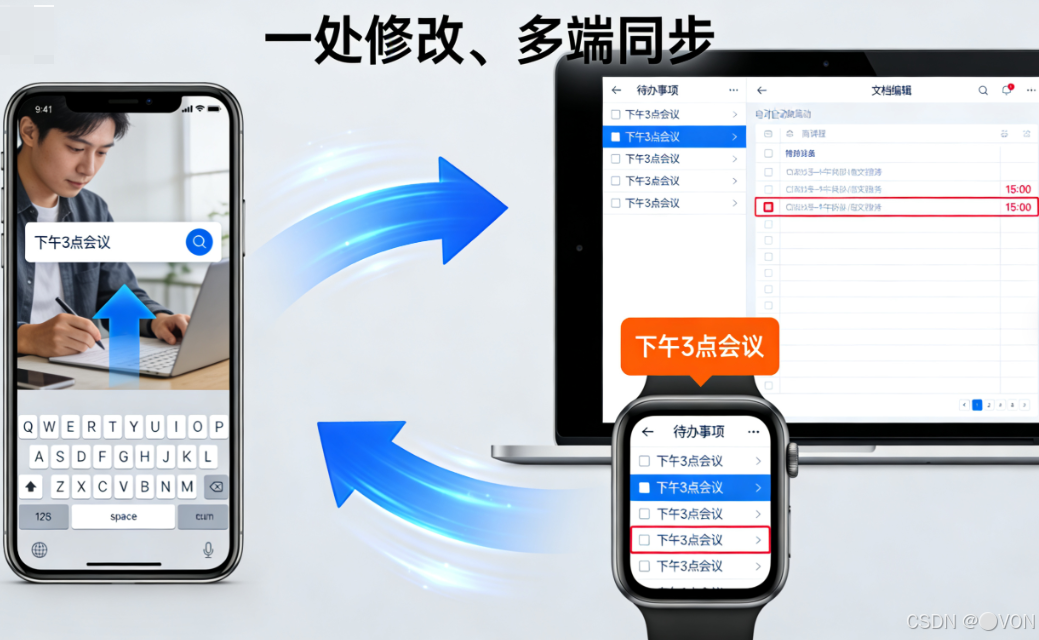
最终效果:用户在手机上勾选任务,平板上立即消失;在车机上新增事项,回家后电脑端自动出现——这才是真正的“以人为中心”的体验。
代码会过时,但“协同”的思想永不过时。
我的博客即将同步至腾讯云开发者社区,邀请大家一同入驻:https://cloud.tencent.com/developer/support-plan?invite_code=9j5yy1rxiho

 浙公网安备 33010602011771号
