


详细介绍:时序数据库系列(七):性能监控实战指标收集
1 监控指标体系设计
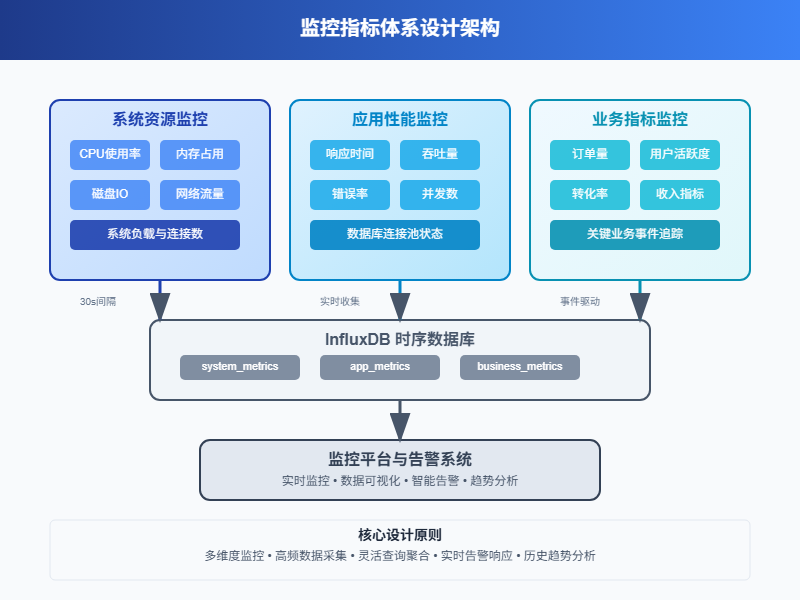
性能监控说白了就是盯着系统的各种数据,看看哪里出问题了。就像医生给病人量体温、测血压一样,我们需要收集服务器的"生命体征"。
现代应用系统复杂得很,从硬件到软件,从网络到数据库,每个环节都可能出状况。建立完整的监控体系,就是要让这些潜在问题无处遁形。
1.1 核心监控维度
系统资源监控
CPU使用率、内存占用、磁盘IO、网络流量这些基础指标必须要有。这就像人的基本生命体征,出问题了第一时间就能发现。
应用性能监控
响应时间、吞吐量、错误率、并发数等。这些指标直接反映用户体验,比如接口响应慢了,用户就会抱怨。
业务指标监控
订单量、用户活跃度、转化率等业务相关的数据。技术指标正常不代表业务就没问题,有时候需要从业务角度看问题。
1.2 数据模型设计
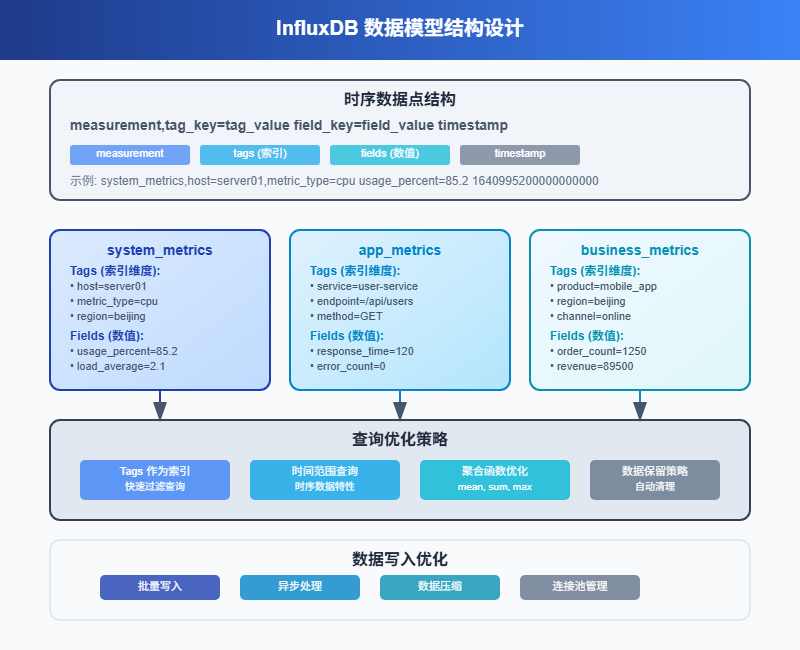
在InfluxDB中,我们按照不同的监控对象来设计measurement:
# 系统资源
system_metrics,host=server01,metric_type=cpu value=85.2 1640995200000000000
system_metrics,host=server01,metric_type=memory value=4096 1640995200000000000
# 应用性能
app_metrics,service=user-service,endpoint=/api/users response_time=120,error_count=0 1640995200000000000
# 业务指标
business_metrics,product=mobile_app,region=beijing order_count=1250,revenue=89500 1640995200000000000
这样设计的好处是查询时可以灵活组合条件,比如查看某台服务器的所有指标,或者查看某个服务的性能趋势。
2 系统资源监控实现
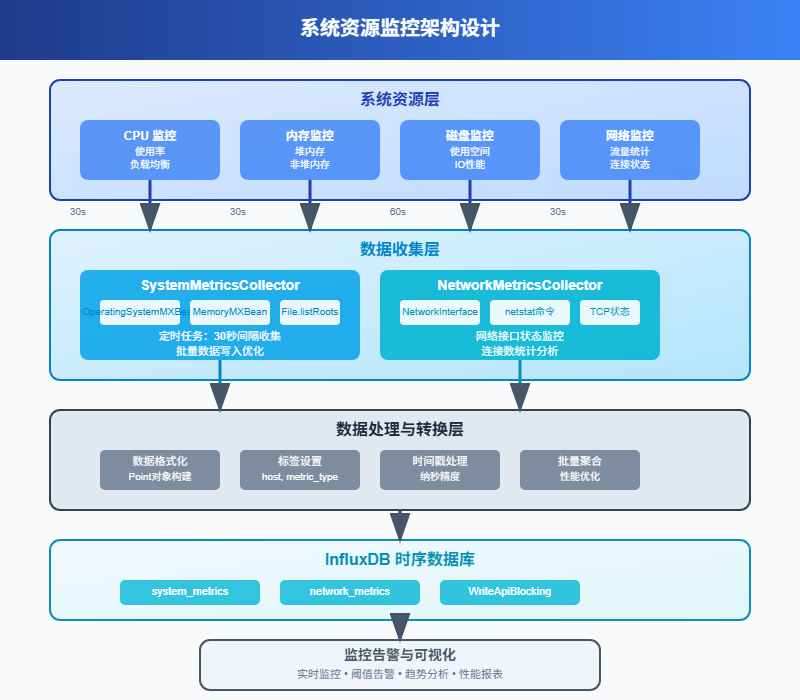
2.1 服务器基础指标收集
系统监控最基础的就是CPU、内存、磁盘、网络这四大件。我们用Java来实现一个完整的监控数据收集器。
import com.influxdb.client.InfluxDBClient;
import com.influxdb.client.InfluxDBClientFactory;
import com.influxdb.client.WriteApiBlocking;
import com.influxdb.client.domain.WritePrecision;
import com.influxdb.client.write.Point;
import com.sun.management.OperatingSystemMXBean;
import java.lang.management.ManagementFactory;
import java.lang.management.MemoryMXBean;
import java.lang.management.MemoryUsage;
import java.time.Instant;
import java.util.concurrent.Executors;
import java.util.concurrent.ScheduledExecutorService;
import java.util.concurrent.TimeUnit;
@Component
public class SystemMetricsCollector {
private final InfluxDBClient influxDBClient;
private final WriteApiBlocking writeApi;
private final ScheduledExecutorService scheduler;
private final String hostname;
public SystemMetricsCollector() {
this.influxDBClient = InfluxDBClientFactory.create(
"http://localhost:8086",
"your-token".toCharArray(),
"your-org",
"monitoring"
);
this.writeApi = influxDBClient.getWriteApiBlocking();
this.scheduler = Executors.newScheduledThreadPool(2);
this.hostname = getHostname();
}
public void startCollection() {
// 每30秒收集一次系统指标
scheduler.scheduleAtFixedRate(this::collectSystemMetrics, 0, 30, TimeUnit.SECONDS);
// 每60秒收集一次磁盘指标
scheduler.scheduleAtFixedRate(this::collectDiskMetrics, 0, 60, TimeUnit.SECONDS);
}
private void collectSystemMetrics() {
try {
OperatingSystemMXBean osBean = (OperatingSystemMXBean)
ManagementFactory.getOperatingSystemMXBean();
MemoryMXBean memoryBean = ManagementFactory.getMemoryMXBean();
Instant timestamp = Instant.now();
// CPU使用率
double cpuUsage = osBean.getProcessCpuLoad() * 100;
Point cpuPoint = Point.measurement("system_metrics")
.addTag("host", hostname)
.addTag("metric_type", "cpu")
.addField("usage_percent", cpuUsage)
.time(timestamp, WritePrecision.NS);
// 内存使用情况
MemoryUsage heapMemory = memoryBean.getHeapMemoryUsage();
long usedMemory = heapMemory.getUsed();
long maxMemory = heapMemory.getMax();
double memoryUsage = (double) usedMemory / maxMemory * 100;
Point memoryPoint = Point.measurement("system_metrics")
.addTag("host", hostname)
.addTag("metric_type", "memory")
.addField("used_bytes", usedMemory)
.addField("max_bytes", maxMemory)
.addField("usage_percent", memoryUsage)
.time(timestamp, WritePrecision.NS);
// 系统负载
double systemLoad = osBean.getSystemLoadAverage();
Point loadPoint = Point.measurement("system_metrics")
.addTag("host", hostname)
.addTag("metric_type", "load")
.addField("load_average", systemLoad)
.time(timestamp, WritePrecision.NS);
// 批量写入
writeApi.writePoints(Arrays.asList(cpuPoint, memoryPoint, loadPoint));
} catch (Exception e) {
logger.error("收集系统指标失败", e);
}
}
private void collectDiskMetrics() {
try {
File[] roots = File.listRoots();
Instant timestamp = Instant.now();
List<Point> diskPoints = new ArrayList<>();
  for (File root : roots) {
  long totalSpace = root.getTotalSpace();
  long freeSpace = root.getFreeSpace();
  long usedSpace = totalSpace - freeSpace;
  double usagePercent = (double) usedSpace / totalSpace * 100;
  Point diskPoint = Point.measurement("system_metrics")
  .addTag("host", hostname)
  .addTag("metric_type", "disk")
  .addTag("mount_point", root.getAbsolutePath())
  .addField("total_bytes", totalSpace)
  .addField("used_bytes", usedSpace)
  .addField("free_bytes", freeSpace)
  .addField("usage_percent", usagePercent)
  .time(timestamp, WritePrecision.NS);
  diskPoints.add(diskPoint);
  }
  writeApi.writePoints(diskPoints);
  } catch (Exception e) {
  logger.error("收集磁盘指标失败", e);
  }
  }
  private String getHostname() {
  try {
  return InetAddress.getLocalHost().getHostName();
  } catch (Exception e) {
  return "unknown";
  }
  }
  }
2.2 网络监控实现
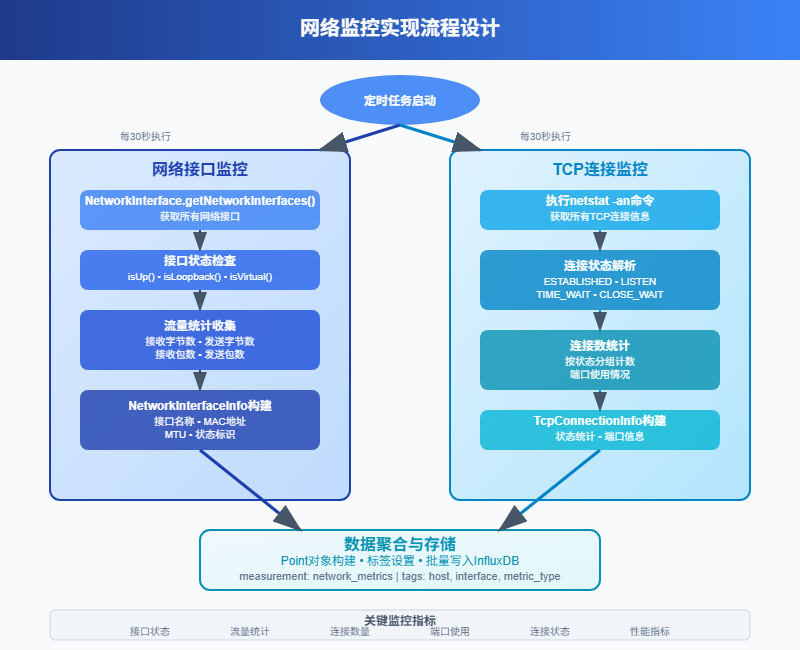
网络监控比较复杂,需要监控网络接口的流量、连接数、错误包等指标。
@Component
public class NetworkMetricsCollector {
private final InfluxDBClient influxDBClient;
private final WriteApiBlocking writeApi;
private final String hostname;
public NetworkMetricsCollector(InfluxDBClient influxDBClient) {
this.influxDBClient = influxDBClient;
this.writeApi = influxDBClient.getWriteApiBlocking();
this.hostname = getHostname();
}
@Scheduled(fixedRate = 30000) // 每30秒执行一次
public void collectNetworkMetrics() {
try {
// 获取网络接口信息
Enumeration<NetworkInterface> interfaces = NetworkInterface.getNetworkInterfaces();
  Instant timestamp = Instant.now();
  List<Point> networkPoints = new ArrayList<>();
    while (interfaces.hasMoreElements()) {
    NetworkInterface networkInterface = interfaces.nextElement();
    if (networkInterface.isLoopback() || !networkInterface.isUp()) {
    continue;
    }
    String interfaceName = networkInterface.getName();
    // 这里简化处理,实际项目中可能需要读取/proc/net/dev文件
    // 或者使用SNMP等方式获取更详细的网络统计信息
    Point networkPoint = Point.measurement("network_metrics")
    .addTag("host", hostname)
    .addTag("interface", interfaceName)
    .addField("status", networkInterface.isUp() ? 1 : 0)
    .addField("mtu", networkInterface.getMTU())
    .time(timestamp, WritePrecision.NS);
    networkPoints.add(networkPoint);
    }
    // 收集TCP连接数
    collectTcpConnections(timestamp, networkPoints);
    writeApi.writePoints(networkPoints);
    } catch (Exception e) {
    logger.error("收集网络指标失败", e);
    }
    }
    private void collectTcpConnections(Instant timestamp, List<Point> points) {
      try {
      // 在Linux系统中可以读取/proc/net/tcp文件
      // 这里提供一个简化的实现思路
      ProcessBuilder pb = new ProcessBuilder("netstat", "-an");
      Process process = pb.start();
      try (BufferedReader reader = new BufferedReader(
      new InputStreamReader(process.getInputStream()))) {
      Map<String, Integer> connectionStates = new HashMap<>();
        String line;
        while ((line = reader.readLine()) != null) {
        if (line.contains("tcp")) {
        String[] parts = line.trim().split("\\s+");
        if (parts.length >= 6) {
        String state = parts[5];
        connectionStates.merge(state, 1, Integer::sum);
        }
        }
        }
        // 写入连接状态统计
        for (Map.Entry<String, Integer> entry : connectionStates.entrySet()) {
          Point tcpPoint = Point.measurement("network_metrics")
          .addTag("host", hostname)
          .addTag("metric_type", "tcp_connections")
          .addTag("state", entry.getKey())
          .addField("count", entry.getValue())
          .time(timestamp, WritePrecision.NS);
          points.add(tcpPoint);
          }
          }
          } catch (Exception e) {
          logger.warn("收集TCP连接信息失败", e);
          }
          }
          }
3 应用性能监控
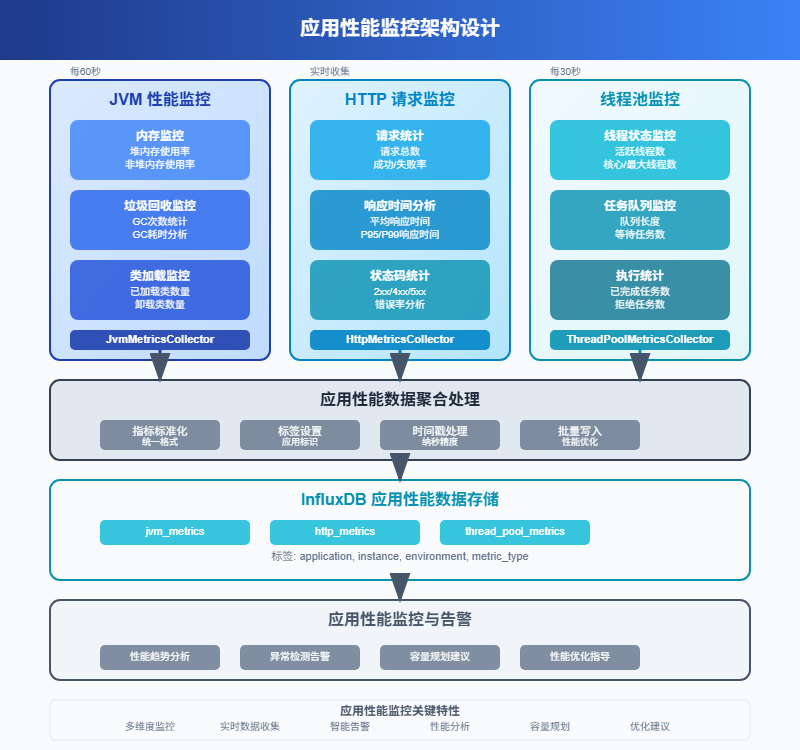
3.1 HTTP接口性能监控
对于Web应用,接口的响应时间和错误率是最重要的指标。我们可以通过拦截器来实现自动化的性能数据收集。
@Component
public class PerformanceInterceptor implements HandlerInterceptor {
private final InfluxDBClient influxDBClient;
private final WriteApiBlocking writeApi;
private final ThreadLocal<Long> startTimeHolder = new ThreadLocal<>();
  public PerformanceInterceptor(InfluxDBClient influxDBClient) {
  this.influxDBClient = influxDBClient;
  this.writeApi = influxDBClient.getWriteApiBlocking();
  }
  @Override
  public boolean preHandle(HttpServletRequest request,
  HttpServletResponse response,
  Object handler) throws Exception {
  startTimeHolder.set(System.currentTimeMillis());
  return true;
  }
  @Override
  public void afterCompletion(HttpServletRequest request,
  HttpServletResponse response,
  Object handler,
  Exception ex) throws Exception {
  try {
  Long startTime = startTimeHolder.get();
  if (startTime != null) {
  long responseTime = System.currentTimeMillis() - startTime;
  String method = request.getMethod();
  String uri = request.getRequestURI();
  int statusCode = response.getStatus();
  String userAgent = request.getHeader("User-Agent");
  String clientIp = getClientIp(request);
  Point performancePoint = Point.measurement("api_metrics")
  .addTag("method", method)
  .addTag("endpoint", uri)
  .addTag("status_code", String.valueOf(statusCode))
  .addTag("client_ip", clientIp)
  .addField("response_time_ms", responseTime)
  .addField("success", statusCode < 400 ? 1 : 0)
  .addField("error", statusCode >= 400 ? 1 : 0)
  .time(Instant.now(), WritePrecision.NS);
  writeApi.writePoint(performancePoint);
  // 如果响应时间超过阈值,记录慢查询
  if (responseTime > 1000) {
  recordSlowRequest(method, uri, responseTime, statusCode);
  }
  }
  } catch (Exception e) {
  logger.error("记录性能指标失败", e);
  } finally {
  startTimeHolder.remove();
  }
  }
  private void recordSlowRequest(String method, String uri, long responseTime, int statusCode) {
  Point slowRequestPoint = Point.measurement("slow_requests")
  .addTag("method", method)
  .addTag("endpoint", uri)
  .addTag("status_code", String.valueOf(statusCode))
  .addField("response_time_ms", responseTime)
  .time(Instant.now(), WritePrecision.NS);
  writeApi.writePoint(slowRequestPoint);
  }
  private String getClientIp(HttpServletRequest request) {
  String xForwardedFor = request.getHeader("X-Forwarded-For");
  if (xForwardedFor != null && !xForwardedFor.isEmpty()) {
  return xForwardedFor.split(",")[0].trim();
  }
  String xRealIp = request.getHeader("X-Real-IP");
  if (xRealIp != null && !xRealIp.isEmpty()) {
  return xRealIp;
  }
  return request.getRemoteAddr();
  }
  }
3.2 数据库性能监控
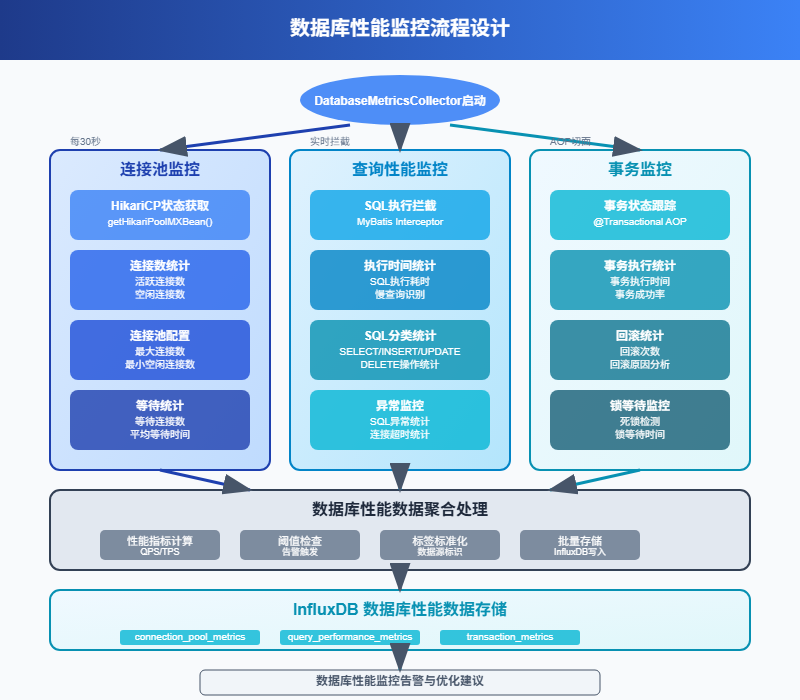
数据库是应用的核心,SQL执行时间、连接池状态、慢查询等都需要重点关注。
@Component
public class DatabaseMetricsCollector {
private final InfluxDBClient influxDBClient;
private final WriteApiBlocking writeApi;
private final DataSource dataSource;
public DatabaseMetricsCollector(InfluxDBClient influxDBClient, DataSource dataSource) {
this.influxDBClient = influxDBClient;
this.writeApi = influxDBClient.getWriteApiBlocking();
this.dataSource = dataSource;
}
@Scheduled(fixedRate = 60000) // 每分钟收集一次
public void collectDatabaseMetrics() {
try {
Instant timestamp = Instant.now();
List<Point> dbPoints = new ArrayList<>();
  // 收集连接池信息
  if (dataSource instanceof HikariDataSource) {
  HikariDataSource hikariDS = (HikariDataSource) dataSource;
  HikariPoolMXBean poolBean = hikariDS.getHikariPoolMXBean();
  Point poolPoint = Point.measurement("database_metrics")
  .addTag("metric_type", "connection_pool")
  .addTag("pool_name", hikariDS.getPoolName())
  .addField("active_connections", poolBean.getActiveConnections())
  .addField("idle_connections", poolBean.getIdleConnections())
  .addField("total_connections", poolBean.getTotalConnections())
  .addField("threads_awaiting_connection", poolBean.getThreadsAwaitingConnection())
  .time(timestamp, WritePrecision.NS);
  dbPoints.add(poolPoint);
  }
  // 收集数据库状态信息
  collectDatabaseStatus(timestamp, dbPoints);
  writeApi.writePoints(dbPoints);
  } catch (Exception e) {
  logger.error("收集数据库指标失败", e);
  }
  }
  private void collectDatabaseStatus(Instant timestamp, List<Point> points) {
    try (Connection connection = dataSource.getConnection()) {
    // 查询数据库连接数
    String connectionCountSql = "SHOW STATUS LIKE 'Threads_connected'";
    try (PreparedStatement stmt = connection.prepareStatement(connectionCountSql);
    ResultSet rs = stmt.executeQuery()) {
    if (rs.next()) {
    int connectionCount = rs.getInt("Value");
    Point connectionPoint = Point.measurement("database_metrics")
    .addTag("metric_type", "connections")
    .addField("current_connections", connectionCount)
    .time(timestamp, WritePrecision.NS);
    points.add(connectionPoint);
    }
    }
    // 查询慢查询数量
    String slowQuerySql = "SHOW STATUS LIKE 'Slow_queries'";
    try (PreparedStatement stmt = connection.prepareStatement(slowQuerySql);
    ResultSet rs = stmt.executeQuery()) {
    if (rs.next()) {
    int slowQueries = rs.getInt("Value");
    Point slowQueryPoint = Point.measurement("database_metrics")
    .addTag("metric_type", "slow_queries")
    .addField("slow_query_count", slowQueries)
    .time(timestamp, WritePrecision.NS);
    points.add(slowQueryPoint);
    }
    }
    // 查询查询缓存命中率
    collectQueryCacheMetrics(connection, timestamp, points);
    } catch (Exception e) {
    logger.error("收集数据库状态失败", e);
    }
    }
    private void collectQueryCacheMetrics(Connection connection, Instant timestamp, List<Point> points) {
      try {
      String cacheSql = "SHOW STATUS WHERE Variable_name IN ('Qcache_hits', 'Qcache_inserts', 'Qcache_not_cached')";
      try (PreparedStatement stmt = connection.prepareStatement(cacheSql);
      ResultSet rs = stmt.executeQuery()) {
      Map<String, Long> cacheStats = new HashMap<>();
        while (rs.next()) {
        cacheStats.put(rs.getString("Variable_name"), rs.getLong("Value"));
        }
        long hits = cacheStats.getOrDefault("Qcache_hits", 0L);
        long inserts = cacheStats.getOrDefault("Qcache_inserts", 0L);
        long notCached = cacheStats.getOrDefault("Qcache_not_cached", 0L);
        long totalQueries = hits + inserts + notCached;
        double hitRate = totalQueries > 0 ? (double) hits / totalQueries * 100 : 0;
        Point cachePoint = Point.measurement("database_metrics")
        .addTag("metric_type", "query_cache")
        .addField("cache_hits", hits)
        .addField("cache_inserts", inserts)
        .addField("cache_not_cached", notCached)
        .addField("hit_rate_percent", hitRate)
        .time(timestamp, WritePrecision.NS);
        points.add(cachePoint);
        }
        } catch (Exception e) {
        logger.warn("收集查询缓存指标失败", e);
        }
        }
        }
4 业务指标监控
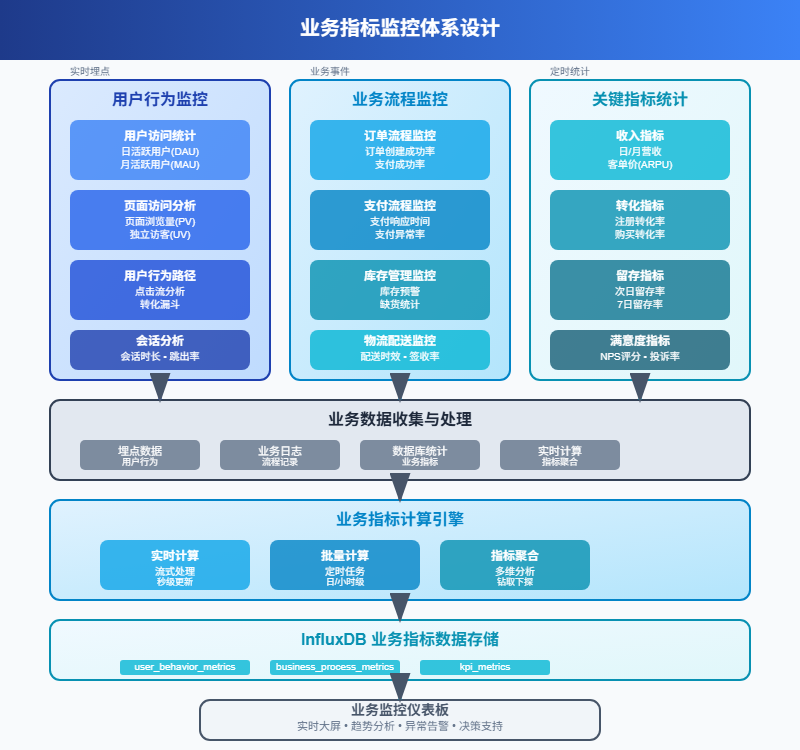
4.1 业务事件追踪
除了技术指标,业务指标同样重要。用户注册、订单创建、支付成功等关键业务事件都需要监控。
@Service
public class BusinessMetricsService {
private final InfluxDBClient influxDBClient;
private final WriteApiBlocking writeApi;
public BusinessMetricsService(InfluxDBClient influxDBClient) {
this.influxDBClient = influxDBClient;
this.writeApi = influxDBClient.getWriteApiBlocking();
}
public void recordUserRegistration(String userId, String source, String region) {
Point registrationPoint = Point.measurement("business_events")
.addTag("event_type", "user_registration")
.addTag("source", source)
.addTag("region", region)
.addField("user_id", userId)
.addField("count", 1)
.time(Instant.now(), WritePrecision.NS);
writeApi.writePoint(registrationPoint);
}
public void recordOrderCreated(String orderId, String userId, double amount, String productCategory) {
Point orderPoint = Point.measurement("business_events")
.addTag("event_type", "order_created")
.addTag("product_category", productCategory)
.addField("order_id", orderId)
.addField("user_id", userId)
.addField("amount", amount)
.addField("count", 1)
.time(Instant.now(), WritePrecision.NS);
writeApi.writePoint(orderPoint);
}
public void recordPaymentResult(String orderId, String paymentMethod, boolean success, double amount) {
Point paymentPoint = Point.measurement("business_events")
.addTag("event_type", "payment")
.addTag("payment_method", paymentMethod)
.addTag("status", success ? "success" : "failed")
.addField("order_id", orderId)
.addField("amount", amount)
.addField("success", success ? 1 : 0)
.addField("count", 1)
.time(Instant.now(), WritePrecision.NS);
writeApi.writePoint(paymentPoint);
}
@Scheduled(fixedRate = 300000) // 每5分钟统计一次
public void calculateBusinessMetrics() {
try {
Instant now = Instant.now();
Instant fiveMinutesAgo = now.minus(5, ChronoUnit.MINUTES);
// 计算最近5分钟的业务指标
calculateRecentMetrics(fiveMinutesAgo, now);
} catch (Exception e) {
logger.error("计算业务指标失败", e);
}
}
private void calculateRecentMetrics(Instant start, Instant end) {
try {
QueryApi queryApi = influxDBClient.getQueryApi();
// 查询最近5分钟的注册数
String registrationQuery = String.format(
"from(bucket: \"monitoring\") " +
"|> range(start: %s, stop: %s) " +
"|> filter(fn: (r) => r._measurement == \"business_events\" and r.event_type == \"user_registration\") " +
"|> count()",
start.toString(), end.toString()
);
List<FluxTable> registrationTables = queryApi.query(registrationQuery);
  int registrationCount = extractCountFromQuery(registrationTables);
  // 查询最近5分钟的订单金额
  String orderAmountQuery = String.format(
  "from(bucket: \"monitoring\") " +
  "|> range(start: %s, stop: %s) " +
  "|> filter(fn: (r) => r._measurement == \"business_events\" and r.event_type == \"order_created\") " +
  "|> sum(column: \"amount\")",
  start.toString(), end.toString()
  );
  List<FluxTable> orderTables = queryApi.query(orderAmountQuery);
    double totalOrderAmount = extractSumFromQuery(orderTables);
    // 记录汇总指标
    Point summaryPoint = Point.measurement("business_summary")
    .addTag("time_window", "5min")
    .addField("registration_count", registrationCount)
    .addField("total_order_amount", totalOrderAmount)
    .time(end, WritePrecision.NS);
    writeApi.writePoint(summaryPoint);
    } catch (Exception e) {
    logger.error("计算业务汇总指标失败", e);
    }
    }
    private int extractCountFromQuery(List<FluxTable> tables) {
      return tables.stream()
      .flatMap(table -> table.getRecords().stream())
      .mapToInt(record -> ((Number) record.getValue()).intValue())
      .sum();
      }
      private double extractSumFromQuery(List<FluxTable> tables) {
        return tables.stream()
        .flatMap(table -> table.getRecords().stream())
        .mapToDouble(record -> ((Number) record.getValue()).doubleValue())
        .sum();
        }
        }
4.2 实时告警机制
监控数据收集了,还需要及时发现异常。我们可以实现一个简单的告警系统。
@Service
public class AlertService {
private final InfluxDBClient influxDBClient;
private final NotificationService notificationService;
public AlertService(InfluxDBClient influxDBClient, NotificationService notificationService) {
this.influxDBClient = influxDBClient;
this.notificationService = notificationService;
}
@Scheduled(fixedRate = 60000) // 每分钟检查一次
public void checkAlerts() {
try {
checkCpuUsage();
checkMemoryUsage();
checkResponseTime();
checkErrorRate();
} catch (Exception e) {
logger.error("检查告警失败", e);
}
}
private void checkCpuUsage() {
try {
QueryApi queryApi = influxDBClient.getQueryApi();
String query = "from(bucket: \"monitoring\") " +
"|> range(start: -5m) " +
"|> filter(fn: (r) => r._measurement == \"system_metrics\" and r.metric_type == \"cpu\") " +
"|> mean()";
List<FluxTable> tables = queryApi.query(query);
  for (FluxTable table : tables) {
  for (FluxRecord record : table.getRecords()) {
  double cpuUsage = ((Number) record.getValue()).doubleValue();
  String host = (String) record.getValueByKey("host");
  if (cpuUsage > 80) {
  String message = String.format("服务器 %s CPU使用率过高: %.2f%%", host, cpuUsage);
  notificationService.sendAlert("CPU_HIGH", message, AlertLevel.WARNING);
  }
  if (cpuUsage > 95) {
  String message = String.format("服务器 %s CPU使用率严重过高: %.2f%%", host, cpuUsage);
  notificationService.sendAlert("CPU_CRITICAL", message, AlertLevel.CRITICAL);
  }
  }
  }
  } catch (Exception e) {
  logger.error("检查CPU使用率告警失败", e);
  }
  }
  private void checkResponseTime() {
  try {
  QueryApi queryApi = influxDBClient.getQueryApi();
  String query = "from(bucket: \"monitoring\") " +
  "|> range(start: -10m) " +
  "|> filter(fn: (r) => r._measurement == \"api_metrics\") " +
  "|> group(columns: [\"endpoint\"]) " +
  "|> mean(column: \"response_time_ms\")";
  List<FluxTable> tables = queryApi.query(query);
    for (FluxTable table : tables) {
    for (FluxRecord record : table.getRecords()) {
    double avgResponseTime = ((Number) record.getValue()).doubleValue();
    String endpoint = (String) record.getValueByKey("endpoint");
    if (avgResponseTime > 2000) {
    String message = String.format("接口 %s 平均响应时间过长: %.0fms", endpoint, avgResponseTime);
    notificationService.sendAlert("RESPONSE_TIME_HIGH", message, AlertLevel.WARNING);
    }
    }
    }
    } catch (Exception e) {
    logger.error("检查响应时间告警失败", e);
    }
    }
    private void checkErrorRate() {
    try {
    QueryApi queryApi = influxDBClient.getQueryApi();
    String query = "from(bucket: \"monitoring\") " +
    "|> range(start: -10m) " +
    "|> filter(fn: (r) => r._measurement == \"api_metrics\") " +
    "|> group(columns: [\"endpoint\"]) " +
    "|> aggregateWindow(every: 10m, fn: sum) " +
    "|> pivot(rowKey:[\"_time\"], columnKey: [\"_field\"], valueColumn: \"_value\") " +
    "|> map(fn: (r) => ({ r with error_rate: float(v: r.error) / float(v: r.success + r.error) * 100.0 }))";
    List<FluxTable> tables = queryApi.query(query);
      for (FluxTable table : tables) {
      for (FluxRecord record : table.getRecords()) {
      Object errorRateObj = record.getValueByKey("error_rate");
      if (errorRateObj != null) {
      double errorRate = ((Number) errorRateObj).doubleValue();
      String endpoint = (String) record.getValueByKey("endpoint");
      if (errorRate > 5) {
      String message = String.format("接口 %s 错误率过高: %.2f%%", endpoint, errorRate);
      notificationService.sendAlert("ERROR_RATE_HIGH", message, AlertLevel.WARNING);
      }
      }
      }
      }
      } catch (Exception e) {
      logger.error("检查错误率告警失败", e);
      }
      }
      }
      enum AlertLevel {
      INFO, WARNING, CRITICAL
      }
      @Service
      public class NotificationService {
      public void sendAlert(String alertType, String message, AlertLevel level) {
      // 这里可以集成邮件、短信、钉钉、企业微信等通知方式
      logger.warn("告警通知 [{}] {}: {}", level, alertType, message);
      // 发送邮件通知
      sendEmailAlert(alertType, message, level);
      // 发送钉钉通知
      sendDingTalkAlert(alertType, message, level);
      }
      private void sendEmailAlert(String alertType, String message, AlertLevel level) {
      // 邮件发送逻辑
      }
      private void sendDingTalkAlert(String alertType, String message, AlertLevel level) {
      // 钉钉机器人通知逻辑
      }
      }
5 性能优化与最佳实践
5.1 数据写入优化
监控数据量通常很大,写入性能很关键。批量写入、异步处理、数据压缩都是常用的优化手段。
@Configuration
public class InfluxDBOptimizedConfig {
@Bean
public InfluxDBClient influxDBClient() {
return InfluxDBClientFactory.create(
"http://localhost:8086",
"your-token".toCharArray(),
"your-org",
"monitoring"
);
}
@Bean
public WriteApi writeApi(InfluxDBClient client) {
WriteOptions options = WriteOptions.builder()
.batchSize(1000)  // 批量大小
.flushInterval(5000)  // 刷新间隔5秒
.bufferLimit(10000)  // 缓冲区大小
.retryInterval(1000)  // 重试间隔
.maxRetries(3)  // 最大重试次数
.build();
return client.makeWriteApi(options);
}
}
@Service
public class OptimizedMetricsCollector {
private final WriteApi writeApi;
private final BlockingQueue<Point> metricsQueue;
  private final ScheduledExecutorService scheduler;
  public OptimizedMetricsCollector(WriteApi writeApi) {
  this.writeApi = writeApi;
  this.metricsQueue = new LinkedBlockingQueue<>(50000);
    this.scheduler = Executors.newScheduledThreadPool(2);
    // 启动批量写入任务
    startBatchWriter();
    }
    public void recordMetric(Point point) {
    try {
    if (!metricsQueue.offer(point)) {
    logger.warn("指标队列已满,丢弃数据点");
    }
    } catch (Exception e) {
    logger.error("记录指标失败", e);
    }
    }
    private void startBatchWriter() {
    scheduler.scheduleAtFixedRate(() -> {
    try {
    List<Point> batch = new ArrayList<>();
      metricsQueue.drainTo(batch, 1000);
      if (!batch.isEmpty()) {
      writeApi.writePoints(batch);
      logger.debug("批量写入 {} 个数据点", batch.size());
      }
      } catch (Exception e) {
      logger.error("批量写入失败", e);
      }
      }, 0, 5, TimeUnit.SECONDS);
      }
      @PreDestroy
      public void shutdown() {
      try {
      scheduler.shutdown();
      if (!scheduler.awaitTermination(10, TimeUnit.SECONDS)) {
      scheduler.shutdownNow();
      }
      // 写入剩余数据
      List<Point> remaining = new ArrayList<>();
        metricsQueue.drainTo(remaining);
        if (!remaining.isEmpty()) {
        writeApi.writePoints(remaining);
        }
        } catch (Exception e) {
        logger.error("关闭指标收集器失败", e);
        }
        }
        }
5.2 查询性能优化
监控查询通常涉及大量数据,合理的索引设计和查询优化很重要。
@Service
public class OptimizedQueryService {
private final InfluxDBClient influxDBClient;
private final QueryApi queryApi;
public OptimizedQueryService(InfluxDBClient influxDBClient) {
this.influxDBClient = influxDBClient;
this.queryApi = influxDBClient.getQueryApi();
}
// 优化的时间范围查询
public List<MetricData> getMetricsInTimeRange(String measurement,
  String host,
  Instant start,
  Instant end) {
  // 使用参数化查询,避免字符串拼接
  String query = "from(bucket: \"monitoring\") " +
  "|> range(start: " + start + ", stop: " + end + ") " +
  "|> filter(fn: (r) => r._measurement == \"" + measurement + "\") " +
  "|> filter(fn: (r) => r.host == \"" + host + "\") " +
  "|> aggregateWindow(every: 1m, fn: mean, createEmpty: false)";
  List<FluxTable> tables = queryApi.query(query);
    return convertToMetricData(tables);
    }
    // 聚合查询优化
    public Map<String, Double> getAggregatedMetrics(String measurement,
      Duration timeWindow) {
      Instant end = Instant.now();
      Instant start = end.minus(timeWindow);
      String query = "from(bucket: \"monitoring\") " +
      "|> range(start: " + start + ", stop: " + end + ") " +
      "|> filter(fn: (r) => r._measurement == \"" + measurement + "\") " +
      "|> group(columns: [\"host\"]) " +
      "|> mean()";
      List<FluxTable> tables = queryApi.query(query);
        Map<String, Double> result = new HashMap<>();
          for (FluxTable table : tables) {
          for (FluxRecord record : table.getRecords()) {
          String host = (String) record.getValueByKey("host");
          Double value = ((Number) record.getValue()).doubleValue();
          result.put(host, value);
          }
          }
          return result;
          }
          // 分页查询大量数据
          public PagedResult<MetricData> getMetricsPaged(String measurement,
            int page,
            int size,
            Instant start,
            Instant end) {
            int offset = page * size;
            String query = "from(bucket: \"monitoring\") " +
            "|> range(start: " + start + ", stop: " + end + ") " +
            "|> filter(fn: (r) => r._measurement == \"" + measurement + "\") " +
            "|> sort(columns: [\"_time\"], desc: true) " +
            "|> limit(n: " + size + ", offset: " + offset + ")";
            List<FluxTable> tables = queryApi.query(query);
              List<MetricData> data = convertToMetricData(tables);
                // 获取总数(简化实现)
                long total = getTotalCount(measurement, start, end);
                return new PagedResult<>(data, page, size, total);
                  }
                  private List<MetricData> convertToMetricData(List<FluxTable> tables) {
                    List<MetricData> result = new ArrayList<>();
                      for (FluxTable table : tables) {
                      for (FluxRecord record : table.getRecords()) {
                      MetricData data = new MetricData();
                      data.setTime(record.getTime());
                      data.setMeasurement(record.getMeasurement());
                      data.setValue(((Number) record.getValue()).doubleValue());
                      data.setHost((String) record.getValueByKey("host"));
                      result.add(data);
                      }
                      }
                      return result;
                      }
                      private long getTotalCount(String measurement, Instant start, Instant end) {
                      String countQuery = "from(bucket: \"monitoring\") " +
                      "|> range(start: " + start + ", stop: " + end + ") " +
                      "|> filter(fn: (r) => r._measurement == \"" + measurement + "\") " +
                      "|> count()";
                      List<FluxTable> tables = queryApi.query(countQuery);
                        return tables.stream()
                        .flatMap(table -> table.getRecords().stream())
                        .mapToLong(record -> ((Number) record.getValue()).longValue())
                        .sum();
                        }
                        }
                        class MetricData {
                        private Instant time;
                        private String measurement;
                        private Double value;
                        private String host;
                        // getters and setters
                        }
                        class PagedResult<T> {
                          private List<T> data;
                            private int page;
                            private int size;
                            private long total;
                            private int totalPages;
                            public PagedResult(List<T> data, int page, int size, long total) {
                              this.data = data;
                              this.page = page;
                              this.size = size;
                              this.total = total;
                              this.totalPages = (int) Math.ceil((double) total / size);
                              }
                              // getters and setters
                              }
这套监控系统涵盖了从系统资源到业务指标的全方位监控,通过Java代码实现了自动化的数据收集、存储和告警。关键是要根据实际业务需求调整监控指标和告警阈值,确保监控系统既能及时发现问题,又不会产生太多噪音。
记住,监控不是目的,快速发现和解决问题才是。好的监控系统应该让你在问题影响用户之前就能发现并处理。

 浙公网安备 33010602011771号