


HTML:登录页面 - 教程
灵感:最近在搞一个个人博客, 想做一个简洁好看的登录界面,琢磨良久之后还是成功做出来了,这次主要分为三个文件:login.html、login.css、login.js。具体代码在后面:
话不多说,放码而来!
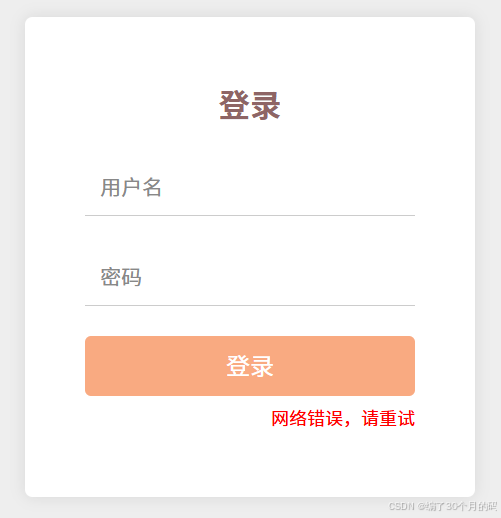
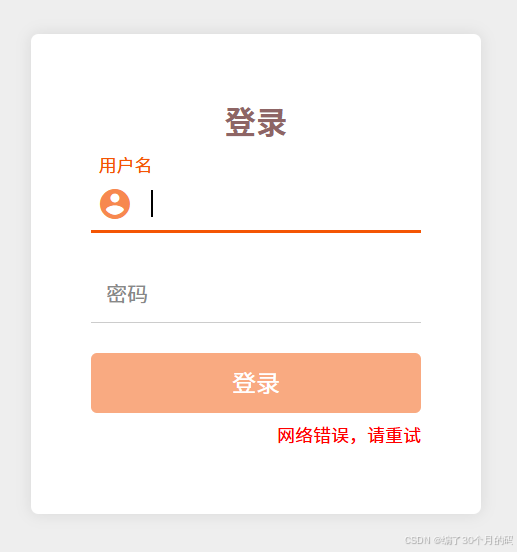
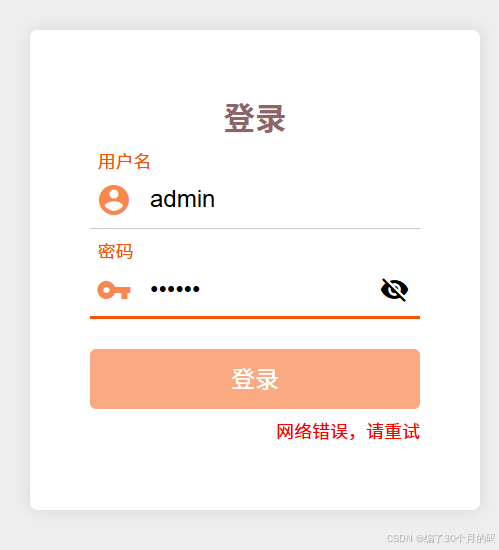
实物参考如下图片:
login.html
登录页面
<script src="jquery-3.7.1.min.js"></script>
<script src="login.js"></script>
login.css
* {
  margin: 0;
  padding: 0;
  box-sizing: border-box;
  transition: 0.3s;
}
html {
  position: relative;
  scroll-behavior: smooth;
  background-color: #f0f0f0;
}
body {
  position: relative;
  background: #eee;
  font-family: Helvetica Neue, Helvetica, Arial, sans-serif;
  font-size: 14px;
  color: #000;
  margin: 0;
  padding: 0;
}
a {
  text-decoration: none;
  color: #000;
}
li {
  list-style: none;
}
img {
  vertical-align: bottom;
}
i {
  font-style: normal;
}
@font-face {
  font-family: 'icomoon';
  src: url('../fonts/icomoon.eot?mhxy37');
  src: url('../fonts/icomoon.eot?mhxy37#iefix') format('embedded-opentype'), url('../fonts/icomoon.ttf?mhxy37') format('truetype'), url('../fonts/icomoon.woff?mhxy37') format('woff'), url('../fonts/icomoon.svg?mhxy37#icomoon') format('svg');
  font-weight: normal;
  font-style: normal;
  font-display: block;
}
[class^="icon-"],
[class*=" icon-"] {
  /* use !important to prevent issues with browser extensions that change fonts */
  font-family: 'icomoon' !important;
  speak: never;
  font-style: normal;
  font-weight: normal;
  font-variant: normal;
  text-transform: none;
  line-height: 1;
  /* Better Font Rendering =========== */
  -webkit-font-smoothing: antialiased;
  -moz-osx-font-smoothing: grayscale;
}
.icon-account_circle:before {
  content: "\eb77";
}
.icon-visibility_off:before {
  content: "\ebfb";
}
.icon-vpn_key:before {
  content: "\e92b";
}
.icon-remove_red_eye:before {
  content: "\ea91";
}
.login-container {
  display: grid;
  place-items: center;
  height: 100vh;
}
.login-container form {
  display: flex;
  flex-direction: column;
  align-items: center;
  justify-content: center;
  width: 300px;
  height: 320px;
  border-radius: 5px;
  background-color: white;
  box-shadow: 0 0 10px rgba(0, 0, 0, 0.1);
}
.login-container form h2 {
  margin-bottom: 20px;
  text-align: center;
  color: #8e6565;
}
.login-container form .input-group {
  position: relative;
  width: 220px;
  height: 40px;
  margin-bottom: 20px;
}
.login-container form .input-group label {
  position: absolute;
  left: 10px;
  top: 10px;
  transition: all 0.3s ease;
  pointer-events: none;
  color: #888;
}
.login-container form .input-group .line::before,
.login-container form .input-group .line::after {
  content: '';
  position: absolute;
  height: 2px;
  background-color: #f45504;
  width: 0;
  transition: width 0.3s ease;
}
.login-container form .input-group .line {
  width: 220px;
}
.login-container form .input-group .line::before {
  left: 50%;
  bottom: 0;
}
.login-container form .input-group .line:after {
  right: 50%;
  bottom: 0;
}
.login-container form .input-group input {
  position: absolute;
  bottom: 0;
  left: 0;
  width: 220px;
  padding: 10px 0 10px 40px;
  border: none;
  border-bottom: 1px solid #ccc;
  font-size: 16px;
  outline: none;
  transition: border-bottom-color 0.3s ease;
}
.login-container form .input-group input:focus + label,
.login-container form .input-group input:valid + label {
  top: -15px;
  left: 5px;
  font-size: 12px;
  color: #f45504;
}
.login-container form .input-group input:focus + label + .line::before,
.login-container form .input-group input:focus + label + .line::after {
  width: 110px;
}
.login-container form .input-group .icon {
  display: none;
  position: absolute;
  top: 50%;
  left: 4px;
  font-size: 24px;
  font-weight: 400;
  color: rgba(244, 85, 4, 0.7);
  transform: translateY(-50%);
  transition: 1s ease-in-out;
}
.login-container form .input-group button[type="button"] {
  display: none;
  position: absolute;
  right: 2px;
  top: 50%;
  outline: none;
  appearance: none;
  -webkit-appearance: none;
  -moz-appearance: none;
  width: 30px;
  height: 30px;
  line-height: 30px;
  border: none;
  text-align: center;
  background-color: transparent;
  transform: translateY(-50%);
}
.login-container form .input-group button[type="button"] i {
  display: block;
  width: 30px;
  height: 30px;
  line-height: 30px;
  font-size: 20px;
}
.login-container form button[type="submit"] {
  width: 220px;
  line-height: 30px;
  padding: 5px;
  background-color: rgba(244, 85, 4, 0.5);
  color: white;
  border: none;
  border-radius: 4px;
  font-size: 16px;
  cursor: pointer;
  transition: background-color 0.3s ease;
}
.login-container form button[type="submit"]:hover {
  background-color: rgba(244, 85, 4, 0.9);
}
.login-container form button[type="submit"]:checked {
  background-color: rgba(244, 85, 4, 0.2);
}
.login-container form p {
  display: block;
  width: 220px;
  height: 20px;
  line-height: 20px;
  text-align: right;
  font-size: 12px;
  margin-top: 5px;
  color: red;
}
/*# sourceMappingURL=login.css.map */
login.js
// ****************************************隐藏或显示密码*******************************************
const passwordInput = document.getElementById('password');
const toggle_button = document.querySelector('button[type="button"]');
toggle_button.addEventListener('click', function (){
    const eye_icon = this.querySelector("i")
    if (passwordInput.type === 'password') {
        passwordInput.type = 'text';
        eye_icon.classList.remove('icon-visibility_off')
        eye_icon.classList.add('icon-remove_red_eye')
    } else {
        passwordInput.type = 'password';
        eye_icon.classList.remove('icon-remove_red_eye')
        eye_icon.classList.add('icon-visibility_off')
    }
})
// ****************************************账号提交*******************************************
const form = document.querySelector('form');
const usernameInput = document.querySelector('#username');
const tip = document.querySelector('.tip');
form.addEventListener('submit', async function(event) {
    event.preventDefault();
    let username = usernameInput.value;
    let password = passwordInput.value;
    try {
        const response = await fetch('/login', {
            method: 'POST',
            headers: {
                'Content-Type': 'application/json'
            },
            body: JSON.stringify({
                'username': username,
                'password': password
            })
        });
        const result = await response.json();
        if (result.status === 1) {
            tip.textContent = result.error;
        } else if (result.status === 2) {
            tip.textContent = result.error;
        }
        else if (result.status === 0) {
            window.location.href = '/index';
        }
    } catch (error) {
        tip.textContent = '网络错误,请重试';
    }
});
// ****************************************图标的显示*******************************************
const us_icon = document.querySelector('.input-group .icon-account_circle')
const pd_icon = document.querySelector('.input-group .icon-vpn_key')
function checkInputContent(input) {
    return input.value.trim() !== '';
}
// 对用户名的绑定
usernameInput.addEventListener('focus', function () {
    us_icon.style.display = 'block'
})
usernameInput.addEventListener('blur', function () {
    if (!checkInputContent(this))
    {
        us_icon.style.display = 'none'
    }
})
usernameInput.addEventListener('input', function () {
    if (checkInputContent(this)) {
        us_icon.style.display = 'block'
    }
})
// 对密码框的绑定
passwordInput.addEventListener('focus', function () {
    pd_icon.style.display = 'block'
})
passwordInput.addEventListener('blur', function () {
    if (!checkInputContent(this))
    {
        pd_icon.style.display = 'none'
        toggle_button.style.display = 'none'
    }
})
passwordInput.addEventListener('input', function () {
    if (checkInputContent(this)) {
        pd_icon.style.display = 'block'
        toggle_button.style.display = 'block'
    }
    else {
        toggle_button.style.display = 'none'
    }
})
注意:在login.html中引入了jquery文件,这个文件是实现前后端通信的文件,可以直接从网上下载,在login.css中引入了字体图标,这个可以从iconmoon官网获取,只需要修改对应类名或者文件路径就可以正常运行
路漫漫其修远兮
吾将上下而求索
各位道友,编程之路,道阻且长~
下期再会!

 浙公网安备 33010602011771号