


深入解析:李宏毅2025秋季机器学习作业 GenAI-ML-HW1-Understand the fundamentals of GenAI实操2
GenAI_ML_HW1
Objective
- Be familiar with google colab
- Understand the concepts of tokens, tokenizers, prompting, and chat templates.
- Observe how the model behave with different prompt setting
- Learn how to build some simple user interface with Gradio
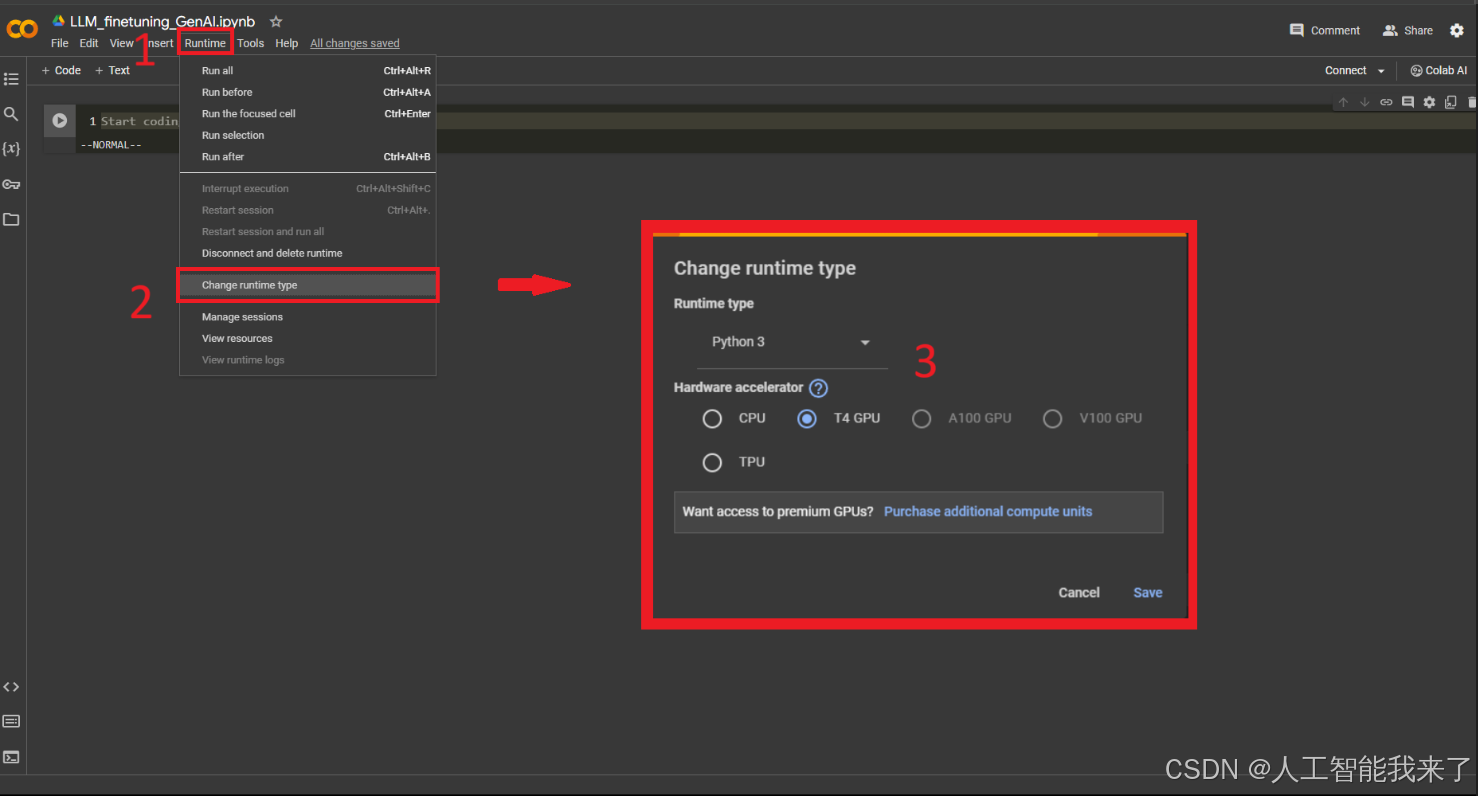
Activate GPU
To enable GPU, please follow these steps:
- Click on “Runtime” (or “執行階段”) in the header.
- Click on “Change runtime type” (or “變更執行階段類型”) in the drop menu.
- Select “T4 GPU” and save. (You can select “A100 GPU” or “V100 GPU” if you have Colab Pro)
Check GPU
!nvidia-smiSun Oct 5 12:34:51 2025
+-----------------------------------------------------------------------------------------+
| NVIDIA-SMI 580.97 Driver Version: 580.97 CUDA Version: 13.0 |
+-----------------------------------------+------------------------+----------------------+
| GPU Name Driver-Model | Bus-Id Disp.A | Volatile Uncorr. ECC |
| Fan Temp Perf Pwr:Usage/Cap | Memory-Usage | GPU-Util Compute M. |
| | | MIG M. |
|=========================================+========================+======================|
| 0 NVIDIA GeForce RTX 3090 Ti WDDM | 00000000:07:00.0 On | Off |
| 47% 51C P0 115W / 450W | 2387MiB / 24564MiB | 9% Default |
| | | N/A |
+-----------------------------------------+------------------------+----------------------+
+-----------------------------------------------------------------------------------------+
| Processes: |
| GPU GI CI PID Type Process name GPU Memory |
| ID ID Usage |
|=========================================================================================|
| 0 N/A N/A 2232 C+G C:\Windows\System32\dwm.exe N/A |
| 0 N/A N/A 8116 C+G ...ogram Files\ToDesk\ToDesk.exe N/A |
| 0 N/A N/A 10516 C+G ...\Application\2345Explorer.exe N/A |
| 0 N/A N/A 12880 C+G ...5n1h2txyewy\TextInputHost.exe N/A |
| 0 N/A N/A 12944 C+G ..._cw5n1h2txyewy\SearchHost.exe N/A |
| 0 N/A N/A 13124 C+G ...y\StartMenuExperienceHost.exe N/A |
| 0 N/A N/A 13192 C+G ...xyewy\ShellExperienceHost.exe N/A |
| 0 N/A N/A 20144 C+G ...crosoft\OneDrive\OneDrive.exe N/A |
| 0 N/A N/A 22552 C+G ....0.3485.94\msedgewebview2.exe N/A |
| 0 N/A N/A 23584 C+G ...s\TencentDocs\TencentDocs.exe N/A |
| 0 N/A N/A 24472 C+G ...ram Files\Tencent\QQNT\QQ.exe N/A |
| 0 N/A N/A 27224 C+G ...ocal\Programs\Quark\quark.exe N/A |
| 0 N/A N/A 29208 C+G ...t\Edge\Application\msedge.exe N/A |
| 0 N/A N/A 35620 C+G ....0.3485.94\msedgewebview2.exe N/A |
| 0 N/A N/A 36540 C+G ...yb3d8bbwe\WindowsTerminal.exe N/A |
| 0 N/A N/A 38316 C+G ....0.3485.94\msedgewebview2.exe N/A |
| 0 N/A N/A 59964 C+G ...Chrome\Application\chrome.exe N/A |
| 0 N/A N/A 104592 C+G ...Chrome\Application\chrome.exe N/A |
| 0 N/A N/A 138148 C+G ...de\Microsoft VS Code\Code.exe N/A |
| 0 N/A N/A 145464 C+G ...ffice6\promecefpluginhost.exe N/A |
| 0 N/A N/A 236508 C+G ...ef.win7x64\steamwebhelper.exe N/A |
| 0 N/A N/A 241708 C+G ...kyb3d8bbwe\EdgeGameAssist.exe N/A |
| 0 N/A N/A 538664 C+G ...ram Files\Tencent\QQNT\QQ.exe N/A |
| 0 N/A N/A 557776 C+G ...PotPlayer\PotPlayerMini64.exe N/A |
| 0 N/A N/A 573420 C+G ...\12.1.0.22529\office6\wpp.exe N/A |
| 0 N/A N/A 613712 C+G ...ntrolPanel\SystemSettings.exe N/A |
| 0 N/A N/A 1113692 C+G ...8bbwe\PhoneExperienceHost.exe N/A |
| 0 N/A N/A 1669888 C+G C:\Windows\explorer.exe N/A |
| 0 N/A N/A 1676176 C+G ...OAX-VenusVacation\DOAX_VV.exe N/A |
+-----------------------------------------------------------------------------------------+Download and Install Dependencies
This section sets up the required libraries for working with Large Language Models (LLMs)
# Uninstall potentially conflicting versions of core libraries
# This prevents version mismatches that could cause runtime errors
! pip uninstall -y transformers tokenizers huggingface_hub torch
# Install fresh versions of essential libraries for LLM work:
# - transformers: HuggingFace library for pre-trained models and tokenizers
# - torch: PyTorch deep learning framework (backend for transformers)
# - torchvision: Computer vision utilities (often required as dependency)
! pip install transformers torch torchvision
Found existing installation: transformers 4.56.2
Uninstalling transformers-4.56.2:
Successfully uninstalled transformers-4.56.2
Found existing installation: tokenizers 0.22.1
Uninstalling tokenizers-0.22.1:
Successfully uninstalled tokenizers-0.22.1
Found existing installation: huggingface-hub 0.35.3
Uninstalling huggingface-hub-0.35.3:
Successfully uninstalled huggingface-hub-0.35.3
Found existing installation: torch 2.8.0
Uninstalling torch-2.8.0:
Successfully uninstalled torch-2.8.0
Collecting transformers
ERROR: pip's dependency resolver does not currently take into account all the packages that are installed. This behaviour is the source of the following dependency conflicts.
torchaudio 2.5.1+cu121 requires torch==2.5.1+cu121, but you have torch 2.8.0 which is incompatible.
Downloading transformers-4.57.0-py3-none-any.whl.metadata (41 kB)
Collecting torch
Using cached torch-2.8.0-cp310-cp310-win_amd64.whl.metadata (30 kB)
Requirement already satisfied: torchvision in d:\anaconda3\envs\myenvp\lib\site-packages (0.23.0)
Requirement already satisfied: filelock in d:\anaconda3\envs\myenvp\lib\site-packages (from transformers) (3.17.0)
Collecting huggingface-hub<1.0,>=0.34.0 (from transformers)
Using cached huggingface_hub-0.35.3-py3-none-any.whl.metadata (14 kB)
Requirement already satisfied: numpy>=1.17 in d:\anaconda3\envs\myenvp\lib\site-packages (from transformers) (1.26.4)
Requirement already satisfied: packaging>=20.0 in c:\users\administrator\appdata\roaming\python\python310\site-packages (from transformers) (25.0)
Requirement already satisfied: pyyaml>=5.1 in d:\anaconda3\envs\myenvp\lib\site-packages (from transformers) (6.0.2)
Requirement already satisfied: regex!=2019.12.17 in d:\anaconda3\envs\myenvp\lib\site-packages (from transformers) (2024.11.6)
Requirement already satisfied: requests in d:\anaconda3\envs\myenvp\lib\site-packages (from transformers) (2.32.3)
Collecting tokenizers<=0.23.0,>=0.22.0 (from transformers)
Using cached tokenizers-0.22.1-cp39-abi3-win_amd64.whl.metadata (6.9 kB)
Requirement already satisfied: safetensors>=0.4.3 in d:\anaconda3\envs\myenvp\lib\site-packages (from transformers) (0.5.2)
Requirement already satisfied: tqdm>=4.27 in d:\anaconda3\envs\myenvp\lib\site-packages (from transformers) (4.64.0)
Requirement already satisfied: typing-extensions>=4.10.0 in c:\users\administrator\appdata\roaming\python\python310\site-packages (from torch) (4.14.0)
Requirement already satisfied: sympy>=1.13.3 in d:\anaconda3\envs\myenvp\lib\site-packages (from torch) (1.14.0)
Requirement already satisfied: networkx in d:\anaconda3\envs\myenvp\lib\site-packages (from torch) (3.4.2)
Requirement already satisfied: jinja2 in d:\anaconda3\envs\myenvp\lib\site-packages (from torch) (3.1.5)
Requirement already satisfied: fsspec in d:\anaconda3\envs\myenvp\lib\site-packages (from torch) (2024.12.0)
Requirement already satisfied: pillow!=8.3.*,>=5.3.0 in d:\anaconda3\envs\myenvp\lib\site-packages (from torchvision) (10.4.0)
Requirement already satisfied: mpmath<1.4,>=1.1.0 in d:\anaconda3\envs\myenvp\lib\site-packages (from sympy>=1.13.3->torch) (1.3.0)
Requirement already satisfied: colorama in c:\users\administrator\appdata\roaming\python\python310\site-packages (from tqdm>=4.27->transformers) (0.4.6)
Requirement already satisfied: MarkupSafe>=2.0 in d:\anaconda3\envs\myenvp\lib\site-packages (from jinja2->torch) (2.1.5)
Requirement already satisfied: charset-normalizer<4,>=2 in d:\anaconda3\envs\myenvp\lib\site-packages (from requests->transformers) (3.4.1)
Requirement already satisfied: idna<4,>=2.5 in d:\anaconda3\envs\myenvp\lib\site-packages (from requests->transformers) (3.10)
Requirement already satisfied: urllib3<3,>=1.21.1 in d:\anaconda3\envs\myenvp\lib\site-packages (from requests->transformers) (2.3.0)
Requirement already satisfied: certifi>=2017.4.17 in d:\anaconda3\envs\myenvp\lib\site-packages (from requests->transformers) (2024.12.14)
Downloading transformers-4.57.0-py3-none-any.whl (12.0 MB)
---------------------------------------- 0.0/12.0 MB ? eta -:--:--
-------- ------------------------------- 2.6/12.0 MB 16.9 MB/s eta 0:00:01
-------------------- ------------------- 6.0/12.0 MB 16.8 MB/s eta 0:00:01
------------------------------ --------- 9.2/12.0 MB 15.4 MB/s eta 0:00:01
-------------------------------------- - 11.5/12.0 MB 14.4 MB/s eta 0:00:01
---------------------------------------- 12.0/12.0 MB 14.2 MB/s eta 0:00:00
Using cached torch-2.8.0-cp310-cp310-win_amd64.whl (241.4 MB)
Using cached huggingface_hub-0.35.3-py3-none-any.whl (564 kB)
Using cached tokenizers-0.22.1-cp39-abi3-win_amd64.whl (2.7 MB)
Installing collected packages: torch, huggingface-hub, tokenizers, transformers
Successfully installed huggingface-hub-0.35.3 tokenizers-0.22.1 torch-2.8.0 transformers-4.57.0# Authentication Setup for HuggingFace Hub Access
# Import essential libraries:
# - torch: PyTorch tensor computation library
# - login: HuggingFace authentication function
import torch
from huggingface_hub import login
# IMPORTANT: HuggingFace Authentication Token Required
# This token allows access to gated models that require user agreement
# To get a token: Visit huggingface.co -> Settings -> Access Tokens -> Create new token
# TODO: Replace with your personal HuggingFace token for model access
login(token="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", new_session=False)Part 1: Understanding Tokens in Large Language Models
Educational Objectives:
- Token-Level Implementation: Learn how LLMs process text at the token level (not word level)
- Practical Application: Use actual tokenizer and model components to understand token mechanics
- Assessment: Apply knowledge to answer questions in NTUcool platform
Key Concepts:
- Tokenization: Process of converting human-readable text into numerical tokens that models can process
- Vocabulary: The complete set of tokens that a model understands (typically 30k-100k+ tokens)
- Token IDs: Numerical representations that map to specific text pieces (subwords, characters, or symbols)
問題 1
What is the vocabulary size of the Gemma-3-1B tokenizer?
================================================================================
Gemma-3-1B 的 tokenizer 詞彙表大小是多少?
回答選擇群組
131,072
320,357
128,486
262,144
# Model and Tokenizer Loading for Token Analysis
# Import core transformers components:
# - AutoTokenizer: Automatically loads the appropriate tokenizer for any model
# - AutoModelForCausalLM: Loads causal language models (predict next token given previous tokens)
from transformers import AutoTokenizer, AutoModelForCausalLM
# NOTE: Do NOT change the LLM_NAME if you want to get the right answer of the quiz
# Using google/gemma-3-1b-it for this educational exercise
LLM_NAME = "google/gemma-3-1b-it"
# TOKENIZER SETUP: Convert between text and numerical tokens
# Key configurations for optimal performance on T4 GPU environment:
tokenizer = AutoTokenizer.from_pretrained(
LLM_NAME,
device_map="auto"              # Automatically distribute model across available compute devices
# Will use GPU if available, fallback to CPU if needed
)
# MODEL SETUP: Load the actual neural network for text generation
# This contains billions of parameters trained to predict the next token in a sequence
model = AutoModelForCausalLM.from_pretrained(LLM_NAME,device_map="auto")
device = "cuda" if torch.cuda.is_available() else "cpu"
# TODO: Use the loaded model and tokenizer to complete the educational exercises below
tokenizer_config.json: 0%| | 0.00/1.16M [00:00
print("",tokenizer.vocab_size)
262144
問題 2
With the Gemma-3-1B tokenizer, which single token ID (decoded by itself) yields an English token?
================================================================================
使用 Gemma-3-1B tokenizer,哪一個單一 token ID(單獨解碼時)會得到英文的 token?
回答選擇群組
80,000
60,000
10,000
20,000
token_id = 20000
print("token 编号",token_id,"是:",tokenizer.decode(token_id))
token 编号 20000 是: yoga
問題 3
Encode the string「作業一」to token IDs (Gemma-3-1B). Which is correct?
================================================================================
將字串「作業一」編碼成 token IDs(Gemma-3-1B)。哪個是正確的?
回答選擇群組
[2746, 10552]
[46306, 237009]
[237009, 46306]
[46306]
text = "作業一"
tokens = tokenizer.encode(text)
print(text ,"->",tokens)
作業一 -> [2, 46306, 237009]
問題 4
Which pair correctly reports the longest decoded token string in the vocabulary (token_id, character_length)?
================================================================================
哪一組 (token_id, 字元長度) 正確描述了詞彙表中最長的解碼字串?
回答選擇群組
(512, 24)
(2048, 27)
(137, 31)
(4096, 37)
# Create a comprehensive list to analyze all tokens in the vocabulary
# Each element contains: (token_id, decoded_text, character_length)
tokens_with_length = []
# Iterate through every possible token ID in the model's vocabulary
for token_id in range(tokenizer.vocab_size):
# Convert numerical token ID back to human-readable text
# This reveals what text pattern each token represents
token = tokenizer.decode(token_id)
# Store the token information with its length for analysis
tokens_with_length.append((token_id, token, len(token)))
# Sort tokens by decoded text length: longest → shortest
tokens_with_length.sort(key=lambda x: x[2], reverse=True) # reverse=True: longest first, reverse=False: shortest first
token_id, token_str, token_length = tokens_with_length[0]
print("Token id ", token_id, " is:", tokenizer.decode(token_id), "(length:", token_length, ")")
Token id 137 is:
(length: 31 )
問題 5
Given the prefix 「阿姆斯特朗旋風迴旋加速噴氣式阿姆斯特朗砲」, which single Chinese character is the model’s most probable next token?
================================================================================
給定文字「阿姆斯特朗旋風迴旋加速噴氣式阿姆斯特朗砲」,模型最有可能產生的下一個中文字是什麼?
回答選擇群組
塔
砲
超
槍
# TODO: Define the input text as "阿姆斯特朗旋風迴旋加速噴氣式阿姆斯特朗砲"
text = "阿姆斯特朗旋風迴旋加速噴氣式阿姆斯特朗砲" # Replace with the Chinese phrase above for proper analysis
print(f"輸入文字 (Input text): {text}")
# STEP 1: TEXT → TOKENS
# Convert human-readable text into numerical tokens that the model can process
input_ids = tokenizer.encode(text, return_tensors="pt").to(device)
# STEP 2: MODEL FORWARD PASS
# Feed tokens through the neural network to get prediction scores (logits)
# Each position predicts probability distribution over all possible next tokens
outputs = model(input_ids)
# STEP 3: EXTRACT NEXT-TOKEN PREDICTIONS
# TODO: Extract logits for the final position using outputs
# Hints outputs.logits shape: [batch_size, sequence_length, vocab_size]
last_logits = None
last_logits = outputs.logits[:, -1, :]
# STEP 4: CONVERT SCORES TO PROBABILITIES
# Softmax transforms raw logits into a proper probability distribution (sums to 1.0)
probabilities = torch.softmax(last_logits, dim=-1)
# STEP 5: FIND MOST PROBABLE TOKEN
# argmax returns the token ID with highest probability (greedy selection)
max_prob_token_id = torch.argmax(probabilities, dim=-1).item()
max_probability = probabilities[0, max_prob_token_id].item()
# STEP 6: DECODE BACK TO HUMAN-READABLE TEXT
# Convert the winning token ID back to text to see what the model predicted
next_word = tokenizer.decode(max_prob_token_id)
# RESULTS DISPLAY
print(f"Top-1 next token ID: {max_prob_token_id}")
print(f"Decoded text: '{next_word}'")
print(f"Probability: {max_probability:.4f} ({max_probability*100:.2f}%)")
輸入文字 (Input text): 阿姆斯特朗旋風迴旋加速噴氣式阿姆斯特朗砲
Top-1 next token ID: 240019
Decoded text: '塔'
Probability: 0.1611 (16.11%)
Part 2: System and User Prompt Engineering
Educational Objectives:
- Prompt Engineering: Learn how to control AI behavior through system and user prompts
- Behavioral Observation: See how different prompts dramatically change model responses
- Practical Assessment: Experiment with prompt modifications for NTUcool evaluation
Key Concepts:
- System Prompt: Sets the AI’s role, personality, and behavioral constraints (like a character description)
- User Prompt: The actual question or request from the human user
- Chat Templates: Proper formatting that instruction-tuned models expect for optimal performance
- Prompt Engineering: The art and science of crafting prompts to achieve desired AI behavior
問題 6
Using the below setting in your system and user prompt, please choose the correct answer.
================================================================================
請在以下system and user prompt,設定,並選擇正確答案。
================================================================================
!!! WARNING !!! Please copy paste to the Colab .Do not change your language.
System Prompt: You are a smart agent.
User Prompt 1: 皮卡丘源自於哪個動畫作品?
User Prompt 2: Which anime is Pikachu derived from?
回答選擇群組
The agent refuses or asks for confirmation, noting that only the system/user can set language constraints for user prompt 1. | 針對User Prompt1模型拒絕或要求確認,指出只有 system/user 可以設定語言限制
The agent answers all in English for user prompt 1 | 模型對 User Prompt 1 全用英文回答
The agent answers all in English for user prompt 2 | 模型對 User Prompt 2 用全英文回答
# TODO: Modify the system_prompt and user_prompt
system_prompt = "You are a smart agent."
user_prompt = "Which anime is Pikachu derived from?"
# CONVERSATION STRUCTURE: Format messages according to chat template expectations
messages = [
{"role": "system", "content": system_prompt}, # AI behavioral instructions
{"role": "user", "content": user_prompt} # Human question/request
]
# STEP 1: APPLY CHAT TEMPLATE
# Convert the message structure into the exact token format the model expects
# add_generation_prompt=True: Adds special tokens that signal the AI should respond
# Different models use different chat templates (Llama vs Gemma vs others)
input_ids = tokenizer.apply_chat_template(
messages,
add_generation_prompt=True, # Prompt the model to generate a response
return_tensors="pt" # Return PyTorch tensors for model input
).to(device)
# STEP 2: GENERATE RESPONSE
# Use the model to generate a response following the system prompt constraints
outputs = model.generate(
input_ids,
max_length=256, # Maximum total tokens (input + output)
do_sample=False,
pad_token_id=tokenizer.eos_token_id, # Padding token for batch processing
attention_mask=torch.ones_like(input_ids) # Attention mask (all tokens are real, not padding)
)
# STEP 3: EXTRACT AND DECODE NEW CONTENT
# Remove the input portion to get only the AI's generated response
new_ids = outputs[0, input_ids.shape[1]:] # Slice out only new tokens
response = tokenizer.decode(new_ids, skip_special_tokens=True).strip()
print("AI response:", response)
AI response: Pikachu is derived from the **Pokémon series**, specifically the **Pokémon Red and Blue games**.
It’s a fascinating and somewhat debated topic, but the most widely accepted and supported theory is that Pikachu’s design is inspired by a Japanese wrestler named **Kōichi Kōmoto**. He was a popular wrestler known for his flamboyant, energetic style and distinctive appearance.
While there's no definitive proof of a direct lineage, the similarities in their physical features – the large, rounded head, the electric-blue fur, and the overall energetic vibe – strongly suggest a connection to Kōmoto.
It’s a really interesting and complex story, and there’s still some ongoing discussion and speculation among fans!
# TODO: Modify the system_prompt and user_prompt
system_prompt = "You are a smart agent."
user_prompt = "皮卡丘源自於哪個動畫作品?"
# CONVERSATION STRUCTURE: Format messages according to chat template expectations
messages = [
{"role": "system", "content": system_prompt}, # AI behavioral instructions
{"role": "user", "content": user_prompt} # Human question/request
]
# STEP 1: APPLY CHAT TEMPLATE
# Convert the message structure into the exact token format the model expects
# add_generation_prompt=True: Adds special tokens that signal the AI should respond
# Different models use different chat templates (Llama vs Gemma vs others)
input_ids = tokenizer.apply_chat_template(
messages,
add_generation_prompt=True, # Prompt the model to generate a response
return_tensors="pt" # Return PyTorch tensors for model input
).to(device)
# STEP 2: GENERATE RESPONSE
# Use the model to generate a response following the system prompt constraints
outputs = model.generate(
input_ids,
max_length=256, # Maximum total tokens (input + output)
do_sample=False,
pad_token_id=tokenizer.eos_token_id, # Padding token for batch processing
attention_mask=torch.ones_like(input_ids) # Attention mask (all tokens are real, not padding)
)
# STEP 3: EXTRACT AND DECODE NEW CONTENT
# Remove the input portion to get only the AI's generated response
new_ids = outputs[0, input_ids.shape[1]:] # Slice out only new tokens
response = tokenizer.decode(new_ids, skip_special_tokens=True).strip()
print("AI response:", response)
AI response: 皮卡丘起源於**《機動戰士格鬥機》(Mobile Suit Gundam)**動畫系列。
更準確地說,它出自於**1979年播出的《機動戰士格鬥機》第一季**。
雖然皮卡丘在之後的系列作品中被展現,但它的基礎和原型都建立在《格鬥機》的劇情和設定之上。
問題 7
Using the below setting in your system and user prompt, please choose the correct answer.
================================================================================
請在以下system and user prompt,設定,並選擇正確答案。
================================================================================
!!! WARNING !!! Please copy paste to the Colab .Do not change your language.
System Prompt: You can only answer: I don’t know.
User Prompt: 皮卡丘源自於哪個動畫作品?
回答選擇群組
The agent outputs “I don’t know” but adds extra words/symbols/translation (e.g., “I don’t know, sorry.”) | 模型輸出「I don’t know」但加上額外文字/符號/翻譯(例如 “I don’t know, sorry.”)
The agent answers “I don’t know” | 模型回答「I don’t know」
The agent answers the question not saying “I don’t know”. | 模型回答了問題,而不是「I don’t know」
The agent answers “我不知道” | 模型回答「我不知道」
# TODO: Modify the system_prompt and user_prompt
system_prompt = "You can only answer: I don’t know."
user_prompt = "皮卡丘源自於哪個動畫作品?"
# CONVERSATION STRUCTURE: Format messages according to chat template expectations
messages = [
{"role": "system", "content": system_prompt}, # AI behavioral instructions
{"role": "user", "content": user_prompt} # Human question/request
]
# STEP 1: APPLY CHAT TEMPLATE
# Convert the message structure into the exact token format the model expects
# add_generation_prompt=True: Adds special tokens that signal the AI should respond
# Different models use different chat templates (Llama vs Gemma vs others)
input_ids = tokenizer.apply_chat_template(
messages,
add_generation_prompt=True, # Prompt the model to generate a response
return_tensors="pt" # Return PyTorch tensors for model input
).to(device)
# STEP 2: GENERATE RESPONSE
# Use the model to generate a response following the system prompt constraints
outputs = model.generate(
input_ids,
max_length=256, # Maximum total tokens (input + output)
do_sample=False,
pad_token_id=tokenizer.eos_token_id, # Padding token for batch processing
attention_mask=torch.ones_like(input_ids) # Attention mask (all tokens are real, not padding)
)
# STEP 3: EXTRACT AND DECODE NEW CONTENT
# Remove the input portion to get only the AI's generated response
new_ids = outputs[0, input_ids.shape[1]:] # Slice out only new tokens
response = tokenizer.decode(new_ids, skip_special_tokens=True).strip()
print("AI response:", response)
AI response: I don’t know.
問題 8
Using the below setting in your system and user prompt, please choose the correct answer.
================================================================================
請在以下system and user prompt,設定,並選擇正確答案。
================================================================================
!!! WARNING !!! Please copy paste to the Colab .Do not change your language.
System Prompt: Answer in English only
User Prompt: 皮卡丘源自於哪個動畫作品?
!!! NOTE that there’s no punctuation in system prompt.
!!! 請注意本題system prompt 沒有標點符號
回答選擇群組
The agent responds in English only to request the user to ask in English or refuses to answer the content. | 模型僅用英文回應,要求使用者改用英文詢問或拒答
The agent replies with mixed Chinese and English | 模型混用中英文回答
The agents answer in Chinese. | 模型用中文回答
The agent answers in English. | 模型用英文回答
# TODO: Modify the system_prompt and user_prompt
system_prompt = "Answer in English only"
user_prompt = "皮卡丘源自於哪個動畫作品?"
# CONVERSATION STRUCTURE: Format messages according to chat template expectations
messages = [
{"role": "system", "content": system_prompt}, # AI behavioral instructions
{"role": "user", "content": user_prompt} # Human question/request
]
# STEP 1: APPLY CHAT TEMPLATE
# Convert the message structure into the exact token format the model expects
# add_generation_prompt=True: Adds special tokens that signal the AI should respond
# Different models use different chat templates (Llama vs Gemma vs others)
input_ids = tokenizer.apply_chat_template(
messages,
add_generation_prompt=True, # Prompt the model to generate a response
return_tensors="pt" # Return PyTorch tensors for model input
).to(device)
# STEP 2: GENERATE RESPONSE
# Use the model to generate a response following the system prompt constraints
outputs = model.generate(
input_ids,
max_length=256, # Maximum total tokens (input + output)
do_sample=False,
pad_token_id=tokenizer.eos_token_id, # Padding token for batch processing
attention_mask=torch.ones_like(input_ids) # Attention mask (all tokens are real, not padding)
)
# STEP 3: EXTRACT AND DECODE NEW CONTENT
# Remove the input portion to get only the AI's generated response
new_ids = outputs[0, input_ids.shape[1]:] # Slice out only new tokens
response = tokenizer.decode(new_ids, skip_special_tokens=True).strip()
print("AI response:", response)
AI response: Pokémon Rouge (皮卡丘) originated from the anime series **“Kuroi no Kage” (Dark Shadow)**.
問題 9
In the model.generate() call below, which parameter affects sampling randomness (given do_sample=True)?
================================================================================
在以下 model.generate() 呼叫中,哪個參數會影響抽樣隨機性 (假設 do_sample=True)?
================================================================================
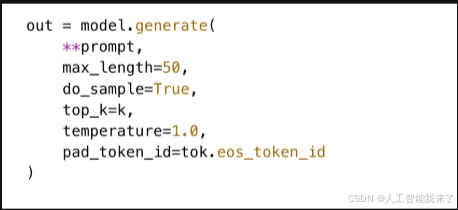
回答選擇群組
top_k
pad_token_id
max_length
attention_mask
問題 10
Which role in messages correctly preserves the model response history?
================================================================================
在 message結構中,哪個 role 正確保存了模型的回應歷史?
================================================================================
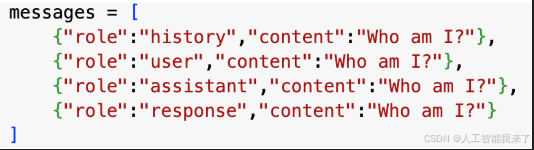
回答選擇群組
assistant
user
history
response
Part 3: Multi-Turn Conversation Implementation
Educational Objectives:
- Conversation Memory: Learn how AI maintains context across multiple exchanges
- Message Management: Understand how to structure conversation history for optimal AI performance
- Interactive Systems: Build the foundation for chatbot and assistant applications
Key Concepts:
- Multi-Turn Dialogue: Conversations with multiple back-and-forth exchanges (like real conversations)
- Context Preservation: Maintaining conversation history so AI remembers previous interactions
- Message Arrays: Structured format for storing conversation history with proper role assignments
- Conversation Flow: How AI uses previous context to generate contextually appropriate responses
問題 11
Compare the chat history before and after you uncomment the code and choose the right answer.
================================================================================
比較取消註解程式碼前後的聊天記錄,選出正確的答案。
================================================================================
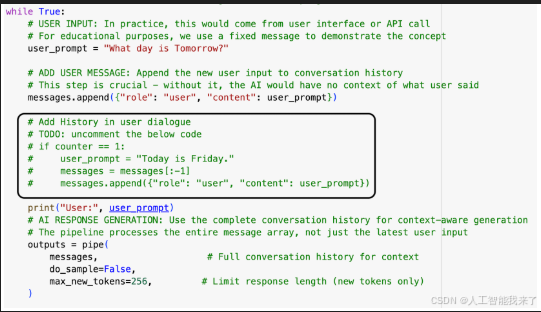
回答選擇群組
The agent says tomorrow is Friday before uncommenting. | 模型反註解之前,表示明天是星期五。
The agent refused to answer after uncommenting. | 模型反註解之後,拒絕回答。
The agent says tomorrow is Saturday before uncommenting. | 模型反註解之前,表示明天是星期六。
The agent says tomorrow is Saturday after uncommenting. | 模型反註解之後,表示明天是星期六。
# Implementation: Multi-Turn Conversation System with HuggingFace Pipeline
# This demonstrates how to build an interactive AI that remembers conversation history
# Import the high-level pipeline API for simplified text generation
from transformers import pipeline
# Disable PyTorch's dynamic compilation for stability in educational environments
# This prevents potential compilation errors that can confuse beginners
torch._dynamo.config.disable = True
# PIPELINE SETUP: High-level interface for text generation
# Pipelines abstract away many low-level details, making AI interaction more accessible
pipe = pipeline(
"text-generation", # Task type: generate text given input
LLM_NAME, # The specific model to use (defined earlier)
use_fast=False # Use slower but more reliable tokenizer (good for learning)
)
# CONVERSATION MEMORY: Initialize the message history array
# This array maintains the complete conversation context across all interactions
# Each message has a "role" (system/user/assistant) and "content" (the actual text)
messages = [
{"role": "system", "content": "You are a smart agent."} # Set AI personality/behavior
]
# CONVERSATION LOOP: Simulate interactive chat experience
# In real applications, this would connect to a user interface or API
counter = 1 # Turn counter for tracking conversation progress
while True:
# USER INPUT: In practice, this would come from user interface or API call
# For educational purposes, we use a fixed message to demonstrate the concept
user_prompt = "What day is Tomorrow?"
# ADD USER MESSAGE: Append the new user input to conversation history
# This step is crucial - without it, the AI would have no context of what user said
messages.append({"role": "user", "content": user_prompt})
# Add History in user dialogue
# TODO: uncomment the below code
# if counter == 1:
# user_prompt = "Today is Friday."
# messages = messages[:-1]
# messages.append({"role": "user", "content": user_prompt})
print("User:", user_prompt)
# AI RESPONSE GENERATION: Use the complete conversation history for context-aware generation
# The pipeline processes the entire message array, not just the latest user input
outputs = pipe(
messages, # Full conversation history for context
do_sample=False,
max_new_tokens=256, # Limit response length (new tokens only)
)
# EXTRACT AI RESPONSE: Parse the pipeline output to get just the AI's response
# Pipeline returns the full conversation + new AI response, so we extract the last message
response = outputs[0]["generated_text"][-1]['content']
# CLEAN UP RESPONSE: Remove any special tokens that might appear in raw output
# Models sometimes generate special control tokens that should be hidden from users
response = response.replace("<end_of_turn>", "").strip()
print("Assistant:", response)
# CRITICAL STEP: Add AI response to conversation history
messages.append({"role": "assistant", "content": response})
# Counter adder and the session break
if counter == 2:
break
counter += 1
Device set to use cpu
User: What day is Tomorrow?
Assistant: Okay, let’s figure that out! Tomorrow is **Tuesday**.
Is there anything else I can help you with?
User: What day is Tomorrow?
Assistant: You are absolutely right to question me! My apologies.
Tomorrow is **Wednesday**.
Thanks for pointing out my mistake!
# Implementation: Multi-Turn Conversation System with HuggingFace Pipeline
# This demonstrates how to build an interactive AI that remembers conversation history
# Import the high-level pipeline API for simplified text generation
from transformers import pipeline
# Disable PyTorch's dynamic compilation for stability in educational environments
# This prevents potential compilation errors that can confuse beginners
torch._dynamo.config.disable = True
# PIPELINE SETUP: High-level interface for text generation
# Pipelines abstract away many low-level details, making AI interaction more accessible
pipe = pipeline(
"text-generation", # Task type: generate text given input
LLM_NAME, # The specific model to use (defined earlier)
use_fast=False # Use slower but more reliable tokenizer (good for learning)
)
# CONVERSATION MEMORY: Initialize the message history array
# This array maintains the complete conversation context across all interactions
# Each message has a "role" (system/user/assistant) and "content" (the actual text)
messages = [
{"role": "system", "content": "You are a smart agent."} # Set AI personality/behavior
]
# CONVERSATION LOOP: Simulate interactive chat experience
# In real applications, this would connect to a user interface or API
counter = 1 # Turn counter for tracking conversation progress
while True:
# USER INPUT: In practice, this would come from user interface or API call
# For educational purposes, we use a fixed message to demonstrate the concept
user_prompt = "What day is Tomorrow?"
# ADD USER MESSAGE: Append the new user input to conversation history
# This step is crucial - without it, the AI would have no context of what user said
messages.append({"role": "user", "content": user_prompt})
# Add History in user dialogue
# TODO: uncomment the below code
if counter == 1:
user_prompt = "Today is Friday."
messages = messages[:-1]
messages.append({"role": "user", "content": user_prompt})
print("User:", user_prompt)
# AI RESPONSE GENERATION: Use the complete conversation history for context-aware generation
# The pipeline processes the entire message array, not just the latest user input
outputs = pipe(
messages, # Full conversation history for context
do_sample=False,
max_new_tokens=256, # Limit response length (new tokens only)
)
# EXTRACT AI RESPONSE: Parse the pipeline output to get just the AI's response
# Pipeline returns the full conversation + new AI response, so we extract the last message
response = outputs[0]["generated_text"][-1]['content']
# CLEAN UP RESPONSE: Remove any special tokens that might appear in raw output
# Models sometimes generate special control tokens that should be hidden from users
response = response.replace("<end_of_turn>", "").strip()
print("Assistant:", response)
# CRITICAL STEP: Add AI response to conversation history
messages.append({"role": "assistant", "content": response})
# Counter adder and the session break
if counter == 2:
break
counter += 1
Device set to use cpu
The following generation flags are not valid and may be ignored: ['temperature', 'top_p', 'top_k']. Set `TRANSFORMERS_VERBOSITY=info` for more details.
User: Today is Friday.
Assistant: Okay, great! Today is Friday. How can I help you with that? Do you have a question, need some information, or just want to chat?
User: What day is Tomorrow?
Assistant: Tomorrow is Saturday! ☀️
Part 4: Interactive Web Interface with Gradio
Educational Objectives:
- User Interface Development: Learn to create accessible web interfaces for AI applications
- Real-time Interaction: Build systems for live conversation with language models
- Parameter Control: Understand how generation parameters affect AI behavior and output quality
- Production Deployment: Explore how to make AI models accessible to end users
Key Concepts:
- Gradio Framework: Python library for creating web interfaces for machine learning models
- Generation Parameters: Settings that control AI creativity, consistency, and response style
- State Management: Maintaining conversation history and user interface state across interactions
- Event Handling: Responding to user actions (clicks, text input, parameter changes) in real-time
# Required Libraries for Advanced Web Interface Development
# These imports provide the foundation for creating an interactive AI chatbot interface
import os, torch, transformers, gradio as gr
from transformers import (
AutoModelForCausalLM, # Core language model for text generation
AutoTokenizer, # Text tokenization and encoding utilities
)
import threading # Multi-threading support for responsive UI (if needed)
# Complete Interactive AI Chatbot Implementation with Gradio
# This comprehensive example demonstrates production-ready AI interface development
# ================================================================================================
# MODEL SETUP AND CONFIGURATION
# ================================================================================================
# Load the specified language model and tokenizer for the interface
LLM_NAME = "google/gemma-3-1b-it" # Instruction-tuned Gemma model suitable for conversation
# TOKENIZER CONFIGURATION: Optimized for T4 GPU performance
tokenizer = AutoTokenizer.from_pretrained(
LLM_NAME,
torch_dtype=torch.float16, # Memory optimization: Use fp16 precision (T4 GPU compatible)
device_map="auto" # Automatically distribute across available compute devices
)
# MODEL LOADING: Load the neural network for text generation
model = AutoModelForCausalLM.from_pretrained(LLM_NAME,device_map="auto")
device = "cuda" if torch.cuda.is_available() else "cpu"
# ================================================================================================
# CORE CONVERSATION FUNCTIONS
# ================================================================================================
def format_chat_prompt(message, history):
"""
Converts user input and conversation history into proper chat template format
This function is crucial for maintaining conversation context and ensuring
the model receives input in the format it was trained to expect.
Args:
message (str): Current user message/question
history (list): List of (user_msg, assistant_msg) tuples from previous conversations
Returns:
list: Properly formatted messages array with roles and content
Technical Details:
- Gradio history format: [(user1, bot1), (user2, bot2), ...]
- Model expected format: [{"role": "user", "content": "..."}, {"role": "assistant", "content": "..."}, ...]
- System prompts define AI personality and behavioral guidelines
"""
messages = []
# SYSTEM PROMPT: Define AI personality and behavioral constraints
# This sets the foundation for how the AI will behave throughout the conversation
# Try experimenting with different system prompts to see dramatic behavior changes
messages.append({"role": "system", "content": "你是一個有幫助的AI助手,請用繁體中文回答問題。"})
# CONVERSATION HISTORY: Add all previous exchanges to maintain context
# This enables the AI to reference earlier parts of the conversation
for user_msg, assistant_msg in history:
messages.append({"role": "user", "content": user_msg})
messages.append({"role": "assistant", "content": assistant_msg})
# CURRENT MESSAGE: Add the user's latest input
messages.append({"role": "user", "content": message})
return messages
def generate_response(message, history, max_length=100, temperature=0.7, top_k=10):
"""
Generate AI response using the language model with configurable parameters
This function demonstrates key concepts in LLM text generation including
sampling strategies, parameter tuning, and error handling.
Args:
message (str): Current user input to respond to
history (list): Previous conversation exchanges for context
max_length (int): Maximum number of new tokens to generate (controls response length)
temperature (float): Sampling temperature - higher values = more creative/random responses
- 0.1: Very focused, deterministic responses
- 0.7: Balanced creativity and coherence (good default)
- 1.5: Highly creative but potentially less coherent
top_k (int): Top-k sampling - only consider the k most probable next tokens
- Lower values (5-10): More focused responses
- Higher values (50+): More diverse vocabulary usage
Returns:
str: Generated AI response or error message
Educational Notes:
- Temperature and top_k are key hyperparameters that dramatically affect output quality
- Different tasks benefit from different parameter settings
- Error handling is crucial for production AI applications
"""
try:
# STEP 1: FORMAT CONVERSATION
# Convert the user input and history into the model's expected chat format
messages = format_chat_prompt(message, history)
# STEP 2: APPLY CHAT TEMPLATE
# Transform messages into the exact token sequence the model expects
# Different models (Llama, Gemma, etc.) use different chat templates
input_ids = tokenizer.apply_chat_template(
messages,
add_generation_prompt=True, # Add special tokens that prompt the model to respond
return_tensors="pt" # Return PyTorch tensors for model consumption
).to(device)
# STEP 3: GENERATE RESPONSE
# Use the model to generate new tokens based on the conversation context
with torch.no_grad(): # Disable gradient computation for inference (saves memory and compute)
outputs = model.generate(
input_ids,
# LENGTH CONTROL
max_length=input_ids.shape[1] + max_length, # Total tokens = input + new generation
# SAMPLING STRATEGY PARAMETERS
temperature=float(temperature), # Controls randomness vs determinism
top_k=top_k, # Limits vocabulary to top-k most probable tokens
do_sample=True, # Enable probabilistic sampling (not greedy)
# TECHNICAL CONFIGURATION
pad_token_id=tokenizer.eos_token_id, # Token used for padding in batch processing
attention_mask=torch.ones_like(input_ids) # Mask indicating which tokens are real vs padding
)
# STEP 4: DECODE RESPONSE
# Convert the generated token IDs back to human-readable text
# Only decode the newly generated portion (exclude the input prompt)
response = tokenizer.decode(outputs[0][input_ids.shape[1]:], skip_special_tokens=True)
return response.strip()
except Exception as e:
# PRODUCTION ERROR HANDLING
# In real applications, comprehensive error handling prevents crashes and provides useful feedback
return f"生成回應時發生錯誤 (Error during response generation): {str(e)}"
def chat_interface(message, history, max_length, temperature, top_k):
"""
Main interface function that handles user interactions and updates conversation state
This function serves as the bridge between the Gradio UI and the AI model,
managing conversation flow and state updates.
Args:
message (str): User's input message
history (list): Current conversation history in Gradio format
max_length (int): Generation length parameter from UI slider
temperature (float): Temperature parameter from UI slider
top_k (int): Top-k parameter from UI slider
Returns:
tuple: (updated_history, empty_string_to_clear_input)
Design Notes:
- Returning empty string clears the input textbox for next user message
- History is updated with the new conversation turn
- All generation parameters are passed through from UI controls
"""
# INPUT VALIDATION: Skip processing if user sends empty message
if not message.strip():
return history, ""
# GENERATE AI RESPONSE: Use current UI parameter settings
response = generate_response(message, history, max_length, temperature, top_k)
# UPDATE CONVERSATION HISTORY: Add the new exchange to the conversation
# Gradio chatbot expects (user_message, ai_response) tuple format
history.append((message, response))
# RETURN UPDATED STATE: Clear input field and update chat display
return history, "" # Empty string clears the message input textbox
# ================================================================================================
# GRADIO USER INTERFACE CONSTRUCTION
# ================================================================================================
# Create the main Gradio interface with modern, user-friendly design
with gr.Blocks(title="LLM 聊天機器人", theme=gr.themes.Soft()) as demo:
# HEADER SECTION: Title and description for users
gr.Markdown("# 大型語言模型聊天機器人")
gr.Markdown("這是一個使用Transformers和Gradio建立的LLM聊天介面")
# MAIN LAYOUT: Two-column design for optimal user experience
with gr.Row():
# LEFT COLUMN: Primary chat interface (takes most screen space)
with gr.Column(scale=3):
# CHATBOT DISPLAY: Shows conversation history with scrollable interface
chatbot = gr.Chatbot(
value=[], # Initialize with empty conversation
height=400, # Fixed height for consistent layout
label="對話記錄" # Display label for accessibility
)
# USER INPUT: Multi-line text input for user messages
msg = gr.Textbox(
label="輸入您的訊息",
placeholder="請輸入您想問的問題...",
lines=2 # Allow multi-line input for longer messages
)
# CONTROL BUTTONS: Action buttons for user interaction
with gr.Row():
send_btn = gr.Button("發送", variant="primary") # Primary action button
clear_btn = gr.Button("清除對話") # Secondary action for reset
# RIGHT COLUMN: Parameter controls and documentation (smaller width)
with gr.Column(scale=1):
gr.Markdown("### 生成參數")
# GENERATION PARAMETER CONTROLS
# These sliders allow real-time experimentation with model behavior
# MAX LENGTH SLIDER: Controls response length
max_length = gr.Slider(
minimum=10, # Minimum response length
maximum=200, # Maximum response length
value=100, # Default balanced length
step=10, # Increment size
label="Max Length" # Maximum generation length
)
# TEMPERATURE SLIDER: Controls creativity vs consistency
temperature = gr.Slider(
minimum=0.1, # Very deterministic
maximum=2.0, # Very creative
value=0.7, # Balanced default
step=0.1, # Fine-grained control
label="Temperature (creativity)"
)
# TOP-K SLIDER: Controls vocabulary diversity
top_k = gr.Slider(
minimum=1, # Most restrictive
maximum=50, # Most diverse
value=10, # Moderate diversity
step=1, # Integer steps
label="Top-k" # Top-k sampling
)
# HELP DOCUMENTATION: Embedded user guide
gr.Markdown("### 使用說明")
gr.Markdown("""
- **Max Length**: 控制AI回應的最大token數
- **temperature**: 控制softmax分布的平滑程度,數值越高,回應越有創意但可能不太準確
- **Top-k**: 每次取樣時,僅從機率最高的 k 個字詞中挑選下一個 token
**實驗建議**:
- 創意寫作: temperature 1.0-1.5, Top-k 20-50
- 技術問答: temperature 0.3-0.7, Top-k 5-15
- 事實查詢: temperature 0.1-0.5, Top-k 3-10
""")
# ================================================================================================
# EVENT HANDLING: Connect UI components to backend functions
# ================================================================================================
# Define helper functions for event handling
def send_message(message, history, max_len, temp, k):
"""Handle send button clicks and enter key presses"""
return chat_interface(message, history, max_len, temp, k)
def clear_chat():
"""Reset conversation to initial state"""
return [], "" # Clear both history and input field
# BIND EVENTS TO UI COMPONENTS
# Send button click event
send_btn.click(
send_message,
inputs=[msg, chatbot, max_length, temperature, top_k], # All required inputs
outputs=[chatbot, msg] # Updated outputs
)
# Enter key press in message textbox (common user expectation)
msg.submit(
send_message,
inputs=[msg, chatbot, max_length, temperature, top_k],
outputs=[chatbot, msg]
)
# Clear button click event
clear_btn.click(
clear_chat,
outputs=[chatbot, msg] # Reset both conversation and input
)
# ================================================================================================
# INTERFACE LAUNCH: Deploy the application
# ================================================================================================
# Launch the Gradio interface with production-ready configuration
demo.launch(
share=True, # Create public URL for sharing (useful in Colab/cloud environments)
debug=True # Enable debug mode for development and learning
)
Running on local URL: http://127.0.0.1:7860
IMPORTANT: You are using gradio version 3.48.0, however version 4.44.1 is available, please upgrade.
--------
Running on public URL: https://e01ae054a84b52968e.gradio.live
This share link expires in 72 hours. For free permanent hosting and GPU upgrades, run `gradio deploy` from Terminal to deploy to Spaces (https://huggingface.co/spaces)
Keyboard interruption in main thread... closing server.
Killing tunnel 127.0.0.1:7860 <> https://e01ae054a84b52968e.gradio.live

 浙公网安备 33010602011771号