


自定义Spring Boot Starter项目并且在其他项目中通过pom引入使用 - 指南
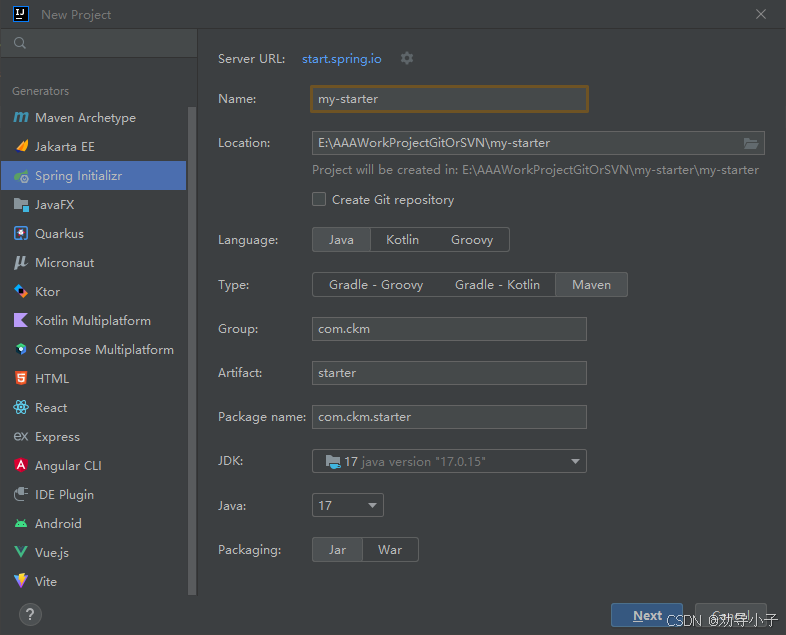
1、创建starter项目
我电脑只有JDK 8,但是创建项目的时候最低只能选择17,后续创建完后去修改即可
2、项目结构
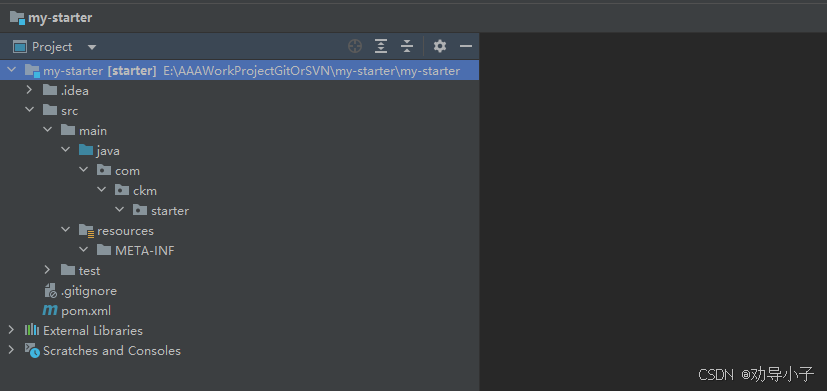
- 删除主启动类Application:Starter不需要启动类
- 删除配置文件application.properties:Starter不需要自己的配置文件
- 删除test里面的测试启动类
在resources下创建META-INF文件夹
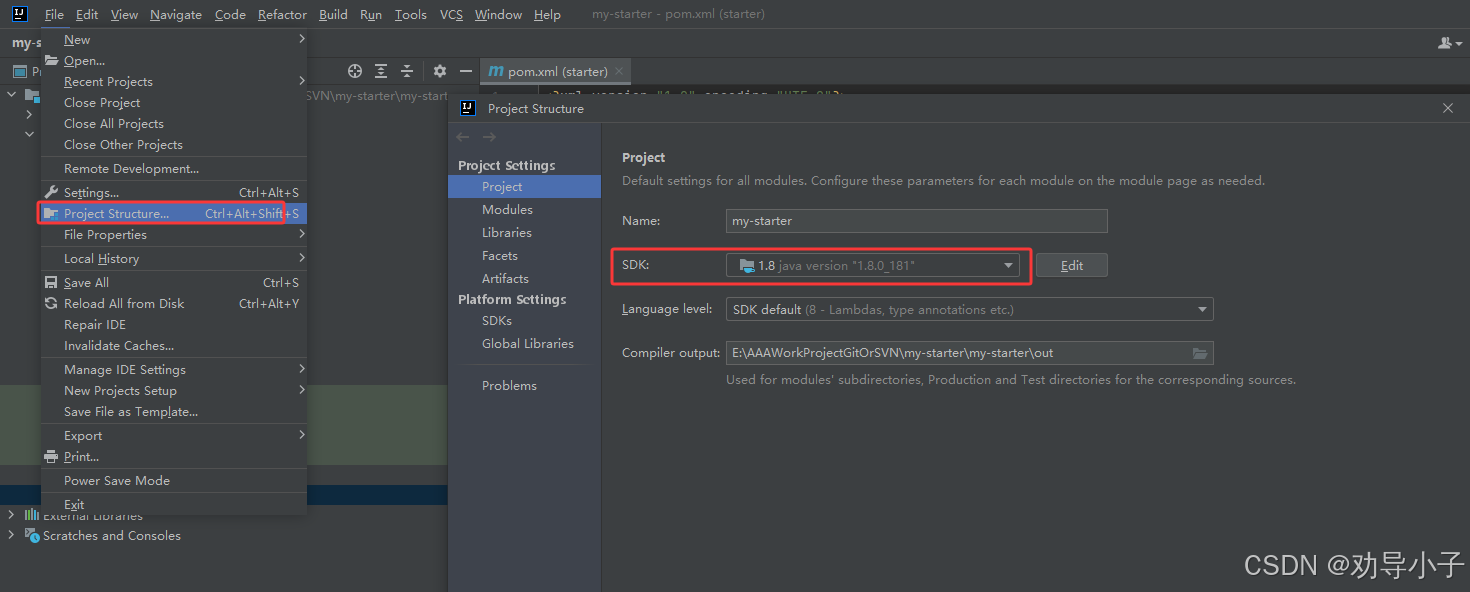
3、修改JDK
修改成JDK8,如果你有更高的版本请切换
4、配置pom.xml
<?xml version="1.0" encoding="UTF-8"?>
    <project xmlns="http://maven.apache.org/POM/4.0.0" xmlns:xsi="http://www.w3.org/2001/XMLSchema-instance"
    xsi:schemaLocation="http://maven.apache.org/POM/4.0.0 https://maven.apache.org/xsd/maven-4.0.0.xsd">
<modelVersion>4.0.0</modelVersion>
  <!-- 继承SpringBoot父项目 -->
    <parent>
    <groupId>org.springframework.boot</groupId>
    <artifactId>spring-boot-starter-parent</artifactId>
    <version>2.6.3</version> <!-- 适配JDK 8 的版本 -->
      <relativePath/> <!-- lookup parent from repository -->
    </parent>
    <!-- 项目基本信息 -->
    <groupId>com.ckm</groupId>
    <artifactId>starter</artifactId>
    <version>0.0.1-SNAPSHOT</version>
    <name>my-starter</name>
    <description>my-starter</description>
      <url/>
      <licenses>
        <license/>
      </licenses>
      <developers>
        <developer/>
      </developers>
      <scm>
        <connection/>
        <developerConnection/>
        <tag/>
        <url/>
      </scm>
      <properties>
      <java.version>8</java.version> <!-- JDK 8 -->
      </properties>
      <dependencies>
        <dependency>
        <groupId>org.springframework.boot</groupId>
        <artifactId>spring-boot-starter</artifactId>
        </dependency>
        <!-- 可选:配置元数据(后面文章会讲) -->
          <dependency>
          <groupId>org.springframework.boot</groupId>
          <artifactId>spring-boot-configuration-processor</artifactId>
          <optional>true</optional>
          </dependency>
          <!-- 可选:Lombok,简化代码 -->
            <dependency>
            <groupId>org.projectlombok</groupId>
            <artifactId>lombok</artifactId>
            <optional>true</optional>
            </dependency>
          </dependencies>
          <build>
            <plugins>
              <plugin>
              <groupId>org.springframework.boot</groupId>
              <artifactId>spring-boot-maven-plugin</artifactId>
                <configuration>
                <skip>true</skip> <!-- 打包时跳过主启动类,必须加这个不然打包会报错 -->
                </configuration>
              </plugin>
            </plugins>
          </build>
        </project>
注意这里的<optional>
<!-- Starter项目 -->
  <!-- Starter项目 -->
    <dependency>
    <groupId>org.projectlombok</groupId>
    <artifactId>lombok</artifactId>
    <optional>true</optional>  ← 注意这里
    </dependency>
<optional>true</optional>的意思是Starter项目自己可以用Lombok,引用Starter项目的项目不会自动引入Lombok
5、创建业务类、自动配置类、配置属性类
5.1 业务类
package com.ckm.starter;
/**
* Hello服务类
* 提供简单的问候功能
*/
public class HelloService {
private String prefix;  // 前缀
private String suffix;  // 后缀
public HelloService(String prefix, String suffix) {
this.prefix = prefix;
this.suffix = suffix;
}
/**
* 说Hello
* @param name 名字
* @return 问候语
*/
public String sayHello(String name) {
return prefix + " " + name + " " + suffix;
}
}
5.2 自动配置类(核心)
package com.ckm.starter;
import org.springframework.boot.autoconfigure.condition.ConditionalOnMissingBean;
import org.springframework.boot.context.properties.EnableConfigurationProperties;
import org.springframework.context.annotation.Bean;
import org.springframework.context.annotation.Configuration;
/**
* Hello自动配置类
* SpringBoot启动时会自动加载这个配置类
*/
@Configuration  // ← 标记为配置类
@EnableConfigurationProperties(HelloProperties.class)  // ← 启用配置属性
public class HelloAutoConfiguration {
/**
* 注册HelloService到Spring容器
* @param properties 配置属性
* @return HelloService实例
*/
@Bean  // ← 注册为Bean
@ConditionalOnMissingBean  // ← 如果容器中没有HelloService才注册
public HelloService helloService(HelloProperties properties) {
return new HelloService(properties.getPrefix(), properties.getSuffix());
}
}
5.3 配置属性类
package com.ckm.starter;
import org.springframework.boot.context.properties.ConfigurationProperties;
/**
* Hello配置属性类
* 对应配置文件中的 hello.* 配置
*/
@ConfigurationProperties(prefix = "hello")
public class HelloProperties {
/**
* 前缀,默认值:Hello
*/
private String prefix = "Hello";
/**
* 后缀,默认值:!
*/
private String suffix = "!";
// Getter 和 Setter
public String getPrefix() {
return prefix;
}
public void setPrefix(String prefix) {
this.prefix = prefix;
}
public String getSuffix() {
return suffix;
}
public void setSuffix(String suffix) {
this.suffix = suffix;
}
}
三个类的关系:
HelloProperties(配置)
        ↓ 读取配置文件
HelloAutoConfiguration(自动配置)
        ↓ 创建并注册Bean
HelloService(业务类)
        ↓ 被注入到Spring容器
使用方可以 @Autowired 使用
6、创建spring.factories
在resource的META-INF文件夹下创建spring.factories
文件内容:
# Auto Configure
org.springframework.boot.autoconfigure.EnableAutoConfiguration=\
com.ckm.starter.HelloAutoConfiguration
如果有多个可以使用逗号分割,如:
org.springframework.boot.autoconfigure.EnableAutoConfiguration=\
com.ckm.starter.HelloAutoConfiguration,\
com.ckm.starter.OtherAutoConfiguration
格式解读:
org.springframework.boot.autoconfigure.EnableAutoConfiguration=\
↓
这是固定的key,SpringBoot会读取这个key
com.ckm.starter.HelloAutoConfiguration
↓
你的自动配置类的全限定名
SpringBoot约定必须是读取META-INF/spring.factories
// SpringBoot源码(简化版)
public class SpringFactoriesLoader {
public static final String FACTORIES_RESOURCE_LOCATION =
"META-INF/spring.factories";  // ← 看!写死的路径
public static List<String> loadFactoryNames() {
  // 扫描所有jar包的 META-INF/spring.factories
  // 读取配置
  // 加载自动配置类
  }
  }
7、打包
Maven三大打包命令
命令对比:
| 命令 | 全称 | 作用 | 结果 |
|---|---|---|---|
package | 打包 | 编译+测试+打jar包 | jar包在target目录 |
install | 安装 | package + 部署到本地仓库 | jar包在本地Maven仓库 |
deploy | 部署 | install + 部署到远程仓库 | jar包在本地+远程仓库 |
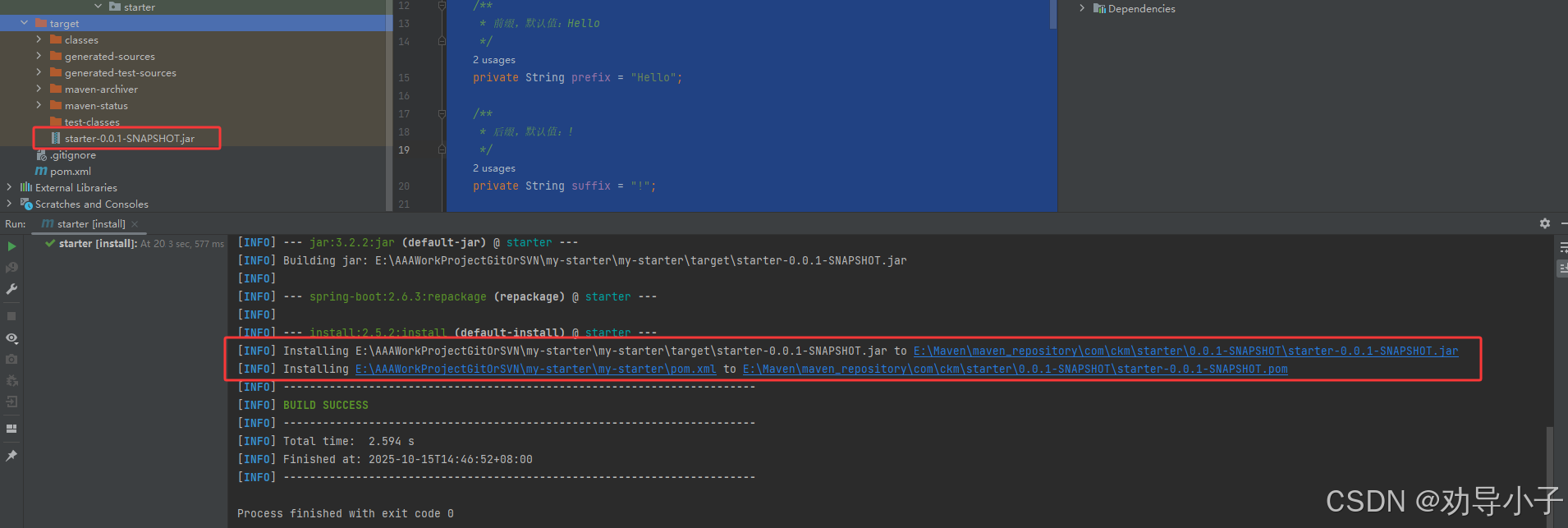
我们这里测试直接使用install打包
8、其他项目使用
8.1 在其他项目pom.xml中引入
<dependency>
<groupId>com.ckm</groupId>
<artifactId>starter</artifactId>
<version>0.0.1-SNAPSHOT</version>
</dependency>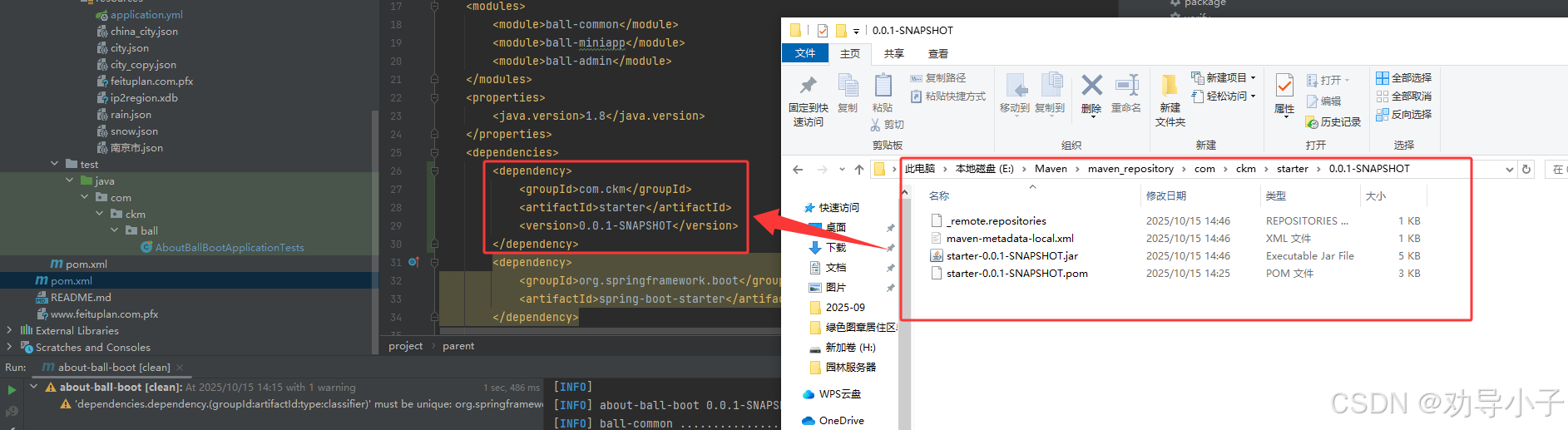
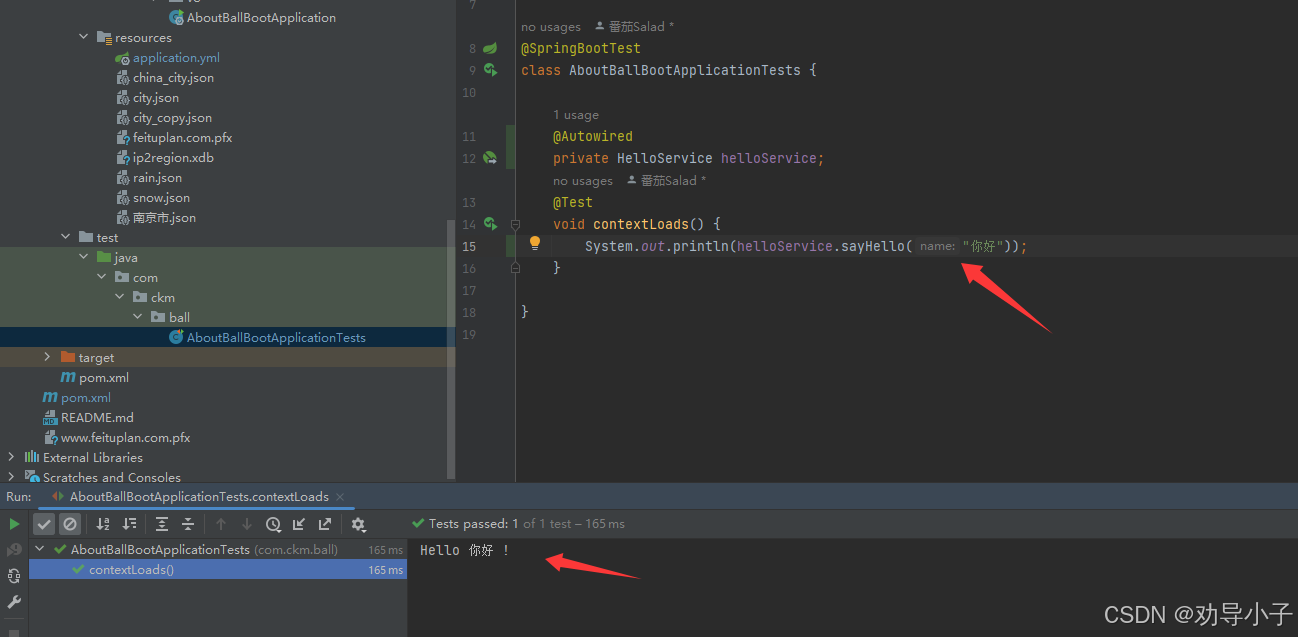
8.2 编写测试类
package com.ckm.ball;
import com.ckm.starter.HelloService;
import org.junit.jupiter.api.Test;
import org.springframework.beans.factory.annotation.Autowired;
import org.springframework.boot.test.context.SpringBootTest;
@SpringBootTest
class AboutBallBootApplicationTests {
@Autowired
private HelloService helloService;
@Test
void contextLoads() {
System.out.println(helloService.sayHello("你好"));
}
}
8.3 自定义配置hello属性值
hello:
  prefix: "世界"
  suffix: "。"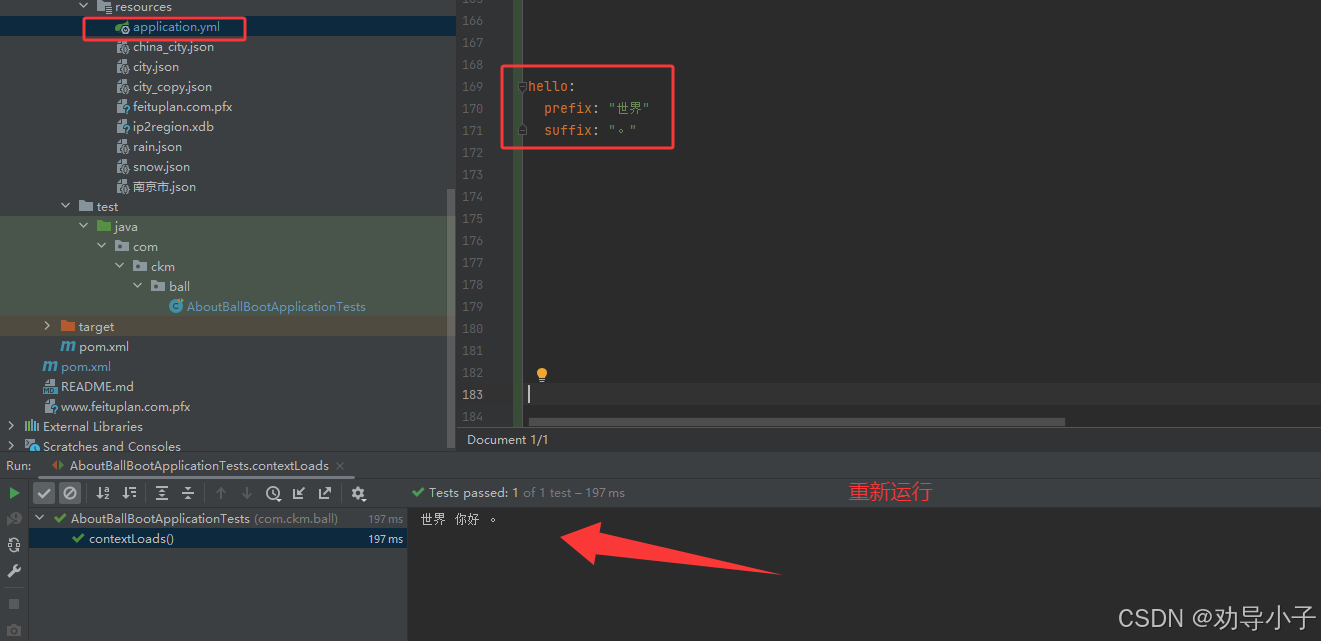
本文参考:https://blog.csdn.net/2301_78967994/article/details/152665942
9、实现可插拔Starter
https://blog.csdn.net/2301_78967994/article/details/152666034
10、配置元数据让你的Starter拥有智能提示
https://blog.csdn.net/2301_78967994/article/details/152666090
随着版本的更新,现在不用自动配置元数据就能识别出来了
没有配置元数据: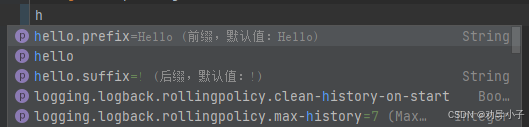

 浙公网安备 33010602011771号