uml第6次作业
UML作业第六次:分析系统,绘制顺序图
一、顺序图 语法小结
简单示例
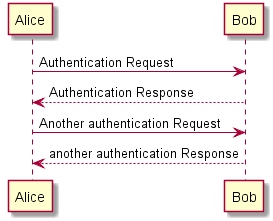
可以用->来绘制参与者之间传递的消息, 而不必显式地声明参与者。也可以使用 --> 绘制一个虚线箭头。还能用 <- 和 <--,这不影响绘图,但可以提高可读性。(注意:仅适用于时序图,对于其它示意图,规则是不同的)

@startuml
Alice -> Bob: Authentication Request
Bob --> Alice: Authentication Response

Alice -> Bob: Another authentication Request
Alice <-- Bob: another authentication Response
@enduml
声明参与者
关键字 participant 用于改变参与者的先后顺序
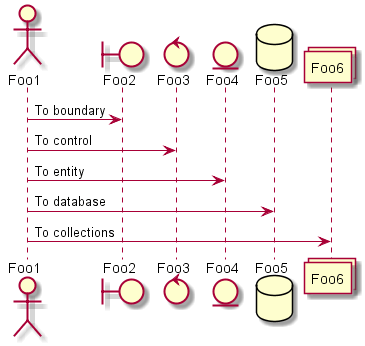
也可以使用其它关键字来声明参与者:
- actor
- boundary
- control
- entity
- database
@startuml
actor Foo1
boundary Foo2
control Foo3
entity Foo4
database Foo5
collections Foo6
Foo1 -> Foo2 : To boundary
Foo1 -> Foo3 : To control
Foo1 -> Foo4 : To entity
Foo1 -> Foo5 : To database
Foo1 -> Foo6 : To collections

@enduml
关键字 as 用于重命名参与者
@startuml
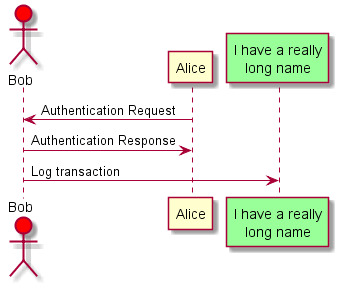
actor Bob #red
' The only difference between actor
'and participant is the drawing
participant Alice
participant "I have a really\nlong name" as L #99FF99
/' You can also declare:
   participant L as "I have a really\nlong name"  #99FF99
  '/

Alice->Bob: Authentication Request
Bob->Alice: Authentication Response
Bob->L: Log transaction
@enduml
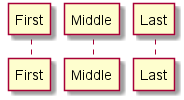
可以使用关键字 order自定义顺序来打印参与者
@startuml
participant Last order 30
participant Middle order 20
participant First order 10
@enduml
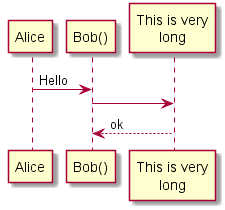
在参与者中使用非字母符号
可以使用引号定义参与者,还可以用关键字 as 给参与者定义别名
@startuml
Alice -> "Bob()" : Hello
"Bob()" -> "This is very\nlong" as Long
' You can also declare:
' "Bob()" -> Long as "This is very\nlong"
Long --> "Bob()" : ok
@enduml
给自己发消息
参与者可以给自己发信息,消息文字可以用\n来换行
@startuml
Alice->Alice: This is a signal to self.\nIt also demonstrates\nmultiline \ntext
@enduml

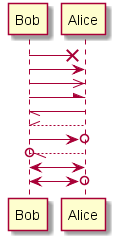
修改箭头样式
修改箭头样式的方式有以下几种:
- 表示一条丢失的消息:末尾加
x - 让箭头只有上半部分或者下半部分:将
<和>替换成\或者/ - 细箭头:将箭头标记写两次 (如
>>或//) - 虚线箭头:用
--替代- - 箭头末尾加圈:
->o - 双向箭头:
<->
@startuml
Bob ->x Alice
Bob -> Alice
Bob ->> Alice
Bob -\ Alice
Bob \\- Alice
Bob //-- Alice

Bob ->o Alice
Bob o\\-- Alice

Bob <-> Alice
Bob <->o Alice
@enduml
修改箭头颜色
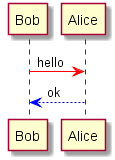
@startuml
Bob -[#red]> Alice : hello
Alice -[#0000FF]->Bob : ok
@enduml
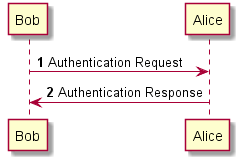
对消息序列编号
关键字 autonumber 用于自动对消息编号
@startuml
autonumber
Bob -> Alice : Authentication Request
Bob <- Alice : Authentication Response
@enduml
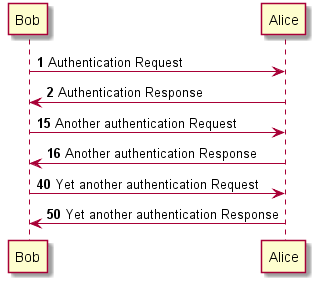
语句 autonumber start 用于指定编号的初始值,而 autonumber startincrement 可以同时指定编号的初始值和每次增加的值
@startuml
autonumber
Bob -> Alice : Authentication Request
Bob <- Alice : Authentication Response

autonumber 15
Bob -> Alice : Another authentication Request
Bob <- Alice : Another authentication Response

autonumber 40 10
Bob -> Alice : Yet another authentication Request
Bob <- Alice : Yet another authentication Response

@enduml
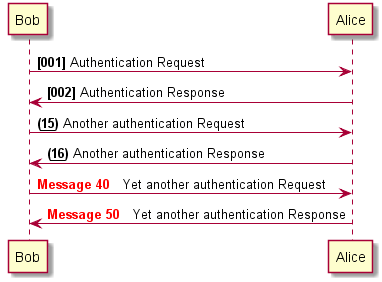
可以在双引号内指定编号的格式(0 表示数字;# 也表示数字,但默认为0)
@startuml
autonumber "<b>[000]"
Bob -> Alice : Authentication Request
Bob <- Alice : Authentication Response

autonumber 15 "<b>(<u>##</u>)"
Bob -> Alice : Another authentication Request
Bob <- Alice : Another authentication Response

autonumber 40 10 "<font color=red><b>Message 0  "
Bob -> Alice : Yet another authentication Request
Bob <- Alice : Yet another authentication Response

@enduml
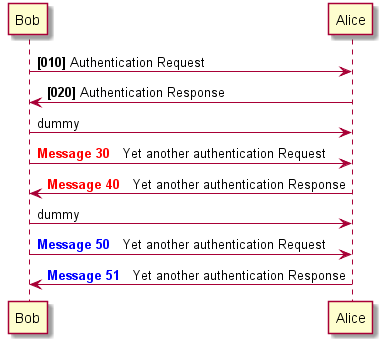
还可以用语句 autonumber stop 和 autonumber resume incrementformat 来表示暂停或继续使用自动编号
@startuml
autonumber 10 10 "<b>[000]"
Bob -> Alice : Authentication Request
Bob <- Alice : Authentication Response

autonumber stop
Bob -> Alice : dummy

autonumber resume "<font color=red><b>Message 0  "
Bob -> Alice : Yet another authentication Request
Bob <- Alice : Yet another authentication Response

autonumber stop
Bob -> Alice : dummy

autonumber resume 1 "<font color=blue><b>Message 0  "
Bob -> Alice : Yet another authentication Request
Bob <- Alice : Yet another authentication Response
@enduml
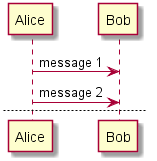
分割示意图
关键字 newpage 用于把一张图分割成多张,在 newpage 之后添加文字,作为新的示意图的标题。
@startuml

Alice -> Bob : message 1
Alice -> Bob : message 2

newpage

Alice -> Bob : message 3
Alice -> Bob : message 4

newpage A title for the\nlast page

Alice -> Bob : message 5
Alice -> Bob : message 6
@enduml
组合消息
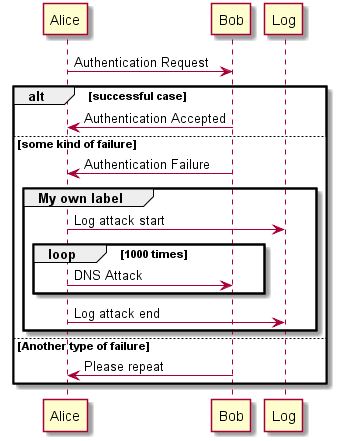
可以通过以下关键词将组合消息:
- all/else
- opt
- loop
- par
- break
- critical
- group,后面紧跟消息内容
可以在标头(header)添加需要显示的文字(group除外),关键词 end 用来结束分组。
@startuml
Alice -> Bob: Authentication Request

alt successful case

    Bob -> Alice: Authentication Accepted

else some kind of failure

    Bob -> Alice: Authentication Failure
    group My own label
        Alice -> Log : Log attack start
        loop 1000 times
            Alice -> Bob: DNS Attack
        end
        Alice -> Log : Log attack end
    end

else Another type of failure

   Bob -> Alice: Please repeat

end
@enduml
注释
可以通过在消息后面添加 note left 或者 note right 关键词来给消息添加注释
@startuml
Alice->Bob : hello
note left: this is a first note

Bob->Alice : ok
note right: this is another note

Bob->Bob : I am thinking
note left
    a note
    can also be defined
    on several lines
end note
@enduml

更改备注框的情况
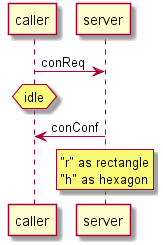
可以使用 hnote 和 rnote 这两个关键字来修改备注框的形状
@startuml
caller -> server : conReq
hnote over caller : idle
caller <- server : conConf
rnote over server
 "r" as rectangle
 "h" as hexagon
endrnote
@enduml
分隔符
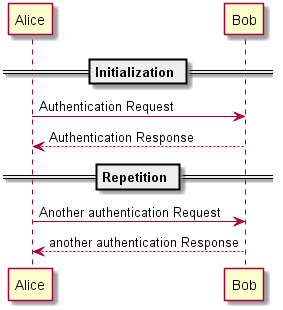
可以通过使用 == 关键词来将你的图表分割多个步骤
@startuml

== Initialization ==

Alice -> Bob: Authentication Request
Bob --> Alice: Authentication Response

== Repetition ==

Alice -> Bob: Another authentication Request
Alice <-- Bob: another authentication Response

@enduml
延迟
可以使用...来表示延迟,并且还可以给延迟添加注释
@startuml

Alice -> Bob: Authentication Request
...
Bob --> Alice: Authentication Response
...5 minutes latter...
Bob --> Alice: Bye !

@enduml

生命线的激活与撤销
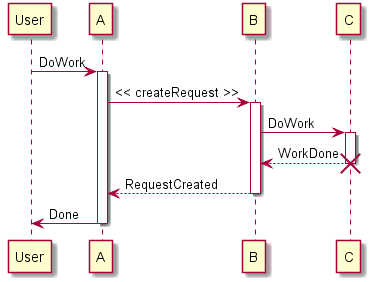
关键字activate和deactivate用来表示参与者的生命活动,一旦参与者被激活,它的生命线就会显示出来,activate和deactivate适用于以上情形,destroy表示一个参与者的生命线的终结。
@startuml
participant User

User -> A: DoWork
activate A

A -> B: << createRequest >>
activate B

B -> C: DoWork
activate C
C --> B: WorkDone
destroy C

B --> A: RequestCreated
deactivate B

A -> User: Done
deactivate A

@enduml
进入和发出消息
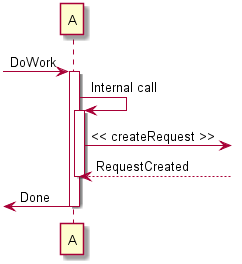
如果只想关注部分图示,可以使用进入和发出箭头,使用方括号[和]表示图示的左、右两侧。
@startuml
[-> A: DoWork

activate A

A -> A: Internal call
activate A

A ->] : << createRequest >>

A<--] : RequestCreated
deactivate A
[<- A: Done
deactivate A
@enduml
包裹参与者
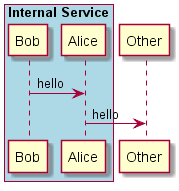
可以使用box和end box画一个盒子将参与者包裹起来,还可以在box关键字之后添加标题或者背景颜色。
@startuml

box "Internal Service" #LightBlue
    participant Bob
    participant Alice
end box
participant Other

Bob -> Alice : hello
Alice -> Other : hello

@enduml
填充区设置
可以设定填充区的参数配置
@startuml
skinparam ParticipantPadding 20
skinparam BoxPadding 10

box "Foo1"
participant Alice1
participant Alice2
end box
box "Foo2"
participant Bob1
participant Bob2
end box
Alice1 -> Bob1 : hello
Alice1 -> Out : out
@enduml

二、《工厂采购》系统
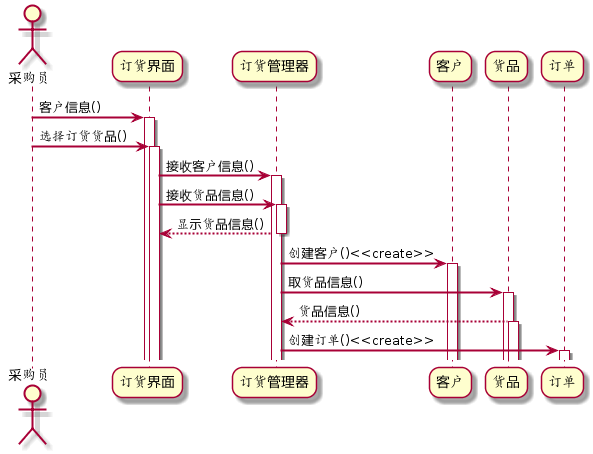
- 采购员选择采购货品
- 到订货界面,接收客户信息,接收货品信息,显示货品信息
- 到订货管理器,创建客户,取货品信息,创建订单
- 创建客户到客户区,取货品信息到货品区,创建订单到订单区
@startuml
skinparam sequenceArrowThickness 2
  skinparam roundcorner 20
  skinparam maxmessagesize 60

  actor 采购员
  participant "订货界面" as A
  participant "订货管理器" as B
  participant "客户" as C
  participant "货品" as D
  participant "订单" as E

 采购员 -> A: 客户信息()
 activate A
 采购员 -> A: 选择订货货品()
 activate A

 A -> B:接收客户信息()
 activate B
 A -> B:接收货品信息()
 activate B
 B --> A: 显示货品信息()
 deactivate B

 B -> C: 创建客户()<<create>>
 activate C
 B -> D: 取货品信息()
 activate D
 D --> B: 货品信息()
 activate D
 B -> E: 创建订单()<<create>>
 activate E
@enduml

 浙公网安备 33010602011771号