


今天我们主要来学习CheckBox控件的使用方法,和他相关的事件监听方法。
我们想实现以下功能:
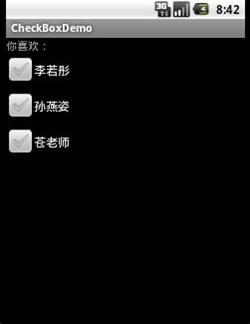
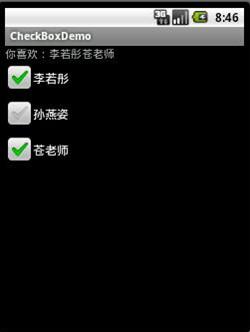
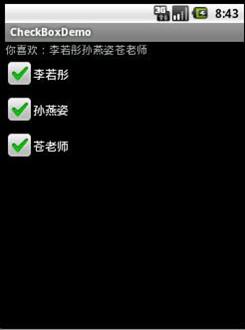
主要代码有:
1.strings.xml
 1 <?xml version="1.0" encoding="utf-8"?>
 2 <resources>
 3
 4     <string name="app_name">CheckBoxDemo</string>
 5     <string name="text_name">你喜欢:</string>
 6     <string name="li">李若彤</string>
 7     <string name="sun">孙燕姿</string>
 8     <string name="cang">苍老师</string>
 9
10 </resources>
2.main.xml
 main.xml

 1 <?xml version="1.0" encoding="utf-8"?>
 2 <LinearLayout xmlns:android="http://schemas.android.com/apk/res/android"
 3     android:layout_width="fill_parent"
 4     android:layout_height="fill_parent"
 5     android:orientation="vertical" >
 6
 7     <TextView
 8         android:id="@+id/myText"
 9         android:layout_width="fill_parent"
10         android:layout_height="wrap_content"
11         android:text="@string/text_name" />
12
13     <CheckBox
14         android:id="@+id/li"
15         android:layout_width="fill_parent"
16         android:layout_height="wrap_content"
17         android:text="@string/li" />
18
19     <CheckBox
20         android:id="@+id/sun"
21         android:layout_width="fill_parent"
22         android:layout_height="wrap_content"
23         android:text="@string/sun" />
24
25     <CheckBox
26         android:id="@+id/cang"
27         android:layout_width="fill_parent"
28         android:layout_height="wrap_content"
29         android:text="@string/cang" />
30
31 </LinearLayout>
3.CheckBoxDemoActivity.java
CheckBoxDemoActivity.java
 1 package com.yangnet.activity;
 2
 3 import com.yangnet.activity.R;
 4
 5 import android.app.Activity;
 6 import android.os.Bundle;
 7 import android.widget.CheckBox;
 8 import android.widget.CompoundButton;
 9 import android.widget.TextView;
10 import android.widget.CompoundButton.OnCheckedChangeListener;
11
12 public class CheckBoxDemoActivity extends Activity
13 {
14     /** Called when the activity is first created. */
15     private CheckBox mCB_li, mCB_sun, mCB_cang;
16     private TextView mTV;
17     String tvValue = null;
18
19     @Override
20     public void onCreate(Bundle savedInstanceState)
21     {
22         super.onCreate(savedInstanceState);
23         setContentView(R.layout.main);
24         mTV = (TextView) findViewById(R.id.myText);
25         mCB_li = (CheckBox) findViewById(R.id.li);
26         mCB_li.setOnCheckedChangeListener(onCheckedChangeListener);
27         mCB_sun = (CheckBox) findViewById(R.id.sun);
28         mCB_sun.setOnCheckedChangeListener(onCheckedChangeListener);
29         mCB_cang = (CheckBox) findViewById(R.id.cang);
30         mCB_cang.setOnCheckedChangeListener(onCheckedChangeListener);
31     }
32
33
34     private OnCheckedChangeListener onCheckedChangeListener = new OnCheckedChangeListener()
35     {
36
37         @Override
38         public void onCheckedChanged(CompoundButton buttonView,
39                 boolean isChecked)
40         {
41             if (isChecked)
42             {
43                 tvValue = mTV.getText().toString()
44                         + buttonView.getText().toString();
45             } else
46             {
47
48                 if (tvValue.contains(buttonView.getText().toString()))
49                 {
50                     tvValue = tvValue.replace(buttonView.getText().toString(),
51                             "");
52                 }
53             }
54
55             mTV.setText(tvValue);
56
57         }
58     };
59 }
说明:由于时间关系没有加注释,有问题的童鞋可以跟帖。我们可以一起讨论,一起学习,共同进步!!

 浙公网安备 33010602011771号