

spring boot 拦截器 以及token验证登录简单案列
直接上操作
一, 编写token工具类
1, 将依赖导入
<dependency>
    <groupId>io.jsonwebtoken</groupId>
    <artifactId>jjwt</artifactId>
    <version>0.9.0</version>
</dependency>
<dependency>
    <groupId>org.bitbucket.b_c</groupId>
    <artifactId>jose4j</artifactId>
    <version>0.6.4</version>
</dependency>
2,
编写token工具类  CreatToken
@Component  //将类注入容器
public class CreatToken {

    /**
     * 生成token
     * @param user
     * @param expire
     * @return
     * @throws Exception
     */
    public static String generateToken(User user, int expire) throws Exception {
        JwtClaims claims = new JwtClaims();
        claims.setSubject(user.getAccount());
        claims.setClaim(CommonConstants.key.CONTEXT_NAME,user.getName());
        claims.setClaim(CommonConstants.key.CONTEXT_USER_ID, user.getAccount());
        claims.setClaim(CommonConstants.key.PASSWORD, user.getPassage());
        claims.setExpirationTimeMinutesInTheFuture(expire == 0 ? 60 : expire);

        Key key = new HmacKey(CommonConstants.key.JWT_PRIVATE_KEY.getBytes("UTF-8"));

        JsonWebSignature jws = new JsonWebSignature();
        jws.setPayload(claims.toJson());
        jws.setAlgorithmHeaderValue(AlgorithmIdentifiers.HMAC_SHA256);
        jws.setKey(key);
        // relaxes the key length requirement
        jws.setDoKeyValidation(false);
        //签名
        String token = jws.getCompactSerialization();

        return token;
    }

    /**
     * 解析token
     * @param token
     * @return
     * @throws Exception
     */
    public static Result getInfoFromToken(String token) throws Exception {

        if (token == null) {
            return null;
        }
        Key key = new HmacKey(CommonConstants.key.JWT_PRIVATE_KEY.getBytes("UTF-8"));

        JwtConsumer jwtConsumer = new JwtConsumerBuilder()
                .setRequireExpirationTime()
                .setAllowedClockSkewInSeconds(30)
                .setRequireSubject()
                .setVerificationKey(key)
                .setRelaxVerificationKeyValidation() // relaxes key length requirement
                .build();
        JwtClaims processedClaims = jwtConsumer.processToClaims(token);

        if(null!=processedClaims.getAudience()){
            return new Result("200","TOKEN验证通过");
        }
        return new Result("500","TOKEN验证不通过");
    }
}
3,编写登录以及token验证接口

@GetMapping("/loginpass")

public Result Login(@RequestParam("account")String account,@RequestParam("passage")String passage ){
    User user = tokenService.logIn(account, passage);
    if(null != user && user.getPassage()!=null && user.getAccount() !=null ){
        //登录成功获取token
        try {
            String s = CreatToken.generateToken(user, 0);
            return new Result(s);
        } catch (Exception e) {
            e.printStackTrace();
        }
    }
    return  new Result();
}
登录成功  拿到token之后,就可以实现拦截器
二,编写一个拦截器类 AuthenticationFilter 并实现 HandlerInterceptor 接口的 preHandle 方法,在该方法中处理拦截到的请求。
//认证拦截器
@Component //添加到容器
public class AuthenticationFilter implements HandlerInterceptor {

    @Override
    public boolean preHandle(HttpServletRequest request, HttpServletResponse response, Object handler) throws Exception {
        //        是否登录
        boolean isLogin=false;
        // 请求头带上令牌 Authorization :Bearer token
       // final  String authHeader = request.getHeader("Authorization");
         //由于没有web页面这里的请求头我就写死了,同样能验证效果(token是登录生成的)
        final  String authHeader = "Bearer+eyJhbGciOiJIUzI1NiJ9.eyJzdWIiOiJ5YW5nbGlqdW4iLCJDT05URVhUX05BTUUiOm51bGwsIkNPTl
RFWFRfVVNFUl9JRCI6InlhbmdsaWp1biIsIlBBU1NXT1JEIjoiNjY2NjYiLCJleHAiOjE2NTYzOTkzNTZ9.zoI3ei7Gc2rfWIS9A9rBdF2ep3Euo2hRo2HYtqronDk";
        if(null != authHeader){
            //   截取token
            final String token=authHeader.substring(7);
            //   解析token
            Result infoFromToken = null ;
                try {
                     infoFromToken = CreatToken.getInfoFromToken(token);
                }catch (Exception e){
                    System.out.println("解码异常为》》》》"+e);
                }
            //防止空指针异常  // 判断是否登录
            if(infoFromToken!=null&& "200".equals(infoFromToken.getCode())){
                 // 已经登录,放行请求
                    isLogin=true;
            }
        }
        if(!isLogin){
//            未登录,则响应信息
            response.setContentType("application/json;charset=UTF-8");
            response.setCharacterEncoding("UTF-8");
            response.setStatus(401);
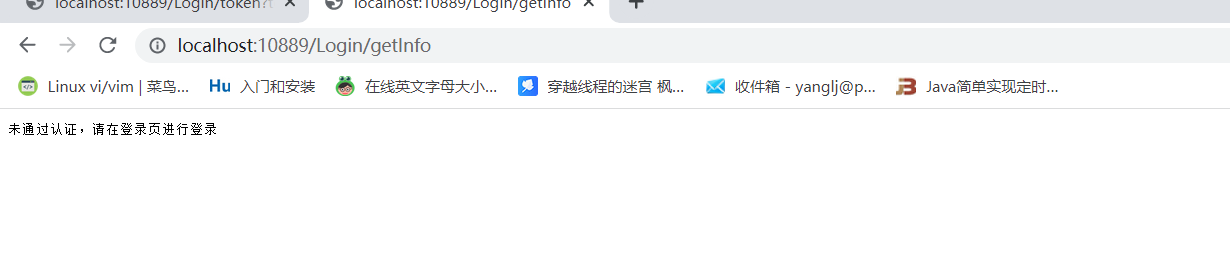
            response.getWriter().write("未通过认证,请在登录页进行登录");
        }

//        不放行
        return isLogin;
    }
}
@Configuration   //拦截器注入
public class WebMvcConfig  extends WebMvcConfigurationSupport {
    //拦截器类
    @Autowired
    private AuthenticationFilter authenticationFilter;

    @Override
    protected void addInterceptors(InterceptorRegistry registry) {
        registry.addInterceptor(authenticationFilter)
//       拦截所有请求
                .addPathPatterns("/**")
//         排除登录请求
           .excludePathPatterns("/asserts/**","/login.html","/Login/loginpass");
    }
}

最后就可以实现

登录成功

拦截成功
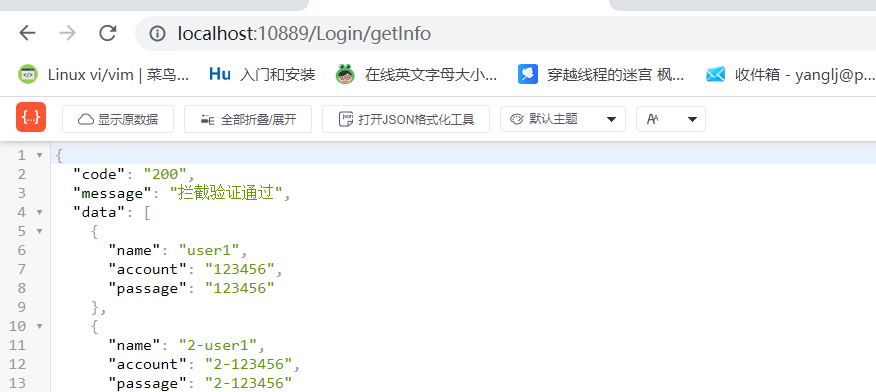
请求成功
特别说明
原文链接:https://blog.csdn.net/grow_/article/details/124431407

 浙公网安备 33010602011771号