

Vue.js-----轻量高效的MVVM框架(七、表单控件绑定)
Vue.js-----轻量高效的MVVM框架(七、表单控件绑定)
话不多说,先上完整代码:

<!DOCTYPE html>
<html>

    <head>
        <meta charset="UTF-8">
        <script type="text/javascript" src="js/vue.js"></script>
        <title></title>
    </head>

    <body>
        <h2>表单控件</h2>
        <div id="dr01">
            <div>
                <h4>#Text</h4>
                <span>Message is: {{ message }}</span>
                <br>
                <input type="text" v-model="message" placeholder="please input the message">
            </div>
            <div>
                <h4>#CheckBox</h4>
                <input id="checkbox" type="checkbox" v-model="checked" />
                <label for="checkbox">the checkbox is checked: {{checked}}</label>

                <br />

                <input type="checkbox" id="box01" value="box01" v-model="checkedNames" />
                <label for="box01">box01</label>
                <input type="checkbox" id="box02" value="box02" v-model="checkedNames" />
                <label for="box02">box02</label>
                <input type="checkbox" id="box03" value="box03" v-model="checkedNames" />
                <label for="box03">box03</label>
                <br />
                <span>CheckedNames:{{checkedNames|json}}</span>
            </div>
            <div>
                <h4>#Radio</h4>
                <input type="radio" id="man" value="man" v-model="picked" />
                <label for="man">man</label>
                <br />
                <input type="radio" id="female" value="female" v-model="picked" />
                <label for="female">female</label>
                <br />
                <span>Picked: {{ picked }}</span>
            </div>
            <div>
                <h4>#Selected</h4>
                <p>单选</p>
                <select v-model="drSelected">
                    <option selected="selected">A</option>
                    <option>B</option>
                    <option>C</option>
                    <option>D</option>
                </select>
                <span>the single selected is: {{drSelected}}</span>

                <p>多选</p>
                <select v-model="drMutiSelected" multiple style="text-align: center; overflow: hidden; width: 50px;">
                    <option selected="selected">A</option>
                    <option>B</option>
                    <option>C</option>
                    <option>D</option>
                </select>
                <span>ctrl multiple selected:{{drMutiSelected}}</span>
                <p>动态选项,用v-for渲染:</p>
                <select v-model="dr02Selected">
                    <option v-for="option in options" v-bind:value="option.value">
                        {{option.text}}
                    </option>
                </select>
                <span>Selected: {{ dr02Selected }}</span>
            </div>
        </div>
        <h2>绑定Value</h2>
        <div id="dr02">
            <input id="02picked" type="radio" v-model="picked" v-bind:value="radio_picked">
            <label for="02picked">the radio value:{{picked}}</label>

            <br />

            <input id="02checkbox" type="checkbox" v-model="toggle" v-bind:true-value="check_true" v-bind:false-value="check_false" />
            <label for="02checkbox">the checkbox value:{{toggle}}</label>

            <br />

            <select v-model="selected">
                <!-- 对象字面量 -->
                <option v-bind:value="{number:123}">123</option>
            </select>

        </div>
        <h2>参数特性</h2>
        <div id="dr03">
            <h4>#lazy</h4>
            <!-- 在input元素中添加lazy属性将会当input出发change时候触发数据更新 -->
            <input id="msg03" v-model="msg03" lazy/>
            <label for="msg03">the input value is {{msg03}}</label>

            <h4>#number</h4>
            <input id="age" v-model="age" type="tel" number/>
            <label for="age">the age is {{age}}</label>

            <h4>#debounce</h4>
            <input id="debounce" v-model="username" debounce="500" />
            <label for="debounce">username is {{username}}</label>
        </div>
        <script>
            var dr01 = new Vue({
                el: '#dr01',
                data: {
                    message: "msg",
                    checked: false,
                    drSelected: "",
                    drMutiSelected: "",
                    checkedNames: [],
                    dr02Selected: "",
                    options: [{
                        text: "one",
                        value: "A"
                    }, {
                        text: "two",
                        value: "B"
                    }, {
                        text: "three",
                        value: "C"
                    }, {
                        text: "four",
                        value: "D"
                    }]
                }
            });
            var dr02 = new Vue({
                el: "#dr02",
                data: {
                    picked: "unpicked",
                    radio_picked: "picked",
                    toggle: "un_checked",
                    check_true: "checked",
                    check_false: "un_checked",
                }
            });
            var dr03 = new Vue({
                el: "#dr03",
                data: {
                    msg03: "msg03",
                    age: 12,
                    username: "wangzf",
                }
            });
        </script>
    </body>

</html>
#1、Text
最常见的input示例:
html
<h4>#Text</h4>
<span>Message is: {{ message }}</span>
<br>
<input type="text" v-model="message" placeholder="please input the message">
然后在js中定义data的message:"msg"
结果展示:

#2、CheckBox
html
第一个复选框没有value属性,绑定了model为"checked",默认值是布尔类型,选中为true,未选中为false。
第二个复选框选项绑定的model是checkedNames,在多个选项中进行多选操作,最终的结果会将checkedNames转化为json数组。
<h4>#CheckBox</h4>
<input id="checkbox" type="checkbox" v-model="checked" />
<label for="checkbox">the checkbox is checked: {{checked}}</label>

<br />

<input type="checkbox" id="box01" value="box01" v-model="checkedNames" />
<label for="box01">box01</label>
<input type="checkbox" id="box02" value="box02" v-model="checkedNames" />
<label for="box02">box02</label>
<input type="checkbox" id="box03" value="box03" v-model="checkedNames" />
<label for="box03">box03</label>
<br />
<span>CheckedNames:{{checkdNames|json}}</span>
在js中定义初始值checked:false,checkedNames:[](在这里复选框要转化为json格式的数组,所以一定要定义为空的数组,勾选某个选项后,自动更新为新的json数组)
checked: false,
checkedNames: [],
结果展示
当选中第一个复选框,第二个复选框按照231的顺序勾选的结果(与数组操作类似,入栈出栈的顺序):

#3、Radio
html
<h4>#Radio</h4>
<input type="radio" id="man" value="man" v-model="picked" />
<label for="man">man</label>
<br />
<input type="radio" id="female" value="female" v-model="picked" />
<label for="female">female</label>
<br />
<span>Picked: {{ picked }}</span>
因为在页面中定义了v-model="picked",所以我们需要在js中的vue组件中定义data的picked属性,如果默认都不选择,则定义picked:"",如果默认选择man,则定义picked:"man",如果默认选择female,则定义picked:"female"。
这里定义的是默认man。

#4、Select
html
<h4>#Selected</h4>
<p>单选</p>
<select v-model="drSelected">
    <option selected="selected">A</option>
    <option>B</option>
    <option>C</option>
    <option>D</option>
</select>
<span>the single selected is: {{drSelected}}</span>
在js中的vue组件中定义data属性 drSelected: "",
因为在页面中我们默认选中A,所以即使初始化的时候drSelected是空字符串,页面加载完毕后也会赋值给selected "A"
初始化页面展示:

#5、Select
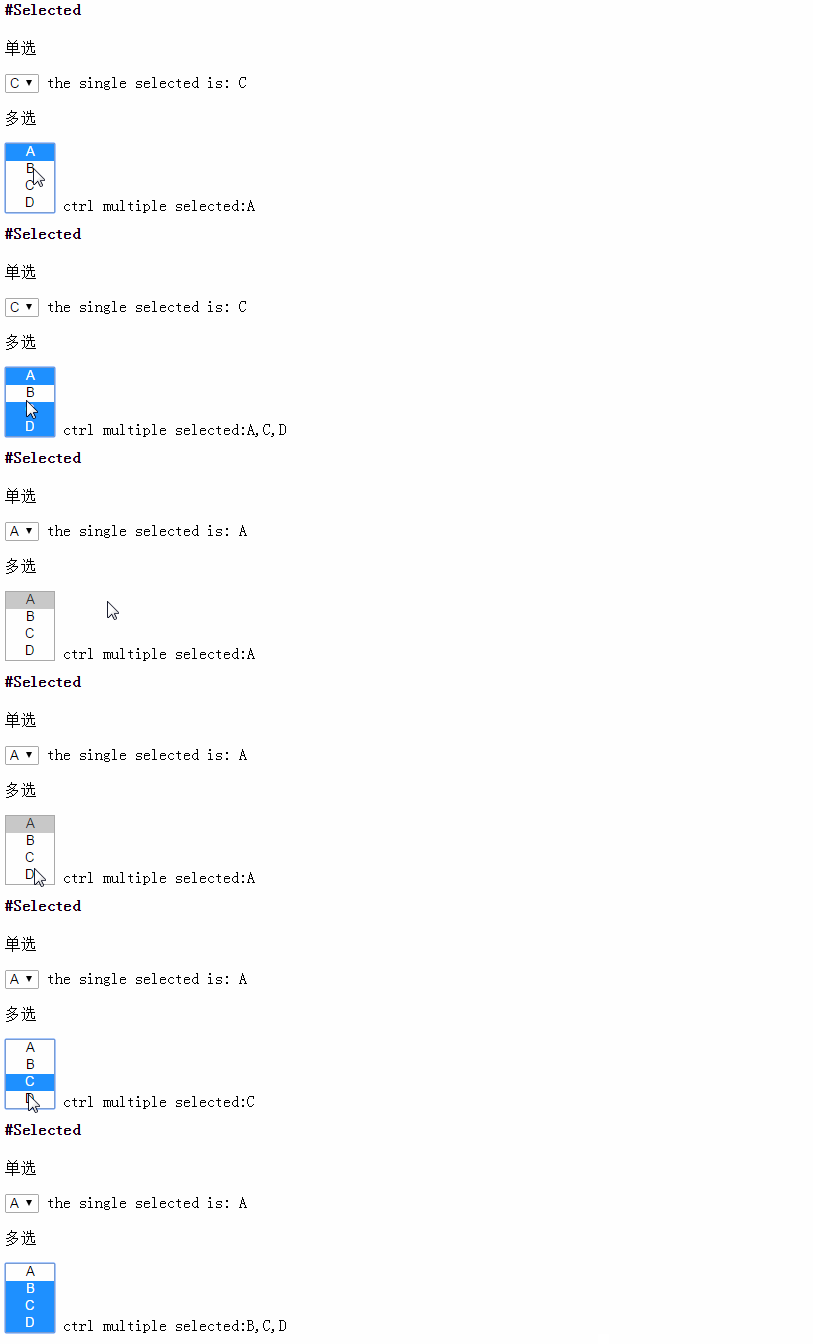
5.1 多选
html:
<p>多选(按ctrl多选)</p>
<select v-model="drMutiSelected" multiple style="text-align: center; overflow: hidden; width: 50px;">
    <option selected="selected">A</option>
    <option>B</option>
    <option>C</option>
    <option>D</option>
</select>
<span>ctrl multiple selected:{{drMutiSelected}}</span>
在js中定义vue组件的data属性 drMutiSelected: "", 这里和checkbox不同,多选的结果顺序按照从上到下,简单的说就是每个选项都是有序号的,按照序号排列
结果展示:
5.2 select动态渲染
html
<p>动态选项,用v-for渲染:</p>
<select v-model="dr02Selected">
    <option v-for="option in options" v-bind:value="option.value">
        {{option.text}}
    </option>
</select>
<span>Selected: {{ dr02Selected }}</span>
js中的data属性添加option数组
options: [{
    text: "one",
    value: "A"
}, {
    text: "two",
    value: "B"
}, {
    text: "three",
    value: "C"
}, {
    text: "four",
    value: "D"
}]
解释:
在下拉菜单中定义选项为遍历options数组的结果,option显示的是option.text属性,并把对应的值option.value绑定给当前选项
页面初始化:

#绑定Value
<h2>绑定Value</h2>
<div id="dr02">
    <input id="man02" type="radio" v-model="gender" v-bind:value="man02">
    <label for="man02">{{man02}}</label>
    <input id="female02" type="radio" v-model="gender" v-bind:value="female02">
    <label for="female02">{{female02}}</label>

    <div>your gender is {{gender}}</div>

    <br />

    <input id="02checkbox" type="checkbox" v-model="toggle" v-bind:true-value="check_true" v-bind:false-value="check_false" />
    <label for="02checkbox">the checkbox value:{{toggle}}</label>
</div>
js中定义的vue组件:
var dr02 = new Vue({
    el: "#dr02",
    data: {
        gender: "",
        man02: "man",
        female02: "female",
        toggle: "un_checked",
        check_true: "checked",
        check_false: "un_checked",
        selected02: ""
    }
});
解释:
1、radio。
与上面radio不同的是,input中的value值替换成了我们自己定义的数据,将man02和female02的值绑定到了input中,默认不选中某一个,当选中man时,value的值就是data中的man02的值,当选中female时,value的值就是data中的female02的值
2、checkbox。
与上面的checkbox不同,这里的checkbox绑定了选中和未选中的两种状态的值,选中时value为data中的check_true的值,为选中时value为data中的check_false的值。
页面初始化:

#参数特性
<h2>参数特性</h2>
<div id="dr03">
    <h4>#lazy</h4>
    <!-- 在input元素中添加lazy属性将会当input出发change时候触发数据更新 -->
    <input id="msg03" v-model="msg03" lazy/>
    <label for="msg03">the input value is {{msg03}}</label>

    <h4>#number</h4>
    <input v-model="age" number>
    <label for="age">the age is {{age}}</label>

    <h4>#debounce</h4>
    <input id="debounce" v-model="username" debounce="500" />
    <label for="debounce">username is {{username}}</label>
</div>
在js中添加vue组件
var dr03 = new Vue({
    el: "#dr03",
    data: {
        msg03: "msg03",
        age: 12,
        username: "pxy",
    }
});
理解:
1、lazy,延迟数据更新,这里并不是说取数据的时候才要更新数据,而是说在绑定的值确定发生变化的时候才要更新数据,示例中是id为"msg03"触发onchange的时候更新数据,简单的说就是当input失去焦点的时候触发数据更新。
2、number,在绑定的元素上添加number属性,如果当前的数值可以转化为number,则更新后的数据为number类型,如果当前的数值不能转化为number类型,则更新后的数据一般转化为string类型。
3、debounce,英文的意思是去除抖动。这里设置debounce="500",如果输入过程中两次输入的值的间隔时间不超过500ms,则不触发数据更新,不输入超过500ms则触发数据更新。
结果测试:


 浙公网安备 33010602011771号