jmeter BeanShell PostProcessor 获取http请求的response出参,存入CSV
在http请求同级节点下建立一个BeanShell PostProcessor,获取http请求响应结果里的order_txn_reference

1、下图所示为http请求的响应结果:

2、下图所示为BeanShell PostProcessor和http请求的位置:
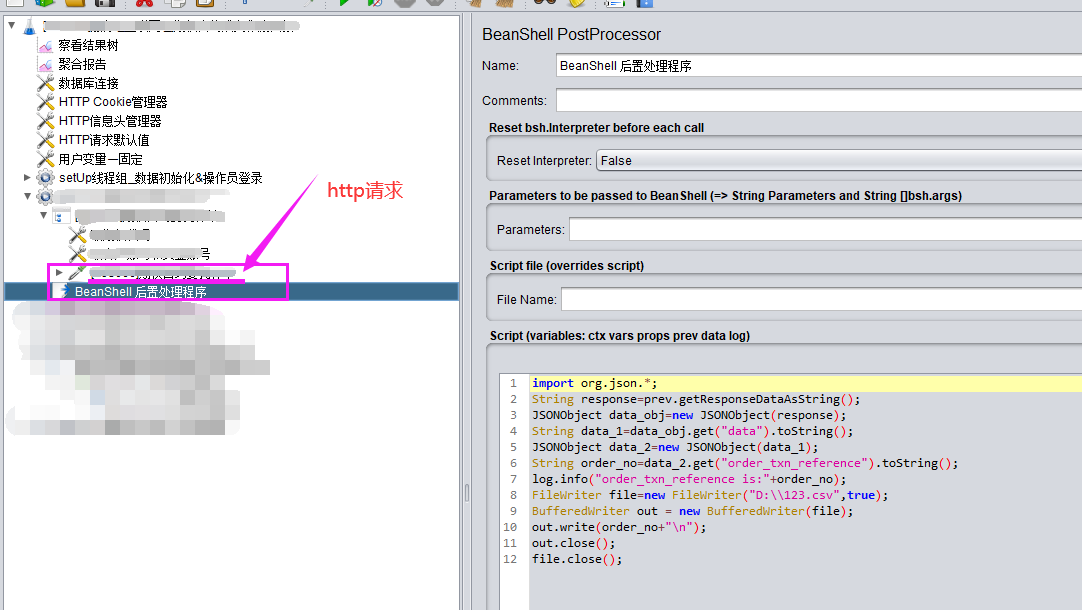
3、需下载json.jar放置到jmeter的lib目录下

https://pan.baidu.com/s/1KFDUIq40BhUXcy2NYo7YkA 密码: c91m
放置好后需要重启jmeter,否则无效
(转载:https://blog.csdn.net/agrapea/article/details/124665058)
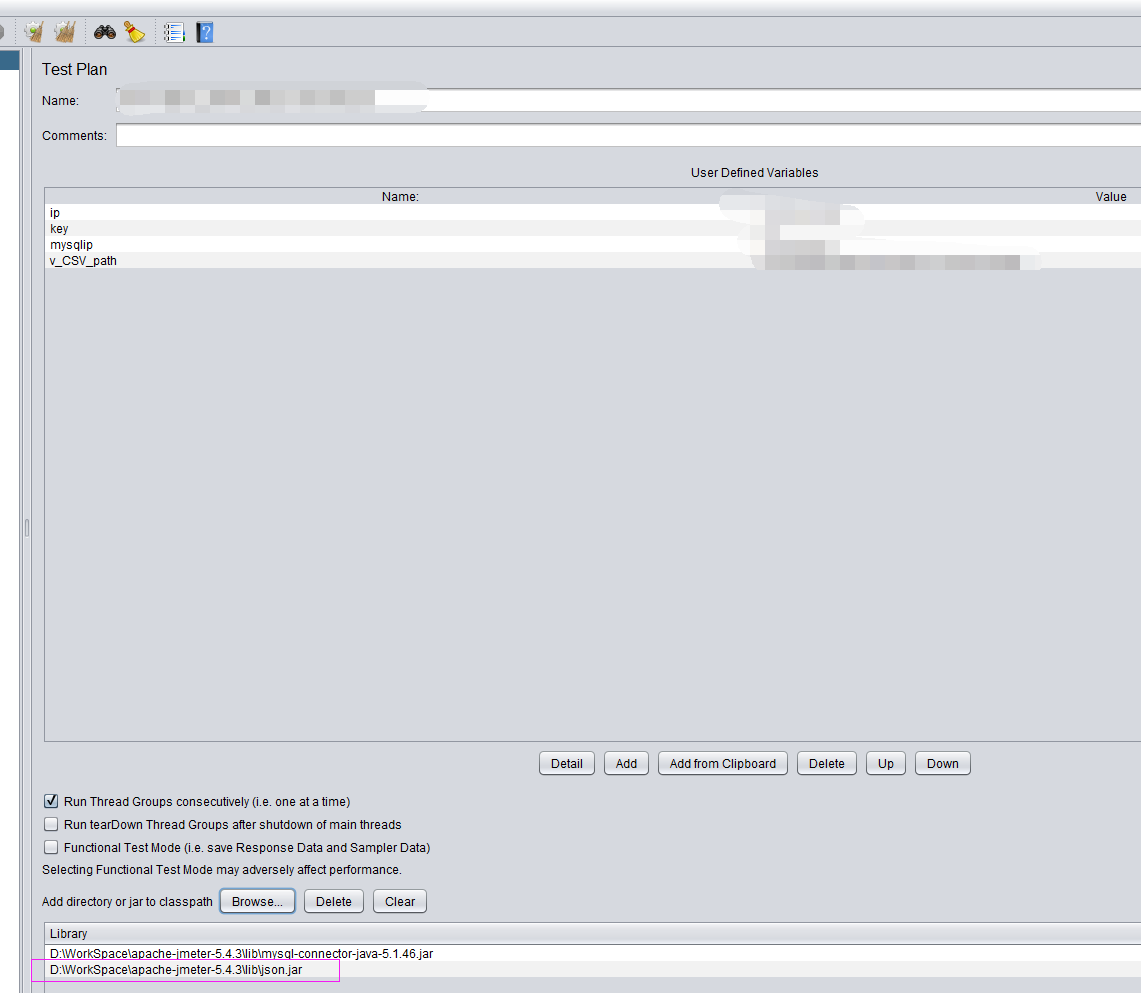
4、测试计划加载json.jar
5、BeanShell PostProcessor插件写如下代码:
import org.json.*;
String response=prev.getResponseDataAsString();
JSONObject data_obj=new JSONObject(response);
String data_1=data_obj.get("data").toString();
JSONObject data_2=new JSONObject(data_1);
String order_no=data_2.get("order_txn_reference").toString();
log.info("order_txn_reference is:"+order_no);
FileWriter file=new FileWriter("D:\\123.csv",true);
BufferedWriter out = new BufferedWriter(file);
out.write(order_no+"\n");
out.close();
file.close();
若是需要存入多个出参到CSV文件里,则使用如下脚本:
import org.json.*;
import java.io;

String strCsvFile="token1.csv";
String strPath=vars.get("v_CSVpath")+strCsvFile;
FileWriter file=new FileWriter(strPath,true);//创建文件对象
BufferedWriter out = new BufferedWriter(file);//创建字符缓存输出流
String response=prev.getResponseDataAsString();
JSONObject data_obj=new JSONObject(response);
String data_1=data_obj.get("data").toString();
JSONObject data_2=new JSONObject(data_1);
String token=data_2.get("token").toString();
String user_name=data_2.get("user_name").toString();
String strCsvContent=new String("");
strCsvContent+=token;
strCsvContent+=',';
strCsvContent+=user_name;
strCsvContent+="\n";
out.write(strCsvContent);
out.close();
file.close();
若是jmeter.log日志里出现如下报错:
2023-02-28 17:52:05,797 ERROR o.a.j.u.BeanShellInterpreter: Error invoking bsh method: eval Sourced file: inline evaluation of: ``import org.json.*; String response=prev.getResponseDataAsString(); JSONObject da . . . '' : Typed variable declaration : Object constructor
则把json.jar包放到/lib/ext目录下试试,或者其他目录下
若是需要把获取到的出参存入到变量里,则使用如下脚本:
import org.json.*;
String response=prev.getResponseDataAsString();
JSONObject data_obj=new JSONObject(response);
String data_1=data_obj.get("data").toString();
JSONObject data_2=new JSONObject(data_1);
String order_no=data_2.get("order_txn_reference").toString();
log.info("order_txn_reference is:"+order_no);
vars.put("order_id",order_no);
log.info("xxxxxxxxxxxxxxxxxxxxxxx order_id 变量 is"+vars.get("order_id"));

 浙公网安备 33010602011771号