
HTML5新特性
1、新的语义化元素
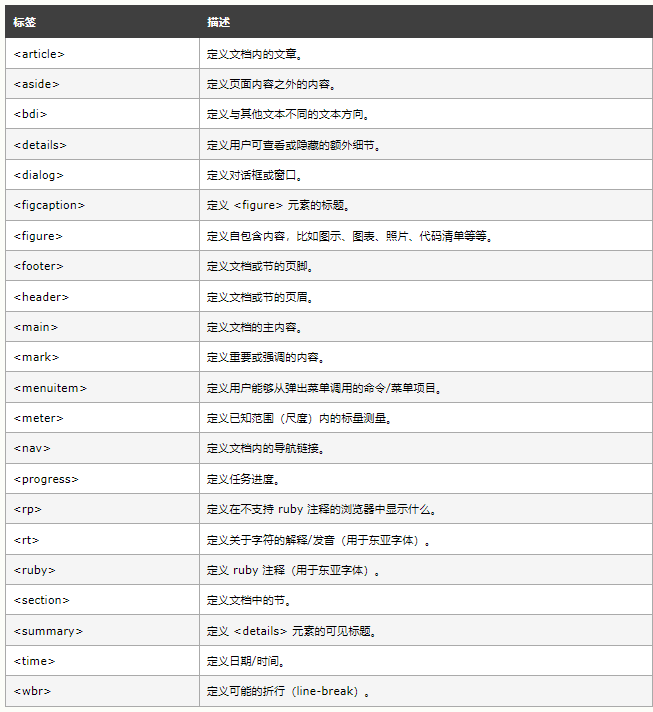
三栏布局公共部分
<!doctype html>
<html lang="en">
<head>
    <meta charset="UTF-8">
    <meta name="viewport"
          content="width=device-width, user-scalable=no, initial-scale=1.0, maximum-scale=1.0, minimum-scale=1.0">
    <meta http-equiv="X-UA-Compatible" content="ie=edge">
    <title>flex-流式布局</title>
    <style>
        body,html{
            width: 100%;
            height: 100%;
            margin: 0;
            padding: 0;
        }
        .header{
            height: 60px;
            line-height: 60px;
            text-align: center;
            background-color: #cdb4db;
        }

         .footer{
            height: 60px;
            line-height: 60px;
            text-align: center;
            background-color: #bde0fe;
        }


    </style>
</head>
<body>
<header class="header">头部</header>
<div class="main">
    <aside class="left-side">
        <section>左边 </section>
    </aside>
    <main class="main-doc">中间部分 </main>
    <aside  class="right-side">
        <article>右边</article>
    </aside>
</div>
<footer class="footer">尾部</footer>
</body>
</html>
flex布局
 .main{
            width: 100%;
            height: calc(100% - 120px);
            background-color: #ffafcc;
            overflow: hidden;
            display: flex;
        }
        .main-doc{
            background-color: orange;
            height: 100%;
            flex: auto;

        }
        .left-side{
            float: left;
            background-color: lightgreen;
            height: 100%;
            flex: 0 0 100px;
        }
        .right-side{
            float: right;
            background-color: lightsalmon;
            height: 100%;
            flex: 0 0 100px;

        }
float布局
 .main{
            width: 100%;
            height: calc(100% - 120px);
            background-color: #ffafcc;
            overflow: hidden;
        }
        .main-doc{
            background-color: orange;
            width: 100%;
            height: 100%;
        }
        .left-side{
            float: left;
            background-color: lightgreen;
            width: 200px;
            height: 100%;
        }
        .right-side{
            float: right;
            background-color: lightsalmon;
            width: 200px;
            height: 100%;
        }
//结构中中间部分放到最后防止页面塌陷
 <aside class="left-side">
        <section>左边 </section>
    </aside>
    <aside  class="right-side">
        <article>右边</article>
    </aside>
    <main class="main-doc">中间部分 </main>
grid布局
.main{
            width: 100%;
            height: calc(100% - 120px);
            background-color: #ffafcc;
            display: grid;
            grid-template-columns: 200px auto 200px;
        }
        .main-doc{
            background-color: orange;

        }
        .left-side{
            background-color: lightgreen;

        }
        .right-side{
            background-color: lightsalmon;

        }
2、新的属性语法
<input type="text" value="你好哇双引号">
<input type="text" value='你好哇单引号'>
<input type="text" value=你好哇没引号>
<input type="text" value="你好哇 有空格">
3、canvas为一个画布标签,只是作为一个图形容器,必须要用脚本来执行
<!doctype html>
<html lang="en">
<head>
    <meta charset="UTF-8">
    <meta name="viewport"
          content="width=device-width, user-scalable=no, initial-scale=1.0, maximum-scale=1.0, minimum-scale=1.0">
    <meta http-equiv="X-UA-Compatible" content="ie=edge">
    <title>Document</title>
</head>
<body>
<canvas id="canvas" width="1080" height="1000"></canvas>
</body>
<script>
    var canvas = document.getElementById('canvas');
    var ctx = canvas.getContext('2d');
    ctx.translate(300, 300) //平移至300,300坐标
    // 画圆线使用arc(中心点X,中心点Y,半径,起始角度,结束角度)
    ctx.arc(0, 0, 100, 0, 2 * Math.PI)
    ctx.arc(0, 0, 5, 0, 2 * Math.PI)
    // 执行画线段的操作stroke
    ctx.stroke()
    ctx.closePath()
    // canvas 创建图形有两种方式
    // 实心矩形
    ctx.fillRect(100,100,100,100)
    // 空心矩形
    ctx.strokeRect(200,100,100,100)
    ctx.fillStyle='pink'
    ctx.fillRect(100,200,100,100)

    ctx.strokeStyle='red'
    ctx.strokeRect(200,200,100,100)

    ctx.clearRect(150,150,100,100)
    ctx.closePath()

    // 圆形绘制
    // context.arc(x, y, radius, starAngle,endAngle, anticlockwise)
    //实心圆
    ctx.beginPath()
    ctx.arc(200,0,100,0,Math.PI*2,true)
    ctx.fillStyle='pink'
    ctx.closePath()
    ctx.fill()
    // 圆弧
    ctx.beginPath()
    ctx.arc(400,0,100,0,Math.PI*2,true)
    ctx.strokeStyle='red'
    ctx.closePath()
    ctx.stroke()
    // 绘制直线
    ctx.beginPath()
    ctx.strokeStyle='green'
    ctx.moveTo(500,0)
    ctx.lineTo(0,333)
    ctx.stroke()
    // 线性渐变
    var g1 = ctx.createLinearGradient(0, 0, 0, 300);
    g1.addColorStop(0, '#E55D87');
    g1.addColorStop(0.5, '#ccc');
    g1.addColorStop(1, '#5FC3E4');
    ctx.fillStyle = g1;
    ctx.fillRect(0, 0, 400, 300);
    // 把图片放在图布上
    var img=new Image()
    img.src='./img/layout.jpeg'
    ctx.drawImage(img,100,200)
</script>
</html>

 浙公网安备 33010602011771号