
Java基础第四部分
方法
在java中,方法就是用来完成解决某件事情或实现某个功能的办法,方法实现的过程中,会包含很多条语句用于完成某些有意义的功能,其设计原则为一般一个 方法对应一个功能。其格式为:
执行语句
………
return 返回值;
}
修饰符:目前就用 public static。还有其他的修饰符。 返回值类型:就是功能结果的数据类型。当这个方法没有返回值的时候,返回值的类型为void;当这个方法有返回值的时候,返回值的类型根据返回的数据来确 定(如果有返回值,必须使用return)。 方法名:符合命名规则即可 参数:实际参数:就是实际参与运算的。形式参数;就是方法定义上的,用于接收实际参数的。 参数类型:就是参数的数据类型 参数名:就是变量名 方法体语句:就是完成功能的代码。 return:结束方法的。 返回值:就是功能的结果,由return带给调用者
public class Demo01 {
public static void main(String[] args) {
int i = add(3, 4);
System.out.println(i);
}
public static int add(int a, int b){
return a + b;
}
}

方法的参数
方法的参数分为两种:形参和实参。形参代表方法定义上的,用于接收实际参数的参数。实参代表实际参与运算的参数。Java中方法的参数传递都是通过值传递 实现的,所谓值传递,就是将实际参数值的副本传入方法内,而参数本身不会受到任何影响。
public class Demo01 {
public static void main(String[] args) {
int c = 5;
int d = 6;
swap(c,d);
System.out.println(c+"-------"+d);
}
public static void swap(int a, int b){
int temp = a;
a = b;
b = temp;
System.out.println(a+"======="+b);
}
}

方法重载
在Java方法的执行过程中,重载的概念是相当重要的。Java允许同一个类中定义多个同名的方法,只要形参列表不同即可。如果同一个类中包含了两个或两个以 上的方法名相同,但是形参列表不同(与返回值类型无关),我们则成为方法重载。所谓的重载就是要求两同一不同:同一个类中方法名相同,参数列表不同。对 于方法其他部分(返回值类型,修饰符等)与重载没有任何关系。参数列表不同包括:A:参数个数不同。B:参数类型不同。C:参数的顺序不同(算重载,但是在开发中 不用)
public class Demo02 {
public static void main(String[] args) {
int c = add(1,2);
double d = add(2.3,5);
double e = add(3,1.5);
int f =add(4,5,6);
System.out.println(c);
System.out.println(d);
System.out.println(e);
System.out.println(f);
}
public static int add(int a, int b){
return a + b;
}
public static double add(double a, int b){
return a + b;
}
public static double add(int a, double b){
return a + b;
}
public static int add(int a, int b,int c){
return a + b + c;
}
}

形参个数可变的方法
形参个数可变表示允许为方法指定数量不确定的形参。如果在方法定义时,在最后一个形参的类型后加三个点(...),则表明该形参可以接受多个参数值,多个参 数值被当成数组传入。
public class Demo03 {
public static void main(String[] args) {
paramChange(2,"test1","test2","test3");
}
public static void paramChange(int a, String ...strings){
System.out.println(a);
for (String string:strings){
System.out.println(string);
}
}
}

递归
递归算法是一种直接或间接地调用自身的算法。在计算机编写程序中,递归算法对解决一大类问题是十分有效的,它往往使算法的描述简洁而且易于理解
其一般形式为:
func( mode){ if(endCondition){ //递归出口 end; }else{ func(mode_small) //调用本身,递归 } }
public class Demo05 {
public static void main(String[] args) {
test(5);
}
public static void test(int a){
if(a==0){
System.out.println(a);
}else {
test(--a);
}
}
}

数组
一维数组
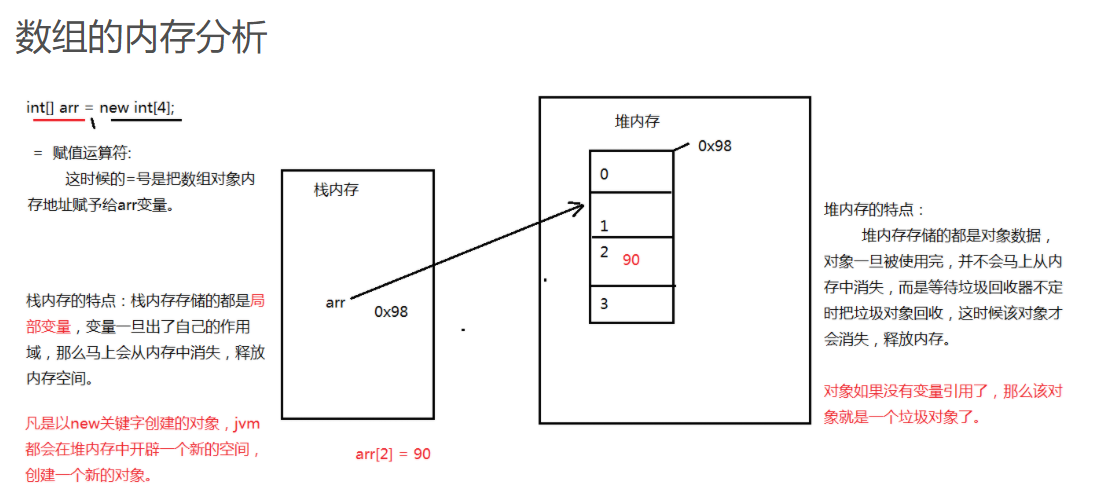
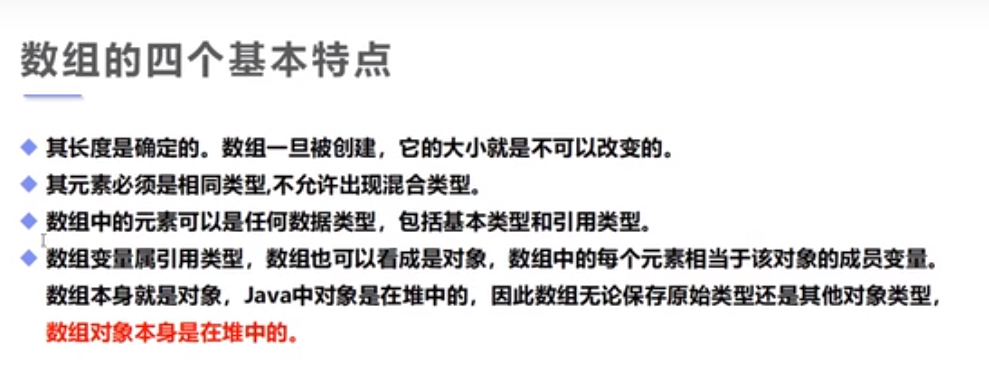
所谓的数组指的就是一组相关类型的变量集合,并且这些变量可以按照统一的方式进行操作,数组本身属于引用数据类型. 数组的最大好处就是能都给存储进来的 元素自动进行编号. 注意编号是从0开始。方便操作这些数据
数组的定义
格式1:
元素类型[] 数组名 = new 元素类型[元素个数或数组长度];
示例:int[] arr = new int[5];
格式2:
元素类型[] 数组名 = new 元素类型[]{元素,元素,……};
int[] arr = new int[]{3,5,1,7};
int[] arr = {3,5,1,7};
数组的初始化
初始化方式1:不使用运算符new
int[] arr = { 1, 2, 3, 4, 5 };
int[] arr2 = new int[] { 1, 2, 3, 4, 5 };
初始化方式2:
int[] arr3=new int[3];
arr3[0]=1;
arr3[1]=5;
arr3[2]=6;
数组的遍历
数组中有一个属性可以获取到数组中元素的个数,也就是数组的长度. 数组名.length
public class Demo01 {
public static void main(String[] args) {
//int arrays1[] ,不建议这样写
//两种静态初始化
int[] arr1 = { 1, 2, 3}; //不能分开写
int[] arr2= new int[] { 1, 2, 3 };
//动态初始化
int[] arr3=new int[3];
arr3[0]=1;
arr3[1]=2;
arr3[2]=3;
for (int i = 0; i < arr3.length; i++) {
System.out.println(arr3[i]);
}
}
}

常见异常
-
NullPointerException 空指针异常
原因: 引用类型变量没有指向任何对象,而访问了对象的属性或者是调用了对象的方法。
-
ArrayIndexOutOfBoundsException 索引值越界
原因:访问了不存在的索引值。
-
总结
二维数组
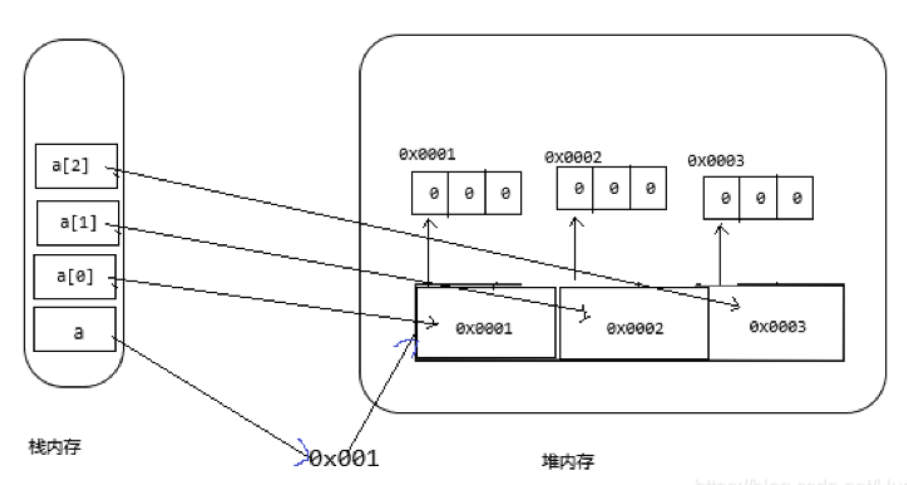
实质就是存储是一维数组。
数组定义:
数组类型 数组名 = new [数组类型一维数组的个数] [每一个一维数组中元素的个数];
public class Demo02 {
public static void main(String[] args) {
int m = 0;
//静态初始化
int[][] arrays0 = new int[][]{{12, 13, 14, 15}, {16, 17, 18, 19}, {20, 21, 22, 23}, {24, 25, 26, 27}};
int[][] arrays = new int[3][4];
//动态初始化
for (int i = 0; i < arrays.length; i++) {
for (int j = 0; j < arrays[i].length; j++) {
arrays[i][j] = (m++);
}
}
//输出arrays
for (int i = 0; i < arrays.length; i++) {
System.out.println(" \t");
for (int j = 0; j < arrays[i].length; j++) {
System.out.print(arrays[i][j] + " ");
}
System.out.println(" \t");
}
System.out.println("====================");
//输出arrays0
for (int i = 0; i < arrays0.length; i++) {
System.out.println(" \t");
for (int j = 0; j < arrays0[i].length; j++) {
System.out.print(arrays0[i][j] + " ");
}
System.out.println(" \t");
}
}
}
Arrays工具类
数组转换字符串
public class Demo03 {
public static void main(String[] args) {
int[] array = new int[]{1,2,6,8,9};
System.out.println("转换前:"+array);
//转换字符串
String str = Arrays.toString(array);
System.out.println("转换后的字符串:"+str);
}
}

对数组进行升序排列
public class Demo04 {
public static void main(String[] args) {
int[] array = new int[]{15,6,21,8,3};
System.out.println("原数组:"+Arrays.toString(array));
//转换字符串
Arrays.sort(array);
System.out.println("排序后的数组:"+Arrays.toString(array));
}
}

所有元素赋特定值
public class Demo05 {
public static void main(String[] args) {
int[] array = new int[]{15,6,21,8,3};
System.out.println("原数组:"+Arrays.toString(array));
//所有元素赋特定值
Arrays.fill(array,10);
System.out.println("排序后的数组:"+Arrays.toString(array));
}
}

判断数组是否相等
public class Demo06 {
public static void main(String[] args) {
int[] array0 = new int[]{15,6,21,8,3};
int[] array1 = new int[]{15,6,21,8,3};
int[] array2 = new int[]{11,25,2,81,9};
boolean boo=Arrays.equals(array0,array1);
boolean boo2=Arrays.equals(array1, array2);
System.out.println("array0:"+Arrays.toString(array0));
System.out.println("array1:"+Arrays.toString(array1));
System.out.println("array2:"+Arrays.toString(array2));
System.out.println("array0与array1是否相等?"+boo);
System.out.println("array1与array2是否相等?"+boo2);
}
}

对数组复制
public class Demo07 {
public static void main(String[] args) {
int[] array = new int[]{15,6,21,8,3};
System.out.println("array:"+Arrays.toString(array));
//把数组复制成特定长度的数组
int array1[]=Arrays.copyOf(array,array.length);
System.out.println("array1:"+Arrays.toString(array1));
}
}

查询数组下标
public class Demo08 {
public static void main(String[] args) {
int[] array = new int[]{15,6,21,8,3};
//查询数组下标
int i=Arrays.binarySearch(array, 21);
System.out.println("数组array第5个数字下标是:"+i);
}
}

数组转换成集合
public class Demo09 {
public static void main(String[] args) {
int[] array = new int[]{15,6,21,8,3};
//数组转换成字符串
String str = Arrays.toString(array);
//字符串转换成集合
List<String> list = Arrays.asList(str);
for (int i = 0; i < list.size(); i++) {
System.out.println("转换后的List集合:"+list.get(i));
}
}
}

稀疏数组
当一个数组中大部分元素为0,或者为同一个值的数组时,可以使用稀疏数组来保存该数组,稀疏数组的处理方法是:
.记录数组一共有几行几列,有多少个不同的值
.把具有不同值的元素的行列及值记录在一个小规模的数组中,从而缩小程序的规模

即第一行第一列记录记录原始数组行数,第一行第二列记录原始数组列数,第一行第三列总共有多少个值,第二行记录第一个有效数据,第三行记录第二个有效 数据

public class Demo10 {
public static void main(String[] args) {
//创建一个二维数组,11行11列
//0-无子,1-黑子,2-白子
int[][] array = new int[11][11];
array[1][2] = 1;
array[2][3] = 2;
//统计非0子的个数
int sum = 0;
System.out.println("=========原数组为:");
//输出原始二维数组
for (int i = 0; i < array.length; i++) {
for (int j = 0; j <array[i].length ; j++) {
if (array[i][j]!=0){
sum++;
}
System.out.print(array[i][j]+" ");
}
System.out.println();
}
//创建稀疏数组
int[][] array2 = new int[sum+1][3];
array2[0][0] = 11;
array2[0][1] = 11;
array2[0][2] = sum;
int count = 0;
for (int i = 0; i < array.length; i++) {
for (int j = 0; j <array[i].length ; j++) {
if(array[i][j]!=0){
count++;
array2[count][0] = i;
array2[count][1] = j;
array2[count][2] = array[i][j];
}
}
}
System.out.println("=========稀疏数组为:");
//输出稀疏数组
for (int i = 0; i <array2.length ; i++) {
System.out.println(array2[i][0]+"\t"+array2[i][1]+"\t"+array2[i][2]);
}