

pytest测试框架(一)简介与运行方式
简介
pytest是一个全功能的python的测试工具,与python自带的unittest测试框架类似,但pytest使用起来更加的简洁和高效,并兼容unittest框架。pytest可以结合requests实现接口测试,结合selenium、appium实现ui自动化测试,还可以结合allure2集成到Jenkins中实现持续集成,支持的扩展插件非常多,具体可以查看文档:https://docs.pytest.org/
安装
pip install -U pytest
用例识别与运行
- 用例编写规范
- 测试文件以 test_开头或以_test结尾
- 测试类以Test开头,并且不能带有__init__方法
- 测试函数以test_开头
- 断言使用assert
# content of test_sample.py
def inc(x):
    return x + 1


def test_answer():
    assert inc(3) == 5
- 用例运行方式
- 直接使用pytest命令执行, pytest会收集当前目录和递归查找子目录下所有符合编写规范的函数、类、方法来执行
- 执行结果中, F 代表用例未通过, . 代表用例通过
- 也可以通过文件名类名方法执行部分用例
- pytest 文件名.py
- pytest 文件名.py::类名
- pytest 文件名.py::类名::方法名
$ pytest
=========================== test session starts ============================
platform linux -- Python 3.x.y, pytest-7.x.y, pluggy-1.x.y
rootdir: /home/sweet/project
collected 1 item

test_sample.py F                                                     [100%]

================================= FAILURES =================================
_______________________________ test_answer ________________________________

    def test_answer():
>       assert inc(3) == 5
E       assert 4 == 5
E        +  where 4 = inc(3)

test_sample.py:6: AssertionError
========================= short test summary info ==========================
FAILED test_sample.py::test_answer - assert 4 == 5
============================ 1 failed in 0.12s =============================
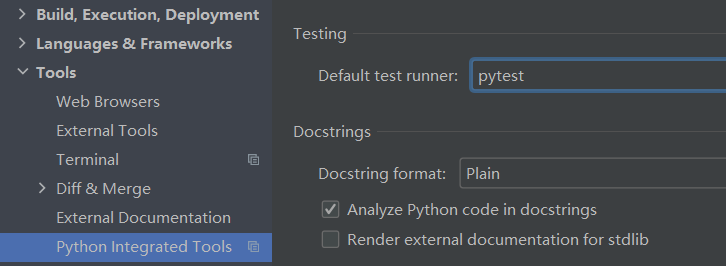
- 在pycharm中运行用例,需要做如下设置
本文来自博客园,作者:小小滴人a,转载请注明原文链接:https://www.cnblogs.com/xxiaow/p/16667090.html
任何人的成功都无法一蹴而就,每一阶段的抵达,都离不开一步一个脚印的积累。只要不急不躁,耐心努力,保持对新事物的好奇,就是行进在成为更好自己的路上。慢慢来,别着急,生活终将为你备好所有的答案。
 浙公网安备 33010602011771号