第 5 篇 Scrum 冲刺博客
站立会议照片
![image-20231123130846178]()
昨日已完成的工作
- 显示用户的活动信息,包括其他用户对其主题的回复
- 展示社区信息,包括搜索功能、社区卡片列表和分页功能
今日计划完成的工作
- 展示用户搜索结果,包括搜索功能、用户卡片列表和分页功能
- 处理 Clerk Webhooks 的 Next.js API 路由函数。
- 用于接收来自 Clerk 的实时事件通知,并根据事件类型执行相应的业务逻辑。
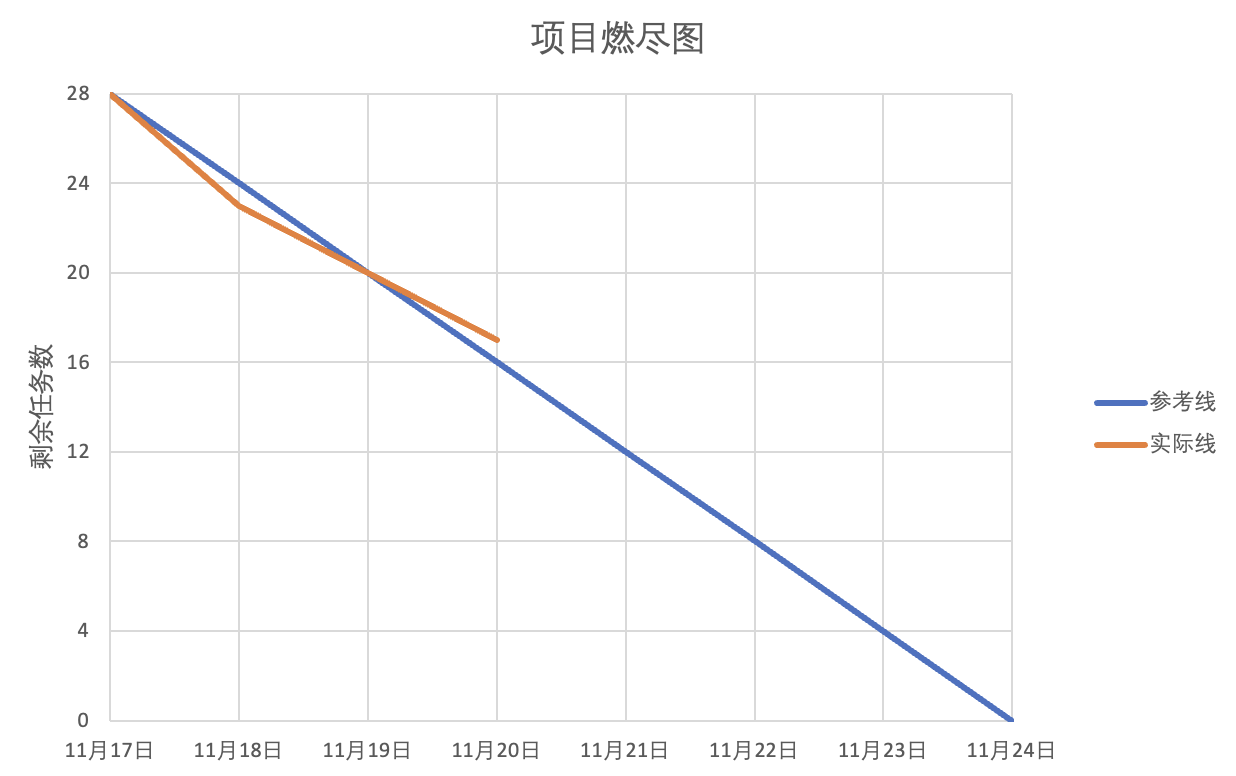
项目燃尽图
![image-20231124084320659]()
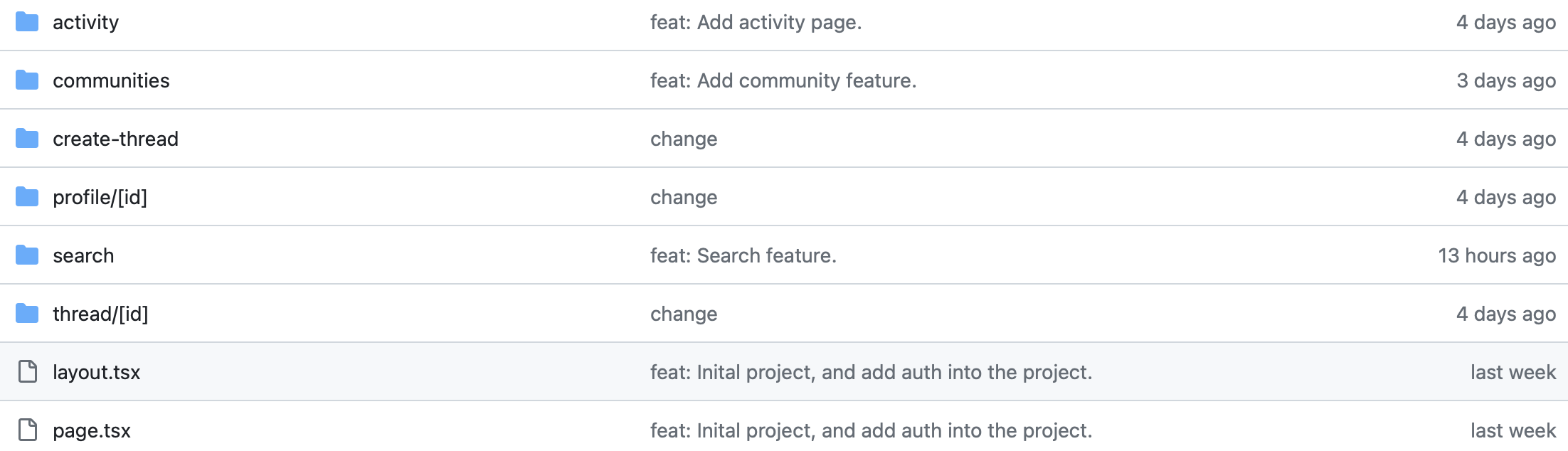
代码签入记录
![image-20231125103140232]()
适当的项目程序/模块的最新(运行)截图
import { redirect } from "next/navigation";
import { currentUser } from "@clerk/nextjs";

import Comment from "@/components/forms/Comment";
import ThreadCard from "@/components/cards/ThreadCard";

import { fetchUser } from "@/lib/actions/user.actions";
import { fetchThreadById } from "@/lib/actions/thread.actions";

export const revalidate = 0;

async function page({ params }: { params: { id: string } }) {
  if (!params.id) return null;

  const user = await currentUser();
  if (!user) return null;

  const userInfo = await fetchUser(user.id);
  if (!userInfo?.onboarded) redirect("/onboarding");

  const thread = await fetchThreadById(params.id);

  return (
    <section className='relative'>
      <div>
        <ThreadCard
          id={thread._id}
          currentUserId={user.id}
          parentId={thread.parentId}
          content={thread.text}
          author={thread.author}
          community={thread.community}
          createdAt={thread.createdAt}
          comments={thread.children}
        />
      </div>

      <div className='mt-7'>
        <Comment
          threadId={params.id}
          currentUserImg={user.imageUrl}
          currentUserId={JSON.stringify(userInfo._id)}
        />
      </div>

      <div className='mt-10'>
        {thread.children.map((childItem: any) => (
          <ThreadCard
            key={childItem._id}
            id={childItem._id}
            currentUserId={user.id}
            parentId={childItem.parentId}
            content={childItem.text}
            author={childItem.author}
            community={childItem.community}
            createdAt={childItem.createdAt}
            comments={childItem.children}
            isComment
          />
        ))}
      </div>
    </section>
  );
}

export default page;
每人每日总结
| 成员 |
总结 |
| 林程星 |
项目取得较大进展,继续加油 |
| 邓梓荣 |
协助实现发布帖子的功能 |
| 曾中港 |
协助实现发布帖子的功能 |
| 刘鸿杰 |
体会到功能实现流程化设计的思想 |
| 冯威炀 |
曾经的拓展学习终究为自己的工作打下了坚实的基础 |
| 陈昊宇 |
实践还需更加努力 |
| 刘苑佳 |
学习和了解软件测试的相关方法 |


 浙公网安备 33010602011771号