
vue 高德地图实现进度条轨迹回放
<template>
  <div style="position: relative">
    <div style="position: absolute; right: 10px; top: 10px; z-index: 1">
      <el-button @click="silderInput">开始回放</el-button>
      <el-button @click="pauseAnimation">暂停回放</el-button>
      <el-button @click="resumeAnimation">继续回放</el-button>
      <el-slider v-model="sliderVal" :step="1" @input="sliderChange" @change="silderInput" :max="lineArr.length - 1"
        :min="0"></el-slider>
    </div>
    <div style="position: absolute; left: 50px; bottom: 30px;z-index: 1; width: 95%; height: 20px;  "></div>
    <div id="amapcontainer" style="width: 100%; height: 880px"></div>
  </div>
</template>
import AMapLoader from "@amap/amap-jsapi-loader";
window._AMapSecurityConfig = {
  securityJsCode: "密钥",
};

 data() {
    return {
      map: null, // 高德地图实例
      int: null,
      lineArr: [
        [108.478935, 34.997761],
        [108.478934, 34.997825],
        [108.478912, 34.998549],
        [108.478914, 34.998551],
        [108.478914, 34.998551],
        [108.478998, 34.998555],
        [108.479282, 34.99856],
        [108.479658, 34.998528],
        [108.480151, 34.998453],
        [108.480784, 34.998302],
        [108.480788, 34.998305],
        [108.481149, 34.998184],
        [108.481573, 34.997997],
        [108.481863, 34.997846],
        [108.482072, 34.997718],
        [108.482072, 34.997718],
        [108.482072, 34.997718],
        [108.482362, 34.997718],
        [108.483633, 34.998935],
        [108.48367, 34.998968],
        [108.484648, 34.999861],
      ], // 轨迹
      marker: null,
      polyline: null,
      percentage: 50, // 进度条进度
      sliderVal: 0,
      progressTime: 0,
      markerSpeed: 100, // 初始化速度
      afterData: [],//后面的数据
    };
  },
mounted() {
    // 轨迹经纬度去重,否定有问题;
    const uniqueCoordinates = this.lineArr.filter((item, index, self) => {
      return self.findIndex(t => t[0] === item[0] && t[1] === item[1]) === index;
    });
    this.lineArr = uniqueCoordinates;
    // end
    //DOM初始化完成进行地图初始化
    this.initAMap();
  },

methods: {
    // 地图初始化
    initAMap() {
      AMapLoader.load({
        key: "", // 申请好的Web端开发者Key,首次调用 load 时必填
        version: "2.0", // 指定要加载的 JSAPI 的版本,缺省时默认为 1.4.15
        plugins: [
          "AMap.Scale",
          "AMap.ToolBar",
          "AMap.ControlBar",
          "AMap.Geocoder",
          "AMap.Marker",
          "AMap.CitySearch",
          "AMap.Geolocation",
          "AMap.AutoComplete",
          "AMap.InfoWindow",
          "AMap.moveAnimation"
        ], // 需要使用的的插件列表,如比例尺'AMap.Scale'等
      }).then((AMap) => {
        // 获取到作为地图容器的DOM元素,创建地图实例
        this.map = new AMap.Map("amapcontainer", {
          //设置地图容器id
          resizeEnable: true,
          viewMode: "3D", // 使用3D视图
          zoomEnable: true, // 地图是否可缩放,默认值为true
          dragEnable: true, // 地图是否可通过鼠标拖拽平移,默认为true
          doubleClickZoom: true, // 地图是否可通过双击鼠标放大地图,默认为true
          zoom: 17, //初始化地图级别
          center: [108.347428, 34.90923], // 初始化中心点坐标 北京
          // mapStyle: "amap://styles/darkblue", // 设置颜色底层
        });
        this.marker = new AMap.Marker({
          position: [108.478935, 34.997761],
          icon: "https://a.amap.com/jsapi_demos/static/demo-center-v2/car.png",
          offset: new AMap.Pixel(-13, -26),
        });
        this.map.add(this.marker);

        // 所有路线轨迹(初始轨迹);
        this.polyline = new AMap.Polyline({
          path: this.lineArr,
          showDir: true,
          strokeColor: "#f90", //线颜色
          // strokeOpacity: 1,     //线透明度
          strokeWeight: 6, //线宽
          // strokeStyle: "solid"  //线样式
        });
        this.map.add(this.polyline);
        // 走过的路径
        this.passedPolyline = new AMap.Polyline({
          strokeColor: "#AF5", //线颜色
          strokeWeight: 6, //线宽
        });
        this.map.add(this.passedPolyline);
        this.map.setFitView(); // 根据覆盖物自适应展示地图
      })
        .catch((e) => {
          console.log(e);
        });
    },
    // 松开手触发
    silderInput() {
      let array = [];
      if (this.afterData.length === 0) {
        array = this.lineArr;
      } else {
        array = this.afterData
      }
      var that = this;
      AMap.plugin("AMap.MoveAnimation", () => {
        that.progressTime = that.formatSeconds(0);
        that.markerSpeed = that.markerSpeed * that.speedCount;//markerSpeed的值是100;
        this.marker.moveAlong(array, {
          duration: 200, //可根据实际采集时间间隔设置速度
          // JSAPI2.0 是否延道路自动设置角度在 moveAlong 里设置
          autoRotation: true,
        });
        this.marker.on("moving", (e) => {
          // lat:34.998553
          // lng:108.478947
          let lngs = e.passedPath[e.passedPath.length - 1].lng; // 经度 当前所在的位置信息;
          let lats = e.passedPath[e.passedPath.length - 1].lat; // 纬度
          let info = [];
          info.push('<div style="margin-top: -10px;">');
          info.push("经度 :" + lngs);
          info.push("纬度 :" + lats);
          let infoWindow = new AMap.InfoWindow({
            content: info.join("<br/>"),
            offset: new AMap.Pixel(3, -20),
          });
          infoWindow.open(this.map, e.target.getPosition());
          var index = this.lineArr.findIndex(([lng, lat]) => lng === lngs && lat === lats);
          if (index > 0) {
            this.sliderVal = index;
          }
        });
      });
    },
    sliderChange(val) {
      let beforeData = this.lineArr.slice(0, val + 1);//包含val;
      this.afterData = this.lineArr.slice(val + 1);//不包含val;因为不包含所以不能设置setPostion;
      let info = [];
      info.push('<div style="margin-top: -10px;">');
      info.push("经度 :" + this.lineArr[val][0]);
      info.push("纬度 :" + this.lineArr[val][1]);
      let infoWindow = new AMap.InfoWindow({
        content: info.join("<br/>"),
        offset: new AMap.Pixel(3, -20),
      });
      infoWindow.open(this.map, new AMap.LngLat(this.lineArr[val][0], this.lineArr[val][1]));
      if (val > 0) {//解决车闪烁问题;
        this.marker.setPosition(new AMap.LngLat(this.lineArr[val][0], this.lineArr[val][1]));
      }
      if (beforeData.length > 0) {
        this.passedPolyline.setPath(beforeData);//设置走过的路径;
      }
    },
    monitorInterval() {
      this.int = setInterval(() => {
        this.sliderVal += 1 * this.speedCount;
      }, (TIME_VARIABLE / 100) * 100);
    },
    // 暂停回放
    pauseAnimation() {
      clearInterval(this.int);
      this.marker.pauseMove();
    },
    // 继续回放
    resumeAnimation() {
      this.marker.resumeMove();
    },
    formatSeconds(value) {
      var secondTime = parseInt(value); // 秒
      var minuteTime = 0; // 分
      var hourTime = 0; // 小时
      if (secondTime > 60) {
        minuteTime = parseInt(secondTime / 60);
        secondTime = parseInt(secondTime % 60);
        if (minuteTime > 60) {
          hourTime = parseInt(minuteTime / 60);
          minuteTime = parseInt(minuteTime % 60);
        }
      }
      var result =
        parseInt(secondTime) < 10
          ? "0" + parseInt(secondTime)
          : "" + parseInt(secondTime);
      result =
        parseInt(minuteTime) < 10
          ? "0" + parseInt(minuteTime) + ":" + result
          : "" + parseInt(minuteTime) + ":" + result;
      return result;
    },
  },
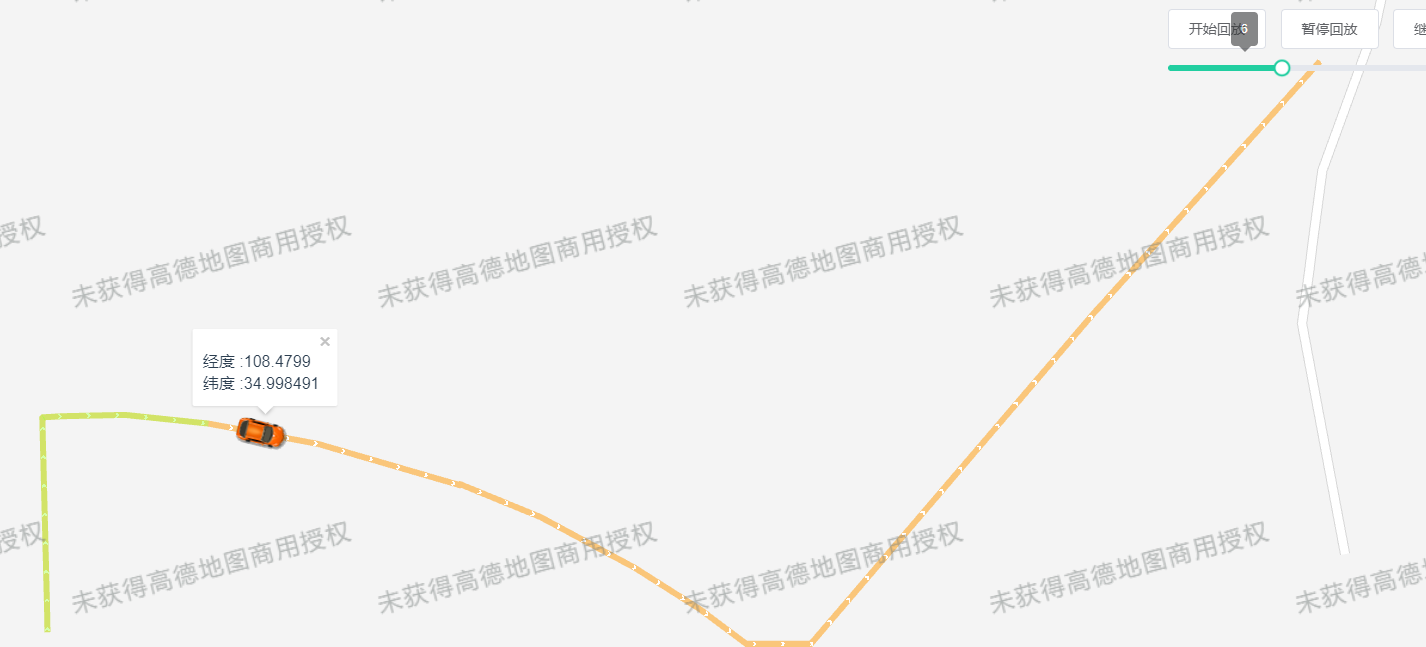
效果图:
本文来自博客园,作者:danmo_xx,转载请注明原文链接:https://www.cnblogs.com/xx321/p/18281595

 浙公网安备 33010602011771号