
centos 7 安装MySQL 5.7
1,下载 MySQL yum包
wget http://repo.mysql.com/mysql57-community-release-el7-10.noarch.rpm
2.安装MySQL源
rpm -Uvh mysql57-community-release-el7-10.noarch.rpm
注意:
有冲突

删掉:yum remove mysql84-community-release-el7-1.noarch;
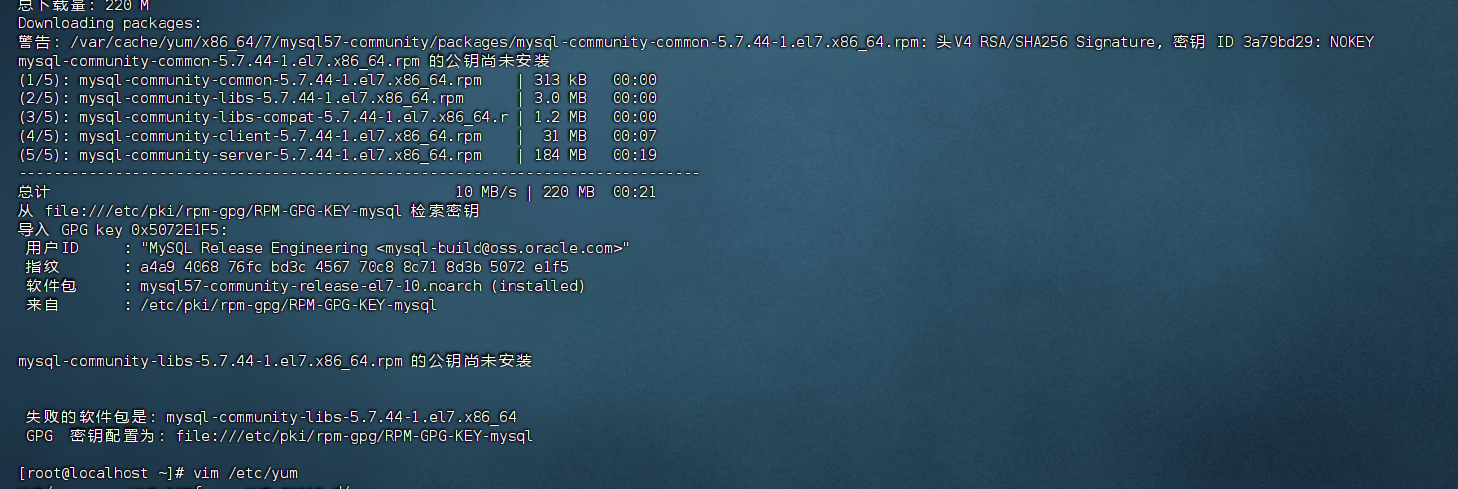
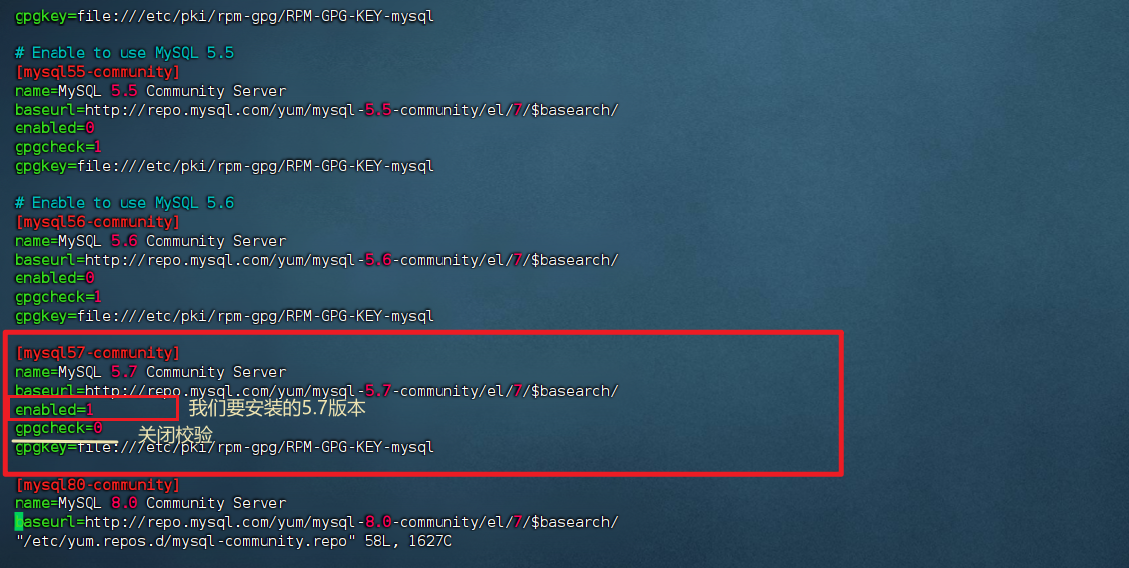
编辑vim /etc/yum.repos.d/mysql-community.repo
3.安装MySQL服务端
yum install -y mysql-community-server
4.启动MySQL
systemctl start mysqld.service
systemctl enable mysqld.service 开机自启
5.检查是否启动成功
systemctl status mysqld.service
点击查看代码
[root@localhost ~]# systemctl status mysqld.service
● mysqld.service - MySQL Server
   Loaded: loaded (/usr/lib/systemd/system/mysqld.service; enabled; vendor preset: disabled)
   Active: active (running) since 二 2025-01-14 23:13:26 PST; 33s ago
     Docs: man:mysqld(8)
           http://dev.mysql.com/doc/refman/en/using-systemd.html
  Process: 99177 ExecStart=/usr/sbin/mysqld --daemonize --pid-file=/var/run/mysqld/mysqld.pid $MYSQLD_OPTS (code=exited, status=0/SUCCESS)
  Process: 98921 ExecStartPre=/usr/bin/mysqld_pre_systemd (code=exited, status=0/SUCCESS)
 Main PID: 99180 (mysqld)
    Tasks: 27
   CGroup: /system.slice/mysqld.service
           └─99180 /usr/sbin/mysqld --daemonize --pid-file=/var/run/mysqld/...

1月 14 23:13:17 localhost.localdomain systemd[1]: Starting MySQL Server...
1月 14 23:13:26 localhost.localdomain systemd[1]: Started MySQL Server.
6.查看临时密码
grep password /var/log/mysqld.log
点击查看代码
[root@localhost ~]# grep 'passwd' /var/log/mysqld.log
[root@localhost ~]# grep password /var/log/mysqld.log
2025-01-15T07:13:23.526993Z 1 [Note] A temporary password is generated for root@localhost: wZdQnp+Mk1R;
点击查看代码
[root@localhost ~]# mysqladmin -uroot -p'wZdQnp+Mk1R;' password 'Mima@123'
mysqladmin: [Warning] Using a password on the command line interface can be insecure.
## mysqladmin: [警告] 在命令行界面中使用密码可能不安全
Warning: Since password will be sent to server in plain text, use ssl connection to ensure password safety.
## 警告:由于密码将以明文形式发送到服务器,请使用SSL连接以确保密码安全
[root@localhost ~]# mysql -uroot -p'Mima@123'
mysql: [Warning] Using a password on the command line interface can be insecure.
Welcome to the MySQL monitor.  Commands end with ; or \g.
Your MySQL connection id is 6
Server version: 5.7.44 MySQL Community Server (GPL)

Copyright (c) 2000, 2023, Oracle and/or its affiliates.

Oracle is a registered trademark of Oracle Corporation and/or its
affiliates. Other names may be trademarks of their respective
owners.

Type 'help;' or '\h' for help. Type '\c' to clear the current input statement.

mysql>

或:
mysql -uroot -p
这将提示你输入临时密码,然后进入MySQL命令行界面执行更改密码的操作:
ALTER USER 'root'@'localhost' IDENTIFIED BY '新密码';
FLUSH PRIVILEGES;

 浙公网安备 33010602011771号