
如何优雅地使用vuex状态管理

状态替换为变量,状态管理就是统一管理多组件共同使用的公共变量,如用户信息。
状态管理是一个杯子,大家都用一个吸管。
1 使用Vuex进行状态管理
- 在State定义变量
- 在Mutation为State赋值
- 在Action拿数据并调用Mutation写State
- 在页面组件用Getter读取State
2 Vuex组成
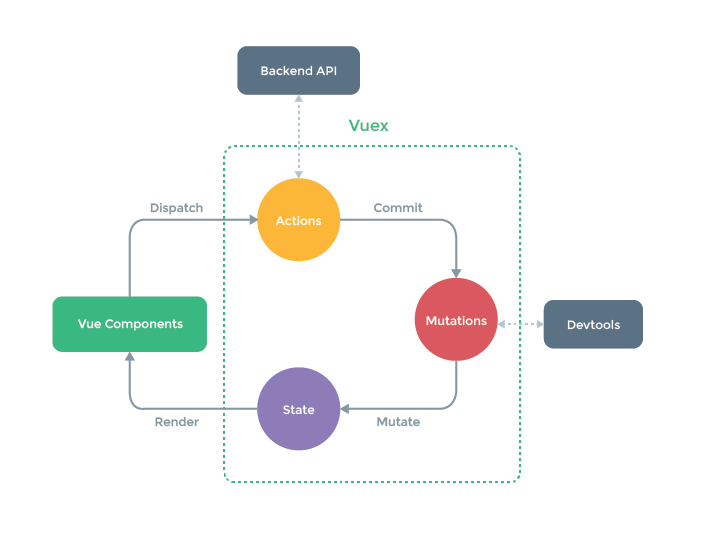
页面组件并不直接操作State
- State == 公共变量
- Mutation封装State读操作
- Getter让组件以计算属性形式读取State
- Action封装对State读写操作,再以Mutation提交,比如异步操作(网络 and etc)
State
存放公共变量
Getters
封装State的读操作,然后放在组件的计算属性,组件中就能以 this.count 获得
computed: {
  count () {
    return this.$store.state.todos
      .filter(todo => todo.done).length
  }
}
上面的操作并不优雅,最佳实践是:
使用mapGetters获得State
export default {
  username: (state) =>
    state.user.info.name,
  dicts: (state) => state.dict.dicts,
  count: (state) => state.calc.count
}
组件直接引入
import { mapGetters } from 'vuex'
  computed: {
    ...mapGetters(['count', 'dicts'])
  }
Mutations
更改Vuex的store中State的唯一方法是提交 mutation。
定义一个Mutation
  mutations: {
    DICT_ALL(state, dicts) {
      state.dicts = dicts
    }
  }
使用Mutation初始化State
commit('DICT_ALL', dicts)
Actions
封装State写操作
actions: {
  getAllDict: function({ commit }, account) {
    return
      new Promise(async(resolve, reject) => {
        try {
          let { data } = await getUserInfo(account)
          commit('USER_INFO', data)
          resolve()
        } catch (error) {
          reject(error)
        }
    })
  }
}
3 最佳实践
以字典数据为例,试举一个完整例子
3.1 组件使用的字典数据
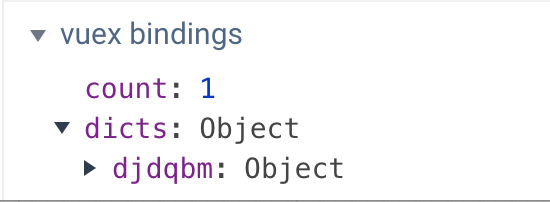
this.dicts[`${dict_name}`][`${dict_code}`]
3.2 构建vuex store
3.2.1 分文件定义
新建 src/store
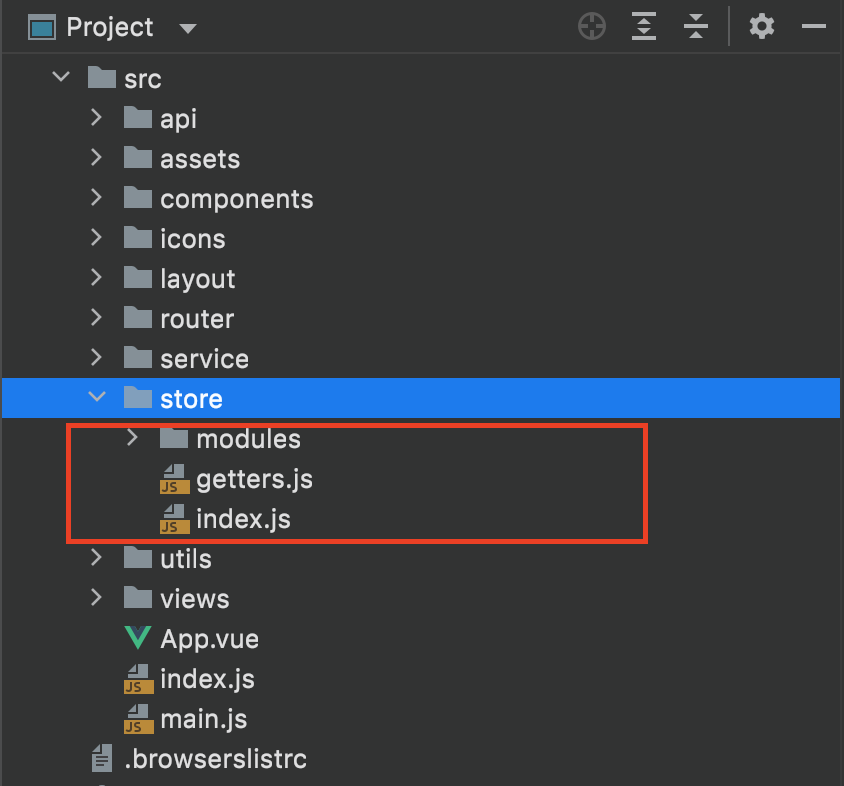
其中:
- index.js vuex的全局实例
- getters.js 在此定义 读state为计算属性
- mudules State小模块,各类信息分开存放,比如字典
3.2.1 index.js
做了以下:
- 自动挂载mudules下所有子模块
- 本地存储State, 让数据只需拉取一次
- 挂载Getters
import Vue from 'vue'
import Vuex from 'vuex'
import getters from './getters'
import persistedstate from 'vuex-persistedstate'
Vue.use(Vuex)

const files = require.context('./modules', false, /\.js$/)
const modules = {}
files.keys().map((key) => {
  modules[key.replace(/(\.\/|\.js)/g, '')] = files(key).default
})
export default new Vuex.Store({
  plugins: [
    persistedstate({
      key: 'kOSS'
    })
  ],
  modules,
  getters
})
3.2.2 getters.js
此处定义字典数据的读操作:
export default {
  dicts: (state) => state.dict.dicts
}
组件中酱紫挂载:
import { mapGetters } from 'vuex'
computed: {
    ...mapGetters(['dicts'])
  }
3.2.3 mudules
该目录下定义 dict.js
import { listDictionaryByDictCodes } from '@/service/dict.system.service'
import _ from 'lodash'

export default {
  namespaced: true,
  state: {
    dicts: null
  },
  mutations: {
    DICT_ALL(state, dicts) {
      state.dicts = dicts
    }
  },
  actions: {
    getAllDict: function({ commit }) {
      return new Promise(async(resolve, reject) => {
        try {
          const dictCodeList = ['companyCode']
          const { result } = await listDictionaryByDictCodes(dictCodeList.map((o) => { return o }).join(','))
          const dicts = {}
          _.forEach(result, (item) => {
            dicts[`${item.dictCode}`] = item.dictItem
          })
          console.log('Dict Result', dicts)
          commit('DICT_ALL', dicts)
          resolve()
        } catch (error) {
          reject(error)
        }
      })
    }
  }
}
3.2.4 main.js
在main.js挂载上文src/store/index.js中的store实例
import Vue from 'vue'
import App from './App'
import store from '@/store'
import router from '@/router'
Vue.use(Vuex)
new Vue({
  el: '#app',
  router,
  store,
  render: (h) => h(App)
})
3.3 初始化State
找个场景搭便车即可。
敏感数据,就在用户登录成功的回调函数内;
否则插在App的生命周期函数中, created 或者 mounted都可。
created() {
  // 只有缓存不存在时才请求数据
  if (!this.dicts) {
    this.$store.dispatch('dict/getAllDict')
  }
},
4 总结
状态管理其目标,还是在分离视图、数据、操作。
本文中使用状态管理,无非网络延迟太高,vuex减少了网络请求的次数。

 浙公网安备 33010602011771号