
mac添加 anyway 软件信任方法,使得mac也可以运行非dmg jdk
Enable Apps from “Anywhere.”
Earlier, macOS had a dedicated option called “Anywhere” in System Preferences > Security & Privacy. It allowed users to install apps from anywhere instead of just App Store or identified developers. However, the toggle was removed later.
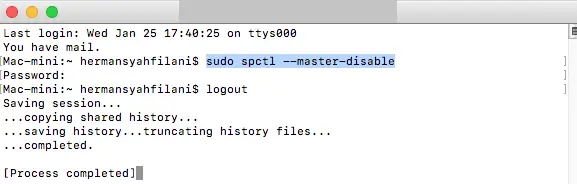
The good thing is that you can bring it back using a simple terminal command. Open the Terminal and enter sudo spctl –master-disable. Now, go to System Preferences > Security & Privacy; the “Anywhere” option shall now be enabled and selected automatically. You can now install and run apps from anywhere you want to.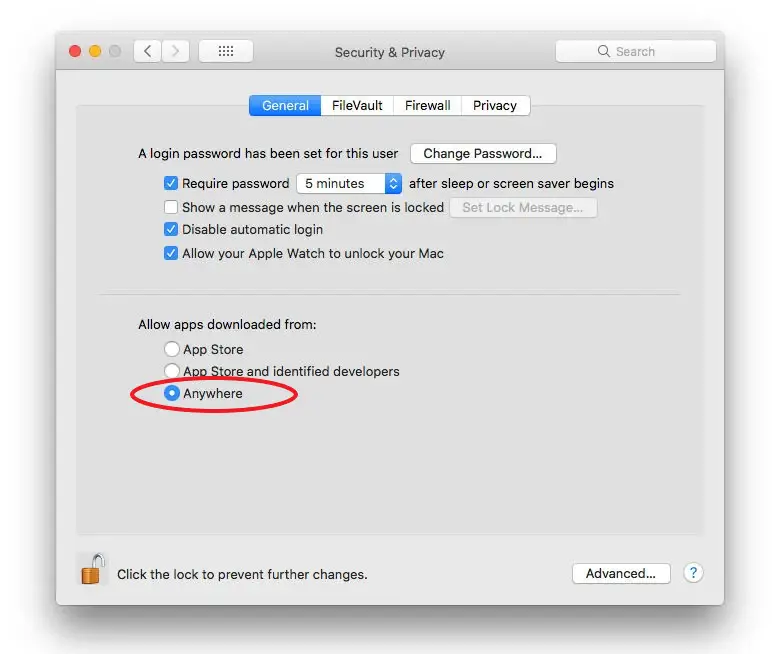
If you want to revert to default settings, use the command sudo spctl –master-enable. This will disable the option.
在成为高手的路上,就算有他人的冷漠,也不会阻挡我。

 浙公网安备 33010602011771号