


python学习笔记 day12 作业讲解
1.编写装饰器,为多个函数加上认证的功能(用户的账号密码来源于文件)
要求成功登陆一次,后续的函数都无需输入用户名和密码
flag=1
def wrapper(f):
    def inner(*args):
        global flag
        while flag:
            username=input("username>>>")
            password=input("password>>>")
            with open('info',mode='r',encoding='utf-8') as file:
                line=file.readline().split(' ')
                if username==line[0] and password==line[1]:
                    print("登录成功!")
                    flag=0  #登陆成功之后后面的函数都无需再输入用户名密码
        ret=f(*args)
        return ret
    return inner

@wrapper
def func1(a,b):
    return a+b
@wrapper
def func2(a,b,c):
    return a*b*c
print('func1函数执行结果:',func1(1,2))
print('func2函数执行结果:',func2(1,2,3))
运行结果:

版本二(EVa-J):
flag=0
def wrapper(f):
    def inner(*args):
        global flag
        if flag:
            ret = f(*args)
            return ret
        else:
            username=input(">>>")
            password=input(">>>")
            with open('info',encoding='utf-8') as file:
                line=file.readline().split(' ')
            if username==line[0] and password==line[1]:
                print("登录成功")
                flag=1
                ret=f(*args)
                return ret
            else:
                print("登录失败")
    return inner
@wrapper
def func1(a,b):
    return a+b
@wrapper
def func2(a,b,c):
    return a*b*c
print(func1(1,2))
print(func2(1,2,3))
版本三(在上面基础上完善了一下,登陆失败后可以重新输入用户名密码,进行尝试)
flag=0
def login(f):
    def inner(*args):
        global flag
        logging=1
        while logging:
            if flag:  #登录成功,下次就不用在输入用户名密码了
                ret = f(*args)
                return ret
            else:
                username=input("username>>>")
                password=input("password>>>")
                with open("info",mode='r',encoding='utf-8') as file:
                    line=file.readline().split(' ')
                    if username==line[0] and password==line[1]:
                        print("登录成功!")
                        flag=1
                        ret = f(*args)
                        return ret
                    else:
                        print("登陆失败")
                        if input("continue?(Y or N)>>>").upper()=='N':
                            logging=0
    return inner

@login
def add_shopping(a,b):
    print(a,b)
    return "增加商品"

@login
def del_shopping(a,b):
    print(a,b)
    return "删除商品"
print(add_shopping(1,2))
print(del_shopping(1,2))
2.编写装饰器,为多个函数加上记录调用功能,要求每次调用函数都将被调用的函数名称写入文件:
def wrapper(f):
    def inner(*args):
        ret=f(*args)
        with open('info1',mode='a+',encoding='utf-8') as file:
            name=f.__name__
            file.write(name)
        return ret
    return inner

@wrapper
def func1(a,b):
    return a+b
@wrapper
def func2(c,d,e):
    return c*d*e
@wrapper
def func3(a,b,c,d,e):
    return a,b,c,d,e
print(func1(1,2))
print(func2(1,2,3))
print(func3(1,2,3,4,5))
运行结果:
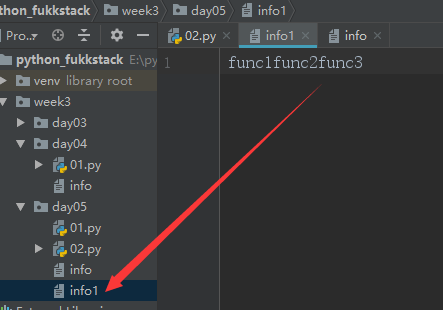
这需要用到一个函数func.__name__ 可以得到func函数的函数名;
3.编写下载网页内容的函数,要求功能是:用户传入一个url,函数返回下载页面的结果:
def download(url):
    code=urlopen(url).read()
    return code
4.为3编写装饰器,实现缓存网页内容的功能:
from urllib.request import urlopen

def cache(f):
    def inner(*args,**kwargs):
        with open('info2',mode='r+',encoding='utf-8') as file:
            line=file.readlines()
            if line:
                print("这是原来下载好的内容",line)
            else:
                ret=f(*args,**kwargs)
                file.write(str(ret)+'\n')
                return ret
    return inner
@cache
def download(url):
    code=urlopen(url).read()
    return code
print('这是新的要下载的内容:',download('https://zhidao.baidu.com/question/520009128815601365.html'))
版本二(Eva-J):
from urllib.request import urlopen
import os
def cache(f):
    def inner(*args,**kwargs):
        if os.path.getsize('infp3'):
            with open('infp3',mode='rb') as file:
                return file.read()
        else:
            ret=f(*args,**kwargs)
            with open("infp3",mode='wb') as file:
                file.write(b'****'+ret)
            return ret
    return inner

@cache
def func(url):
    ret=urlopen(url).read()
    return ret

print(func('http://www.baidu.com'))
print(func('http://www.baidu.com'))
print(func('http://www.baidu.com'))

只有第一个是从网页中下载的内容读的(因为读的是ret的内容),后面两个因为第一个下载的内容已经写入文件了(前面加了***)所以独到的是***后面一堆~
上面写的有一个问题就是,如果来一个新的网址,因为文件里面已经有内容了,它读的还是原来网址下载的内容,这其实不合理 ,我们可以改成,来一个url 判断这个url有没有被下载过(可以建一个字典来存,url作为键)如果之前下载过,就从文件里面读取(带有***号的是之前已经下载到文件中了,从文件读取的,不是从网页上下载读到的),如果这个url之前 没有出现过就直接打印下载的网页内容:
from urllib.request import urlopen
import os
dict={}
count=0
def cache(f):
    def inner(url):
        global dict
        global count
        if url in dict:
            with open("infp3",mode='rb') as file:
                return file.readlines()
        else:
            ret=f(url)
            with open('infp3',mode='ab') as file:
                file.write(b'***'+ret)
            dict[url]=count
            count += 1
        return ret
    return inner
@cache
def func(url):
    ret=urlopen(url).read()
    return ret

print(func("https://www.cnblogs.com/xuanxuanlove/p/9568322.html"))
print(func("https://www.baidu.com"))
print(func("https://www.baidu.com"))
print(func("https://www.bilibili.com/"))
print(func("https://www.bilibili.com/"))
运行结果:

第三个和第五个应该是从文件里面读的~
相比之前 第一个url 是从网页下载的,其他的url 不管是不是新的网址,都从文件读第一个url的内容,现在新的网址就从网页下载到文件,从网页读,旧的url 就从文件读(带有***)
talk is cheap,show me the code

 浙公网安备 33010602011771号