
Python脚本获取Windows和Linux的系统版本信息,如何实现python和telnet通信
在Python的世界里,获取Windows版本信息和Linux的版本信息都可以采用platform模块,但platform模块也不是万能的,有些特殊的信息(比如Windows的内部版本号)这个模块拿不到,那么只能另辟蹊径了。
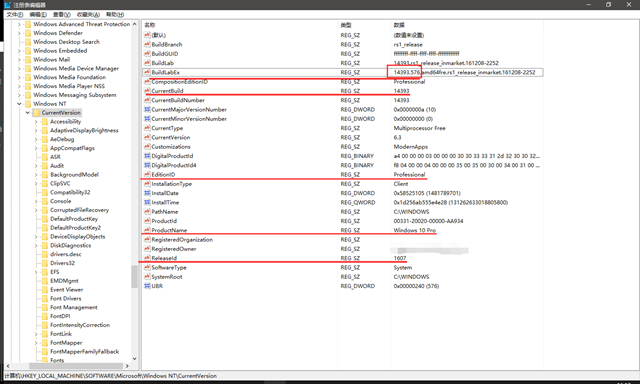
在Linux系统中,可以简单的认为一切都是文件,那么就算没有现成的命令可用时,可以用open()文件的方法通过对文件的读写控制它。而在Windows的大部分信息在注册表中都能查到,因此可以从注册表上下手。Windows注册表是一个好东西,拿数据就像在Linux下一切都是文件一样方便,如果想用Python访问注册表,除了权限外就是需要模块了,在Python中_winreg是一个内置模块,通过这一模块可以对注册表进行读写。
本脚本收集了一些获取版本信息的常见方法,除了platform模块外,还有其他的模块可供使用,因为platform模块不是内置模块,因此需要额外安装。Windows下运行脚本需要考虑权限问题和中文字符的问题,解决Python打印中文字符的问题是通过脚本中的get_system_encoding()函数实现的,这个函数取自Django,经过测试这个函数还是非常好用的。
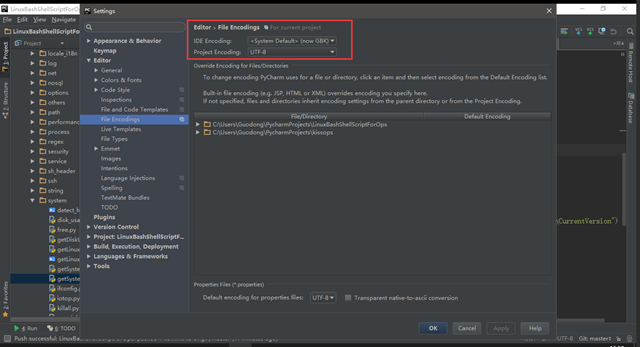
注:在PyCharm中,经常遇到Run窗口打印出的中文显示乱码,代码中没有经过正确转码是一方面,而IDE的编码设置也是一方面。如果是在Windows下开发,那么建议代码用UTF-8编写,IDE的编码则设置为“GBK”,设置方法“File”-->"Settings"-->"Editor"-->"File Encoding"-->"IDE Encoding"选择“<System Default (now GBK)>”, "Project Encoding"选择UTF-8保证代码的编码一致性。
脚本如下:
#!/usr/bin/python
# encoding: utf-8
# -*- coding: utf8 -*-
"""
Created by PyCharm.
File:               LinuxBashShellScriptForOps:getSystemVersion.py
User:               Guodong
Create Date:        2016/12/16
Create Time:        14:51
 """
import sys
import os
import platform
import subprocess
import codecs
import locale


def get_system_encoding():
    """
    The encoding of the default system locale but falls back to the given
    fallback encoding if the encoding is unsupported by python or could
    not be determined.  See tickets #10335 and #5846
    """
    try:
        encoding = locale.getdefaultlocale()[1] or 'ascii'
        codecs.lookup(encoding)
    except Exception:
        encoding = 'ascii'
    return encoding


DEFAULT_LOCALE_ENCODING = get_system_encoding()

mswindows = (sys.platform == "win32")  # learning from 'subprocess' module
linux = (sys.platform == "linux2")

hidden_hostname = True

if mswindows:
    uname = list(platform.uname())
    if hidden_hostname:
        uname[1] = "hidden_hostname"
    print uname

    import _winreg

    try:
        reg_key = _winreg.OpenKey(_winreg.HKEY_LOCAL_MACHINE, "SOFTWARE\\Microsoft\\Windows NT\\CurrentVersion")
        if reg_key:
            ProductName = _winreg.QueryValueEx(reg_key, "ProductName")[0] or None
            EditionId = _winreg.QueryValueEx(reg_key, "EditionId")[0] or None
            ReleaseId = _winreg.QueryValueEx(reg_key, "ReleaseId")[0] or None
            CurrentBuild = _winreg.QueryValueEx(reg_key, "CurrentBuild")[0] or None
            BuildLabEx = _winreg.QueryValueEx(reg_key, "BuildLabEx")[0][:9] or None
            print (ProductName, EditionId, ReleaseId, CurrentBuild, BuildLabEx)
    except Exception as e:
        print e.message.decode(DEFAULT_LOCALE_ENCODING)

if linux:
    uname = list(platform.uname())
    if hidden_hostname:
        uname[1] = "hidden_hostname"
    print uname

    proc_obj = subprocess.Popen(r'uname -a', shell=True, stdout=subprocess.PIPE,
                                stderr=subprocess.STDOUT)
    result = proc_obj.stdout.read().strip().decode(DEFAULT_LOCALE_ENCODING)
    if result:
        print result

    if os.path.isfile("/proc/version"):
        with open("/proc/version", 'r') as f:
            content = f.read().strip()
        if content != "":
            print content

    if os.path.isfile("/etc/issue"):
        with open("/etc/issue", 'r') as f:
            content = f.read().strip()
        if content != "":
            print content
注:脚本内容可以通过GitHub获取,地址:https://github.com/DingGuodong/LinuxBashShellScriptForOps/blob/master/functions/system/getSystemVersion.py:。
截图如下:
(1)注册表信息获取位置:
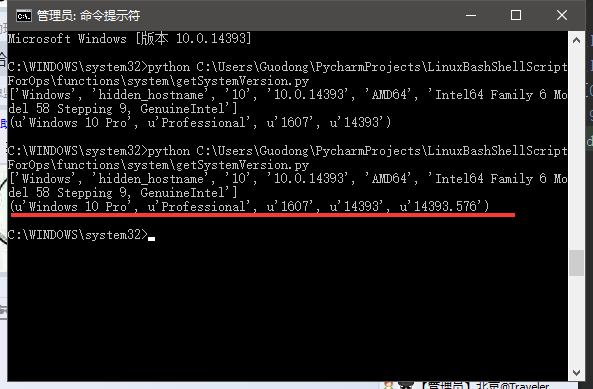
(2)Windows环境下的输出:
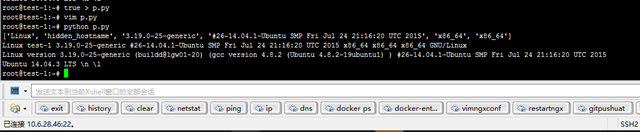
(3)Linux环境下的输出:
如何实现python和telnet通信
一、Windows下开启Telnet服务

(详见:与Win7防火墙无缝结合 Telnet功能测试)
1、Windows 2000/XP/2003/Vista:默认已安装但禁止了Telnet服务
(1)开启Telnet:运行services.msc打开服务管理,找到Telnet服务项设置其启动类型为“自动”或者“手动”(更安全,只在需要的时候才启用),然后启动该服务即可。
2、Windos 7:默认未安装Telnet服务
(1)安装Telnet:依次点击“开始”→“控制面板”→“程序”,“在程序和功能”找到并点击“打开或关闭Windows 功能”进入Windows 功能设置对话框。找到并勾选“Telnet客户端”和“Telnet服务器”,最后“确定”稍等片刻即可完成安装。
(2)开启Telnet:方法同1中的(1)
二、Linux下开启Telnet服务
(详见:Ubuntu 10.10 下配置Telnet服务器)
(1)安装telnetd(即telnet-server):apt-get install telnetd
(2)安装xinetd(telnet-server的运行需要由xinetd来管理):apt-get install xinetd
(3)配置telnet文件:vi /etc/xinetd.d/telnet
(4)开启xinetd:service xinetd start
三、使用Python实现Telnet远程登录
  Python中专门提供了telnetlib库,用来完成基于telnet协议的通信功能。
|
1
2
3
4
5
6
7
8
9
10
11
12
13
14
15
16
17
18
19
20
21
22
23
24
25
26
27
28
29
30
|
1 # -*- coding: utf-8 -*- 2 3 import telnetlib 4 5 '''Telnet远程登录:Windows客户端连接Linux服务器''' 6 7 # 配置选项 8 Host = '192.168.1.2' # Telnet服务器IP 9 username = 'admin' # 登录用户名10 password = '123456' # 登录密码11 finish = ':~$ ' # 命令提示符(标识着上一条命令已执行完毕)12 13 # 连接Telnet服务器14 tn = telnetlib.Telnet(Host)15 16 # 输入登录用户名17 tn.read_until('login: ')18 tn.write(username + '\n')19 20 # 输入登录密码21 tn.read_until('Password: ')22 tn.write(password + '\n')23 24 # 登录完毕后,执行ls命令25 tn.read_until(finish)26 tn.write('ls\n')27 28 # ls命令执行完毕后,终止Telnet连接(或输入exit退出)29 tn.read_until(finish)30 tn.close() # tn.write('exit\n') |

 浙公网安备 33010602011771号